automatic transmission CADILLAC CT5 2023 Owner's Manual
[x] Cancel search | Manufacturer: CADILLAC, Model Year: 2023, Model line: CT5, Model: CADILLAC CT5 2023Pages: 526, PDF Size: 6.85 MB
Page 277 of 526

Cadillac CT5 Owner Manual (GMNA-Localizing-U.S./Canada-16500419) -
2023 - CRC - 5/10/22
276 Driving and Operating
If the vehicle is left parked and
running with the remote key
inside the vehicle, it will
continue to run for up to
30 minutes.
The vehicle could turn off
sooner if it is parked on a hill,
due to lack of available fuel.
Automatic Transmission
The timer will reset if the
vehicle is taken out of P (Park)
while it is running.
Manual Transmission
The timer will reset if vehicle
speed exceeds 4
km/h (2.5 mph).
Engine Exhaust{
Warning
Engine exhaust contains
carbon monoxide (CO),
which cannot be seen or
smelled. Exposure to CO can
cause unconsciousness and
even death. (Continued)
Warning (Continued)
Exhaust may enter the
vehicle if:
.The vehicle idles in areas
with poor ventilation
(parking garages, tunnels,
deep snow that may block
underbody airflow or tail
pipes).
.The exhaust smells or
sounds strange or
different.
.The exhaust system leaks
due to corrosion or
damage.
.The vehicle exhaust
system has been modified,
damaged, or improperly
repaired.
.There are holes or
openings in the vehicle
body from damage or
aftermarket modifications
that are not completely
sealed.(Continued)
Warning (Continued)
If unusual fumes are
detected or if it is suspected
that exhaust is coming into
the vehicle:
.Drive it only with the
windows completely down.
.Have the vehicle repaired
immediately.
Never park the vehicle with
the engine running in an
enclosed area such as a
garage or a building that has
no fresh air ventilation.
Running the Vehicle
While Parked
The vehicle should not be left
running while parked.
If the vehicle is left with the
engine running, follow the
proper steps to be sure the
vehicle will not move. See
Shifting Into Park 0273 and
Engine Exhaust 0276.
Page 278 of 526

Cadillac CT5 Owner Manual (GMNA-Localizing-U.S./Canada-16500419) -
2023 - CRC - 5/10/22
Driving and Operating 277
If parking on a hill and pulling a
trailer, see Driving
Characteristics and Towing
Tips0365.
Automatic
Transmission
The shift pattern is displayed
in the top of the shift lever.
The selected gear position will
illuminate red on the shift
lever, while all others will be
displayed in white. If the shift
is not immediate, as in very cold conditions, the indicator
on the shift lever may flash
until it is fully engaged.
The shift lever always starts
from a center position,
represented by an up/down
arrow on the shift pattern.
After releasing the shift lever,
it will return to the center
position.
The transmission does not
operate when the vehicle
is off.
If the vehicle is in accessory
mode, the transmission can be
shifted into P (Park).
If the vehicle is turned off
while at a relatively high
vehicle speed, the
transmission will automatically
shift to N (Neutral). Once the
vehicle is stopped, it can be
shifted into P (Park).
P :
This position locks the
drive wheels. Use P (Park)
when starting the engine to
prevent the vehicle from
moving easily.
{Warning
It is dangerous to get out of
the vehicle if the
transmission is not in
P (Park) with the parking
brake set. The vehicle
can roll.
(Continued)
Page 279 of 526

Cadillac CT5 Owner Manual (GMNA-Localizing-U.S./Canada-16500419) -
2023 - CRC - 5/10/22
278 Driving and Operating
Warning (Continued)
Do not leave the vehicle
when the engine is running.
If the engine has been left
running, the vehicle can
move suddenly. You or
others could be injured. To
be sure the vehicle will not
move, even when on fairly
level ground, always set the
parking brake and place the
transmission into P (Park).
See Shifting Into Park0273
and
Electric Parking Brake 0288.
This vehicle is equipped with
an electronically controlled
transmission. The shift lock
release button is designed to
prevent inadvertent shifting
out of P (Park) unless the
ignition is on, the brake pedal
is applied, and the shift lock
release button is pressed.
When the vehicle is stopped,
press ENGINE START/STOP
to turn off the vehicle. The
transmission will shift to
P (Park) automatically unless
the vehicle is in N (Neutral),
See “Car Wash Mode”
following. The vehicle will not shift into
P (Park) if it is moving too fast.
Stop the vehicle and shift into
P (Park).
To shift in and out of P (Park),
see Shifting Into Park
0273
and
Shifting out of Park 0274.
Service Shift Lever Message
If the message SERVICE
SHIFTER SEE OWNER’S
MANUAL appears in the
Driver Information
Center (DIC), the shift lever
needs service. Have the
vehicle serviced as soon as
possible. If the vehicle is
automatically shifting into
P (Park), check to see if the
P (Park) button on top of the
shift lever is stuck. To operate
the vehicle, hold the shift lever
in the desired gear,
R (Reverse) or D (Drive), until
vehicle speed exceeds
15 km/h (10 mph), then release
the shift lever.
Page 280 of 526

Cadillac CT5 Owner Manual (GMNA-Localizing-U.S./Canada-16500419) -
2023 - CRC - 5/10/22
Driving and Operating 279
R :Use this gear to back up.
If the vehicle is shifted from
either R (Reverse) to D (Drive)
or M (Manual Mode),
or M (Manual Mode) or
D (Drive) to R (Reverse) while
the speed is too high, the
vehicle will shift to N (Neutral).
Reduce the vehicle speed and
try the shift again.
To shift into R (Reverse): 1. Bring the vehicle to a complete stop.
2. Press and hold shift lock release button on the side
of the shift lever.
3. From the center position, move the shift lever
forward through the first
detent to the end of travel.
R is illuminated in red.
4. After releasing the shift lever, it will return to the
center position.
To shift out of R (Reverse): 1. Bring the vehicle to a complete stop. 2. Shift to the desired gear.
3. After releasing the shift
lever, it will return to the
center position.
At low vehicle speeds,
R (Reverse) can be used to
rock the vehicle back and forth
to get out of snow, ice, or sand
without damaging the
transmission. See If the
Vehicle Is Stuck 0261.
N : In this position, the engine
does not connect with the
wheels. To restart the engine
when the vehicle is already
moving, use N (Neutral) only.
{Warning
Shifting into a drive gear
while the engine is running
at high speed is dangerous.
Unless your foot is firmly on
the brake pedal, the vehicle
could move very rapidly. You
could lose control and hit
people or objects. Do not
(Continued)
Warning (Continued)
shift into a drive gear while
the engine is running at high
speed.
Caution
Shifting out of P (Park) or
N (Neutral) with the engine
running at high speed may
damage the transmission.
The repairs would not be
covered by the vehicle
warranty. Be sure the
engine is not running at high
speed when shifting the
vehicle.
The vehicle is not designed to
stay in N (Neutral) for more
than five minutes. It may
automatically shift into
P (Park). N (Neutral) is not
intended for towing. If the
vehicle needs to be towed, see
Transporting a Disabled
Vehicle 0455.
Page 282 of 526

Cadillac CT5 Owner Manual (GMNA-Localizing-U.S./Canada-16500419) -
2023 - CRC - 5/10/22
Driving and Operating 281
Car Wash Mode (Engine On–
Driver in Vehicle)
To place the vehicle in
N (Neutral) with the engine on
and the vehicle occupied:
1. Drive to the entrance of the car wash.
2. Apply the brake pedal.
3. Shift to N (Neutral).
4. Release the brake pedal. The vehicle is now ready
for the car wash.
Car Wash Mode (Engine On –
Driver out of Vehicle)
To place the vehicle in
N (Neutral) with the engine on
and the vehicle unoccupied:
1. Drive to the entrance of the car wash.
2. Apply the brake pedal.
3. Open the door.
4. Shift to N (Neutral), then release the brake pedal. 5. The indicator should
continue to show N. If it
does not, repeat
Steps 2–4.
6. Exit the vehicle and close the door. The vehicle is
now ready for the
car wash.
7. The vehicle may automatically shift to
P (Park) upon re-entry.
Caution
A transmission hot message
may display if the automatic
transmission fluid is too hot.
Driving under this condition
can damage the vehicle.
Stop and idle the engine to
cool the automatic
transmission fluid. This
message clears when the
transmission fluid has cooled
sufficiently.
D : This position is for normal
driving. If more power is
needed for passing, press the
accelerator pedal down. To shift into D (Drive):
1. Bring the vehicle to a complete stop.
2. From the center position, move the shift lever back.
.If the vehicle is in
P (Park), press the shift
lock release button while
pulling the shift
lever back.
.D will illuminate in red.
.After releasing the shift
lever, it will return to the
center position.
To shift out of D (Drive): 1. Bring the vehicle to a complete stop.
2. Shift to the desired gear.
3. After releasing the shift lever, it will return to the
center position.
Downshifting the transmission
in slippery road conditions
could result in skidding. See
“Skidding” under Loss of
Control 0245.
Page 283 of 526
Cadillac CT5 Owner Manual (GMNA-Localizing-U.S./Canada-16500419) -
2023 - CRC - 5/10/22
282 Driving and Operating
Caution
Spinning the tires or holding
the vehicle in one place on a
hill using only the
accelerator pedal may
damage the transmission.
The repair will not be
covered by the vehicle
warranty. If the vehicle is
stuck, do not spin the tires.
When stopping on a hill, use
the brakes to hold the
vehicle in place.
If equipped with the 2.0L L4
engine, engine speeds may be
increased while driving at
highway speeds while the
engine is still warming up.
Manual Mode
Tap Shift Caution
Driving with the engine at a
high rpm without upshifting
while using Tap Shift, could
damage the vehicle. Always
upshift when necessary
while using Tap Shift.
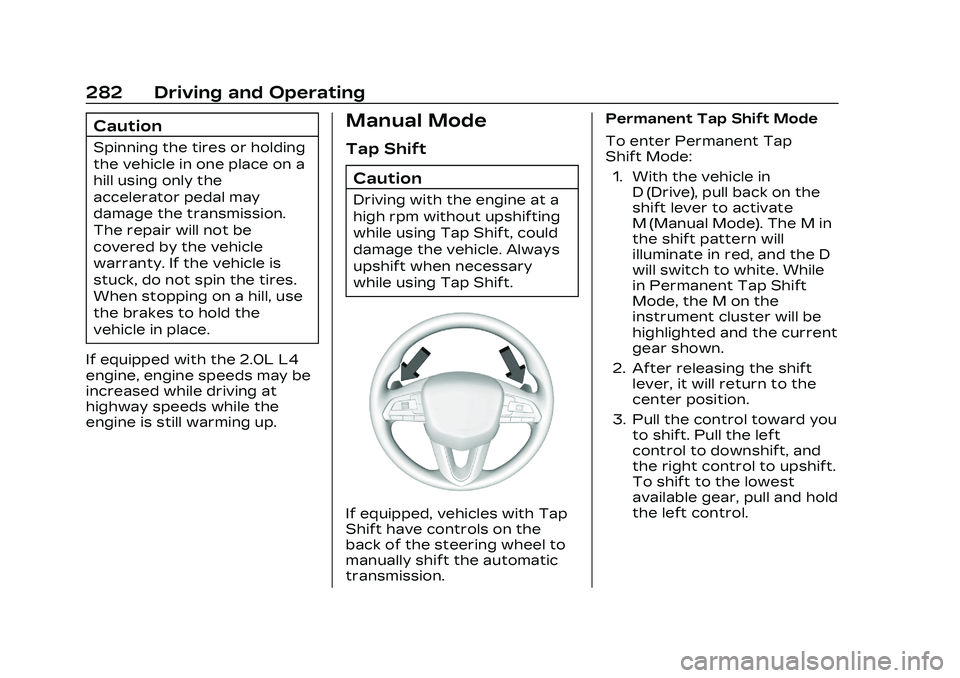
If equipped, vehicles with Tap
Shift have controls on the
back of the steering wheel to
manually shift the automatic
transmission. Permanent Tap Shift Mode
To enter Permanent Tap
Shift Mode:
1. With the vehicle in D (Drive), pull back on the
shift lever to activate
M (Manual Mode). The M in
the shift pattern will
illuminate in red, and the D
will switch to white. While
in Permanent Tap Shift
Mode, the M on the
instrument cluster will be
highlighted and the current
gear shown.
2. After releasing the shift lever, it will return to the
center position.
3. Pull the control toward you to shift. Pull the left
control to downshift, and
the right control to upshift.
To shift to the lowest
available gear, pull and hold
the left control.
Page 284 of 526

Cadillac CT5 Owner Manual (GMNA-Localizing-U.S./Canada-16500419) -
2023 - CRC - 5/10/22
Driving and Operating 283
To exit Permanent Tap
Shift Mode:1. To exit M (Manual Mode) and return to D (Drive), pull
back on the shift lever. The
D in the shift pattern will
illuminate in red, and the M
will switch to white.
2. After releasing the shift lever, it will return to the
center position.
M (Manual Mode) can be exited
to return to D (Drive) at any
speed by pulling the lever
rearward from the center
position. It is not necessary to
stop the vehicle or shift to
N (Neutral) or P (Park) prior to
shifting back to D (Drive).
Temporary Tap Manual
Shift Mode
To enter Temporary Tap
Shift Mode: 1. With the transmission in D (Drive) and not in
Permanent Tap Shift
Mode, the Tap Shift
controls will activate a Temporary Tap Manual
Shift Mode, allowing the
transmission to be
manually shifted. While in
Temporary Tap Shift
Mode, the D on the
instrument cluster will be
highlighted and the current
gear shown.
2. To shift to the lowest available gear, press and
hold the left control.
3. To deactivate, hold the right control briefly.
Automatic shifts return
after no manual shifts have
been done for seven to
10 seconds.
While using Tap Shift, the
vehicle will have firmer, quicker
shifting. This can be used for
sport driving or when climbing
or descending hills, to stay in
gear longer, or to downshift
for more power or engine
braking.
The transmission will only
allow shifting into gears
appropriate for the vehicle speed and engine revolutions
per minute (rpm). The
transmission will not
automatically shift to the next
higher gear if the engine rpm
is too high. It will only
automatically shift to the next
lower gear if the engine rpm is
much too low.
Manual
Transmission
If equipped, this is the shift
pattern for the manual
transmission.
Page 294 of 526
Cadillac CT5 Owner Manual (GMNA-Localizing-U.S./Canada-16500419) -
2023 - CRC - 5/10/22
Driving and Operating 293
Driver Mode Control
Driver Mode Control (DMC)
allows the driver to adjust the
overall driving experience to
better suit driver preference
by adjusting vehicle systems
to fit specific driving needs.
Drive mode availability and
affected vehicle systems are
dependent on vehicle trim
level, region, and optional
features.
If the vehicle is in Tour Mode
or My Mode, it will stay in that
mode through future ignition
cycles. If the vehicle is in any
other mode, it will return to
Tour Mode when the vehicle is
restarted. When a mode is
selected, an indicator will
come on in the instrument
cluster and stay on.
Mode Activation
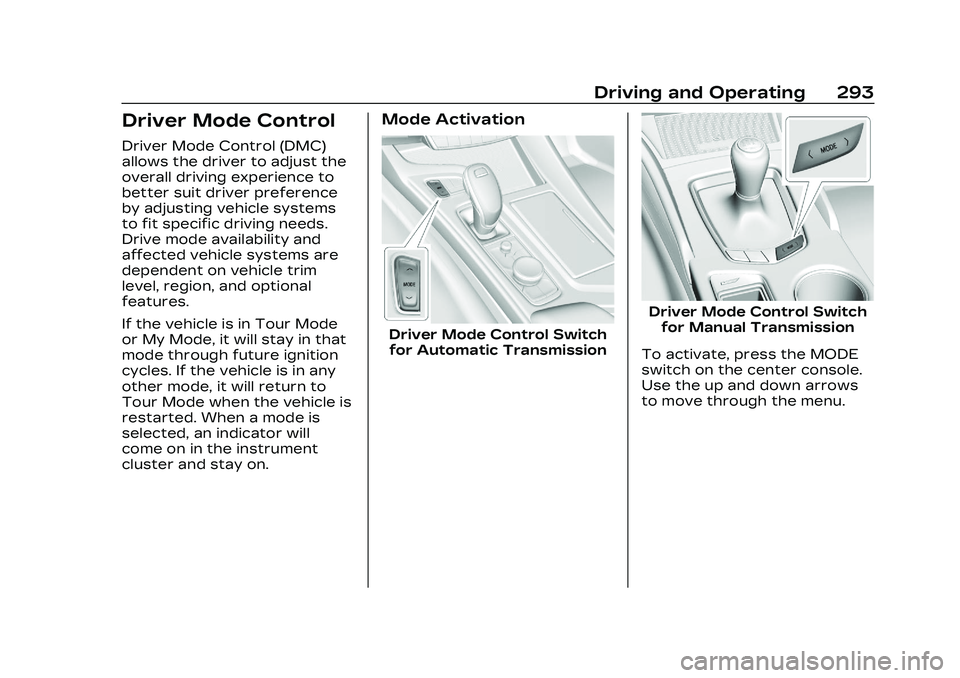
Driver Mode Control Switchfor Automatic Transmission
Driver Mode Control Switch for Manual Transmission
To activate, press the MODE
switch on the center console.
Use the up and down arrows
to move through the menu.
Page 296 of 526
Cadillac CT5 Owner Manual (GMNA-Localizing-U.S./Canada-16500419) -
2023 - CRC - 5/10/22
Driving and Operating 295
Sport Mode
Use this mode where road
conditions or personal
preference demand a more
controlled response. When
this mode is selected, the
vehicle immediately
downshifts. The vehicle also
monitors driving behaviors and
automatically enables
Performance Shift Features
when spirited driving is
detected. These features
maintain lower transmission
gears to increase available
engine braking and improve
acceleration response. The
vehicle will exit this feature
and return to normal operation
after a short period when
spirited driving is no longer
detected. The steering
changes to provide more
precise control. If the vehicle
has Magnetic Ride Control, the
suspension changes to
provide better cornering
performance.See
“Mode Selection
Attributes” later in this
section.
Snow/Ice Mode
Use this mode for slippery
surfaces to help control wheel
speed. This mode can
compromise the acceleration
on dry asphalt.
This feature is not intended
for use when the vehicle is
stuck in sand, mud, or gravel.
If the vehicle is stuck, see If
the Vehicle Is Stuck 0261.
See “Mode Selection
Attributes” later in this
section.
Track Mode (V-Series and
V-Series Blackwing)
When in Track Mode, the
automatic transmission and
steering function similar to
Sport Mode. The accelerator
pedal is adjusted to give
maximum control during the
highest level of spirited
driving. The Magnetic Ride
Control is set to the optimum level for vehicle
responsiveness. PTM can be
accessed through this mode.
See
“Performance Traction
Management” in Competitive
Driving Mode 0299.
See “Mode Selection
Attributes” later in this
section.
While driving on a track, turn
off applicable driver
assistance features. For more
information see Assistance
Systems for Driving 0346.
My Mode
My Mode is used to
personalize everyday driving.
This mode is designed to allow
the driver to configure vehicle
systems to their own
preference for city or normal
driving.
Page 302 of 526

Cadillac CT5 Owner Manual (GMNA-Localizing-U.S./Canada-16500419) -
2023 - CRC - 5/10/22
Driving and Operating 301
SPORT
.For use by drivers who are
familiar with the track.
.Dry conditions only.
.Requires more driving skill
than DRY.
.StabiliTrak/ESC is on and
more engine power is
available than in DRY.
RACE 1
.For use by drivers who are
familiar with the track.
.Dry conditions only.
.Requires more driving skill
than modes DRY or SPORT.
.StabiliTrak/ESC is off and
available engine power is the
same as SPORT.
RACE 2
.For use by experienced
drivers who are familiar with
the track.
.Dry conditions only.
.Requires more driving skill
than in other modes.
.StabiliTrak/ESC is off and
engine power is available for
maximum cornering speed.
In any PTM Mode, Launch
Control is available. Use PTM
Race 2 for the most
consistent performance
during drag strip use. See
“Custom Launch Control” in
Track Events and Competitive
Driving (V-Series and V-Series
Blackwing) 0246.
Launch Control
If equipped, Launch Control is
available within Competitive
Driving Mode and PTM to
allow high levels of vehicle
acceleration in a straight line.
Launch Control is a form of
traction control that manages
tire spin while launching the
vehicle. This feature is
intended for use during closed
course race events where
consistent zero to
60 and quarter mile times are
desirable. Launch Control is only
available when the following
criteria are met:
.Competitive Driving Mode is
selected or any of the PTM
modes are selected. The
traction off light comes on in
the instrument cluster and
the appropriate DIC
message displays.
.The vehicle is not moving.
.The steering wheel is
pointing straight.
Automatic Transmissions
.The brake pedal is firmly
pressed to the floor,
equivalent to a panic brake
event.
.The accelerator pedal is
rapidly applied to wide open
throttle. If the vehicle rolls
due to wide open throttle,
release the throttle, press
the brake pedal more firmly,
and reapply the accelerator
to wide open throttle.