battery CADILLAC CT5 2023 Owners Manual
[x] Cancel search | Manufacturer: CADILLAC, Model Year: 2023, Model line: CT5, Model: CADILLAC CT5 2023Pages: 526, PDF Size: 6.85 MB
Page 10 of 526
Cadillac CT5 Owner Manual (GMNA-Localizing-U.S./Canada-16500419) -
2023 - CRC - 5/6/22
Keys, Doors, and Windows 9
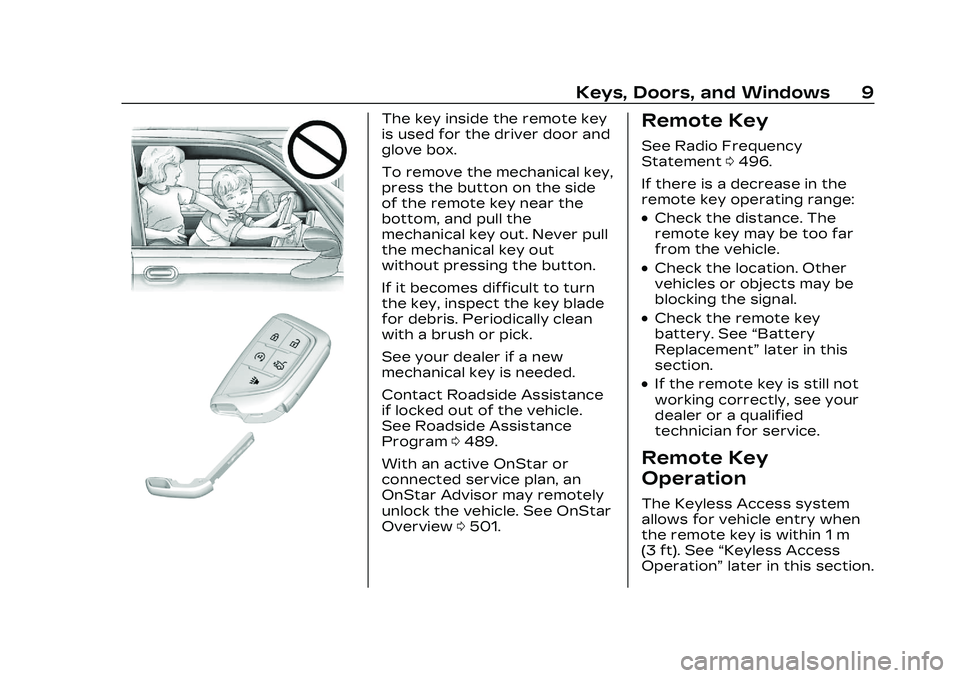
The key inside the remote key
is used for the driver door and
glove box.
To remove the mechanical key,
press the button on the side
of the remote key near the
bottom, and pull the
mechanical key out. Never pull
the mechanical key out
without pressing the button.
If it becomes difficult to turn
the key, inspect the key blade
for debris. Periodically clean
with a brush or pick.
See your dealer if a new
mechanical key is needed.
Contact Roadside Assistance
if locked out of the vehicle.
See Roadside Assistance
Program0489.
With an active OnStar or
connected service plan, an
OnStar Advisor may remotely
unlock the vehicle. See OnStar
Overview 0501.Remote Key
See Radio Frequency
Statement 0496.
If there is a decrease in the
remote key operating range:
.Check the distance. The
remote key may be too far
from the vehicle.
.Check the location. Other
vehicles or objects may be
blocking the signal.
.Check the remote key
battery. See “Battery
Replacement” later in this
section.
.If the remote key is still not
working correctly, see your
dealer or a qualified
technician for service.
Remote Key
Operation
The Keyless Access system
allows for vehicle entry when
the remote key is within 1 m
(3 ft). See “Keyless Access
Operation” later in this section.
Page 15 of 526

Cadillac CT5 Owner Manual (GMNA-Localizing-U.S./Canada-16500419) -
2023 - CRC - 5/6/22
14 Keys, Doors, and Windows
Mechanical Key Access
To access a vehicle with a
weak remote key battery, see
Door Locks018.
Programming Remote
Keys to the Vehicle
Only remote keys programmed
to the vehicle will work. If a
remote key is lost or stolen, a
replacement can be purchased
and programmed through your
dealer. The vehicle can be
reprogrammed so that lost or
stolen remote keys no longer
work. Each vehicle can have
up to eight remote keys
matched to it.
Starting the Vehicle with a
Low Remote Key Battery
For improved vehicle security,
the remote key is equipped
with a motion sensor. When
starting the vehicle, if the
remote key has been idle for a
while, the DIC may display KEY
IN SLEEP MODE, MOVE KEY,
THEN START. Move the remote key slightly and try
starting the vehicle. When
starting the vehicle, if the
remote key battery is depleted
or there is signal interference,
the DIC may display NO KEY
FOUND, REPLACE BATTERY
IN KEY or NO REMOTE KEY
WAS DETECTED PLACE KEY
IN KEY POCKET THEN START
YOUR VEHICLE, follow the
steps shown below:
1. Place the remote key into
the rear cupholder. 2. With the vehicle in P (Park)
or N (Neutral) press the
brake pedal and ENGINE
START/STOP.
Replace the remote key
battery as soon as
possible.
Battery Replacement
{Warning
Never allow children to play
with the remote key. The
remote key contains a small
battery, which can be a
choking hazard. If swallowed,
internal burns can occur,
resulting in severe injury or
death. Seek medical
attention immediately if a
battery is swallowed.
{Warning
To avoid personal injury, do
not touch metal surfaces on
the remote key when it has
been exposed to extreme
(Continued)
Page 16 of 526

Cadillac CT5 Owner Manual (GMNA-Localizing-U.S./Canada-16500419) -
2023 - CRC - 5/6/22
Keys, Doors, and Windows 15
Warning (Continued)
heat. These surfaces can be
hot to the touch at
temperatures above 59 °C
(138 °F).
Caution
When replacing the battery,
do not touch any of the
circuitry on the remote key.
Static from your body could
damage the remote key.
Caution
Always replace the battery
with the correct type.
Replacing the battery with
an incorrect type could
potentially create a risk of
battery explosion. Dispose
of used batteries according
to instructions and local
laws. Do not attempt to
burn, crush, or cut the used
battery, and avoid exposing(Continued)
Caution (Continued)
the battery to environments
with extremely low air
pressures or high
temperatures.
Caution
If the remote key is not
reassembled properly,
liquids could enter the
housing and damage the
circuitry, resulting in a
remote key malfunction and/
or failure. To prevent
damage, always follow the
steps for remote key
reassembly in this manual to
ensure the remote key is
sealed properly whenever
the remote key is opened.
Replace the battery if the DIC
displays REPLACE BATTERY
IN KEY.
1. Press the button on the side of the remote key and
pull the mechanical key
out. Never pull the
mechanical key out without
pressing the button.
Page 17 of 526
Cadillac CT5 Owner Manual (GMNA-Localizing-U.S./Canada-16500419) -
2023 - CRC - 5/6/22
16 Keys, Doors, and Windows
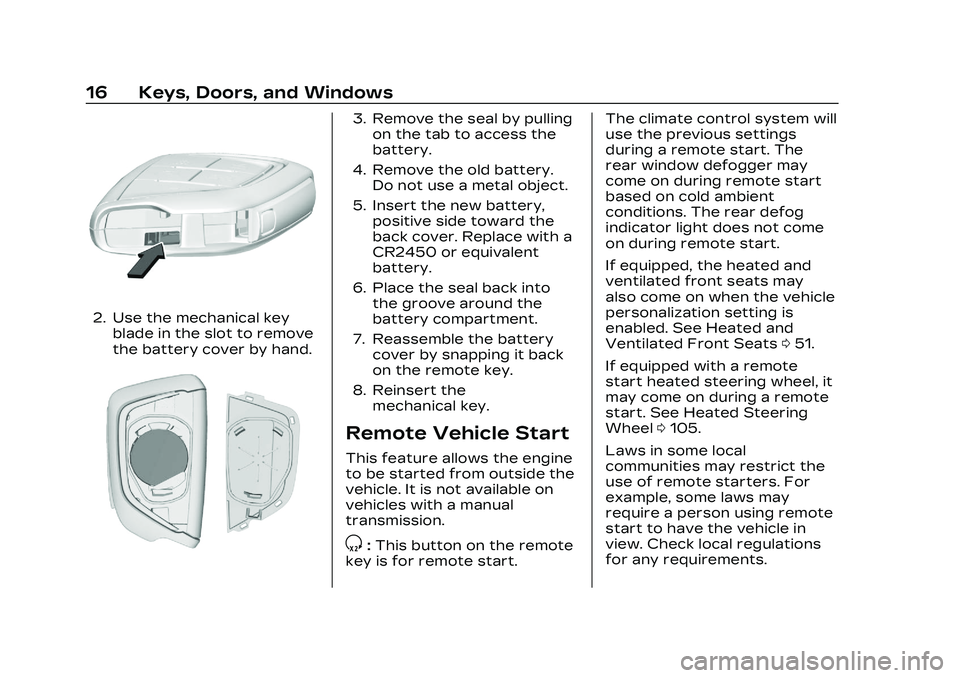
2. Use the mechanical keyblade in the slot to remove
the battery cover by hand.
3. Remove the seal by pullingon the tab to access the
battery.
4. Remove the old battery. Do not use a metal object.
5. Insert the new battery, positive side toward the
back cover. Replace with a
CR2450 or equivalent
battery.
6. Place the seal back into the groove around the
battery compartment.
7. Reassemble the battery cover by snapping it back
on the remote key.
8. Reinsert the mechanical key.
Remote Vehicle Start
This feature allows the engine
to be started from outside the
vehicle. It is not available on
vehicles with a manual
transmission.
S:This button on the remote
key is for remote start. The climate control system will
use the previous settings
during a remote start. The
rear window defogger may
come on during remote start
based on cold ambient
conditions. The rear defog
indicator light does not come
on during remote start.
If equipped, the heated and
ventilated front seats may
also come on when the vehicle
personalization setting is
enabled. See Heated and
Ventilated Front Seats
051.
If equipped with a remote
start heated steering wheel, it
may come on during a remote
start. See Heated Steering
Wheel 0105.
Laws in some local
communities may restrict the
use of remote starters. For
example, some laws may
require a person using remote
start to have the vehicle in
view. Check local regulations
for any requirements.
Page 20 of 526

Cadillac CT5 Owner Manual (GMNA-Localizing-U.S./Canada-16500419) -
2023 - CRC - 5/6/22
Keys, Doors, and Windows 19
.Use the mechanical key in
the driver door. The key lock
cylinder is covered with
a cap.
See“Driver Door Key Lock
Cylinder Access (In Case of
Dead Battery)” later in this
section.
To lock or unlock the doors
from inside the vehicle:
.PressQorKon the power
door lock switch.
.Pull the front door handle
once to open the door. Pull
the rear door handle once to
unlock and once more to
open the door. Keyless AccessThe remote key must be within
1 m (3 ft) of the trunk or door
being opened or locked. To
unlock and unlatch any door,
press the release button on
the inside grip area of the
outside door handle. Touch
the sensor on the front
outside door handle to lock.
See
“Keyless Access
Operation” in Remote Key
Operation 09. Driver Door Key Lock
Cylinder Access (In Case of
Dead Battery)
To access the driver door key
lock cylinder and unlatch
the door:
1. Insert the mechanical key
into the slot at the bottom
of the handle and push
upward all the way until
the cover frees. Do not pry
or pull on the key.
Page 25 of 526
Cadillac CT5 Owner Manual (GMNA-Localizing-U.S./Canada-16500419) -
2023 - CRC - 5/6/22
24 Keys, Doors, and Windows
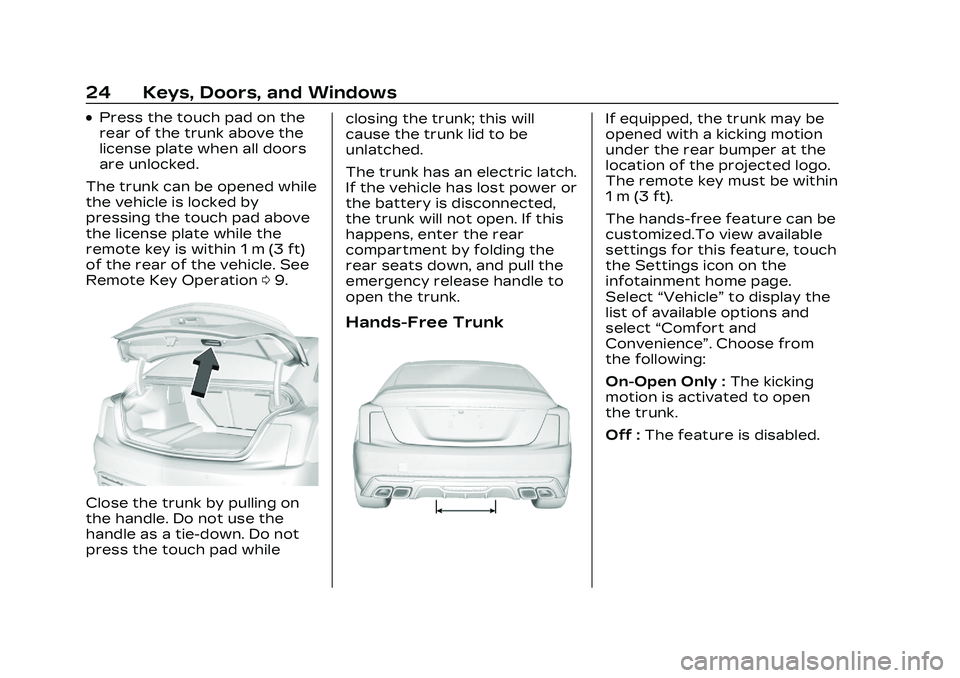
.Press the touch pad on the
rear of the trunk above the
license plate when all doors
are unlocked.
The trunk can be opened while
the vehicle is locked by
pressing the touch pad above
the license plate while the
remote key is within 1 m (3 ft)
of the rear of the vehicle. See
Remote Key Operation 09.
Close the trunk by pulling on
the handle. Do not use the
handle as a tie-down. Do not
press the touch pad while closing the trunk; this will
cause the trunk lid to be
unlatched.
The trunk has an electric latch.
If the vehicle has lost power or
the battery is disconnected,
the trunk will not open. If this
happens, enter the rear
compartment by folding the
rear seats down, and pull the
emergency release handle to
open the trunk.
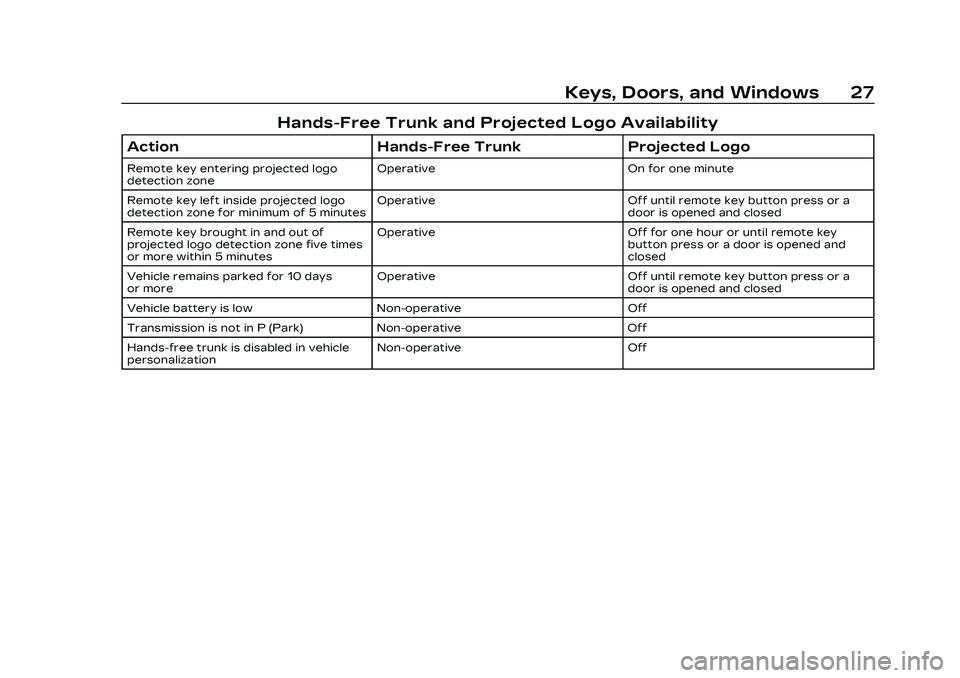
Hands-Free Trunk
If equipped, the trunk may be
opened with a kicking motion
under the rear bumper at the
location of the projected logo.
The remote key must be within
1 m (3 ft).
The hands-free feature can be
customized.To view available
settings for this feature, touch
the Settings icon on the
infotainment home page.
Select
“Vehicle” to display the
list of available options and
select “Comfort and
Convenience”. Choose from
the following:
On-Open Only : The kicking
motion is activated to open
the trunk.
Off : The feature is disabled.
Page 27 of 526
Cadillac CT5 Owner Manual (GMNA-Localizing-U.S./Canada-16500419) -
2023 - CRC - 5/6/22
26 Keys, Doors, and Windows
The projected logo will not
work under these conditions:
.The vehicle battery is low.
.The transmission is not in
P (Park).
.Hands Free Trunk Control is
set to Off in vehicle
personalization. To view
available settings for this
feature, touch the Settings
icon on the infotainment
home page. Select“Vehicle”
to display the list of available
options and select “Comfort
and Convenience”.
.The vehicle remains parked
for 10 days or more, with no
remote key use or Keyless
Access operation. To
re-enable, press any button
on the remote key or open
and close a vehicle door. The projected logo will not
work for a single remote key
when a remote key:
.Has been left within
approximately 2 m (6 ft) of
the trunk for several
minutes.
.Has been left inside the
vehicle and all vehicle doors
are closed.
.Has approached the area
outside of the trunk five
times within several minutes.
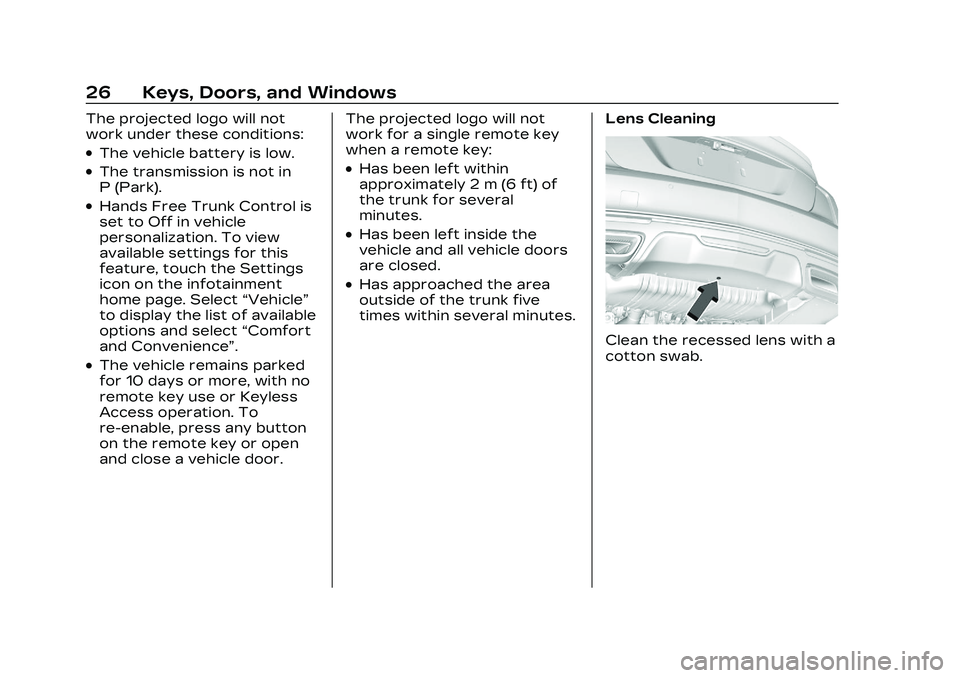
Lens Cleaning
Clean the recessed lens with a
cotton swab.
Page 28 of 526
Cadillac CT5 Owner Manual (GMNA-Localizing-U.S./Canada-16500419) -
2023 - CRC - 5/6/22
Keys, Doors, and Windows 27
Hands-Free Trunk and Projected Logo Availability
ActionHands-Free Trunk Projected Logo
Remote key entering projected logo
detection zone Operative On for one minute
Remote key left inside projected logo
detection zone for minimum of 5 minutes Operative Off until remote key button press or a
door is opened and closed
Remote key brought in and out of
projected logo detection zone five times
or more within 5 minutes Operative Off for one hour or until remote key
button press or a door is opened and
closed
Vehicle remains parked for 10 days
or more Operative Off until remote key button press or a
door is opened and closed
Vehicle battery is low Non-operative Off
Transmission is not in P (Park) Non-operative Off
Hands-free trunk is disabled in vehicle
personalization Non-operative Off
Page 31 of 526

Cadillac CT5 Owner Manual (GMNA-Localizing-U.S./Canada-16500419) -
2023 - CRC - 5/6/22
30 Keys, Doors, and Windows
Power Sounder,
Inclination Sensor, and
Intrusion Sensor
In addition to the standard
theft-deterrent system
features, this system may also
have a power sounder,
inclination sensor, and
intrusion sensor.
The power sounder provides
an audible alarm which is
distinct from the vehicle’s
horn. It has its own power
source, and can sound an
alarm if the vehicle’s battery is
compromised.
The inclination sensor can set
off the alarm if it senses
movement of the vehicle, such
as when a tire is removed.
Make sure the vehicle's alarm
is not armed prior to any
jacking.The intrusion sensor monitors
the vehicle interior, and can
activate the alarm if it senses
unauthorized entry into the
vehicle's interior. Do not allow
passengers or pets to remain
in the vehicle when the
intrusion sensor is activated.
Before arming the
theft-deterrent system and
activating the intrusion sensor:
.Make sure all doors and
windows are completely
closed.
.Secure any loose items such
as sun glasses.
.Make sure there are no
obstructions blocking the
sensors in the front
overhead console.
.Close DVD screens before
leaving the vehicle.
Inclination and Intrusion
Sensor Disable Switch
It is recommended that the
intrusion and inclination
sensor be deactivated if pets
are left in the vehicle or the
vehicle is being transported.
With the vehicle turned off,
press
oin the front
overhead console. The
indicator light will come on
momentarily, indicating that
these sensors have been
disabled for the next alarm
system arming cycle.
Page 40 of 526

Cadillac CT5 Owner Manual (GMNA-Localizing-U.S./Canada-16500419) -
2023 - CRC - 5/6/22
Keys, Doors, and Windows 39
Window Lockout
With Folding Mirrors,
Without Folding Mirrors Similar
This feature stops the rear
passenger window switches
from working.
.Press2to engage the rear
window lockout feature. The
indicator light is on when
engaged.
.Press2again to disengage.
Window Express
Movement
All windows can be opened
without holding the window
switch. Press the switch down
fully and quickly release to
express open the window.
If equipped, pull the window
switch up fully and quickly
release to express close the
window. Briefly press or pull
the window switch in the same
direction to stop that
window’s express movement.
Window Automatic
Reversal System
The express-close feature will
reverse window movement if it
comes in contact with an
object. Extreme cold or ice
could cause the window to
auto-reverse. The window will
operate normally after the
object or condition is removed.
Programming the Power
Windows
Programming may be
necessary if the vehicle
battery has been
disconnected or discharged.
If the window is unable to
express-up, program each
express-close window:
1. Close all doors.
2. Turn the ignition on or to accessory mode.
3. Partially open the window to be programmed. Then
close it and continue to pull
the switch briefly after the
window has fully closed.
4. Open the window and continue to press the
switch briefly after the
window has fully opened.