radio CADILLAC CT6 2016 User Guide
[x] Cancel search | Manufacturer: CADILLAC, Model Year: 2016, Model line: CT6, Model: CADILLAC CT6 2016Pages: 397, PDF Size: 7.09 MB
Page 168 of 397
Cadillac CT6 Owner Manual (GMNA-Localizing-U.S./Canada-9235592) -
2016 - crc - 11/6/15
Instruments and Controls 167Make sure the hand-held transmitter
has a new battery for quick and
accurate transmission of the
radio-frequency signal.
Programming the Universal
Remote System For questions or help programming
the Universal Remote system, call
1-800-355-3515 or see
www.homelink.com.
Programming involves
time-sensitive actions, and may time
out causing the procedure to be
repeated.
To program up to three devices:
1. Hold the end of the hand-held
transmitter about 3 to 8 cm (1
to 3 in) away from the
Universal Remote system
buttons with the indicator light
in view. The hand-held
transmitter was supplied by the
manufacturer of the garage
door opener receiver.
2. At the same time, press and
hold both the hand-held
transmitter button and one of
the three Universal Remote system buttons to be used to
operate the garage door. Do
not release either button until
the indicator light changes from
a slow to a rapid flash. Then
release both buttons.
Some garage door openers
may require substitution of
Step 2 with the procedure
under “ Radio Signals for
Canada and Some Gate
Operators ” later in this section.
3. Press and hold the newly
programmed Universal Remote
system button for five seconds
while watching the indicator
light and garage door
activation.
.
If the indicator light stays on
continuously or the garage
door moves when the
button is pressed, then
programming is complete.
There is no need to
complete Steps 4 – 6.
.
If the indicator light does
not come on or the garage
door does not move, a
second button press may be required. For a second
time, press and hold the
newly programmed button
for five seconds. If the light
stays on or the garage door
moves, programming is
complete.
.
If the indicator light blinks
rapidly for two seconds,
then changes to a solid light
and the garage door does
not move, continue with
programming Steps 4 – 6.
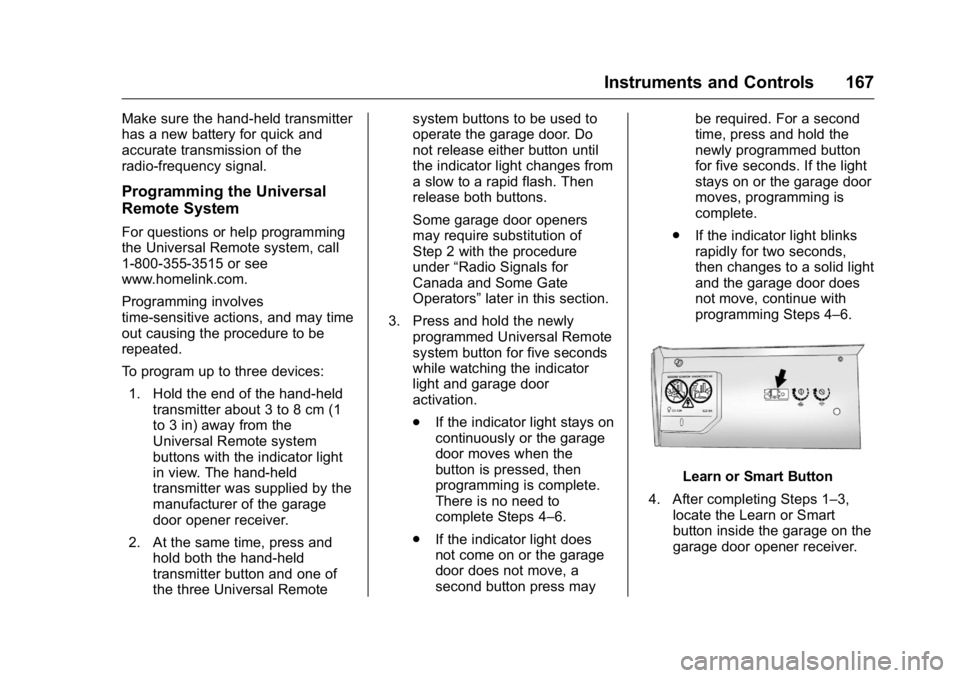
Learn or Smart Button
4. After completing Steps 1 – 3,
locate the Learn or Smart
button inside the garage on the
garage door opener receiver.
Page 169 of 397
Cadillac CT6 Owner Manual (GMNA-Localizing-U.S./Canada-9235592) -
2016 - crc - 11/6/15
168 Instruments and Controls The name and color of the
button may vary by
manufacturer.
5. Press and release the Learn or
Smart button. Step 6 must be
completed within 30 seconds of
pressing this button.
6. Inside the vehicle, press and
hold the newly programmed
Universal Remote system
button for two seconds and
then release it. If the garage
door does not move or the
lamp on the garage door
opener receiver does not flash,
press and hold the same
button a second time for
two seconds, then release it.
Again, if the door does not
move or the garage door lamp
does not flash, press and hold
the same button a third time for
two seconds, then release it.
The Universal Remote system
should now activate the
garage door.
Repeat the process for
programming the two remaining
buttons. Radio Signals for Canada and
Some Gate Operators For questions or programming help
call 1-800-355-3515 or see
www.homelink.com.
Canadian radio-frequency laws and
some U.S. gate operators require
transmitter signals to time out or quit
after several seconds of
transmission. This may not be long
enough for the Universal Remote
system to pick up the signal during
programming.
If the programming did not work,
replace Step 2 under “ Programming
the Universal Remote System ” with
the following:
Press and hold the Universal
Remote system button while
pressing and releasing the
hand-held transmitter button every
two seconds until the signal has
been successfully accepted by the
Universal Remote system. The
Universal Remote system indicator
light will flash slowly at first and then
rapidly. Proceed with Step 3 under
“ Programming the Universal Remote
System ” to complete. Universal Remote System
Operation Using the Universal Remote
System Press and hold the appropriate
Universal Remote system button for
at least one-half second. The
indicator light will come on while the
signal is being transmitted.
Erasing Universal Remote
System Buttons Erase all programmed buttons when
vehicle ownership is terminated.
To erase:
1. Press and hold the two outside
buttons until the indicator light
begins to flash. This should
take about 10 seconds.
2. Release both buttons.
Page 178 of 397

Cadillac CT6 Owner Manual (GMNA-Localizing-U.S./Canada-9235592) -
2016 - crc - 11/6/15
Infotainment System 177
Infotainment
System Introduction Infotainment . . . . . . . . . . . . . . . . . . 177
Introduction Infotainment See the infotainment manual for
information on the radio, audio
players, rear seat infotainment,
phone, navigation system, and
voice or speech recognition. It also
includes information on settings.
Page 183 of 397

Cadillac CT6 Owner Manual (GMNA-Localizing-U.S./Canada-9235592) -
2016 - crc - 11/6/15
182 Climate Controls CautionDo not try to clear frost or other
material from the inside of the
front windshield and rear window
with a razor blade or anything
else that is sharp. This may
damage the rear window
defogger grid and affect the
radio's ability to pick up stations
clearly. The repairs would not be
covered by the vehicle warranty.
Driver and Passenger Heated and
Ventilated Seats (If Equipped) :
Press
I or
+ to heat the driver or
passenger seatback only.
Press
J or
z to heat the driver or
passenger seat cushion and
seatback.
Press
C or
{ to ventilate the driver
or passenger seat. See Heated and
Ventilated Front Seats 0 64 .
Remote Start Climate Control
Operation : If equipped with the
remote start feature, the climate
control system may run when the vehicle is started remotely. The
system uses the driver ’ s previous
settings to heat or cool the inside of
the vehicle. The rear defog may
come on during remote start based
on cold ambient conditions. The
rear defog indicator light does not
come on during a remote start.
If equipped with heated or ventilated
seats, they may come on during a
remote start. See Remote Vehicle
Start 0 36 and Heated and
Ventilated Front Seats 0 64 .
Sensor The solar sensor, on top of the
instrument panel near the
windshield, monitors the solar heat.
The climate control system uses the
sensor information to adjust the
temperature, fan speed,
recirculation, and air delivery mode
for best comfort.
If the sensor is covered, the
automatic climate control system
may not work properly.
Page 189 of 397

Cadillac CT6 Owner Manual (GMNA-Localizing-U.S./Canada-9235592) -
2016 - crc - 11/6/15
188 Climate Controls Pressing this button cancels
automatic recirculation. Press AUTO
to return to automatic operation;
recirculation runs automatically as
needed.
Manual recirculation mode is not
available when in Defrost or Defog
modes.
Auto Defog : The climate control
system may have a sensor to
automatically detect high humidity
inside the vehicle. When high
humidity is detected, the climate
control system may adjust to
outside air supply and turn on the
air conditioner. If the climate control
system does not detect possible
window fogging, it returns to normal
operation. To turn Auto Defog off or
on, see “ Climate and Air Quality ”
under Vehicle
Personalization 0 157 .
Ionizer : If equipped with an ionizer,
this feature helps to clean the air
inside the vehicle and remove
contaminants; such as pollen,
odors, and dust. If the climate
control system is on and the ionizer
is enabled, the ionizer status indicator will be lit on the climate
control touch screen. To turn the
ionizer on or off, see “ Climate and
Air Quality ” under Vehicle
Personalization 0 157 .
Rear Window Defogger
K : Press to turn the rear window
defogger on or off.
The rear window defogger can be
set to automatic operation. See
“ Climate and Air Quality ” under
Vehicle Personalization 0 157 .
When Auto Rear Defog is selected,
the rear window defogger turns on
automatically when the interior
temperature is cold and the outside
temperature is about 4 °C (40 °F)
and below.
The upper grid lines on the rear
window are antenna lines and are
not intended to heat when the
defogger is activated.
The heated outside rearview mirrors
turn on when the rear window
defogger button is on and help to
clear fog or frost from the surface of
the mirrors. CautionDo not try to clear frost or other
material from the inside of the
front windshield and rear window
with a razor blade or anything
else that is sharp. This may
damage the rear window
defogger grid and affect the
radio's ability to pick up stations
clearly. The repairs would not be
covered by the vehicle warranty.
Driver and Passenger Heated and
Ventilated Seats (If Equipped) :
Press
I or
+ to heat the driver or
passenger seatback only.
Press
J or
z to heat the driver or
passenger seat cushion and
seatback.
Press
C or
{ to ventilate the driver
or passenger seat. See Heated and
Ventilated Front Seats 0 64 .
Remote Start Climate Control
Operation : If equipped with the
remote start feature, the climate
control system may run when the
Page 193 of 397

Cadillac CT6 Owner Manual (GMNA-Localizing-U.S./Canada-9235592) -
2016 - crc - 11/6/15
192 Driving and Operating Trailer Towing General Towing
Information . . . . . . . . . . . . . . . . . . 255
Driving Characteristics and
Towing Tips . . . . . . . . . . . . . . . . . 255
Trailer Towing . . . . . . . . . . . . . . . . 258
Towing Equipment . . . . . . . . . . . . 259
Conversions and Add-Ons Add-On Electrical
Equipment . . . . . . . . . . . . . . . . . . 260
Driving Information Distracted Driving Distraction comes in many forms
and can take your focus from the
task of driving. Exercise good
judgment and do not let other
activities divert your attention away
from the road. Many local
governments have enacted laws
regarding driver distraction. Become
familiar with the local laws in
your area.
To avoid distracted driving, always
keep your eyes on the road, hands
on the wheel, and mind on the drive.
.
Do not use a phone in
demanding driving situations.
Use a hands-free method to
place or receive necessary
phone calls.
.
Watch the road. Do not read,
take notes, or look up
information on phones or other
electronic devices.
.
Designate a front seat
passenger to handle potential
distractions. .
Become familiar with vehicle
features before driving, such as
programming favorite radio
stations and adjusting climate
control and seat settings.
Program all trip information into
any navigation device prior to
driving.
.
Wait until the vehicle is parked
to retrieve items that have fallen
to the floor.
.
Stop or park the vehicle to tend
to children.
.
Keep pets in an appropriate
carrier or restraint.
.
Avoid stressful conversations
while driving, whether with a
passenger or on a cell phone.
{ Warning
Taking your eyes off the road too
long or too often could cause a
crash resulting in injury or death.
Focus your attention on driving.
Page 203 of 397

Cadillac CT6 Owner Manual (GMNA-Localizing-U.S./Canada-9235592) -
2016 - crc - 11/6/15
202 Driving and Operating
Starting and
Operating New Vehicle Break-In Follow these recommended
guidelines during the first
2 400 km (1,500 mi) of driving this
vehicle. Parts have a break-in
period and performance will be
better in the long run.
For the first 2 400 km (1,500 mi):
.
Avoid full throttle starts and
abrupt stops.
.
Do not exceed 4000 engine rpm.
.
Avoid driving at any one
constant speed, fast or slow.
.
Avoid downshifting to brake or
slow the vehicle when the
engine speed will exceed
4000 rpm.
.
Do not let the engine labor.
Never lug the engine in high
gear at low speeds. .
Do not participate in track
events, sport driving schools,
or similar activities during this
break-in period.
.
Check engine oil with every
refueling and add if necessary.
Oil and fuel consumption may be
higher than normal during the
first 2 400 km (1,500 mi).
.
To break in new tires, drive at
moderate speeds and avoid hard
cornering for the first
300 km (200 mi). New tires do
not have maximum traction and
may tend to slip.
.
New brake linings also need a
break – in period. Avoid making
hard stops during the first
300 km (200 mi). This is
recommended every time brake
linings are replaced. Ignition Positions
The vehicle has an electronic
keyless ignition with pushbutton
start.
Pressing the button cycles it through
three modes: ACC/ACCESSORY,
ON/RUN/START, and Stopping the
Engine/OFF.
The Remote Keyless Entry (RKE)
transmitter must be in the vehicle for
the system to operate. If the
pushbutton start is not working, the
vehicle may be near a strong radio
antenna signal causing interference
Page 224 of 397

Cadillac CT6 Owner Manual (GMNA-Localizing-U.S./Canada-9235592) -
2016 - crc - 11/6/15
Driving and Operating 223accelerator pedal to maintain your
speed. When going downhill, the
cruise control system may
automatically brake to slow the
vehicle down. Also, you may have
to brake or shift to a lower gear to
keep your speed down. If the brake
pedal is applied, cruise control
disengages.
Ending Cruise Control
There are four ways to end cruise
control:
.
Step lightly on the brake pedal.
.
Press
* .
.
Shift the transmission to
N (Neutral).
.
Press
J .
Erasing Speed Memory
The cruise control set speed is
erased from memory if
J is
pressed or if the ignition is
turned off. Adaptive Cruise Control If equipped with Adaptive Cruise
Control (ACC), it allows the driver to
select the cruise control set speed
and following gap. Read this entire
section before using this system.
The following gap is the following
time between your vehicle and a
vehicle detected directly ahead in
your path, moving in the same
direction. If no vehicle is detected in
your path, ACC works like regular
cruise control. ACC uses camera
and radar sensors. See Radio
Frequency Statement 0 371 .
If a vehicle is detected in your path,
ACC can apply acceleration or
limited, moderate braking to
maintain the selected following gap.
To disengage ACC, apply the brake.
If ACC is controlling your vehicle
speed when the Traction Control
System (TCS) or StabiliTrak ®
electronic stability control system
activates, the ACC may automatically disengage. See
Traction Control/Electronic Stability
Control 0 217 . When road
conditions allow ACC to be safely
used, ACC can be turned back on.
ACC will not engage if the TCS or
StabiliTrak electronic stability control
system is disabled.
{ WarningACC has limited braking ability
and may not have time to slow
the vehicle down enough to avoid
a collision with another vehicle
you are following. This can occur
when vehicles suddenly slow or
stop ahead, or enter your lane.
Also see “ Alerting the Driver ” in
this section. Complete attention is
always required while driving and
you should be ready to take
action and apply the brakes. See
Defensive Driving 0 193 .
Page 236 of 397
Cadillac CT6 Owner Manual (GMNA-Localizing-U.S./Canada-9235592) -
2016 - crc - 11/6/15
Driving and Operating 235Pressing the brake pedal after the
vehicle comes to a stop will release
RAB. If the brake pedal is not
pressed soon after the stop, the
Electric Parking Brake (EPB) may
be set. When it is safe, press the
accelerator pedal firmly at any time
to override RAB.
{ WarningThere may be instances where
unexpected or undesired
automatic braking occurs. If this
happens, either press the brake
pedal or firmly press the
accelerator pedal to release the
brakes from the Rear Automatic
Braking system. Before releasing
the brakes, check the RVC
screen and check the area
around the vehicle to make sure it
is safe to proceed.
Rear Cross Traffic Alert (RCTA)
If equipped, RCTA displays a red
warning triangle with a left or right
pointing arrow on the RVC screen to
warn of traffic coming from the left or right. This system detects objects
coming from up to 20 m (65 ft) from
the left or right side of the vehicle.
When an object is detected, either
three beeps sound from the left or
right or three Safety Alert Seat
pulses occur on the left or right side,
depending on the direction of the
detected vehicle.
Use caution while backing up when
towing a trailer, as the RCTA
detection zones that extend out
from the back of the vehicle do not
move further back when a trailer is
towed.
See Radio Frequency
Statement 0 371 .
Turning the Features On or Off
Touch
X on the center stack to
turn on or off the Front and Rear
Parking Assist, Rear Automatic
Braking (RAB), Rear Cross Traffic
Alert (RCTA), and the Backing
Warning System at the same time.
The indicator light next to the button
comes on when the features are on
and turns off when the features
have been disabled. Turn off parking assist, RCTA, and
RAB when towing a trailer.
To turn the RPA symbols or
guidance lines (on some models) on
or off, see “ Rear Camera ” under
Vehicle Personalization 0 157 .
RCTA can also be turned on or off
through vehicle personalization. See
“ Collision/Detection Systems ” under
Vehicle Personalization 0 157 .
Automatic Parking
Assist (APA) If equipped, APA searches for and
steers the vehicle into parallel and
perpendicular parking spots. When
using APA, you must still shift gears,
and control the brakes and
accelerator. The Driver information
Center (DIC) and audible beeps
help to guide parking maneuvers.
Do not use APA when towing a
trailer.
Page 249 of 397

Cadillac CT6 Owner Manual (GMNA-Localizing-U.S./Canada-9235592) -
2016 - crc - 11/6/15
248 Driving and Operating trailer. LCA may alert to objects
attached to the vehicle, such as a
trailer, bicycle, or object extending
out to either side of the vehicle.
Attached objects may also interfere
with the detection of vehicles. This
is normal system operation; the
vehicle does not need service.
LCA may not always alert the driver
to vehicles in the next lane over,
especially in wet conditions or when
driving on sharp curves. The system
does not need to be serviced. The
system may light up due to
guardrails, signs, trees, shrubs, and
other non-moving objects. This is
normal system operation; the
vehicle does not need service.
LCA may not operate when the LCA
sensors in the left or right corners of
the rear bumper are covered with
mud, dirt, snow, ice, or slush, or in
heavy rainstorms. For cleaning
instructions, see "Washing the
Vehicle" under Exterior Care 0 333 .
If the DIC still displays the system
unavailable message after cleaning
both sides of the vehicle toward the
rear corners of the vehicle, see your
dealer. If the LCA displays do not light up
when moving vehicles are in the
side blind zone or are rapidly
approaching this zone and the
system is clean, the system may
need service. Take the vehicle to
your dealer.
When LCA is disabled for any
reason other than the driver turning
it off, the Side Blind Zone Alert On
option will not be available on the
personalization menu.
Radio Frequency Information See Radio Frequency
Statement 0 371 .
Lane Departure
Warning (LDW) If equipped, LDW may help avoid
crashes due to unintentional lane
departures. It may provide a
warning if the vehicle is crossing a
detected lane marking without using
a turn signal in the lane departure
direction. Since this system is part
of the Lane Keep Assist (LKA)
system, read the entire LKA section
before using this feature. Lane Keep Assist (LKA) If equipped, LKA may help avoid
crashes due to unintentional lane
departures. It may assist by gently
turning the steering wheel if the
vehicle approaches a detected lane
marking without using a turn signal
in that direction. It may also provide
a Lane Departure Warning (LDW)
system alert as the lane marking is
crossed. The LKA system will not
assist or provide an LDW alert if it
detects that you are actively
steering. Override LKA by turning
the steering wheel. LKA uses a
camera to detect lane markings
between 60 km/h (37 mph) and
180 km/h (112 mph).
{ Warning
The LKA system does not
continuously steer the vehicle.
It may not keep the vehicle in the
lane or give a Lane Departure
Warning (LDW) alert, even if a
lane marking is detected.
(Continued)