fuel CADILLAC CT6 2016 Owner's Manual
[x] Cancel search | Manufacturer: CADILLAC, Model Year: 2016, Model line: CT6, Model: CADILLAC CT6 2016Pages: 397, PDF Size: 7.09 MB
Page 181 of 397

Cadillac CT6 Owner Manual (GMNA-Localizing-U.S./Canada-9235592) -
2016 - crc - 11/6/15
180 Climate Controls To improve fuel efficiency and to
cool the vehicle faster, recirculation
may be automatically selected in
warm weather. The recirculation
light will not come on in AUTO
mode. Press
@ to select
recirculation; press it again to select
outside air.
English units can be changed to
metric units through the instrument
cluster. See “ Cluster Options Menu ”
or “ Cluster Menu ” under Instrument
Cluster (Uplevel) 0 121 or
Instrument Cluster (Base
Level) 0 118 .
OFF : Press to turn the fan on or
off. The temperature control and air
delivery mode can still be adjusted.
Q /
R : The temperature can be
adjusted separately for the driver
and the passenger. Press to
increase or decrease the
temperature. Press and hold to
rapidly increase or decrease the
temperature.
The driver and passenger
temperatures can also be adjusted
by touching the buttons on the touch
screen. SYNC : Touch SYNC on the touch
screen to link all climate zone
settings to the driver settings. When
all climate zone settings are linked
the SYNC indicator will be lit. Adjust
the driver side temperature control
to change the linked temperature.
When the front or rear passenger
settings are adjusted, the SYNC
indicator will turn off.
Manual Operation
Q 9 R : Press the fan control
buttons or the touch screen fan
control, to increase or decrease the
fan speed. Press and hold the
buttons or the touch screen control
to adjust speed more quickly. The
fan speed setting displays. Pressing
either button cancels automatic fan
control and the fan can be
controlled manually. Press AUTO to
return to automatic operation.
Driver and Passenger Air Delivery
Mode Controls : When the climate
information is displayed, touch the
desired air delivery mode on the
touch screen to change the direction
of the airflow. The selected air
delivery mode button is lit. Touching any of the air delivery buttons
cancels automatic air delivery
control and the direction of the
airflow can be controlled manually.
Press AUTO to return to automatic
operation.
To change the current mode, select
one of the following:
Y : Air is directed to the instrument
panel outlets.
\ : Air is divided between the
instrument panel outlets and the
floor outlets.
[ : Air is directed to the floor
outlets.
- : Clears the windows of fog or
moisture. Air is directed to the
windshield and floor outlets.
0 : Clears the windshield of fog or
frost more quickly. Air is directed to
the windshield. Press
0 to turn on
or off. Changing the air delivery
mode also turns the defrost off.
A/C : Touch A/C on the touch
screen to turn the automatic air
conditioning on or off. If the fan is
Page 187 of 397

Cadillac CT6 Owner Manual (GMNA-Localizing-U.S./Canada-9235592) -
2016 - crc - 11/6/15
186 Climate Controls 9. Ionizer Status Indicator (If
Equipped)
Climate Control Touch Screen
The fan, air delivery mode, air
conditioning, driver and passenger
temperatures, and SYNC settings
can be controlled by touching
CLIMATE on the infotainment home
screen or the climate button in the
touch screen application tray.
A selection can then be made on
the front climate control page
displayed. See the infotainment
manual.
Climate Control Status Screen The climate control status screen
appears briefly when the climate
control buttons on the faceplate are
adjusted.
Automatic Operation
The system automatically controls
the fan speed, air delivery, air
conditioning, and recirculation in
order to heat or cool the vehicle to
the desired temperature.
When the indicator light is on or
AUTO is displayed on the touch
screen, the system is in full
automatic operation. If the air
delivery mode or fan setting is
manually adjusted, the auto
indicator turns off and the display
will show the selected settings. Auto
operation can be turned off
individually for climate settings.
For automatic operation:
1. Press AUTO.
2. Set the temperature. Allow the
system time to stabilize. Then
adjust the temperature as
needed for best comfort. To improve fuel efficiency and to
cool the vehicle faster, recirculation
may be automatically selected in
warm weather. The recirculation
light will not come on in AUTO
mode. Press
@ to select
recirculation; press it again to select
outside air.
English units can be changed to
metric units through the instrument
cluster. See “ Cluster Options Menu ”
under Instrument Cluster (Uplevel)
0 121 or Instrument Cluster (Base
Level) 0 118 .
OFF : Press to turn the fan on or
off. The temperature control and air
delivery mode can still be adjusted.
Q /
R : The temperature can be
adjusted separately for the driver
and the passenger. Press up or
down to increase or decrease the
temperature. Press and hold up or
down to rapidly increase or
decrease the temperature.
The driver and passenger
temperatures can also be adjusted
by touching the buttons on the touch
screen.
Page 192 of 397

Cadillac CT6 Owner Manual (GMNA-Localizing-U.S./Canada-9235592) -
2016 - crc - 11/6/15
Driving and Operating 191
Driving and
Operating Driving Information Distracted Driving . . . . . . . . . . . . 192
Defensive Driving . . . . . . . . . . . . . 193
Drunk Driving . . . . . . . . . . . . . . . . . 193
Control of a Vehicle . . . . . . . . . . . 193
Braking . . . . . . . . . . . . . . . . . . . . . . . 193
Steering . . . . . . . . . . . . . . . . . . . . . . 194
Off-Road Recovery . . . . . . . . . . . 194
Loss of Control . . . . . . . . . . . . . . . 195
Driving on Wet Roads . . . . . . . . 195
Hill and Mountain Roads . . . . . 196
Winter Driving . . . . . . . . . . . . . . . . 197
If the Vehicle Is Stuck . . . . . . . . 198
Vehicle Load Limits . . . . . . . . . . . 198
Starting and Operating New Vehicle Break-In . . . . . . . . . 202
Ignition Positions . . . . . . . . . . . . . 202
Starting the Engine . . . . . . . . . . . 204
Retained Accessory
Power (RAP) . . . . . . . . . . . . . . . . 206
Engine Coolant Heater . . . . . . . 206
Shifting Into Park . . . . . . . . . . . . . 207
Shifting out of Park . . . . . . . . . . . 208
Parking over Things
That Burn . . . . . . . . . . . . . . . . . . . 209 Engine Exhaust Engine Exhaust . . . . . . . . . . . . . . 209
Running the Vehicle While
Parked . . . . . . . . . . . . . . . . . . . . . . 210
Automatic Transmission Automatic Transmission . . . . . . 210
Manual Mode . . . . . . . . . . . . . . . . . 212
Drive Systems All-Wheel Drive . . . . . . . . . . . . . . . 213
Brakes Antilock Brake
System (ABS) . . . . . . . . . . . . . . . 214
Electric Parking Brake . . . . . . . . 214
Brake Assist . . . . . . . . . . . . . . . . . . 216
Hill Start Assist (HSA) . . . . . . . . 216
Automatic Vehicle
Hold (AVH) . . . . . . . . . . . . . . . . . . 217
Ride Control Systems Traction Control/Electronic
Stability Control . . . . . . . . . . . . . 217
Driver Mode Control . . . . . . . . . . 219
Cruise Control Cruise Control . . . . . . . . . . . . . . . . 220
Adaptive Cruise Control . . . . . . 223
Driver Assistance Systems
Driver Assistance Systems . . . 230 Assistance Systems for
Parking or Backing . . . . . . . . . . 231
Assistance Systems for
Driving . . . . . . . . . . . . . . . . . . . . . . 237
Forward Collision Alert (FCA)
System . . . . . . . . . . . . . . . . . . . . . . 237
Front Automatic Braking (FAB)
System . . . . . . . . . . . . . . . . . . . . . . 240
Front Pedestrian Braking
(FPB) System . . . . . . . . . . . . . . . 241
Night Vision System . . . . . . . . . . 243
Side Blind Zone
Alert (SBZA) . . . . . . . . . . . . . . . . 246
Lane Change Alert (LCA) . . . . . 246
Lane Departure
Warning (LDW) . . . . . . . . . . . . . 248
Lane Keep Assist (LKA) . . . . . . 248
Surround Vision Recorder . . . . 250
Fuel Fuel . . . . . . . . . . . . . . . . . . . . . . . . . . 251
California Fuel
Requirements . . . . . . . . . . . . . . . 253
Fuels in Foreign Countries . . . 253
Fuel Additives . . . . . . . . . . . . . . . . 253
Filling the Tank . . . . . . . . . . . . . . . 253
Filling a Portable Fuel
Container . . . . . . . . . . . . . . . . . . . 255
Page 199 of 397

Cadillac CT6 Owner Manual (GMNA-Localizing-U.S./Canada-9235592) -
2016 - crc - 11/6/15
198 Driving and Operating Warning (Continued).
Adjust the climate control
system to circulate the air
inside the vehicle and set
the fan speed to the highest
setting. See “ Climate
Control Systems. ”
For more information about CO,
see Engine Exhaust 0 209 .
To save fuel, run the engine for
short periods to warm the vehicle
and then shut the engine off and
partially close the window. Moving
about to keep warm also helps.
If it takes time for help to arrive,
when running the engine, push the
accelerator pedal slightly so the
engine runs faster than the idle
speed. This keeps the battery
charged to restart the vehicle and to
signal for help with the headlamps.
Do this as little as possible, to
save fuel. If the Vehicle Is Stuck Slowly and cautiously spin the
wheels to free the vehicle when
stuck in sand, mud, ice, or snow.
If stuck too severely for the traction
system to free the vehicle, turn the
traction system off and use the
rocking method. See Traction
Control/Electronic Stability
Control 0 217 .
{ WarningIf the vehicle's tires spin at high
speed, they can explode, and you
or others could be injured. The
vehicle can overheat, causing an
engine compartment fire or other
damage. Spin the wheels as little
as possible and avoid going
above 56 km/h (35 mph).
Rocking the Vehicle to Get
it Out
Turn the steering wheel left and
right to clear the area around the
front wheels. Turn off any traction
system. Shift back and forth between R (Reverse) and a low
forward gear, spinning the wheels
as little as possible. To prevent
transmission wear, wait until the
wheels stop spinning before shifting
gears. Release the accelerator
pedal while shifting, and press
lightly on the accelerator pedal
when the transmission is in gear.
Slowly spinning the wheels in the
forward and reverse directions
causes a rocking motion that could
free the vehicle. If that does not get
the vehicle out after a few tries, it
might need to be towed out. If the
vehicle does need to be towed out,
see Towing the Vehicle 0 330 .
Vehicle Load Limits It is very important to know how
much weight the vehicle can
carry. This weight is called the
vehicle capacity weight and
includes the weight of all
occupants, cargo, and all
nonfactory-installed options.
Two labels on the vehicle may
show how much weight it may
Page 202 of 397
Cadillac CT6 Owner Manual (GMNA-Localizing-U.S./Canada-9235592) -
2016 - crc - 11/6/15
Driving and Operating 201
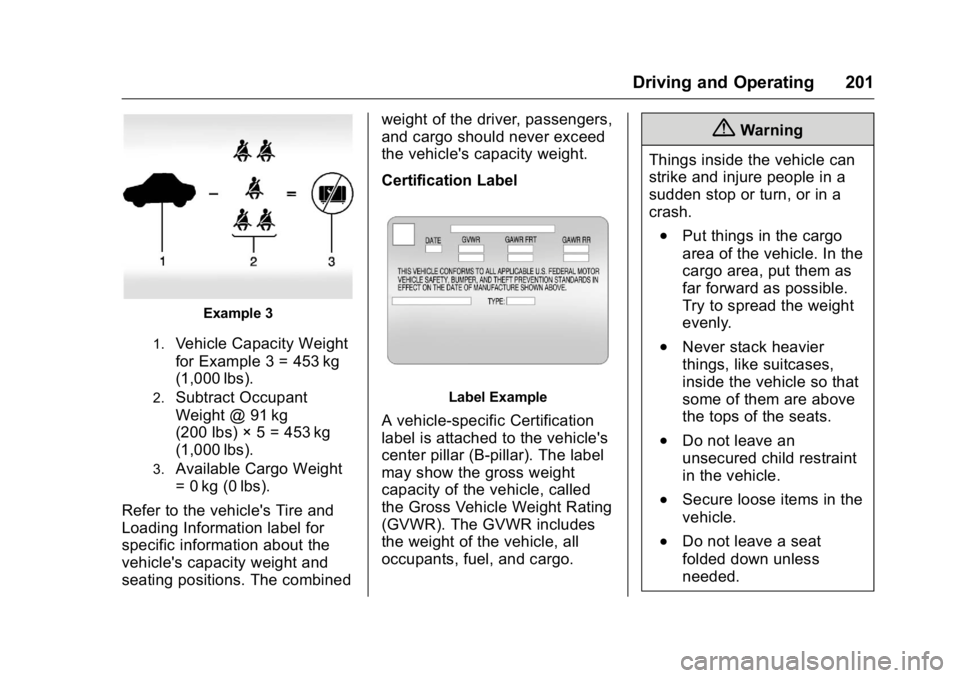
Example 3
1.
Vehicle Capacity Weight
for Example 3 = 453 kg
(1,000 lbs).2.
Subtract Occupant
Weight @ 91 kg
(200 lbs) × 5 = 453 kg
(1,000 lbs).3.
Available Cargo Weight
= 0 kg (0 lbs).
Refer to the vehicle's Tire and
Loading Information label for
specific information about the
vehicle's capacity weight and
seating positions. The combined weight of the driver, passengers,
and cargo should never exceed
the vehicle's capacity weight.
Certification Label
Label Example
A vehicle-specific Certification
label is attached to the vehicle's
center pillar (B-pillar). The label
may show the gross weight
capacity of the vehicle, called
the Gross Vehicle Weight Rating
(GVWR). The GVWR includes
the weight of the vehicle, all
occupants, fuel, and cargo. { Warning
Things inside the vehicle can
strike and injure people in a
sudden stop or turn, or in a
crash. .
Put things in the cargo
area of the vehicle. In the
cargo area, put them as
far forward as possible.
Try to spread the weight
evenly. .
Never stack heavier
things, like suitcases,
inside the vehicle so that
some of them are above
the tops of the seats. .
Do not leave an
unsecured child restraint
in the vehicle.
.
Secure loose items in the
vehicle.
.
Do not leave a seat
folded down unless
needed.
Page 203 of 397

Cadillac CT6 Owner Manual (GMNA-Localizing-U.S./Canada-9235592) -
2016 - crc - 11/6/15
202 Driving and Operating
Starting and
Operating New Vehicle Break-In Follow these recommended
guidelines during the first
2 400 km (1,500 mi) of driving this
vehicle. Parts have a break-in
period and performance will be
better in the long run.
For the first 2 400 km (1,500 mi):
.
Avoid full throttle starts and
abrupt stops.
.
Do not exceed 4000 engine rpm.
.
Avoid driving at any one
constant speed, fast or slow.
.
Avoid downshifting to brake or
slow the vehicle when the
engine speed will exceed
4000 rpm.
.
Do not let the engine labor.
Never lug the engine in high
gear at low speeds. .
Do not participate in track
events, sport driving schools,
or similar activities during this
break-in period.
.
Check engine oil with every
refueling and add if necessary.
Oil and fuel consumption may be
higher than normal during the
first 2 400 km (1,500 mi).
.
To break in new tires, drive at
moderate speeds and avoid hard
cornering for the first
300 km (200 mi). New tires do
not have maximum traction and
may tend to slip.
.
New brake linings also need a
break – in period. Avoid making
hard stops during the first
300 km (200 mi). This is
recommended every time brake
linings are replaced. Ignition Positions
The vehicle has an electronic
keyless ignition with pushbutton
start.
Pressing the button cycles it through
three modes: ACC/ACCESSORY,
ON/RUN/START, and Stopping the
Engine/OFF.
The Remote Keyless Entry (RKE)
transmitter must be in the vehicle for
the system to operate. If the
pushbutton start is not working, the
vehicle may be near a strong radio
antenna signal causing interference
Page 206 of 397

Cadillac CT6 Owner Manual (GMNA-Localizing-U.S./Canada-9235592) -
2016 - crc - 11/6/15
Driving and Operating 205CautionCranking the engine for long
periods of time, by returning the
ignition to the START position
immediately after cranking has
ended, can overheat and damage
the cranking motor, and drain the
battery. Wait at least 15 seconds
between each try, to let the
cranking motor cool down.
2. If the engine does not start
after five to 10 seconds,
especially in very cold weather
(below − 18 °C or 0 °F), it could
be flooded with too much
gasoline. Try pushing the
accelerator pedal all the way to
the floor and holding it there as
you press ENGINE START/
STOP. Wait at least 15 seconds
between each try, to allow the
cranking motor to cool down.
When the engine starts,
release the accelerator. If the
vehicle starts briefly but then
stops again, do the same thing.
This clears the extra gasoline from the engine. Do not race
the engine immediately after
starting it. Operate the engine
and transmission gently until
the oil warms up and lubricates
all moving parts.
Stop/Start System
{ WarningExiting the vehicle without first
shifting into P (Park) may cause
the vehicle to move. You or others
may be injured. Because the
vehicle has the auto engine stop/
start feature, the vehicle's engine
might seem to be shut off;
however, once the brake pedal is
released, the engine will start up
again.
Shift to P (Park) and turn the
ignition to LOCK/OFF, before
exiting the vehicle.
The vehicle has a fuel saving stop/
start system to shut off the engine
and help conserve fuel. Auto Engine Stop/Start
When the brakes are applied and
the vehicle is at a complete stop,
the engine may turn off. When
stopped, the tachometer displays
AUTO STOP. See Tachometer
0 124 . When the brake pedal is
released or the accelerator pedal is
pushed, the engine will restart.
Auto Stop may be deactivated if:
.
A minimum vehicle speed is not
reached.
.
The engine or transmission is
not at the required operating
temperature.
.
The outside temperature is not
in the required operating range,
typically between − 10 °C (14 °F)
and 50 °C (122 °F).
.
The shift lever is in any gear
other than D (Drive).
.
The battery has been recently
disconnected.
.
The battery charge is low.
.
The interior comfort level has not
reached the required level for
the climate control system or
Page 207 of 397

Cadillac CT6 Owner Manual (GMNA-Localizing-U.S./Canada-9235592) -
2016 - crc - 11/6/15
206 Driving and Operating defog settings. See Automatic
Climate Control System (Quad
Zone) 0 178
or Automatic Climate Control
System (Dual Zone) 0 185 .
.
The Auto Stop time is greater
than two minutes.
The automatic engine stop/start
function can be disabled by
touching
h on the touchscreen.
The indicator next to the switch will
come on when the system is active. Retained Accessory
Power (RAP) These vehicle accessories can be
used for up to 10 minutes after the
engine is turned off:
.
Audio System
.
Power Windows
.
Sunroof (if equipped)
Power to the audio system will work
up to 10 minutes or until the driver
door is opened. Power to the
windows or sunroof will work up to
10 minutes or until any door is
opened.
Engine Coolant Heater Vehicles with the engine coolant
heater can use this option in cold
weather conditions at or below − 18 °
C (0 °F) for easier starting and better
fuel economy during engine
warm-up. Plug in the coolant heater
at least four hours before starting
your vehicle. An internal thermostat
in the plug-end of the cord may exist which will prevent engine coolant
heater operation at temperatures
above − 18 °C (0 °F).
To Use the Engine Coolant
Heater 1. Turn off the engine.
2. Open the hood and unwrap the
electrical cord. The cord is
clipped to the diagonal brace
on the passenger side of the
engine compartment.
Check the heater cord for
damage. If it is damaged, do
not use it. See your dealer for
a replacement. Inspect the
cord for damage yearly.
3. Plug it into a normal, grounded
110-volt AC outlet.
Page 212 of 397

Cadillac CT6 Owner Manual (GMNA-Localizing-U.S./Canada-9235592) -
2016 - crc - 11/6/15
Driving and Operating 211ON/RUN. If you cannot shift out of
P (Park), ease pressure on the shift
lever and push the shift lever all the
way into P (Park) as you maintain
brake application. Then press the
shift lever button and move the shift
lever into another gear. See Shifting
out of Park 0 208 .
CautionShifting to R (Reverse) while the
vehicle is moving forward could
damage the transmission. The
repairs would not be covered by
the vehicle warranty. Shift to
R (Reverse) only after the vehicle
is stopped.
R : Use this gear to back up.
At low vehicle speeds, R (Reverse)
can be used to rock the vehicle
back and forth to get out of snow,
ice, or sand without damaging the
transmission. See If the Vehicle Is
Stuck 0 198 .
N : In this position, the engine does
not connect with the wheels. To
restart when the vehicle is already moving, use N (Neutral) only. You
can also use N (Neutral) when the
vehicle is being towed.
{ WarningShifting into a drive gear while the
engine is running at high speed is
dangerous. Unless your foot is
firmly on the brake pedal, the
vehicle could move very rapidly.
You could lose control and hit
people or objects. Do not shift
into a drive gear while the engine
is running at high speed.
Caution
Shifting out of P (Park) or
N (Neutral) with the engine
running at high speed may
damage the transmission. The
repairs would not be covered by
the vehicle warranty. Be sure the
engine is not running at high
speed when shifting the vehicle. D : This position is for normal
driving. It provides the best fuel
economy. If you need more power
for passing, and you are:
.
Going less than 55 km/h
(35 mph), push the accelerator
pedal about halfway down.
.
Going about 55 km/h (35 mph) or
more, push the accelerator all
the way down.
The transmission will shift down
to a lower gear and have more
power.
Downshifting the transmission in
slippery road conditions could result
in skidding. See “ Skidding ” under
Loss of Control 0 195 .
M : This mode can be entered by
moving the shift lever from D (Drive)
to M (Manual Mode). M (Manual
Mode) allows the driver to select
gears appropriate for current driving
conditions. M (Manual Mode) can be
exited by returning the shift lever to
D (Drive). See Manual Mode 0 212 .
Page 252 of 397

Cadillac CT6 Owner Manual (GMNA-Localizing-U.S./Canada-9235592) -
2016 - crc - 11/6/15
Driving and Operating 251Video List : Touch to display a list
of the most recent and saved
videos. Touch the delete button next
to the name to delete a saved video.
Rewind : Touch to rewind the video.
Touch again to stop rewinding.
Play/Pause : Touch to play or
pause a recorded video.
Fast Forward : Touch to fast
forward the video. Touch again to
stop fast forward.
Save : Touch to save a video. This
protects the video from being
erased. Once the SD card is full,
files will be overwritten unless they
have been saved.
Front/Rear Camera View : Select
to switch between the front and rear
camera views in playback.
Touching
S Back returns to the
player view with video that was
previously loaded still showing.
The latest recorded video file can be
played. In addition: .
There are approximately
12 hours of video storage based
on an 8GB SD card. This could
vary based on exterior lighting
conditions.
.
The recorded video is stored in
five-minute-long files.
.
All files can be viewed on the
playback app or when the SD
card is read by a PC.
.
Once the SD card is full, the
oldest files will be overwritten.
To Delete Data : Remove the SD
card from the vehicle and insert into
a personal computer to manually
delete the file.
Error messages can occur if:
.
No SD card is present.
.
There is a system error.
.
The SD card is full. Fuel Use of the recommended fuel is an
important part of the proper
maintenance of this vehicle. When
driving in the U.S. and Canada, to
help keep the engine clean and
maintain optimum vehicle
performance, we recommend using
TOP TIER Detergent Gasolines.
See www.toptiergas.com for a list of
TOP TIER Detergent Gasolines.
If the vehicle has the 2.0L L4 turbo
engine, use premium unleaded
gasoline meeting ASTM
specification D4814 with a posted
octane rating of 91 or higher.