door lock CADILLAC CT6 2016 Owner's Guide
[x] Cancel search | Manufacturer: CADILLAC, Model Year: 2016, Model line: CT6, Model: CADILLAC CT6 2016Pages: 397, PDF Size: 7.09 MB
Page 100 of 397
Cadillac CT6 Owner Manual (GMNA-Localizing-U.S./Canada-9235592) -
2016 - crc - 11/6/15
Seats and Restraints 99Caution (Continued)restraint. Use the window lockout
button on the driver door to
prevent adjustment of the seat
whenever a child restraint is
installed.
CautionDo not let the LATCH
attachments rub against the
vehicle ’ s safety belts. This may
damage these parts. If necessary,
move buckled safety belts to
avoid rubbing the LATCH
attachments.
If you need to secure more than one
child restraint in the rear seat, see
Where to Put the Restraint 0 94 .
This system is designed to make
the installation of child restraints
easier. When using lower anchors,
do not use the vehicle's safety belts.
Instead, use the vehicle's anchors
and child restraint attachments to secure the restraints. Some
restraints also use another vehicle
anchor to secure a top tether.
1. Attach and tighten the lower
attachments to the lower
anchors. If the child restraint
does not have lower
attachments or the desired
seating position does not have
lower anchors, secure the child
restraint with the top tether and
the safety belts. Move the head
restraint up if needed to get a
tight installation. Refer to your
child restraint manufacturer
instructions and the
instructions in this manual.
1.1. Find the lower anchors for
the desired seating
position.
1.2. Put the child restraint on
the seat.
1.3. Attach and tighten the
lower attachments on the
child restraint to the lower
anchors. 2. If the child restraint
manufacturer recommends that
the top tether be attached,
attach and tighten the top
tether to the top tether anchor,
if equipped. Refer to the child
restraint instructions and the
following steps:
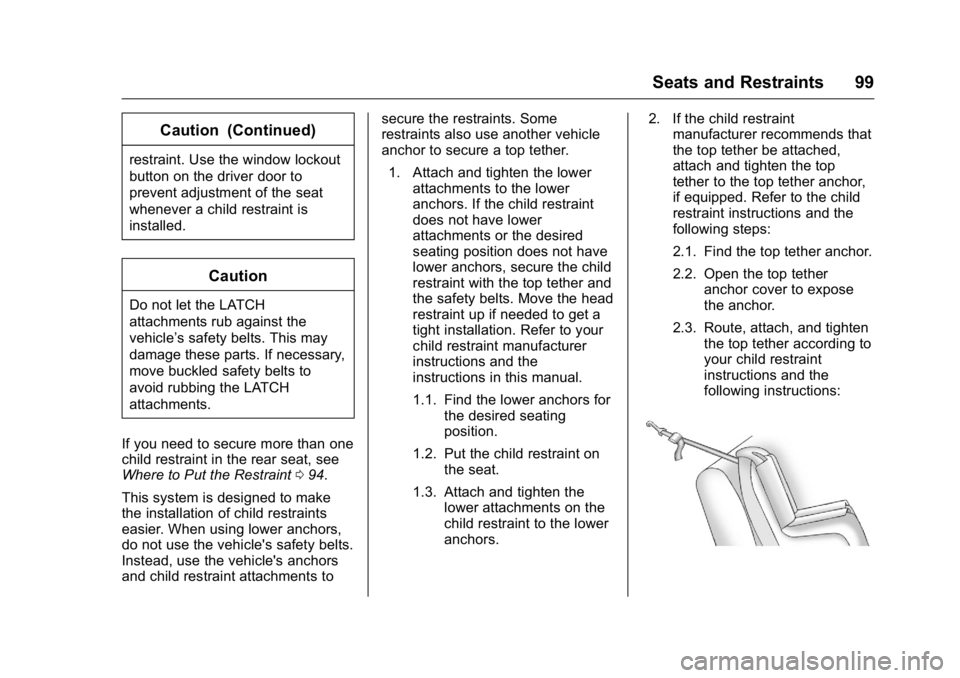
2.1. Find the top tether anchor.
2.2. Open the top tether
anchor cover to expose
the anchor.
2.3. Route, attach, and tighten
the top tether according to
your child restraint
instructions and the
following instructions:
Page 110 of 397
Cadillac CT6 Owner Manual (GMNA-Localizing-U.S./Canada-9235592) -
2016 - crc - 11/6/15
Instruments and Controls 109
Instruments and
Controls Controls Steering Wheel Adjustment . . . 110
Steering Wheel Controls . . . . . . 111
Heated Steering Wheel . . . . . . . 111
Horn . . . . . . . . . . . . . . . . . . . . . . . . . . 111
Windshield Wiper/Washer . . . . . 111
Compass . . . . . . . . . . . . . . . . . . . . . 113
Clock . . . . . . . . . . . . . . . . . . . . . . . . . 113
Power Outlets . . . . . . . . . . . . . . . . 114
Wireless Charging . . . . . . . . . . . . 115
Warning Lights, Gauges, and
Indicators Warning Lights, Gauges, and
Indicators . . . . . . . . . . . . . . . . . . . 117
Instrument Cluster (Base
Level) . . . . . . . . . . . . . . . . . . . . . . . 118
Instrument Cluster
(Uplevel) . . . . . . . . . . . . . . . . . . . . 121
Speedometer . . . . . . . . . . . . . . . . . 123
Odometer . . . . . . . . . . . . . . . . . . . . . 124
Trip Odometer . . . . . . . . . . . . . . . . 124
Tachometer . . . . . . . . . . . . . . . . . . . 124
Fuel Gauge . . . . . . . . . . . . . . . . . . . 124
Boost Gauge (Performance
Configuration Only) . . . . . . . . . 125 Engine Oil Pressure Gauge
(Base Level Cluster Only) . . . 126
Engine Oil Temperature Gauge
(Performance
Configuration Only) . . . . . . . . . 127
Engine Coolant Temperature
Gauge . . . . . . . . . . . . . . . . . . . . . . 128
Voltmeter Gauge (Base Level
Cluster Only) . . . . . . . . . . . . . . . . 129
Safety Belt Reminders . . . . . . . . 129
Airbag Readiness Light . . . . . . . 130
Passenger Airbag Status
Indicator . . . . . . . . . . . . . . . . . . . . 130
Charging System Light . . . . . . . 131
Malfunction Indicator Lamp
(Check Engine Light) . . . . . . . . 132
Brake System Warning
Light . . . . . . . . . . . . . . . . . . . . . . . . 133
Electric Parking Brake
Light . . . . . . . . . . . . . . . . . . . . . . . . 134
Service Electric Parking Brake
Light . . . . . . . . . . . . . . . . . . . . . . . . 134
Antilock Brake System (ABS)
Warning Light . . . . . . . . . . . . . . . 135
Lane Keep Assist (LKA)
Light . . . . . . . . . . . . . . . . . . . . . . . . 135
Vehicle Ahead Indicator . . . . . . 136
Pedestrian Ahead Indicator . . . 136
Traction Off Light . . . . . . . . . . . . . 136
StabiliTrak ®
OFF Light . . . . . . . . 136 Traction Control System (TCS)/
StabiliTrak ®
Light . . . . . . . . . . . 137
Engine Coolant Temperature
Warning Light . . . . . . . . . . . . . . . 137
Tire Pressure Light . . . . . . . . . . . 137
Engine Oil Pressure Light . . . . 138
Low Fuel Warning Light . . . . . . 138
Auto Stop Mode (Uplevel
Cluster) . . . . . . . . . . . . . . . . . . . . . 139
Security Light . . . . . . . . . . . . . . . . . 139
High-Beam On Light . . . . . . . . . . 139
Lamps On Reminder . . . . . . . . . 139
Cruise Control Light . . . . . . . . . . 140
Door Ajar Light . . . . . . . . . . . . . . . 140
Information Displays Driver Information
Center (DIC) . . . . . . . . . . . . . . . . 140
Head-Up Display (HUD) . . . . . . 143
Vehicle Messages Vehicle Messages . . . . . . . . . . . . 146
Battery Voltage and Charging
Messages . . . . . . . . . . . . . . . . . . . 147
Brake System Messages . . . . . 147
Compass Messages . . . . . . . . . . 148
Cruise Control Messages . . . . . 148
Door Ajar Messages . . . . . . . . . . 148
Engine Cooling System
Messages . . . . . . . . . . . . . . . . . . . 149
Engine Oil Messages . . . . . . . . . 149
Page 156 of 397

Cadillac CT6 Owner Manual (GMNA-Localizing-U.S./Canada-9235592) -
2016 - crc - 11/6/15
Instruments and Controls 155
Security Messages THEFT ATTEMPTED This message displays if the vehicle
detects a tamper condition.
Service Vehicle Messages SERVICE POWER STEERING This message displays and a chime
may sound when there may be a
problem with the power steering
system. If this message displays
and a reduction in steering
performance or loss of power
steering assistance is noticed, see
your dealer.
SERVICE VEHICLE SOON This message is displayed if there is
a problem with the vehicle. Take the
vehicle to your dealer for service. Steering System
Messages ACTION REQUIRED TURN
STEERING WHEEL START
VEHICLE AGAIN This message displays to indicate
that the steering column lock device
was unable to unlock the column,
and the engine did not start. If this
happens, immediately turn the
steering wheel from side to side.
If that does not unlock the steering
column, turn the ignition off, and
then open the driver door. Then turn
the vehicle back on and turn the
steering wheel from side to side for
about 15 seconds. The steering
column must be turned to each side
immediately after pressing ENGINE
START/STOP to help the steering
column lock device unlock the
column. In some situations it may
take significant force. This situation
may be avoided by straightening the
front wheels before turning off the
engine. SERVICE ACTIVE STEERING
SYSTEM This message displays when there
may be a problem with Active Rear
Steer system. The rear wheels may
be locked at current position and the
driver may experience a small
steering wheel correction for the
vehicle going forward. If the problem
persists for the next ignition cycle,
see your dealer for service.
SERVICE STEERING
COLUMN LOCK This message displays when a
problem with the steering column
lock device has been detected. See
your dealer for service.
STEERING COLUMN LOCKED This message displays when the
steering column is locked with the
engine running. It is normal for the
steering column to be locked during
a remote start. The steering column
should unlock after the brake pedal
and ENGINE START/STOP are
pressed.
Page 160 of 397

Cadillac CT6 Owner Manual (GMNA-Localizing-U.S./Canada-9235592) -
2016 - crc - 11/6/15
Instruments and Controls 159Compensation Technology ” under
“ Infotainment System Settings ” in
the infotainment manual.
Select Off or On.
Maximum Start Up Volume
This feature sets the maximum
startup volume. If the vehicle is
started and the volume is greater
than this level, the volume is
adjusted to this level.
To set the maximum startup volume,
touch + or − to increase or
decrease.
Vehicle Select and the following may
display:
.
Climate and Air Quality
.
Collision/Detection Systems
.
Comfort and Convenience
.
Lighting
.
Power Door Locks
.
Remote Lock, Unlock, Start Climate and Air Quality
Select and the following may
display:
.
Auto Fan Speed
.
Air Quality Sensor
.
Auto Heated Seats
.
Auto Defog
.
Auto Rear Defog
.
Ionizer
Auto Fan Speed
This feature will set the auto fan
speed.
Select Low, Medium, or High.
Air Quality Sensor
This allows for selection of air
quality sensor operation at high or
low sensitivity.
Select Off, Low Sensitivity, or High
Sensitivity. Auto Heated Seats
When enabled, this feature will
automatically activate heated seats
at the level required by the interior
temperature. See Heated and
Ventilated Front Seats 0 64 .
Select Off or On.
Auto Defog
When set to On, the front defog will
automatically react to temperature
and humidity conditions that may
cause fogging.
Select Off or On.
Auto Rear Defog
If equipped, this allows the Auto
Rear Defog to be turned on or off.
This feature will automatically turn
on the rear window defogger when it
is cold outside.
Select Off or On.
Page 163 of 397
Cadillac CT6 Owner Manual (GMNA-Localizing-U.S./Canada-9235592) -
2016 - crc - 11/6/15
162 Instruments and Controls Select Off, 30 Seconds, 60
Seconds, or 120 Seconds.
Power Door Locks Select and the following may
display:
.
Unlocked Door Anti-Lockout
.
Auto Door Unlock
.
Delayed Door Lock
Unlocked Door Anti-Lockout
When on, this feature will keep the
driver door from locking when the
door is open. If Off is selected, the
Delayed Door Lock menu will be
available.
Select Off, On.
Auto Door Unlock
This allows selection of which of the
doors will automatically unlock when
the vehicle is shifted into P (Park).
Select Off, All Doors, or Driver Door. Delayed Door Lock
When on, this feature will delay the
locking of the doors. To override the
delay, press the power door lock
switch on the door.
Select Off or On.
Remote Lock, Unlock, Start Select and the following may
display:
.
Remote Unlock Light Feedback
.
Remote Lock Feedback
.
Remote Door Unlock
.
Remote Start Auto Cool Seats
.
Remote Start Auto Heat Seats
.
Remote Window Operation
.
Passive Door Unlock
.
Passive Door Lock
.
Remote Left in Vehicle Alert
Remote Unlock Light Feedback
When on, the exterior lamps will
flash when unlocking the vehicle
with the RKE transmitter.
Select Off or Flash Lights. Remote Lock Feedback
This allows selection of what type of
feedback is given when locking the
vehicle with the RKE transmitter.
Select Off, Lights and Horn, Lights
Only, or Horn Only.
Remote Door Unlock
This allows selection of which doors
will unlock when pressing
K on the
RKE transmitter.
Select All Doors or Driver Door.
Remote Start Auto Cool Seats
If equipped and turned on, this
feature will turn the ventilated seats
on when using remote start on
warm days.
Select Off, On-Driver and
Passenger, or On-Driver.
Remote Start Auto Heat Seats
If equipped and turned on, this
feature will turn the heated seats on
when using remote start on
cold days.
Select Off, On-Driver and
Passenger, or On-Driver.
Page 164 of 397

Cadillac CT6 Owner Manual (GMNA-Localizing-U.S./Canada-9235592) -
2016 - crc - 11/6/15
Instruments and Controls 163Remote Window Operation
This allows the window to be
opened when pressing
K on the
RKE transmitter. See Remote
Keyless Entry (RKE) System
Operation 0 29 .
Select Off or On.
Passive Door Unlock
This allows the selection of what
doors will unlock when using the
button on the driver door handle to
unlock the vehicle.
Select All Doors or Driver Door.
Passive Door Lock
This allows passive locking to be
turned on or off and selects
feedback. See Remote Keyless
Entry (RKE) System Operation 0 29 .
Select Off, On with Horn
Chirp, or On.
Remote Left in Vehicle Alert
This feature sounds an alert when
the RKE transmitter is left in the
vehicle.
Select Off or On. Bluetooth Select and the following may
display:
.
Pair New Device
.
Device Management
.
Ringtones
.
Voice Mail Numbers
.
Text Message Alerts
Pair New Device
Select to pair a new device. See
“ Pairing ” in “ Infotainment Controls ”
under “ Bluetooth ” in the infotainment
manual.
Device Management
Select to connect to a different
phone source, disconnect a phone,
or delete a phone.
Ringtones
Touch to change the ring tone for
the specific phone. The phone does
not need to be connected to change
the ring tone. Voice Mail Numbers
This feature displays the voice mail
number for all connected phones.
To change the voice mail number,
touch +. Type a new number, then
touch SAVE.
Text Message Alerts
This feature allows text messages
to be received. See “ Text
Messaging ” under “ Phone ” in the
infotainment manual.
Select Off or On.
Apple CarPlay ™Select and the following may
display:
.
Apple CarPlay
.
Manage Apple CarPlay Devices
Apple CarPlay
This feature allows Apple devices to
be connected to the infotainment
system through a USB port.
Select Off or On.
Page 255 of 397

Cadillac CT6 Owner Manual (GMNA-Localizing-U.S./Canada-9235592) -
2016 - crc - 11/6/15
254 Driving and Operating Warning (Continued).
Fuel can spray out if the
refueling nozzle is inserted
too quickly. This spray can
happen if the tank is nearly
full, and is more likely in hot
weather. Insert the refueling
nozzle slowly and wait for
any hiss noise to stop prior
to beginning to flow fuel.
If equipped, the fuel door is locked
when the vehicle doors are locked.
Press
K on the RKE transmitter to
unlock. To open the fuel door, push and
release the rearward center edge of
the door.
The vehicle has a capless refueling
system and does not have a fuel
cap. The filling nozzle must be fully
inserted and latched prior to starting
fuel flow.
{ WarningOverfilling the fuel tank by more
than three clicks of a standard fill
nozzle may cause:
.
Vehicle performance issues,
including engine stalling and
damage to the fuel system.
.
Fuel spills.
.
Potential fuel fires.
Be careful not to spill fuel. Wait a
few seconds after you have finished
pumping before removing the
nozzle. Clean fuel from painted
surfaces as soon as possible. See
Exterior Care 0 333 .{ WarningIf a fire starts while you are
refueling, do not remove the
nozzle. Shut off the flow of fuel by
shutting off the pump or by
notifying the station attendant.
Leave the area immediately.
Filling the Tank with a Portable
Gas Can
If the vehicle runs out of fuel and
must be filled from a portable
gas can:
1. Locate the capless funnel
adapter from under the carpet
in the trunk.
2. Insert and latch the funnel into
the capless fuel system.
Page 295 of 397

Cadillac CT6 Owner Manual (GMNA-Localizing-U.S./Canada-9235592) -
2016 - crc - 11/6/15
294 Vehicle Care
Fuses Usage
F1 Power outlet
F2 Visor
F3 Front blower
F4 Body control
module 8
F5 Power steering
column Fuses Usage
F6 Column lock
F7 Glove box door
F8 Front heated seat
module
F9 Sensing and
diagnostic module
F10 Body control
module 4 Fuses Usage
F11 Body control
module 3
F12 Data link connector
F13 –
F14 –
F15 Rear vision camera
F16 Display
F17 HVAC control
F18 OnStar
F19 –
F20 Lane departure
warning
F21 –
F22 INFO 2
F23 Central gateway
module
F24 INFO 1
F25 Video processing
module
F26 Steering wheel
controls
F27 USB charge port
Page 338 of 397
Cadillac CT6 Owner Manual (GMNA-Localizing-U.S./Canada-9235592) -
2016 - crc - 11/6/15
Vehicle Care 337Caution (Continued)brushes. Damage could occur
and the repairs would not be
covered by the vehicle warranty.
Brake System Visually inspect brake lines and
hoses for proper hook-up, binding,
leaks, cracks, chafing, etc. Inspect
disc brake pads for wear and rotors
for surface condition. Inspect brake
linings/shoes for wear or cracks.
Inspect all other brake parts.
Steering, Suspension, and
Chassis Components Visually inspect steering,
suspension, and chassis
components for damaged, loose,
or missing parts or signs of wear at
least once a year.
Inspect power steering for proper
attachment, connections, binding,
leaks, cracks, chafing, etc.
Visually check constant velocity joint
boots and axle seals for leaks. Body Component Lubrication Lubricate all key lock cylinders,
hood hinges, liftgate hinges, and the
steel fuel door hinges, unless the
components are plastic. Applying
silicone grease on weatherstrips
with a clean cloth will make them
last longer, seal better, and not stick
or squeak.
Underbody Maintenance At least twice a year, spring and fall,
use plain water to flush any
corrosive materials from the
underbody. Take care to thoroughly
clean any areas where mud and
other debris can collect.
Do not directly power wash the
transfer case and/or front/rear axle
output seals. High pressure water
can overcome the seals and
contaminate the fluid. Contaminated
fluid will decrease the life of the
transfer case and/or axles and
should be replaced. Sheet Metal Damage If the vehicle is damaged and
requires sheet metal repair or
replacement, make sure the body
repair shop applies anti-corrosion
material to parts repaired or
replaced to restore corrosion
protection.
Original manufacturer replacement
parts will provide the corrosion
protection while maintaining the
vehicle warranty.
Finish Damage Quickly repair minor chips and
scratches with touch-up materials
available from your dealer to avoid
corrosion. Larger areas of finish
damage can be corrected in your
dealer's body and paint shop.
Chemical Paint Spotting
Airborne pollutants can fall upon
and attack painted vehicle surfaces
causing blotchy, ring-shaped
discolorations, and small, irregular
dark spots etched into the paint
surface. See “ Finish Care ”
previously in this section.
Page 355 of 397

Cadillac CT6 Owner Manual (GMNA-Localizing-U.S./Canada-9235592) -
2016 - crc - 11/6/15
354 Service and Maintenance Usage Fluid/Lubricant
Key Lock Cylinders, Hood and Door
Hinges Multi-Purpose Lubricant, Superlube (GM Part No. 12346241, in
Canada 10953474).
Weatherstrip Conditioning Weatherstrip Lubricant (GM Part No. 3634770, in Canada 10953518) or
Dielectric Silicone Grease (GM Part No. 12345579, in Canada 10953481).
Maintenance Replacement Parts Replacement parts identified below by name, part number, or specification can be obtained from your dealer.
Part GM Part Number ACDelco Part Number
Engine Air Cleaner/Filter
2.0L L4 Engine 23184137 A3205C
3.0L V6 Twin Turbo Engine (Driver Side) 23441383 A3207C
3.0L V6 Twin Turbo Engine (Passenger Side) 23450879 A3206C
3.6L V6 Engine 23458700 A3204C
Engine Oil Filter
2.0L L4 Engine 12640445 PF64
3.0L V6 Twin Turbo Engine 19330000 PF63E
3.6L V6 Engine 19330000 PF63E
Passenger Compartment Air Filter 13356916 CF185