ignition CADILLAC CT6 2016 Owners Manual
[x] Cancel search | Manufacturer: CADILLAC, Model Year: 2016, Model line: CT6, Model: CADILLAC CT6 2016Pages: 397, PDF Size: 7.09 MB
Page 8 of 397

Cadillac CT6 Owner Manual (GMNA-Localizing-U.S./Canada-9235592) -
2016 - crc - 11/6/15
In Brief 71. Air Vents 0 189 .
2. Exterior Lamp Controls 0 170 .
Turn Signal Lever. See Turn
and Lane-Change
Signals 0 173 .
3. Instrument Cluster (Uplevel)
0 121 or Instrument Cluster
(Base Level) 0 118 .
Driver Information Center (DIC)
Display. See Driver Information
Center (DIC) 0 140 .
4. Windshield Wiper/
Washer 0 111 .
5. ENGINE START/STOP Button.
See Ignition Positions 0 202 .
6. Parking Assist Button. See
Assistance Systems for
Parking or Backing 0 231 .
Automatic Parking Assist (APA)
Button. See Assistance
Systems for Parking or
Backing 0 231 .
Automatic Engine Start/Stop
Disable Switch. See Starting
the Engine 0 204 . 7. Light Sensor. See Automatic
Headlamp System 0 172 .
8. Hazard Warning
Flashers 0 173 .
Glove Box Button. See Glove
Box 0 106 .
9. Infotainment 0 177 .
10. Heated and Ventilated Front
Seats 0 64 (If Equipped).
11. Infotainment Touch Pad. See
the infotainment manual.
12. Automatic Climate Control
System (Quad Zone) 0 178 or
Automatic Climate Control
System (Dual Zone) 0 185 .
13. Automatic Vehicle Hold
(AVH) 0 217 .
MODE Button. See Driver
Mode Control 0 219 .
Traction Control/Electronic
Stability Control 0 217 .
14. Shift Lever. See Automatic
Transmission 0 210 .
15. Driver Information Center (DIC)
Controls. See Driver
Information Center (DIC) 0 140 . 16. Steering Wheel Controls. See
the infotainment manual.
17. Horn 0 111 .
18. Steering Wheel Adjustment
0 110 (Out of View).
19. Forward Collision Alert (FCA)
System 0 237 (If Equipped).
Lane Keep Assist (LKA) 0 248
(If Equipped).
Heated Steering Wheel 0 111
(If Equipped).
20. Cruise Control 0 220 .
Adaptive Cruise Control 0 223
(If Equipped).
Phone Button. See “ Steering
Wheel Controls ” in the
infotainment manual.
21. Data Link Connector (DLC)
(Out of View). See Malfunction
Indicator Lamp (Check Engine
Light) 0 132 .
22. Instrument Panel
Storage 0 106 .
Instrument Panel Fuse
Block 0 293 .
Page 11 of 397
Cadillac CT6 Owner Manual (GMNA-Localizing-U.S./Canada-9235592) -
2016 - crc - 11/6/15
10 In Brief From inside, press
Q or
K . See
Power Door Locks 0 39 .
Trunk
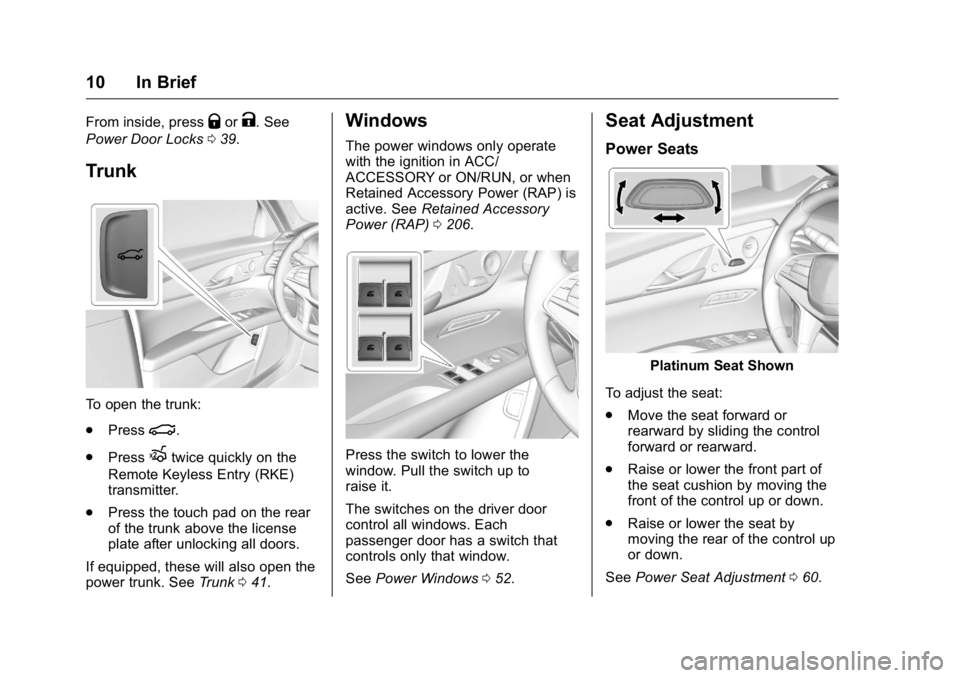
To open the trunk:
.
Press
| .
.
Press
X twice quickly on the
Remote Keyless Entry (RKE)
transmitter.
.
Press the touch pad on the rear
of the trunk above the license
plate after unlocking all doors.
If equipped, these will also open the
power trunk. See Trunk 0 41 .Windows The power windows only operate
with the ignition in ACC/
ACCESSORY or ON/RUN, or when
Retained Accessory Power (RAP) is
active. See Retained Accessory
Power (RAP) 0 206 .
Press the switch to lower the
window. Pull the switch up to
raise it.
The switches on the driver door
control all windows. Each
passenger door has a switch that
controls only that window.
See Power Windows 0 52 .Seat Adjustment Power Seats
Platinum Seat Shown
To adjust the seat:
.
Move the seat forward or
rearward by sliding the control
forward or rearward.
.
Raise or lower the front part of
the seat cushion by moving the
front of the control up or down.
.
Raise or lower the seat by
moving the rear of the control up
or down.
See Power Seat Adjustment 0 60 .
Page 12 of 397

Cadillac CT6 Owner Manual (GMNA-Localizing-U.S./Canada-9235592) -
2016 - crc - 11/6/15
In Brief 11Uplevel Seat Adjustment If equipped, the ignition must be on
to use all uplevel seat features.
Platinum Seat
1. Feature Select
2. Up
3. Forward
4. Down
5. Rearward
.
Move Feature Select (1) to
display seat adjustments on the
center stack. Press and release
or hold to scroll through
features. .
Press Up (2) to make upward
adjustments of the selected
feature.
.
Press Forward (3) to make
forward adjustments of the
selected feature.
.
Press Down (4) to make
downward adjustments of the
selected feature.
.
Press Rearward (5) to make
rearward adjustments of the
selected feature.
Reclining Seatbacks
Platinum Seat Shown To adjust the seatback:
.
Tilt the top of the control
rearward to recline.
.
Tilt the top of the control forward
to raise.
See Reclining Seatbacks 0 62 .
Base Lumbar Adjustment
Base Seat Shown
To adjust lumbar support,
if equipped:
1. Forward
2. Rearward
.
Press Forward (1) to move
lumbar support inward.
Page 13 of 397

Cadillac CT6 Owner Manual (GMNA-Localizing-U.S./Canada-9235592) -
2016 - crc - 11/6/15
12 In Brief .
Press Rearward (2) to move
lumbar support outward.
Massage
Platinum Driver Seat Shown,
Passenger Seat Similar
If equipped, the ignition must be on
to use the massage feature. To activate and adjust the massage
feature:
1. Toggle the center selection
control (2) located on the door
to view adjustable massage
options on the center stack
display.
2. Select massage feature.
3. Press the control up (3) or
down (5) to select the
massage type.
4. Press the control forward (4) or
rearward (6) to change the
intensity.
5. Press the massage control
button (1) to recall the last
massage type and intensity.
See Massage 0 66 .Memory Features
Platinum Seat Driver Buttons
Shown, Passenger Buttons
Similar
If equipped, the SET, 1, 2, and
B (Exit) buttons on the driver door and
front passenger door are used to
manually store and recall memory
settings for the driver and
passenger seats. The driver
memory buttons also store outside
mirror, power tilt and telescoping
steering column positions, and
massage settings (if equipped).
Page 14 of 397

Cadillac CT6 Owner Manual (GMNA-Localizing-U.S./Canada-9235592) -
2016 - crc - 11/6/15
In Brief 13When Auto Memory Recall is
enabled in the personalization
menu, positions previously stored to
memory buttons 1 and 2 are
recalled when the ignition is
changed from OFF to ON/RUN/
START or ACC/ACCESSORY.
When Easy Exit Options is enabled
in the personalization menu, the
seat will move rearward to the
stored position when the ignition is
changed to OFF and the driver door
is opened within a short time.
See Memory Seats 0 63 and
Vehicle Personalization 0 157 .Second Row Seats
If equipped, the armrest may have
seat adjustment controls.
1. Seatback Display and Lumbar
Adjustment Control
2. Power Seat Adjustment
3. Seatback Recline
4. Massage
See Rear Seats 0 66 . Rear Seat Armrest
The rear seat has an armrest in the
center of the seatback. Lower the
armrest and press button at the
front of the armrest to access the
cupholders.
To fold, press the cupholders into
the seat if they have been opened,
lift the armrest up, and push it
rearward until it is flush with the
seatback.
Page 15 of 397
Cadillac CT6 Owner Manual (GMNA-Localizing-U.S./Canada-9235592) -
2016 - crc - 11/6/15
14 In Brief Heated and Ventilated Rear
Seats
{ WarningIf you cannot feel temperature
change or pain to the skin, the
seat heater may cause burns.
See the Warning under Heated
and Ventilated Front Seats 0 64 .
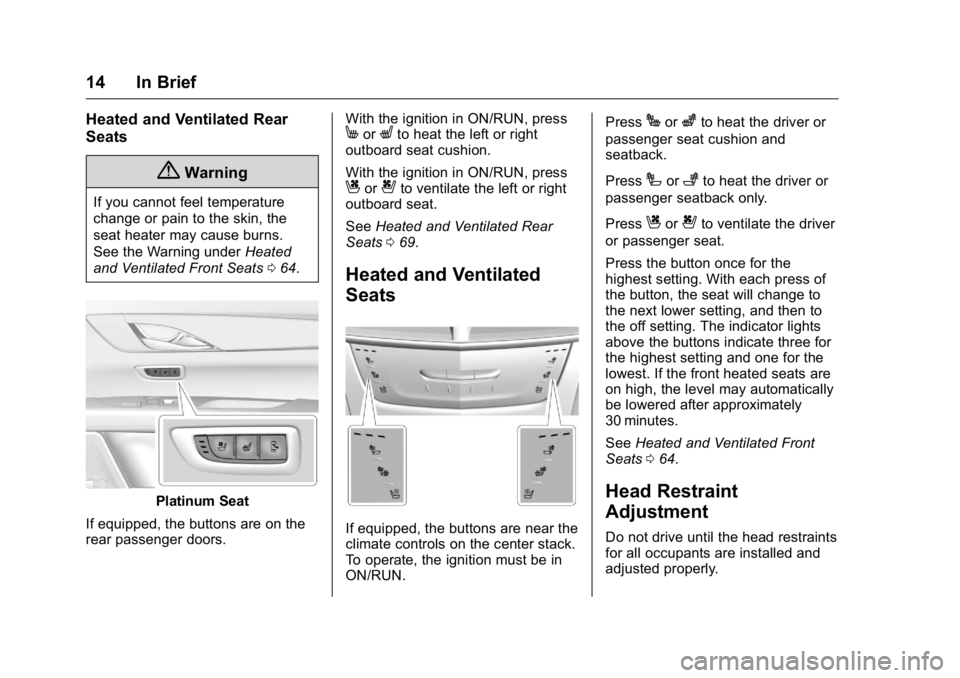
Platinum Seat
If equipped, the buttons are on the
rear passenger doors. With the ignition in ON/RUN, press
M or
L to heat the left or right
outboard seat cushion.
With the ignition in ON/RUN, press
C or
{ to ventilate the left or right
outboard seat.
See Heated and Ventilated Rear
Seats 0 69 .
Heated and Ventilated
Seats
If equipped, the buttons are near the
climate controls on the center stack.
To operate, the ignition must be in
ON/RUN. Press
J or
z to heat the driver or
passenger seat cushion and
seatback.
Press
I or
+ to heat the driver or
passenger seatback only.
Press
C or
{ to ventilate the driver
or passenger seat.
Press the button once for the
highest setting. With each press of
the button, the seat will change to
the next lower setting, and then to
the off setting. The indicator lights
above the buttons indicate three for
the highest setting and one for the
lowest. If the front heated seats are
on high, the level may automatically
be lowered after approximately
30 minutes.
See Heated and Ventilated Front
Seats 0 64 .
Head Restraint
Adjustment Do not drive until the head restraints
for all occupants are installed and
adjusted properly.
Page 19 of 397

Cadillac CT6 Owner Manual (GMNA-Localizing-U.S./Canada-9235592) -
2016 - crc - 11/6/15
18 In Brief
Windshield Wiper/Washer
With the ignition in ACC/
ACCESSORY or ON/RUN, move
the lever to select the wiper speed.
HI : Use for fast wipes.
LO : Use for slow wipes. AUTO : Use this setting for
intermittent wipes or Rainsense ™ ,
when enabled. For intermittent
wipes, move the lever up to AUTO,
then turn the band on the wiper
lever up for more frequent wipes or
down for less frequent wipes.
If Rainsense is enabled in vehicle
personalization, move the lever up
to AUTO, then turn the band on the
wiper lever to adjust the sensitivity
to moisture.
.
Turn the band up for more
sensitivity to moisture.
.
Turn the band down for less
sensitivity to moisture.
.
Move the windshield wiper lever
out of the AUTO position to
deactivate Rainsense. To enable or disable this feature,
see “ Rain Sense Wipers ” under
Vehicle Personalization 0 157 .
OFF : Use to turn the wipers off.
1X : For a single wipe, briefly move
the lever down. For several wipes,
hold the lever down.
f : Pull the lever toward you to
spray windshield washer fluid and
activate the wipers.
See Windshield Wiper/
Washer 0 111 .
Page 25 of 397

Cadillac CT6 Owner Manual (GMNA-Localizing-U.S./Canada-9235592) -
2016 - crc - 11/6/15
24 In Brief See Assistance Systems for Parking
or Backing 0 231 .
Surround Vision
Recorder If equipped, the Surround Vision
Recorder records 360° camera
views to an SD card. Only images
are recorded, no sound.
See Surround Vision
Recorder 0 250 .
Power Outlets
1. Power Outlet 110V/120V
Alternating Current 2. Power Outlet 12 Volt Direct
Current
The 12-volt accessory power outlet
can be used to plug in electrical
equipment, such as a cell phone or
MP3 player.
The vehicle has an accessory
power outlet on the rear seat trim
panel.
Lift the cover to access the
accessory power outlet.
See Power Outlets 0 114 .
Universal Remote System If equipped, this system provides a
way to replace up to three remote
control transmitters used to activate
devices such as garage door
openers, security systems, and
home automation devices.
Read the instructions completely
before attempting to program the
Universal Remote system. Because
of the steps involved, it may be
helpful to have another person
available to assist you with
programming the Universal Remote
system.
See Universal Remote
System 0 166 .
Sunroof If equipped with a sunroof, the
ignition must be in ON/RUN or ACC/
ACCESSORY, or in Retained
Accessory Power (RAP), to operate
the sunroof. See Ignition Positions
0 202 and Retained Accessory
Power (RAP) 0 206 .
Page 28 of 397
Cadillac CT6 Owner Manual (GMNA-Localizing-U.S./Canada-9235592) -
2016 - crc - 11/6/15
In Brief 27The oil life system can also be reset
as follows:
1. Turn the ignition on with the
engine off.
2. Fully press and release the
accelerator pedal three times
within five seconds.
If the CHANGE ENGINE OIL
SOON message is not on, the
system is reset.
See Engine Oil Life System 0 272 .
Driving for Better Fuel
Economy Driving habits can affect fuel
mileage. Here are some driving tips
to get the best fuel economy
possible.
.
Avoid fast starts and accelerate
smoothly.
.
Brake gradually and avoid
abrupt stops.
.
Avoid idling the engine for long
periods of time. .
When road and weather
conditions are appropriate, use
cruise control.
.
Always follow posted speed
limits or drive more slowly when
conditions require.
.
Keep vehicle tires properly
inflated.
.
Combine several trips into a
single trip.
.
Replace the vehicle's tires with
the same TPC Spec number
molded into the tire's sidewall
near the size.
.
Follow recommended scheduled
maintenance. Roadside Service U.S.: 1-800-224-1400
Canada: 1-800-882-1112
TTY Users (U.S. Only):
1-888-889-2438
New Cadillac owners are
automatically enrolled in the
Roadside Service Program.
See Roadside Service 0 364 .
Page 37 of 397
Cadillac CT6 Owner Manual (GMNA-Localizing-U.S./Canada-9235592) -
2016 - crc - 11/6/15
36 Keys, Doors, and Windows
Remote Vehicle Start This feature allows the engine to be
started from outside the vehicle.
/ : This button will be on the RKE
transmitter if the vehicle has remote
start.
The climate control system will use
the previous settings during a
remote start. The rear window
defogger may come on during
remote start based on cold ambient
conditions. The rear defog indicator
light does not come on during
remote start.
If equipped, the heated and
ventilated front seats may also
come on when the vehicle
personalization setting is enabled.
See Heated and Ventilated Front
Seats 0 64 .
Laws in some local communities
may restrict the use of remote
starters. For example, some laws
may require a person using remote
start to have the vehicle in view.
Check local regulations for any
requirements. If your vehicle is low on fuel, do not
use the remote start feature. The
vehicle may run out of fuel.
The RKE transmitter range may be
shorter while the vehicle is running.
Other conditions can affect the
performance of the transmitter. See
Remote Keyless Entry (RKE)
System 0 29 .
Starting the Engine Using Remote
Start
1. Press and release
Q on the
RKE transmitter.
2. Immediately press and hold
/for at least four seconds or until
the lamps flash. This confirms
the request to remote start the
vehicle has been received.
During the remote start, the
doors will be locked and the
parking lamps will remain on as
long as the engine is running.
The engine will shut off after
10 minutes unless a time
extension is done or the
ignition is put in ON/RUN/
START. 3. Press the brake pedal and
select the ON/RUN/START
ignition mode to drive the
vehicle.
Extending Engine Run Time
The engine run time can also be
extended by another 10 minutes,
if during the first 10 minutes
Steps 1 and 2 are repeated while
the engine is still running. An
extension can be requested
30 seconds after starting. This
provides a total of 20 minutes.
The remote start can only be
extended once.
When the remote start is extended,
the second 10 minute period is
added on to the first 10 minutes for
a total of 20 minutes.
A maximum of two remote starts,
or a remote start with an extension,
are allowed between ignition cycles.
The vehicle's ignition must be
changed to ON/RUN/START and
then back to OFF before the remote
start procedure can be used again.