steering CADILLAC CT6 2016 Owners Manual
[x] Cancel search | Manufacturer: CADILLAC, Model Year: 2016, Model line: CT6, Model: CADILLAC CT6 2016Pages: 397, PDF Size: 7.09 MB
Page 4 of 397
Cadillac CT6 Owner Manual (GMNA-Localizing-U.S./Canada-9235592) -
2016 - crc - 11/6/15
Introduction 3
{ DangerDanger indicates a hazard with a
high level of risk which will result
in serious injury or death.
{ WarningWarning indicates a hazard that
could result in injury or death.
CautionCaution indicates a hazard that
could result in property or vehicle
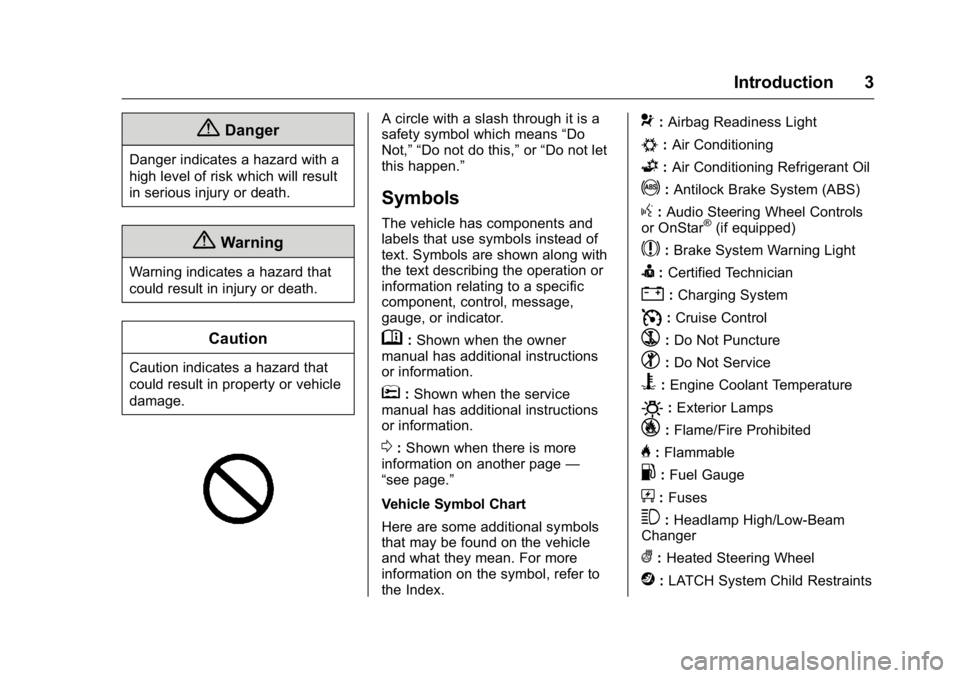
damage. A circle with a slash through it is a
safety symbol which means “ Do
Not, ” “ Do not do this, ” or “ Do not let
this happen. ”
Symbols The vehicle has components and
labels that use symbols instead of
text. Symbols are shown along with
the text describing the operation or
information relating to a specific
component, control, message,
gauge, or indicator.
M : Shown when the owner
manual has additional instructions
or information.
* : Shown when the service
manual has additional instructions
or information.
0 : Shown when there is more
information on another page —
“ see page. ”
Vehicle Symbol Chart
Here are some additional symbols
that may be found on the vehicle
and what they mean. For more
information on the symbol, refer to
the Index. 9 : Airbag Readiness Light
# : Air Conditioning
G : Air Conditioning Refrigerant Oil
! : Antilock Brake System (ABS)
g : Audio Steering Wheel Controls
or OnStar ®
(if equipped)
$ : Brake System Warning Light
I : Certified Technician
" : Charging System
I : Cruise Control
` : Do Not Puncture
^ : Do Not Service
B : Engine Coolant Temperature
O : Exterior Lamps
_ : Flame/Fire Prohibited
H : Flammable
. : Fuel Gauge
+ : Fuses
3 : Headlamp High/Low-Beam
Changer
( : Heated Steering Wheel
j : LATCH System Child Restraints
Page 6 of 397
Cadillac CT6 Owner Manual (GMNA-Localizing-U.S./Canada-9235592) -
2016 - crc - 11/6/15
In Brief 5
In Brief Instrument Panel Instrument Panel Overview . . . . . . 6
Initial Drive Information Initial Drive Information . . . . . . . . . . 8
Stop/Start System . . . . . . . . . . . . . . . 8
Remote Keyless Entry (RKE)
System . . . . . . . . . . . . . . . . . . . . . . . . 8
Remote Vehicle Start . . . . . . . . . . . 9
Door Locks . . . . . . . . . . . . . . . . . . . . . 9
Trunk . . . . . . . . . . . . . . . . . . . . . . . . . . 10
Windows . . . . . . . . . . . . . . . . . . . . . . . 10
Seat Adjustment . . . . . . . . . . . . . . . 10
Memory Features . . . . . . . . . . . . . . 12
Second Row Seats . . . . . . . . . . . . 13
Heated and Ventilated Seats . . . 14
Head Restraint Adjustment . . . . 14
Safety Belts . . . . . . . . . . . . . . . . . . . . 15
Passenger Sensing System . . . 15
Mirror Adjustment . . . . . . . . . . . . . . 15
Steering Wheel Adjustment . . . . 16
Interior Lighting . . . . . . . . . . . . . . . . 16
Exterior Lighting . . . . . . . . . . . . . . . 17
Windshield Wiper/Washer . . . . . . 18
Climate Controls . . . . . . . . . . . . . . . 19
Transmission . . . . . . . . . . . . . . . . . . 20 Vehicle Features Infotainment System . . . . . . . . . . . 20
Steering Wheel Controls . . . . . . . 20
Cruise Control . . . . . . . . . . . . . . . . . 20
Driver Information
Center (DIC) . . . . . . . . . . . . . . . . . 21
Forward Collision Alert (FCA)
System . . . . . . . . . . . . . . . . . . . . . . . 21
Night Vision System . . . . . . . . . . . 21
Front Automatic Braking (FAB)
System . . . . . . . . . . . . . . . . . . . . . . . 22
Front Pedestrian Braking (FPB)
System . . . . . . . . . . . . . . . . . . . . . . . 22
Lane Keep Assist (LKA) . . . . . . . 22
Lane Change Alert (LCA) . . . . . . 22
Surround Vision . . . . . . . . . . . . . . . 22
Rear Vision Camera (RVC) . . . . 23
Rear Cross Traffic Alert (RCTA)
System . . . . . . . . . . . . . . . . . . . . . . . 23
Parking Assist . . . . . . . . . . . . . . . . . 23
Automatic Parking
Assist (APA) . . . . . . . . . . . . . . . . . . 23
Rear Automatic Braking (RAB)
System . . . . . . . . . . . . . . . . . . . . . . . 23
Surround Vision Recorder . . . . . 24
Power Outlets . . . . . . . . . . . . . . . . . 24
Universal Remote System . . . . . 24
Sunroof . . . . . . . . . . . . . . . . . . . . . . . . 24 Performance and Maintenance Traction Control/Electronic
Stability Control . . . . . . . . . . . . . . 25
Tire Pressure Monitor . . . . . . . . . . 26
Engine Oil Life System . . . . . . . . 26
Driving for Better Fuel
Economy . . . . . . . . . . . . . . . . . . . . . 27
Roadside Service . . . . . . . . . . . . . . 27
Page 8 of 397

Cadillac CT6 Owner Manual (GMNA-Localizing-U.S./Canada-9235592) -
2016 - crc - 11/6/15
In Brief 71. Air Vents 0 189 .
2. Exterior Lamp Controls 0 170 .
Turn Signal Lever. See Turn
and Lane-Change
Signals 0 173 .
3. Instrument Cluster (Uplevel)
0 121 or Instrument Cluster
(Base Level) 0 118 .
Driver Information Center (DIC)
Display. See Driver Information
Center (DIC) 0 140 .
4. Windshield Wiper/
Washer 0 111 .
5. ENGINE START/STOP Button.
See Ignition Positions 0 202 .
6. Parking Assist Button. See
Assistance Systems for
Parking or Backing 0 231 .
Automatic Parking Assist (APA)
Button. See Assistance
Systems for Parking or
Backing 0 231 .
Automatic Engine Start/Stop
Disable Switch. See Starting
the Engine 0 204 . 7. Light Sensor. See Automatic
Headlamp System 0 172 .
8. Hazard Warning
Flashers 0 173 .
Glove Box Button. See Glove
Box 0 106 .
9. Infotainment 0 177 .
10. Heated and Ventilated Front
Seats 0 64 (If Equipped).
11. Infotainment Touch Pad. See
the infotainment manual.
12. Automatic Climate Control
System (Quad Zone) 0 178 or
Automatic Climate Control
System (Dual Zone) 0 185 .
13. Automatic Vehicle Hold
(AVH) 0 217 .
MODE Button. See Driver
Mode Control 0 219 .
Traction Control/Electronic
Stability Control 0 217 .
14. Shift Lever. See Automatic
Transmission 0 210 .
15. Driver Information Center (DIC)
Controls. See Driver
Information Center (DIC) 0 140 . 16. Steering Wheel Controls. See
the infotainment manual.
17. Horn 0 111 .
18. Steering Wheel Adjustment
0 110 (Out of View).
19. Forward Collision Alert (FCA)
System 0 237 (If Equipped).
Lane Keep Assist (LKA) 0 248
(If Equipped).
Heated Steering Wheel 0 111
(If Equipped).
20. Cruise Control 0 220 .
Adaptive Cruise Control 0 223
(If Equipped).
Phone Button. See “ Steering
Wheel Controls ” in the
infotainment manual.
21. Data Link Connector (DLC)
(Out of View). See Malfunction
Indicator Lamp (Check Engine
Light) 0 132 .
22. Instrument Panel
Storage 0 106 .
Instrument Panel Fuse
Block 0 293 .
Page 13 of 397

Cadillac CT6 Owner Manual (GMNA-Localizing-U.S./Canada-9235592) -
2016 - crc - 11/6/15
12 In Brief .
Press Rearward (2) to move
lumbar support outward.
Massage
Platinum Driver Seat Shown,
Passenger Seat Similar
If equipped, the ignition must be on
to use the massage feature. To activate and adjust the massage
feature:
1. Toggle the center selection
control (2) located on the door
to view adjustable massage
options on the center stack
display.
2. Select massage feature.
3. Press the control up (3) or
down (5) to select the
massage type.
4. Press the control forward (4) or
rearward (6) to change the
intensity.
5. Press the massage control
button (1) to recall the last
massage type and intensity.
See Massage 0 66 .Memory Features
Platinum Seat Driver Buttons
Shown, Passenger Buttons
Similar
If equipped, the SET, 1, 2, and
B (Exit) buttons on the driver door and
front passenger door are used to
manually store and recall memory
settings for the driver and
passenger seats. The driver
memory buttons also store outside
mirror, power tilt and telescoping
steering column positions, and
massage settings (if equipped).
Page 17 of 397
Cadillac CT6 Owner Manual (GMNA-Localizing-U.S./Canada-9235592) -
2016 - crc - 11/6/15
16 In Brief 2. Press one of the four arrows to
move the mirror.
3. Move the selector switch to
)to deselect the mirror.
The vehicle has manual folding
mirrors or, if equipped, power folding
mirrors. See Power Mirrors 0 48 .
Interior Mirror Adjustment
Adjust the rearview mirror for a clear
view of the area behind your
vehicle.
Automatic Dimming Rearview
Mirror
Automatic dimming reduces the
glare of headlamps from behind.
The dimming feature comes on
when the vehicle is started.
Rear Camera Mirror
If equipped, this automatic dimming
rearview mirror provides a wide
angle camera view of the area
behind the vehicle. For ease of use,
adjust the mirror for a clear view of the area behind the vehicle while
the display is off. See Rear Camera
Mirror 0 50 .
Steering Wheel
Adjustment Power Tilt and Telescoping
Steering Wheel
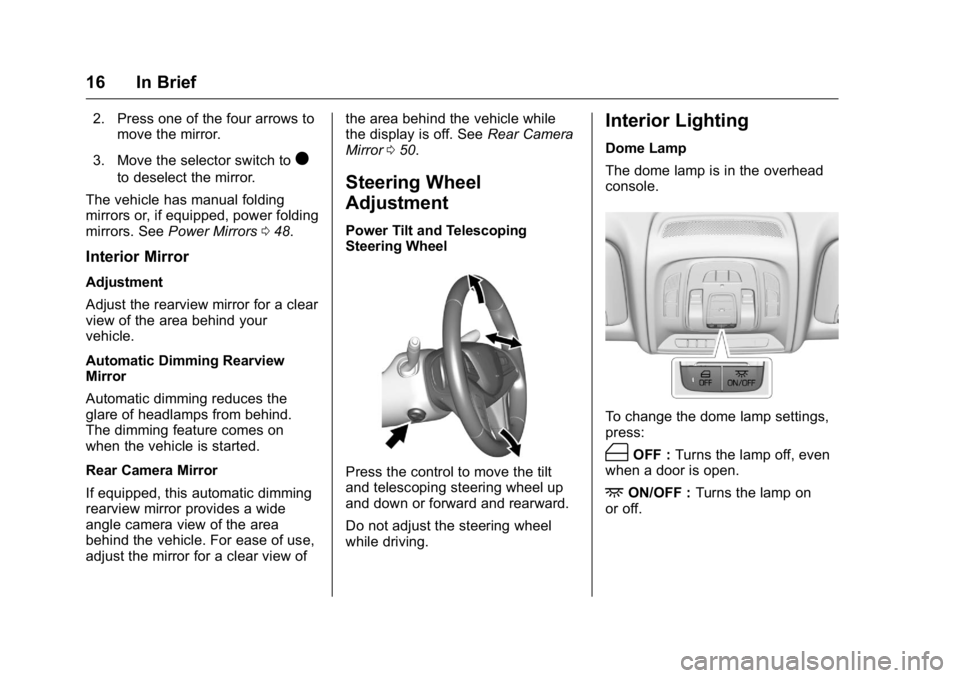
Press the control to move the tilt
and telescoping steering wheel up
and down or forward and rearward.
Do not adjust the steering wheel
while driving. Interior Lighting Dome Lamp
The dome lamp is in the overhead
console.
To change the dome lamp settings,
press:
( OFF : Turns the lamp off, even
when a door is open.
+ ON/OFF : Turns the lamp on
or off.
Page 21 of 397

Cadillac CT6 Owner Manual (GMNA-Localizing-U.S./Canada-9235592) -
2016 - crc - 11/6/15
20 In Brief 9. Ionizer Status Indicator (If
Equipped)
See Automatic Climate Control
System (Quad Zone) 0 178 or
Automatic Climate Control System
(Dual Zone) 0 185 .
Transmission Tap Shift
Vehicles equipped with Tap Shift
allow shifting an automatic
transmission similar to a manual
transmission. Tap Shift can be
enabled through the shift lever or
the Tap Shift controls on the back of
the steering wheel. See Manual
Mode 0 212 . Vehicle Features Infotainment System See the infotainment manual for
information on the radio, audio
players, rear seat infotainment,
phone, navigation system, and
voice or speech recognition. It also
includes information on settings.
Steering Wheel Controls The infotainment system can be
operated by using the steering
wheel controls. See "Steering
Wheel Controls" in the infotainment
manual. Cruise Control
J : Press to turn the system on
and off. A white indicator appears in
the instrument cluster when
turned on.
RES+ : If there is a set speed in
memory, press briefly to resume to
that speed or press and hold to
accelerate. If the cruise control is
already active, use to increase
vehicle speed. To increase speed by
1 km/h (1 mph), press RES+ to the
first detent. To increase speed to the
Page 23 of 397
Cadillac CT6 Owner Manual (GMNA-Localizing-U.S./Canada-9235592) -
2016 - crc - 11/6/15
22 In Brief
Front Automatic Braking
(FAB) System If the vehicle has Forward Collision
Alert (FCA), it also has FAB, which
includes Intelligent Brake
Assist (IBA). When the system
detects a vehicle ahead in your path
that is traveling in the same
direction that you may be about to
crash into, it can provide a boost to
braking or automatically brake the
vehicle. This can help avoid or
lessen the severity of crashes when
driving in a forward gear.
See Front Automatic Braking (FAB)
System 0 240 .
Front Pedestrian Braking
(FPB) System If equipped, the FPB system may
help avoid or reduce the harm
caused by front-end crashes with
nearby pedestrians when driving in
a forward gear. FPB displays an
amber indicator,
~ , when a nearby
pedestrian is detected directly
ahead. When approaching a
detected pedestrian too quickly, FPB provides a red flashing alert on
the windshield and rapidly beeps or
pulses the driver seat. FPB can
provide a boost to braking or
automatically brake the vehicle.
See Front Pedestrian Braking (FPB)
System 0 241 .
Lane Keep Assist (LKA) If equipped, LKA may help avoid
crashes due to unintentional lane
departures. It may assist by gently
turning the steering wheel if the
vehicle approaches a detected lane
marking without using a turn signal
in that direction. It may also provide
a Lane Departure Warning (LDW)
alert as the lane marking is crossed.
The system will not assist or alert if
it detects that you are actively
steering. Override LKA by turning
the steering wheel. LKA uses a
camera to detect lane markings
between 60 km/h (37 mph) and
180 km/h (112 mph).
See Lane Departure Warning (LDW)
0 248 and Lane Keep Assist
(LKA) 0 248 . Lane Change Alert (LCA) If equipped, the LCA system is a
lane-changing aid that assists
drivers with avoiding lane change
crashes that occur with moving
vehicles in the side blind zone (or
spot) areas or with vehicles rapidly
approaching these areas from
behind. The LCA warning display
will light up in the corresponding
outside side mirror and will flash if
the turn signal is on. The Side Blind
Zone Alert (SBZA) system is
included as part of the LCA system.
See Side Blind Zone Alert (SBZA)
0 246 and Lane Change Alert
(LCA) 0 246 .
Surround Vision If equipped, views around the
vehicle display on the center stack
to aid with parking and low-speed
maneuvers.
See “ Surround Vision ” under
Assistance Systems for Parking or
Backing 0 231 .
Page 24 of 397
Cadillac CT6 Owner Manual (GMNA-Localizing-U.S./Canada-9235592) -
2016 - crc - 11/6/15
In Brief 23Front Vision Camera If equipped, a view of the area in
front of the vehicle displays on the
center stack to aid with parking and
low-speed maneuvers.
See “ Front Vision Camera ” under
Assistance Systems for Parking or
Backing 0 231 .
Rear Vision
Camera (RVC) If equipped, RVC displays a view of
the area behind the vehicle on the
center stack display when the
vehicle is shifted into R (Reverse) to
aid with parking and low-speed
backing maneuvers.
See Assistance Systems for Parking
or Backing 0 231 .
Rear Cross Traffic Alert
(RCTA) System If equipped, the RCTA system uses
a triangle with an arrow displayed
on the RVC screen to warn of traffic
behind your vehicle that may cross your vehicle's path while in
R (Reverse). In addition, beeps will
sound, or the driver seat will pulse.
See Assistance Systems for Parking
or Backing 0 231 .
Parking Assist If equipped, Rear Parking
Assist (RPA) uses sensors on the
rear bumper to assist with parking
and avoiding objects while in
R (Reverse). It operates at speeds
less than 8 km/h (5 mph). RPA may
display a warning triangle on the
Rear Vision Camera screen and a
graphic on the instrument cluster to
provide the object distance. In
addition, multiple beeps or seat
pulses may occur if very close to an
object.
The vehicle may also have the Front
Parking Assist system.
See Assistance Systems for Parking
or Backing 0 231 .Automatic Parking
Assist (APA) If equipped, the APA system helps
to search for and maneuver the
vehicle into parallel or perpendicular
parking spots using automatic
steering, DIC displays, and beeps.
When the vehicle speed is below
30 km/h (18 mph), press
O to
enable the system.
See “ Automatic Parking Assist
(APA) ” under Assistance Systems
for Parking or Backing 0 231 .
Rear Automatic Braking
(RAB) System If the vehicle has Adaptive Cruise
Control (ACC) it also has the RAB
system, which is designed to help
avoid or reduce the harm caused by
backing crashes when the vehicle is
shifted into R (Reverse). If the
system detects the vehicle is
backing too fast to avoid a crash
with a detected object behind your
vehicle in your path, it may
automatically brake hard to a stop.
Page 64 of 397

Cadillac CT6 Owner Manual (GMNA-Localizing-U.S./Canada-9235592) -
2016 - crc - 11/6/15
Seats and Restraints 63
Memory Seats
Platinum Driver Seat Buttons
Shown, Passenger Buttons
Similar
If equipped, the SET, 1, 2, and
B(Exit) buttons on the driver door and
front passenger door are used to
manually store and recall memory
settings for the driver and
passenger seats. The driver
memory buttons also store outside
mirror, power tilt and telescoping
steering column positions, and
massage settings, if equipped. Storing Memory Positions
To store positions to the 1 and 2
buttons:
1. The ignition must be in ON/
RUN or ACC/ACCESSORY.
2. Adjust the driver seat, power tilt
and telescoping steering
column, if equipped, massage
type and intensity, if equipped,
and the outside mirrors on
some vehicles.
3. Press and release SET. A beep
will sound.
4. Immediately press and hold 1
until two beeps sound.
5. Repeat Steps 1 – 4 for a second
driver using 2.
To store exit positions and easy exit
features to the
B (Exit) button,
repeat Steps 1 – 4 using
B to store
your positions for getting out of the
vehicle (driver only). Manually Recalling Memory
Positions
Press and hold 1, 2, or
B to
manually recall the previously
stored memory positions. Releasing
1, 2, or
B before the stored
positions are reached stops the
recall.
If the massage feature is off when
the memory recall is performed, the
previously stored type and intensity
will be recalled, but it will remain off
until activated with the On/Off
control or through the center stack
with the platinum seat controls.
Automatically Recalling Memory
Positions (Auto Memory Recall)
(Driver Only)
If programmed on in the vehicle
personalization menu, the Auto
(Automatic) Memory Recall feature
automatically recalls the current
driver ’ s previously stored 1 or 2
position when the ignition is
changed from OFF to ON/RUN or
ACC/ACCESSORY.
Page 65 of 397

Cadillac CT6 Owner Manual (GMNA-Localizing-U.S./Canada-9235592) -
2016 - crc - 11/6/15
64 Seats and Restraints See “ Auto Memory Recall ’ under
“ Comfort and Convenience ” in
Vehicle Personalization 0 157 .
To stop recall movement, press one
of the memory, power mirror,
or power seat controls; or press the
power tilt and telescoping steering
column control.
If the vehicle ’ s driver has changed,
in some vehicles the Driver ID may
be displayed for the first few ignition
cycles.
RKE transmitters are not labeled
with a number. If your memory seat
position is stored to 1 or 2 but this
position is not automatically
recalling, then store your positions
to the other button or switch RKE
transmitters with the other driver.
Easy Exit Recall (Driver Only)
If programmed on in the vehicle
personalization menu, the easy exit
feature automatically recalls the
previously stored exit positions
when leaving the vehicle. See
“ Storing Memory Positions ” earlier in
this section. See also Vehicle
Personalization 0 157 . Easy exit recall automatically
activates when one of the following
occurs:
.
The vehicle is turned off and the
driver door is opened within a
short time.
.
The vehicle is turned off with the
driver door open.
Obstructions
If something has blocked the driver
seat while recalling a memory
position, the recall may stop.
Remove the obstruction. Then do
one of the following:
.
If automatically or manually
recalling the stored memory
position, press and hold the
appropriate manual control for
two seconds. Try recalling again
by pressing the appropriate
memory button. If automatically
recalling the position, try
recalling again by opening the
driver door and pressing
K on
the RKE transmitter.
.
If recalling the exit position,
press and hold the appropriate
manual control for the exit feature not recalling for
two seconds. Then try recalling
the exit position again.
If the memory position is still not
recalling, see your dealer for
service.
Heated and Ventilated
Front Seats
{ WarningIf you cannot feel temperature
change or pain to the skin, the
seat heater may cause burns. To
reduce the risk of burns, people
with such a condition should use
care when using the seat heater,
especially for long periods of
time. Do not place anything on
the seat that insulates against
heat, such as a blanket, cushion,
cover, or similar item. This may
cause the seat heater to
overheat. An overheated seat
heater may cause a burn or may
damage the seat.