transmission CADILLAC CT6 2016 Owners Manual
[x] Cancel search | Manufacturer: CADILLAC, Model Year: 2016, Model line: CT6, Model: CADILLAC CT6 2016Pages: 397, PDF Size: 7.09 MB
Page 6 of 397
Cadillac CT6 Owner Manual (GMNA-Localizing-U.S./Canada-9235592) -
2016 - crc - 11/6/15
In Brief 5
In Brief Instrument Panel Instrument Panel Overview . . . . . . 6
Initial Drive Information Initial Drive Information . . . . . . . . . . 8
Stop/Start System . . . . . . . . . . . . . . . 8
Remote Keyless Entry (RKE)
System . . . . . . . . . . . . . . . . . . . . . . . . 8
Remote Vehicle Start . . . . . . . . . . . 9
Door Locks . . . . . . . . . . . . . . . . . . . . . 9
Trunk . . . . . . . . . . . . . . . . . . . . . . . . . . 10
Windows . . . . . . . . . . . . . . . . . . . . . . . 10
Seat Adjustment . . . . . . . . . . . . . . . 10
Memory Features . . . . . . . . . . . . . . 12
Second Row Seats . . . . . . . . . . . . 13
Heated and Ventilated Seats . . . 14
Head Restraint Adjustment . . . . 14
Safety Belts . . . . . . . . . . . . . . . . . . . . 15
Passenger Sensing System . . . 15
Mirror Adjustment . . . . . . . . . . . . . . 15
Steering Wheel Adjustment . . . . 16
Interior Lighting . . . . . . . . . . . . . . . . 16
Exterior Lighting . . . . . . . . . . . . . . . 17
Windshield Wiper/Washer . . . . . . 18
Climate Controls . . . . . . . . . . . . . . . 19
Transmission . . . . . . . . . . . . . . . . . . 20 Vehicle Features Infotainment System . . . . . . . . . . . 20
Steering Wheel Controls . . . . . . . 20
Cruise Control . . . . . . . . . . . . . . . . . 20
Driver Information
Center (DIC) . . . . . . . . . . . . . . . . . 21
Forward Collision Alert (FCA)
System . . . . . . . . . . . . . . . . . . . . . . . 21
Night Vision System . . . . . . . . . . . 21
Front Automatic Braking (FAB)
System . . . . . . . . . . . . . . . . . . . . . . . 22
Front Pedestrian Braking (FPB)
System . . . . . . . . . . . . . . . . . . . . . . . 22
Lane Keep Assist (LKA) . . . . . . . 22
Lane Change Alert (LCA) . . . . . . 22
Surround Vision . . . . . . . . . . . . . . . 22
Rear Vision Camera (RVC) . . . . 23
Rear Cross Traffic Alert (RCTA)
System . . . . . . . . . . . . . . . . . . . . . . . 23
Parking Assist . . . . . . . . . . . . . . . . . 23
Automatic Parking
Assist (APA) . . . . . . . . . . . . . . . . . . 23
Rear Automatic Braking (RAB)
System . . . . . . . . . . . . . . . . . . . . . . . 23
Surround Vision Recorder . . . . . 24
Power Outlets . . . . . . . . . . . . . . . . . 24
Universal Remote System . . . . . 24
Sunroof . . . . . . . . . . . . . . . . . . . . . . . . 24 Performance and Maintenance Traction Control/Electronic
Stability Control . . . . . . . . . . . . . . 25
Tire Pressure Monitor . . . . . . . . . . 26
Engine Oil Life System . . . . . . . . 26
Driving for Better Fuel
Economy . . . . . . . . . . . . . . . . . . . . . 27
Roadside Service . . . . . . . . . . . . . . 27
Page 8 of 397

Cadillac CT6 Owner Manual (GMNA-Localizing-U.S./Canada-9235592) -
2016 - crc - 11/6/15
In Brief 71. Air Vents 0 189 .
2. Exterior Lamp Controls 0 170 .
Turn Signal Lever. See Turn
and Lane-Change
Signals 0 173 .
3. Instrument Cluster (Uplevel)
0 121 or Instrument Cluster
(Base Level) 0 118 .
Driver Information Center (DIC)
Display. See Driver Information
Center (DIC) 0 140 .
4. Windshield Wiper/
Washer 0 111 .
5. ENGINE START/STOP Button.
See Ignition Positions 0 202 .
6. Parking Assist Button. See
Assistance Systems for
Parking or Backing 0 231 .
Automatic Parking Assist (APA)
Button. See Assistance
Systems for Parking or
Backing 0 231 .
Automatic Engine Start/Stop
Disable Switch. See Starting
the Engine 0 204 . 7. Light Sensor. See Automatic
Headlamp System 0 172 .
8. Hazard Warning
Flashers 0 173 .
Glove Box Button. See Glove
Box 0 106 .
9. Infotainment 0 177 .
10. Heated and Ventilated Front
Seats 0 64 (If Equipped).
11. Infotainment Touch Pad. See
the infotainment manual.
12. Automatic Climate Control
System (Quad Zone) 0 178 or
Automatic Climate Control
System (Dual Zone) 0 185 .
13. Automatic Vehicle Hold
(AVH) 0 217 .
MODE Button. See Driver
Mode Control 0 219 .
Traction Control/Electronic
Stability Control 0 217 .
14. Shift Lever. See Automatic
Transmission 0 210 .
15. Driver Information Center (DIC)
Controls. See Driver
Information Center (DIC) 0 140 . 16. Steering Wheel Controls. See
the infotainment manual.
17. Horn 0 111 .
18. Steering Wheel Adjustment
0 110 (Out of View).
19. Forward Collision Alert (FCA)
System 0 237 (If Equipped).
Lane Keep Assist (LKA) 0 248
(If Equipped).
Heated Steering Wheel 0 111
(If Equipped).
20. Cruise Control 0 220 .
Adaptive Cruise Control 0 223
(If Equipped).
Phone Button. See “ Steering
Wheel Controls ” in the
infotainment manual.
21. Data Link Connector (DLC)
(Out of View). See Malfunction
Indicator Lamp (Check Engine
Light) 0 132 .
22. Instrument Panel
Storage 0 106 .
Instrument Panel Fuse
Block 0 293 .
Page 21 of 397

Cadillac CT6 Owner Manual (GMNA-Localizing-U.S./Canada-9235592) -
2016 - crc - 11/6/15
20 In Brief 9. Ionizer Status Indicator (If
Equipped)
See Automatic Climate Control
System (Quad Zone) 0 178 or
Automatic Climate Control System
(Dual Zone) 0 185 .
Transmission Tap Shift
Vehicles equipped with Tap Shift
allow shifting an automatic
transmission similar to a manual
transmission. Tap Shift can be
enabled through the shift lever or
the Tap Shift controls on the back of
the steering wheel. See Manual
Mode 0 212 . Vehicle Features Infotainment System See the infotainment manual for
information on the radio, audio
players, rear seat infotainment,
phone, navigation system, and
voice or speech recognition. It also
includes information on settings.
Steering Wheel Controls The infotainment system can be
operated by using the steering
wheel controls. See "Steering
Wheel Controls" in the infotainment
manual. Cruise Control
J : Press to turn the system on
and off. A white indicator appears in
the instrument cluster when
turned on.
RES+ : If there is a set speed in
memory, press briefly to resume to
that speed or press and hold to
accelerate. If the cruise control is
already active, use to increase
vehicle speed. To increase speed by
1 km/h (1 mph), press RES+ to the
first detent. To increase speed to the
Page 40 of 397
Cadillac CT6 Owner Manual (GMNA-Localizing-U.S./Canada-9235592) -
2016 - crc - 11/6/15
Keys, Doors, and Windows 39
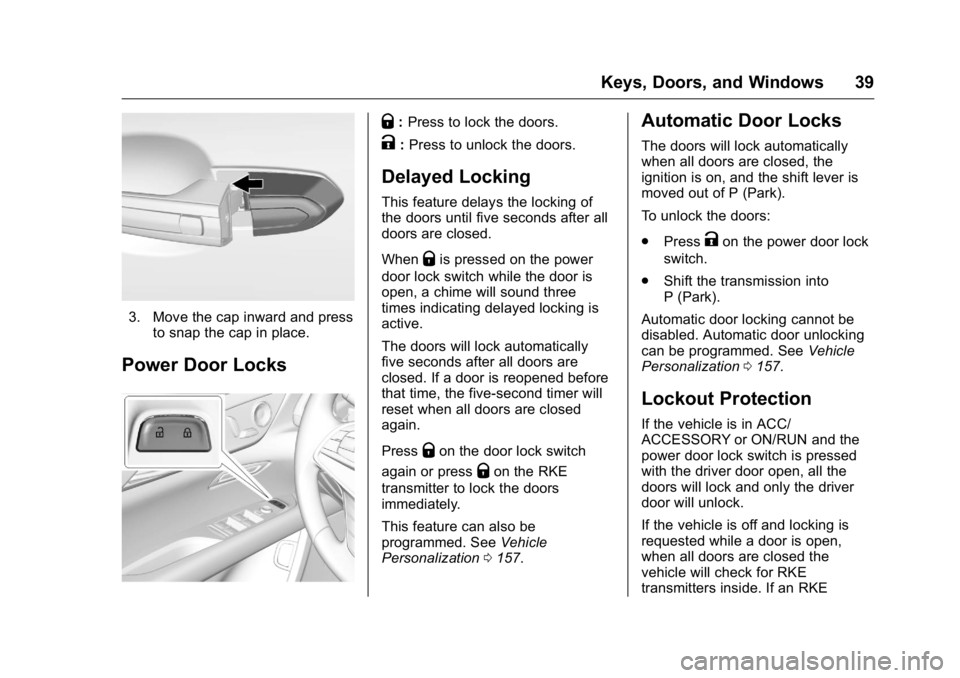
3. Move the cap inward and press
to snap the cap in place.
Power Door Locks Q : Press to lock the doors.
K : Press to unlock the doors.
Delayed Locking This feature delays the locking of
the doors until five seconds after all
doors are closed.
When
Q is pressed on the power
door lock switch while the door is
open, a chime will sound three
times indicating delayed locking is
active.
The doors will lock automatically
five seconds after all doors are
closed. If a door is reopened before
that time, the five-second timer will
reset when all doors are closed
again.
Press
Q on the door lock switch
again or press
Q on the RKE
transmitter to lock the doors
immediately.
This feature can also be
programmed. See Vehicle
Personalization 0 157 .Automatic Door Locks The doors will lock automatically
when all doors are closed, the
ignition is on, and the shift lever is
moved out of P (Park).
To unlock the doors:
.
Press
K on the power door lock
switch.
.
Shift the transmission into
P (Park).
Automatic door locking cannot be
disabled. Automatic door unlocking
can be programmed. See Vehicle
Personalization 0 157 .
Lockout Protection If the vehicle is in ACC/
ACCESSORY or ON/RUN and the
power door lock switch is pressed
with the driver door open, all the
doors will lock and only the driver
door will unlock.
If the vehicle is off and locking is
requested while a door is open,
when all doors are closed the
vehicle will check for RKE
transmitters inside. If an RKE
Page 111 of 397
Cadillac CT6 Owner Manual (GMNA-Localizing-U.S./Canada-9235592) -
2016 - crc - 11/6/15
110 Instruments and Controls Engine Power Messages . . . . . 150
Fuel System Messages . . . . . . . 150
Key and Lock Messages . . . . . 150
Lamp Messages . . . . . . . . . . . . . . 151
Object Detection System
Messages . . . . . . . . . . . . . . . . . . . 151
Ride Control System
Messages . . . . . . . . . . . . . . . . . . . 154
Airbag System Messages . . . . 154
Safety Belt Messages . . . . . . . . 154
Security Messages . . . . . . . . . . . 155
Service Vehicle Messages . . . . 155
Steering System
Messages . . . . . . . . . . . . . . . . . . . 155
Starting the Vehicle
Messages . . . . . . . . . . . . . . . . . . . 156
Tire Messages . . . . . . . . . . . . . . . . 156
Transmission Messages . . . . . . 156
Vehicle Reminder
Messages . . . . . . . . . . . . . . . . . . . 157
Vehicle Speed Messages . . . . . 157
Washer Fluid Messages . . . . . . 157
Window Messages . . . . . . . . . . . 157 Vehicle Personalization Vehicle Personalization . . . . . . . 157
Universal Remote System Universal Remote System . . . . 166
Universal Remote System
Programming . . . . . . . . . . . . . . . 166
Universal Remote System
Operation . . . . . . . . . . . . . . . . . . . 168
Controls Steering Wheel
Adjustment Power Tilt and Telescoping
Steering Wheel
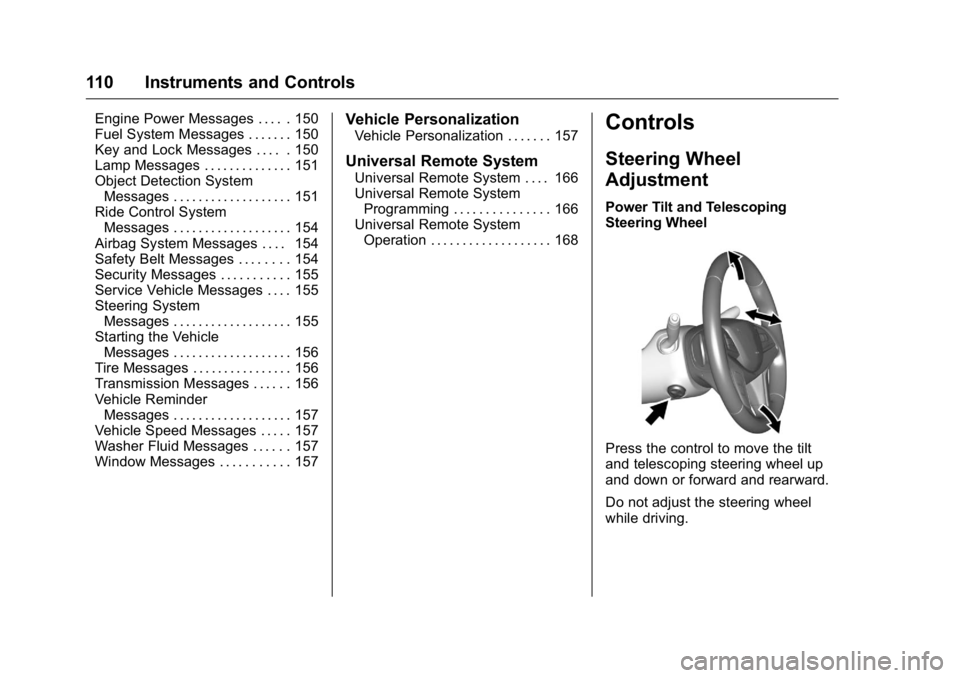
Press the control to move the tilt
and telescoping steering wheel up
and down or forward and rearward.
Do not adjust the steering wheel
while driving.
Page 113 of 397

Cadillac CT6 Owner Manual (GMNA-Localizing-U.S./Canada-9235592) -
2016 - crc - 11/6/15
112 Instruments and Controls 1X : For a single wipe, briefly move
the wiper lever down. For several
wipes, hold the wiper lever down.
Clear snow and ice from the wiper
blades and windshield before using
them. If frozen to the windshield,
carefully loosen or thaw them.
Damaged blades should be
replaced. See Wiper Blade
Replacement 0 286 .
Heavy snow or ice can overload the
wiper motor.
Wiper Parking
If the ignition is put in OFF while the
wipers are on LO, HI, or AUTO, they
will immediately stop.
If the windshield wiper lever is then
moved to OFF before the driver
door is opened or within 10 minutes,
the wipers will restart and move to
the base of the windshield.
If the ignition is put in OFF while the
wipers are performing wipes due to
windshield washing, the wipers
continue to run until they reach the
base of the windshield. Rainsense ™With Rainsense, a sensor near the
top center of the windshield detects
the amount of water on the
windshield and controls the
sensitivity of the windshield wiper.
Keep this area of the windshield
clear of debris to allow for best
system performance.
AUTO : If Rainsense is enabled,
move the windshield wiper lever to
AUTO. Turn the band on the wiper
lever to adjust the sensitivity.
.
Turn the band up for more
sensitivity to moisture.
.
Turn the band down for less
sensitivity to moisture. .
Move the windshield wiper lever
out of the AUTO position to
deactivate Rainsense.
To enable or disable this feature,
see “ Rainsense Wipers ” under
Vehicle Personalization 0 157 .
Wiper Arm Assembly Protection
When using an automatic car wash,
move the windshield wiper lever to
OFF. This disables the automatic
Rainsense windshield wipers.
With Rainsense, if the transmission
is in N (Neutral) and the vehicle
speed is very slow, the wipers will
automatically stop at the base of the
windshield.
The wiper operations return to
normal when the transmission is no
longer in N (Neutral) or the vehicle
speed has increased.
f : Pull the windshield wiper
lever toward you to spray windshield
washer fluid and activate the wipers.
The wipers will continue until the
lever is released or the maximum
wash time is reached. When the
windshield wiper lever is released,
additional wipes may occur
Page 125 of 397

Cadillac CT6 Owner Manual (GMNA-Localizing-U.S./Canada-9235592) -
2016 - crc - 11/6/15
124 Instruments and Controls
Odometer The odometer shows how far the
vehicle has been driven, in either
kilometers or miles.
Trip Odometer The trip odometer shows how far
the vehicle has been driven since
the trip odometer was last reset.
The trip odometer is accessed and
reset through the Driver Information
Center (DIC). See Driver
Information Center (DIC) 0 140 .
Tachometer The tachometer displays the engine
speed in revolutions per
minute (rpm).
On the base cluster, if the vehicle
has the Stop/Start system, when the
ignition is in ON/RUN, the
tachometer indicates the vehicle
status. When pointing to AUTO
STOP, the engine is off but the
vehicle is on and can move. The
engine could auto start at any time.
When the indicator points to OFF,
the vehicle is off. When the engine is on, the
tachometer will indicate the engine ’ s
revolutions per minute (rpm). The
tachometer may vary by several
hundred rpm ’ s, during Auto Stop
mode, when the engine is shutting
off and restarting.
A slight bump may be felt when the
transmission is determining the
most fuel efficient operating range.
CautionIf the engine is operated with the
rpm ’ s in the warning area at the
high end of the tachometer, the
vehicle could be damaged, and
the damage would not be covered
by the vehicle warranty. Do not
operate the engine with the rpm ’ s
in the warning area. Fuel Gauge
Base Level Standard Theme
Shown
Page 133 of 397

Cadillac CT6 Owner Manual (GMNA-Localizing-U.S./Canada-9235592) -
2016 - crc - 11/6/15
132 Instruments and Controls If a short distance must be driven
with the light on, be sure to turn off
all accessories, such as the radio
and air conditioner.
Malfunction Indicator
Lamp (Check Engine
Light) This light is part of the vehicle ’ s
emission control on-board
diagnostic system. If this light is on
while the engine is running, a
malfunction has been detected and
the vehicle may require service. The
light should come on to show that it
is working when the ignition is in
Service Only Mode. See Ignition
Positions 0 202 . Malfunctions are often indicated by
the system before any problem is
noticeable. Being aware of the light
and seeking service promptly when
it comes on may prevent damage.
CautionIf the vehicle is driven continually
with this light on, the emission
control system may not work as
well, the fuel economy may be
lower, and the vehicle may not
run smoothly. This could lead to
costly repairs that might not be
covered by the vehicle warranty.
Caution
Modifications to the engine,
transmission, exhaust, intake,
or fuel system, or the use of
replacement tires that do not
meet the original tire
specifications, can cause this light
to come on. This could lead to
costly repairs not covered by the
(Continued) Caution (Continued) vehicle warranty. This could also
affect the vehicle ’ s ability to pass
an Emissions Inspection/
Maintenance test. See
Accessories and
Modifications 0 262 .
If the light is flashing : A
malfunction has been detected that
could damage the emission control
system and increase vehicle
emissions. Diagnosis and service
may be required.
To help prevent damage, reduce
vehicle speed and avoid hard
accelerations and uphill grades.
If towing a trailer, reduce the
amount of cargo being hauled as
soon as possible.
If the light continues to flash, find a
safe place to park. Turn the vehicle
off and wait at least 10 seconds
before restarting the engine. If the
light is still flashing, follow the
Page 147 of 397
Cadillac CT6 Owner Manual (GMNA-Localizing-U.S./Canada-9235592) -
2016 - crc - 11/6/15
146 Instruments and Controls
Metric
English
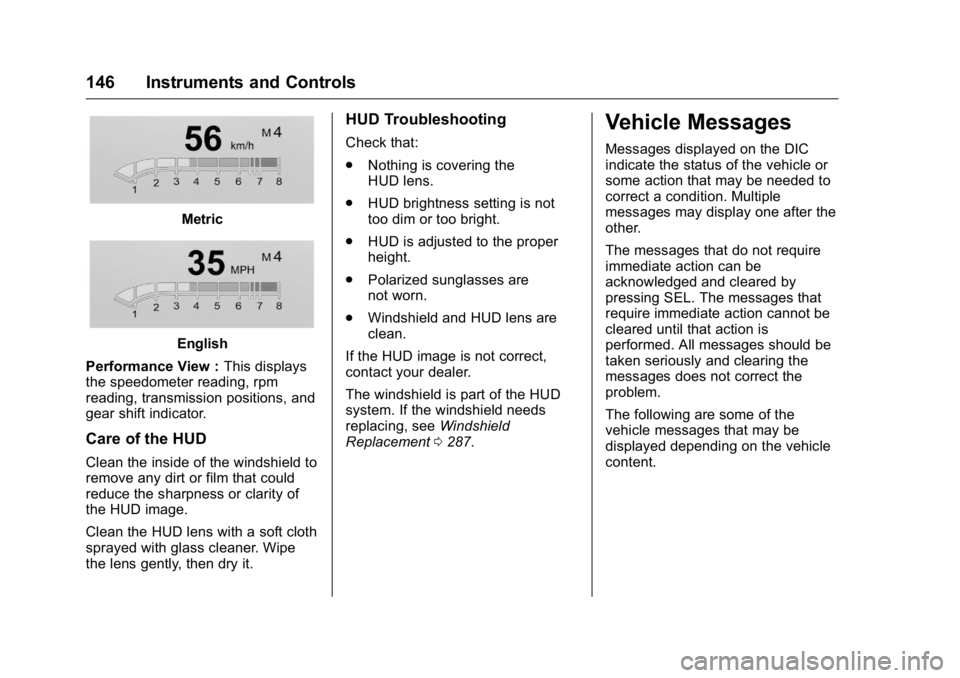
Performance View : This displays
the speedometer reading, rpm
reading, transmission positions, and
gear shift indicator.
Care of the HUD Clean the inside of the windshield to
remove any dirt or film that could
reduce the sharpness or clarity of
the HUD image.
Clean the HUD lens with a soft cloth
sprayed with glass cleaner. Wipe
the lens gently, then dry it. HUD Troubleshooting Check that:
.
Nothing is covering the
HUD lens.
.
HUD brightness setting is not
too dim or too bright.
.
HUD is adjusted to the proper
height.
.
Polarized sunglasses are
not worn.
.
Windshield and HUD lens are
clean.
If the HUD image is not correct,
contact your dealer.
The windshield is part of the HUD
system. If the windshield needs
replacing, see Windshield
Replacement 0 287 .Vehicle Messages Messages displayed on the DIC
indicate the status of the vehicle or
some action that may be needed to
correct a condition. Multiple
messages may display one after the
other.
The messages that do not require
immediate action can be
acknowledged and cleared by
pressing SEL. The messages that
require immediate action cannot be
cleared until that action is
performed. All messages should be
taken seriously and clearing the
messages does not correct the
problem.
The following are some of the
vehicle messages that may be
displayed depending on the vehicle
content.
Page 157 of 397

Cadillac CT6 Owner Manual (GMNA-Localizing-U.S./Canada-9235592) -
2016 - crc - 11/6/15
156 Instruments and Controls
Starting the Vehicle
Messages PRESS BRAKE TO START This message is displayed when
attempting to start the vehicle
without first pressing the brake
pedal.
SERVICE KEYLESS START
SYSTEM This message is displayed if there is
a problem with the pushbutton start
system. Take the vehicle to your
dealer for service.
Tire Messages SERVICE TIRE MONITOR
SYSTEM This message displays if there is a
problem with the Tire Pressure
Monitor System (TPMS). See Tire
Pressure Monitor Operation 0 309 . TIRE LEARNING ACTIVE This message displays when the
system is learning new tires. See
Tire Pressure Monitor
Operation 0 309 .
TIRE PRESSURE LOW ADD
AIR TO TIRE This message displays when the
pressure in one or more of the tires
is low.
This message also displays LEFT
FRONT, RIGHT FRONT, LEFT
REAR, or RIGHT REAR to indicate
the location of the low tire.
The low tire pressure warning light
will also come on. See Tire
Pressure Light 0 137 .
If a tire pressure message appears
on the DIC, stop as soon as
possible. Inflate the tires by adding
air until the tire pressure is equal to
the values shown on the Tire and
Loading Information label. See Tires
0 299 , Vehicle Load Limits 0 198 ,
and Tire Pressure 0 306 . More than one tire pressure
message can appear at a time. The
DIC also shows the tire pressure
values. See Driver Information
Center (DIC) 0 140 .
Transmission Messages SERVICE TRANSMISSION This message displays if there is a
problem with the transmission. See
your dealer.
SHIFT DENIED This message displays when using
Manual Mode and attempting to shift
to a gear not appropriate for the
vehicle speed and engine
revolutions per minute (rpm). See
Manual Mode 0 212 .
SHIFT TO PARK
This message displays when the
transmission needs to be shifted to
P (Park). This may appear when
turning the ignition off if the vehicle
is not in P (Park).