infotainment CADILLAC CT6 2017 1.G User Guide
[x] Cancel search | Manufacturer: CADILLAC, Model Year: 2017, Model line: CT6, Model: CADILLAC CT6 2017 1.GPages: 337, PDF Size: 3.89 MB
Page 65 of 337
Cadillac CT6 Owner Manual (GMNA-Localizing-MidEast-10293390) - 2017 -
CRC - 6/21/16
64 SEATS AND RESTRAINTS
The temperature performance of an
unoccupied seat may be reduced. This
is normal.
The heated or ventilated seats may be
enabled or disabled in the vehicle
personalization menu. SeeRemote
Vehicle Start 034 and Vehicle
Personalization 0152.
Massage
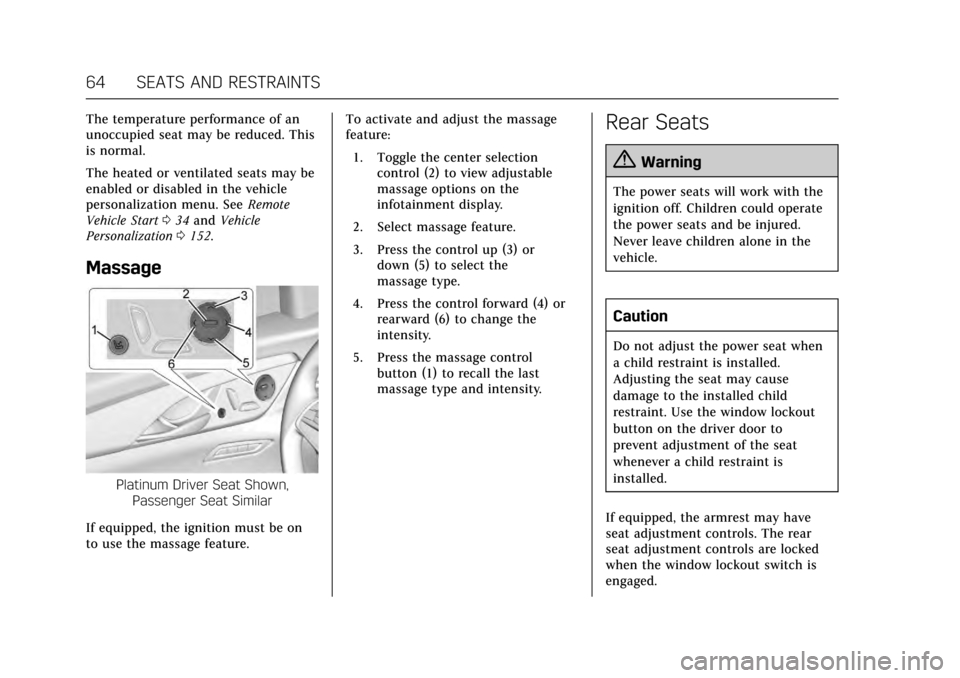
Platinum Driver Seat Shown,
Passenger Seat Similar
If equipped, the ignition must be on
to use the massage feature. To activate and adjust the massage
feature:
1. Toggle the center selection control (2) to view adjustable
massage options on the
infotainment display.
2. Select massage feature.
3. Press the control up (3) or down (5) to select the
massage type.
4. Press the control forward (4) or rearward (6) to change the
intensity.
5. Press the massage control button (1) to recall the last
massage type and intensity.
Rear Seats
{Warning
The power seats will work with the
ignition off. Children could operate
the power seats and be injured.
Never leave children alone in the
vehicle.
Caution
Do not adjust the power seat when
a child restraint is installed.
Adjusting the seat may cause
damage to the installed child
restraint. Use the window lockout
button on the driver door to
prevent adjustment of the seat
whenever a child restraint is
installed.
If equipped, the armrest may have
seat adjustment controls. The rear
seat adjustment controls are locked
when the window lockout switch is
engaged.
Page 105 of 337

Cadillac CT6 Owner Manual (GMNA-Localizing-MidEast-10293390) - 2017 -
CRC - 6/21/16
104 STORAGE
Armrest Storage
Press the latch to access the storage
area in the rear armrest. Press the
button to extend the cupholders.
Push the cupholders in to close.
If equipped, there are seat controls on
the armrest. SeeRear Seats064.
Rear Storage
If equipped, press the lid to access the
storage compartment in the rear
doors.
Center Console Storage
Press the button and lift to access the
storage area. There is an auxiliary jack
and USB port(s) inside. See the
infotainment manual.
Page 109 of 337

Cadillac CT6 Owner Manual (GMNA-Localizing-MidEast-10293390) - 2017 -
CRC - 6/21/16
108 INSTRUMENTS AND CONTROLS
Object Detection SystemMessages . . . . . . . . . . . . . . . . . . . . . . . . 145
Ride Control System Messages . . . . . . . . . . . . . . . . . . . . . . . . 148
Airbag System Messages . . . . . . . . . 149
Safety Belt Messages . . . . . . . . . . . . . 149
Security Messages . . . . . . . . . . . . . . . . 149
Service Vehicle Messages . . . . . . . . 149
Steering System Messages . . . . . . . 149
Starting the Vehicle Messages . . . 150
Tire Messages . . . . . . . . . . . . . . . . . . . . 150
Transmission Messages . . . . . . . . . . 151
Vehicle Reminder Messages . . . . . 151
Vehicle Speed Messages . . . . . . . . . 151
Washer Fluid Messages . . . . . . . . . . 151
Window Messages . . . . . . . . . . . . . . . . 151
Vehicle Personalization
Vehicle Personalization . . . . . . . . . . 152
Universal Remote System
Universal Remote System
Programming . . . . . . . . . . . . . . . . . . . 160
Universal Remote System Operation . . . . . . . . . . . . . . . . . . . . . . . . 162
Controls
Steering Wheel Adjustment
Power Tilt and Telescoping Steering
Wheel
Press the control to move the tilt and
telescoping steering wheel up and
down or forward and rearward.
Do not adjust the steering wheel while
driving.
Steering Wheel Controls
The infotainment system can be
operated by using the steering wheel
controls. See "Steering Wheel
Controls" in the infotainment manual.
Heated Steering Wheel
(:If equipped with a heated steering
wheel, press to turn on or off. An
indicator next to the button is lit
when the feature is turned on.
The steering wheel takes about
three minutes to start heating.
Page 112 of 337
Cadillac CT6 Owner Manual (GMNA-Localizing-MidEast-10293390) - 2017 -
CRC - 6/21/16
INSTRUMENTS AND CONTROLS 111
lever returns to its starting position
when released. SeeRear Camera
Mirror 047.
Clock
The infotainment system controls are
used to access the time and date
settings through the menu system.
See “Home Page ”in the infotainment
manual for information about how to
use the menu system.
Setting the Clock
Time
To set the time:
1. From the Home Page, touch the SETTINGS screen button, then
touch Time and Date.
2. Touch Set Time, then touch + or −to increase or decrease hours
or minutes, and change AM
or PM.
3. Touch 12-24 Hr for a 12 or 24 hour clock.
4. Touch
0to go back to the
previous menu. Date
To set the date:
1. Touch the SETTINGS screen button, then touch Time
and Date.
2. Touch Set Date, then touch + or −to increase or decrease month,
day, or year.
3. Touch
0to go back to the
previous menu.
Auto Set
When on, the time and date will
automatically update.
To set auto set: 1. Touch the SETTINGS screen button, then touch Time
and Date.
2. Touch Set Time or Set Date.
3. Touch Auto Set, then select On-Cell Network or Off-Manual
to manually set the time
and date.
4. Touch
0to go back to the
previous menu. If auto set is on, the time displayed on
the clock may not update immediately
when driving into a new time zone.
Clock Display
When on, the digital clock will display
on the infotainment screen.
To set the clock display:
1. Touch the SETTINGS screen button, then touch Time
and Date.
2. Touch Clock Display, then select Off or On.
3. Touch
0to go back to the
previous menu.
Power Outlets
Power Outlet 12-Volt Direct Current
The 12-volt accessory power outlet
can be used to plug in electrical
equipment, such as a cell phone or
MP3 player.
The vehicle has an accessory power
outlet on the rear seat trim panel.
Page 115 of 337
Cadillac CT6 Owner Manual (GMNA-Localizing-MidEast-10293390) - 2017 -
CRC - 6/21/16
114 INSTRUMENTS AND CONTROLS
To charge a mobile device:1. Remove all objects from the charging pad. The system may
not charge if there are any
objects on the charging pad.
2. Place the mobile device face up on the
@symbol on the
charging pad and align it to the
left wall of the charging bin.
3. The
~will display on theV
on the infotainment screen. This
indicates that the mobile device
is properly positioned and
charging. If a phone is placed on
the charging pad and
~does
not display, remove the phone
from the pad, turn 180 degrees
and wait three seconds before
placing/aligning the phone on
the pad again.
Cigarette Lighter
There may be a cigarette lighter inside
the center console storage area.
To use the cigarette lighter, push it in
all the way, and let go. When it is
ready, it will pop back out by itself.
Caution
Holding a cigarette lighter in while
it is heating does not let the lighter
back away from the heating
element when it is hot. Damage
from overheating can occur to the
lighter or heating element, or a fuse
could be blown. Do not hold a
cigarette lighter in while it is
heating.
Ashtrays
There are front and rear ashtrays.
Caution
If papers, pins, or other flammable
items are put in the ashtray, hot
cigarettes or other smoking
materials could ignite them and
possibly damage the vehicle. Never
put flammable items in the ashtray.
Warning Lights, Gauges,
and Indicators
Warning lights and gauges can signal
that something is wrong before it
becomes serious enough to cause an
expensive repair or replacement.
Paying attention to the warning lights
and gauges could prevent injury.
Some warning lights come on briefly
when the engine is started to indicate
they are working. When one of the
warning lights comes on and stays on
while driving, or when one of the
gauges shows there may be a problem,
check the section that explains what
to do. Waiting to do repairs can be
costly and even dangerous.
Page 153 of 337
Cadillac CT6 Owner Manual (GMNA-Localizing-MidEast-10293390) - 2017 -
CRC - 6/21/16
152 INSTRUMENTS AND CONTROLS
Vehicle Personalization
Use the audio system controls to
access the personalization menus for
customizing vehicle features.
The following are all possible
personalization features. Depending
on the vehicle, some may not be
available.
Infotainment System Audio System
Controls
To access the personalization menu:1. Touch SETTINGS on the Home Page of the infotainment system
display.
2. Touch the desired feature to display a list of available options.
3. Touch to select the desired feature setting.
4. Touch
0Back to exit or move
backward in a menu.
Personalization Menus
The following list of menu items may
be available:
. Time and Date .
Language (Language)
. Valet Mode
. Radio
. Vehicle
. Bluetooth
. Apple CarPlay
. Android Auto
. Voice
. TouchPad
. Display
. Rear Camera
. Return to Factory Settings
. Software Information
Each menu is detailed in the following
information.
Time and Date
Manually set the time and date. See
Clock 0111.
Language (Language)
Select Language, then select from the
available language(s). The selected language will display on
the system, and voice recognition will
reflect the selected language.
Valet Mode
(If Equipped)
This will lock the infotainment system
and steering wheel controls. It may
also limit access to vehicle storage
locations (if equipped).
To enable valet mode:
1. Enter a four-digit code on the keypad.
2. Select Enter to go to the confirmation screen.
3. Re-enter the four-digit code.
Touch LOCK or UNLOCK to lock or
unlock the system. Touch Back to go
back to the previous menu.
The four-digit code can be texted to a
paired phone if forgotten by pressing
the option button on the Valet Mode
lock screen.
Radio
Select and the following may display:
. Manage Favorites
. Number of Favorites Shown
Page 154 of 337

Cadillac CT6 Owner Manual (GMNA-Localizing-MidEast-10293390) - 2017 -
CRC - 6/21/16
INSTRUMENTS AND CONTROLS 153
.Audible Touch Feedback
. Bose Audio Pilot
. Maximum Start Up Volume
Manage Favorites
This allows favorites to be edited. See
“Manage Favorites ”in “Settings” under
“Radio ”in the infotainment manual.
Number of Favorites Shown
Touch to set the number of favorites
to display.
Select the desired number or select
Auto and the infotainment system will
automatically adjust the number of
favorites shown.
Audible Touch Feedback
This allows Audible Touch Feedback
to be turned on or off.
Select Off or On.
Bose Audio Pilot
This feature adjusts the volume based
on the noise in the vehicle. See “Bose
AudioPilot Noise Compensation
Technology” under“Infotainment
System Settings” in the infotainment
manual. Select Off or On.
Maximum Start Up Volume
This feature sets the maximum
startup volume. If the vehicle is
started and the volume is greater than
this level, the volume is adjusted to
this level.
To set the maximum startup volume,
touch + or
−to increase or decrease.
Vehicle
Select and the following may display:
.
Climate and Air Quality
. Collision/Detection Systems
. Comfort and Convenience
. Lighting
. Power Door Locks
. Remote Lock, Unlock, Start
Climate and Air Quality
Select and the following may display:
. Auto Fan Speed
. Air Quality Sensor
. Auto Heated Seats
. Auto Defog .
Auto Rear Defog
. Ionizer
Auto Fan Speed
This feature will set the auto fan
speed.
Select Low, Medium, or High.
Air Quality Sensor
This allows for selection of air quality
sensor operation at high or low
sensitivity.
Select Off, Low Sensitivity, or High
Sensitivity.
Auto Heated Seats
When enabled, this feature will
automatically activate heated seats at
the level required by the interior
temperature. See Heated and Ventilated
Front Seats 062.
Select Off or On.
Auto Defog
When set to On, the front defog will
automatically react to temperature
and humidity conditions that may
cause fogging.
Page 158 of 337

Cadillac CT6 Owner Manual (GMNA-Localizing-MidEast-10293390) - 2017 -
CRC - 6/21/16
INSTRUMENTS AND CONTROLS 157
Remote Window Operation
This allows the window to be opened
when pressing
Kon the RKE
transmitter. See Remote Keyless Entry
(RKE) System Operation 029.
Select Off or On.
Passive Door Unlock
This allows the selection of what
doors will unlock when using the
button on the driver door handle to
unlock the vehicle.
Select All Doors or Driver Door.
Passive Door Lock
This allows passive locking to be
turned on or off and selects feedback.
See Remote Keyless Entry (RKE) System
Operation 029.
Select Off, On with Horn Chirp, or On.
Remote Left in Vehicle Alert
This feature sounds an alert when the
RKE transmitter is left in the vehicle.
Select Off or On.
Bluetooth
Select and the following may display:
. Pair New Device
. Device Management
. Ringtones
. Voice Mail Numbers
. Text Message Alerts
Pair New Device
Select to pair a new device. See
“Pairing” in“Infotainment Controls ”
under “Bluetooth ”in the infotainment
manual.
Device Management
Select to connect to a different phone
source, disconnect a phone, or delete
a phone.
Ringtones
Touch to change the ring tone for the
specific phone. The phone does not
need to be connected to change the
ring tone. Voice Mail Numbers
This feature displays the voice mail
number for all connected phones. To
change the voice mail number, touch
+. Type a new number, then
touch SAVE.
Text Message Alerts
This feature allows text messages to
be received. See
“Text Messaging”
under “Phone ”in the infotainment
manual.
Select Off or On.
Apple CarPlay™
Select and the following may display:
. Apple CarPlay
. Manage Apple CarPlay Devices
Apple CarPlay
This feature allows Apple devices to
be connected to the infotainment
system through a USB port.
Select Off or On.
Page 159 of 337

Cadillac CT6 Owner Manual (GMNA-Localizing-MidEast-10293390) - 2017 -
CRC - 6/21/16
158 INSTRUMENTS AND CONTROLS
Manage Apple CarPlay Devices
Select to manage Apple devices. Apple
CarPlay must be on for this feature to
be accessed.
Android Auto
Select and the following may display:
.Android Auto
. Manage Android Auto Devices
Android Auto
This feature allows Android devices to
be connected to the infotainment
system through a USB port.
Select Off or On.
Manage Android Auto Devices
Select to manage Android devices.
Android Auto must be on for this
feature to be accessed.
Voice
Select and the following may display:
. Confidence Threshold
. Prompt Length
. Audio Feedback Speed
. Display “What Can I Say?” TipsConfidence Threshold
This feature allows the adjustment of
the sensitivity of the speech
recognition system.
Select Confirm More or Confirm Less.
Prompt Length
This feature adjusts the voice prompt
length.
Select Short or Long.
Audio Feedback Speed
This feature adjusts the audio
feedback speed.
Select Slow, Medium, or Fast.
Display
“What Can I Say?” Tips
This feature gives voice
command tips.
Select Off or On.
TouchPad
Select and the following may display:
. Tap to Enter
. Haptic Feedback
. TouchPad Surface
. Inversion .
Cursor Tracking Speed
Tap to Enter
When on, this allows tapping of the
touchpad instead of pressing.
Touch to turn On or Off
Haptic Feedback
When on, feedback will be felt when
touching selections on the screen.
Touch to turn On or Off
TouchPad Surface
Select and the following may display:
. Feature
. Information
Feature
This feature allows the touchpad to be
turned on or off.
Touch to select Enabled or Disabled.
Information
Touch to read more about the
touchpad feature.
Page 160 of 337

Cadillac CT6 Owner Manual (GMNA-Localizing-MidEast-10293390) - 2017 -
CRC - 6/21/16
INSTRUMENTS AND CONTROLS 159
Inversion
Select and the following may display:
.Up/Down
. Left/Right
. Information
Up/Down
This feature allows the finger gesture
to be changed.
Touch to select Default or Inverted.
Left/Right
This feature allows the finger gesture
to be changed.
Touch to select Default or Inverted.
Information
Touch to read more about the
inversion feature.
Cursor Tracking Speed
This feature changes the speed of the
cursor tracking.
Select Faster, Normal, or Slower.Display
Select and the following may display:
. Proximity Sensing
. Calibrate Touchscreen
. Turn Display Off
Proximity Sensing
When on, certain screen buttons and
features will become visible when a
hand approaches the screen.
Select Off, On, or On-Map Only.
Calibrate Touchscreen
Select to calibrate the touchscreen,
then follow the prompts.
Turn Display Off
Select to turn the display off. Touch
anywhere on the display area or any
faceplate button to turn the
display on.
Rear Camera
This allows for Rear Park Assist
Symbols and Guidance Lines to be
turned off or on.
Select Off or On for the desired
feature. See
Assistance Systems for Parking or
Backing 0222.
Return to Factory Settings
Select and the following may display:
.
Restore Vehicle Settings
. Clear All Private Data
. Restore Radio Settings
Restore Vehicle Settings
This allows selection of restoring
vehicle settings.
Select Restore or Cancel.
Clear All Private Data
This allows selection to clear all
private information from the vehicle.
Select Delete or Cancel.
Restore Radio Settings
This allows selection to restore radio
settings.
Select Restore or Cancel.
Software Information
Touch to view the version of the
infotainment system software.