Home control CADILLAC CT6 2018 1.G User Guide
[x] Cancel search | Manufacturer: CADILLAC, Model Year: 2018, Model line: CT6, Model: CADILLAC CT6 2018 1.GPages: 445, PDF Size: 7.7 MB
Page 180 of 445
Cadillac CT6 Owner Manual (GMNA-Localizing-U.S./Canada-11292458) -
2018 - crc - 2/14/17
INSTRUMENTS AND CONTROLS 179
Select Restore or Cancel.
Clear All Private Data
This allows selection to clear all
private information from the vehicle.
Select Delete or Cancel.
Restore Radio Settings
This allows selection to restore radio
settings.
Select Restore or Cancel.
Software Information
Touch to view the version of the
infotainment system software.
Wi-Fi
Select and the following may display:
.Wi-Fi
. Manage Wi-Fi Networks
Wi-Fi
This feature allows Wi-Fi networks to
be turned off or on.
Select Off or On.
Manage Wi-Fi Networks
Select to manage Wi-Fi networks.
Wi-Fi must be on for this feature to be
accessed.
Universal Remote
System
See Radio Frequency Statement 0417.
Universal Remote System
Programming
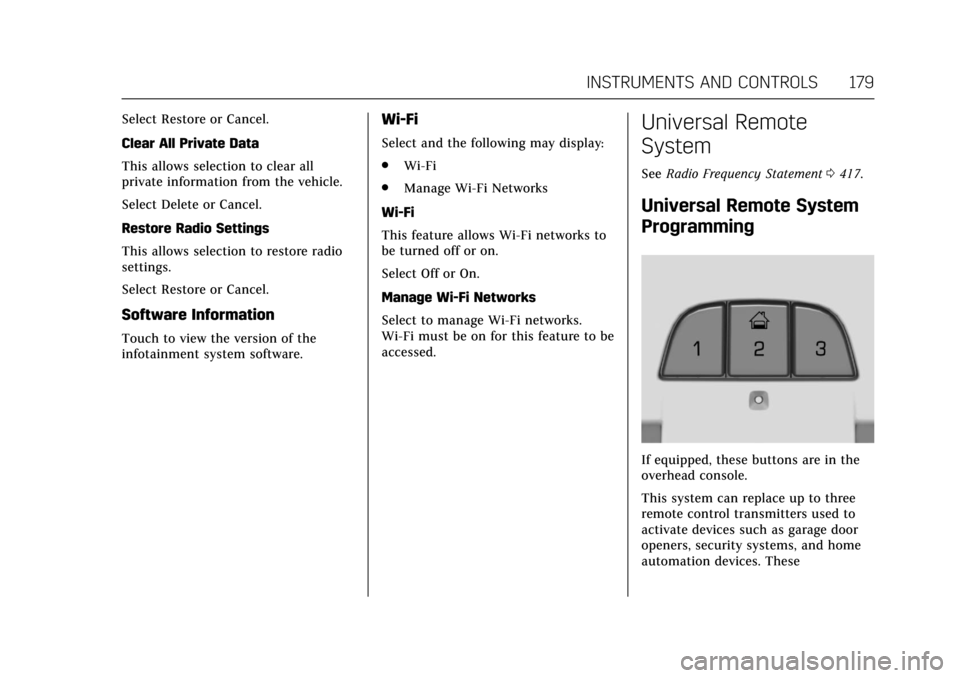
If equipped, these buttons are in the
overhead console.
This system can replace up to three
remote control transmitters used to
activate devices such as garage door
openers, security systems, and home
automation devices. These
Page 181 of 445
Cadillac CT6 Owner Manual (GMNA-Localizing-U.S./Canada-11292458) -
2018 - crc - 2/14/17
180 INSTRUMENTS AND CONTROLS
instructions refer to a garage door
opener, but can be used for other
devices.
Do not use the Universal Remote
system with any garage door opener
that does not have the stop and
reverse feature. This includes any
garage door opener model
manufactured before April 1, 1982.
Read these instructions completely
before programming the Universal
Remote system. It may help to have
another person assist with the
programming process.
Keep the original hand-held
transmitter for use in other vehicles
as well as for future programming.
Erase the programming when vehicle
ownership is terminated. See“Erasing
Universal Remote System Buttons”
later in this section.
To program a garage door opener,
park outside directly in line with and
facing the garage door opener receiver.
Clear all people and objects near the
garage door. Make sure the hand-held transmitter
has a new battery for quick and
accurate transmission of the
radio-frequency signal.
Programming the Universal
Remote System
For questions or help programming
the Universal Remote system, call
1-800-355-3515 or see
www.homelink.com.
Programming involves time-sensitive
actions, and may time out causing the
procedure to be repeated.
To program up to three devices:
1. Hold the end of the hand-held transmitter about 3 to 8 cm (1 to
3 in) away from the Universal
Remote system buttons with the
indicator light in view. The
hand-held transmitter was
supplied by the manufacturer of
the garage door opener receiver.
2. At the same time, press and hold both the hand-held transmitter
button and one of the three
Universal Remote system
buttons to be used to operate the
garage door. Do not release either button until the indicator light
changes from a slow to a rapid
flash. Then release both buttons.
Some garage door openers may
require substitution of Step 2
with the procedure under
“Radio
Signals for Canada and Some
Gate Operators” later in this
section.
3. Press and hold the newly programmed Universal Remote
system button for five seconds
while watching the indicator
light and garage door activation.
.If the indicator light stays on
continuously or the garage
door moves when the button
is pressed, then programming
is complete. There is no need
to complete Steps 4–6.
. If the indicator light does not
come on or the garage door
does not move, a second
button press may be
required. For a second time,
press and hold the newly
programmed button for
Page 182 of 445
Cadillac CT6 Owner Manual (GMNA-Localizing-U.S./Canada-11292458) -
2018 - crc - 2/14/17
INSTRUMENTS AND CONTROLS 181
five seconds. If the light stays
on or the garage door moves,
programming is complete.
. If the indicator light blinks
rapidly for two seconds, then
changes to a solid light and
the garage door does not
move, continue with
programming Steps 4–6.
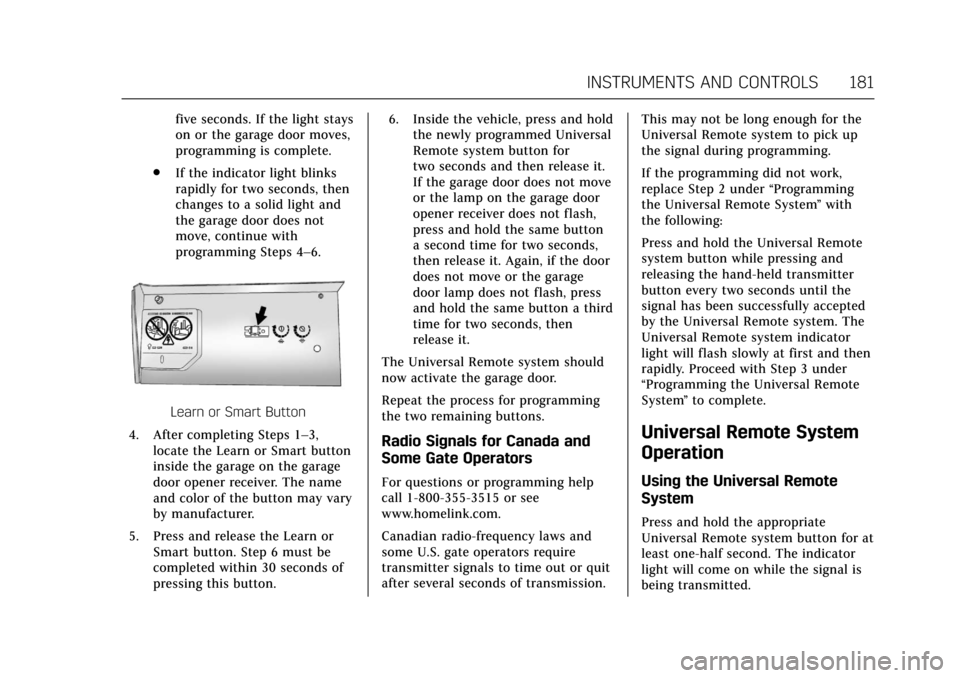
Learn or Smart Button
4. After completing Steps 1–3, locate the Learn or Smart button
inside the garage on the garage
door opener receiver. The name
and color of the button may vary
by manufacturer.
5. Press and release the Learn or Smart button. Step 6 must be
completed within 30 seconds of
pressing this button. 6. Inside the vehicle, press and hold
the newly programmed Universal
Remote system button for
two seconds and then release it.
If the garage door does not move
or the lamp on the garage door
opener receiver does not flash,
press and hold the same button
a second time for two seconds,
then release it. Again, if the door
does not move or the garage
door lamp does not flash, press
and hold the same button a third
time for two seconds, then
release it.
The Universal Remote system should
now activate the garage door.
Repeat the process for programming
the two remaining buttons.
Radio Signals for Canada and
Some Gate Operators
For questions or programming help
call 1-800-355-3515 or see
www.homelink.com.
Canadian radio-frequency laws and
some U.S. gate operators require
transmitter signals to time out or quit
after several seconds of transmission. This may not be long enough for the
Universal Remote system to pick up
the signal during programming.
If the programming did not work,
replace Step 2 under
“Programming
the Universal Remote System ”with
the following:
Press and hold the Universal Remote
system button while pressing and
releasing the hand-held transmitter
button every two seconds until the
signal has been successfully accepted
by the Universal Remote system. The
Universal Remote system indicator
light will flash slowly at first and then
rapidly. Proceed with Step 3 under
“Programming the Universal Remote
System ”to complete.
Universal Remote System
Operation
Using the Universal Remote
System
Press and hold the appropriate
Universal Remote system button for at
least one-half second. The indicator
light will come on while the signal is
being transmitted.
Page 193 of 445
Cadillac CT6 Owner Manual (GMNA-Localizing-U.S./Canada-11292458) -
2018 - crc - 2/14/17
192 CLIMATE CONTROLS
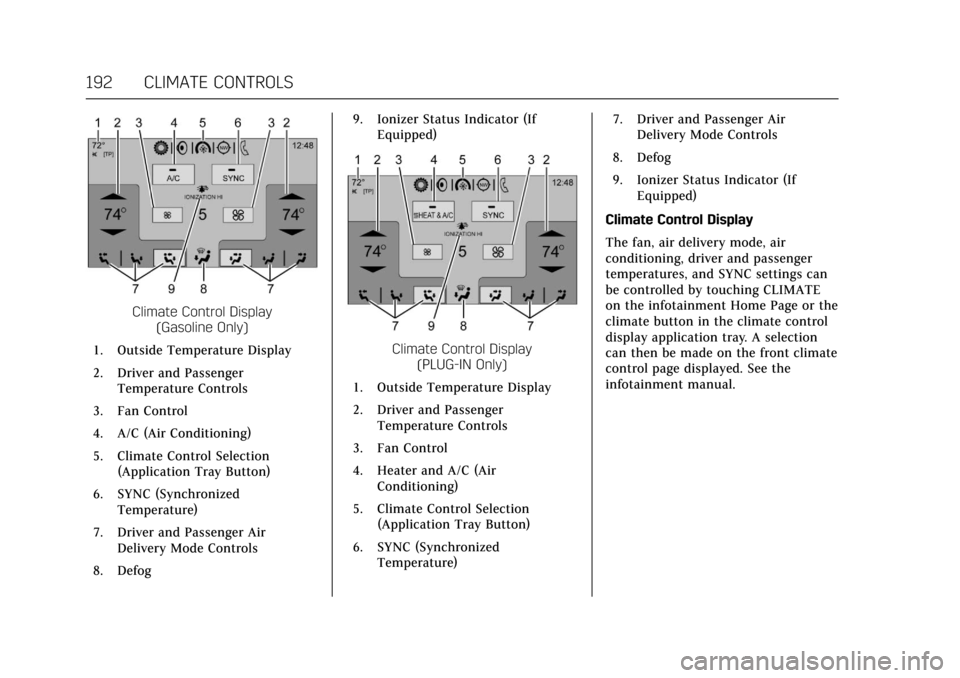
Climate Control Display(Gasoline Only)
1. Outside Temperature Display
2. Driver and Passenger Temperature Controls
3. Fan Control
4. A/C (Air Conditioning)
5. Climate Control Selection (Application Tray Button)
6. SYNC (Synchronized Temperature)
7. Driver and Passenger Air Delivery Mode Controls
8. Defog 9. Ionizer Status Indicator (If
Equipped)
Climate Control Display (PLUG-IN Only)
1. Outside Temperature Display
2. Driver and Passenger Temperature Controls
3. Fan Control
4. Heater and A/C (Air Conditioning)
5. Climate Control Selection (Application Tray Button)
6. SYNC (Synchronized Temperature) 7. Driver and Passenger Air
Delivery Mode Controls
8. Defog
9. Ionizer Status Indicator (If Equipped)
Climate Control Display
The fan, air delivery mode, air
conditioning, driver and passenger
temperatures, and SYNC settings can
be controlled by touching CLIMATE
on the infotainment Home Page or the
climate button in the climate control
display application tray. A selection
can then be made on the front climate
control page displayed. See the
infotainment manual.
Page 199 of 445
Cadillac CT6 Owner Manual (GMNA-Localizing-U.S./Canada-11292458) -
2018 - crc - 2/14/17
198 CLIMATE CONTROLS
9. Ionizer Status Indicator (IfEquipped)
Climate Control Display
The fan, air delivery mode, air
conditioning, driver and passenger
temperatures, and SYNC settings can
be controlled by touching CLIMATE
on the infotainment Home Page or the
climate button in the climate control
display application tray. A selection
can then be made on the front climate
control page displayed. See the
infotainment manual.
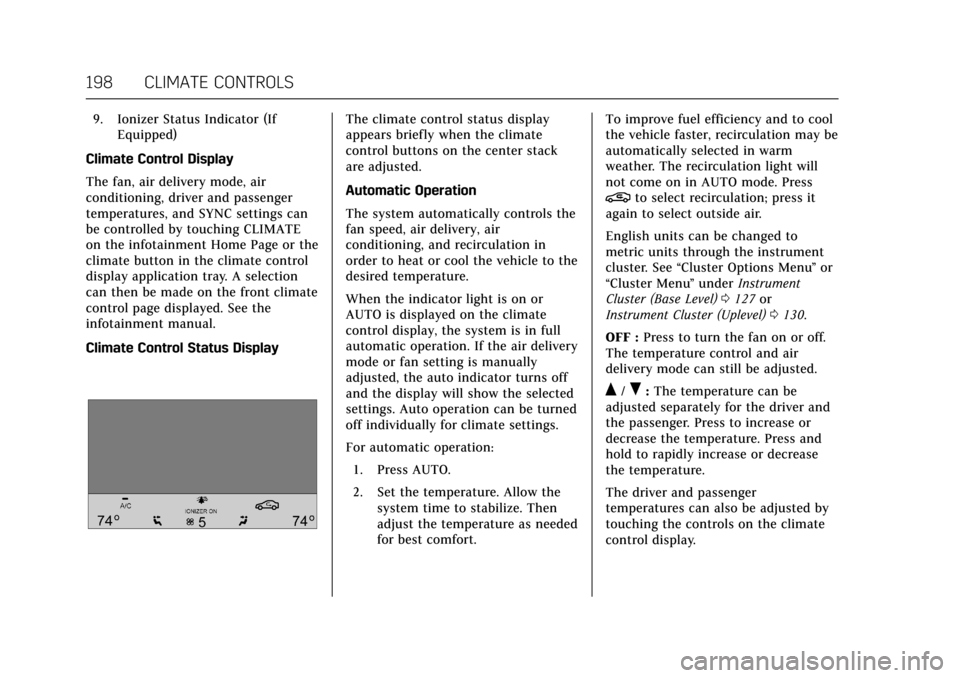
Climate Control Status DisplayThe climate control status display
appears briefly when the climate
control buttons on the center stack
are adjusted.
Automatic Operation
The system automatically controls the
fan speed, air delivery, air
conditioning, and recirculation in
order to heat or cool the vehicle to the
desired temperature.
When the indicator light is on or
AUTO is displayed on the climate
control display, the system is in full
automatic operation. If the air delivery
mode or fan setting is manually
adjusted, the auto indicator turns off
and the display will show the selected
settings. Auto operation can be turned
off individually for climate settings.
For automatic operation: 1. Press AUTO.
2. Set the temperature. Allow the system time to stabilize. Then
adjust the temperature as needed
for best comfort. To improve fuel efficiency and to cool
the vehicle faster, recirculation may be
automatically selected in warm
weather. The recirculation light will
not come on in AUTO mode. Press
@to select recirculation; press it
again to select outside air.
English units can be changed to
metric units through the instrument
cluster. See “Cluster Options Menu ”or
“Cluster Menu ”under Instrument
Cluster (Base Level) 0127 or
Instrument Cluster (Uplevel) 0130.
OFF : Press to turn the fan on or off.
The temperature control and air
delivery mode can still be adjusted.
Q/R: The temperature can be
adjusted separately for the driver and
the passenger. Press to increase or
decrease the temperature. Press and
hold to rapidly increase or decrease
the temperature.
The driver and passenger
temperatures can also be adjusted by
touching the controls on the climate
control display.
Page 204 of 445

Cadillac CT6 Owner Manual (GMNA-Localizing-U.S./Canada-11292458) -
2018 - crc - 2/14/17
CLIMATE CONTROLS 203
9. Air Delivery Mode Control
Rear : Touch Rear on the Home Page
of the infotainment display to open
the rear climate control display. The
rear climate control settings can now
be adjusted from the front
passenger area.
O: PressOor touch ON/OFF on the
rear climate control display to turn
the rear climate control on or off.
SYNC : Touch SYNC on the rear
climate control display to match the
rear climate control temperature to
the front climate control driver
temperature. The SYNC button will
be lit.
Rear Control Lockout : Touch to lock
or unlock control of the rear climate
control system from the rear seat
passengers. When locked, the rear
climate control can only be adjusted
from the front seat.
Automatic Operation
AUTO : Press to turn on or off. The
air delivery is controlled
automatically. The AUTO indicator appears on the display. If the air
delivery mode is manually adjusted,
this cancels full automatic operation.
Manual Operation
9:
Press or press and hold the rear
fan button up or down to increase or
decrease the rear climate airf low. The
rear climate airf low can also be
adjusted by touching the fan controls
on the front climate control display.
Temperature Controls : Press or
press and hold the rear temperature
control buttons up or down to adjust
the rear passenger temperatures. The
rear passenger temperatures can also
be adjusted by touching + for warmer
air or −for cooler air on the front
climate control display.
Air Delivery Mode Control : Press or
press and hold the button up or down
to select the desired air delivery mode.
Touch the right and left arrows at the
bottom of the rear climate control
display to change the direction of the
airf low in the rear seating area.
Air Vents
Adjustable air vents are in the center
and on the sides of the instrument
panel, on the rear of the center
console storage, and in the headliner
over the rear seats, if equipped.
Move the slider knobs to change the
direction of or to close off the airf low.
Operation Tips
. Clear away any ice, snow, or leaves
from air inlets at the base of the
windshield that could block the
flow of air into the vehicle.
Page 208 of 445
Cadillac CT6 Owner Manual (GMNA-Localizing-U.S./Canada-11292458) -
2018 - crc - 2/14/17
DRIVING AND OPERATING 207
.Become familiar with vehicle
features before driving, such as
programming favorite radio
stations and adjusting climate
control and seat settings. Program
all trip information into any
navigation device prior to driving.
. Wait until the vehicle is parked to
retrieve items that have fallen to
the floor.
. Stop or park the vehicle to tend to
children.
. Keep pets in an appropriate carrier
or restraint.
. Avoid stressful conversations
while driving, whether with a
passenger or on a cell phone.
{Warning
Taking your eyes off the road too
long or too often could cause a
crash resulting in injury or death.
Focus your attention on driving. Refer to the infotainment section for
more information on using that
system and the navigation system,
if equipped, including pairing and
using a cell phone.
Defensive Driving
Defensive driving means
“always
expect the unexpected.” The first step
in driving defensively is to wear the
seat belt. See Seat Belts078.
. Assume that other road users
(pedestrians, bicyclists, and other
drivers) are going to be careless
and make mistakes. Anticipate
what they might do and be ready.
. Allow enough following distance
between you and the driver in
front of you.
. Focus on the task of driving.
Drunk Driving
Death and injury associated with
drinking and driving is a global
tragedy.
{Warning
Drinking and then driving is very
dangerous. Your reflexes,
perceptions, attentiveness, and
judgment can be affected by even a
small amount of alcohol. You can
have a serious —or even fatal —
collision if you drive after drinking.
Do not drink and drive or ride with
a driver who has been drinking.
Ride home in a cab; or if you are
with a group, designate a driver
who will not drink.
Control of a Vehicle
Braking, steering, and accelerating are
important factors in helping to control
a vehicle while driving.
Braking (Gasoline Only)
Braking action involves perception
time and reaction time. Deciding to
push the brake pedal is perception
time. Actually doing it is
reaction time.
Page 221 of 445
Cadillac CT6 Owner Manual (GMNA-Localizing-U.S./Canada-11292458) -
2018 - crc - 2/14/17
220 DRIVING AND OPERATING
the vehicle is ready to be driven. This
could take up to 15 seconds at
extremely cold temperatures. See
Vehicle Ready Light (PLUG-IN Only)
0151.
PLUG-IN Operation
This vehicle combines gasoline and
electric propulsion. The gasoline
engine will automatically start to
provide power and then shut off to
save fuel.
The engine may remain
running when:
.
Accelerating aggressively or
climbing hills.
. Vehicle speed is greater than
125 km/h (75 mph).
. Charging the high voltage battery.
. The heater is being used.
The engine and transmission work
together to provide propulsion power
at the highest efficiency. This may
result in higher engine speeds.
Stop/Start System
{Warning
Exiting the vehicle without first
shifting into P (Park) may cause the
vehicle to move. You or others may
be injured. Because the vehicle may
have an auto engine stop/start
feature, the vehicle's engine might
seem to be shut off; however, once
the brake pedal is released, the
engine will start up again.
Shift to P (Park) and turn the
ignition off before exiting the
vehicle.
The vehicle has a fuel saving stop/
start system to shut off the engine
and help conserve fuel.
Auto Engine Stop/Start
When the brakes are applied and the
vehicle is at a complete stop, the
engine may turn off. When stopped,
the tachometer may display Auto
Stop, or the Auto Stop light may come
on in the instrument cluster.
See Tachometer 0134 and Auto Stop Mode (Uplevel Cluster)
0150. When the
brake pedal is released or the
accelerator pedal is pressed, the
engine may restart.
Auto Stop may be deactivated if:
. A minimum vehicle speed is not
reached.
. The engine or transmission is not
at the required operating
temperature.
. The outside temperature is not in
the required operating range,
typically between -10 °C (14 °F)
and 50 °C (122 °F).
. The shift lever is in any gear other
than D (Drive).
. The battery has been recently
disconnected.
. The battery charge is low.
. The interior comfort level has not
reached the required level for the
climate control system or defog
settings.
Page 223 of 445
Cadillac CT6 Owner Manual (GMNA-Localizing-U.S./Canada-11292458) -
2018 - crc - 2/14/17
222 DRIVING AND OPERATING
too much gasoline. Try pushing
the accelerator pedal all the way
to the floor and holding it there
as you press ENGINE START/
STOP. Wait at least 15 seconds
between each try, to allow the
cranking motor to cool down.
When the engine starts, release
the accelerator. If the vehicle
starts briefly but then stops
again, do the same thing. This
clears the extra gasoline from the
engine. Do not race the engine
immediately after starting it.
Operate the engine and
transmission gently until the oil
warms up and lubricates all
moving parts.
Stop/Start System
{Warning
Exiting the vehicle without first
shifting into P (Park) may cause the
vehicle to move. You or others may
be injured. Because the vehicle may
have an auto engine stop/start
feature, the vehicle's engine might(Continued)
Warning (Continued)
seem to be shut off; however, once
the brake pedal is released, the
engine will start up again.
Shift to P (Park) and turn the
ignition off before exiting the
vehicle.
The vehicle has a fuel saving stop/
start system to shut off the engine
and help conserve fuel.
Auto Engine Stop/Start
When the brakes are applied and the
vehicle is at a complete stop, the
engine may turn off. When stopped,
the tachometer may display Auto
Stop, or the Auto Stop light may come
on in the instrument cluster.
See Tachometer 0134 and Auto Stop
Mode (Uplevel Cluster) 0150. When the
brake pedal is released or the
accelerator pedal is pressed, the
engine may restart.
Auto Stop may be deactivated if:
. A minimum vehicle speed is not
reached. .
The engine or transmission is not
at the required operating
temperature.
. The outside temperature is not in
the required operating range,
typically between -10 °C (14 °F)
and 50 °C (122 °F).
. The shift lever is in any gear other
than D (Drive).
. The battery has been recently
disconnected.
. The battery charge is low.
. The interior comfort level has not
reached the required level for the
climate control system or defog
settings.
See Automatic Climate Control
System (Quad Zone - Gasoline Only)
0 197 orAutomatic Climate Control
System (Dual Zone - Gasoline and
PLUG-IN) 0191.
. The Auto Stop time is greater than
two minutes.
Page 442 of 445

Cadillac CT6 Owner Manual (GMNA-Localizing-U.S./Canada-11292458) -
2018 - crc - 2/14/17
INDEX 441
Service Electric Parking BrakeLight . . . . . . . . . . . . . . . . . . . . . . . . . . . . . . . 146
Services Special Application . . . . . . . . . . . . . . . 395
Servicing the Airbag . . . . . . . . . . . . . . . . . 95
Shift Lock Control Function Check, Automatic
Transmission . . . . . . . . . . . . . . . . . . . . . . 327
Shifting Into Park . . . . . . . . . . . . . . . . . . . . . . . . . . 224
Out of Park . . . . . . . . . . . . . . . . . . . . . . . . 225
Side Blind Zone Alert (SBZA) . . . . . . 268
Signals, Turn and Lane-Change . . . . 186
Spare Tire Compact . . . . . . . . . . . . . . . . . . . . . . . . . . . 373
Special Application Services . . . . . . . 395
Specifications and Capacities . . . . . . 404
Speedometer . . . . . . . . . . . . . . . . . . . . . . . . 134
Sport Mode Light . . . . . . . . . . . . . . . . . . . 146
StabiliTrak OFF Light . . . . . . . . . . . . . . . . . . . . . . . . . . 148
Start Assist, Hill . . . . . . . . . . . . . . . . . . . . 237
Start Vehicle, Remote . . . . . . . . . . . . . . . 42
Starter Switch Check . . . . . . . . . . . . . . . 326
Starting the Engine . . . . . . . . . . . .218, 221
Status Screens Charging . . . . . . . . . . . . . . . . . . . . . . . . . . . 275 Steering . . . . . . . . . . . . . . . . . . . . . . . . . . . . . . 208
Heated Wheel . . . . . . . . . . . . . . . . . . . . . 119
Wheel Adjustment . . . . . . . . . . . . . . . . 119
Wheel Controls . . . . . . . . . . . . . . . . . . . 119
Storage Rear . . . . . . . . . . . . . . . . . . . . . . . . . . . . . . . . 116
Storage Areas
Armrest . . . . . . . . . . . . . . . . . . . . . . . . . . . . 116
Center Console . . . . . . . . . . . . . . . . . . . . 116
Convenience Net . . . . . . . . . . . . . . . . . . 117
Glove Box . . . . . . . . . . . . . . . . . . . . . . . . . 115
Instrument Panel . . . . . . . . . . . . . . . . . 115
Storage Compartments . . . . . . . . . . . . . 115
Storing the Tire Sealant and Compressor Kit . . . . . . . . . . . . . . . . . . . . 368
Struts
Gas . . . . . . . . . . . . . . . . . . . . . . . . . . . . . . . . . 328
Stuck Vehicle . . . . . . . . . . . . . . . . . . . . . . . 212
Summer Tires . . . . . . . . . . . . . . . . . . . . . . . 342
Sun Visors . . . . . . . . . . . . . . . . . . . . . . . . . . . . 60
Sunroof . . . . . . . . . . . . . . . . . . . . . . . . . . . . . . . 61
Sunshade Rear Window . . . . . . . . . . . . . . . . . . . . . . . . 60
Symbols . . . . . . . . . . . . . . . . . . . . . . . . . . . . . . . . 3
System Forward Collision Alert (FCA) . . . . 260
Infotainment . . . . . . . . . . . . . . . . . 190, 420 System (cont'd)
Night Vision . . . . . . . . . . . . . . . . . . . . . . . 266
Systems Driver Assistance . . . . . . . . . . . . . . . . . 253
T
Tachometer . . . . . . . . . . . . . . . . . . . . . . . . . 134
Text Telephone (TTY) Users . . . . . . . 410
Theft-Deterrent Systems . . . . . . . . . . . . 53Immobilizer . . . . . . . . . . . . . . . . . . . . . . . . . 53
Thigh Support Adjustment . . . . . . . . . . 68
Time . . . . . . . . . . . . . . . . . . . . . . . . . . . . . . . . . 122
Tires . . . . . . . . . . . . . . . . . . . . . . . . . . . . . . . . . 340 All-Season . . . . . . . . . . . . . . . . . . . . . . . . . 341
Buying New Tires . . . . . . . . . . . . . . . . . 355
Chains . . . . . . . . . . . . . . . . . . . . . . . . . . . . . 360
Changing . . . . . . . . . . . . . . . . . . . . . . . . . . 368
Compact Spare . . . . . . . . . . . . . . . . . . . . 373
Designations . . . . . . . . . . . . . . . . . . . . . . 344
Different Size . . . . . . . . . . . . . . . . . . . . . . 357
If a Tire Goes Flat . . . . . . . . . . . . . . . . 360
Inspection . . . . . . . . . . . . . . . . . . . . . . . . . 353
Low Profile . . . . . . . . . . . . . . . . . . . . . . . . 342
Pressure . . . . . . . . . . . . . . . . . . . . . . 347, 349
Pressure Light . . . . . . . . . . . . . . . . . . . . . 149
Pressure Monitor Operation . . . . . . 350
Pressure Monitor System . . . . . . . . 349
Rotation . . . . . . . . . . . . . . . . . . . . . . . . . . . 353
Sealant and Compressor Kit . . . . . 362