battery CADILLAC CT6 2018 1.G User Guide
[x] Cancel search | Manufacturer: CADILLAC, Model Year: 2018, Model line: CT6, Model: CADILLAC CT6 2018 1.GPages: 445, PDF Size: 7.7 MB
Page 43 of 445
Cadillac CT6 Owner Manual (GMNA-Localizing-U.S./Canada-11292458) -
2018 - crc - 2/14/17
42 KEYS, DOORS, AND WINDOWS
Remote Vehicle Start
If equipped, this feature allows the
engine to be started from outside the
vehicle.
For the PLUG-IN vehicle, the engine
will only start if needed for warming
functions or high voltage battery
charging.
/:This button will be on the RKE
transmitter if the vehicle has remote
start.
The climate control system will use
the previous settings during a remote
start. The rear window defogger may
come on during remote start based on
cold ambient conditions. The rear
defog indicator light does not come on
during remote start.
If equipped, the heated seats and
heated steering wheel or ventilated
seats may come on when enabled in
vehicle personalization. See Vehicle
Personalization 0170.
If equipped, the heated and ventilated
front seats may also come on when
the vehicle personalization setting is
enabled. See Heated and Ventilated
Front Seats 072. Laws in some local communities may
restrict the use of remote starters. For
example, some laws may require a
person using remote start to have the
vehicle in view. Check local
regulations for any requirements.
If your vehicle is low on fuel, do not
use the remote start feature. The
vehicle may run out of fuel.
The RKE transmitter range may be
shorter while the vehicle is running.
Other conditions can affect the
performance of the transmitter. See
Remote Keyless Entry (RKE) System
0
35.
Starting the Engine Using Remote
Start
1. Press and release
Qon the RKE
transmitter.
2. Immediately press and hold
/
for at least four seconds or until
the turn signal lamps flash. This
confirms the request to remote
start the vehicle has been
received. During the remote start, the
doors will be locked and the
parking lamps will remain on as
long as the engine is running.
The engine will shut off after
10 minutes unless a time
extension is done or the vehicle
is started.
3. Press the brake pedal and start the vehicle to drive.
Extending Engine Run Time
The engine run time can also be
extended by another 10 minutes,
if during the first 10 minutes
Steps 1 and 2 are repeated while the
engine is still running. An extension
can be requested 30 seconds after
starting. This provides a total of
20 minutes.
The remote start can only be
extended once.
When the remote start is extended,
the second 10 minute period is added
on to the first 10 minutes for a total
of 20 minutes.
Page 44 of 445
Cadillac CT6 Owner Manual (GMNA-Localizing-U.S./Canada-11292458) -
2018 - crc - 2/14/17
KEYS, DOORS, AND WINDOWS 43
A maximum of two remote starts, or a
remote start with an extension, are
allowed between ignition cycles.
The vehicle's ignition must be turned
from on to off before the remote start
procedure can be used again.
Canceling a Remote Start
To cancel a remote start, do any of
the following:
.Press and hold
/until the
parking lamps turn off.
. Turn on the hazard warning
flashers.
. Turn the vehicle on and then off.
Conditions in Which Remote Start
Will Not Work
The remote start will not operate if
any of the following occur:
. The ignition is in any mode other
than OFF.
. A transmitter is in the vehicle.
. The hood is not closed.
. The hazard warning flashers
are on. .
There is an emission control
system malfunction.
. The engine coolant temperature is
too high.
. The oil pressure is low.
. Two remote vehicle starts have
already been used.
. The vehicle is not in P (Park).Door Locks
{Warning
Unlocked doors can be dangerous.
. Passengers, especially
children, can easily open the
doors and fall out of a moving
vehicle. The doors can be
unlocked and opened while
the vehicle is moving. The
chance of being thrown out of
the vehicle in a crash is
increased if the doors are not
locked. So, all passengers
should wear seat belts
(Continued)
Warning (Continued)
properly and the doors should
be locked whenever the
vehicle is driven.
. Young children who get into
unlocked vehicles may be
unable to get out. A child can
be overcome by extreme heat
and can suffer permanent
injuries or even death from
heat stroke. Always lock the
vehicle whenever leaving it.
. Outsiders can easily enter
through an unlocked door
when you slow down or stop
the vehicle. Locking the doors
can help prevent this from
happening.
To lock or unlock the door from
outside the vehicle:
. Press
QorKon the Remote
Keyless Entry (RKE) transmitter.
. In the case of a dead battery, use
the key in the driver door. The key
cylinder is covered with a cap.
Page 45 of 445
Cadillac CT6 Owner Manual (GMNA-Localizing-U.S./Canada-11292458) -
2018 - crc - 2/14/17
44 KEYS, DOORS, AND WINDOWS
To lock or unlock the door from inside
the vehicle:
.Press
QorKon the power door
lock switch.
. Pulling an interior door handle
will unlock the door. Pulling the
door handle again unlatches it.
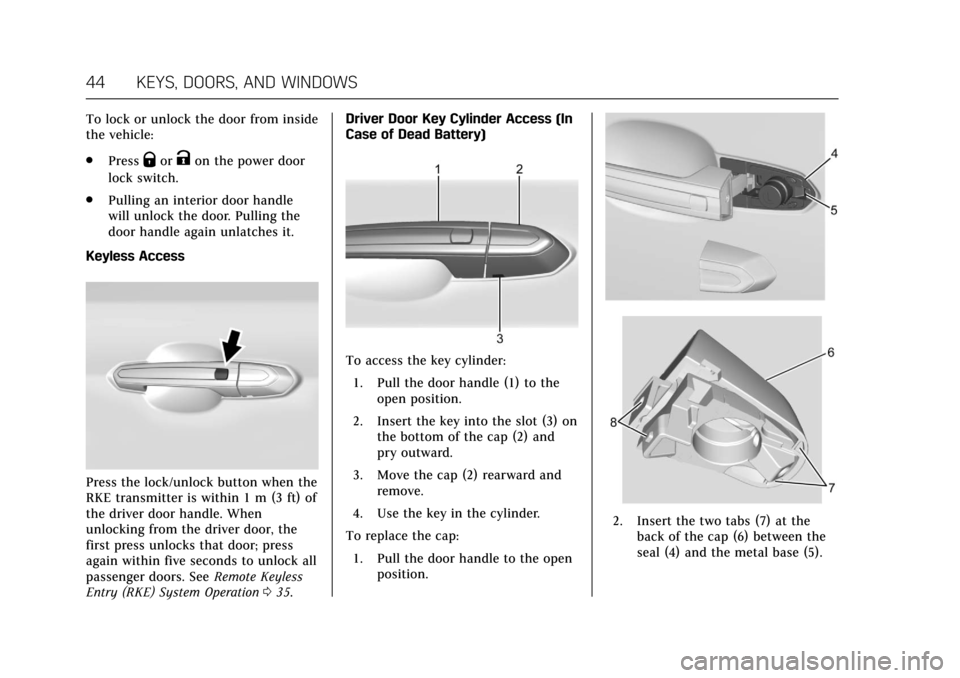
Keyless Access
Press the lock/unlock button when the
RKE transmitter is within 1 m (3 ft) of
the driver door handle. When
unlocking from the driver door, the
first press unlocks that door; press
again within five seconds to unlock all
passenger doors. See Remote Keyless
Entry (RKE) System Operation 035. Driver Door Key Cylinder Access (In
Case of Dead Battery)
To access the key cylinder:
1. Pull the door handle (1) to the open position.
2. Insert the key into the slot (3) on the bottom of the cap (2) and
pry outward.
3. Move the cap (2) rearward and remove.
4. Use the key in the cylinder.
To replace the cap: 1. Pull the door handle to the open position.
2. Insert the two tabs (7) at theback of the cap (6) between the
seal (4) and the metal base (5).
Page 49 of 445
Cadillac CT6 Owner Manual (GMNA-Localizing-U.S./Canada-11292458) -
2018 - crc - 2/14/17
48 KEYS, DOORS, AND WINDOWS
Close the trunk by pulling on the
handle. Do not use the handle as a
tie-down. Do not press the touch pad
while closing the trunk; this will cause
the trunk lid to be unlatched.
The trunk has an electric latch. If the
vehicle has lost power or the battery
is disconnected, the trunk will not
open. If this happens, use the
emergency trunk release handle.
Manual Trunk Access (PLUG–
IN Only)
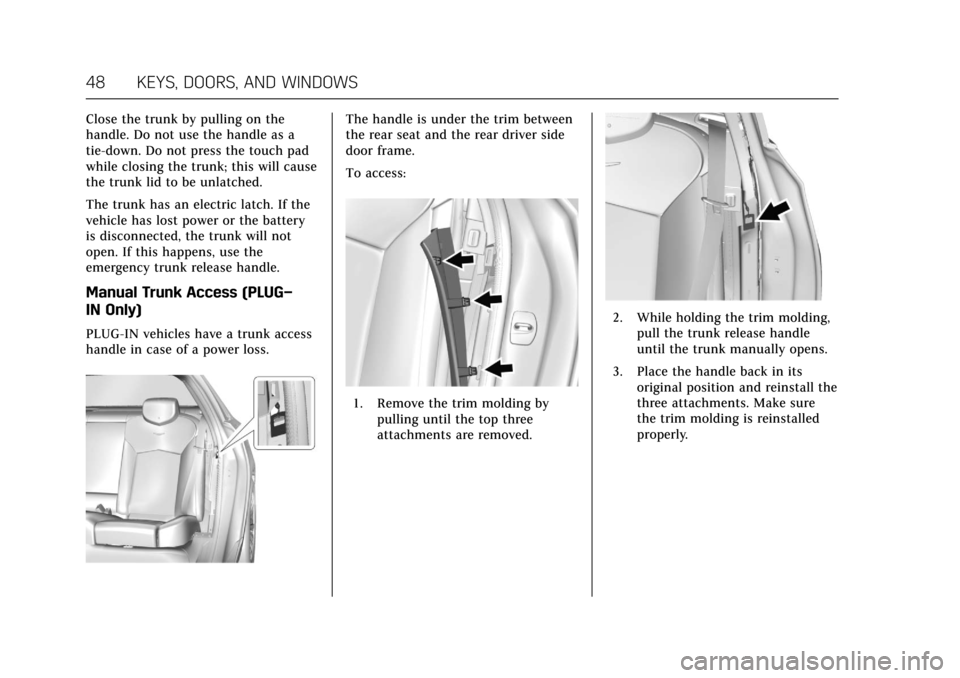
PLUG-IN vehicles have a trunk access
handle in case of a power loss.
The handle is under the trim between
the rear seat and the rear driver side
door frame.
To access:
1. Remove the trim molding bypulling until the top three
attachments are removed.
2. While holding the trim molding,pull the trunk release handle
until the trunk manually opens.
3. Place the handle back in its original position and reinstall the
three attachments. Make sure
the trim molding is reinstalled
properly.
Page 54 of 445
Cadillac CT6 Owner Manual (GMNA-Localizing-U.S./Canada-11292458) -
2018 - crc - 2/14/17
KEYS, DOORS, AND WINDOWS 53
The power sounder provides an
audible alarm, which is distinct from
the vehicle’s horn. It has its own
power source, and can sound an alarm
if the vehicle’s battery is
compromised.
The inclination sensor can set off the
alarm if it senses movement of the
vehicle, such as a change in vehicle
orientation.
The intrusion sensor monitors the
vehicle interior, and can activate the
alarm if it senses unauthorized entry
into the vehicle’s interior. Do not
allow passengers or pets to remain in
the vehicle when the intrusion sensor
is activated.
Before arming the theft-deterrent
system and activating the intrusion
sensor:
.Make sure all doors and windows
are completely closed.
. Secure any loose items such as
sunshades.
. Make sure there are no
obstructions blocking the sensors
in the front overhead console.Inclination and Intrusion
Sensors Disable Switch
It is recommended that the intrusion
and inclination sensors be deactivated
if pets are left in the vehicle or if the
vehicle is being transported.
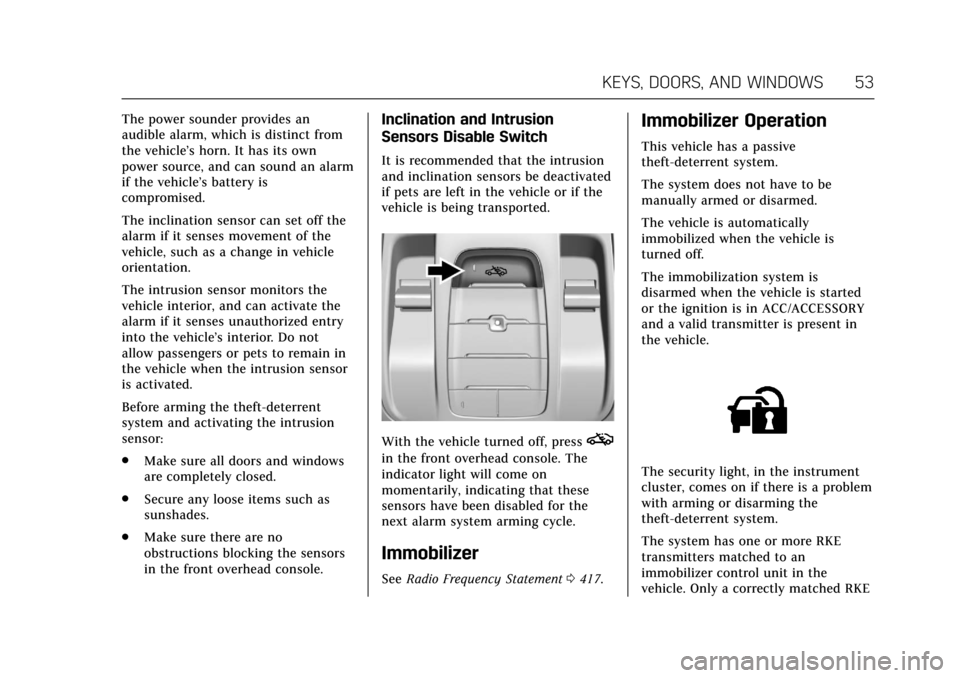
With the vehicle turned off, presso
in the front overhead console. The
indicator light will come on
momentarily, indicating that these
sensors have been disabled for the
next alarm system arming cycle.
Immobilizer
See Radio Frequency Statement 0417.
Immobilizer Operation
This vehicle has a passive
theft-deterrent system.
The system does not have to be
manually armed or disarmed.
The vehicle is automatically
immobilized when the vehicle is
turned off.
The immobilization system is
disarmed when the vehicle is started
or the ignition is in ACC/ACCESSORY
and a valid transmitter is present in
the vehicle.
The security light, in the instrument
cluster, comes on if there is a problem
with arming or disarming the
theft-deterrent system.
The system has one or more RKE
transmitters matched to an
immobilizer control unit in the
vehicle. Only a correctly matched RKE
Page 61 of 445

Cadillac CT6 Owner Manual (GMNA-Localizing-U.S./Canada-11292458) -
2018 - crc - 2/14/17
60 KEYS, DOORS, AND WINDOWS
Warning (Continued)
override, make sure that all people
and obstructions are clear of the
window path.
When the engine is on, override the
automatic reversal system by pulling
and holding the window switch if
conditions prevent it from closing.
Programming the Power
Windows
Programming may be necessary if the
vehicle battery has been disconnected
or discharged. If the window is unable
to express-up, program each
express-close window: 1. Close all doors.
2. Turn the ignition on or to ACC/ ACCESSORY.
3. Partially open the window to be programmed. Then close it and
continue to pull the switch
briefly after the window has fully
closed. 4. Open the window and continue
to press the switch briefly after
the window has fully opened.
Remote Window Operation
If equipped, this feature allows all the
windows to be opened remotely.
If enabled in vehicle personalization,
press and hold
Kon the RKE
transmitter. See Vehicle Personalization
0 170.
Sun Visors
Pull the sun visor down to block glare.
Detach the sun visor from the center
mount to pivot to the side window,
or to extend along the rod.
Rear Window Sunshade
If equipped, press and release the
switch. The rear window sunshade
will fully extend. To close the
sunshade, press and release the switch
again. The sunshade will fully close.
When shifting the vehicle into
R (Reverse), the rear window
sunshade will automatically retract if
Page 91 of 445
Cadillac CT6 Owner Manual (GMNA-Localizing-U.S./Canada-11292458) -
2018 - crc - 2/21/17
90 SEATS AND RESTRAINTS
{Warning
When an airbag inflates, there may
be dust in the air. This dust could
cause breathing problems for
people with a history of asthma or
other breathing trouble. To avoid
this, everyone in the vehicle should
get out as soon as it is safe to do
so. If you have breathing problems
but cannot get out of the vehicle
after an airbag inflates, then get
fresh air by opening a window or a
door. If you experience breathing
problems following an airbag
deployment, you should seek
medical attention.
The vehicle has a feature that may
automatically unlock the doors, turn
on the interior lamps and hazard
warning flashers, and shut off the fuel
system after the airbags inflate. The
feature may also activate, without
airbag inflation, after an event that
exceeds a predetermined threshold.
You can lock the doors, turn off the interior lamps, and turn off the hazard
warning flashers by using the controls
for those features.
{Warning
A crash severe enough to inflate the
airbags may have also damaged
important functions in the vehicle,
such as the fuel system, brake and
steering systems, etc. Even if the
vehicle appears to be drivable after
a moderate crash, there may be
concealed damage that could make
it difficult to safely operate the
vehicle.
Use caution if you should attempt
to restart the engine after a crash
has occurred.
PLUG-IN vehicles have a high voltage
battery and a standard 12-volt battery.
If an airbag inflates or the vehicle has
been in a crash, the vehicle's sensing
system may shut down the high
voltage system. When this occurs, the
high voltage battery is disconnected
and the vehicle is not charging the
12-volt battery or the electrical system. The vehicle may start but it
shuts down once the 12-volt battery is
depleted. The airbag readiness light
and/or the 12-volt battery warning
light are displayed. Before the vehicle
can be operated again, it must be
serviced at your dealer.
In many crashes severe enough to
inflate the airbag, windshields are
broken by vehicle deformation.
Additional windshield breakage may
also occur from the front outboard
passenger airbag.
.
Airbags are designed to inflate
only once. After an airbag inflates,
you will need some new parts for
the airbag system. If you do not
get them, the airbag system will
not be there to help protect you in
another crash. A new system will
include airbag modules and
possibly other parts. The service
manual for the vehicle covers the
need to replace other parts.
Page 96 of 445
Cadillac CT6 Owner Manual (GMNA-Localizing-U.S./Canada-11292458) -
2018 - crc - 2/15/17
SEATS AND RESTRAINTS 95
Servicing the
Airbag-Equipped Vehicle
Airbags affect how the vehicle should
be serviced. There are parts of the
airbag system in several places around
the vehicle. Your dealer and the
service manual have information
about servicing the vehicle and the
airbag system. To purchase a service
manual, seeService Publications
Ordering Information 0416.
{Warning
For up to 10 seconds after the
vehicle is turned off and the 12‐volt
battery is disconnected, an airbag
can still inflate during improper
service. You can be injured if you
are close to an airbag when it
inflates. Avoid yellow connectors.
They are probably part of the airbag
system. Be sure to follow proper
service procedures, and make sure
the person performing work for you
is qualified to do so.
Adding Equipment to the
Airbag-Equipped Vehicle
Adding accessories that change the
vehicle's frame, bumper system,
height, front end, or side sheet metal
may keep the airbag system from
working properly. The operation of the
airbag system can also be affected by
changing any parts of the front seats,
seat belts, airbag sensing and
diagnostic module, steering wheel,
instrument panel, any of the airbag
modules, ceiling or pillar garnish trim,
overhead console, front sensors, side
impact sensors, or airbag wiring.
Your dealer and the service manual
have information about the location of
the airbag sensors, sensing and
diagnostic module, and airbag wiring.
In addition, the vehicle has a
passenger sensing system for the front
outboard passenger position, which
includes sensors that are part of the
passenger seat. The passenger sensing
system may not operate properly if
the original seat trim is replaced with
non-GM covers, upholstery, or trim; or
with GM covers, upholstery, or trim
designed for a different vehicle. Any object, such as an aftermarket seat
heater or a comfort-enhancing pad or
device, installed under or on top of
the seat fabric, could also interfere
with the operation of the passenger
sensing system. This could either
prevent proper deployment of the
passenger airbag(s) or prevent the
passenger sensing system from
properly turning off the passenger
airbag(s). See
Passenger Sensing
System 091.
If the vehicle has rollover roof-rail
airbags, see Different Size Tires and
Wheels 0357 for additional important
information.
If you have to modify your vehicle
because you have a disability and have
questions about whether the
modifications will affect the vehicle's
airbag system, or if you have
questions about whether the airbag
system will be affected if the vehicle is
modified for any other reason, call
Customer Assistance. See Customer
Assistance Offices 0410.
Page 119 of 445

Cadillac CT6 Owner Manual (GMNA-Localizing-U.S./Canada-11292458) -
2018 - crc - 2/14/17
118 INSTRUMENTS AND CONTROLS
Instruments and
Controls
Controls
Steering Wheel Adjustment . . . . . 119
Steering Wheel Controls . . . . . . . . . 119
Heated Steering Wheel . . . . . . . . . . 119
Horn . . . . . . . . . . . . . . . . . . . . . . . . . . . . . . . 120
Windshield Wiper/Washer . . . . . . . 120
Compass . . . . . . . . . . . . . . . . . . . . . . . . . . 122
Clock . . . . . . . . . . . . . . . . . . . . . . . . . . . . . . 122
Power Outlets . . . . . . . . . . . . . . . . . . . . . 123
Wireless Charging . . . . . . . . . . . . . . . . 124
Cigarette Lighter . . . . . . . . . . . . . . . . . . 125
Ashtrays . . . . . . . . . . . . . . . . . . . . . . . . . . 126
Warning Lights, Gauges, and
Indicators
Warning Lights, Gauges, andIndicators . . . . . . . . . . . . . . . . . . . . . . . 126
Instrument Cluster (Base
Level) . . . . . . . . . . . . . . . . . . . . . . . . . . . . 127
Instrument Cluster (Uplevel) . . . . 130
Speedometer . . . . . . . . . . . . . . . . . . . . . . 134
Odometer . . . . . . . . . . . . . . . . . . . . . . . . . 134
Trip Odometer . . . . . . . . . . . . . . . . . . . . 134
Tachometer . . . . . . . . . . . . . . . . . . . . . . . 134
Battery Gauge (High Voltage) . . . 135
Fuel Gauge . . . . . . . . . . . . . . . . . . . . . . . . 135 Power Indicator Gauge
(PLUG-IN Only) . . . . . . . . . . . . . . . . . 136
Boost Gauge (Performance Configuration Only) . . . . . . . . . . . . 136
Engine Oil Pressure Gauge (Base
Level Cluster Only) . . . . . . . . . . . . . 137
Engine Oil Temperature Gauge (Performance
Configuration Only) . . . . . . . . . . . . 138
Engine Coolant Temperature Gauge . . . . . . . . . . . . . . . . . . . . . . . . . . . . 139
Voltmeter Gauge (Base Level Cluster Only) . . . . . . . . . . . . . . . . . . . . 140
Seat Belt Reminders . . . . . . . . . . . . . . 140
Airbag Readiness Light . . . . . . . . . . 141
Passenger Airbag Status Indicator . . . . . . . . . . . . . . . . . . . . . . . . . 141
Charging System Light . . . . . . . . . . . 142
Malfunction Indicator Lamp (Check Engine Light) . . . . . . . . . . . 143
Service Vehicle Soon Light (PLUG-IN Only) . . . . . . . . . . . . . . . . . 145
Brake System Warning Light . . . . 145
Electric Parking Brake Light . . . . . 145
Service Electric Parking Brake Light . . . . . . . . . . . . . . . . . . . . . . . . . . . . . 146
Antilock Brake System (ABS) Warning Light . . . . . . . . . . . . . . . . . . 146
Sport Mode Light . . . . . . . . . . . . . . . . . 146
Winter Driving Mode Light . . . . . . 146 Automatic Vehicle Hold (AVH)
Light . . . . . . . . . . . . . . . . . . . . . . . . . . . . . 147
Lane Keep Assist (LKA) Light . . . 147
Vehicle Ahead Indicator . . . . . . . . . 147
Pedestrian Ahead Indicator . . . . . . 147
Traction Off Light . . . . . . . . . . . . . . . . 148
StabiliTrak OFF Light . . . . . . . . . . . . 148
Traction Control System (TCS)/ StabiliTrak Light . . . . . . . . . . . . . . . . 148
Engine Coolant Temperature Warning Light . . . . . . . . . . . . . . . . . . 149
Tire Pressure Light . . . . . . . . . . . . . . . 149
Engine Oil Pressure Light . . . . . . . . 149
Low Fuel Warning Light . . . . . . . . . 150
Auto Stop Mode (Uplevel Cluster) . . . . . . . . . . . . . . . . . . . . . . . . . . 150
Security Light . . . . . . . . . . . . . . . . . . . . . 150
Vehicle Ready Light (PLUG-IN Only) . . . . . . . . . . . . . . . . . 151
High-Beam On Light . . . . . . . . . . . . . 151
Lamps On Reminder . . . . . . . . . . . . . 151
Cruise Control Light . . . . . . . . . . . . . . 151
Door Ajar Light . . . . . . . . . . . . . . . . . . . 152
Information Displays
Power Flows (PLUG-IN Only) . . . . 152
Programmable Charging (PLUG-IN Only) . . . . . . . . . . . . . . . . . 152
Energy Information (PLUG-IN Only) . . . . . . . . . . . . . . . . . 161
Page 133 of 445
Cadillac CT6 Owner Manual (GMNA-Localizing-U.S./Canada-11292458) -
2018 - crc - 2/14/17
132 INSTRUMENTS AND CONTROLS
The PLUG-IN instrument cluster
displays a preview of information that
includes electric range, charging,
odometer, and battery status. This
happens upon entry when the driver
door is opened before starting the
vehicle. This preview will dismiss after
starting the vehicle or soon after
closing the driver door.
There are several screens that may
display depending on the current
charging status.
The CHARGING OVERRIDE/
INTERRUPTION OCCURRED message
may display to indicate that a
charging override or interruption has
occurred due to one or more of the
following events:
.Override of the charge settings by
the owner.
. Unintended interruption of AC
power at the vehicle's charge port.
Reconfigurable Instrument
Cluster
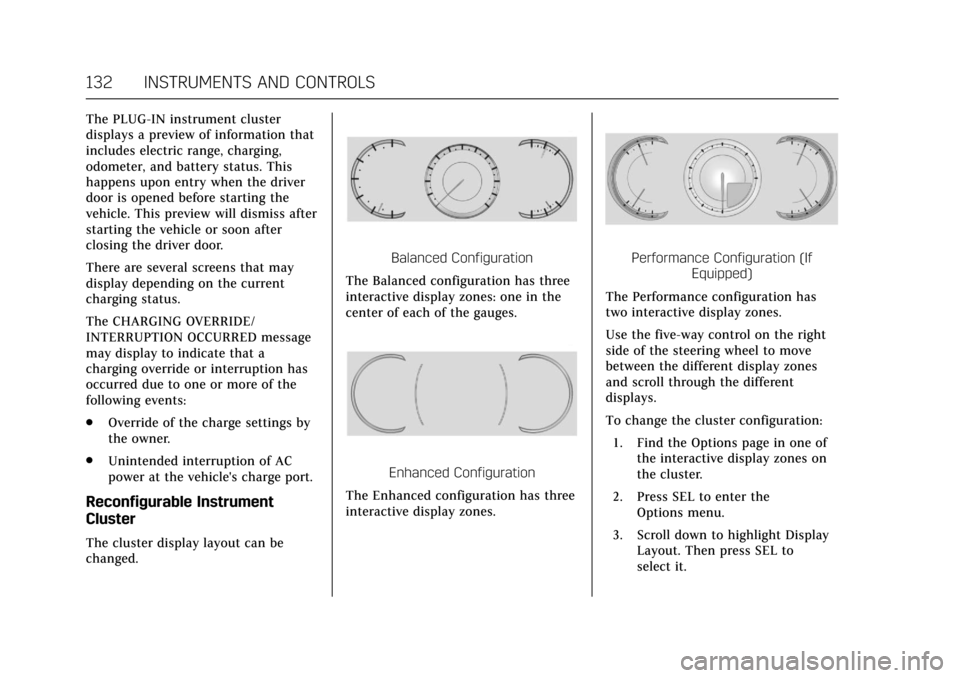
The cluster display layout can be
changed.
Balanced Configuration
The Balanced configuration has three
interactive display zones: one in the
center of each of the gauges.
Enhanced Configuration
The Enhanced configuration has three
interactive display zones.
Performance Configuration (If Equipped)
The Performance configuration has
two interactive display zones.
Use the five-way control on the right
side of the steering wheel to move
between the different display zones
and scroll through the different
displays.
To change the cluster configuration:
1. Find the Options page in one of the interactive display zones on
the cluster.
2. Press SEL to enter the Options menu.
3. Scroll down to highlight Display Layout. Then press SEL to
select it.