oil temperature CADILLAC CT6 2018 1.G Owners Manual
[x] Cancel search | Manufacturer: CADILLAC, Model Year: 2018, Model line: CT6, Model: CADILLAC CT6 2018 1.GPages: 445, PDF Size: 7.7 MB
Page 4 of 445
Cadillac CT6 Owner Manual (GMNA-Localizing-U.S./Canada-11292458) -
2018 - crc - 2/14/17
INTRODUCTION 3
{Warning
Warning indicates a hazard that
could result in injury or death.
Caution
Caution indicates a hazard that
could result in property or vehicle
damage.
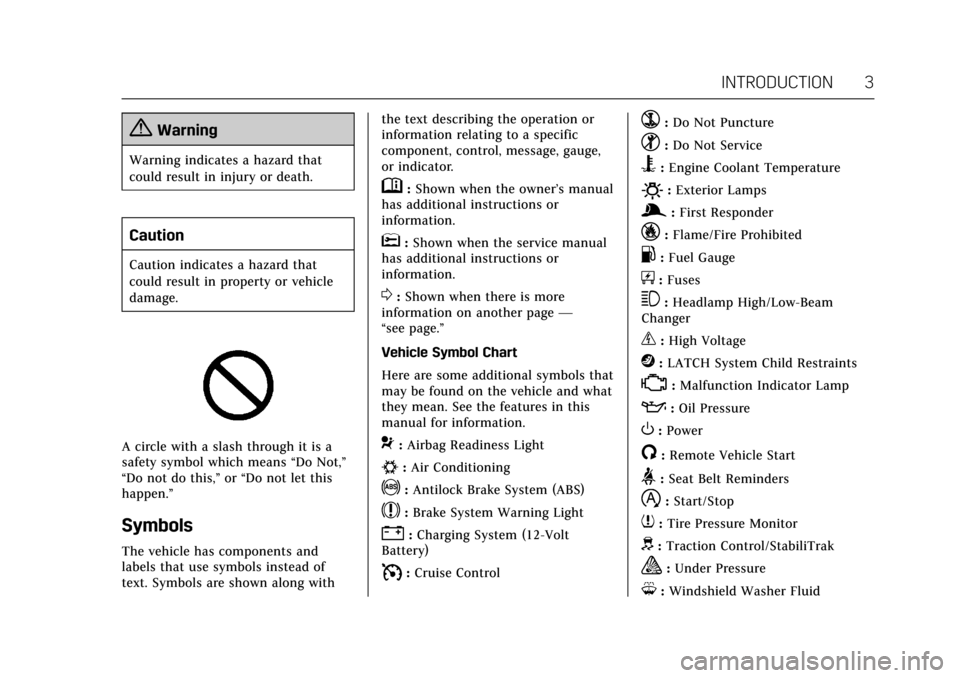
A circle with a slash through it is a
safety symbol which means“Do Not,”
“Do not do this,” or“Do not let this
happen.”
Symbols
The vehicle has components and
labels that use symbols instead of
text. Symbols are shown along with the text describing the operation or
information relating to a specific
component, control, message, gauge,
or indicator.
M:
Shown when the owner’s manual
has additional instructions or
information.
*: Shown when the service manual
has additional instructions or
information.
0: Shown when there is more
information on another page —
“see page.”
Vehicle Symbol Chart
Here are some additional symbols that
may be found on the vehicle and what
they mean. See the features in this
manual for information.
9: Airbag Readiness Light
#:Air Conditioning
!:Antilock Brake System (ABS)
$:Brake System Warning Light
":Charging System (12-Volt
Battery)
I: Cruise Control
`:Do Not Puncture
^:Do Not Service
B:Engine Coolant Temperature
O:Exterior Lamps
g: First Responder
_:Flame/Fire Prohibited
.:Fuel Gauge
+: Fuses
3:Headlamp High/Low-Beam
Changer
_: High Voltage
j: LATCH System Child Restraints
*:Malfunction Indicator Lamp
::Oil Pressure
O:Power
/:Remote Vehicle Start
>:Seat Belt Reminders
h:Start/Stop
7: Tire Pressure Monitor
d:Traction Control/StabiliTrak
a:Under Pressure
M: Windshield Washer Fluid
Page 33 of 445
Cadillac CT6 Owner Manual (GMNA-Localizing-U.S./Canada-11292458) -
2018 - crc - 2/14/17
32 IN BRIEF
If the CHANGE ENGINE OIL
SOON message is not on, the
system is reset.
See Engine Oil Life System 0309.
Driving for Better Fuel
Economy (Gasoline Only)
Driving habits can affect fuel mileage.
Here are some driving tips to get the
best fuel economy possible.
.
Avoid fast starts and accelerate
smoothly.
. Brake gradually and avoid abrupt
stops.
. Avoid idling the engine for long
periods of time.
. When road and weather
conditions are appropriate, use
cruise control.
. Always follow posted speed limits
or drive more slowly when
conditions require.
. Keep vehicle tires properly
inflated.
. Combine several trips into a
single trip. .
Replace the vehicle's tires with the
same TPC Spec number molded
into the tire's sidewall near
the size.
. Follow recommended scheduled
maintenance.Driving for Better Energy
Efficiency (PLUG-IN Only)
Use the following tips to help
maximize energy efficiency and range.
In colder temperatures, while these
efficiency tips will help, the electric
vehicle driving range may be lower
due to higher energy usage.
Driving Style
Acceleration/Braking/Coasting
Avoid unnecessary rapid accelerations
and decelerations.
Electric range is maximized at
80 km/h (50 mph) and below. Higher
speeds use more energy and can
significantly reduce electric range.
Use cruise control when appropriate. Plan ahead for decelerations and coast
whenever possible. For example, do
not rush to traffic signals.
Do not shift to N (Neutral) to coast.
The vehicle recovers energy while
coasting and braking in D (Drive) or M
(Manual Mode).
Drive Mode and PRNDM Selection
Use Tour Mode when possible.
Sport Mode provides more responsive
acceleration than Tour Mode but can
reduce efficiency.
Use Hold Mode on a trip where it is
expected that all of the electric charge
will be depleted. Use Hold Mode
mainly during highway or high speed
driving to maximize both EV miles
and fuel efficiency.
Use M (Manual Model) in heavy
stop-and-go traffic or when traveling
downhill. M (Manual Mode) requires
less brake pedal application and
provides a controlled, efficient way to
slow the vehicle down.
Page 44 of 445
Cadillac CT6 Owner Manual (GMNA-Localizing-U.S./Canada-11292458) -
2018 - crc - 2/14/17
KEYS, DOORS, AND WINDOWS 43
A maximum of two remote starts, or a
remote start with an extension, are
allowed between ignition cycles.
The vehicle's ignition must be turned
from on to off before the remote start
procedure can be used again.
Canceling a Remote Start
To cancel a remote start, do any of
the following:
.Press and hold
/until the
parking lamps turn off.
. Turn on the hazard warning
flashers.
. Turn the vehicle on and then off.
Conditions in Which Remote Start
Will Not Work
The remote start will not operate if
any of the following occur:
. The ignition is in any mode other
than OFF.
. A transmitter is in the vehicle.
. The hood is not closed.
. The hazard warning flashers
are on. .
There is an emission control
system malfunction.
. The engine coolant temperature is
too high.
. The oil pressure is low.
. Two remote vehicle starts have
already been used.
. The vehicle is not in P (Park).Door Locks
{Warning
Unlocked doors can be dangerous.
. Passengers, especially
children, can easily open the
doors and fall out of a moving
vehicle. The doors can be
unlocked and opened while
the vehicle is moving. The
chance of being thrown out of
the vehicle in a crash is
increased if the doors are not
locked. So, all passengers
should wear seat belts
(Continued)
Warning (Continued)
properly and the doors should
be locked whenever the
vehicle is driven.
. Young children who get into
unlocked vehicles may be
unable to get out. A child can
be overcome by extreme heat
and can suffer permanent
injuries or even death from
heat stroke. Always lock the
vehicle whenever leaving it.
. Outsiders can easily enter
through an unlocked door
when you slow down or stop
the vehicle. Locking the doors
can help prevent this from
happening.
To lock or unlock the door from
outside the vehicle:
. Press
QorKon the Remote
Keyless Entry (RKE) transmitter.
. In the case of a dead battery, use
the key in the driver door. The key
cylinder is covered with a cap.
Page 119 of 445
Cadillac CT6 Owner Manual (GMNA-Localizing-U.S./Canada-11292458) -
2018 - crc - 2/14/17
118 INSTRUMENTS AND CONTROLS
Instruments and
Controls
Controls
Steering Wheel Adjustment . . . . . 119
Steering Wheel Controls . . . . . . . . . 119
Heated Steering Wheel . . . . . . . . . . 119
Horn . . . . . . . . . . . . . . . . . . . . . . . . . . . . . . . 120
Windshield Wiper/Washer . . . . . . . 120
Compass . . . . . . . . . . . . . . . . . . . . . . . . . . 122
Clock . . . . . . . . . . . . . . . . . . . . . . . . . . . . . . 122
Power Outlets . . . . . . . . . . . . . . . . . . . . . 123
Wireless Charging . . . . . . . . . . . . . . . . 124
Cigarette Lighter . . . . . . . . . . . . . . . . . . 125
Ashtrays . . . . . . . . . . . . . . . . . . . . . . . . . . 126
Warning Lights, Gauges, and
Indicators
Warning Lights, Gauges, andIndicators . . . . . . . . . . . . . . . . . . . . . . . 126
Instrument Cluster (Base
Level) . . . . . . . . . . . . . . . . . . . . . . . . . . . . 127
Instrument Cluster (Uplevel) . . . . 130
Speedometer . . . . . . . . . . . . . . . . . . . . . . 134
Odometer . . . . . . . . . . . . . . . . . . . . . . . . . 134
Trip Odometer . . . . . . . . . . . . . . . . . . . . 134
Tachometer . . . . . . . . . . . . . . . . . . . . . . . 134
Battery Gauge (High Voltage) . . . 135
Fuel Gauge . . . . . . . . . . . . . . . . . . . . . . . . 135 Power Indicator Gauge
(PLUG-IN Only) . . . . . . . . . . . . . . . . . 136
Boost Gauge (Performance Configuration Only) . . . . . . . . . . . . 136
Engine Oil Pressure Gauge (Base
Level Cluster Only) . . . . . . . . . . . . . 137
Engine Oil Temperature Gauge (Performance
Configuration Only) . . . . . . . . . . . . 138
Engine Coolant Temperature Gauge . . . . . . . . . . . . . . . . . . . . . . . . . . . . 139
Voltmeter Gauge (Base Level Cluster Only) . . . . . . . . . . . . . . . . . . . . 140
Seat Belt Reminders . . . . . . . . . . . . . . 140
Airbag Readiness Light . . . . . . . . . . 141
Passenger Airbag Status Indicator . . . . . . . . . . . . . . . . . . . . . . . . . 141
Charging System Light . . . . . . . . . . . 142
Malfunction Indicator Lamp (Check Engine Light) . . . . . . . . . . . 143
Service Vehicle Soon Light (PLUG-IN Only) . . . . . . . . . . . . . . . . . 145
Brake System Warning Light . . . . 145
Electric Parking Brake Light . . . . . 145
Service Electric Parking Brake Light . . . . . . . . . . . . . . . . . . . . . . . . . . . . . 146
Antilock Brake System (ABS) Warning Light . . . . . . . . . . . . . . . . . . 146
Sport Mode Light . . . . . . . . . . . . . . . . . 146
Winter Driving Mode Light . . . . . . 146 Automatic Vehicle Hold (AVH)
Light . . . . . . . . . . . . . . . . . . . . . . . . . . . . . 147
Lane Keep Assist (LKA) Light . . . 147
Vehicle Ahead Indicator . . . . . . . . . 147
Pedestrian Ahead Indicator . . . . . . 147
Traction Off Light . . . . . . . . . . . . . . . . 148
StabiliTrak OFF Light . . . . . . . . . . . . 148
Traction Control System (TCS)/ StabiliTrak Light . . . . . . . . . . . . . . . . 148
Engine Coolant Temperature Warning Light . . . . . . . . . . . . . . . . . . 149
Tire Pressure Light . . . . . . . . . . . . . . . 149
Engine Oil Pressure Light . . . . . . . . 149
Low Fuel Warning Light . . . . . . . . . 150
Auto Stop Mode (Uplevel Cluster) . . . . . . . . . . . . . . . . . . . . . . . . . . 150
Security Light . . . . . . . . . . . . . . . . . . . . . 150
Vehicle Ready Light (PLUG-IN Only) . . . . . . . . . . . . . . . . . 151
High-Beam On Light . . . . . . . . . . . . . 151
Lamps On Reminder . . . . . . . . . . . . . 151
Cruise Control Light . . . . . . . . . . . . . . 151
Door Ajar Light . . . . . . . . . . . . . . . . . . . 152
Information Displays
Power Flows (PLUG-IN Only) . . . . 152
Programmable Charging (PLUG-IN Only) . . . . . . . . . . . . . . . . . 152
Energy Information (PLUG-IN Only) . . . . . . . . . . . . . . . . . 161
Page 138 of 445
Cadillac CT6 Owner Manual (GMNA-Localizing-U.S./Canada-11292458) -
2018 - crc - 2/14/17
INSTRUMENTS AND CONTROLS 137
English
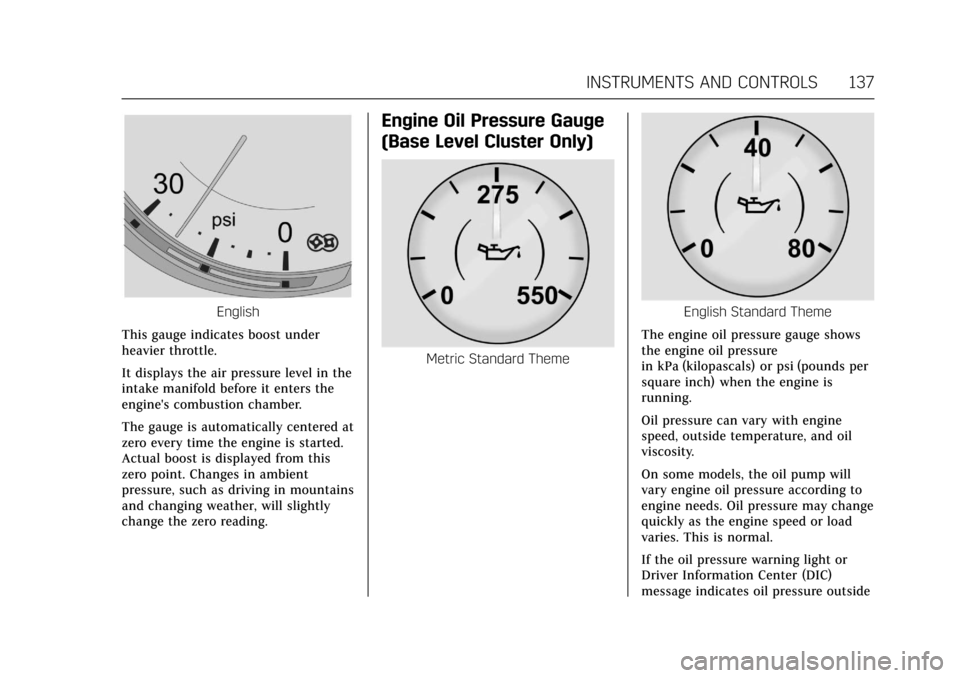
This gauge indicates boost under
heavier throttle.
It displays the air pressure level in the
intake manifold before it enters the
engine's combustion chamber.
The gauge is automatically centered at
zero every time the engine is started.
Actual boost is displayed from this
zero point. Changes in ambient
pressure, such as driving in mountains
and changing weather, will slightly
change the zero reading.
Engine Oil Pressure Gauge
(Base Level Cluster Only)
Metric Standard Theme
English Standard Theme
The engine oil pressure gauge shows
the engine oil pressure
in kPa (kilopascals) or psi (pounds per
square inch) when the engine is
running.
Oil pressure can vary with engine
speed, outside temperature, and oil
viscosity.
On some models, the oil pump will
vary engine oil pressure according to
engine needs. Oil pressure may change
quickly as the engine speed or load
varies. This is normal.
If the oil pressure warning light or
Driver Information Center (DIC)
message indicates oil pressure outside
Page 139 of 445
Cadillac CT6 Owner Manual (GMNA-Localizing-U.S./Canada-11292458) -
2018 - crc - 2/14/17
138 INSTRUMENTS AND CONTROLS
the normal operating range, check the
vehicle's oil as soon as possible. See
Engine Oil0307.
Caution
Lack of proper engine oil
maintenance can damage the
engine. Driving with the engine oil
low can also damage the engine.
The repairs would not be covered
by the vehicle warranty. Check the
oil level as soon as possible. Add oil
if required, but if the oil level is
within the operating range and the
oil pressure is still low, have the
vehicle serviced. Always follow the
maintenance schedule for changing
engine oil.
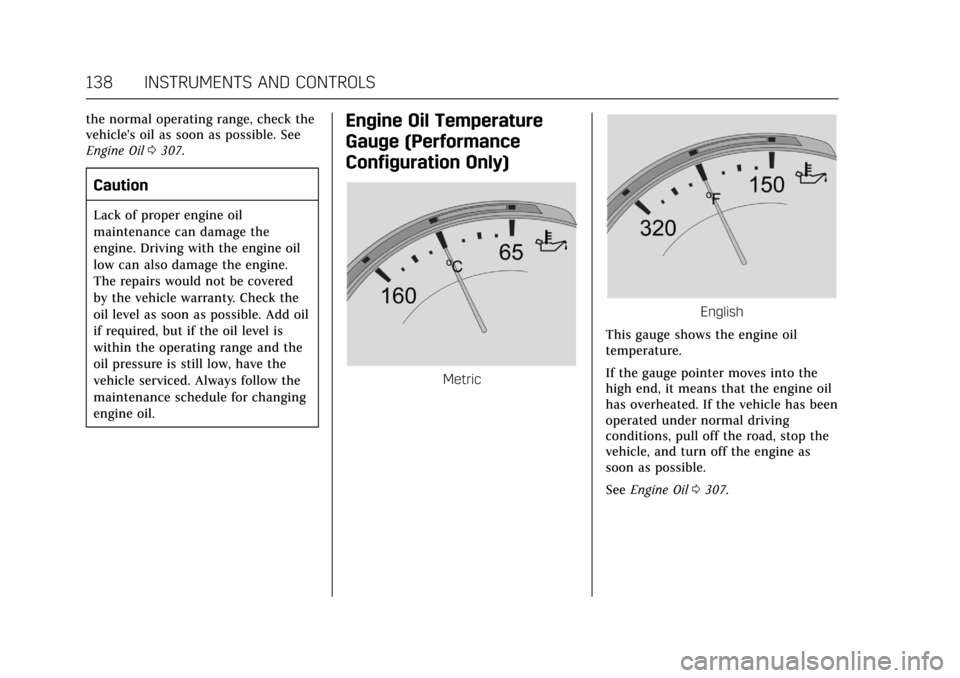
Engine Oil Temperature
Gauge (Performance
Configuration Only)
Metric
English
This gauge shows the engine oil
temperature.
If the gauge pointer moves into the
high end, it means that the engine oil
has overheated. If the vehicle has been
operated under normal driving
conditions, pull off the road, stop the
vehicle, and turn off the engine as
soon as possible.
See Engine Oil 0307.
Page 150 of 445
Cadillac CT6 Owner Manual (GMNA-Localizing-U.S./Canada-11292458) -
2018 - crc - 2/14/17
INSTRUMENTS AND CONTROLS 149
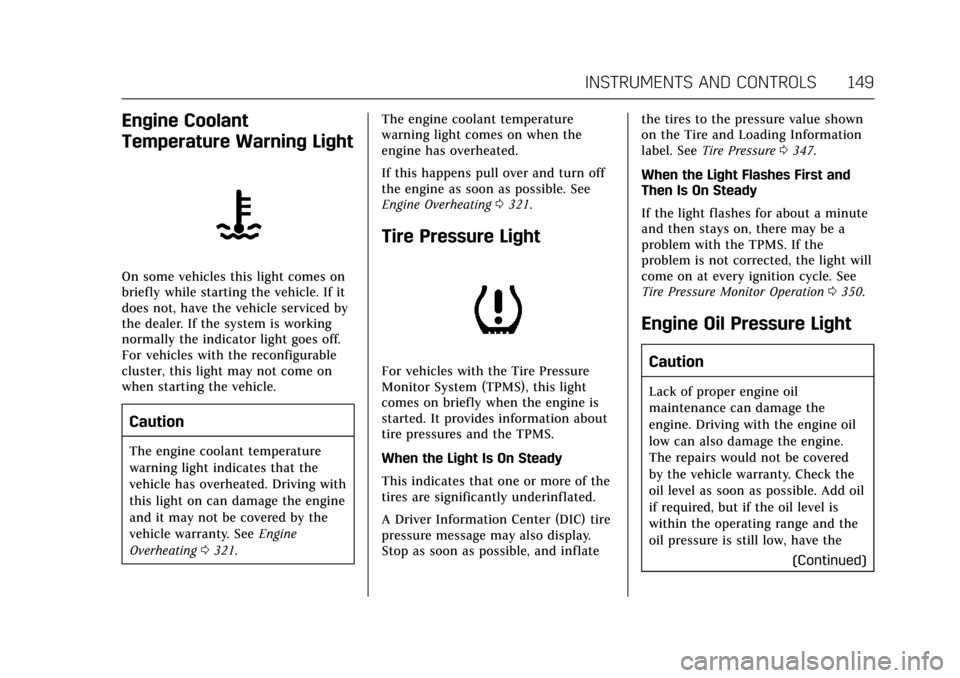
Engine Coolant
Temperature Warning Light
On some vehicles this light comes on
briefly while starting the vehicle. If it
does not, have the vehicle serviced by
the dealer. If the system is working
normally the indicator light goes off.
For vehicles with the reconfigurable
cluster, this light may not come on
when starting the vehicle.
Caution
The engine coolant temperature
warning light indicates that the
vehicle has overheated. Driving with
this light on can damage the engine
and it may not be covered by the
vehicle warranty. SeeEngine
Overheating 0321. The engine coolant temperature
warning light comes on when the
engine has overheated.
If this happens pull over and turn off
the engine as soon as possible. See
Engine Overheating
0321.
Tire Pressure Light
For vehicles with the Tire Pressure
Monitor System (TPMS), this light
comes on briefly when the engine is
started. It provides information about
tire pressures and the TPMS.
When the Light Is On Steady
This indicates that one or more of the
tires are significantly underinflated.
A Driver Information Center (DIC) tire
pressure message may also display.
Stop as soon as possible, and inflate the tires to the pressure value shown
on the Tire and Loading Information
label. See
Tire Pressure 0347.
When the Light Flashes First and
Then Is On Steady
If the light flashes for about a minute
and then stays on, there may be a
problem with the TPMS. If the
problem is not corrected, the light will
come on at every ignition cycle. See
Tire Pressure Monitor Operation 0350.
Engine Oil Pressure Light
Caution
Lack of proper engine oil
maintenance can damage the
engine. Driving with the engine oil
low can also damage the engine.
The repairs would not be covered
by the vehicle warranty. Check the
oil level as soon as possible. Add oil
if required, but if the oil level is
within the operating range and the
oil pressure is still low, have the
(Continued)
Page 223 of 445
Cadillac CT6 Owner Manual (GMNA-Localizing-U.S./Canada-11292458) -
2018 - crc - 2/14/17
222 DRIVING AND OPERATING
too much gasoline. Try pushing
the accelerator pedal all the way
to the floor and holding it there
as you press ENGINE START/
STOP. Wait at least 15 seconds
between each try, to allow the
cranking motor to cool down.
When the engine starts, release
the accelerator. If the vehicle
starts briefly but then stops
again, do the same thing. This
clears the extra gasoline from the
engine. Do not race the engine
immediately after starting it.
Operate the engine and
transmission gently until the oil
warms up and lubricates all
moving parts.
Stop/Start System
{Warning
Exiting the vehicle without first
shifting into P (Park) may cause the
vehicle to move. You or others may
be injured. Because the vehicle may
have an auto engine stop/start
feature, the vehicle's engine might(Continued)
Warning (Continued)
seem to be shut off; however, once
the brake pedal is released, the
engine will start up again.
Shift to P (Park) and turn the
ignition off before exiting the
vehicle.
The vehicle has a fuel saving stop/
start system to shut off the engine
and help conserve fuel.
Auto Engine Stop/Start
When the brakes are applied and the
vehicle is at a complete stop, the
engine may turn off. When stopped,
the tachometer may display Auto
Stop, or the Auto Stop light may come
on in the instrument cluster.
See Tachometer 0134 and Auto Stop
Mode (Uplevel Cluster) 0150. When the
brake pedal is released or the
accelerator pedal is pressed, the
engine may restart.
Auto Stop may be deactivated if:
. A minimum vehicle speed is not
reached. .
The engine or transmission is not
at the required operating
temperature.
. The outside temperature is not in
the required operating range,
typically between -10 °C (14 °F)
and 50 °C (122 °F).
. The shift lever is in any gear other
than D (Drive).
. The battery has been recently
disconnected.
. The battery charge is low.
. The interior comfort level has not
reached the required level for the
climate control system or defog
settings.
See Automatic Climate Control
System (Quad Zone - Gasoline Only)
0 197 orAutomatic Climate Control
System (Dual Zone - Gasoline and
PLUG-IN) 0191.
. The Auto Stop time is greater than
two minutes.
Page 293 of 445
Cadillac CT6 Owner Manual (GMNA-Localizing-U.S./Canada-11292458) -
2018 - crc - 2/14/17
292 DRIVING AND OPERATING
Backing Up
Hold the bottom of the steering wheel
with one hand. To move the trailer to
the left, move that hand to the left. To
move the trailer to the right, move
your hand to the right. Always back
up slowly and, if possible, have
someone guide you.
Making TurnsCaution
Making very sharp turns while
trailering could cause the trailer to
come in contact with the vehicle.
The vehicle could be damaged.
Avoid making very sharp turns
while trailering.
When turning with a trailer, make
wider turns than normal. Do this so
the trailer will not strike soft
shoulders, curbs, road signs, trees,
or other objects. Avoid jerky or sudden
maneuvers. Signal well in advance. If the trailer turn signal bulbs burn
out, the arrows on the instrument
cluster will still flash for turns. It is
important to check occasionally to be
sure the trailer bulbs are still working.
Driving on Grades
Reduce speed and shift to a lower gear
before
starting down a long or steep
downgrade. If the transmission is not
shifted down, the brakes might get hot
and no longer work well.
Vehicles can tow in D (Drive). Shift
the transmission to a lower gear if the
transmission shifts too often under
heavy loads and/or hilly conditions.
When towing at high altitude on steep
uphill grades, consider the following:
Engine coolant will boil at a lower
temperature than at normal altitudes.
If the engine is turned off immediately
after towing at high altitude on steep
uphill grades, the vehicle may show
signs similar to engine overheating. To
avoid this, let the engine run while
parked, preferably on level ground,
with the automatic transmission in
P (Park) for a few minutes before turning the engine off. If the overheat
warning comes on, see
Engine
Overheating 0321.
Parking on Hills
{Warning
Parking the vehicle on a hill with
the trailer attached can be
dangerous. If something goes
wrong, the rig could start to move.
People can be injured, and both the
vehicle and the trailer can be
damaged. When possible, always
park the rig on a flat surface.
If parking the rig on a hill: 1. Press the brake pedal, but do not shift into P (Park) yet. Turn the
wheels into the curb if facing
downhill or into traffic if facing
uphill.
2. Have someone place chocks under the trailer wheels.
3. When the wheel chocks are in place, release the regular brakes
until the chocks absorb the load.
Page 294 of 445
Cadillac CT6 Owner Manual (GMNA-Localizing-U.S./Canada-11292458) -
2018 - crc - 2/14/17
DRIVING AND OPERATING 293
4. Reapply the brake pedal. Thenapply the parking brake and shift
into P (Park).
5. Release the brake pedal.
Leaving After Parking on a Hill
1. Apply and hold the brake pedal.
2. Start the engine.
3. Shift into a gear.
4. Release the parking brake.
5. Let up on the brake pedal.
6. Drive slowly until the trailer is clear of the chocks.
7. Stop and have someone pick up and store the chocks.
Maintenance when Trailer
Towing
The vehicle needs service more often
when pulling a trailer. . Things that
are especially important in trailer
operation are automatic transmission
fluid, engine oil, axle lubricant, belts,
cooling system, and brake system. It is
a good idea to inspect these before
and during the trip. Check periodically to see that all hitch
nuts and bolts are tight.
Trailer Towing
(PLUG-IN Only)
The vehicle is neither designed nor
intended to tow a trailer.
Trailer Towing
(Gasoline Only)
Before pulling a trailer, three
important considerations have to do
with weight:
.
Weight of the trailer.
. Weight of the trailer tongue.
. Total weight on your vehicle's
tires.
Weight of the Trailer
How heavy can a trailer safely be?
It should never weigh more than
454 kg (1,000 lb). But even that can be
too heavy.
Safe trailering requires monitoring the
weight, speed, altitude, road grades,
outside temperature, the dimensions of the front of the trailer, and how
frequently the vehicle is used to pull a
trailer. Take into consideration any
special equipment on the vehicle, and
the amount of tongue weight the
vehicle can carry. See
“Weight of the
Trailer Tongue ”later in this section
for more information.
Trailer weight rating (TWR) is
calculated assuming the tow vehicle
has the driver, a front seat passenger,
and all required trailering equipment.
Weight of additional optional
equipment, passengers, and cargo in
the tow vehicle must be subtracted
from the trailer weight rating.
Ask your dealer for trailering
information or advice, or write us at
our Customer Assistance Offices. See
Customer Assistance Offices 0410.Weight of the Trailer Tongue
The tongue weight load (1) of any
trailer is very important because it is
also part of the vehicle weight. The
Gross Vehicle Weight (GVW) includes
the curb weight of the vehicle, any
cargo carried in it, and the people who
will be riding in the vehicle, as well as
trailer tongue weight. Vehicle options,