front seat CADILLAC CT6 2018 1.G User Guide
[x] Cancel search | Manufacturer: CADILLAC, Model Year: 2018, Model line: CT6, Model: CADILLAC CT6 2018 1.GPages: 445, PDF Size: 7.7 MB
Page 59 of 445
Cadillac CT6 Owner Manual (GMNA-Localizing-U.S./Canada-11292458) -
2018 - crc - 2/14/17
58 KEYS, DOORS, AND WINDOWS
The RCM may not work properly or
display a clear image if:
.There is glare from the sun or
headlamps. This may obstruct
objects from view.
. Dirt, snow, or other debris blocks
the camera lens. Clean the lens
with a soft damp cloth.
. The back of the vehicle has been
damaged and the position and
mounting angle of the camera has
changed.Windows
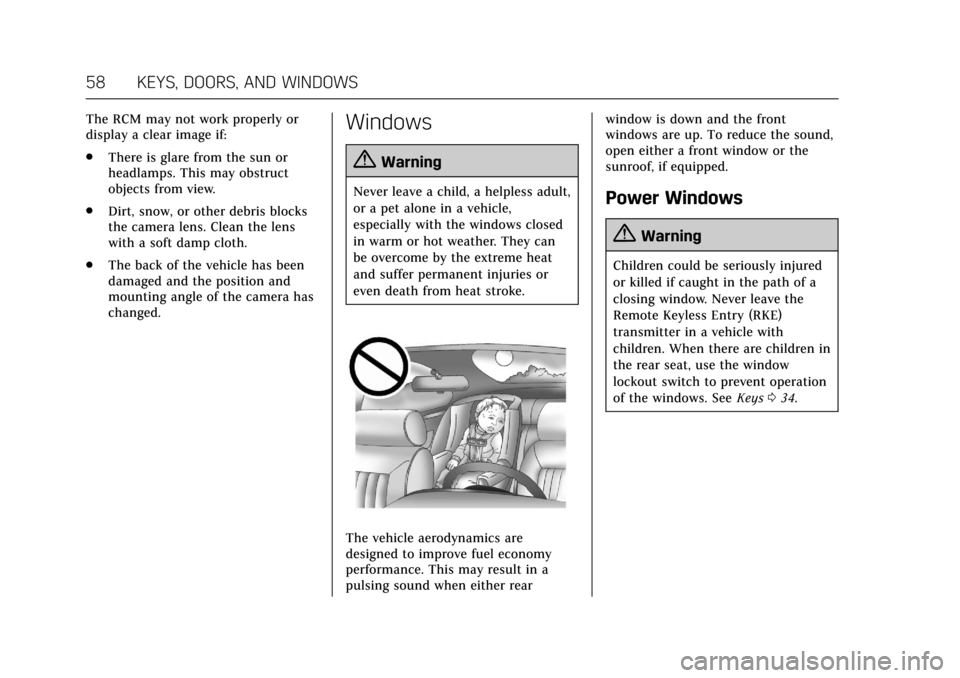
{Warning
Never leave a child, a helpless adult,
or a pet alone in a vehicle,
especially with the windows closed
in warm or hot weather. They can
be overcome by the extreme heat
and suffer permanent injuries or
even death from heat stroke.
The vehicle aerodynamics are
designed to improve fuel economy
performance. This may result in a
pulsing sound when either rear window is down and the front
windows are up. To reduce the sound,
open either a front window or the
sunroof, if equipped.
Power Windows
{Warning
Children could be seriously injured
or killed if caught in the path of a
closing window. Never leave the
Remote Keyless Entry (RKE)
transmitter in a vehicle with
children. When there are children in
the rear seat, use the window
lockout switch to prevent operation
of the windows. See
Keys034.
Page 65 of 445
Cadillac CT6 Owner Manual (GMNA-Localizing-U.S./Canada-11292458) -
2018 - crc - 2/15/17
64 SEATS AND RESTRAINTS
Seats and Restraints
Head Restraints
Head Restraints . . . . . . . . . . . . . . . . . . . . 65
Front Seats
Power Seat Adjustment . . . . . . . . . . . 67
Lumbar Adjustment . . . . . . . . . . . . . . . 67
Thigh Support Adjustment . . . . . . . . 68
Reclining Seatbacks . . . . . . . . . . . . . . . 69
Memory Seats . . . . . . . . . . . . . . . . . . . . . . 69
Heated and Ventilated FrontSeats . . . . . . . . . . . . . . . . . . . . . . . . . . . . . . 72
Massage . . . . . . . . . . . . . . . . . . . . . . . . . . . . 74
Rear Seats
Rear Seats . . . . . . . . . . . . . . . . . . . . . . . . . . 74
Lumbar Adjustment . . . . . . . . . . . . . . . 76
Heated and Ventilated Rear Seats . . . . . . . . . . . . . . . . . . . . . . . . . . . . . . 77
Rear Seat Pass-Through Door . . . . . 77
Seat Belts
Seat Belts . . . . . . . . . . . . . . . . . . . . . . . . . . . 78
How to Wear Seat Belts Properly . . . . . . . . . . . . . . . . . . . . . . . . . . . 79
Lap-Shoulder Belt . . . . . . . . . . . . . . . . . . 80
Seat Belt Use During Pregnancy . . . . . . . . . . . . . . . . . . . . . . . . . 83
Seat Belt Extender . . . . . . . . . . . . . . . . . 83 Safety System Check . . . . . . . . . . . . . . 83
Seat Belt Care . . . . . . . . . . . . . . . . . . . . . . 83
Replacing Seat Belt System Parts
after a Crash . . . . . . . . . . . . . . . . . . . . . . 84
Airbag System
Airbag System . . . . . . . . . . . . . . . . . . . . . 85
Where Are the Airbags? . . . . . . . . . . . 86
When Should an AirbagInflate? . . . . . . . . . . . . . . . . . . . . . . . . . . . 88
What Makes an Airbag Inflate? . . . 89
How Does an Airbag Restrain? . . . 89
What Will You See after an Airbag Inflates? . . . . . . . . . . . . . . . . . . . . . . . . . . 89
Passenger Sensing System . . . . . . . . 91
Servicing the Airbag-Equipped Vehicle . . . . . . . . . . . . . . . . . . . . . . . . . . . . 95
Adding Equipment to the Airbag-Equipped Vehicle . . . . . . . . 95
Airbag System Check . . . . . . . . . . . . . . 96
Replacing Airbag System Parts after a Crash . . . . . . . . . . . . . . . . . . . . . . 96
Child Restraints
Older Children . . . . . . . . . . . . . . . . . . . . . 96
Infants and Young Children . . . . . . 98
Child Restraint Systems . . . . . . . . . 100
Where to Put the Restraint . . . . . . 102
Lower Anchors and Tethers forChildren (LATCH System) . . . . . . 103 Replacing LATCH System Parts
After a Crash . . . . . . . . . . . . . . . . . . . . 109
Securing Child Restraints (With the Seat Belt in the
Rear Seat) . . . . . . . . . . . . . . . . . . . . . . . 109
Securing Child Restraints (With the Seat Belt in the
Front Seat) . . . . . . . . . . . . . . . . . . . . . . 111
Page 66 of 445

Cadillac CT6 Owner Manual (GMNA-Localizing-U.S./Canada-11292458) -
2018 - crc - 2/15/17
SEATS AND RESTRAINTS 65
Head Restraints
The vehicle’s front seats have
adjustable head restraints in the
outboard seating positions.
{Warning
With head restraints that are not
installed and adjusted properly,
there is a greater chance that
occupants will suffer a neck/spinal
injury in a crash. Do not drive until
the head restraints for all occupants
are installed and adjusted properly.
If your vehicle has rear head
restraints that fold down, always
return them to the full upright
position whenever an occupant is
seated in the seat.
Adjust the head restraint so that the
top of the restraint is at the same
height as the top of the occupant's
head. This position reduces the
chance of a neck injury in a crash.
Front Seats
The vehicle's front seats have
adjustable head restraints in the
outboard seating positions.
Pull the head restraint up to raise it.
Try to move the head restraint to
make sure that it is locked in place.
To lower the head restraint, press the
button located on top of the seatback,
and push the head restraint down. Try
to move the head restraint after the
button is released to make sure that it
is locked in place.
Page 67 of 445

Cadillac CT6 Owner Manual (GMNA-Localizing-U.S./Canada-11292458) -
2018 - crc - 2/15/17
66 SEATS AND RESTRAINTS
The fore and aft position of the head
restraint can be adjusted.
To adjust the head restraint forward
and rearward, press the button located
on the side facing of the head
restraint and move it forward or
rearward until the desired locking
position is reached. Try to move the
head restraint after the button is
released to make sure that it is locked
in place.
The front seat outboard head
restraints are not designed to be
removed.
Rear Seats
The vehicle's rear seats have
adjustable head restraints in the
outboard seating positions.
The height of the head restraint can
be adjusted. Pull the head restraint up
to raise it. Try to move the head
restraint to make sure that it is locked
in place.
To lower the head restraint, press the
button, located on the top of the
seatback, and push the head restraint
down. Try to move the head restraint
after the button is released to make
sure that it is locked in place.Always adjust the head restraint so
that the top of the restraint is at the
same height as the top of the
occupant's head.
Rear outboard head restraints are not
removable.
The rear outboard head restraints are
not designed to be folded.
Page 68 of 445
Cadillac CT6 Owner Manual (GMNA-Localizing-U.S./Canada-11292458) -
2018 - crc - 2/15/17
SEATS AND RESTRAINTS 67
Front Seats
Power Seat Adjustment
{Warning
You can lose control of the vehicle
if you try to adjust a driver seat
while the vehicle is moving. Adjust
the driver seat only when the
vehicle is not moving.
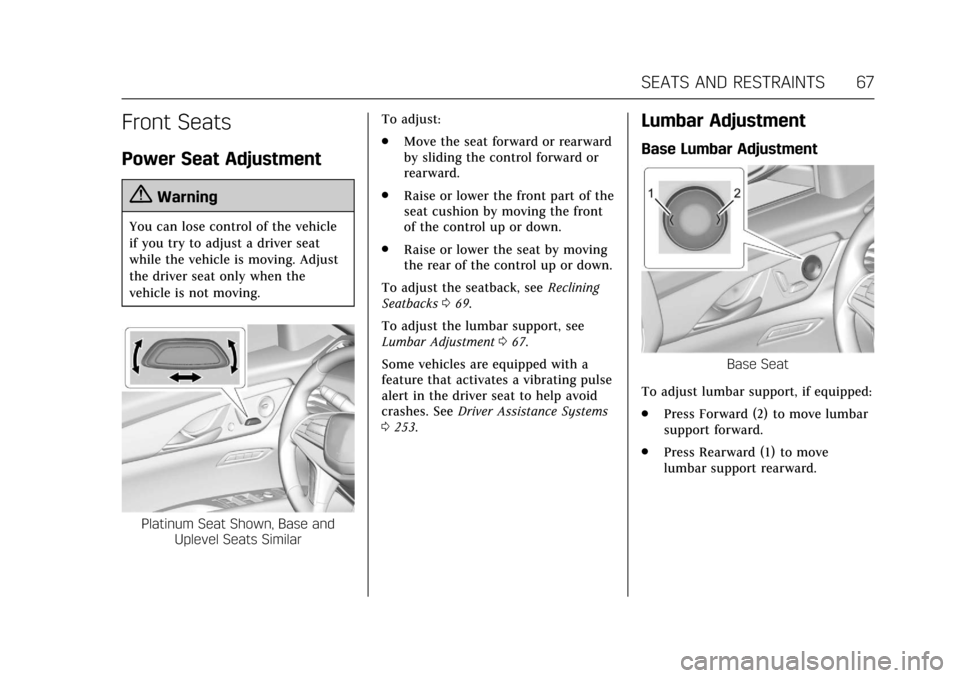
Platinum Seat Shown, Base andUplevel Seats Similar To adjust:
.
Move the seat forward or rearward
by sliding the control forward or
rearward.
. Raise or lower the front part of the
seat cushion by moving the front
of the control up or down.
. Raise or lower the seat by moving
the rear of the control up or down.
To adjust the seatback, see Reclining
Seatbacks 069.
To adjust the lumbar support, see
Lumbar Adjustment 067.
Some vehicles are equipped with a
feature that activates a vibrating pulse
alert in the driver seat to help avoid
crashes. See Driver Assistance Systems
0 253.
Lumbar Adjustment
Base Lumbar Adjustment
Base Seat
To adjust lumbar support, if equipped:
. Press Forward (2) to move lumbar
support forward.
. Press Rearward (1) to move
lumbar support rearward.
Page 70 of 445
Cadillac CT6 Owner Manual (GMNA-Localizing-U.S./Canada-11292458) -
2018 - crc - 2/15/17
SEATS AND RESTRAINTS 69
Reclining Seatbacks
Platinum Seat Shown, Base andUplevel Seats Similar
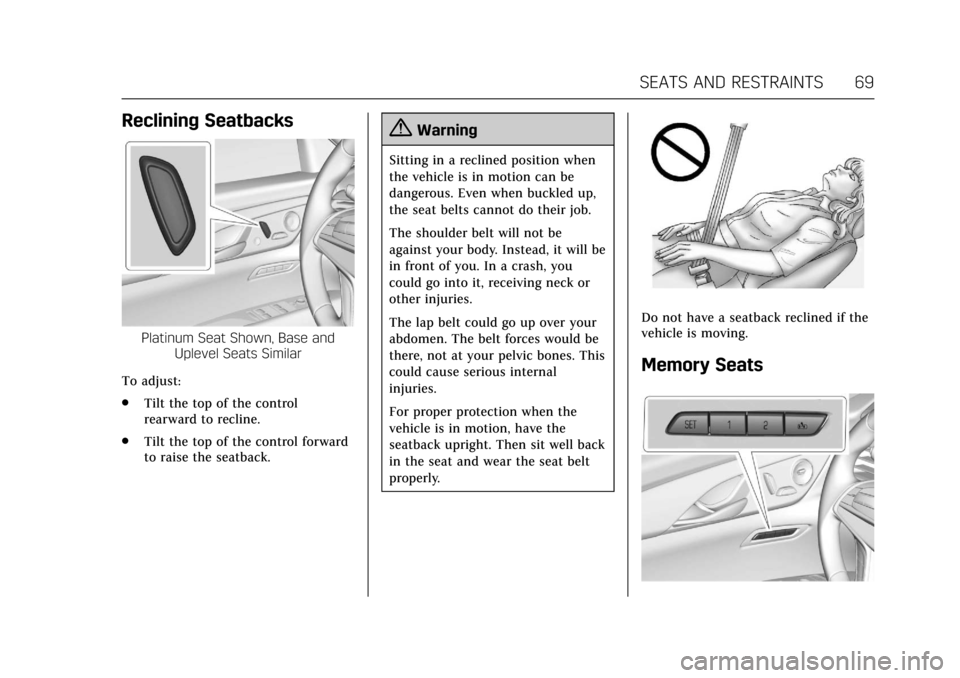
To adjust:
. Tilt the top of the control
rearward to recline.
. Tilt the top of the control forward
to raise the seatback.
{Warning
Sitting in a reclined position when
the vehicle is in motion can be
dangerous. Even when buckled up,
the seat belts cannot do their job.
The shoulder belt will not be
against your body. Instead, it will be
in front of you. In a crash, you
could go into it, receiving neck or
other injuries.
The lap belt could go up over your
abdomen. The belt forces would be
there, not at your pelvic bones. This
could cause serious internal
injuries.
For proper protection when the
vehicle is in motion, have the
seatback upright. Then sit well back
in the seat and wear the seat belt
properly.
Do not have a seatback reclined if the
vehicle is moving.
Memory Seats
Page 73 of 445
Cadillac CT6 Owner Manual (GMNA-Localizing-U.S./Canada-11292458) -
2018 - crc - 2/15/17
72 SEATS AND RESTRAINTS
number that positions were saved to.
Try storing the position to the other
memory button or try the other RKE
transmitter.
Easy Exit Recall
Easy Exit Recall is not linked to an
RKE transmitter. The position stored
to
Bis used for all drivers. To turn
Easy Exit Recall on or off, see "Vehicle
Personalization Settings" previously in
this section and Vehicle Personalization
0 170.
If turned on, the positions saved to
Bare automatically recalled when
one of the following occurs:
. The vehicle is turned off and the
driver door is opened within a
short time.
. The vehicle is turned off with the
driver door open.
To stop Easy Exit Recall movement,
press any of the following memory
controls:
. Power seat
. Memory SET, 1, 2, or
B
.Power mirror, with the driver or
passenger side mirror selected
. Power steering wheel
Obstructions
If something has blocked the driver
seat and/or power steering wheel
while recalling a memory position, the
recall may stop. Remove the
obstruction and try the recall again.
If the memory position still does not
recall, see your dealer for service.
Heated and Ventilated
Front Seats
{Warning
If temperature change or pain to
the skin cannot be felt, the seat
heater may cause burns. To reduce
the risk of burns, use care when
using the seat heater, especially for
long periods of time. Do not place
anything on the seat that insulates
against heat, such as a blanket,
cushion, cover, or similar item. This (Continued)
Warning (Continued)
may cause the seat heater to
overheat. An overheated seat heater
may cause a burn or may damage
the seat.
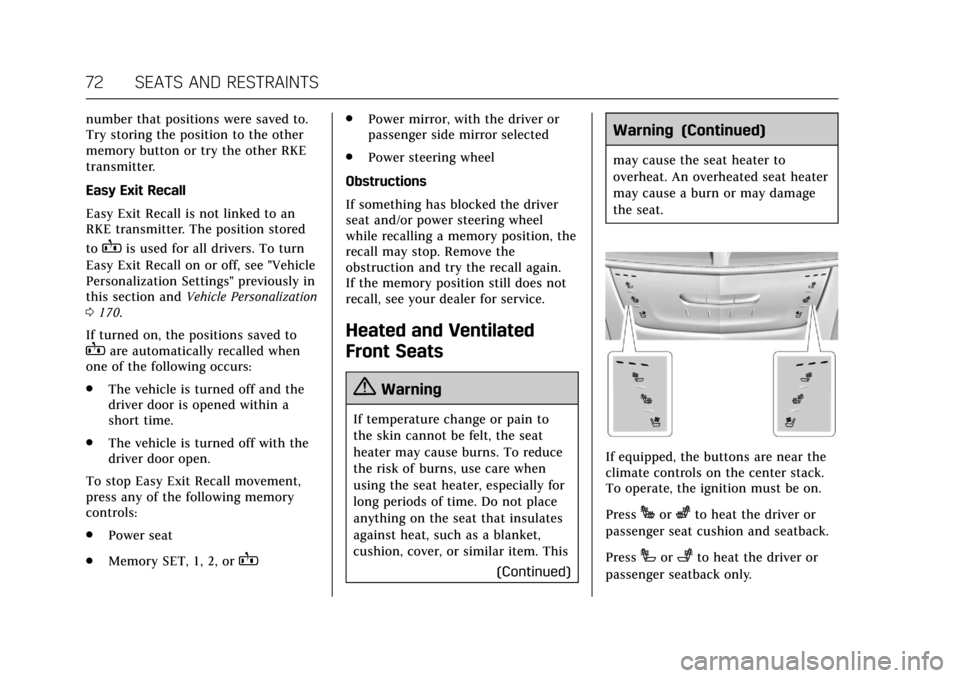
If equipped, the buttons are near the
climate controls on the center stack.
To operate, the ignition must be on.
Press
Jorzto heat the driver or
passenger seat cushion and seatback.
Press
Ior+to heat the driver or
passenger seatback only.
Page 74 of 445
Cadillac CT6 Owner Manual (GMNA-Localizing-U.S./Canada-11292458) -
2018 - crc - 2/15/17
SEATS AND RESTRAINTS 73
PressCor{to ventilate the driver
or passenger seat.
Press the button once for the highest
setting. With each press of the button,
the seat will change to the next lower
setting, and then to the off setting.
The indicator lights next to the
buttons indicate three for the highest
setting and one for the lowest. If the
front heated seats are on high, the
level may automatically be lowered
after approximately 30 minutes.
When this feature is off, the heated
and ventilated seat symbols on the
buttons are white. A ventilated seat
has a fan that pulls or pushes air
through the seat. The air is not
cooled. When a heated seat is turned
on, the symbol turns red. When a
ventilated seat is turned on, the
symbol turns blue.
The passenger seat may take longer to
heat up.
Auto Heated and Ventilated Seats
If the vehicle is equipped with auto
heated or ventilated seats, and the
ignition is on, this feature will automatically activate the heated or
ventilated seats at the level required
by the vehicle's interior temperature.
The active high, medium, low, or off
heated or ventilated seat level will be
indicated by the manual heated and
ventilated seat buttons on the center
stack. Use the manual heated and
ventilated seat buttons on the center
stack to turn auto heated or ventilated
seats off. If the passenger seat is
unoccupied, the auto heated or
ventilated seats feature will not
activate that seat. The auto heated
and ventilated seats feature can be
programmed to always be enabled
when the vehicle is on. If equipped
with a heated steering wheel, the auto
heated steering wheel activation will
follow the heated seat auto activation
and the heated wheel indicator will
follow the state of the steering
wheel heat.
See
Vehicle Personalization 0170.
Remote Start Heated and Ventilated
Seats
If equipped, the heated seats will turn
on automatically during a remote
start if it is cold outside and the ventilated seats will turn on
automatically if it is hot outside.
If equipped, the heated steering wheel
will turn on automatically during a
remote start if it is cold outside. The
heated and ventilated seat indicators
and heated steering wheel indicator
may not come on during this
operation.
The heated and ventilated seats and
heated steering wheel may cancel
when the vehicle is started. These
features can be manually selected
after the ignition is turned on.
The temperature performance of an
unoccupied seat may be reduced. This
is normal.
The heated or ventilated seats will not
turn on during a remote start unless
they are enabled in the vehicle
personalization menu.
See
Remote Vehicle Start 042 and
Vehicle Personalization 0170.
Page 76 of 445
Cadillac CT6 Owner Manual (GMNA-Localizing-U.S./Canada-11292458) -
2018 - crc - 2/15/17
SEATS AND RESTRAINTS 75
vehicle through the rear door and left
the vehicle without the vehicle being
shut off.
The feature can be turned on or off.
SeeVehicle Personalization 0170.
Rear Seat Adjustment
{Warning
The power seats will work with the
ignition off. Children could operate
the power seats and be injured.
Never leave children alone in the
vehicle.
Caution
Do not adjust the power seat when
a child restraint is installed.
Adjusting the seat may cause
damage to the installed child
restraint. Use the window lockout
button on the driver door to
prevent adjustment of the seat
whenever a child restraint is
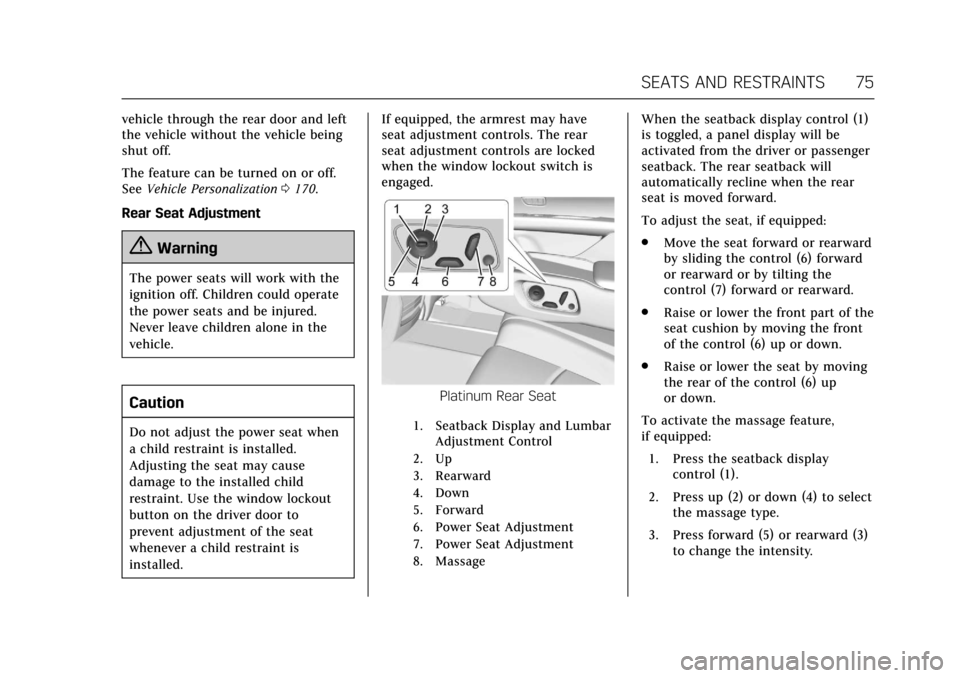
installed. If equipped, the armrest may have
seat adjustment controls. The rear
seat adjustment controls are locked
when the window lockout switch is
engaged.
Platinum Rear Seat
1. Seatback Display and Lumbar
Adjustment Control
2. Up
3. Rearward
4. Down
5. Forward
6. Power Seat Adjustment
7. Power Seat Adjustment
8. Massage
When the seatback display control (1)
is toggled, a panel display will be
activated from the driver or passenger
seatback. The rear seatback will
automatically recline when the rear
seat is moved forward.
To adjust the seat, if equipped:
. Move the seat forward or rearward
by sliding the control (6) forward
or rearward or by tilting the
control (7) forward or rearward.
. Raise or lower the front part of the
seat cushion by moving the front
of the control (6) up or down.
. Raise or lower the seat by moving
the rear of the control (6) up
or down.
To activate the massage feature,
if equipped: 1. Press the seatback display control (1).
2. Press up (2) or down (4) to select the massage type.
3. Press forward (5) or rearward (3) to change the intensity.
Page 77 of 445
Cadillac CT6 Owner Manual (GMNA-Localizing-U.S./Canada-11292458) -
2018 - crc - 2/15/17
76 SEATS AND RESTRAINTS
4. Press the massage control button(8) to recall the last massage
type and intensity.
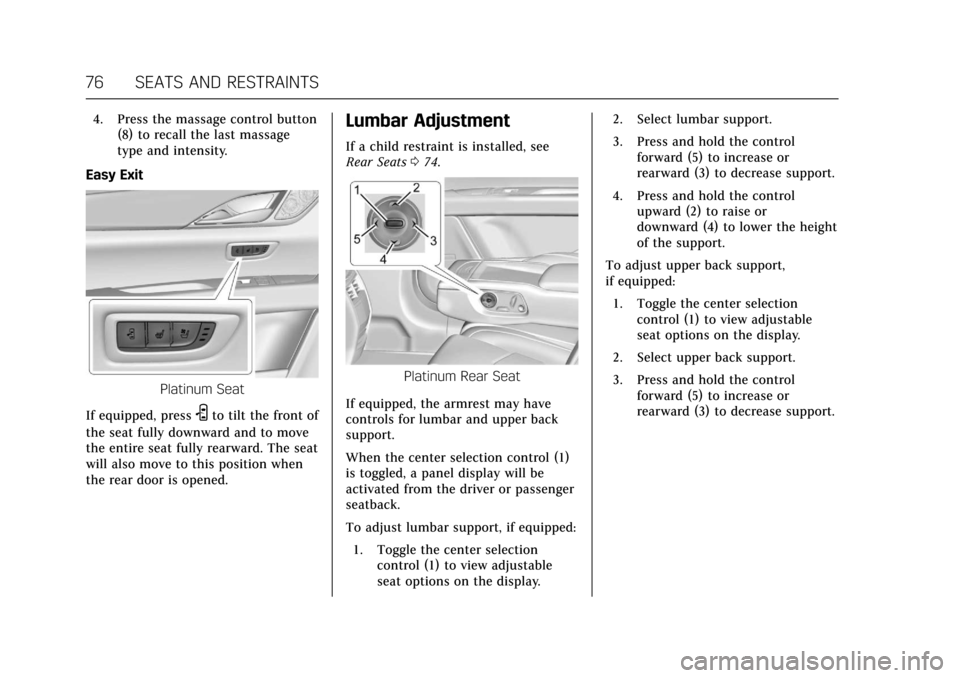
Easy Exit
Platinum Seat
If equipped, press
Sto tilt the front of
the seat fully downward and to move
the entire seat fully rearward. The seat
will also move to this position when
the rear door is opened.
Lumbar Adjustment
If a child restraint is installed, see
Rear Seats 074.
Platinum Rear Seat
If equipped, the armrest may have
controls for lumbar and upper back
support.
When the center selection control (1)
is toggled, a panel display will be
activated from the driver or passenger
seatback.
To adjust lumbar support, if equipped: 1. Toggle the center selection control (1) to view adjustable
seat options on the display. 2. Select lumbar support.
3. Press and hold the control
forward (5) to increase or
rearward (3) to decrease support.
4. Press and hold the control upward (2) to raise or
downward (4) to lower the height
of the support.
To adjust upper back support,
if equipped:
1. Toggle the center selection control (1) to view adjustable
seat options on the display.
2. Select upper back support.
3. Press and hold the control forward (5) to increase or
rearward (3) to decrease support.