front seat CADILLAC CT6 2018 1.G Service Manual
[x] Cancel search | Manufacturer: CADILLAC, Model Year: 2018, Model line: CT6, Model: CADILLAC CT6 2018 1.GPages: 445, PDF Size: 7.7 MB
Page 113 of 445
Cadillac CT6 Owner Manual (GMNA-Localizing-U.S./Canada-11292458) -
2018 - crc - 2/15/17
112 SEATS AND RESTRAINTS
Warning (Continued)
passenger frontal airbag inflates.
This is because the back of the
rear-facing child restraint would be
very close to the inflating airbag.
A child in a forward-facing child
restraint can be seriously injured or
killed if the front outboard
passenger frontal airbag inflates
and the passenger seat is in a
forward position.
Even if the passenger sensing
system has turned off the front
outboard passenger airbag(s), no
system is fail-safe. No one can
guarantee that an airbag will not
deploy under some unusual
circumstance, even though the
airbag(s) are off.
Secure rear-facing child restraints
in a rear seat, even if the airbag(s)
are off. If you secure a
forward-facing child restraint in the
front outboard passenger seat,(Continued)
Warning (Continued)
always move the seat as far back as
it will go. It is better to secure the
child restraint in a rear seat.
SeePassenger Sensing System 091
for additional information.
If the child restraint uses a top tether,
see Lower Anchors and Tethers for
Children (LATCH System) 0103 for top
tether anchor locations.
Do not secure a child seat in a
position without a top tether anchor if
a national or local law requires that
the top tether be anchored, or if the
instructions that come with the child
restraint say that the top strap must
be anchored.
In Canada, the law requires that
forward-facing child restraints have a
top tether, and that the tether be
attached. When using the lap-shoulder belt to
secure the child restraint in this
position, follow the instructions that
came with the child restraint and the
following instructions:
1. Move the seat as far back as it will go before securing the
forward-facing child restraint.
Move the seat upward or the
seatback to an upright position,
if needed, to get a tight
installation of the child restraint.
When the passenger sensing
system has turned off the front
outboard passenger frontal
airbag and knee airbag, the off
indicator on the passenger airbag
status indicator should light and
stay lit when you start the
vehicle. See Passenger Airbag
Status Indicator 0141.
2. Put the child restraint on the seat.
3. Pick up the latch plate, and run the lap and shoulder portions of
the vehicle's seat belt through or
around the restraint. The child
restraint instructions will show
you how.
Page 121 of 445
Cadillac CT6 Owner Manual (GMNA-Localizing-U.S./Canada-11292458) -
2018 - crc - 2/14/17
120 INSTRUMENTS AND CONTROLS
Automatic Heated Steering Wheel
If equipped with remote start, the
heated steering wheel will turn on
automatically during a remote start
along with the heated seats when it is
cold outside. The heated steering
wheel indicator light may not
come on.
If equipped with auto heated seats,
the heated steering wheel will turn on
when the auto heated seat is
activated. The heated steering wheel
indicator will follow the state of the
steering wheel heat.
SeeHeated and Ventilated Front Seats
0 72 and Vehicle Personalization 0170.
Horn
Pressaon the steering wheel pad to
sound the horn.
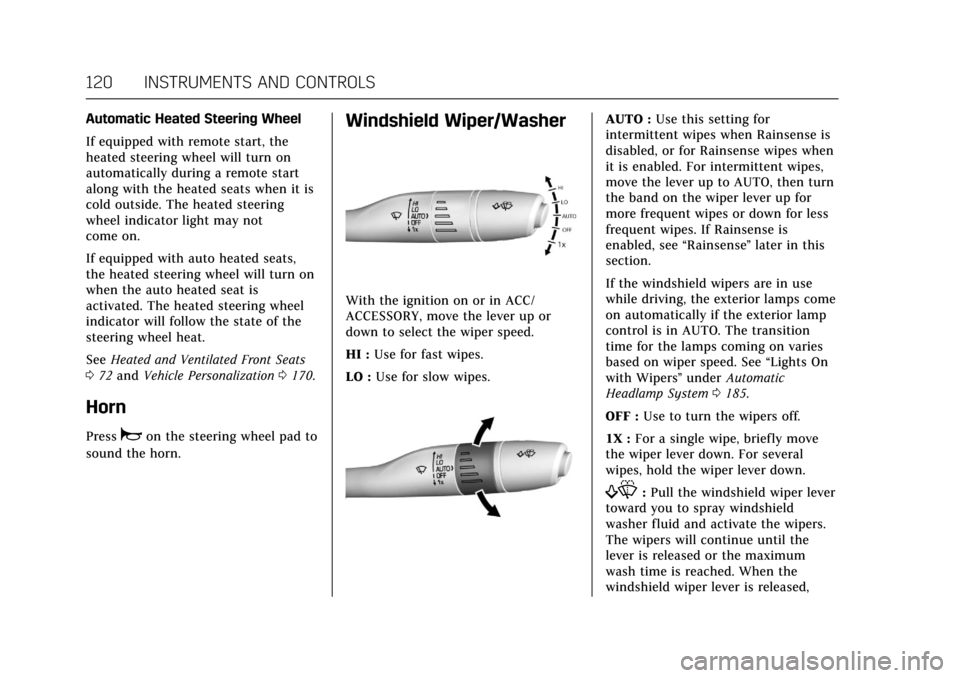
Windshield Wiper/Washer
With the ignition on or in ACC/
ACCESSORY, move the lever up or
down to select the wiper speed.
HI : Use for fast wipes.
LO : Use for slow wipes.
AUTO : Use this setting for
intermittent wipes when Rainsense is
disabled, or for Rainsense wipes when
it is enabled. For intermittent wipes,
move the lever up to AUTO, then turn
the band on the wiper lever up for
more frequent wipes or down for less
frequent wipes. If Rainsense is
enabled, see “Rainsense”later in this
section.
If the windshield wipers are in use
while driving, the exterior lamps come
on automatically if the exterior lamp
control is in AUTO. The transition
time for the lamps coming on varies
based on wiper speed. See “Lights On
with Wipers ”under Automatic
Headlamp System 0185.
OFF : Use to turn the wipers off.
1X : For a single wipe, briefly move
the wiper lever down. For several
wipes, hold the wiper lever down.
f: Pull the windshield wiper lever
toward you to spray windshield
washer fluid and activate the wipers.
The wipers will continue until the
lever is released or the maximum
wash time is reached. When the
windshield wiper lever is released,
Page 142 of 445
Cadillac CT6 Owner Manual (GMNA-Localizing-U.S./Canada-11292458) -
2018 - crc - 2/14/17
INSTRUMENTS AND CONTROLS 141
Passenger Seat Belt Reminder
Light
There is a passenger seat belt
reminder light near the passenger
airbag status indicator. SeePassenger
Sensing System 091.
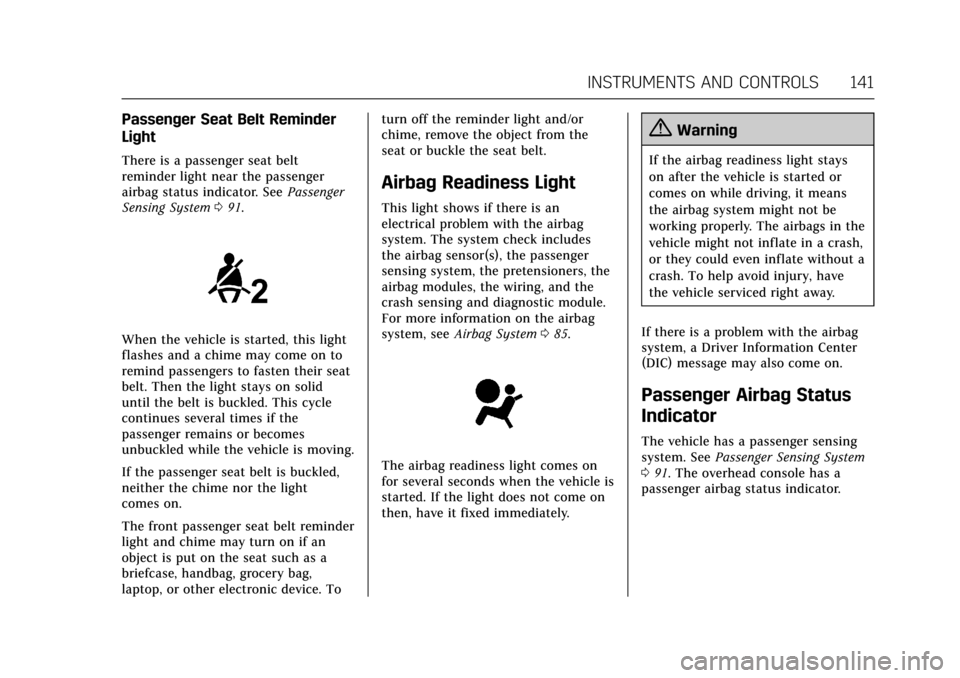
When the vehicle is started, this light
flashes and a chime may come on to
remind passengers to fasten their seat
belt. Then the light stays on solid
until the belt is buckled. This cycle
continues several times if the
passenger remains or becomes
unbuckled while the vehicle is moving.
If the passenger seat belt is buckled,
neither the chime nor the light
comes on.
The front passenger seat belt reminder
light and chime may turn on if an
object is put on the seat such as a
briefcase, handbag, grocery bag,
laptop, or other electronic device. To turn off the reminder light and/or
chime, remove the object from the
seat or buckle the seat belt.
Airbag Readiness Light
This light shows if there is an
electrical problem with the airbag
system. The system check includes
the airbag sensor(s), the passenger
sensing system, the pretensioners, the
airbag modules, the wiring, and the
crash sensing and diagnostic module.
For more information on the airbag
system, see
Airbag System 085.
The airbag readiness light comes on
for several seconds when the vehicle is
started. If the light does not come on
then, have it fixed immediately.
{Warning
If the airbag readiness light stays
on after the vehicle is started or
comes on while driving, it means
the airbag system might not be
working properly. The airbags in the
vehicle might not inflate in a crash,
or they could even inflate without a
crash. To help avoid injury, have
the vehicle serviced right away.
If there is a problem with the airbag
system, a Driver Information Center
(DIC) message may also come on.
Passenger Airbag Status
Indicator
The vehicle has a passenger sensing
system. See Passenger Sensing System
0 91. The overhead console has a
passenger airbag status indicator.
Page 173 of 445

Cadillac CT6 Owner Manual (GMNA-Localizing-U.S./Canada-11292458) -
2018 - crc - 2/14/17
172 INSTRUMENTS AND CONTROLS
.Auto Defog
. Auto Rear Defog
. Ionizer
. Engine Assist Heat
. Engine Assist Heat Plugged In
Auto Fan Speed
This feature will set the auto fan
speed.
Select Low, Medium, or High.
Air Quality Sensor
This allows for selection of air quality
sensor operation at high or low
sensitivity.
Select Off, Low Sensitivity, or High
Sensitivity.
Auto Cooled Seats
When enabled, this feature will
automatically activate the cooled seats
at the level required by the interior
temperature. See Heated and Ventilated
Front Seats 072.
Select Off or On. Auto Heated Seats
When enabled, this feature will
automatically activate heated seats at
the level required by the interior
temperature. See
Heated and Ventilated
Front Seats 072.
If equipped with Auto Heated Steering
Wheel, this feature will turn on when
the Auto Heated Seats turn on.
Select Off or On.
Auto Defog
When set to On, the front defog will
automatically react to temperature
and humidity conditions that may
cause fogging.
Select Off or On.
Auto Rear Defog
If equipped, this allows the Auto Rear
Defog to be turned on or off. This
feature will automatically turn on the
rear window defogger when it is cold
outside.
Select Off or On. Ionizer
If equipped and on, this feature
purifies the air in the interior of the
vehicle.
See
Automatic Climate Control System
(Quad Zone - Gasoline Only) 0197 or
Automatic Climate Control System (Dual
Zone - Gasoline and PLUG-IN) 0191.
Select Off or On.
Engine Assist Heat
If equipped, this feature selects the
outside temperature level at which the
engine may run to assist heating in
Electric Mode. A change in selection
will not take effect until after the
vehicle is first powered down.
Select On for temperatures below
approximately 2 °C (35 °F), or select
Deferred for temperatures below
approximately −10 °C (15 °F).
Engine Assist Heat Plugged In
During remote start, this feature turns
on or off the ability for the engine to
run to help heat the vehicle when it is
plugged in. A change in setting will
not take effect until after the vehicle
is first powered down.
Page 174 of 445
Cadillac CT6 Owner Manual (GMNA-Localizing-U.S./Canada-11292458) -
2018 - crc - 2/14/17
INSTRUMENTS AND CONTROLS 173
Select Off or On.
Collision/Detection Systems
Select and the following may be
displayed:
.Alert Type
. Forward Collision System
. Front Pedestrian Detection
. Rear Cross Traffic Alert
. Adaptive Cruise Go Notifier
. Lane Change Alert
Alert Type
This feature will set crash alerts to
beeps or seat vibrations. This setting
affects all crash alerts including
Forward Collision, Lane Departure
Warning, Adaptive Cruise Control,
Parking Assist, and Backing Warning
alerts.
Select Beeps or Safety Alert Seat.
Forward Collision System
This feature will turn on or off the
Forward Collision Alert (FCA) and
Forward Automatic Braking (FAB).
The Off setting disables all FCA and FAB functions. With the Alert and
Brake setting, both FCA and FAB are
available. The Alert setting disables
FAB, but if the vehicle has Adaptive
Cruise Control (ACC), some
last-second automatic braking
capability is still provided, though less
likely to occur. See
Forward Automatic
Braking (FAB) 0262.
Select Off, Alert and Brake, or Alert.
Front Pedestrian Detection
This feature will turn on or off the
Front Pedestrian Braking (FPB) system
alerts and automatic braking. The Off
setting disables all FPB functions.
With the Alert & Brake setting, system
alerts and automatic braking are both
available. The Alert setting disables
automatic braking. See Front
Pedestrian Braking (FPB) System 0264.
Select Off, Alert, or Alert & Brake.
Rear Cross Traffic Alert
This allows the Rear Cross Traffic
Alert feature to be turned on or off.
Select Off or On. Adaptive Cruise Go Notifier
This feature will give a reminder that
Adaptive Cruise Control provides
when it has brought the vehicle to a
complete stop behind another
stopping vehicle, and then that vehicle
drives on.
Select Off or On.
Lane Change Alert
This allows the Lane Change Alert
feature to be turned on or off.
Select Off or On.
Comfort and Convenience
Select and the following may display:
.
Auto Memory Recall
. Easy Exit Options
. Chime Volume
. Reverse Tilt Mirror
. Auto Mirror Folding
. Rainsense Wipers
Page 196 of 445
Cadillac CT6 Owner Manual (GMNA-Localizing-U.S./Canada-11292458) -
2018 - crc - 2/14/17
CLIMATE CONTROLS 195
air supply and turn on the air
conditioner. If the climate control
system does not detect possible
window fogging, it returns to normal
operation. To turn Auto Defog off or
on, see“Climate and Air Quality”
under Vehicle Personalization 0170.
Ionizer : If equipped with an ionizer,
this feature helps to clean the air
inside the vehicle and remove
contaminants; such as pollen, odors,
and dust. If the climate control
system is on and the ionizer is
enabled, the ionizer status indicator
will be lit on the climate control
display. To turn the ionizer on or off,
see “Climate and Air Quality” under
Vehicle Personalization 0170.
Rear Window Defogger
K:Press to turn the rear window
defogger on or off. The rear window
defogger only works when the engine
is running.
The rear window defogger can be set
to automatic operation. See “Climate
and Air Quality” underVehicle
Personalization 0170. When Auto Rear
Defog is selected, the rear window
defogger turns on automatically when the interior temperature is cold and
the outside temperature is about 4 °C
(40 °F) and below.
The upper grid lines on the rear
window are antenna lines and are not
intended to heat when the defogger is
activated.
The heated outside mirrors turn on
when the rear window defogger
button is on and help to clear fog or
frost from the surface of the mirrors.
Caution
Do not try to clear frost or other
material from the inside of the
front windshield and rear window
with a razor blade or anything else
that is sharp. This may damage the
rear window defogger grid and
affect the radio's ability to pick up
stations clearly. The repairs would
not be covered by the vehicle
warranty.
Driver and Passenger Heated and
Ventilated Seats (If Equipped) :
Press
Ior+to heat the driver or
passenger seatback only.
Press
Jorzto heat the driver or
passenger seat cushion and seatback.
Press
Cor{to ventilate the driver
or passenger seat. See Heated and
Ventilated Front Seats 072.
Remote Start Climate Control
Operation : If equipped with the
remote start feature, the climate
control system may run when the
vehicle is started remotely. The system
uses the driver’s previous settings to
heat or cool the inside of the vehicle.
The rear defog may come on during
remote start based on cold ambient
conditions. The rear defog indicator
light does not come on during a
remote start.
Page 197 of 445

Cadillac CT6 Owner Manual (GMNA-Localizing-U.S./Canada-11292458) -
2018 - crc - 2/14/17
196 CLIMATE CONTROLS
If equipped, the heated seats will turn
on if it is cold outside or the
ventilated seats will turn on if it is hot
outside. The heated and ventilated
seat indicator lights may not come on
during a remote start. If equipped, the
heated steering wheel will come on in
a remote start if it is cold outside. The
heated steering wheel indicator light
may not come on.
SeeRemote Vehicle Start 042 and
Heated and Ventilated Front Seats 072.
Sensor
The solar sensor, on top of the
instrument panel near the windshield,
monitors the solar heat. The climate control system uses the
sensor information to adjust the
temperature, fan speed, recirculation,
and air delivery mode for best
comfort.
If the sensor is covered, the automatic
climate control system may not work
properly.
Page 201 of 445
Cadillac CT6 Owner Manual (GMNA-Localizing-U.S./Canada-11292458) -
2018 - crc - 2/14/17
200 CLIMATE CONTROLS
Pressing this button cancels automatic
recirculation. Press AUTO to return to
automatic operation; recirculation
runs automatically as needed.
Manual recirculation mode is not
available when in Defrost or Defog
modes.
Auto Defog :The climate control
system may have a sensor to
automatically detect high humidity
inside the vehicle. When high
humidity is detected, the climate
control system may adjust to outside
air supply and turn on the air
conditioner. If the climate control
system does not detect possible
window fogging, it returns to normal
operation. To turn Auto Defog off or
on, see “Climate and Air Quality”
under Vehicle Personalization 0170.
Ionizer : If equipped with an ionizer,
this feature helps to clean the air
inside the vehicle and remove
contaminants such as pollen, odors,
and dust. If the climate control
system is on and the ionizer is
enabled, the ionizer status indicator
will be lit on the climate control display. To turn the ionizer on or off,
see
“Climate and Air Quality” under
Vehicle Personalization 0170.
Rear Window Defogger
K:Press to turn the rear window
defogger on or off.
The rear window defogger can be set
to automatic operation. See “Climate
and Air Quality” underVehicle
Personalization 0170. When Auto Rear
Defog is selected, the rear window
defogger turns on automatically when
the interior temperature is cold and
the outside temperature is about 4 °C
(40 °F) and below.
The upper grid lines on the rear
window are antenna lines and are not
intended to heat when the defogger is
activated.
The heated outside mirrors turn on
when the rear window defogger
button is on and help to clear fog or
frost from the surface of the mirrors.
Caution
Do not try to clear frost or other
material from the inside of the
front windshield and rear window
with a razor blade or anything else
that is sharp. This may damage the
rear window defogger grid and
affect the radio's ability to pick up
stations clearly. The repairs would
not be covered by the vehicle
warranty.
Driver and Passenger Heated and
Ventilated Seats (If Equipped) :
Press
Ior+to heat the driver or
passenger seatback only.
Press
Jorzto heat the driver or
passenger seat cushion and seatback.
Press
Cor{to ventilate the driver
or passenger seat. See Heated and
Ventilated Front Seats 072.
Remote Start Climate Control
Operation : If equipped with the
remote start feature, the climate
control system may run when the
vehicle is started remotely. The system
Page 202 of 445
Cadillac CT6 Owner Manual (GMNA-Localizing-U.S./Canada-11292458) -
2018 - crc - 2/14/17
CLIMATE CONTROLS 201
uses the driver’s previous settings to
heat or cool the inside of the vehicle.
The rear window defogger may come
on during remote start based on cold
ambient conditions. The rear window
defogger indicator light does not come
on during a remote start.
If equipped, the heated seats will turn
on if it is cold outside or the
ventilated seats will turn on if it is hot
outside. The heated and ventilated
seat indicator lights may not come on
during a remote start. If equipped, the
heated steering wheel will come on in
a remote start if it is cold outside. The
heated steering wheel indicator light
may not come on.
SeeRemote Vehicle Start 042 and
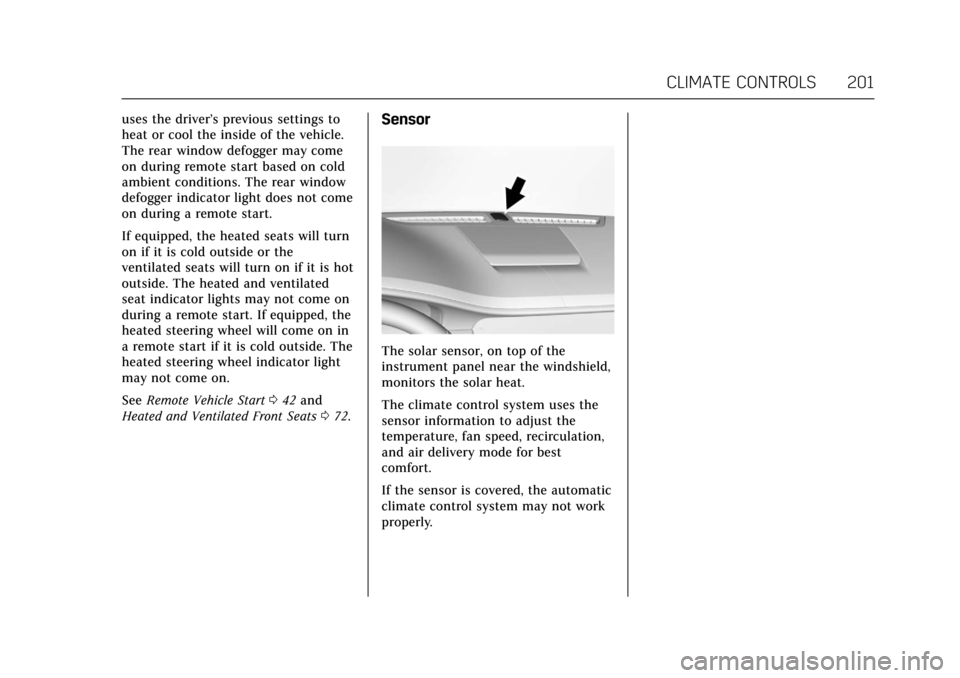
Heated and Ventilated Front Seats 072.Sensor
The solar sensor, on top of the
instrument panel near the windshield,
monitors the solar heat.
The climate control system uses the
sensor information to adjust the
temperature, fan speed, recirculation,
and air delivery mode for best
comfort.
If the sensor is covered, the automatic
climate control system may not work
properly.
Page 204 of 445

Cadillac CT6 Owner Manual (GMNA-Localizing-U.S./Canada-11292458) -
2018 - crc - 2/14/17
CLIMATE CONTROLS 203
9. Air Delivery Mode Control
Rear : Touch Rear on the Home Page
of the infotainment display to open
the rear climate control display. The
rear climate control settings can now
be adjusted from the front
passenger area.
O: PressOor touch ON/OFF on the
rear climate control display to turn
the rear climate control on or off.
SYNC : Touch SYNC on the rear
climate control display to match the
rear climate control temperature to
the front climate control driver
temperature. The SYNC button will
be lit.
Rear Control Lockout : Touch to lock
or unlock control of the rear climate
control system from the rear seat
passengers. When locked, the rear
climate control can only be adjusted
from the front seat.
Automatic Operation
AUTO : Press to turn on or off. The
air delivery is controlled
automatically. The AUTO indicator appears on the display. If the air
delivery mode is manually adjusted,
this cancels full automatic operation.
Manual Operation
9:
Press or press and hold the rear
fan button up or down to increase or
decrease the rear climate airf low. The
rear climate airf low can also be
adjusted by touching the fan controls
on the front climate control display.
Temperature Controls : Press or
press and hold the rear temperature
control buttons up or down to adjust
the rear passenger temperatures. The
rear passenger temperatures can also
be adjusted by touching + for warmer
air or −for cooler air on the front
climate control display.
Air Delivery Mode Control : Press or
press and hold the button up or down
to select the desired air delivery mode.
Touch the right and left arrows at the
bottom of the rear climate control
display to change the direction of the
airf low in the rear seating area.
Air Vents
Adjustable air vents are in the center
and on the sides of the instrument
panel, on the rear of the center
console storage, and in the headliner
over the rear seats, if equipped.
Move the slider knobs to change the
direction of or to close off the airf low.
Operation Tips
. Clear away any ice, snow, or leaves
from air inlets at the base of the
windshield that could block the
flow of air into the vehicle.