charging CADILLAC CT6 2018 1.G Owner's Manual
[x] Cancel search | Manufacturer: CADILLAC, Model Year: 2018, Model line: CT6, Model: CADILLAC CT6 2018 1.GPages: 445, PDF Size: 7.7 MB
Page 159 of 445
Cadillac CT6 Owner Manual (GMNA-Localizing-U.S./Canada-11292458) -
2018 - crc - 2/14/17
158 INSTRUMENTS AND CONTROLS
Electric Rate Finish Time Editing
It is recommended to have the vehicle
unplugged while editing electric rate
finish time. From the Edit (Summer,
Winter, or Yearly) Electric Rate
Schedule screen, touch Edit next to
the row to change.
1. Touch + or−to adjust the time.
2. Touch Off-Peak, Mid-Peak, or Peak to select the electric rate.
3. Touch
0 jto store changes.
Only the finish time can be edited.
The start time is automatically
populated in the rate table.
Electric Rate Schedule Viewing
From the Select Electric Rate Plan
screen, touch View (Summer, Winter,
or Yearly) Schedule.
Temporary Charge Mode
Override and Cancel
Programmed Delayed Charge Modes
can be temporarily overridden to an
Immediate Charge Mode for one
charge cycle. Also, the next planned
departure time can be temporarily
overridden for one charge cycle. In
addition to the in-vehicle overrides via
the infotainment display, there are
other ways to temporarily override a
Delayed Charge Mode. See Plug-In
Charging (PLUG-IN Only) 0274.
Temporary Override of a Delayed
Charge Mode
To temporarily override a Delayed
Charge Mode to Immediate Charge
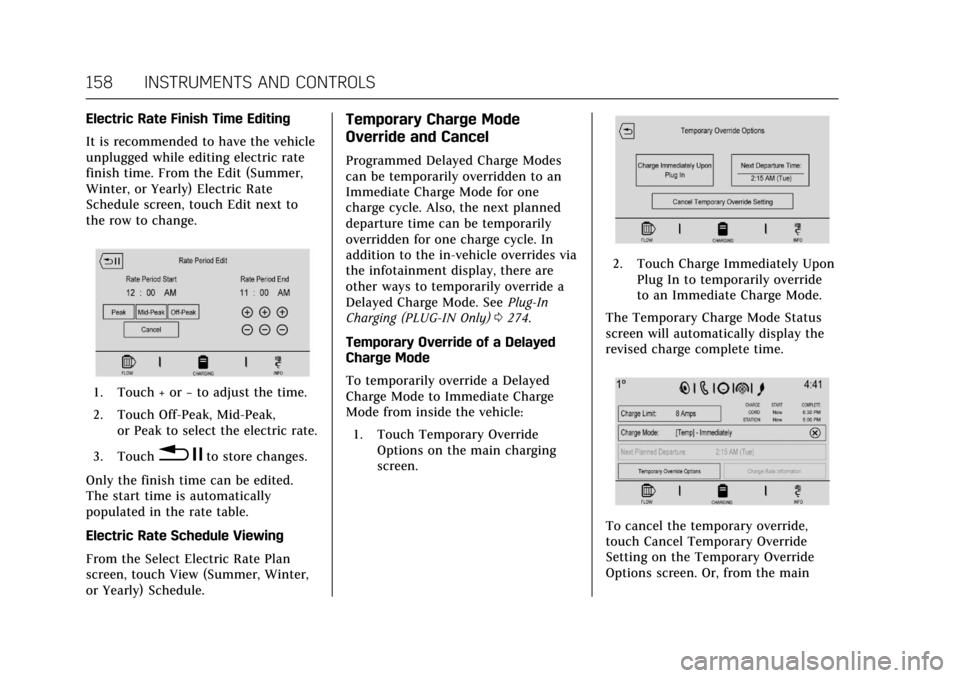
Mode from inside the vehicle: 1. Touch Temporary Override Options on the main charging
screen.
2. Touch Charge Immediately UponPlug In to temporarily override
to an Immediate Charge Mode.
The Temporary Charge Mode Status
screen will automatically display the
revised charge complete time.
To cancel the temporary override,
touch Cancel Temporary Override
Setting on the Temporary Override
Options screen. Or, from the main
Page 160 of 445
Cadillac CT6 Owner Manual (GMNA-Localizing-U.S./Canada-11292458) -
2018 - crc - 2/14/17
INSTRUMENTS AND CONTROLS 159
charging screen, touch the X on the
far right side of the Charge Mode
button.
Temporary Override of the Next
Planned Departure Time
It is recommended to have the vehicle
unplugged while editing
departure time.
To temporarily override the Next
Planned Departure Time from inside
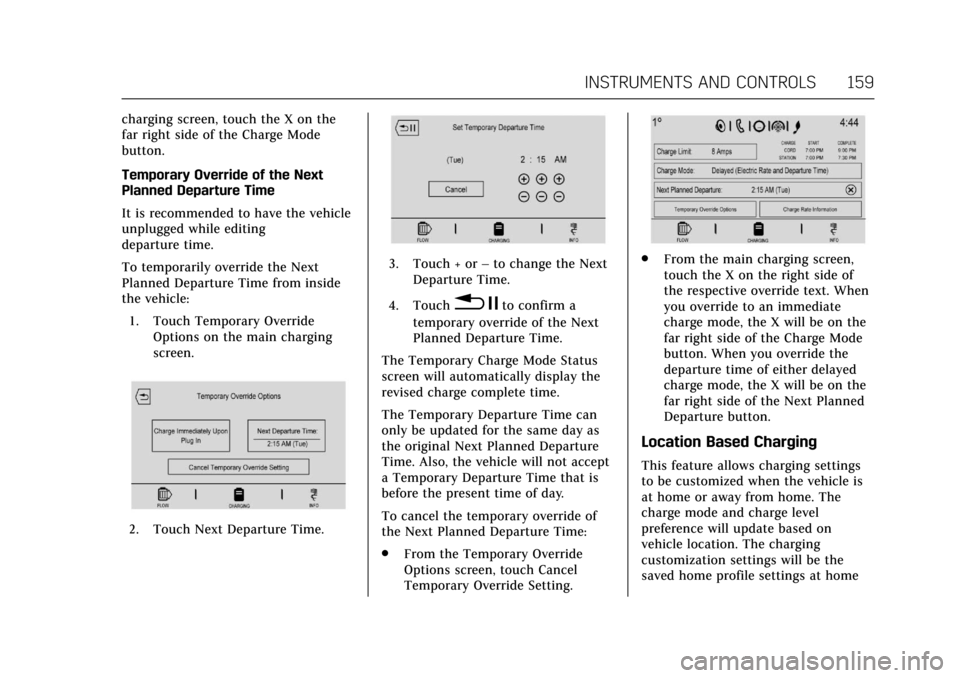
the vehicle:1. Touch Temporary Override Options on the main charging
screen.
2. Touch Next Departure Time.
3. Touch + or –to change the Next
Departure Time.
4. Touch
0 jto confirm a
temporary override of the Next
Planned Departure Time.
The Temporary Charge Mode Status
screen will automatically display the
revised charge complete time.
The Temporary Departure Time can
only be updated for the same day as
the original Next Planned Departure
Time. Also, the vehicle will not accept
a Temporary Departure Time that is
before the present time of day.
To cancel the temporary override of
the Next Planned Departure Time:
. From the Temporary Override
Options screen, touch Cancel
Temporary Override Setting.
.From the main charging screen,
touch the X on the right side of
the respective override text. When
you override to an immediate
charge mode, the X will be on the
far right side of the Charge Mode
button. When you override the
departure time of either delayed
charge mode, the X will be on the
far right side of the Next Planned
Departure button.
Location Based Charging
This feature allows charging settings
to be customized when the vehicle is
at home or away from home. The
charge mode and charge level
preference will update based on
vehicle location. The charging
customization settings will be the
saved home profile settings at home
Page 161 of 445

Cadillac CT6 Owner Manual (GMNA-Localizing-U.S./Canada-11292458) -
2018 - crc - 2/14/17
160 INSTRUMENTS AND CONTROLS
and Charge Immediate when away
from home. Dashes will display on the
screen when GPS is unavailable.
Using Location Based Charging
To use location based charging, a
home location must first be stored. To
store a home location:1. From the Home Page, touch Settings.
2. Touch Vehicle.
3. Touch Energy Settings.
4. Touch Location Based Charging.
5. Touch Set Home Location.
6. A pop-up will confirm the setting and the compass will be lit. In
addition, the Set Home Location
will change to Update Home
Location.
To turn location based charging on
or off: 1. Follow Steps 1–4 under “Using
Location Based Charging” to get
to the Location Based Charging
screen.
2. Touch ON or OFF to turn the system on or off. Updating Home Location
To update the home location:
1. Follow Steps 1–4 under “Using
Location Based Charging” to get
to the Location Based Charging
screen.
2. Choose Update Home Location.
3. Choose:
Update : Use when the vehicle is
parked in a new location.
Cancel : Use to cancel this operation
and make no changes.
Remove : Use to remove the stored
home location from the vehicle. This
will turn the feature off because there
will be no home location stored.
Expiration : Use to store the charge
level preference at the home location
for up to 90 days. After 90 days, a
notification will display on the screen
and the charge level preference will
need to be reset for the next 90 days.Charging Interrupted or
Overridden Pop-Up
The Charging Interrupted or
Overridden pop-up will appear if any
of the following conditions occur:
. The charging options have been
updated through the mobile app.
. There was an unintended loss of
AC power during the plug-in
charge event. For example, there
was a power outage or the charge
cord was unplugged from the wall.
. The charge process was
interrupted by the utility company.
See Utility Interruption of Charging
(PLUG-IN Only) 0284.
Page 162 of 445
Cadillac CT6 Owner Manual (GMNA-Localizing-U.S./Canada-11292458) -
2018 - crc - 2/14/17
INSTRUMENTS AND CONTROLS 161
Programmable Charging
Disabled
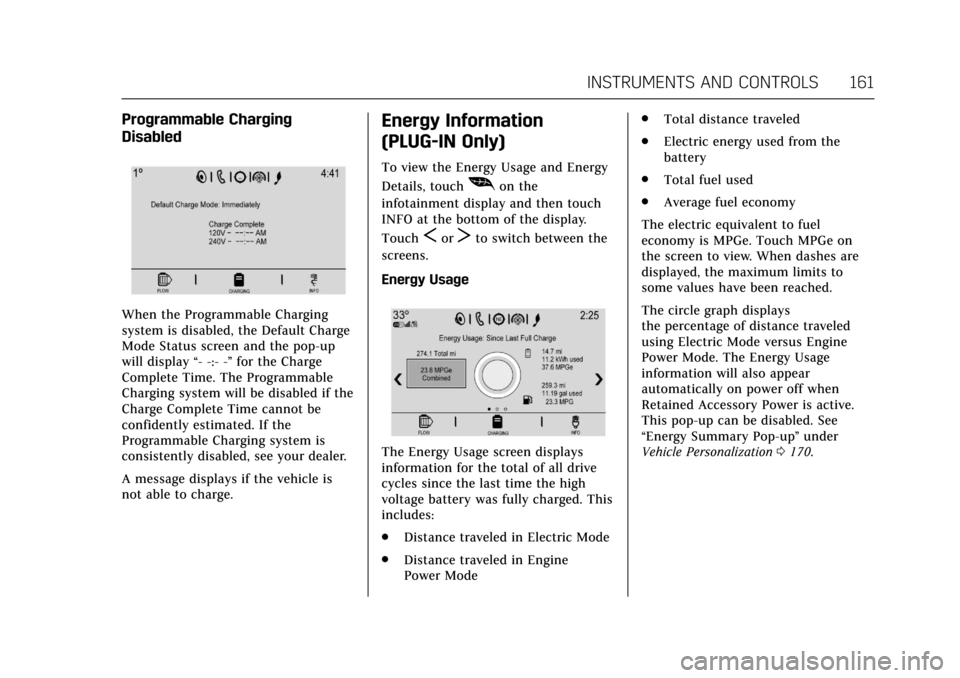
When the Programmable Charging
system is disabled, the Default Charge
Mode Status screen and the pop-up
will display“- -:- -”for the Charge
Complete Time. The Programmable
Charging system will be disabled if the
Charge Complete Time cannot be
confidently estimated. If the
Programmable Charging system is
consistently disabled, see your dealer.
A message displays if the vehicle is
not able to charge.
Energy Information
(PLUG-IN Only)
To view the Energy Usage and Energy
Details, touch
[on the
infotainment display and then touch
INFO at the bottom of the display.
Touch
SorTto switch between the
screens.
Energy Usage
The Energy Usage screen displays
information for the total of all drive
cycles since the last time the high
voltage battery was fully charged. This
includes:
. Distance traveled in Electric Mode
. Distance traveled in Engine
Power Mode .
Total distance traveled
. Electric energy used from the
battery
. Total fuel used
. Average fuel economy
The electric equivalent to fuel
economy is MPGe. Touch MPGe on
the screen to view. When dashes are
displayed, the maximum limits to
some values have been reached.
The circle graph displays
the percentage of distance traveled
using Electric Mode versus Engine
Power Mode. The Energy Usage
information will also appear
automatically on power off when
Retained Accessory Power is active.
This pop-up can be disabled. See
“Energy Summary Pop-up ”under
Vehicle Personalization 0170.
Page 175 of 445

Cadillac CT6 Owner Manual (GMNA-Localizing-U.S./Canada-11292458) -
2018 - crc - 2/14/17
174 INSTRUMENTS AND CONTROLS
Auto Memory Recall
This feature automatically recalls the
current driver’s previously stored 1 or
2 button positions when entering the
vehicle. SeeMemory Seats 069.
Select Off or On.
Easy Exit Options
This feature automatically recalls the
current driver’s previously stored exit
button position when exiting the
vehicle. See Memory Seats 069.
Select Off or On.
Chime Volume
This allows the selection of the chime
volume level.
Touch + or −to adjust the volume.
Reverse Tilt Mirror
When on, both the driver and
passenger outside mirrors will tilt
downward when the vehicle is shifted
to R (Reverse) to improve visibility of
the ground near the rear wheels. They
will return to their previous driving
position when the vehicle is shifted
out of R (Reverse) or the engine is
turned off. Select Off, On - Driver and Passenger,
On - Driver, or On - Passenger.
Auto Mirror Folding
When on, the outside mirrors will
automatically fold or unfold when the
Remote Keyless Entry (RKE)
transmitter
QorKbutton is pressed
and held.
Select Off or On.
Rainsense Wipers
This allows the Rainsense Wipers
feature to be disabled or enabled. See
“Rainsense ”in Windshield Wiper/
Washer 0120.
Select Disabled or Enabled.
Energy
Select and the following may display:
. Location Based Charging
. Energy Summary Pop-up
. Charge Status Feedback
. Charge Cord Theft Alert
. Charge Power Loss Alert Location Based Charging
This allows the feature to be turned
on or off.
Select Update Home Location, On,
or Off.
Energy Summary Pop-up
This allows the feature to be turned
on or off.
Select Off or On.
Charge Status Feedback
If the feature is on, horn chirps
are on.
Select Off or On.
Charge Cord Theft Alert
This feature allows the theft alert to
sound when the charge cord is
attempted to be removed and the
vehicle theft system is armed.
Select Off or On.
Charge Power Loss Alert
This feature allows an alert to sound
when the vehicle is charging and loses
power at the electrical outlet.
Select Off or On.
Page 207 of 445
Cadillac CT6 Owner Manual (GMNA-Localizing-U.S./Canada-11292458) -
2018 - crc - 2/14/17
206 DRIVING AND OPERATING
Lane DepartureWarning (LDW) . . . . . . . . . . . . . . . . . 270
Lane Keep Assist (LKA) . . . . . . . . . . 271
Surround Vision Recorder . . . . . . . 272
Charging
Plug-In Charging (PLUG-IN Only) . . . . . . . . . . . . . . . . . 274
Delayed Charging Override (PLUG-IN Only) . . . . . . . . . . . . . . . . . 275
Charging Status Feedback (PLUG-IN Only) . . . . . . . . . . . . . . . . . 275
Charge Cord (PLUG-IN Only) . . . . 279
Utility Interruption of Charging (PLUG-IN Only) . . . . . . . . . . . . . . . . . 284
Electrical Requirements for Battery Charging
(PLUG-IN Only) . . . . . . . . . . . . . . . . . 285
Fuel
Fuel . . . . . . . . . . . . . . . . . . . . . . . . . . . . . . . 286
California Fuel Requirements . . . . 287
Fuels in Foreign Countries . . . . . . . 287
Fuel Additives . . . . . . . . . . . . . . . . . . . . 287
Filling the Tank . . . . . . . . . . . . . . . . . . 288
Filling a Portable Fuel
Container . . . . . . . . . . . . . . . . . . . . . . . . 290
Trailer Towing
General Towing Information . . . . 290
Driving Characteristics andTowing Tips . . . . . . . . . . . . . . . . . . . . . 290 Trailer Towing
(PLUG-IN Only) . . . . . . . . . . . . . . . . . 293
Trailer Towing (Gasoline Only) . . . . . . . . . . . . . . . . . 293
Towing Equipment . . . . . . . . . . . . . . . 294
Conversions and Add-Ons
Add-On Electrical Equipment . . . 295
Driving Information
Distracted Driving
Distraction comes in many forms and
can take your focus from the task of
driving. Exercise good judgment and
do not let other activities divert your
attention away from the road. Many
local governments have enacted laws
regarding driver distraction. Become
familiar with the local laws in
your area.
To avoid distracted driving, keep your
eyes on the road, keep your hands on
the steering wheel, and focus your
attention on driving.
. Do not use a phone in demanding
driving situations. Use a
hands-free method to place or
receive necessary phone calls.
. Watch the road. Do not read, take
notes, or look up information on
phones or other electronic devices.
. Designate a front seat passenger
to handle potential distractions.
Page 221 of 445
Cadillac CT6 Owner Manual (GMNA-Localizing-U.S./Canada-11292458) -
2018 - crc - 2/14/17
220 DRIVING AND OPERATING
the vehicle is ready to be driven. This
could take up to 15 seconds at
extremely cold temperatures. See
Vehicle Ready Light (PLUG-IN Only)
0151.
PLUG-IN Operation
This vehicle combines gasoline and
electric propulsion. The gasoline
engine will automatically start to
provide power and then shut off to
save fuel.
The engine may remain
running when:
.
Accelerating aggressively or
climbing hills.
. Vehicle speed is greater than
125 km/h (75 mph).
. Charging the high voltage battery.
. The heater is being used.
The engine and transmission work
together to provide propulsion power
at the highest efficiency. This may
result in higher engine speeds.
Stop/Start System
{Warning
Exiting the vehicle without first
shifting into P (Park) may cause the
vehicle to move. You or others may
be injured. Because the vehicle may
have an auto engine stop/start
feature, the vehicle's engine might
seem to be shut off; however, once
the brake pedal is released, the
engine will start up again.
Shift to P (Park) and turn the
ignition off before exiting the
vehicle.
The vehicle has a fuel saving stop/
start system to shut off the engine
and help conserve fuel.
Auto Engine Stop/Start
When the brakes are applied and the
vehicle is at a complete stop, the
engine may turn off. When stopped,
the tachometer may display Auto
Stop, or the Auto Stop light may come
on in the instrument cluster.
See Tachometer 0134 and Auto Stop Mode (Uplevel Cluster)
0150. When the
brake pedal is released or the
accelerator pedal is pressed, the
engine may restart.
Auto Stop may be deactivated if:
. A minimum vehicle speed is not
reached.
. The engine or transmission is not
at the required operating
temperature.
. The outside temperature is not in
the required operating range,
typically between -10 °C (14 °F)
and 50 °C (122 °F).
. The shift lever is in any gear other
than D (Drive).
. The battery has been recently
disconnected.
. The battery charge is low.
. The interior comfort level has not
reached the required level for the
climate control system or defog
settings.
Page 226 of 445
Cadillac CT6 Owner Manual (GMNA-Localizing-U.S./Canada-11292458) -
2018 - crc - 2/14/17
DRIVING AND OPERATING 225
Warning (Continued)
on fairly level ground, always set
the parking brake and move the
shift lever to P (Park). SeeShifting
Into Park 0224. If you are towing a
trailer, see Driving Characteristics
and Towing Tips 0290.
If you have to leave the vehicle with
the engine running, the vehicle must
be in P (Park) and the parking brake
set. After shifting into P (Park), try to
move the shift lever out without first
pushing the button on the shift lever.
If you can, the shift lever was not
fully locked into P (Park).
Torque Lock
Torque lock is when the weight of the
vehicle puts too much force on the
parking pawl in the transmission. This
happens when parking on a hill and
shifting the transmission into P (Park)
is not done properly and then it is
difficult to shift out of P (Park). To
prevent torque lock, set the parking brake and then shift into P (Park). To
find out how, see "Shifting Into Park"
listed previously.
If torque lock does occur, the vehicle
may need to be pushed uphill by
another vehicle to relieve the parking
pawl pressure, so you can shift out of
P (Park).
Shifting out of Park
This vehicle is equipped with an
electronic shift lock release system.
The shift lock release is designed to
prevent movement of the shift lever
out of P (Park), unless the ignition is
on and the brake pedal is applied.
The shift lock release is always
functional except in the case of an
uncharged or low voltage (less than
9 volt) battery.
If the vehicle has an uncharged
battery or a battery with low voltage,
try charging or jump starting the
battery. See
Jump Starting - North
America 0374.
To shift out of P (Park): 1. Apply the brake pedal. 2. Release the parking brake. See
Electric Parking Brake 0235.
3. Press the shift lever button.
4. Move the shift lever.
If unable to shift out of P (Park): 1. Fully release the shift lever button.
2. While holding down the brake pedal, press the shift lever
button again.
3. Move the shift lever.
If the shift lever will not move from
P (Park), consult your dealer or a
professional towing service.
Parking over Things
That Burn
{Warning
Things that can burn could touch
hot exhaust parts under the vehicle
and ignite. Do not park over papers,
leaves, dry grass, or other things
that can burn.
Page 275 of 445
Cadillac CT6 Owner Manual (GMNA-Localizing-U.S./Canada-11292458) -
2018 - crc - 2/14/17
274 DRIVING AND OPERATING
Charging
Plug-In Charging
(PLUG-IN Only)
This section explains the charging of
the vehicle's high voltage battery. Do
not allow the vehicle to remain in
extreme temperatures for long periods
without being driven or plugged in.
Plug the vehicle in when temperatures
are below 0 °C (32 °F) and above 32 °C
(90 °F) to maximize the life of the high
voltage battery.
When using the portable charge cord
included with the vehicle, it will take
approximately 12.5 hours to charge
the vehicle with the 12 amp AC
current setting or 20 hours using the
default 8 amp AC current setting.
When using a charging station
capable of 16 amps or more, it will
take approximately 4.5 hours to
charge the vehicle. Charge times will
vary with outside temperature. There
are three ways to program how the
vehicle is charged. SeeProgrammable
Charging (PLUG-IN Only) 0152. The charging system may run fans
and pumps that result in sounds from
the vehicle while it is turned off.
Additional unexpected clicking sounds
may be caused by the electrical
devices used while charging.
While the charge cord is plugged into
the vehicle, the vehicle cannot be
driven.
Charging
Start Charge
1. Make sure the vehicle is parked and turned off.
2. Push the rearward edge of the charge port door in and release
to open the door.
In cold weather conditions, ice
may form around the charge port
door. Remove ice from the area
before attempting to open or
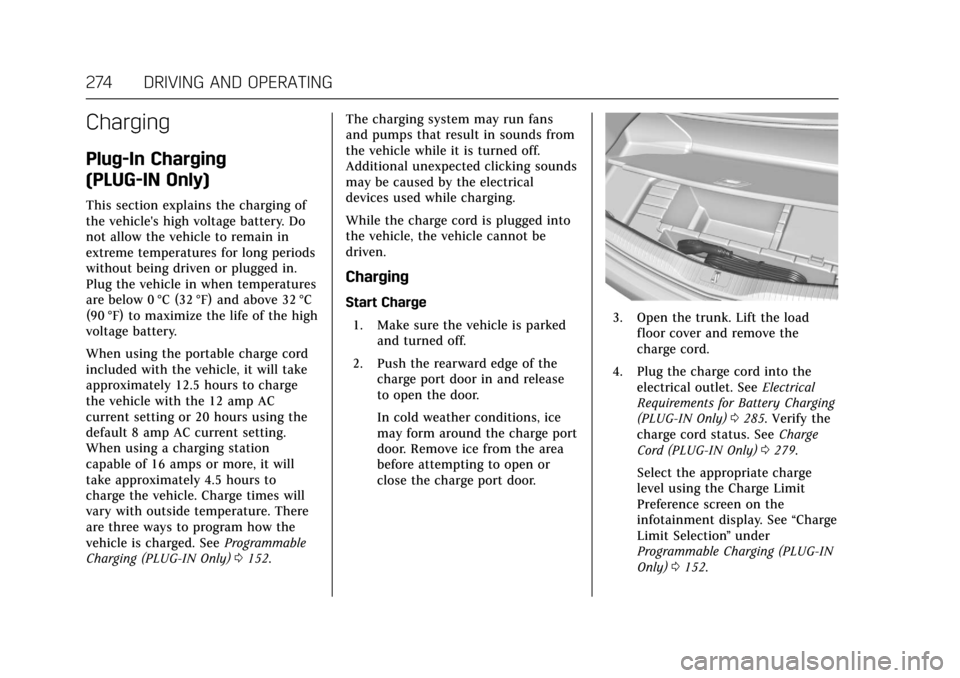
close the charge port door.3. Open the trunk. Lift the loadfloor cover and remove the
charge cord.
4. Plug the charge cord into the electrical outlet. See Electrical
Requirements for Battery Charging
(PLUG-IN Only) 0285. Verify the
charge cord status. See Charge
Cord (PLUG-IN Only) 0279.
Select the appropriate charge
level using the Charge Limit
Preference screen on the
infotainment display. See “Charge
Limit Selection ”under
Programmable Charging (PLUG-IN
Only) 0152.
Page 276 of 445

Cadillac CT6 Owner Manual (GMNA-Localizing-U.S./Canada-11292458) -
2018 - crc - 2/14/17
DRIVING AND OPERATING 275
5. Plug in the vehicle plug of thecharge cord into the charge port
on the vehicle. Verify that the
charging status indicator
illuminates on top of the
instrument panel and an audible
beep occurs. See Charging Status
Feedback (PLUG-IN Only) 0275.
6. If equipped, to arm the charge cord theft alert, lock the vehicle
with the RKE transmitter. To
disable this feature, see “Charge
Cord Theft Alert ”in Vehicle
Personalization 0170. End Charge
1. Unlock the vehicle with the RKE transmitter to disarm the charge
cord theft alert.2. Unplug the vehicle plug of thecharge cord from the vehicle.
3. Close the charge port door by pushing firmly on the rearward
edge of the door surface.
4. Unplug the charge cord from the electrical outlet.
5. Place the charge cord into the storage compartment.
Delayed Charging Override
(PLUG-IN Only)
To temporarily override a delayed
charge event, unplug the charge cord
from the charge port and then plug it back in within five seconds. A single
audible beep will sound and charging
will begin immediately.
To cancel a temporary override,
unplug the charge cord, wait for
10 seconds, and then plug the charge
cord back in. A double audible beep
will sound and charging will be
delayed.
See
Programmable Charging (PLUG-IN
Only) 0152 for advanced charge
scheduling options.
Charging Status Feedback
(PLUG-IN Only)