service CADILLAC CT6 2018 1.G Workshop Manual
[x] Cancel search | Manufacturer: CADILLAC, Model Year: 2018, Model line: CT6, Model: CADILLAC CT6 2018 1.GPages: 445, PDF Size: 7.7 MB
Page 269 of 445
Cadillac CT6 Owner Manual (GMNA-Localizing-U.S./Canada-11292458) -
2018 - crc - 2/14/17
268 DRIVING AND OPERATING
Warning (Continued)
detects a pedestrian or large
animal. The system may not detect
pedestrians, including children,
or animals:. If they are less than 25 m
(82 ft) away.
. If they are not directly ahead
in the sensor coverage area,
fully visible, standing upright,
or part of a group.
. If the pedestrian or animal is
moving too quickly through
the field of view, such as a
bicyclist.
. If the pedestrian is wearing
certain types of clothing.
. If headlamps are off, except
when parked.
. If the outside temperature is
higher than 30 °C (86 °F).
. Due to poor visibility,
including in heavy fog, rain,
or snow.
(Continued)
Warning (Continued)
.If the sensor is blocked by
dirt, snow, rain, or ice.
Be ready to take action and apply
the brakes. For more information,
see Defensive Driving 0207. Keep
the Night Vision sensor clean and
in good repair.
Pedestrian detection may not be
available in high outside temperatures.
An amber icon,
*, displays. The
system does not need service.
In rain, snow, or fog the image may
not be clear and the direction of the
road ahead may not be seen. In more
severe weather conditions, the image
may be unclear and unusable. The
system does not need service.
Keep the system sensor clean by
activating the windshield washer up to
five times when it is dark enough for
the system to operate. If the Night
Vision image still looks blurry, use a
soft wet cloth to gently clean the
sensor camera lens and dry thoroughly. The sensor is behind the
front grille to the inside of the driver
side headlamp.
The camera must also be aligned to
work correctly. If the camera needs
adjustment, see your dealer. Do not
attempt to adjust the camera yourself.
Side Blind Zone
Alert (SBZA)
If equipped, the SBZA system is a
lane-changing aid that assists drivers
with avoiding crashes that occur with
moving vehicles in the side blind zone
(or spot) areas. When the vehicle is in
a forward gear, the left or right side
mirror display will light up if a moving
vehicle is detected in that blind zone.
If the turn signal is activated and a
vehicle is also detected on the same
side, the display will flash as an extra
warning not to change lanes. Since
this system is part of the Lane Change
Alert (LCA) system, read the entire
LCA section before using this feature.
Page 271 of 445

Cadillac CT6 Owner Manual (GMNA-Localizing-U.S./Canada-11292458) -
2018 - crc - 2/14/17
270 DRIVING AND OPERATING
LCA can be disabled through vehicle
personalization using the Side Blind
Zone Alert option. See“Collision/
Detection Systems” underVehicle
Personalization 0170. If LCA is
disabled by the driver, the LCA mirror
displays will not light up.
When the System Does Not
Seem to Work Properly
The LCA system requires some driving
for the system to calibrate to
maximum performance. This
calibration may occur more quickly if
the vehicle is driving on a straight
highway road with traffic and roadside
objects (e.g., guardrails, barriers).
LCA displays may not come on when
passing a vehicle quickly, for a
stopped vehicle, or when towing a
trailer. The LCA detection zones that
extend back from the side of the
vehicle do not move further back
when a trailer is towed. Use caution
while changing lanes when towing a
trailer. LCA may alert to objects
attached to the vehicle, such as a
trailer, bicycle, or object extending out
to either side of the vehicle. Attached
objects may also interfere with the detection of vehicles. This is normal
system operation; the vehicle does not
need service.
LCA may not always alert the driver to
vehicles in the next lane over,
especially in wet conditions or when
driving on sharp curves. The system
does not need to be serviced. The
system may light up due to guardrails,
signs, trees, shrubs, and other
non-moving objects. This is normal
system operation; the vehicle does not
need service.
LCA may not operate when the LCA
sensors in the left or right corners of
the rear bumper are covered with
mud, dirt, snow, ice, or slush, or in
heavy rainstorms. For cleaning
instructions, see "Washing the
Vehicle" under
Exterior Care0380.
If the DIC still displays the system
unavailable message after cleaning
both sides of the vehicle toward the
rear corners of the vehicle, see your
dealer.
If the LCA displays do not light up
when moving vehicles are in the side
blind zone or are rapidly approaching this zone and the system is clean, the
system may need service. Take the
vehicle to your dealer.
When LCA is disabled for any reason
other than the driver turning it off,
the Side Blind Zone Alert On option
will not be available on the
personalization menu.
Radio Frequency Information
See
Radio Frequency Statement 0417.
Lane Departure
Warning (LDW)
If equipped, LDW may help avoid
crashes due to unintentional lane
departures. It may provide a warning
if the vehicle is crossing a detected
lane marking without using a turn
signal in the lane departure direction.
Since this system is part of the Lane
Keep Assist (LKA) system, read the
entire LKA section before using this
feature.
Page 273 of 445
Cadillac CT6 Owner Manual (GMNA-Localizing-U.S./Canada-11292458) -
2018 - crc - 2/14/17
272 DRIVING AND OPERATING
When on,Ais green if LKA is
available to assist and provide LDW
alerts. It may assist by gently turning
the steering wheel and display
A
as amber if the vehicle approaches a
detected lane marking without using a
turn signal in that direction. It may also provide an LDW alert by
flashing
Aamber as the lane
marking is crossed. Additionally, there
may be three beeps, or the driver seat
may pulse three times, on the right or
left, depending on the lane departure
direction.
Take Steering
The LKA system does not
continuously steer the vehicle. If LKA
does not detect active driver steering,
an alert, chime, or DIC message may
be provided. Move the steering wheel
to dismiss.
When the System Does Not
Seem to Work Properly
The system performance may be
affected by:
. Close vehicles ahead. .
Sudden lighting changes, such as
when driving through tunnels.
. Banked roads.
. Roads with poor lane markings,
such as two-lane roads.
If the LKA system is not functioning
properly when lane markings are
clearly visible, cleaning the windshield
may help.
A system unavailable message may
display if the camera is blocked. The
LKA system does not need service.
LKA assistance and/or LDW alerts
may occur due to tar marks, shadows,
cracks in the road, temporary or
construction lane markings, or other
road imperfections. This is normal
system operation; the vehicle does not
need service. Turn LKA off if these
conditions continue.
Surround Vision Recorder
If equipped, this system records the
360° camera views to an SD card. Only
images are recorded, no sound. An SD
card will be needed for this system. The recommended SD card is an
8-32GB SDHC card with FAT32 file
system, Class 4 and over.
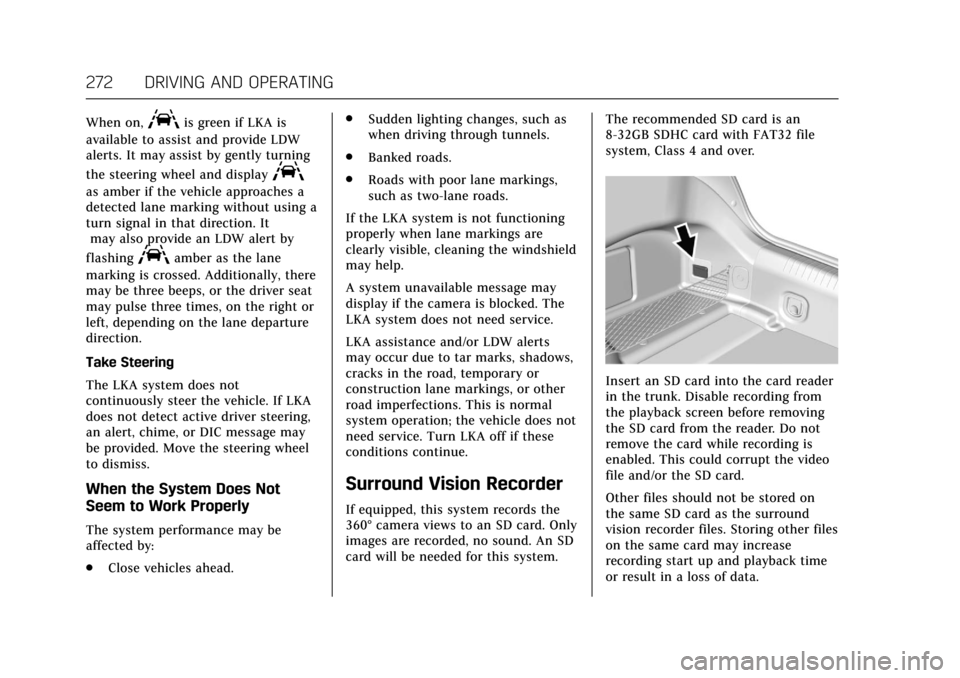
Insert an SD card into the card reader
in the trunk. Disable recording from
the playback screen before removing
the SD card from the reader. Do not
remove the card while recording is
enabled. This could corrupt the video
file and/or the SD card.
Other files should not be stored on
the same SD card as the surround
vision recorder files. Storing other files
on the same card may increase
recording start up and playback time
or result in a loss of data.
Page 281 of 445
Cadillac CT6 Owner Manual (GMNA-Localizing-U.S./Canada-11292458) -
2018 - crc - 2/14/17
280 DRIVING AND OPERATING
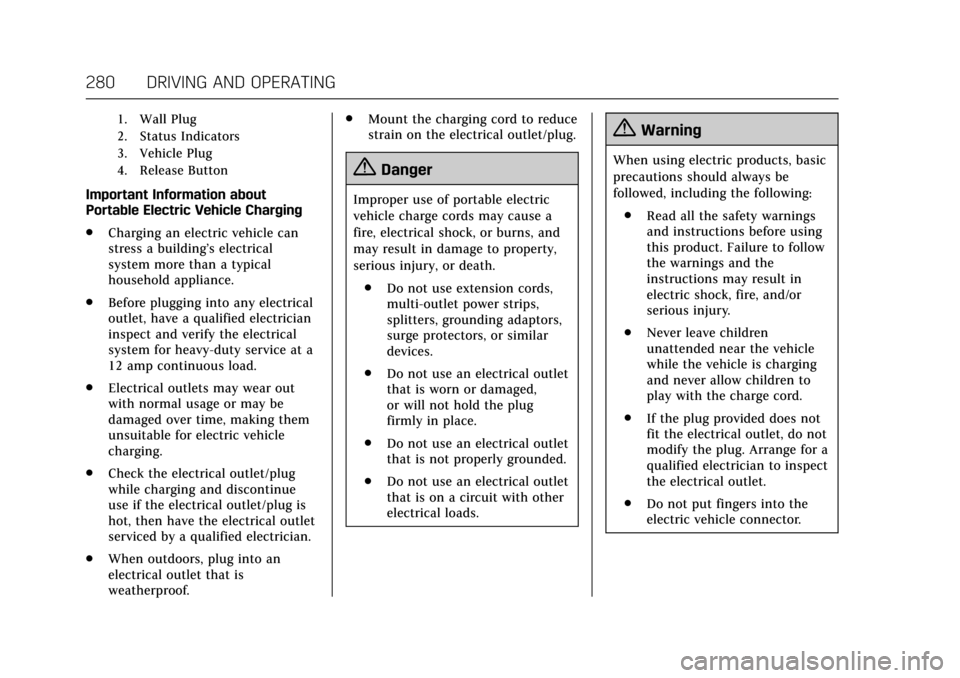
1. Wall Plug
2. Status Indicators
3. Vehicle Plug
4. Release Button
Important Information about
Portable Electric Vehicle Charging
.Charging an electric vehicle can
stress a building’s electrical
system more than a typical
household appliance.
. Before plugging into any electrical
outlet, have a qualified electrician
inspect and verify the electrical
system for heavy-duty service at a
12 amp continuous load.
. Electrical outlets may wear out
with normal usage or may be
damaged over time, making them
unsuitable for electric vehicle
charging.
. Check the electrical outlet/plug
while charging and discontinue
use if the electrical outlet/plug is
hot, then have the electrical outlet
serviced by a qualified electrician.
. When outdoors, plug into an
electrical outlet that is
weatherproof. .
Mount the charging cord to reduce
strain on the electrical outlet/plug.
{Danger
Improper use of portable electric
vehicle charge cords may cause a
fire, electrical shock, or burns, and
may result in damage to property,
serious injury, or death.
. Do not use extension cords,
multi-outlet power strips,
splitters, grounding adaptors,
surge protectors, or similar
devices.
. Do not use an electrical outlet
that is worn or damaged,
or will not hold the plug
firmly in place.
. Do not use an electrical outlet
that is not properly grounded.
. Do not use an electrical outlet
that is on a circuit with other
electrical loads.
{Warning
When using electric products, basic
precautions should always be
followed, including the following:
. Read all the safety warnings
and instructions before using
this product. Failure to follow
the warnings and the
instructions may result in
electric shock, fire, and/or
serious injury.
. Never leave children
unattended near the vehicle
while the vehicle is charging
and never allow children to
play with the charge cord.
. If the plug provided does not
fit the electrical outlet, do not
modify the plug. Arrange for a
qualified electrician to inspect
the electrical outlet.
. Do not put fingers into the
electric vehicle connector.
Page 283 of 445
Cadillac CT6 Owner Manual (GMNA-Localizing-U.S./Canada-11292458) -
2018 - crc - 2/14/17
282 DRIVING AND OPERATING
OPSymbol Fault/Condition/Event
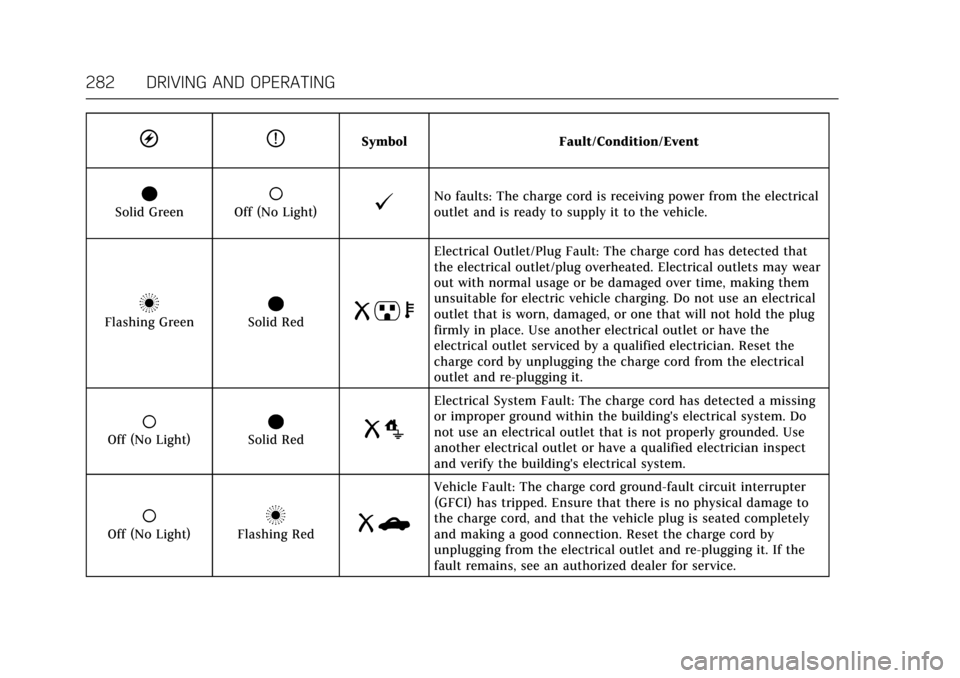
OSolid Green(Off (No Light)@No faults: The charge cord is receiving power from the electrical
outlet and is ready to supply it to the vehicle.
nFlashing GreenOSolid RedR pb
Electrical Outlet/Plug Fault: The charge cord has detected that
the electrical outlet/plug overheated. Electrical outlets may wear
out with normal usage or be damaged over time, making them
unsuitable for electric vehicle charging. Do not use an electrical
outlet that is worn, damaged, or one that will not hold the plug
firmly in place. Use another electrical outlet or have the
electrical outlet serviced by a qualified electrician. Reset the
charge cord by unplugging the charge cord from the electrical
outlet and re-plugging it.
(Off (No Light)OSolid RedR o
Electrical System Fault: The charge cord has detected a missing
or improper ground within the building's electrical system. Do
not use an electrical outlet that is not properly grounded. Use
another electrical outlet or have a qualified electrician inspect
and verify the building's electrical system.
(Off (No Light)nFlashing RedRb
Vehicle Fault: The charge cord ground-fault circuit interrupter
(GFCI) has tripped. Ensure that there is no physical damage to
the charge cord, and that the vehicle plug is seated completely
and making a good connection. Reset the charge cord by
unplugging from the electrical outlet and re-plugging it. If the
fault remains, see an authorized dealer for service.
Page 284 of 445
Cadillac CT6 Owner Manual (GMNA-Localizing-U.S./Canada-11292458) -
2018 - crc - 2/14/17
DRIVING AND OPERATING 283
OPSymbol Fault/Condition/Event
OSolid GreennFlashing RedR m
Charge Cord Fault: The charge cord has detected a potential
problem with the charge cord. Reset the charge cord by
unplugging from the electrical outlet and re-plugging it. If the
fault remains, see an authorized dealer for service.
If no status indicators are lit, ensure
the electrical outlet is powered.
Charge Limit Selection
Charge level selection can be made
using the Charge Limit Preference
screen on the infotainment display.
See “Charge Limit Selection ”under
Programmable Charging (PLUG-IN Only)
0 152.
{Warning
Using a charge level that exceeds
the electrical circuit or electrical
outlet capacity may start a fire or
damage the electrical circuit. Use
the lowest charge level until a
(Continued)
Warning (Continued)
qualified electrician inspects the
electrical circuit capacity. Use the
lowest charge level if the electrical
circuit or electrical outlet capacity
is not known.
Grounding Instructions
This product must be grounded. If this
product should malfunction or break
down, grounding provides a path of
least resistance for electric current to
reduce the risk of electric shock. This
product is equipped with a cord that
has an equipment grounding
conductor and a grounding plug. The
plug must be plugged into an appropriate outlet that is properly
installed and grounded in accordance
with all local codes and ordinances.
{Warning
Improper connection of the charge
cord ground may cause electrical
shock. Check with a qualified
electrician if there is doubt as to
whether the charge circuit is
properly grounded. Do not modify
the plug provided with the product.
If it will not fit the electrical outlet,
have a proper electrical outlet
installed by a qualified electrician.
Page 287 of 445
Cadillac CT6 Owner Manual (GMNA-Localizing-U.S./Canada-11292458) -
2018 - crc - 2/14/17
286 DRIVING AND OPERATING
The following are the minimum
requirements for circuits used to
charge this vehicle:
.120 volts/15 amps
. 240 volts/20 amps
Charging equipment with a rating of
at least 240 volts/20 amps will provide
the fastest charging time and best
charging efficiency to recharge the
high voltage battery. 240 volt/40 amp
circuits provide flexibility for future
vehicle charging needs. Always follow
the charging equipment installation
instructions. Contact your dealer for
more information.
Caution
Do not use portable or stationary
backup generating equipment to
charge the vehicle. This may cause
damage to the vehicle's charging
system. Only charge the vehicle
from utility supplied power.
Fuel
GM recommends the use of TOP
TIER®detergent gasoline to keep the
engine cleaner and reduce engine
deposits. See www.toptiergas.com for a
list of TOP TIER detergent gasoline
marketers and applicable countries.
Do not use any fuel labeled E85 or
FlexFuel. Do not use gasoline with
ethanol levels greater than 15% by
volume.
For the 2.0L L4 turbo engine,
premium unleaded gasoline meeting
ASTM specification D4814 with a
posted octane rating of 93 is highly
recommended for best performance and fuel economy. Unleaded gasoline
with an octane rated as low as 87 can
be used. Using unleaded gasoline
rated below 93 octane, however, will
lead to reduced acceleration and fuel
economy. If knocking occurs, use a
gasoline rated at 93 octane as soon as
possible, otherwise, the engine could
be damaged. If heavy knocking is
heard when using gasoline with a
93 octane rating, the engine needs
service.
For the 3.6L V6 engine, use regular
unleaded gasoline meeting ASTM
specification D4814 with a posted
octane rating of 87 or higher. Do not
use gasoline with a posted octane
rating of less than 87, as this may
cause engine knock and will lower fuel
economy.
For the 3.0L twin turbo V6 engine, use
premium unleaded gasoline meeting
ASTM specification D4814 with a
posted octane rating of 93.
If unavailable, unleaded gasoline with
a posted octane rating of 91 may be
used, but with reduced performance
and fuel economy. If the octane is less
than 91, the engine could be damaged
and the repairs would not be covered
Page 288 of 445
Cadillac CT6 Owner Manual (GMNA-Localizing-U.S./Canada-11292458) -
2018 - crc - 2/14/17
DRIVING AND OPERATING 287
by the vehicle warranty. If heavy
knocking is heard when using gasoline
rated at 93 octane, the engine needs
service.
Prohibited Fuels
Caution
Do not use fuels with any of the
following conditions; doing so may
damage the vehicle and void its
warranty:. For vehicles which are not
FlexFuel, fuel labeled greater
than 15% ethanol by volume,
such as mid-level ethanol
blends (16 –50% ethanol),
E85, or FlexFuel.
. Fuel with any amount of
methanol, methylal, and
aniline. These fuels can
corrode metal fuel system
parts or damage plastic and
rubber parts.
. Fuel containing metals such
as methylcyclopentadienyl
manganese tricarbonyl
(Continued)
Caution (Continued)
(MMT), which can damage
the emissions control system
and spark plugs.
. Fuel with a posted octane
rating of less than the
recommended fuel. Using this
fuel will lower fuel economy
and performance, and may
decrease the life of the
emissions catalyst.
California Fuel
Requirements
If the vehicle is certified to meet
California Emissions Standards, it is
designed to operate on fuels that meet
California specifications. See the
underhood emission control label.
If this fuel is not available in states
adopting California Emissions
Standards, the vehicle will operate
satisfactorily on fuels meeting federal
specifications, but emission control
system performance may be affected.
The malfunction indicator lamp could
turn on and the vehicle may not pass a smog-check test. See
Malfunction
Indicator Lamp (Check Engine Light)
0 143. If this occurs, return to your
authorized dealer for diagnosis. If it is
determined that the condition is
caused by the type of fuel used,
repairs may not be covered by the
vehicle warranty.
Fuels in Foreign Countries
The U.S., Canada, and Mexico post
fuel octane ratings in anti-knock index
(AKI). For fuel not to use in a foreign
country, see “Prohibited Fuels” inFuel
0 286.
Fuel Additives
To keep fuel systems clean, TOP TIER
detergent gasoline is recommended.
See Fuel 0286.
If TOP TIER detergent gasoline is not
available, one bottle of GM Fuel
System Treatment Cleaner added to
the fuel tank at every engine oil
change, can help. GM Fuel System
Treatment Cleaner is the only gasoline
additive recommended by General
Motors. It is available at your dealer.
Page 294 of 445
Cadillac CT6 Owner Manual (GMNA-Localizing-U.S./Canada-11292458) -
2018 - crc - 2/14/17
DRIVING AND OPERATING 293
4. Reapply the brake pedal. Thenapply the parking brake and shift
into P (Park).
5. Release the brake pedal.
Leaving After Parking on a Hill
1. Apply and hold the brake pedal.
2. Start the engine.
3. Shift into a gear.
4. Release the parking brake.
5. Let up on the brake pedal.
6. Drive slowly until the trailer is clear of the chocks.
7. Stop and have someone pick up and store the chocks.
Maintenance when Trailer
Towing
The vehicle needs service more often
when pulling a trailer. . Things that
are especially important in trailer
operation are automatic transmission
fluid, engine oil, axle lubricant, belts,
cooling system, and brake system. It is
a good idea to inspect these before
and during the trip. Check periodically to see that all hitch
nuts and bolts are tight.
Trailer Towing
(PLUG-IN Only)
The vehicle is neither designed nor
intended to tow a trailer.
Trailer Towing
(Gasoline Only)
Before pulling a trailer, three
important considerations have to do
with weight:
.
Weight of the trailer.
. Weight of the trailer tongue.
. Total weight on your vehicle's
tires.
Weight of the Trailer
How heavy can a trailer safely be?
It should never weigh more than
454 kg (1,000 lb). But even that can be
too heavy.
Safe trailering requires monitoring the
weight, speed, altitude, road grades,
outside temperature, the dimensions of the front of the trailer, and how
frequently the vehicle is used to pull a
trailer. Take into consideration any
special equipment on the vehicle, and
the amount of tongue weight the
vehicle can carry. See
“Weight of the
Trailer Tongue ”later in this section
for more information.
Trailer weight rating (TWR) is
calculated assuming the tow vehicle
has the driver, a front seat passenger,
and all required trailering equipment.
Weight of additional optional
equipment, passengers, and cargo in
the tow vehicle must be subtracted
from the trailer weight rating.
Ask your dealer for trailering
information or advice, or write us at
our Customer Assistance Offices. See
Customer Assistance Offices 0410.Weight of the Trailer Tongue
The tongue weight load (1) of any
trailer is very important because it is
also part of the vehicle weight. The
Gross Vehicle Weight (GVW) includes
the curb weight of the vehicle, any
cargo carried in it, and the people who
will be riding in the vehicle, as well as
trailer tongue weight. Vehicle options,
Page 296 of 445

Cadillac CT6 Owner Manual (GMNA-Localizing-U.S./Canada-11292458) -
2018 - crc - 2/14/17
DRIVING AND OPERATING 295
Because the vehicle has antilock
brakes, do not tap into the vehicle's
brake system. If this is done, both
brake systems will not work well or
at all.Conversions and
Add-Ons
Add-On Electrical
Equipment
{Warning
The Data Link Connector (DLC) is
used for vehicle service and
Emission Inspection/Maintenance
testing. SeeMalfunction Indicator
Lamp (Check Engine Light) 0143.
A device connected to the DLC —
such as an aftermarket fleet or
driver-behavior tracking device —
may interfere with vehicle systems.
This could affect vehicle operation
and cause a crash. Such devices
may also access information stored
in the vehicle’s systems.
Caution
Some electrical equipment can
damage the vehicle or cause
components to not work and would
not be covered by the vehicle
warranty. Always check with your
dealer before adding electrical
equipment.
Add-on equipment can drain the
vehicle's 12-volt battery, even if the
vehicle is not operating.
The vehicle has an airbag system.
Before attempting to add anything
electrical to the vehicle, see Servicing
the Airbag-Equipped Vehicle 095 and
Adding Equipment to the
Airbag-Equipped Vehicle 095.