Gas CADILLAC CT6 2018 1.G Owners Manual
[x] Cancel search | Manufacturer: CADILLAC, Model Year: 2018, Model line: CT6, Model: CADILLAC CT6 2018 1.GPages: 445, PDF Size: 7.7 MB
Page 6 of 445
Cadillac CT6 Owner Manual (GMNA-Localizing-U.S./Canada-11292458) -
2018 - crc - 2/14/17
IN BRIEF 5
In Brief
Instrument Panel
Instrument Panel Overview . . . . . . . . . 6
Initial Drive Information
Initial Drive Information . . . . . . . . . . . 8
Stop/Start System(Gasoline Only) . . . . . . . . . . . . . . . . . . . . 8
Remote Keyless Entry (RKE) System . . . . . . . . . . . . . . . . . . . . . . . . . . . . . 8
Remote Vehicle Start . . . . . . . . . . . . . . . 9
Door Locks . . . . . . . . . . . . . . . . . . . . . . . . . . 9
Trunk . . . . . . . . . . . . . . . . . . . . . . . . . . . . . . . 10
Windows . . . . . . . . . . . . . . . . . . . . . . . . . . . 10
Seat Adjustment . . . . . . . . . . . . . . . . . . . 11
Memory Features . . . . . . . . . . . . . . . . . . 13
Second Row Seats . . . . . . . . . . . . . . . . . 13
Heated and Ventilated Seats . . . . . . 14
Head Restraint Adjustment . . . . . . . 15
Seat Belts . . . . . . . . . . . . . . . . . . . . . . . . . . . 15
Passenger Sensing System . . . . . . . . 15
Mirror Adjustment . . . . . . . . . . . . . . . . 16
Steering Wheel Adjustment . . . . . . . 16
Interior Lighting . . . . . . . . . . . . . . . . . . . 17
Exterior Lighting . . . . . . . . . . . . . . . . . . . 17
Windshield Wiper/Washer . . . . . . . . 18
Climate Controls . . . . . . . . . . . . . . . . . . . 19
Transmission . . . . . . . . . . . . . . . . . . . . . . . 20
Vehicle Features
Infotainment System . . . . . . . . . . . . . . 21
Steering Wheel Controls . . . . . . . . . . 21
Cruise Control . . . . . . . . . . . . . . . . . . . . . 21
Driver Information Center (DIC) . . . . . . . . . . . . . . . . . . . . . . 22
Forward Collision Alert (FCA) System . . . . . . . . . . . . . . . . . . . . . . . . . . . . 22
Night Vision System . . . . . . . . . . . . . . . 22
Forward Automatic Braking (FAB) . . . . . . . . . . . . . . . . . . . . 22
Front Pedestrian Braking (FPB) System . . . . . . . . . . . . . . . . . . . . . . . . . . . . 22
Lane Keep Assist (LKA) . . . . . . . . . . . 23
Lane Change Alert (LCA) . . . . . . . . . . 23
Surround Vision . . . . . . . . . . . . . . . . . . . 23
Rear Vision Camera (RVC) . . . . . . . . 23
Rear Cross Traffic Alert (RCTA) System . . . . . . . . . . . . . . . . . . . . . . . . . . . . 23
Parking Assist . . . . . . . . . . . . . . . . . . . . . . 24
Automatic Parking Assist (APA) . . . . . . . . . . . . . . . . . . . . . . 24
Reverse Automatic Braking (RAB) . . . . . . . . . . . . . . . . . . . . 24
Surround Vision Recorder . . . . . . . . . 24
Power Outlets . . . . . . . . . . . . . . . . . . . . . . 24
Universal Remote System . . . . . . . . . 25
Sunroof . . . . . . . . . . . . . . . . . . . . . . . . . . . . . 25
PLUG-IN Features
High Voltage Safety Information . . . . . . . . . . . . . . . . . . . . . . 26
Charging . . . . . . . . . . . . . . . . . . . . . . . . . . . . 27
Regenerative Braking . . . . . . . . . . . . . . 29
Service . . . . . . . . . . . . . . . . . . . . . . . . . . . . . . 29
Performance and Maintenance
Traction Control/Electronic Stability Control . . . . . . . . . . . . . . . . . . 30
Tire Pressure Monitor . . . . . . . . . . . . . 30
Fuel (2.0L L4 Turbo Engine) . . . . . . 30
Fuel (3.0L Twin Turbo V6 Engine) . . . . . . . . . . . . . . . . . . . . . . . . 31
Fuel (3.6L V6 Engine) . . . . . . . . . . . . . 31
E85 or FlexFuel . . . . . . . . . . . . . . . . . . . . 31
Engine Oil Life System . . . . . . . . . . . . 31
Driving for Better Fuel Economy (Gasoline Only) . . . . . . . . . . . . . . . . . . . 32
Driving for Better Energy Efficiency (PLUG-IN Only) . . . . . . 32
Roadside Service . . . . . . . . . . . . . . . . . . . 33
Page 8 of 445

Cadillac CT6 Owner Manual (GMNA-Localizing-U.S./Canada-11292458) -
2018 - crc - 2/14/17
IN BRIEF 7
1.Air Vents 0203.
2. Exterior Lamp Controls 0183.
Turn Signal Lever. See Turn and
Lane-Change Signals 0186.
3. Tap Shift Paddles (If Equipped). See Manual Mode (Gasoline Only)
0 233.
Regen On Demand (If Equipped).
See Regenerative Braking
(PLUG-IN Only) 0237.
4. Instrument Cluster (Base Level)
0127 orInstrument Cluster
(Uplevel) 0130.
Driver Information Center (DIC)
Display. See Driver Information
Center (DIC) 0162.
5. Windshield Wiper/Washer 0120.
6. ENGINE START/STOP Button. See Ignition Positions 0217.
7. Parking Assist Button. See Assistance Systems for Parking or
Backing 0254.
Automatic Parking Assist (APA)
Button (If Equipped). See
Assistance Systems for Parking or
Backing 0254. Automatic Engine Stop/Start
Disable Switch (If Equipped).
See
Starting the Engine (PLUG-IN
Only) 0218 orStarting the Engine
(Gasoline Only) 0221.
8. Light Sensor. See Automatic
Headlamp System 0185.
9. Hazard Warning Flashers 0186.
Glove Box Button. See Glove Box
0 115.
10. Infotainment 0190.
11. Heated and Ventilated Front Seats
072 (If Equipped).
12. Infotainment Touch Pad. See the infotainment manual.
13. Automatic Climate Control System
(Quad Zone - Gasoline Only) 0197
or Automatic Climate Control
System (Dual Zone - Gasoline and
PLUG-IN) 0191.
14. Automatic Vehicle Hold (AVH)
0237 (If Equipped).
MODE Button. See Driver Mode
Control (Gasoline Only) 0241.
Traction Control/Electronic
Stability Control 0239. 15. Shift Lever. See
Automatic
Transmission 0231.
16. Driver Information Center (DIC) Controls. See Driver Information
Center (DIC) 0162.
17. Steering Wheel Controls. See the infotainment manual.
18. Horn 0120.
19. Steering Wheel Adjustment 0119
(Out of View).
20. Forward Collision Alert (FCA)
System 0260 (If Equipped).
Lane Keep Assist (LKA) 0271 (If
Equipped).
Heated Steering Wheel 0119 (If
Equipped).
21. Cruise Control 0242.
Adaptive Cruise Control 0245 (If
Equipped).
Phone Button. See “Steering
Wheel Controls ”in the
infotainment manual.
22. Data Link Connector (DLC) (Out of View). See Malfunction
Indicator Lamp (Check Engine
Light) 0143.
Page 9 of 445
Cadillac CT6 Owner Manual (GMNA-Localizing-U.S./Canada-11292458) -
2018 - crc - 2/14/17
8 IN BRIEF
23.Instrument Panel Storage 0115.
Instrument Panel Fuse Block
0 335.
24. Electric Parking Brake 0235.
Instrument Panel Illumination
Control 0187 (Out of View).
Head-Up Display (HUD) 0165 (If
Equipped) (Out of View).Initial Drive Information
This section provides a brief overview
about some of the important features
that may or may not be on your
specific vehicle.
For more detailed information, refer to
each of the features which can be
found later in this owner’s manual.
Stop/Start System
(Gasoline Only)
The vehicle has a fuel saving stop/
start system to shut off the engine
and help conserve fuel.
When the brakes are applied and the
vehicle is at a complete stop, the
engine may turn off. When the brake
pedal is released or the accelerator
pedal is pushed, the engine will
restart.
If equipped, the automatic engine
stop/start function can be disabled by
touching
hon the center stack.
See Starting the Engine (PLUG-IN Only)
0 218 orStarting the Engine (Gasoline
Only) 0221.
Remote Keyless Entry
(RKE) System
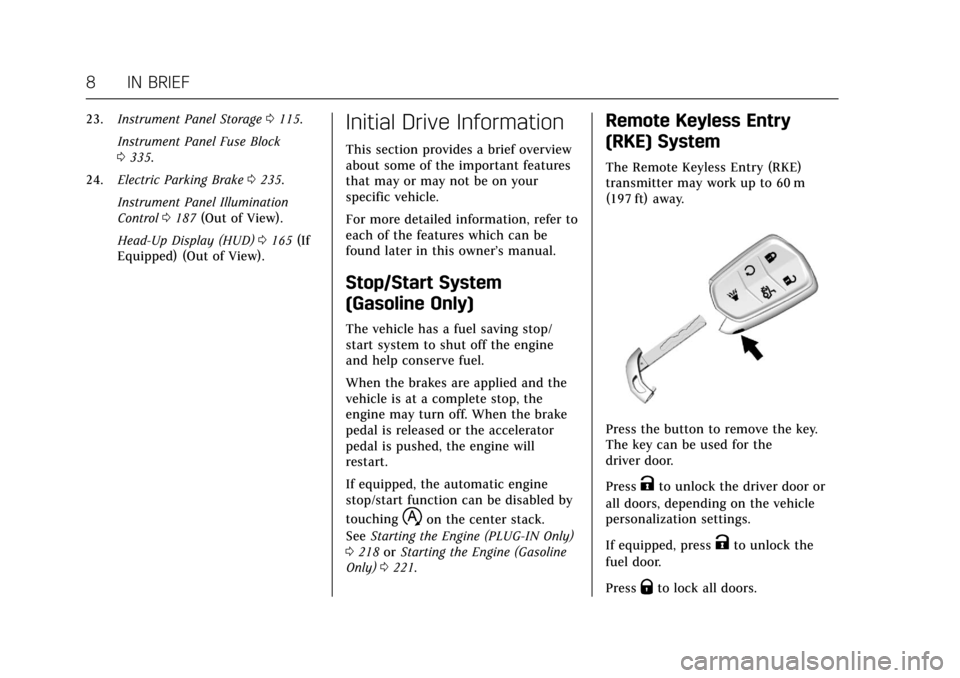
The Remote Keyless Entry (RKE)
transmitter may work up to 60 m
(197 ft) away.
Press the button to remove the key.
The key can be used for the
driver door.
Press
Kto unlock the driver door or
all doors, depending on the vehicle
personalization settings.
If equipped, press
Kto unlock the
fuel door.
Press
Qto lock all doors.
Page 21 of 445
Cadillac CT6 Owner Manual (GMNA-Localizing-U.S./Canada-11292458) -
2018 - crc - 2/14/17
20 IN BRIEF
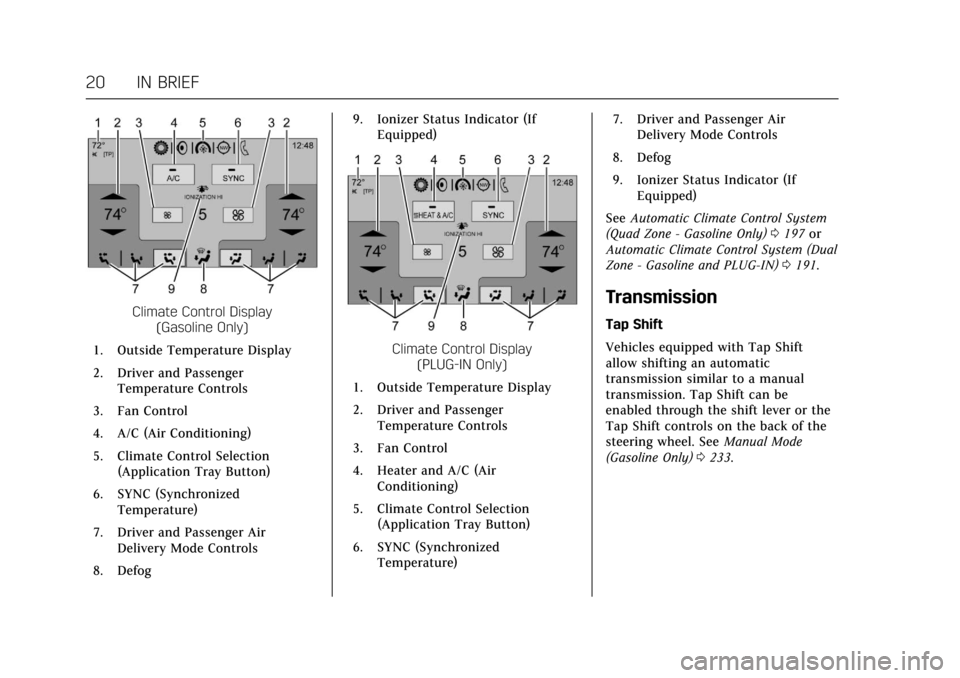
Climate Control Display(Gasoline Only)
1. Outside Temperature Display
2. Driver and Passenger Temperature Controls
3. Fan Control
4. A/C (Air Conditioning)
5. Climate Control Selection (Application Tray Button)
6. SYNC (Synchronized Temperature)
7. Driver and Passenger Air Delivery Mode Controls
8. Defog 9. Ionizer Status Indicator (If
Equipped)
Climate Control Display (PLUG-IN Only)
1. Outside Temperature Display
2. Driver and Passenger Temperature Controls
3. Fan Control
4. Heater and A/C (Air Conditioning)
5. Climate Control Selection (Application Tray Button)
6. SYNC (Synchronized Temperature) 7. Driver and Passenger Air
Delivery Mode Controls
8. Defog
9. Ionizer Status Indicator (If Equipped)
See Automatic Climate Control System
(Quad Zone - Gasoline Only) 0197 or
Automatic Climate Control System (Dual
Zone - Gasoline and PLUG-IN) 0191.
Transmission
Tap Shift
Vehicles equipped with Tap Shift
allow shifting an automatic
transmission similar to a manual
transmission. Tap Shift can be
enabled through the shift lever or the
Tap Shift controls on the back of the
steering wheel. See Manual Mode
(Gasoline Only) 0233.
Page 25 of 445
Cadillac CT6 Owner Manual (GMNA-Localizing-U.S./Canada-11292458) -
2018 - crc - 2/14/17
24 IN BRIEF
SeeAssistance Systems for Parking or
Backing 0254.
Parking Assist
If equipped, Rear Parking Assist (RPA)
uses sensors on the rear bumper to
assist with parking and avoiding
objects while in R (Reverse).
It operates at speeds less than 8 km/h
(5 mph). RPA may show a warning
triangle on the infotainment display
and a graphic on the instrument
cluster to provide the object distance.
In addition, multiple beeps or seat
pulses may occur if very close to an
object.
The vehicle may also have the Front
Parking Assist system.
See Assistance Systems for Parking or
Backing 0254.
Automatic Parking
Assist (APA)
If equipped, the APA system helps to
search for and maneuver the vehicle
into parallel or perpendicular parking
spots using automatic steering, displays, and beeps. When the vehicle
speed is below 30 km/h (18 mph),
touch
Oto enable the system.
See “Automatic Parking Assist (APA)”
under Assistance Systems for Parking
or Backing 0254.
Reverse Automatic
Braking (RAB)
If the vehicle has Adaptive Cruise
Control (ACC) it also has the RAB
system, which is designed to help
avoid or reduce the harm caused by
backing crashes when the vehicle is
shifted into R (Reverse). If the system
detects the vehicle is backing too fast
to avoid a crash with a detected object
behind your vehicle in your path, it
may automatically brake hard to
a stop.
See Assistance Systems for Parking or
Backing 0254.
Surround Vision Recorder
If equipped, the Surround Vision
Recorder records 360° camera views to
an SD card. Only images are recorded,
no sound. See
Surround Vision Recorder 0272.
Power Outlets
Power Outlet 12-Volt Direct
Current
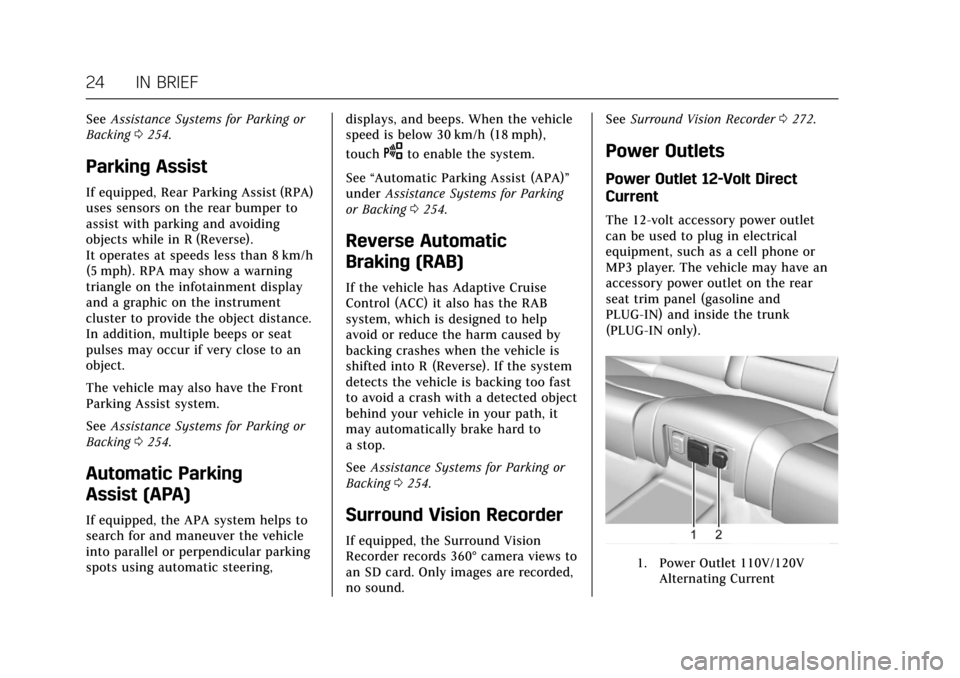
The 12-volt accessory power outlet
can be used to plug in electrical
equipment, such as a cell phone or
MP3 player. The vehicle may have an
accessory power outlet on the rear
seat trim panel (gasoline and
PLUG-IN) and inside the trunk
(PLUG-IN only).
1. Power Outlet 110V/120V
Alternating Current
Page 31 of 445
Cadillac CT6 Owner Manual (GMNA-Localizing-U.S./Canada-11292458) -
2018 - crc - 2/14/17
30 IN BRIEF
Performance and
Maintenance
Traction Control/Electronic
Stability Control
The Traction Control System (TCS)
limits wheel spin. The system is on
when the vehicle is started.
The StabiliTrak system assists with
directional control of the vehicle in
difficult driving conditions. The
system is on when the vehicle is
started.
.To turn off TCS, press and release
Yon the center console.iilluminates in the instrument
cluster and the appropriate DIC
message displays.
. Press and release
Yagain to turn
TCS back on.
. To turn off both TCS and
StabiliTrak, press and hold
Yon
the center console until
gandi
illuminate in the instrument
cluster. The appropriate DIC
message displays. .
Press and release
Yagain to turn
on both systems.
See Traction Control/Electronic Stability
Control 0239.
The vehicle has Driver Mode Control.
See Driver Mode Control (Gasoline Only)
0 241.
Tire Pressure Monitor
This vehicle may have a Tire Pressure
Monitor System (TPMS).
The low tire pressure warning light
alerts to a significant loss in pressure
of one of the vehicle's tires. If the
warning light comes on, stop as soon
as possible and inflate the tires to the
recommended pressure shown on the
Tire and Loading Information label.
See Vehicle Load Limits 0213. The
warning light will remain on until the
tire pressure is corrected. The low tire pressure warning light
may come on in cool weather when
the vehicle is first started, and then
turn off as the vehicle is driven. This
may be an early indicator that the tire
pressures are getting low and the tires
need to be inflated to the proper
pressure.
The TPMS does not replace normal
monthly tire maintenance. Maintain
the correct tire pressures.
See
Tire Pressure Monitor System
0 349.
Fuel (2.0L L4 Turbo Engine)
Premium Recommended Fuel
Use premium 93 octane unleaded
gasoline in your vehicle. Unleaded
gasoline with an octane rating as low
as 87 may be used, but it will reduce
performance and fuel economy. See
Fuel 0286.
Page 32 of 445
Cadillac CT6 Owner Manual (GMNA-Localizing-U.S./Canada-11292458) -
2018 - crc - 2/14/17
IN BRIEF 31
Fuel (3.0L Twin Turbo
V6 Engine)
Premium Required Fuel
Use premium 93 octane unleaded
gasoline in your vehicle. Unleaded
gasoline with a 91 octane rating may
be used, but it will reduce
performance and fuel economy. See
Fuel0286.
Fuel (3.6L V6 Engine)
Regular Fuel
Use only unleaded gasoline rated
87 octane or higher in your vehicle.
Do not use gasoline with an octane
rating lower as it may result in vehicle
damage and lower fuel economy. See
Fuel 0286.
E85 or FlexFuel
No E85 or FlexFuel
Gasoline-ethanol fuel blends greater
than E15 (15% ethanol by volume),
such as E85, cannot be used in this
vehicle.
Engine Oil Life System
The engine oil life system calculates
engine oil life based on vehicle use
and displays the CHANGE ENGINE
OIL SOON message when it is time to change the engine oil and filter. The
oil life system should be reset to 100%
only following an oil change.
Resetting the Oil Life System
1. Using the DIC buttons, display REMAINING OIL LIFE on the
DIC. See Driver Information Center
(DIC) 0162.
2. Press and hold SEL to clear the CHANGE ENGINE OIL SOON
message and reset the oil life
at 100%.
Be careful not to reset the oil life
display accidentally at any time
other than after the oil is
changed. It cannot be reset
accurately until the next oil
change.
The oil life system can also be reset as
follows: 1. Using the DIC buttons, display REMAINING OIL LIFE on the
DIC. See Driver Information Center
(DIC) 0162.
2. Fully press and release the accelerator pedal three times
within five seconds.
Page 33 of 445
Cadillac CT6 Owner Manual (GMNA-Localizing-U.S./Canada-11292458) -
2018 - crc - 2/14/17
32 IN BRIEF
If the CHANGE ENGINE OIL
SOON message is not on, the
system is reset.
See Engine Oil Life System 0309.
Driving for Better Fuel
Economy (Gasoline Only)
Driving habits can affect fuel mileage.
Here are some driving tips to get the
best fuel economy possible.
.
Avoid fast starts and accelerate
smoothly.
. Brake gradually and avoid abrupt
stops.
. Avoid idling the engine for long
periods of time.
. When road and weather
conditions are appropriate, use
cruise control.
. Always follow posted speed limits
or drive more slowly when
conditions require.
. Keep vehicle tires properly
inflated.
. Combine several trips into a
single trip. .
Replace the vehicle's tires with the
same TPC Spec number molded
into the tire's sidewall near
the size.
. Follow recommended scheduled
maintenance.Driving for Better Energy
Efficiency (PLUG-IN Only)
Use the following tips to help
maximize energy efficiency and range.
In colder temperatures, while these
efficiency tips will help, the electric
vehicle driving range may be lower
due to higher energy usage.
Driving Style
Acceleration/Braking/Coasting
Avoid unnecessary rapid accelerations
and decelerations.
Electric range is maximized at
80 km/h (50 mph) and below. Higher
speeds use more energy and can
significantly reduce electric range.
Use cruise control when appropriate. Plan ahead for decelerations and coast
whenever possible. For example, do
not rush to traffic signals.
Do not shift to N (Neutral) to coast.
The vehicle recovers energy while
coasting and braking in D (Drive) or M
(Manual Mode).
Drive Mode and PRNDM Selection
Use Tour Mode when possible.
Sport Mode provides more responsive
acceleration than Tour Mode but can
reduce efficiency.
Use Hold Mode on a trip where it is
expected that all of the electric charge
will be depleted. Use Hold Mode
mainly during highway or high speed
driving to maximize both EV miles
and fuel efficiency.
Use M (Manual Model) in heavy
stop-and-go traffic or when traveling
downhill. M (Manual Mode) requires
less brake pedal application and
provides a controlled, efficient way to
slow the vehicle down.
Page 37 of 445
Cadillac CT6 Owner Manual (GMNA-Localizing-U.S./Canada-11292458) -
2018 - crc - 2/14/17
36 KEYS, DOORS, AND WINDOWS
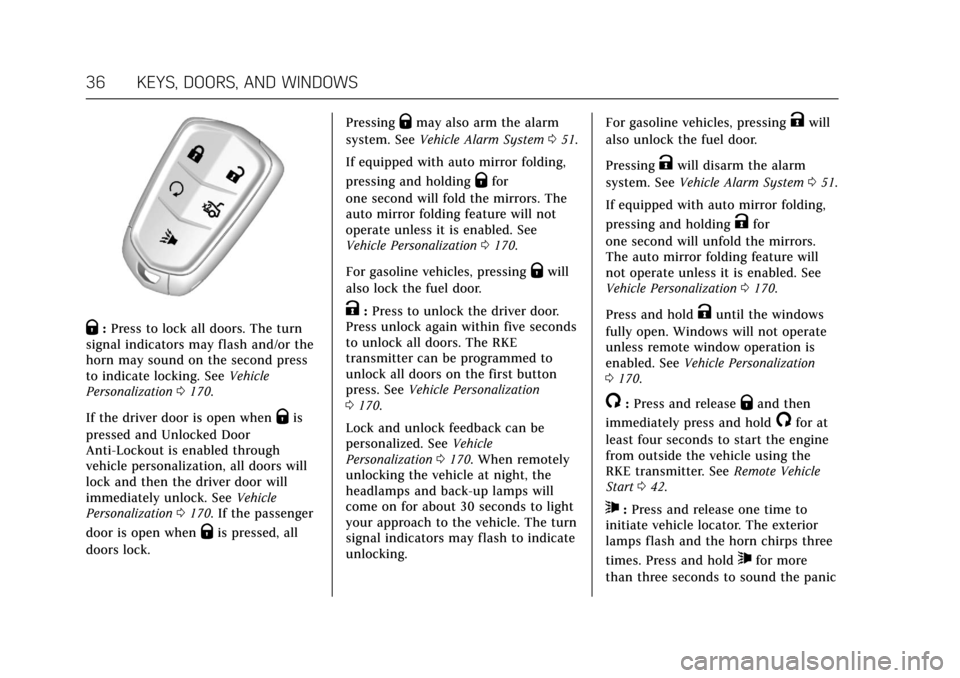
Q:Press to lock all doors. The turn
signal indicators may flash and/or the
horn may sound on the second press
to indicate locking. See Vehicle
Personalization 0170.
If the driver door is open when
Qis
pressed and Unlocked Door
Anti-Lockout is enabled through
vehicle personalization, all doors will
lock and then the driver door will
immediately unlock. See Vehicle
Personalization 0170. If the passenger
door is open when
Qis pressed, all
doors lock. Pressing
Qmay also arm the alarm
system. See Vehicle Alarm System 051.
If equipped with auto mirror folding,
pressing and holding
Qfor
one second will fold the mirrors. The
auto mirror folding feature will not
operate unless it is enabled. See
Vehicle Personalization 0170.
For gasoline vehicles, pressing
Qwill
also lock the fuel door.
K: Press to unlock the driver door.
Press unlock again within five seconds
to unlock all doors. The RKE
transmitter can be programmed to
unlock all doors on the first button
press. See Vehicle Personalization
0 170.
Lock and unlock feedback can be
personalized. See Vehicle
Personalization 0170. When remotely
unlocking the vehicle at night, the
headlamps and back-up lamps will
come on for about 30 seconds to light
your approach to the vehicle. The turn
signal indicators may flash to indicate
unlocking. For gasoline vehicles, pressing
Kwill
also unlock the fuel door.
Pressing
Kwill disarm the alarm
system. See Vehicle Alarm System 051.
If equipped with auto mirror folding,
pressing and holding
Kfor
one second will unfold the mirrors.
The auto mirror folding feature will
not operate unless it is enabled. See
Vehicle Personalization 0170.
Press and hold
Kuntil the windows
fully open. Windows will not operate
unless remote window operation is
enabled. See Vehicle Personalization
0 170.
/:Press and releaseQand then
immediately press and hold
/for at
least four seconds to start the engine
from outside the vehicle using the
RKE transmitter. See Remote Vehicle
Start 042.
7:Press and release one time to
initiate vehicle locator. The exterior
lamps flash and the horn chirps three
times. Press and hold
7for more
than three seconds to sound the panic
Page 38 of 445
Cadillac CT6 Owner Manual (GMNA-Localizing-U.S./Canada-11292458) -
2018 - crc - 2/14/17
KEYS, DOORS, AND WINDOWS 37
alarm. The horn sounds and the turn
signal lamps flash for 30 seconds,
or until
7is pressed again or the
vehicle is started.
X: Press twice quickly to open the
trunk. Press once to stop the trunk
from moving. See Trunk047.
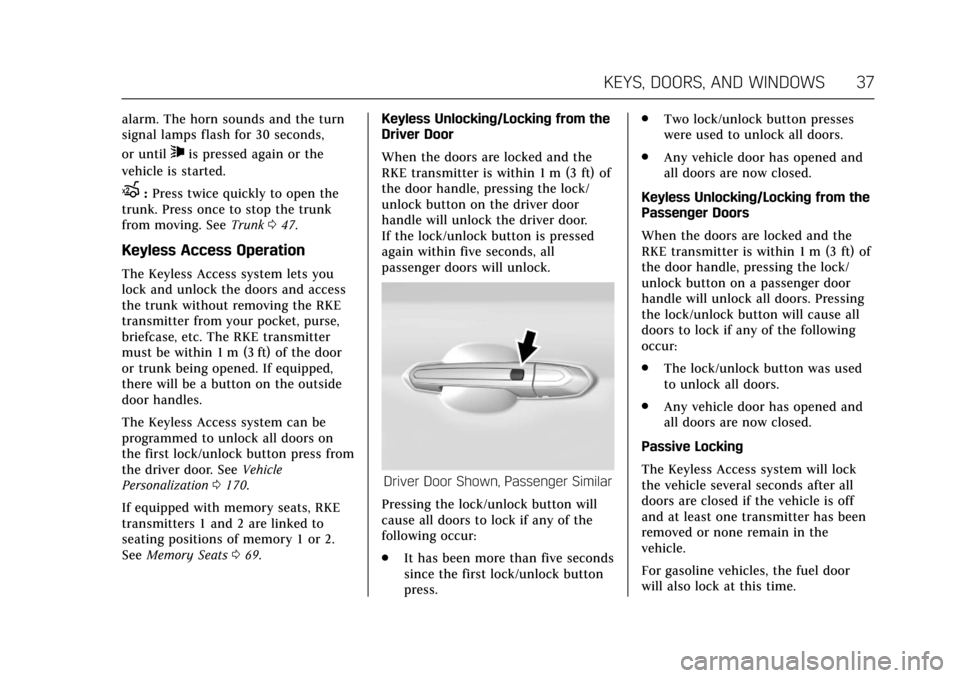
Keyless Access Operation
The Keyless Access system lets you
lock and unlock the doors and access
the trunk without removing the RKE
transmitter from your pocket, purse,
briefcase, etc. The RKE transmitter
must be within 1 m (3 ft) of the door
or trunk being opened. If equipped,
there will be a button on the outside
door handles.
The Keyless Access system can be
programmed to unlock all doors on
the first lock/unlock button press from
the driver door. See Vehicle
Personalization 0170.
If equipped with memory seats, RKE
transmitters 1 and 2 are linked to
seating positions of memory 1 or 2.
See Memory Seats 069. Keyless Unlocking/Locking from the
Driver Door
When the doors are locked and the
RKE transmitter is within 1 m (3 ft) of
the door handle, pressing the lock/
unlock button on the driver door
handle will unlock the driver door.
If the lock/unlock button is pressed
again within five seconds, all
passenger doors will unlock.
Driver Door Shown, Passenger Similar
Pressing the lock/unlock button will
cause all doors to lock if any of the
following occur:
. It has been more than five seconds
since the first lock/unlock button
press. .
Two lock/unlock button presses
were used to unlock all doors.
. Any vehicle door has opened and
all doors are now closed.
Keyless Unlocking/Locking from the
Passenger Doors
When the doors are locked and the
RKE transmitter is within 1 m (3 ft) of
the door handle, pressing the lock/
unlock button on a passenger door
handle will unlock all doors. Pressing
the lock/unlock button will cause all
doors to lock if any of the following
occur:
. The lock/unlock button was used
to unlock all doors.
. Any vehicle door has opened and
all doors are now closed.
Passive Locking
The Keyless Access system will lock
the vehicle several seconds after all
doors are closed if the vehicle is off
and at least one transmitter has been
removed or none remain in the
vehicle.
For gasoline vehicles, the fuel door
will also lock at this time.