instrument panel CADILLAC CTS 2004 1.G Owner's Manual
[x] Cancel search | Manufacturer: CADILLAC, Model Year: 2004, Model line: CTS, Model: CADILLAC CTS 2004 1.GPages: 454, PDF Size: 2.87 MB
Page 130 of 454

Turn Signal/Multifunction Lever
The lever on the left side of the steering column
includes the following:
Turn and Lane-Change Signals
Headlamps
Headlamp High/Low Beam-Changer
Flash-To-Pass Feature
Fog Lamps
Cruise Control (CTS)
For more information on the exterior lamps, seeExterior
Lamps on page 3-24.
Turn and Lane-Change Signals
To signal a turn, move the lever all the way up or
down. The lever returns automatically when the
turn is complete.
An arrow on the instrument
panel cluster will ash in
the direction of the
turn or lane change.
Raise or lower the lever until the arrow starts to ash to
signal a lane change. Hold it there until the lane
change is complete. The lever returns to its original
position when it’s released.
Arrows that ash rapidly when signaling for a turn or
lane change may be caused by a burned-out signal bulb.
Other driver’s won’t see the signal. CTS
CTS-V
3-10
Page 131 of 454

Replace burned-out bulbs to help avoid possible
accidents. Check the fuse and for burned-out bulbs if
the arrow fails to work when signaling a turn. SeeFuses
and Circuit Breakers on page 5-100.
Turn Signal On Chime
If the turn signal is left on for about 1 mile (1.6 km), a
warning chime will sound and the Turn Signal On
message will appear on the Driver Information
Center (DIC) display. See “Turn Signal On Message”
underDIC Warnings and Messages on page 3-70.
Headlamp High/Low-Beam Changer
Push forward on the turn signal/multifunction lever to
change the headlamps from low to high beam. Pull the
lever back and then release it to change from high
to low beam.
This light on the
instrument panel cluster
will be on, indicating
high-beam usage.
Flash-To-Pass Feature
This feature allows you to use the high-beam headlamps
to signal the driver in front of you that you want to pass.
Pull and hold the turn signal/multifunction lever toward
you to use this feature. When you do, the following
will occur:
If the headlamps are either off, in low-beam or in
Daytime Running Lamps (DRL) mode, the
high-beam headlamps will turn on. They’ll stay on
as long as you hold the lever there. Release
the lever to turn them off.
If the headlamps are in high-beam mode, they will
switch to low beam. To return to high-beam, push
the lever away from you.
3-11
Page 132 of 454
Headlamps
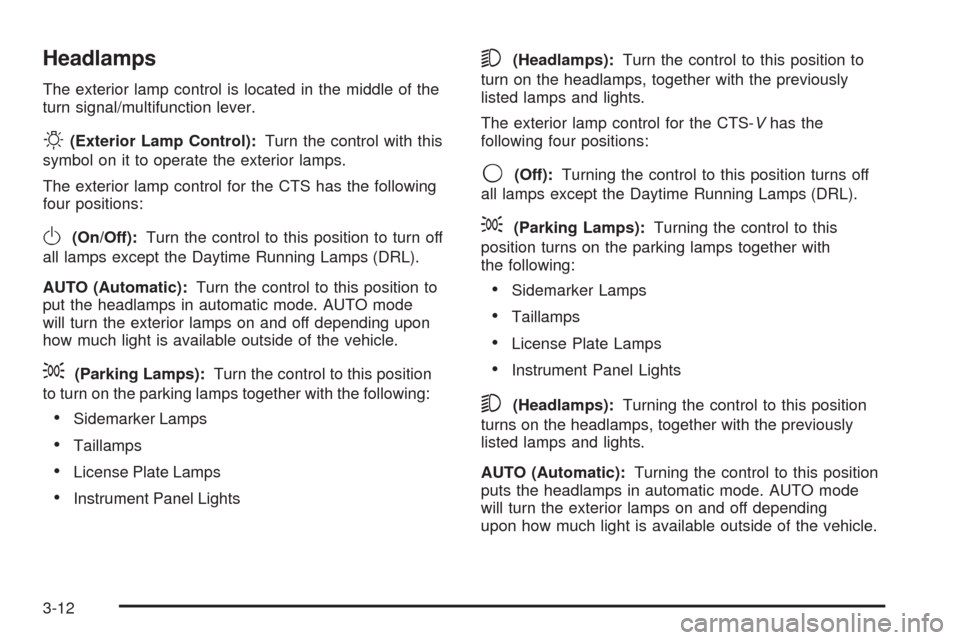
The exterior lamp control is located in the middle of the
turn signal/multifunction lever.
O(Exterior Lamp Control):Turn the control with this
symbol on it to operate the exterior lamps.
The exterior lamp control for the CTS has the following
four positions:
O(On/Off):Turn the control to this position to turn off
all lamps except the Daytime Running Lamps (DRL).
AUTO (Automatic):Turn the control to this position to
put the headlamps in automatic mode. AUTO mode
will turn the exterior lamps on and off depending upon
how much light is available outside of the vehicle.
;(Parking Lamps):Turn the control to this position
to turn on the parking lamps together with the following:
Sidemarker Lamps
Taillamps
License Plate Lamps
Instrument Panel Lights
5(Headlamps):Turn the control to this position to
turn on the headlamps, together with the previously
listed lamps and lights.
The exterior lamp control for the CTS-Vhas the
following four positions:
9(Off):Turning the control to this position turns off
all lamps except the Daytime Running Lamps (DRL).
;(Parking Lamps):Turning the control to this
position turns on the parking lamps together with
the following:
Sidemarker Lamps
Taillamps
License Plate Lamps
Instrument Panel Lights
5(Headlamps):Turning the control to this position
turns on the headlamps, together with the previously
listed lamps and lights.
AUTO (Automatic):Turning the control to this position
puts the headlamps in automatic mode. AUTO mode
will turn the exterior lamps on and off depending
upon how much light is available outside of the vehicle.
3-12
Page 135 of 454
If your vehicle is in cruise control when the traction
control system begins to limit wheel spin, the cruise
control will automatically disengage. SeeTraction
Control System (TCS) (CTS) on page 4-8orTraction
Control System (TCS) (CTS-V) on page 4-9and
Stabilitrak
®System on page 4-11. When road conditions
allow you to safely use it again, you may turn the
cruise control back on.
Setting Cruise Control
{CAUTION:
If you leave your cruise control on when you
are not using cruise, you might hit a button
and go into cruise when you do not want to.
You could be startled and even lose control.
Keep the cruise control switch off until you
want to use cruise control.
1. Move the cruise control switch to on.
2. Get up to the speed you want.
3. Press in the set button at the end of the lever and
release it.
4. Take your foot off the accelerator pedal.This light on the instrument
panel cluster will come on
while cruise control is on.
Resuming a Set Speed
Suppose you set your cruise control at a desired speed
and then you apply the brake. This, of course,
disengages the cruise control. But you don’t need to
reset it.
Once you’re going about 25 mph (40 km/h) or more, you
can move the cruise control switch briey from on to
resume/accelerate.
You’ll go right back up to your chosen speed and
stay there.
If you hold the switch at resume/accelerate the vehicle
will keep going faster until you release the switch or
apply the brake. So unless you want to go faster, don’t
hold the switch at resume/accelerate.
3-15
Page 139 of 454
This light on the instrument
panel cluster will come on
when cruise control is
set. It will go out when
cruise control is turned off.
Resuming a Set Speed
Suppose you set your cruise control at a desired speed
and then you apply the brake. This shuts off the
cruise control. But you don’t need to reset it.
Once the vehicle is traveling approximately
25 mph (40 km/h) or more, you can press the
plus (resume/accelerate) button to return to your
desired preset speed. The cruise control light will
be displayed again.
The vehicle will return to and stay at your preset speed.
If you press and hold the plus (resume/accelerate)
button, the vehicle speed will increase until you
release the button or apply the brake. Unless you
want to go faster, do not press and hold the plus
(resume/accelerate) button.
Increasing Speed While Using
Cruise Control
There are two ways to go to a higher speed:
Use the accelerator pedal to get to the higher
speed. Press the set button, then release the button
and the accelerator pedal. You will now cruise at
the higher speed.
Press the plus (resume/accelerate) button. Hold it
until you get up to the speed that you want, and
then release the button. To increase your speed
in very small amounts, briey press the plus
(resume/accelerate) button and then release it.
Each time you do this, your vehicle will speed up
approximately 1 mph (1.6 km/h).
The accelerate feature will only work after you have set
the cruise control speed by pressing the set button.
3-19
Page 144 of 454
Exterior Lamps
Headlamps
SeeTurn Signal/Multifunction Lever on page 3-10for
more information on the headlamps.
Daytime Running Lamps
Daytime Running Lamps (DRL) can make it easier for
others to see the front of your vehicle during the
day. DRL can be helpful in many different driving
conditions, but they can be especially helpful in the short
periods after dawn and before sunset. Fully functional
daytime running lamps are required on all vehicles
rst sold in Canada.
The DRL system will make the turn signal lamps come
on when the following conditions are met:
It is still daylight and the ignition is in ON or START,
the exterior lamp control is in OFF or AUTO with the
headlamps off, and
an automatic transmission is not in PARK (P) or the
parking brake is not set on a manual transmission.When DRL are on, only your front turn signal lamps will
be on. No other exterior lamps will be on when the
DRL are being used. Your instrument panel won’t be lit
up either.
When the exterior lamp control is in AUTO and it’s dark
enough outside, the DRL will turn off and the low-beam
headlamps will turn on. When it’s bright enough
outside, the low-beam headlamps will go off, and the
DRL will turn back on. If you start your vehicle in a dark
garage, the automatic headlamp system will come on
immediately. Once you leave the garage, it will take
about one minute for the automatic headlamp system to
change to DRL if it is light outside. During that delay,
your instrument panel cluster may not be as bright
as usual. Make sure your instrument panel brightness
lever is in the full bright position. See “Instrument Panel
Brightness” underInterior Lamps on page 3-26.
3-24
Page 145 of 454

If it’s dark enough outside and the exterior lamp control
is off, a Headlamps Suggested message will appear
on the Driver’s Information Center (DIC) display.
This message informs the driver that turning on the
exterior lamps is recommended even though the DRL
are still illuminated. Turning the exterior lamp control to
AUTO or to the low-beam headlamp position will
turn off the DRL and cancel the Headlamps Suggested
message. If the parking lamps or the fog lamps were
turned on instead, the DRL will still turn off and the
Headlamps Suggested message will be displayed. You
can turn it off by pressing the OK button if you have
the Navigation audio system or the CLR button if
you have the Base audio system.
To operate your vehicle with the DRL off, turn the
exterior lamp control off. Then turn on the fog lamps
or parking lamps, and the DRL will turn off. The
Headlamps Suggested message will appear on the
DIC display. This will work regardless of gear position
and whether or not the parking brake is set.
As with any vehicle, you should turn on the regular
headlamp system when you need it.Light Sensor
The light sensor for the DRL and AUTO headlamp
feature is located on top of the instrument panel. If you
cover the sensor, it will read dark, and the exterior
lamps or the Headlamps Suggested message will
appear on the DIC whenever the ignition is on.
3-25
Page 146 of 454

Exterior Lighting Battery Saver
If the parking lamps or headlamps have been left on,
the exterior lamps will turn off about 10 minutes after the
ignition is turned to OFF. This protects against draining
the battery in case you have accidentally left the
headlamps or parking lamps on. The battery saver does
not work if the headlamps are turned on after the
ignition is turned to OFF.
If you need to leave the lamps on for more than
10 minutes, use the exterior lamp control to turn the
lamps back on.
Interior Lamps
Instrument Panel Brightness
The lever for this feature is
located on the overhead
console.
Slide the lever toward the symbol to brighten the lights
or away from it to dim them.
If you slide the lever all the way toward the symbol past
the resistance point, the interior lamps will come on.
To turn them off, slide the lever back toward the
minimum brightness setting.
3-26
Page 147 of 454
Entry Lighting
The entry lighting system turns on the reading and
dome lamps and the backlighting to the exterior lamp
control when a door is opened or if you press the remote
keyless entry transmitter unlock button. If activated by
the transmitter, the lighting will remain active for
about 25 seconds. The entry lighting system uses the
light sensor; it must be dark outside in order for the
lamps to turn on. The lamps turn off about 25 seconds
after the last door is closed. They will dim to off if
the ignition key is placed in ON, or immediately
deactivate if the power locks are activated.
Parade Dimming
This feature prohibits dimming of the instrument panel
displays and backlighting during daylight hours when the
key is in the ignition and the headlamps are on. This
feature operates with the light sensor and is fully
automatic. When the light sensor reads darkness outside
and the parking lamps are active, the instrument
panel displays can be adjusted by sliding the instrument
panel brightness lever toward the symbol to brighten
or away from the symbol to dim the lighting.
Reading Lamps
The reading lamps are located on the overhead console.
These lamps come on automatically when any door
is opened.For manual operation, press the button next to each
lamp to turn it on. Press it again to turn the lamp off.
If the reading lamps are left on, they automatically shut
off 10 minutes after the ignition has been turned off.
Accessory Power Outlets
With accessory power outlets, you can plug in auxiliary
electrical equipment such as a cellular telephone or
CB radio.
The front accessory power outlet is located in the
ashtray on the instrument panel below the climate
control system. The outlet will have a cigarette lighter
if your vehicle has this option. Remove the cigarette
lighter to access the outlet.
The rear accessory power outlet is located on the back
of the center console.
Your vehicle may have a small cap that must be
removed to access the accessory power outlet. If it
does, when not using the outlet be sure to cover it with
the protective cap.
Notice:Leaving electrical equipment on for
extended periods will drain the battery. Always turn
off electrical equipment when not in use and do
not plug in equipment that exceeds the maximum
amperage rating.
3-27
Page 150 of 454
Do not cover the solar sensor located in the center of
the instrument panel, near the windshield. For more
information on the solar sensor, see “Sensors” later in
this section.
Manual Operation
yNz(Mode):Pressing the mode switch and
changing the mode cancels automatic operation and
places the system in manual mode. Press AUTO
to return to automatic operation.
The outboard air outlets will always receive air ow
regardless of the mode selected. SeeOutlet
Adjustment on page 3-34to change this airow
from the outboard outlets.
To change the current mode, select one of the following:
Y(Vent):This mode directs air to the instrument
panel outlets.
\(Bi-Level):This mode directs approximately half
of the air to the instrument panel outlets, and then
directs most of the remaining air to the oor outlets.
Some air may be directed toward the windshield.
In automatic operation, cooler air is directed to the
upper outlets and warmer air to the oor outlets.
[(Floor):This mode directs most of the air to the
oor outlets with some air directed to the outboard
outlets (for the side windows), and a little air directed to
the windshield.
The mode switch can also be used to select the defog
mode. Information on defogging and defrosting can
be found later in this section.
y9z(Fan):Press this switch to increase or
decrease the fan speed. Pressing this switch cancels
automatic operation and places the system in manual
mode. Press AUTO to return to automatic operation.
If the airow seems low when the fan speed is at
the highest setting, the passenger compartment air lter
may need to be replaced. For more information, see
Passenger Compartment Air Filter on page 3-35
andScheduled Maintenance on page 6-4.
h(Recirculation):This mode keeps outside air from
coming in the vehicle. It can be used to prevent outside
air and odors from entering your vehicle or to help heat or
cool the air inside your vehicle more quickly. Press this
button to turn the recirculation mode on or off. The
air-conditioning compressor also comes on.
Recirculation is not available in the defrost mode and
will automatically turn off after 10 minutes when defog
is selected.
3-30