light CADILLAC CTS 2009 2.G Owner's Manual
[x] Cancel search | Manufacturer: CADILLAC, Model Year: 2009, Model line: CTS, Model: CADILLAC CTS 2009 2.GPages: 490, PDF Size: 2.68 MB
Page 125 of 490

If the ignition is on, the brake system warning light on the
instrument panel cluster should come on. If it does not,
you need to have the vehicle serviced. SeeBrake System
Warning Light on page 3-39for more information.
To release the parking brake, pull the release lever
located to the left of the steering wheel on the instrument
panel.Notice:Driving with the parking brake on can
overheat the brake system and cause premature
wear or damage to brake system parts. Make sure
that the parking brake is fully released and the brake
warning light is off before driving.
A warning chime will sound if the parking brake is set,
the ignition is on, and the vehicle begins to move.
To stop the chime, fully release the parking brake.
If you are towing a trailer and parking on a hill,
seeTowing a Trailer (CTS-V) on page 4-27orTowing a
Trailer (CTS) on page 4-28for more information.
2-43
Page 126 of 490

Electric Parking Brake
{CAUTION:
On vehicles with a manual transmission, releasing
the clutch and pressing the accelerator will release
the Electric Parking Brake. If the vehicle is not in a
gear, the vehicle could move, and you or others
could be injured. Make sure the vehicle is in a
gear before attempting to drive away. To avoid
unexpected vehicle movement, do not partially
release the clutch or press the accelerator pedal
until you are ready to release the parking brake
and drive away.Vehicles with
the Electric
Parking Brake
(EPB) have
a switch in the
center console.
The EPB takes the place of the manual parking brake
system, the foot pedal and release handle. The system
has two warning lights and ve Driver Information Center
(DIC) messages. SeeBrake System Warning Light on
page 3-39andDIC Warnings and Messages on
page 3-58for more information. In case of insufficient
electrical power, the EPB cannot be applied or released.
2-44
Page 127 of 490

EPB Apply
The EPB can be applied any time the vehicle is stopped.
The EPB is applied by momentarily lifting up on the EPB
switch. Once fully applied, the BRAKE light will be on,
and the DIC message “Park Brake Set” will be displayed.
If the light does not come on, or is ashing, you need to
have the vehicle serviced. Do not drive the vehicle if
the BRAKE light is ashing. See your dealer/retailer.
SeeBrake System Warning Light on page 3-39for more
information.
If the EPB is applied while the vehicle is in motion,
a chime will sound, and the DIC message “Release
Park Brake Switch” will be displayed. The vehicle
will decelerate as long as the switch is held in the
up position. Releasing the EPB switch during the
deceleration will release the parking brake. If the
switch is held in the up position until the vehicle
comes to a stop, the EPB will remain applied.
If the BRAKE light is on, either the EPB is applied, or
there is a failure in the hydraulic brake system.If this light is ashing, the EPB is only partially applied
or released, or there is a problem with the EPB.
The DIC message “Service Park Brake” will be
displayed. If this light is ashing, release the EPB, and
attempt to apply it again. If this light continues to
ash, do not drive the vehicle. See your dealer/retailer.
If the
Ylight is on, the EPB has detected an error
in another system and is operating with reduced
functionality. To apply the EPB when this light is on, lift up
on the EPB switch and hold it in the up position. Full
application of the parking brake by the EPB system may
take a longer period of time than normal when this light is
on. Continue to hold the switch until the BRAKE light
remains on. If the
Ylight is on, see your dealer/retailer.
If the EPB fails to apply, the rear wheels should be
blocked to prevent vehicle movement.
2-45
Page 128 of 490

EPB Release
To release the EPB, turn the ignition switch to the
ON/RUN position, apply and hold the brake pedal, and
push down momentarily on the EPB switch. If you attempt
to release the EPB without the brake pedal applied, a
chime will sound, and the DIC message “Press Brake
Pedal to Release Park Brake” will be displayed. The EPB
is released when the BRAKE light is off and the DIC
message “Park Brake Released” is displayed.
If the
Ylight is on, the EPB has detected an error
in another system and is operating with reduced
functionality. To release the EPB when this light is on,
push down on the EPB switch and hold it in the down
position. EPB release may take a longer period of time
than normal when this light is on. Continue to hold the
switch until the BRAKE light is off. If the
Ylight is on,
see your dealer/retailer.
Notice:Driving with the parking brake on can
overheat the brake system and cause premature
wear or damage to brake system parts. Make sure
that the parking brake is fully released and the brake
warning light is off before driving.
Automatic EPB Release
The EPB will automatically release if the vehicle is
running, placed into gear and an attempt is made to
drive away. Avoid rapid acceleration when the EPB
is applied, to preserve park brake lining life.
The EPB can also be used to prevent roll back for
vehicles with a manual transmission taking off on a hill.
In a situation where no roll back is desired, an applied
EPB will allow both feet to be used for the clutch
and accelerator pedals in preparation for starting the
vehicle moving in the intended direction.
In this situation, perform the normal clutch and
accelerator actions required to begin moving the vehicle.
There is no need to push the switch to release the EPB.
If you are towing a trailer and parking on a hill, see
Towing a Trailer (CTS-V) on page 4-27orTowing
a Trailer (CTS) on page 4-28for more information.
2-46
Page 134 of 490

Mirrors
Automatic Dimming Rearview Mirror
This vehicle has an automatic dimming inside rearview
mirror with OnStar®controls. SeeOnStar®System
on page 2-56for more information.
O(On/Off):Press to turn the dimming feature on or off.
Automatic Dimming Mirror Operation
Automatic dimming reduces the glare of lights from
behind the vehicle. The dimming feature comes on and
the indicator light illuminates each time the vehicle is
started.
Cleaning the Mirror
Do not spray glass cleaner directly on the mirror.
Use a soft towel dampened with water.
Outside Power Mirrors
Controls for the outside
power mirrors are located
on the driver’s door.
To adjust each mirror:
1. Press (A) or (B) to select the driver’s or passenger
side mirror.
2. Press one of the four arrows located on the control
pad to move the mirror to the desired direction.
3. Adjust each outside mirror so that you can see a
little of your vehicle, and the area behind your
vehicle.
4. Press either (A) or (B) again to deselect the mirror.
2-52
Page 136 of 490

Object Detection Systems
Ultrasonic Rear Parking
Assist (URPA)
For vehicles with the URPA system, it operates at speeds
less than 5mph (8 km/h), and assists the driver with
parking and avoiding objects while in R (Reverse).
The sensors on the rear bumper are used to detect the
distance to an object up to 8 feet (2.5 m) behind the
vehicle, and at least 10 inches (25.4 cm) off the ground.
{CAUTION:
The Ultrasonic Rear Parking Assist (URPA) system
does not replace driver vision. It cannot detect:
objects that are below the bumper, underneath
the vehicle, or if they are too close or far from
the vehicle
children, pedestrians, bicyclists, or pets.
CAUTION: (Continued)
CAUTION: (Continued)
If you do not use proper care before and while
backing; vehicle damage, injury, or death could
occur. Even with URPA, always check behind the
vehicle before backing up. While backing, be sure
to look for objects and check the vehicle’s mirrors.
The display is located
above the rear window and
can be seen by looking
over your right shoulder.
URPA uses three color-coded lights to provide distance
and system information.
2-54
Page 137 of 490
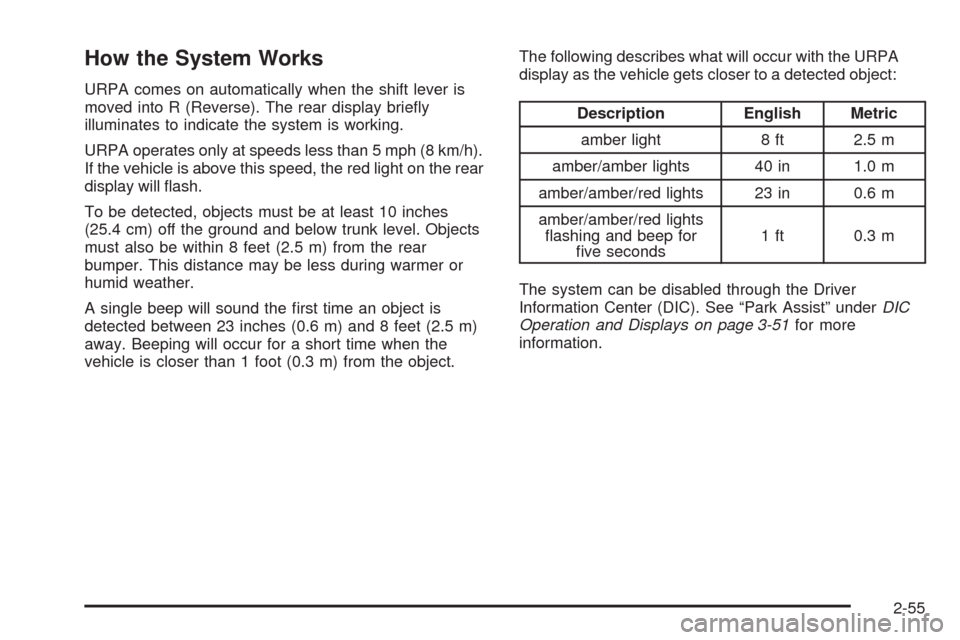
How the System Works
URPA comes on automatically when the shift lever is
moved into R (Reverse). The rear display briey
illuminates to indicate the system is working.
URPA operates only at speeds less than 5 mph (8 km/h).
If the vehicle is above this speed, the red light on the rear
display will ash.
To be detected, objects must be at least 10 inches
(25.4 cm) off the ground and below trunk level. Objects
must also be within 8 feet (2.5 m) from the rear
bumper. This distance may be less during warmer or
humid weather.
A single beep will sound the rst time an object is
detected between 23 inches (0.6 m) and 8 feet (2.5 m)
away. Beeping will occur for a short time when the
vehicle is closer than 1 foot (0.3 m) from the object.The following describes what will occur with the URPA
display as the vehicle gets closer to a detected object:
Description English Metric
amber light 8 ft 2.5 m
amber/amber lights 40 in 1.0 m
amber/amber/red lights 23 in 0.6 m
amber/amber/red lights
ashing and beep for
ve seconds1 ft 0.3 m
The system can be disabled through the Driver
Information Center (DIC). See “Park Assist” underDIC
Operation and Displays on page 3-51for more
information.
2-55
Page 138 of 490

When the System Does Not Seem to
Work Properly
If the URPA system will not activate due to a temporary
condition, the message PARK ASSIST OFF will be
displayed on the DIC and a red light will be shown on
the rear URPA display when the shift lever is moved into
R (Reverse). This occurs under the following conditions:
The driver disables the system.
The ultrasonic sensors are not clean. Keep the
vehicle’s rear bumper free of mud, dirt, snow,
ice and slush. For cleaning instructions, see
Washing Your Vehicle on page 5-110.
A trailer was attached to the vehicle, or a bicycle or
an object was hanging out of the trunk during the
last drive cycle, the red light may illuminate in
the rear display. Once the attached object is
removed, URPA will return to normal operation.
A tow bar is attached to the vehicle.
The vehicle’s bumper is damaged. Take the vehicle
to your dealer/retailer to repair the system.
Other conditions may affect system performance,
such as vibrations from a jackhammer or the
compression of air brakes on a very large truck.
If the system is still disabled after driving forward at least
15 mph (25 km/h), take the vehicle to your dealer/retailer.
OnStar®System
OnStar uses several innovative technologies and live
advisors to provide a wide range of safety, security,
information, and convenience services. If the airbags
deploy, the system is designed to make an automatic
call to OnStar Emergency advisors who can request
emergency services be sent to your location. If the keys
are locked in the vehicle, call OnStar at 1-888-4-ONSTAR
to have a signal sent to unlock the doors. OnStar
Hands-Free Calling, including 30 trial minutes good
for 60 days, is available on most vehicles. OnStar
Turn-by-Turn Navigation service, with one trial route, is
available on most vehicles. Press the OnStar button to
have an OnStar advisor contact Roadside Service.
OnStar service is provided subject to the OnStar Terms
and Conditions included in the OnStar Subscriber glove
box literature.
2-56
Page 141 of 490

How OnStar Service Works
The OnStar system can record and transmit vehicle
information. This information is automatically sent to an
OnStar Call Center when the OnStar button is pressed,
the emergency button is pressed, or if the airbags or
AACN system deploy. This information usually includes
the vehicle’s GPS location and, in the event of a crash,
additional information regarding the crash that the vehicle
was involved in (e.g. the direction from which the vehicle
was hit). When the Virtual Advisor feature of OnStar
Hands-Free Calling is used, the vehicle also sends
OnStar the vehicle’s GPS location so they can provide
services where it is located.
OnStar service cannot work unless the vehicle is in a
place where OnStar has an agreement with a wireless
service provider for service in that area. OnStar service
also cannot work unless the vehicle is in a place where
the wireless service provider OnStar has hired for that
area has coverage, network capacity and reception when
the service is needed, and technology that is compatible
with the OnStar service. Not all services are available
everywhere, particularly in remote or enclosed areas, or
at all times.Location information about the vehicle is only available if
the GPS satellite signals are unobstructed and available.
The vehicle must have a working electrical system,
including adequate battery power, for the OnStar
equipment to operate. There are other problems OnStar
cannot control that may prevent OnStar from providing
OnStar service at any particular time or place. Some
examples are damage to important parts of the vehicle in
a crash, hills, tall buildings, tunnels, weather or wireless
phone network congestion.
Your Responsibility
Increase the volume of the radio if the OnStar advisor
cannot be heard. If the light next to the OnStar buttons is
red, the system may not be functioning properly. Press
the OnStar button and request a vehicle diagnostic. If the
light appears clear (no light is appearing), your OnStar
subscription has expired and all services have been
deactivated. Press the OnStar button to conrm that the
OnStar equipment is active.
2-59
Page 142 of 490

Universal Home Remote
System
The Universal Home Remote System provides a way to
replace up to three hand-held Radio-Frequency (RF)
transmitters used to activate devices such as garage
door openers, security systems, and home lighting.
This device complies with Part 15 of the FCC Rules.
Operation is subject to the following two conditions:
1. This device may not cause harmful interference.
2. This device must accept any interference received,
including interference that may cause undesired
operation.
This device complies with RSS-210 of Industry Canada.
Operation is subject to the following two conditions:
1. This device may not cause interference.
2. This device must accept any interference received,
including interference that may cause undesired
operation of the device.
Changes or modications to this system by other than
an authorized service facility could void authorization to
use this equipment.
Universal Home Remote System
Operation (With One Triangular LED)
If there is one triangular Light Emitting Diode (LED)
indicator light above the Universal Home Remote
buttons, follow the instructions below.
This system provides a way to replace up to three remote
control transmitters used to activate devices such as
garage door openers, security systems, and home
automation devices.
Do not use the Universal Home Remote with any
garage door opener that does not have the stop and
reverse feature. This includes any garage door opener
model manufactured before April 1, 1982.
Read the instructions completely before attempting to
program the Universal Home Remote. Because of
the steps involved, it may be helpful to have another
person available to assist you in the programming
the Universal Home Remote.
2-60