tires CADILLAC CTS 2009 2.G Owners Manual
[x] Cancel search | Manufacturer: CADILLAC, Model Year: 2009, Model line: CTS, Model: CADILLAC CTS 2009 2.GPages: 490, PDF Size: 2.68 MB
Page 1 of 490
Seats and Restraint System............................. 1-1
Head Restraints
......................................... 1-2
Front Seats
............................................... 1-4
Rear Seats
..............................................1-13
Safety Belts
.............................................1-14
Child Restraints
.......................................1-34
Airbag System
.........................................1-58
Restraint System Check
............................1-74
Features and Controls..................................... 2-1
Keys
........................................................ 2-3
Doors and Locks
......................................2-16
Windows
.................................................2-22
Theft-Deterrent Systems
............................2-26
Starting and Operating Your Vehicle
...........2-30
Mirrors
....................................................2-52
Object Detection Systems
..........................2-54
OnStar
®System
......................................2-56
Universal Home Remote System
................2-60
Storage Areas
.........................................2-64
Sunroof
..................................................2-65
Instrument Panel............................................. 3-1
Instrument Panel Overview
.......................... 3-4
Climate Controls
......................................3-24
Warning Lights, Gages, and Indicators
........3-30
Driver Information Center (DIC)
..................3-50
Audio System(s)
.......................................3-85Driving Your Vehicle....................................... 4-1
Your Driving, the Road, and the Vehicle
....... 4-2
Towing
...................................................4-26
Service and Appearance Care.......................... 5-1
Service
..................................................... 5-3
Fuel
......................................................... 5-5
Checking Things Under the Hood
...............5-12
All-Wheel Drive
........................................5-51
Rear Axle
...............................................5-52
Headlamp Aiming
.....................................5-53
Bulb Replacement
....................................5-57
Windshield Wiper Blade Replacement
.........5-59
Tires
......................................................5-61
Appearance Care
...................................5-106
Vehicle Identication
...............................5-114
Electrical System
....................................5-114
Capacities and Specications
...................5-127
Maintenance Schedule..................................... 6-1
Maintenance Schedule
................................ 6-2
Customer Assistance Information.................... 7-1
Customer Assistance and Information
........... 7-2
Reporting Safety Defects
...........................7-14
Vehicle Data Recording and Privacy
...........7-16
Index................................................................ 1
2009 Cadillac CTS/CTS-V Owner ManualM
Page 120 of 490

M (Manual Mode):This position allows the driver to
select the range of gears appropriate for current driving
conditions. If the vehicle has this feature, see Driver
Shift Control (DSC) later in this section.
Notice:Spinning the tires or holding the vehicle in
one place on a hill using only the accelerator pedal
may damage the transmission. If you are stuck, do
not spin the tires. When stopping on a hill, use the
brakes to hold the vehicle in place.
Driver Shift Control (DSC)
Notice:If you drive the vehicle at high RPMs without
upshifting while using Driver Shift Control (DSC), you
could damage the vehicle. Always upshift when
necessary while using DSC.
Driver Shift Control (DSC) allows you to shift an
automatic transmission similar to a manual transmission.
To use the DSC feature:
1. Move the shift lever to the right from D (Drive) to
M (Manual Mode).
Once in M (Manual Mode), if you do not move the
shift lever forward or rearward, the vehicle will be in
sport mode. When you are in sport mode the vehicle
will still shift automatically. The transmission may
remain in a gear longer than it would in the normal
driving mode based on braking, throttle input, and
vehicle lateral acceleration.SPORT MODE will be displayed in the DIC
momentarily. The vehicle will remain in sport mode
if the shift lever is not moved. Sport mode will
shift automatically but remain in a gear longer then
it would in normal driving mode based on braking
and acceleration.
2. Press the shift lever forward to upshift or rearward
to downshift.
The tachometer display on the instrument panel cluster
will show which gear the vehicle is in. The number
indicates the requested gear range when moving the
shift lever forward or rearward. SeeSpeedometer and
Odometer on page 3-33for more information on the
odometer.
2-38
Page 190 of 490
Engine Coolant Temperature Gage
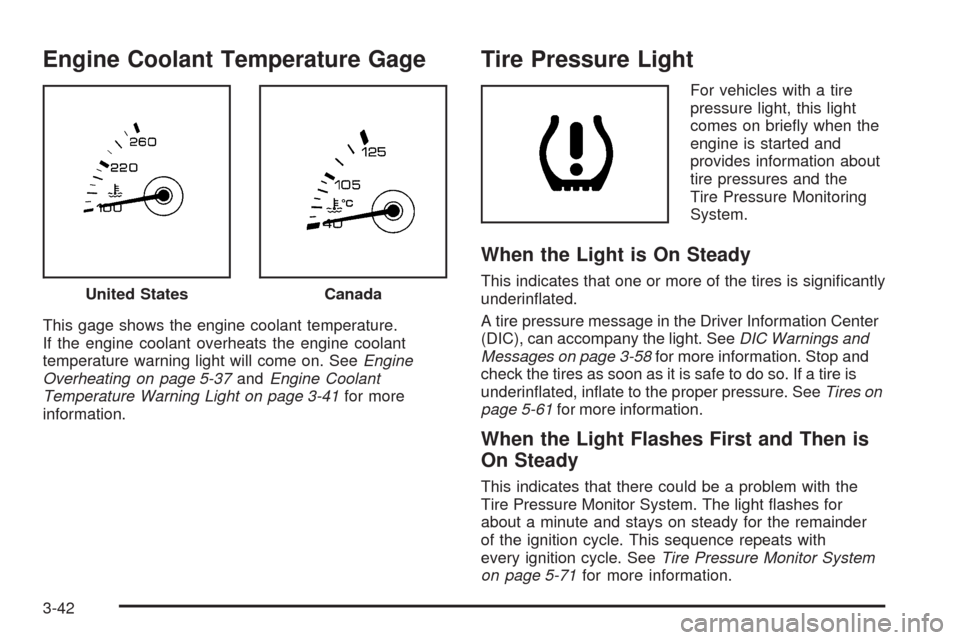
This gage shows the engine coolant temperature.
If the engine coolant overheats the engine coolant
temperature warning light will come on. SeeEngine
Overheating on page 5-37andEngine Coolant
Temperature Warning Light on page 3-41for more
information.
Tire Pressure Light
For vehicles with a tire
pressure light, this light
comes on briey when the
engine is started and
provides information about
tire pressures and the
Tire Pressure Monitoring
System.
When the Light is On Steady
This indicates that one or more of the tires is signicantly
underinated.
A tire pressure message in the Driver Information Center
(DIC), can accompany the light. SeeDIC Warnings and
Messages on page 3-58for more information. Stop and
check the tires as soon as it is safe to do so. If a tire is
underinated, inate to the proper pressure. SeeTires on
page 5-61for more information.
When the Light Flashes First and Then is
On Steady
This indicates that there could be a problem with the
Tire Pressure Monitor System. The light ashes for
about a minute and stays on steady for the remainder
of the ignition cycle. This sequence repeats with
every ignition cycle. SeeTire Pressure Monitor System
on page 5-71for more information. United States
Canada
3-42
Page 191 of 490

Malfunction Indicator Lamp
Check Engine Light
A computer system called OBD II (On-Board
Diagnostics-Second Generation) monitors operation
of the fuel, ignition, and emission control systems.
It makes sure that emissions are at acceptable levels
for the life of the vehicle, helping to produce a cleaner
environment.
This light should come on
when the ignition is on, but
the engine is not running,
as a check to show it
is working.
If it does not come on, have the vehicle serviced by
your dealer/retailer.
If the check engine light comes on and stays on, while
the engine is running, this indicates that there is an
OBD II problem and service is required.Malfunctions often are indicated by the system before
any problem is apparent. Being aware of the light
can prevent more serious damage to the vehicle.
This system assists the service technician in correctly
diagnosing any malfunction.
Notice:If the vehicle is continually driven with
this light on, after a while, the emission controls
might not work as well, the vehicle’s fuel economy
might not be as good, and the engine might not
run as smoothly. This could lead to costly repairs
that might not be covered by the vehicle warranty.
Notice:Modications made to the engine,
transmission, exhaust, intake, or fuel system of the
vehicle or the replacement of the original tires
with other than those of the same Tire Performance
Criteria (TPC) can affect the vehicle’s emission
controls and can cause this light to come on.
Modications to these systems could lead to
costly repairs not covered by the vehicle warranty.
This could also result in a failure to pass a
required Emission Inspection/Maintenance test.
SeeAccessories and Modifications on page 5-3.
3-43
Page 208 of 490
Calibrating Drive In Circles
This message displays when calibrating the compass.
Drive the vehicle in circles at less than 5 mph (8 km/h)
to complete the calibration. SeeDIC Compass on
page 3-56for more information.
Calibration Complete
This message displays when the compass calibration is
complete. SeeDIC Compass on page 3-56for more
information.
Change Engine Oil Soon
When this message displays, it means that service is
required for the vehicle. See your dealer/retailer.
SeeEngine Oil on page 5-18andScheduled
Maintenance on page 6-4for more information.
When you reset the Change Engine Oil Soon message
by clearing it from the display, you still must reset
the engine oil life system separately. For more
information on resetting the engine oil life system,
seeEngine Oil Life System on page 5-21.
Check Tire Pressure
This message displays when the pressure in one or
more of the vehicle’s tires needs to be checked. It also
displays Left Front, Right Front, Left Rear, or Right
Rear to indicate which tire. More than one tire pressure
message can be received at a time. To read the
other messages, press the set/reset button. If a tire
pressure message appears, stop as soon as you can.
Have the tire pressures checked and set to those shown
on the Tire Loading Information label. SeeTires on
page 5-61,Loading the Vehicle on page 4-20, and
Inflation - Tire Pressure on page 5-69. The DIC display
also shows the tire pressure values. SeeDIC
Operation and Displays on page 3-51. If the tire
pressure is low, the low tire pressure warning light
comes on. SeeTire Pressure Light on page 3-42.
Cruise Set To XXX MPH (km/h)
This message displays whenever the cruise control
is set. SeeCruise Control on page 3-14for more
information.
3-60
Page 219 of 490

The message could display if the stability system
takes longer than usual to complete its diagnostic
checks due to driving conditions.
The message displays if an engine or vehicle related
problem has been detected and the vehicle needs
service. See your dealer/retailer.
The message turns off as soon as the conditions that
caused the message to be displayed are no longer
present.
Start Aborted By Theft Deterrent
This message displays if there is a communication
problem between the keyless access system and the
vehicle. The vehicle cannot be started when this
message displays. See your dealer/retailer for service.
Suspension Mode Sport (CTS-V Only)
This message will be displayed when sport mode is
selected using the Magnetic Ride Control button in the
center of the instrument panel. SeeMagnetic Ride
Control™ on page 4-8for more information.
Suspension Mode Tour (CTS-V Only)
This message will be displayed when touring mode
is selected using the Magnetic Ride Control button in
the center of the instrument panel. SeeMagnetic
Ride Control™ on page 4-8for more information.
Theft Attempted
This message displays if the theft-deterrent system has
detected a break-in attempt while you were away
from the vehicle. SeeTheft-Deterrent System on
page 2-26for more information.
Tighten Gas Cap
This message displays when the fuel cap has not been
fully tightened. Recheck the fuel cap to ensure that it
is on and tightened properly.
Tire Learning Active
This message displays when the Tire Pressure Monitor
System (TPMS) is re-learning the tire positions on
the vehicle. The tire positions must be re-learned after
rotating the tires or after replacing a tire or sensor.
SeeTire Inspection and Rotation on page 5-76,
Tire Pressure Monitor System on page 5-71, and
Inflation - Tire Pressure on page 5-69for more
information.
3-71
Page 278 of 490

Your Driving, the Road, and
the Vehicle
Driving for Better Fuel Economy
Driving habits can affect fuel mileage. Here are some
driving tips to get the best fuel economy possible.
Avoid fast starts and accelerate smoothly.
Brake gradually and avoid abrupt stops.
Avoid idling the engine for long periods of time.
When road and weather conditions are appropriate,
use cruise control, if equipped.
Always follow posted speed limits or drive more
slowly when conditions require.
Keep vehicle tires properly inated.
Combine several trips into a single trip.
Replace the vehicle’s tires with the same TPC Spec
number molded into the tire’s sidewall near the size.
Follow recommended scheduled maintenance.
Defensive Driving
Defensive driving means “always expect the
unexpected.” The rst step in driving defensively is to
wear your safety belt — SeeSafety Belts: They Are for
Everyone on page 1-14.
{CAUTION:
Assume that other road users (pedestrians,
bicyclists, and other drivers) are going to be
careless and make mistakes. Anticipate what they
might do and be ready. In addition:
Allow enough following distance between you
and the driver in front of you.
Focus on the task of driving.
Driver distraction can cause collisions resulting in
injury or possible death. These simple defensive
driving techniques could save your life.
4-2
Page 279 of 490

Drunk Driving
{CAUTION:
Drinking and then driving is very dangerous. Your
reexes, perceptions, attentiveness, and judgment
can be affected by even a small amount of alcohol.
You can have a serious — or even fatal — collision
if you drive after drinking. Do not drink and drive or
ride with a driver who has been drinking. Ride home
in a cab; or if you are with a group, designate a
driver who will not drink.
Death and injury associated with drinking and driving is
a global tragedy.
Alcohol affects four things that anyone needs to drive a
vehicle: judgment, muscular coordination, vision, and
attentiveness.
Police records show that almost 40 percent of all motor
vehicle-related deaths involve alcohol. In most cases,
these deaths are the result of someone who was drinking
and driving. In recent years, more than 17,000 annual
motor vehicle-related deaths have been associated with
the use of alcohol, with about 250,000 people injured.For persons under 21, it is against the law in every
U.S. state to drink alcohol. There are good medical,
psychological, and developmental reasons for
these laws.
The obvious way to eliminate the leading highway
safety problem is for people never to drink alcohol and
then drive.
Medical research shows that alcohol in a person’s
system can make crash injuries worse, especially
injuries to the brain, spinal cord, or heart. This means
that when anyone who has been drinking — driver
or passenger — is in a crash, that person’s chance of
being killed or permanently disabled is higher than if the
person had not been drinking.
Control of a Vehicle
The following three systems help to control your vehicle
while driving — brakes, steering, and accelerator. At
times, as when driving on snow or ice, it is easy to ask
more of those control systems than the tires and road can
provide. Meaning, you can lose control of your vehicle.
SeeTraction Control System (TCS) on page 4-6.
Adding non-dealer/non-retailer accessories can affect
your vehicle’s performance. SeeAccessories and
Modifications on page 5-3.
4-3
Page 286 of 490
Steering Tips
It is important to take curves at a reasonable speed.
Traction in a curve depends on the condition of the tires
and the road surface, the angle at which the curve is
banked, and your speed. While in a curve, speed is the
one factor you can control.
If you need to reduce speed, do it before you enter the
curve, while the front wheels are straight ahead.
Try to adjust the speed so you can drive through the
curve. Maintain a reasonable, steady speed. Wait to
accelerate until you are out of the curve, and then
accelerate gently into the straightaway.
Steering in Emergencies
There are times when steering can be more effective
than braking. For example, you come over a hill and nd
a truck stopped in your lane, or a car suddenly pulls out
from nowhere, or a child darts out from between parked
cars and stops right in front of you. You can avoid these
problems by braking — if you can stop in time. But
sometimes you cannot; there is not room. That is the time
for evasive action — steering around the problem.
Your vehicle can perform very well in emergencies like
these. First apply the brakes. SeeBraking on page 4-4.
It is better to remove as much speed as you can from a
possible collision. Then steer around the problem, to the
left or right depending on the space available.An emergency like this requires close attention and a
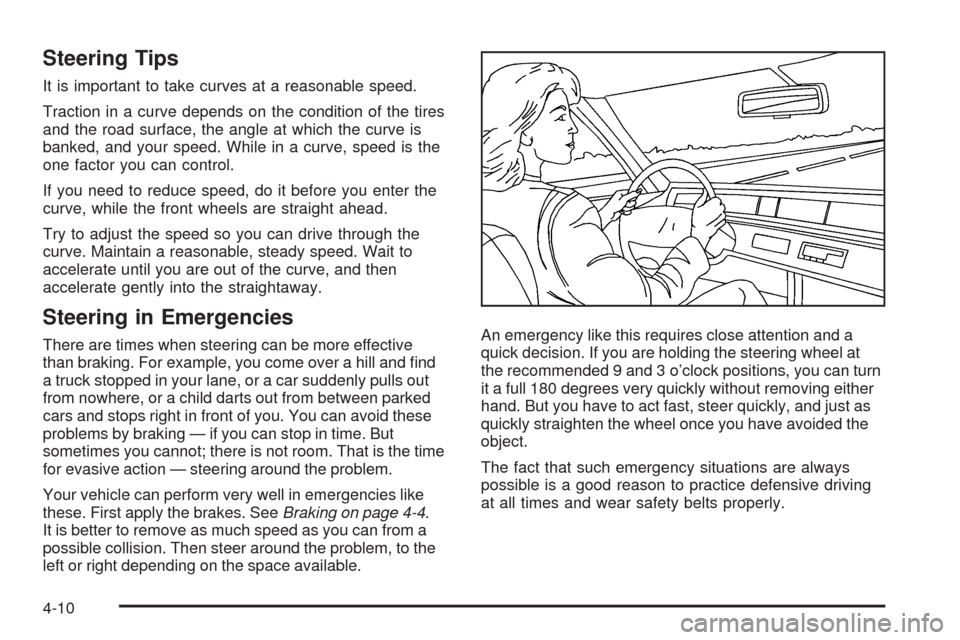
quick decision. If you are holding the steering wheel at
the recommended 9 and 3 o’clock positions, you can turn
it a full 180 degrees very quickly without removing either
hand. But you have to act fast, steer quickly, and just as
quickly straighten the wheel once you have avoided the
object.
The fact that such emergency situations are always
possible is a good reason to practice defensive driving
at all times and wear safety belts properly.
4-10
Page 287 of 490

Off-Road Recovery
The vehicle’s right wheels can drop off the edge of a
road onto the shoulder while driving.
If the level of the shoulder is only slightly below the
pavement, recovery should be fairly easy. Ease off the
accelerator and then, if there is nothing in the way, steer
so that your vehicle straddles the edge of the pavement.
Turn the steering wheel 3 to 5 inches, 8 to 13 cm, (about
one-eighth turn) until the right front tire contacts the
pavement edge. Then turn the steering wheel to go
straight down the roadway.
Passing
Passing another vehicle on a two-lane road can be
dangerous. To reduce the risk of danger while passing:
Look down the road, to the sides, and to crossroads
for situations that might affect a successful pass.
If in doubt, wait.
Watch for traffic signs, pavement markings, and
lines that could indicate a turn or an intersection.
Never cross a solid or double-solid line on your side
of the lane.
Do not get too close to the vehicle you want to
pass. Doing so can reduce your visibility.
Wait your turn to pass a slow vehicle.
When you are being passed, ease to the right.
Loss of Control
Let us review what driving experts say about what
happens when the three control systems — brakes,
steering, and acceleration — do not have enough friction
where the tires meet the road to do what the driver has
asked.
In any emergency, do not give up. Keep trying to steer
and constantly seek an escape route or area of less
danger.
4-11