light CADILLAC CTS 2011 2.G Owners Manual
[x] Cancel search | Manufacturer: CADILLAC, Model Year: 2011, Model line: CTS, Model: CADILLAC CTS 2011 2.GPages: 496, PDF Size: 7.71 MB
Page 294 of 496
Black plate (34,1)Cadillac CTS/CTS-V Owner Manual - 2011
9-34 Driving and Operating
A warning chime will sound if the
parking brake is set, the ignition is
on, and the vehicle begins to move.
To stop the chime, fully release the
parking brake.
If you are towing a trailer and
parking on a hill, seeDriving
Characteristics and Towing Tips
on
page 9‑52for more information.
Parking Brake (Electric)
{WARNING
On vehicles with a manual
transmission, releasing the clutch
and pressing the accelerator will
release the Electric Parking
Brake. If the vehicle is not in a
gear, the vehicle could move, and
you or others could be injured.
Make sure the vehicle is in a gear
before attempting to drive away.
(Continued)
WARNING (Continued)
To avoid unexpected vehicle
movement, do not partially
release the clutch or press the
accelerator pedal until you are
ready to release the parking
brake and drive away.
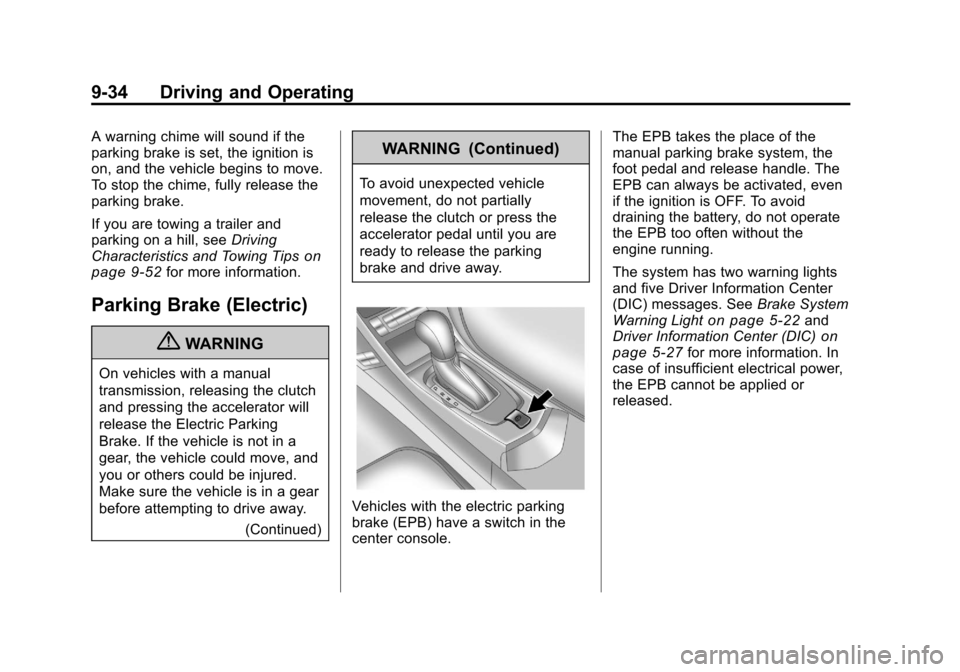
Vehicles with the electric parking
brake (EPB) have a switch in the
center console. The EPB takes the place of the
manual parking brake system, the
foot pedal and release handle. The
EPB can always be activated, even
if the ignition is OFF. To avoid
draining the battery, do not operate
the EPB too often without the
engine running.
The system has two warning lights
and five Driver Information Center
(DIC) messages. See
Brake System
Warning Light
on page 5‑22and
Driver Information Center (DIC)on
page 5‑27for more information. In
case of insufficient electrical power,
the EPB cannot be applied or
released.
Page 295 of 496

Black plate (35,1)Cadillac CTS/CTS-V Owner Manual - 2011
Driving and Operating 9-35
EPB Apply
The EPB can be applied any time
the vehicle is stopped. The EPB is
applied by momentarily lifting up on
the EPB switch. Once fully applied,
the BRAKE light will be on, and the
DIC message PARK BRAKE SET
will be displayed. While the brake is
being applied, the status light will
flash until full apply is reached.
If the light does not come on,
or remains flashing, you need to
have the vehicle serviced. Do not
drive the vehicle if the BRAKE light
is flashing. See your dealer. See
Brake System Warning Light
on
page 5‑22for more information.
If the EPB is applied while the
vehicle is in motion, a chime will
sound, and the DIC message
RELEASE PARK BRAKE SWITCH
will be displayed. The vehicle will
decelerate as long as the switch is
held in the up position. Releasing
the EPB switch during the
deceleration will release the parking brake. If the switch is held in the up
position until the vehicle comes to a
stop, the EPB will remain applied.
If the BRAKE light is on, either the
EPB is applied, or there is a failure
in the hydraulic brake system.
If this light is flashing continuously,
the EPB is only partially applied or
released, or there is a problem with
the EPB. The DIC message
SERVICE PARK BRAKE will be
displayed. If this light is flashing
continuously, release the EPB, and
attempt to apply it again. If this light
continues to flash, do not drive the
vehicle. See your dealer.
If the yellow light is on, the EPB has
detected an error in another system
and is operating with reduced
functionality. To apply the EPB when
this light is on, lift up on the EPB
switch and hold it in the up position.
Full application of the parking brake
by the EPB system may take a
longer period of time than normal
when this light is on. Continue tohold the switch until the BRAKE
light remains on. If the yellow light is
on, see your dealer.
If the EPB fails to apply, the rear
wheels should be blocked to
prevent vehicle movement.
EPB Release
To release the EPB, turn the ignition
switch to the ON/RUN position,
apply and hold the brake pedal, and
push down momentarily on the EPB
switch. If you attempt to release the
EPB without the brake pedal
applied, a chime will sound, and the
DIC message STEP ON BRAKE TO
RELEASE PARK BRAKE will be
displayed. The EPB is released
when the BRAKE light is off and the
DIC message PARK BRAKE
RELEASED is displayed.
Page 296 of 496
Black plate (36,1)Cadillac CTS/CTS-V Owner Manual - 2011
9-36 Driving and Operating
If the yellow light is on, the EPB has
detected an error in another system
and is operating with reduced
functionality. To release the EPB
when this light is on, push down on
the EPB switch and hold it in the
down position. EPB release may
take a longer period of time than
normal when this light is on.
Continue to hold the switch until the
BRAKE light is off. If the yellow light
is on, see your dealer.
Notice:Driving with the parking
brake on can overheat the brake
system and cause premature
wear or damage to brake system
parts. Make sure that the parking
brake is fully released and the red
brake warning light is off before
driving.Automatic EPB Release
The EPB will automatically release if
the vehicle is running, placed into
gear, and an attempt is made to
drive away. Avoid rapid acceleration
when the EPB is applied, to
preserve park brake lining life.
The EPB can also be used to
prevent roll back for vehicles with a
manual transmission taking off on a
hill. In a situation where no roll back
is desired, an applied EPB will allow
both feet to be used for the clutch
and accelerator pedals in
preparation for starting the vehicle
moving in the intended direction.
In this situation, perform the normal
clutch and/or accelerator actions
required to begin moving the
vehicle. There is no need to push
the switch to release the EPB.
If you are towing a trailer and
parking on a hill, see Driving
Characteristics and Towing Tips
on
page 9‑52for more information.
Brake Assist
(Except CTS-V)
This vehicle has a brake assist
feature designed to assist the driver
in stopping or decreasing vehicle
speed in emergency driving
conditions. This feature uses the
stability system hydraulic brake
control module to supplement the
power brake system under
conditions where the driver has
quickly and forcefully applied the
brake pedal in an attempt to quickly
stop or slow down the vehicle. The
stability system hydraulic brake
control module increases brake
pressure at each corner of the
vehicle until the ABS activates.
Minor brake pedal pulsation or
pedal movement during this time is
normal and the driver should
continue to apply the brake pedal as
the driving situation dictates. The
brake assist feature will
automatically disengage when the
brake pedal is released or brake
pedal pressure is quickly
decreased.
Page 297 of 496

Black plate (37,1)Cadillac CTS/CTS-V Owner Manual - 2011
Driving and Operating 9-37
Ride Control Systems
Traction Control
System (TCS)
The vehicle has a Traction Control
System (TCS) that limits wheel
spin. This is especially useful in
slippery road conditions. On a
rear-wheel-drive vehicle, the system
operates if it senses that one or
both of the rear wheels are spinning
or beginning to lose traction. On an
All-Wheel-Drive (AWD) vehicle, the
system will operate if it senses that
any of the wheels are spinning or
beginning to lose traction. When this
happens, the system brakes the
spinning wheel(s) and/or reduces
engine power to limit wheel spin.
The system may be heard or felt
while it is working, but this is
normal.The TCS/StabiliTrak warning light
flashes when the traction control
system is limiting wheel spin.
The TCS/StabiliTrak warning light
comes on if there is a problem with
the traction control system. When
the TCS/StabiliTrak warning light is
on, the system will not limit wheel
spin. Adjust your driving
accordingly. SeeTraction Control
System (TCS)/StabiliTrak
®Lighton
page 5‑24for more information.
TCS automatically comes on
whenever the vehicle is started. To
limit wheel spin, especially in
slippery road conditions, the system
should always be left on, but it may
be necessary to turn the system off
if the vehicle is stuck in sand, mud
or snow and rocking the vehicle is
required. See If the Vehicle is Stuck
on page 9‑11for more information. See
Winter Driving
on page 9‑9for information on using TCS when
driving in snowy or icy conditions.
This button is located on the
instrument panel (CTS) or the
steering wheel (CTS-V).
Press and release the TCS/
StabiliTrak button and the traction
control system will turn off and the
TCS/StabiliTrak warning light will
come on. Press the button again to
turn the system back on. For
information on turning StabiliTrak off
and on, see StabiliTrak System
following.
Adding non‐dealer accessories can
affect your vehicle's performance.
SeeAccessories and Modifications
on page 10‑4for more information.
Page 298 of 496

Black plate (38,1)Cadillac CTS/CTS-V Owner Manual - 2011
9-38 Driving and Operating
StabiliTrak System
The vehicle has an electronic
stability control system called
StabiliTrak. It is an advanced
computer controlled system that
assists with directional control of the
vehicle in difficult driving conditions.
StabiliTrak activates when the
system senses a discrepancy
between the intended path and the
direction the vehicle is actually
traveling. StabiliTrak selectively
applies braking pressure at any one
of the vehicle's brakes to help steer
the vehicle in the direction which
you are steering.
When the system activates, this
warning light flashes on the
instrument panel. A noise may be
heard or a vibration may be felt inthe brake pedal. This is normal.
Continue to steer the vehicle in the
intended direction.
If there is a problem detected
with StabiliTrak, SERVICE
STABILITRAK displays on the
Driver Information Center (DIC) and
the TCS/StabiliTrak warning light
comes on the instrument panel
cluster. When this message and
warning light displays, the system is
not operational. Driving should be
adjusted accordingly. See
Driver
Information Center (DIC)
on
page 5‑27and Messages and
Traction Control System (TCS)/
StabiliTrak
®Lighton page 5‑24for
more information.
This button is located on the
instrument panel (CTS) or the
steering wheel (CTS-V).
StabiliTrak comes on automatically
whenever the vehicle is started. The
system should be left on to help
assist with directional control of the
vehicle. If StabiliTrak needs to be
turned off, press and hold the TCS/
StabiliTrak button until the TCS/
StabiliTrak warning light comes on
and STABILITRAK OFF comes on
the DIC. More steering effort is
required when the system is
turned off.
Page 299 of 496
Black plate (39,1)Cadillac CTS/CTS-V Owner Manual - 2011
Driving and Operating 9-39
If cruise control is being used when
the StabiliTrak activates, the cruise
control will automatically disengage.
When road conditions allow,
reengage the cruise control. See
Cruise Control
on page 9‑40for
more information.
Competitive Driving Mode
To select this optional handling
mode, press the TCS/
StabiliTrak button quickly two times
and STABILITRAK COMPETITIVE
MODE displays in the Driver
Information Center (DIC). While in
the StabiliTrak Competitive Mode,
the TCS/StabiliTrak warning light
comes on, TCS does not limit wheel
spin, and more effort is required to
turn the steering wheel. Adjust your
driving accordingly.
Press the TCS/StabiliTrak button
again, or turn the ignition to ACC/
ACCESSORY and restart the
vehicle, to turn TCS back on and
turn the TCS/StabiliTrak warning
light off. Notice:
When traction control is
turned off, or Competitive Driving
Mode is active, it is possible to
lose traction. If you attempt to
shift with the drive wheels
spinning with a loss of traction, it
is possible to cause damage to
the transmission. Do not attempt
to shift when the drive wheels do
not have traction. Damage caused
by misuse of the vehicle is not
covered. See the warranty book
for additional information.
Magnetic Ride Control
With this feature on the CTS-V, the
Magnetic Ride Control system
adjusts the ride of the vehicle to
Tour or Sport modes. Magnetic Ride
Control monitors the suspension
system to determine the proper
system response. TOUR:
Use for normal city and
highway driving. This setting
provides a smooth, soft ride.
SPORT: Use where road conditions
or personal preference demand
more control. This setting provides
more “feel,” or response to road
conditions.
The setting can be changed at any
time. Based on road conditions,
steering wheel angle, and the
vehicle speed, the system
automatically adjusts to provide the
best handling while providing a
smooth ride. The Tour and Sport
modes will feel similar on a smooth
road. Select a new setting whenever
driving conditions change.
Page 301 of 496

Black plate (41,1)Cadillac CTS/CTS-V Owner Manual - 2011
Driving and Operating 9-41
I(On/Off):Turns the system on
or off. The indicator light on the
button turns on when cruise control
is on.
+RES (Resume/Accelerate):
Press briefly to make the vehicle
resume to a previously set speed,
or press and hold to accelerate.
−SET (Set/Coast): Press to set the
speed and activate cruise control or
make the vehicle decelerate.
[(Cancel): Press to disengage
cruise control without erasing the
set speed from memory.
Setting Cruise Control
If the cruise button is on when not in
use, it could get bumped and go into
cruise when not desired. Keep the
cruise control switch off when cruise
is not being used. The cruise control light on the
instrument panel cluster comes on
after the cruise control has been set
to the desired speed.
1. Press the
Ibutton.
2. Get up to the desired speed.
3. Press the −SET button and
release it.
4. Take your foot off the accelerator.
Resuming a Set Speed
If the cruise control is set at a
desired speed and then the brakes
are applied, the cruise control is
disengaged without erasing the set
speed from memory.
Once the vehicle is driving at about
40 km/h (25 mph) or more, press the
+RES button on the steering wheel.
The vehicle returns to the previous
set speed and stays there. Increasing Speed While Using
Cruise Control
If the cruise control system is
already activated,.Press and hold the +RES button
on the steering wheel until the
desired speed is reached, then
release it.
.To increase vehicle speed in
small amounts, press the +RES
button. Each time this is done,
the vehicle goes about 1.6 km/h
(1 mph) faster.
Reducing Speed While Using
Cruise Control
If the cruise control system is
already activated,
.Press and hold the −SET button
on the steering wheel until the
desired speed is reached, then
release it.
Page 302 of 496

Black plate (42,1)Cadillac CTS/CTS-V Owner Manual - 2011
9-42 Driving and Operating
.To slow down in small amounts,
press the−SET button on the
steering wheel briefly. Each time
this is done, the vehicle goes
about 1.6 km/h (1 mph) slower.
Passing Another Vehicle While
Using Cruise Control
Use the accelerator pedal to
increase the vehicle's speed. When
you take your foot off the pedal, the
vehicle will slow down to the
previous set cruise speed.
Using Cruise Control on Hills
How well the cruise control works
on hills depends upon the vehicle
speed, load, and the steepness of
the hills. When going up steep hills,
you might have to step on the
accelerator pedal to maintain the
vehicle speed. When going
downhill, you might have to brake or
shift to a lower gear to keep the
vehicle's speed down. When the
brakes are applied the cruise control
is disengaged. Ending Cruise Control
There are four ways to end cruise
control:
.Step lightly on the brake pedal
(manual and automatic
transmissions).
.Press the clutch pedal to the
floor (manual transmissions).
.Press[on the steering wheel.
.To turn off the cruise control,
press
Ion the steering wheel.
Erasing Speed Memory
The cruise control set speed is
erased from memory by pressing
the
Ibutton or if the ignition is
turned off.
Object Detection
Systems
Ultrasonic Parking Assist
For vehicles with the Ultrasonic
Rear Parking Assist (URPA) system,
it assists the driver with parking and
avoiding objects while in
R (Reverse). URPA operates at
speeds less than 8 km/h (5 mph),
and the sensors on the rear bumper
detect objects up to 2.4m (8 ft)
behind the vehicle, and at least
25.4 cm (10 in) off the ground.
Page 306 of 496

Black plate (46,1)Cadillac CTS/CTS-V Owner Manual - 2011
9-46 Driving and Operating
The following illustration shows the
field of view that the camera
provides.A. View displayed by the camera.
B. Corner of the rear bumper.
When the System Does Not
Seem To Work Properly
The rear vision camera system
might not work properly or display a
clear image if:
.It is dark.
.The sun or the beam of
headlights is shining directly into
the camera lens.
.Ice, snow, mud, or anything else
builds up on the camera lens.
Clean the lens, rinse it with
water, and wipe it with a soft
cloth.
.The back of the vehicle is in an
accident, the position and
mounting angle of the camera
can change or the camera can
be affected. Be sure to have the
camera and its position and
mounting angle checked at your
dealer.
.There are extreme temperature
changes.
Page 311 of 496

Black plate (51,1)Cadillac CTS/CTS-V Owner Manual - 2011
Driving and Operating 9-51
When replacing the fuel cap, turn it
clockwise until it clicks once. Make
sure the cap is fully installed. The
diagnostic system can determine if
the fuel cap has been left off or
improperly installed. This would
allow fuel to evaporate into the
atmosphere. SeeMalfunction
Indicator Lamp on page 5‑19.
{WARNING
If a fire starts while you are
refueling, do not remove the
nozzle. Shut off the flow of fuel by
shutting off the pump or by
notifying the station attendant.
Leave the area immediately.
Notice: If a new fuel cap is
needed, be sure to get the right
type of cap from your dealer. The
wrong type fuel cap might not fit
properly, might cause the
malfunction indicator lamp to
light, and could damage the fuel tank and emissions system. See
Malfunction Indicator Lamp
on
page 5‑19.
Filling a Portable Fuel
Container
{WARNING
Never fill a portable fuel container
while it is in the vehicle. Static
electricity discharge from the
container can ignite the fuel
vapor. You can be badly burned
and the vehicle damaged if this
occurs. To help avoid injury to you
and others:
.Dispense fuel only into
approved containers.
.Do not fill a container while it
is inside a vehicle, in a
vehicle's trunk, pickup bed,
or on any surface other than
the ground.
(Continued)
WARNING (Continued)
.Bring the fill nozzle in contact
with the inside of the fill
opening before operating the
nozzle. Contact should be
maintained until the filling is
complete.
.Do not smoke while
pumping fuel.
.Do not use a cellular phone
while pumping fuel.