light CADILLAC CTS 2011 2.G Owners Manual
[x] Cancel search | Manufacturer: CADILLAC, Model Year: 2011, Model line: CTS, Model: CADILLAC CTS 2011 2.GPages: 496, PDF Size: 7.71 MB
Page 256 of 496

Black plate (4,1)Cadillac CTS/CTS-V Owner Manual - 2011
8-4 Climate Controls
Recirculation is not available in the
defrost mode and automatically
turns off 10 minutes after defog is
selected. This helps to limit window
fogging in the vehicle.
Using recirculation for long periods
of time could cause the air inside
the vehicle to become too dry or
stuffy. To prevent this from
happening, after the air in the
vehicle has cooled, select outside
air or press the auto button.
F(Outside Air):Press to turn
on the outside air. An indicator light
turns on. The outside air mode pulls
fresh air from outside the vehicle.
Outside air is always selected in
defrost mode to prevent fogging.
Rear Window Defogger
The rear window defogger uses a
warming grid to remove fog or frost
from the rear window. It only works
when the ignition is in ON/RUN.
=(Rear Window Defogger):
Press to turn the rear window
defogger on or off.
The rear window defogger stays on
for about 15 minutes, before turning
off if the vehicle is moving at a
slower speed. At higher speeds, the
rear window defogger may stay on
continuously. With each additional
press, the defogger runs for about
10 minutes. The defogger can also
be turned off by turning off the
engine.
The heated outside rearview mirrors
turn on when the rear window
defogger button is on and helps to
clear fog or frost from the surface of
the mirrors. See Heated Mirrors
on
page 2‑27.
Notice: Do not try to clear frost
or other material from the inside
of the front windshield and rear
window with a razor blade or
anything else that is sharp. This
may damage the rear window
defogger grid and affect your radio's ability to pick up stations
clearly. The repairs wouldn't be
covered by your warranty.
z/{(Heated and Ventilated
Seats): Press to heat or ventilate
the seat. See Heated and Ventilated
Front Seats on page 3‑12.
Remote Start Climate Control
Operation: For vehicles with
remote vehicle start, the climate
control system automatically heats
and cools the vehicle based on the
temperature inside and outside of
the vehicle. The climate control
displays will be blank. See Remote
Vehicle Start on page 2‑11.
In cold weather the windshield
defroster and/or rear window
defogger automatically turn on.
If the vehicle has heated seats, they
will also turn on.
When the ignition is turned to ON/
RUN, the climate control system
returns to the settings used before
the vehicle was last turned off. The
heated seats will turn off,
if equipped.
Page 257 of 496
Black plate (5,1)Cadillac CTS/CTS-V Owner Manual - 2011
Climate Controls 8-5
Sensors
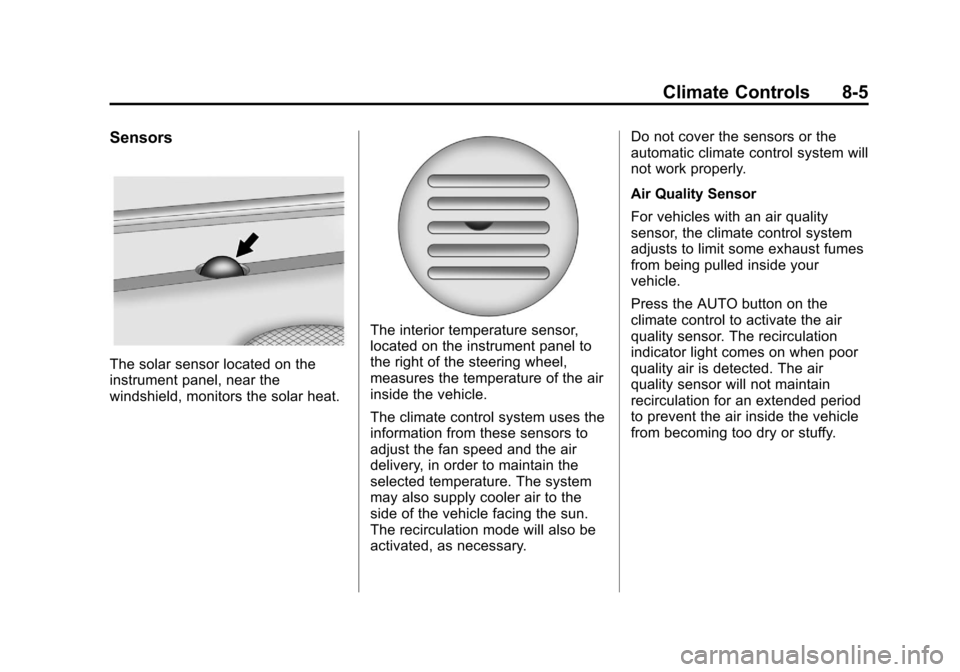
The solar sensor located on the
instrument panel, near the
windshield, monitors the solar heat.
The interior temperature sensor,
located on the instrument panel to
the right of the steering wheel,
measures the temperature of the air
inside the vehicle.
The climate control system uses the
information from these sensors to
adjust the fan speed and the air
delivery, in order to maintain the
selected temperature. The system
may also supply cooler air to the
side of the vehicle facing the sun.
The recirculation mode will also be
activated, as necessary.Do not cover the sensors or the
automatic climate control system will
not work properly.
Air Quality Sensor
For vehicles with an air quality
sensor, the climate control system
adjusts to limit some exhaust fumes
from being pulled inside your
vehicle.
Press the AUTO button on the
climate control to activate the air
quality sensor. The recirculation
indicator light comes on when poor
quality air is detected. The air
quality sensor will not maintain
recirculation for an extended period
to prevent the air inside the vehicle
from becoming too dry or stuffy.
Page 263 of 496

Black plate (3,1)Cadillac CTS/CTS-V Owner Manual - 2011
Driving and Operating 9-3
Death and injury associated with
drinking and driving is a global
tragedy.
Alcohol affects four things that
anyone needs to drive a vehicle:
judgment, muscular coordination,
vision, and attentiveness.
Police records show that almost
40 percent of all motor
vehicle-related deaths involve
alcohol. In most cases, these
deaths are the result of someone
who was drinking and driving. In
recent years, more than
17,000 annual motor vehicle-related
deaths have been associated with
the use of alcohol, with about
250,000 people injured.
For persons under 21, it is against
the law in every U.S. state to drink
alcohol. There are good medical,
psychological, and developmental
reasons for these laws.
The obvious way to eliminate the
leading highway safety problem is
for people never to drink alcohol
and then drive.Medical research shows that
alcohol in a person's system can
make crash injuries worse,
especially injuries to the brain,
spinal cord, or heart. This means
that when anyone who has been
drinking
—driver or passenger —is
in a crash, that person's chance of
being killed or permanently disabled
is higher than if the person had not
been drinking.
Control of a Vehicle
The following three systems
help to control the vehicle while
driving —brakes, steering, and
accelerator. At times, as when
driving on snow or ice, it is easy to
ask more of those control systems
than the tires and road can provide.
Meaning, you can lose control of the
vehicle. See Traction Control
System (TCS) on page 9‑37.
Adding non‐dealer accessories can
affect vehicle performance. See
Accessories and Modifications
on
page 10‑4.
Braking
See Brake System Warning Lighton page 5‑22.
Braking action involves perception
time and reaction time. Deciding to
push the brake pedal is perception
time. Actually doing it is
reaction time.
Average reaction time is about
three‐fourths of a second. But that is
only an average. It might be less
with one driver and as long as two
or three seconds or more with
another. Age, physical condition,
alertness, coordination, and
eyesight all play a part. So do
alcohol, drugs, and frustration. But
even in three‐fourths of a second, a
vehicle moving at 100 km/h
(60 mph) travels 20 m (66 ft). That
could be a lot of distance in an
emergency, so keeping enough
space between the vehicle and
others is important.
Page 265 of 496

Black plate (5,1)Cadillac CTS/CTS-V Owner Manual - 2011
Driving and Operating 9-5
If there is a need to reduce speed,
do it before entering the curve, while
the front wheels are straight.
Try to adjust the speed so you can
drive through the curve. Maintain a
reasonable, steady speed. Wait to
accelerate until out of the curve, and
then accelerate gently into the
straightaway.
Steering in Emergencies
There are times when steering can
be more effective than braking. For
example, you come over a hill and
find a truck stopped in your lane,
or a car suddenly pulls out from
nowhere, or a child darts out from
between parked cars and stops right
in front of you. These problems can
be avoided by braking—if you can
stop in time. But sometimes you
cannot stop in time because there is
no room. That is the time for
evasive action —steering around
the problem.
The vehicle can perform very well in
emergencies like these. First apply
the brakes. See Braking
onpage 9‑3
. It is better to remove as
much speed as possible from a
collision. Then steer around the
problem, to the left or right
depending on the space available.
An emergency like this requires
close attention and a quick decision.
If holding the steering wheel at the
recommended 9 and 3 o'clock
positions, it can be turned a full
180 degrees very quickly without
removing either hand. But you have
to act fast, steer quickly, and just as
quickly straighten the wheel once
you have avoided the object. The fact that such emergency
situations are always possible is a
good reason to practice defensive
driving at all times and wear safety
belts properly.
Off-Road Recovery
The vehicle's right wheels can drop
off the edge of a road onto the
shoulder while driving.
If the level of the shoulder is only
slightly below the pavement,
recovery should be fairly easy. Ease
off the accelerator and then, if there
is nothing in the way, steer so that
Page 267 of 496

Black plate (7,1)Cadillac CTS/CTS-V Owner Manual - 2011
Driving and Operating 9-7
Competitive Driving
Competitive driving may affect the
vehicle warranty. See the warranty
book before using the vehicle for
competitive driving.
Notice:If you use your vehicle
for competitive driving, the
engine may use more oil than it
would with normal use. Low oil
levels can damage the engine. Be
sure to check the oil level often
during competitive driving and
keep the level at or near the
upper mark that shows the proper
operating range on the engine oil
dipstick. For information on how
to add oil, see Engine Oil
on
page 10‑11.
CTS‐V Only: For competitive
driving, it is recommended that the
brake fluid be replaced with a high
performance brake fluid that has a
dry boiling point greater than 279°C
(534°F). After conversion to the high
performance brake fluid, follow the
brake fluid service recommendations outlined by the
fluid manufacturer. Do not use
silicone or DOT‐5 brake fluids.
Driving on Wet Roads
Rain and wet roads can reduce
vehicle traction and affect your
ability to stop and accelerate.
Always drive slower in these types
of driving conditions and avoid
driving through large puddles and
deep‐standing or flowing water.
{WARNING
Wet brakes can cause crashes.
They might not work as well in a
quick stop and could cause
pulling to one side. You could
lose control of the vehicle.
(Continued)
WARNING (Continued)
After driving through a large
puddle of water or a car/vehicle
wash, lightly apply the brake
pedal until the brakes work
normally.
Flowing or rushing water creates
strong forces. Driving through
flowing water could cause your
vehicle to be carried away. If this
happens, you and other vehicle
occupants could drown. Do not
ignore police warnings and be
very cautious about trying to drive
through flowing water.
Page 271 of 496
Black plate (11,1)Cadillac CTS/CTS-V Owner Manual - 2011
Driving and Operating 9-11
feel really uncomfortable from the
cold. Moving about to keep warm
also helps.
If it takes some time for help to
arrive, now and then when you run
the engine, push the accelerator
pedal slightly so the engine runs
faster than the idle speed. This
keeps the battery charged to restart
the vehicle and to signal for help
with the headlamps. Do this as little
as possible to save fuel.
If the Vehicle is Stuck
Slowly and cautiously spin the
wheels to free the vehicle when
stuck in sand, mud, ice, or snow.
If stuck too severely for the traction
system to free the vehicle, turn the
traction system off and use the
rocking method.
{WARNING
If the vehicle's tires spin at high
speed, they can explode, and you
or others could be injured. The
vehicle can overheat, causing an
engine compartment fire or other
damage. Spin the wheels as little
as possible and avoid going
above 55 km/h (35 mph) as
shown on the speedometer.
For information about using tire
chains on the vehicle, see Tire
Chains on page 10‑89.
Rocking the Vehicle to Get
it Out
Turn the steering wheel left and
right to clear the area around the
front wheels. Turn off any traction
system. Shift back and forth
between R (Reverse) and a forward
gear, or with a manual transmission,
between 1 (First) or 2 (Second) and
R (Reverse), spinning the wheels as
little as possible. To prevent transmission wear, wait until the
wheels stop spinning before shifting
gears. Release the accelerator
pedal while shifting, and press
lightly on the accelerator pedal
when the transmission is in gear.
Slowly spinning the wheels in the
forward and reverse directions
causes a rocking motion that could
free the vehicle. If that does not get
the vehicle out after a few tries, it
might need to be towed out. If the
vehicle does need to be towed out,
see
Towing the Vehicle
on
page 10‑117.
Vehicle Load Limits
It is very important to know how
much weight the vehicle can
carry. This weight is called the
vehicle capacity weight and
includes the weight of all
occupants, cargo and all
nonfactory‐installed options.
Page 289 of 496

Black plate (29,1)Cadillac CTS/CTS-V Owner Manual - 2011
Driving and Operating 9-29
The tachometer display indicates
which gear the vehicle is in. The
number indicates the requested
gear range when moving the shift
lever forward or rearward.
CTS-V vehicles use tracer lights
around the outside of the
tachometer as a performance
up‐shift light. These tracers flash to
indicate when to shift to the next
higher gear to avoid the engine
speed limit. SeeTachometer
on
page 5‑13for more information. While using the DSC feature, the
vehicle will have firmer, quicker
shifting. You can use this for sport
driving or when climbing or
descending hills, to stay in gear
longer, or to downshift for more
power or engine braking.
The transmission will only allow
you to shift into gears appropriate
for the vehicle speed and engine
revolutions per minute (RPM). The
transmission will not automatically
shift to the next lower gear if the
engine rpm is too high, nor to the
next higher gear when the maximum
engine rpm is reached.
If shifting is prevented for any
reason, the currently selected gear
will flash multiple times, indicating
that the transmission has not shifted
gears.
While in the DSC mode, the CTS
automatic transmission will
automatically downshift when the
vehicle comes to a stop. This will
allow for more power during
acceleration.
The CTS-V automatic transmission
will not automatically downshift on
hard acceleration when in
DSC mode.
When accelerating the vehicle from
a stop in snowy and icy conditions,
it is suggested to shift into second
gear. A higher gear allows the
vehicle to gain more traction on
slippery surfaces.
Page 291 of 496

Black plate (31,1)Cadillac CTS/CTS-V Owner Manual - 2011
Driving and Operating 9-31
The CTS-V transmission prevents
easily shifting into R (Reverse) using
normal shifting force while the
vehicle is moving at more than
5 km/h (3 mph), or when the ignition
is in LOCK/OFF.
Shift Speeds (Manual
Transmission)
{WARNING
If you skip a gear when you
downshift, you could lose control
of the vehicle. You could injure
yourself or others. Do not shift
down more than one gear at a
time when you downshift.
Notice: If you skip more than one
gear when you downshift, or if
you race the engine when you
release the clutch pedal while
downshifting, you could damage
the engine, clutch, driveshaft or
the transmission. Do not skip
gears or race the engine when
downshifting. If the vehicle speed drops below
32 km/h (20 mph), or if the engine is
not running smoothly, downshift to
the next lower gear. You may have
to downshift two or more gears to
keep the engine running smoothly
or for good performance.
Up-Shift Light
Vehicles with a manual transmission
have an up‐shift light on the
instrument panel. This light shows
when to shift to the next higher gear
for the best fuel economy.
When this light comes on, you can
shift to the next higher gear if
weather, road, and traffic conditions
allow. For the best fuel economy,
accelerate slowly and shift when the
light comes on.
While you accelerate, it is normal for
the light to go on and off if you
quickly change the position of the
accelerator. Ignore the light when
you downshift.
CTS-V vehicles use tracer lights
around the outside of the
tachometer as a performance
up‐shift light. These tracers flash to
indicate when to shift to the next
higher gear to avoid the engine
speed limit. See
Tachometer
on
page 5‑13for more information.
Skip Shift (CTS‐V)
Under light acceleration, the
transmission will only allow you to
shift from 1 (First) to 4 (Fourth).
Shifts from 1 (First) to 2 (Second) or
3 (Third) are not allowed. This helps
improve fuel mileage.
Under harder acceleration, Skip
Shift is disabled, and the driver has
all gears available.
Page 292 of 496
Black plate (32,1)Cadillac CTS/CTS-V Owner Manual - 2011
9-32 Driving and Operating
Drive Systems
All-Wheel Drive
Vehicles with this feature always
send engine power to all four
wheels. It is fully automatic, and
adjusts itself as needed for road
conditions.
When using a compact spare tire on
an AWD vehicle, the system
automatically detects the compact
spare and disables AWD. To restore
AWD operation and prevent
excessive wear on the system,
replace the compact spare with a
full-size tire as soon as possible.
SeeCompact Spare Tire
on
page 10‑111for more information.
Brakes
Antilock Brake
System (ABS)
This vehicle has the Antilock Brake
System (ABS), an advanced
electronic braking system that helps
prevent a braking skid.
When the engine is started and the
vehicle begins to drive away, ABS
checks itself. A momentary motor or
clicking noise might be heard while
this test is going on, and it might
even be noticed that the brake
pedal moves a little. This is normal.
If there is a problem with ABS, this
warning light stays on. See Antilock
Brake System (ABS) Warning Light
on page 5‑23. If driving safely on a wet road and it
becomes necessary to slam on the
brakes and continue braking to
avoid a sudden obstacle, a
computer senses that the wheels
are slowing down. If one of the
wheels is about to stop rolling, the
computer will separately work the
brakes at each wheel.
ABS can change the brake pressure
to each wheel, as required, faster
than any driver could. This can help
the driver steer around the obstacle
while braking hard.
As the brakes are applied, the
computer keeps receiving updates
on wheel speed and controls
braking pressure accordingly.
Page 293 of 496

Black plate (33,1)Cadillac CTS/CTS-V Owner Manual - 2011
Driving and Operating 9-33
Remember: ABS does not change
the time needed to get a foot up to
the brake pedal or always decrease
stopping distance. If you get too
close to the vehicle in front of you,
there will not be enough time to
apply the brakes if that vehicle
suddenly slows or stops. Always
leave enough room up ahead to
stop, even with ABS.
Using ABS
Do not pump the brakes. Just hold
the brake pedal down firmly and let
ABS work. You might hear the ABS
pump or motor operating and feel
the brake pedal pulsate, but this is
normal.
Braking in Emergencies
ABS allows the driver to steer and
brake at the same time. In many
emergencies, steering can help
more than even the very best
braking.
Parking Brake (Manual)
The parking brake pedal is located
on the lower portion of the
instrument panel to the left of the
steering wheel.
To set the parking brake, hold the
brake pedal down, then push the
parking brake pedal down.
If the ignition is on, the brake
system warning light on the
instrument panel cluster should
come on. If it does not, you need tohave the vehicle serviced. See
Brake System Warning Light
on
page 5‑22for more information.
To release the parking brake, pull
the release lever located to the left
of the steering wheel on the
instrument panel.
Notice: Driving with the parking
brake on can overheat the brake
system and cause premature
wear or damage to brake system
parts. Make sure that the parking
brake is fully released and the
brake warning light is off before
driving.