radio controls CADILLAC CTS 2011 2.G User Guide
[x] Cancel search | Manufacturer: CADILLAC, Model Year: 2011, Model line: CTS, Model: CADILLAC CTS 2011 2.GPages: 496, PDF Size: 7.71 MB
Page 177 of 496
Black plate (37,1)Cadillac CTS/CTS-V Owner Manual - 2011
Instruments and Controls 5-37
Electronic Key Already Known
If the vehicle has the keyless
access system, this message
displays if you try to match a
transmitter that has already been
learned. See the Keyless Access
information forRemote Keyless
Entry (RKE) System Operation (Key
Access)
on page 2‑5or Remote
Keyless Entry (RKE) System
Operation (Keyless Access)
on
page 2‑7for more information.
Electronic Key Not Detected
If the vehicle has the keyless
access system, this message
displays if the vehicle does not
detect the presence of a transmitter
when you have attempted to start
the vehicle or a vehicle door has
just closed. The following conditions
may cause this message to appear:
.Driver-added equipment plugged
into the accessory power outlet
on the center console is causing
interference. Examples of these
devices are cell phones and cell
phone chargers, two-way radios, power inverters, or similar items.
Try moving the keyless access
transmitter away from these
devices when starting the
vehicle. In addition, PDA devices
and remote garage and gate
openers may also generate
Electromagnetic Interference
(EMI) that may interfere with the
keyless access transmitter. Do
not carry the keyless access
transmitter in the same pocket or
bag as these devices.
.The vehicle is experiencing
Electromagnetic Interference
(EMI). Some locations, such as
airports, automatic toll booths,
and some gas stations have EMI
fields which may interfere with
the keyless access transmitter.
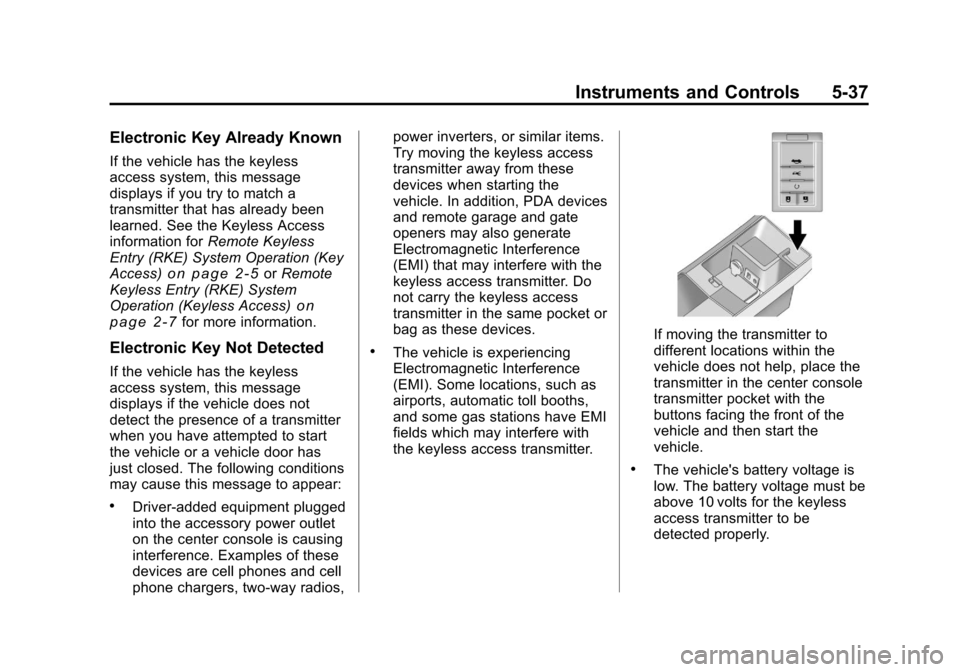
If moving the transmitter to
different locations within the
vehicle does not help, place the
transmitter in the center console
transmitter pocket with the
buttons facing the front of the
vehicle and then start the
vehicle.
.The vehicle's battery voltage is
low. The battery voltage must be
above 10 volts for the keyless
access transmitter to be
detected properly.
Page 178 of 496

Black plate (38,1)Cadillac CTS/CTS-V Owner Manual - 2011
5-38 Instruments and Controls
Electronic Key Not Detected
Restart Allowed
If the vehicle has the keyless
access system, this message
displays when the keyless access
transmitter is not detected inside the
vehicle while you are trying to turn
the ignition off. The vehicle may be
near a strong radio antenna signal
causing the keyless access system
to be jammed. If you have the
keyless access transmitter with you,
get out of the vehicle and lock the
doors. If you do not have the
keyless access transmitter with you,
you will be able to start the vehicle
again within five minutes, or until the
vehicle's content theft deterrent
system is armed. SeeStarting the
Engine
on page 9‑19for more
information.
Learn Delay Active Wait
XX Min (Minutes)
If the vehicle has the keyless
access system, this message
displays when matching new
transmitters to the vehicle. See the
Keyless Access information for
Remote Keyless Entry (RKE)
System Operation (Key Access)
on
page 2‑5or Remote Keyless Entry
(RKE) System Operation (Keyless
Access)
on page 2‑7for more
information.
Maximum # Electronic Keys
Learned
If the vehicle has the keyless
access system, this message
displays when the maximum
number of transmitters have been
learned. See the Keyless Access
information for Remote Keyless
Entry (RKE) System Operation (Key
Access)
on page 2‑5or Remote
Keyless Entry (RKE) System
Operation (Keyless Access)
on
page 2‑7for more information.
Press Start Control To
Learn Keys
If the vehicle has the keyless
access system, this message
displays when matching new
transmitters to the vehicle. See the
Keyless Access information for
Remote Keyless Entry (RKE)
System Operation (Key Access)
on
page 2‑5or Remote Keyless Entry
(RKE) System Operation (Keyless
Access)
on page 2‑7for more
information.
Ready To Learn
Electronic Key # X
If the vehicle has the keyless
access system, this message
displays while matching new
transmitters to the vehicle. See the
Keyless Access information for
Remote Keyless Entry (RKE)
System Operation (Key Access)
on
page 2‑5or Remote Keyless Entry
(RKE) System Operation (Keyless
Access)
on page 2‑7for more
information.
Page 193 of 496

Black plate (53,1)Cadillac CTS/CTS-V Owner Manual - 2011
Instruments and Controls 5-53
.Entry/Exit Steering Only:Easy
Exit will automatically move the
steering column to a full up and
full forward position when the
key is removed from the ignition
on Key Access vehicles,
or when the ignition is turned off
and the driver door opened on
Keyless Access vehicles. This
movement will also occur when
the door mounted EXIT button is
pressed.
Easy Entry will automatically
recall the driver seat, outside
mirrors and steering column
memory positions of the current
driver (1 or 2) when the ignition
is turned on.
No Change: No change will be
made to this feature. The current
setting will remain.Exiting the Feature
Settings Menu
The feature settings menu will be
exited when any of the following
occurs:
.The vehicle is no longer in
ON/RUN.
.The trip/fuel or vehicle
information DIC buttons are
pressed.
.The end of the feature settings
menu is reached and exited.
.A 40 second time period has
elapsed with no selection made.
Universal Remote
System
See Radio Frequency Statementon
page 13‑18for information
regarding Part 15 of the Federal
Communications Commission (FCC)
rules and Industry Canada
Standards RSS-210/220/310.
Universal Remote System
Programming
This system provides a way to
replace up to three remote control
transmitters used to activate
devices such as garage door
openers, security systems, and
home automation devices.
Page 194 of 496

Black plate (54,1)Cadillac CTS/CTS-V Owner Manual - 2011
5-54 Instruments and Controls
Do not use the Universal Home
Remote with any garage door
opener that does not have the stop
and reverse feature. This includes
any garage door opener model
manufactured before April 1, 1982.
Read the instructions completely
before attempting to program the
Universal Home Remote. Because
of the steps involved, it may be
helpful to have another person
available to assist you with
programming the Universal Home
Remote.
Keep the original hand-held
transmitter for use in other vehicles
as well as for future Universal Home
Remote programming. It is also
recommended that upon the sale of
the vehicle, the programmed
Universal Home Remote buttons
should be erased for security
purposes. See“Erasing Universal
Home Remote Buttons” later in this
section. When programming a garage door,
park outside of the garage. Park
directly in line with and facing the
garage door opener motor-head or
gate motor-head. Be sure that
people and objects are clear of the
garage door or gate that is being
programmed.
It is recommended that a new
battery be installed in your
hand-held transmitter for quicker
and more accurate transmission of
the radio-frequency signal.
Programming the Universal
Home Remote System
For questions or help programming
the Universal Home Remote
System, call 1‐800‐355‐3515 or go
to www.homelink.com.
Programming a garage door opener
involves time-sensitive actions, so
read the entire procedure before
starting. Otherwise, the device will
time out and the procedure will have
to be repeated.To program up to three devices:
1. From inside the vehicle, press
and hold down the two outside
buttons at the same time,
releasing only when the
Universal Home Remote
indicator light begins to flash,
after 20 seconds. This step will
erase the factory settings or all
previously programmed buttons.
Do not hold down the buttons for
longer than 30 seconds and do
not repeat this step to program
the remaining two Universal
Home Remote buttons.
Page 196 of 496

Black plate (56,1)Cadillac CTS/CTS-V Owner Manual - 2011
5-56 Instruments and Controls
7. Firmly press and release the“Learn” or“Smart” button. After
you press this button, you will
have 30 seconds to complete
Step 8.
8. Immediately return to the vehicle. Firmly press and hold
the Universal Home Remote
button, selected in Step 3 to
control the garage door, for
two seconds, and then release
it. If the garage door does not
move, press and hold the same
button a second time for
two seconds, and then release
it. Again, if the door does not
move, press and hold the same
button a third time for
two seconds, and then release.
The Universal Home Remote
should now activate the
garage door. To program the remaining two
Universal Home Remote buttons,
begin with Step 2 of
“Programming
the Universal Home Remote
System.” Do not repeat Step 1, as
this will erase all previous
programming from the Universal
Home Remote buttons.
Gate Operator and Canadian
Programming
If you have questions or need
help programming the Universal
Home Remote System, call
1-800-355-3515 or go to
www.homelink.com.
Canadian radio-frequency laws
require transmitter signals to time
out or quit after several seconds of
transmission. This may not be long
enough for Universal Home Remote
to pick up the signal during
programming. Similarly, some U.S.
gate operators are manufactured to
time out in the same manner. If you live in Canada, or you are
having difficulty programming a gate
operator or garage door opener by
using the
“Programming Universal
Home Remote” procedures,
regardless of where you live,
replace Step 3 under “Programming
Universal Home Remote” with the
following:
Continue to press and hold the
Universal Home Remote button
while you press and release every
two seconds (cycle) the hand-held
transmitter button until the
frequency signal has been
successfully accepted by the
Universal Home Remote. The
Universal Home Remote indicator
light will flash slowly at first and then
rapidly. Proceed with Step 4 under
“Programming Universal Home
Remote” to complete the training
procedure.
Page 207 of 496

Black plate (1,1)Cadillac CTS/CTS-V Owner Manual - 2011
Infotainment System 7-1
Infotainment
System
Introduction
Introduction . . . . . . . . . . . . . . . . . . . 7-1
Theft-Deterrent Feature . . . . . . . 7-2
Operation . . . . . . . . . . . . . . . . . . . . . 7-2
Radio
AM-FM Radio . . . . . . . . . . . . . . . . . 7-9
Satellite Radio . . . . . . . . . . . . . . . 7-12
Radio Reception . . . . . . . . . . . . . 7-16
Backglass Antenna . . . . . . . . . . 7-17
Multi-Band Antenna . . . . . . . . . . 7-17
Audio Players
CD Player . . . . . . . . . . . . . . . . . . . 7-17
CD/DVD Player . . . . . . . . . . . . . . 7-20
MP3 . . . . . . . . . . . . . . . . . . . . . . . . . 7-25
Hard Drive Device (HDD) . . . . 7-29
Auxiliary Devices . . . . . . . . . . . . 7-36
Phone
Bluetooth . . . . . . . . . . . . . . . . . . . . 7-38
Introduction
Read the following pages to
become familiar with the audio
system's features.
{WARNING
Taking your eyes off the road for
extended periods could cause a
crash resulting in injury or death
to you or others. Do not give
extended attention to
entertainment tasks while driving.
This system provides access to
many audio and non‐audio listings.
To minimize taking your eyes off the
road while driving, do the following
while the vehicle is parked:
.Become familiar with the
operation and controls of the
audio system.
.Set up the tone, speaker
adjustments, and preset radio
stations. For more information, see
Defensive
Driving on page 9‑2.
Notice: Contact your dealer
before adding any equipment.
Adding audio or communication
equipment could interfere with
the operation of the vehicle's
engine, radio, or other systems,
and could damage them. Follow
federal rules covering mobile
radio and telephone equipment.
The vehicle has Retained
Accessory Power (RAP). With RAP,
the audio system can be played
even after the ignition is turned off.
See Retained Accessory Power
(RAP)
on page 9‑19for more
information.
Navigation System
For vehicles with a navigation
system, see the separate Navigation
System Manual.
Page 210 of 496
Black plate (4,1)Cadillac CTS/CTS-V Owner Manual - 2011
7-4 Infotainment System
4. To decrease the highlightedsetting, do one of the following:
.Turn the TUNE/TONE knob
counterclockwise.
.Turn the MENU/SELECT
knob counterclockwise.
.Press thesREV button.
.Press the©SEEK button.
To quickly adjust bass, midrange,
or treble to the middle position,
press the softkey under the BASS,
MID, or TREB tab for more than
two seconds.
To quickly adjust all tone and
speaker controls to the middle
position, press the TUNE/TONE
knob for more than two seconds.
Adjusting the Speakers
(Balance/Fade)
BAL/FADE (Balance/Fade): To
adjust balance or fade:
1. Press the TUNE/TONE knob until the speaker control tabs
display. 2. Continue pressing the TUNE/
TONE knob, or press the softkey
under the desired tab to highlight
the desired tone setting.
3. To increase the highlighted setting, do one of the following:
.Turn the TUNE/TONE knob
clockwise.
.Turn the MENU/SELECT
knob clockwise.
.Press the\FWD button.
.Press the¨SEEK button.
4. To decrease the highlighted setting, do one of the following:
.Turn the TUNE/TONE knob
counterclockwise.
.Turn the MENU/SELECT
knob counterclockwise.
.Press thesREV button.
.Press the©SEEK button. To quickly adjust balance or fade to
the middle position, press the
softkey under the BAL or FADE tab
for more than two seconds.
To quickly adjust all speaker and
tone controls to the middle position,
press the TUNE/TONE knob for
more than two seconds.
Adjusting the Equalizer (EQ)
If the radio has this feature, the EQ
can be adjusted between talk and
manual.
To choose an EQ setting:
1. Press the TUNE/TONE knob.
2. Select EQ.
3. Select Talk or Manual.
4. Press the Back button to go
back to the Tone Settings menu.
Page 216 of 496
Black plate (10,1)Cadillac CTS/CTS-V Owner Manual - 2011
7-10 Infotainment System
Selecting a Station
Seek Tuning
If the radio station is not known:
Briefly press
¨SEEK or©SEEK.
The radio will search for the next
receivable station. If the radio does
not find a station, it switches
automatically to a more sensitive
search level. If it still does not find a
station, the frequency that was last
active begins to play and “None
Found” displays.
If the radio station is known:
Press and hold
¨SEEK or©SEEK
until the desired station on the
pop‐up frequency display is almost
reached, then release the button.
Manual Tuning
Turn the TUNE knob to select the
frequency on the pop‐up display. Station List
Turn the MENU/SELECT knob to
display the station list. To create a
list of available stations, select
“Refresh AM Station List”
or
“Refresh FM Station List”,
depending on which band is
being used.
In FM, RDS information may be
utilized to categorize the stations by
genre.
In both AM and FM, the stations are
arranged in frequency order.Storing a Radio Station as a
Favorite
Drivers are encouraged to set up
their radio station favorites while the
vehicle is stopped. Tune to favorite
stations using the presets, favorites
button, and steering wheel controls,
if the vehicle has this feature.
FAV (Favorites): A maximum of
36 stations can be programmed as
favorites using the six softkeys
below the radio station frequency
tabs on the display and by using the radio favorites page button
(FAV button). Press the FAV button
to go through up to six pages of
favorites, each having six favorite
stations available per page. Each
page of favorites can contain any
combination of AM, FM, or XM
stations.
To store a station as a favorite,
perform the following steps:
1. Tune to the desired radio station.
2. Press the FAV button to display
the page where the station is to
be stored.
3. Press and hold one of the six softkeys until a beep sounds
and “Favorite Saved” displays.
When that softkey is pressed
and released, the radio recalls
the station that was set.
4. Repeat the steps for each radio station to be stored as a favorite.
Page 219 of 496
Black plate (13,1)Cadillac CTS/CTS-V Owner Manual - 2011
Infotainment System 7-13
Selecting an XM Station
Seek Tuning
Press
¨SEEK or©SEEK to go to
the next or previous station.
Selecting a Station by Station List
The infotainment system can list all
XM stations.
To select a station from the
station list:
1. Turn the TUNE/TONE knob and highlight the desired station.
2. Press the TUNE/TONE knob to select the station.
The highlighted station will also
automatically be selected if the
TUNE/TONE is released and no
longer turned. Selecting a Station by Category
The infotainment system can list XM
stations by genre.
To select a station from the
category list:
1. Turn the MENU/SELECT knob
and highlight the desired genre,
then press the MENU/SELECT
knob to select the genre.
2. Turn the MENU/SELECT knob and highlight the desired station,
then press the MENU/SELECT
knob to select the station.
Storing an XM Station as a
Favorite
Drivers are encouraged to set up
their radio station favorites while the
vehicle is stopped. Tune to favorite
stations using the presets, favorites
button, and steering wheel controls,
if the vehicle has this feature. FAV (Favorites):
A maximum of
36 stations can be programmed as
favorites using the six softkeys
below the radio station frequency
tabs on the display and by using the
radio favorites page button (FAV
button). Press the FAV button to go
through up to six pages of favorites,
each having six favorite stations
available per page. Each page of
favorites can contain any
combination of AM, FM, or XM
stations.
To store a station as a favorite:
1. Tune to the desired radio station.
2. Press the FAV button to display the page where the station is to
be stored.
3. Press and hold one of the six softkeys until a beep sounds.
When that softkey is pressed
and released, the radio recalls
the station that was set.
4. Repeat the steps for each radio station to be stored as a favorite.
Page 242 of 496
Black plate (36,1)Cadillac CTS/CTS-V Owner Manual - 2011
7-36 Infotainment System
On AM/FM, press the REV or FWD
button multiple times to rewind or
fast forward. Each press will rewind
or fast forward 30 seconds of
content. On XM, press the REV or
FWD button multiple times to jump
to the previous or next song or
commercial.
When the radio station is changed,
the buffer is cleared and
automatically restarted for the
current station. You cannot rewind
the content from a previously tuned
station.
Time shifting of AM/FM or XM is not
available while recording or while
other sources of playback are
selected.
Pausing AM/FM or XM™
(if equipped) with the Vehicle
Turned Off
If AM/FM or XM is paused before
the vehicle is turned off, the radio
will continue to buffer the current
radio station for up to one hour.
If the vehicle is turned back onwithin one hour, the radio will
automatically resume playback from
the pause point.
Auxiliary Devices
The 3.5 mm (1/8 in) input jack and
the USB port (if equipped), located
in the center console bin, allow
portable devices to connect to the
vehicle. This is not an audio output;
do not plug headphones into the
auxiliary input jack.
Set up auxiliary devices while the
vehicle is stopped. See
Defensive
Driving
on page 9‑2for more
information on driver distraction.
When a device is first connected to
the 3.5 mm (1/8 in) input jack or the
USB port (if equipped) the
infotainment system automatically
switches to that device. If an
auxiliary device has already been
connected, press the AUX or CD/
AUX button.
3.5 mm Jack
Connect a 3.5 mm (1/8 in) cable to
the auxiliary input jack to use a
portable audio player.
Playback of an audio device that is
connected to the 3.5 mm (1/8 in)
jack can only be controlled using
the controls on the device.
VOL/
O(Volume/Power): Turn
clockwise or counterclockwise to
increase or decrease the volume of
the portable player. Use the portable
device to make additional volume
adjustments.
CD or CD/AUX (CD/Auxiliary):
Press to play a CD when a portable
audio device is playing. Press again
to start playing audio from the
connected portable audio player. If a
portable audio player is not
connected, “No Aux Device”
displays.