cruise control CADILLAC CTS 2011 2.G Owners Manual
[x] Cancel search | Manufacturer: CADILLAC, Model Year: 2011, Model line: CTS, Model: CADILLAC CTS 2011 2.GPages: 496, PDF Size: 7.71 MB
Page 2 of 496

Black plate (2,1)Cadillac CTS/CTS-V Owner Manual - 2011
2011 Cadillac CTS/CTS-V Owner ManualM
Driving and Operating. . . . . . . . 9-1
Driving Information . . . . . . . . . . . . . 9-2
Starting and Operating . . . . . . . 9-16
Engine Exhaust . . . . . . . . . . . . . . 9-24
Automatic Transmission . . . . . . 9-26
Manual Transmission . . . . . . . . . 9-30
Drive Systems . . . . . . . . . . . . . . . . 9-32
Brakes . . . . . . . . . . . . . . . . . . . . . . . 9-32
Ride Control Systems . . . . . . . . 9-37
Cruise Control . . . . . . . . . . . . . . . . 9-40
Object Detection Systems . . . . 9-42
Fuel . . . . . . . . . . . . . . . . . . . . . . . . . . 9-47
Towing . . . . . . . . . . . . . . . . . . . . . . . 9-52
Conversions and Add-Ons . . . 9-58 Vehicle Care
. . . . . . . . . . . . . . . . . 10-1
General Information . . . . . . . . . . 10-3
Vehicle Checks . . . . . . . . . . . . . . . 10-4
Headlamp Aiming . . . . . . . . . . . 10-35
Bulb Replacement . . . . . . . . . . 10-38
Electrical System . . . . . . . . . . . . 10-40
Wheels and Tires . . . . . . . . . . . 10-66
Jump Starting . . . . . . . . . . . . . . 10-112
Towing . . . . . . . . . . . . . . . . . . . . . 10-117
Appearance Care . . . . . . . . . . 10-120
Service and Maintenance . . . 11-1
General Information . . . . . . . . . . 11-1
Scheduled Maintenance . . . . . . 11-3
Recommended Fluids,
Lubricants, and Parts . . . . . . . 11-7
Maintenance Records . . . . . . . 11-11 Technical Data
. . . . . . . . . . . . . . . 12-1
Vehicle Identification . . . . . . . . . 12-1
Vehicle Data . . . . . . . . . . . . . . . . . . 12-2
Customer Information . . . . . . . 13-1
Customer Information . . . . . . . . 13-1
Reporting Safety Defects . . . . 13-15
Vehicle Data Recording and
Privacy . . . . . . . . . . . . . . . . . . . . 13-17
Index . . . . . . . . . . . . . . . . . . . . . i-1
Page 5 of 496
Black plate (5,1)Cadillac CTS/CTS-V Owner Manual - 2011
Introduction v
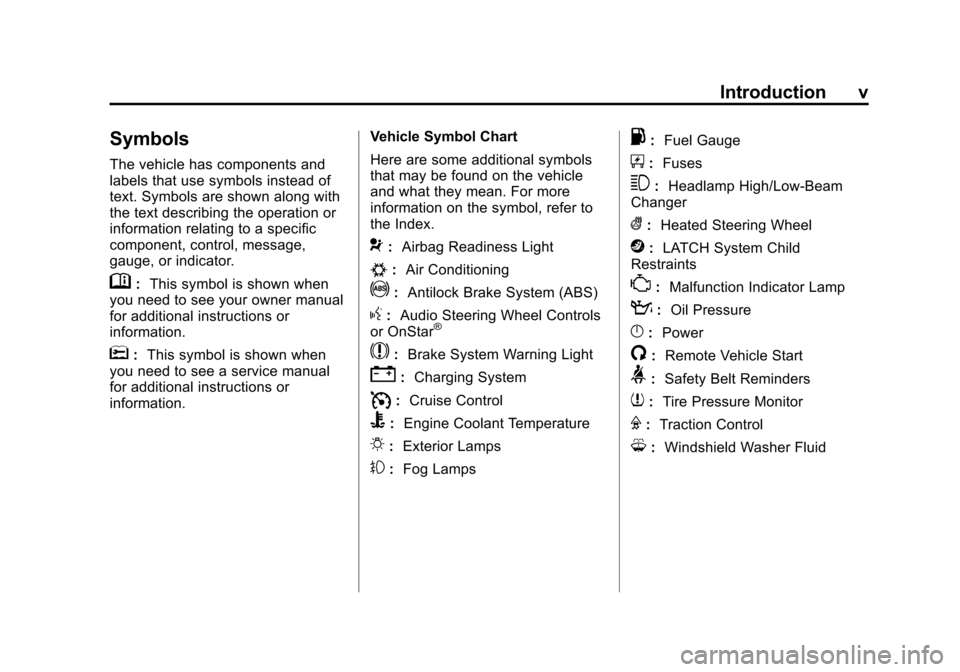
Symbols
The vehicle has components and
labels that use symbols instead of
text. Symbols are shown along with
the text describing the operation or
information relating to a specific
component, control, message,
gauge, or indicator.
M:This symbol is shown when
you need to see your owner manual
for additional instructions or
information.
*: This symbol is shown when
you need to see a service manual
for additional instructions or
information. Vehicle Symbol Chart
Here are some additional symbols
that may be found on the vehicle
and what they mean. For more
information on the symbol, refer to
the Index.
9:
Airbag Readiness Light
#:Air Conditioning
!:Antilock Brake System (ABS)
g:Audio Steering Wheel Controls
or OnStar®
$: Brake System Warning Light
":Charging System
I:Cruise Control
B: Engine Coolant Temperature
O:Exterior Lamps
#:Fog Lamps
.: Fuel Gauge
+:Fuses
3: Headlamp High/Low-Beam
Changer
(: Heated Steering Wheel
j:LATCH System Child
Restraints
*: Malfunction Indicator Lamp
::Oil Pressure
}:Power
/:Remote Vehicle Start
>:Safety Belt Reminders
7:Tire Pressure Monitor
F:Traction Control
M:Windshield Washer Fluid
Page 7 of 496
Black plate (1,1)Cadillac CTS/CTS-V Owner Manual - 2011
In Brief 1-1
In Brief
Instrument Panel
Instrument Panel . . . . . . . . . . . . . . 1-2
Initial Drive Information
Initial Drive Information . . . . . . . . 1-4
Starting the Engine . . . . . . . . . . . 1-4
Remote Keyless Entry (RKE)System . . . . . . . . . . . . . . . . . . . . . . 1-4
Remote Vehicle Start . . . . . . . . . 1-5
Door Locks . . . . . . . . . . . . . . . . . . . 1-5
Liftgate . . . . . . . . . . . . . . . . . . . . . . . . 1-6
Trunk Release . . . . . . . . . . . . . . . . 1-6
Windows . . . . . . . . . . . . . . . . . . . . . . 1-6
Seat Adjustment . . . . . . . . . . . . . . 1-7
Memory Features . . . . . . . . . . . . . 1-8
Heated and Ventilated Seats . . . . . . . . . . . . . . . . . . . . . . . . 1-9
Head Restraint Adjustment . . . . 1-9
Safety Belt . . . . . . . . . . . . . . . . . . . 1-10
Sensing System for Passenger Airbag . . . . . . . . . . 1-10
Mirror Adjustment . . . . . . . . . . . . 1-10 Steering Wheel
Adjustment . . . . . . . . . . . . . . . . . 1-11
Interior Lighting . . . . . . . . . . . . . . 1-12
Exterior Lighting . . . . . . . . . . . . . 1-12
Windshield Wiper/Washer . . . . 1-13
Climate Controls . . . . . . . . . . . . . 1-14
Transmission . . . . . . . . . . . . . . . . 1-15Vehicle Features
Radio(s) . . . . . . . . . . . . . . . . . . . . . 1-15
Satellite Radio . . . . . . . . . . . . . . . 1-16
Portable Audio Devices . . . . . . 1-16
Bluetooth
®. . . . . . . . . . . . . . . . . . . 1-16
Steering Wheel Controls (Audio) . . . . . . . . . . . . . . . . . . . . . 1-17
Navigation System . . . . . . . . . . . 1-17
Driver Information Center (DIC) . . . . . . . . . . . . . . . 1-18
Cruise Control . . . . . . . . . . . . . . . 1-18
Rear Vision Camera (RVC) . . . . . . . . . . . . . 1-19
Ultrasonic Parking Assist . . . . 1-19
Storage Compartments . . . . . . 1-19
Power Outlets . . . . . . . . . . . . . . . 1-20
Universal Remote System . . . 1-20
Sunroof . . . . . . . . . . . . . . . . . . . . . . 1-20
Performance and Maintenance
Traction Control System (TCS) . . . . . . . . . . . . . . 1-21
StabiliTrak
®. . . . . . . . . . . . . . . . . . 1-21
Tire Pressure Monitor . . . . . . . . 1-22
Tire Sealant and Compressor Kit . . . . . . . . . . . . . 1-22
Engine Oil Life System . . . . . . 1-22
Driving for Better Fuel Economy . . . . . . . . . . . . . . . . . . . 1-23
Roadside Service . . . . . . . . . . . . 1-23
OnStar
®. . . . . . . . . . . . . . . . . . . . . 1-24
Page 9 of 496

Black plate (3,1)Cadillac CTS/CTS-V Owner Manual - 2011
In Brief 1-3
A.Air Vents on page 8‑6.
B. Driver Information Center (DIC)
on page 5‑27.
C. Instrument Panel Illumination
Control on page 6‑5.
D. Turn and Lane-Change Signals
on page 6‑4.
E. Instrument Cluster
on
page 5‑11.
F. Windshield Wiper/Washer
on
page 5‑4.
Rear Window Wiper/Washer
on
page 5‑6(If Equipped).
G. Navigation Button (If Equipped). See Navigation System Manual.
H. Traction Control System (TCS)
on page 9‑37.
Magnetic Ride Control
on
page 9‑39(CTS‐V
Model Only).
I. Clock on page 5‑8.
J. Passenger Sensing System
on
page 3‑37. K.
Hazard Warning Flashers
on
page 6‑4.
L. Navigation Display Brightness Control (If Equipped). See
Navigation System Manual.
M. AM-FM Radio
on page 7‑9(Base Audio System).
Navigation/Radio System (If
Equipped). See Navigation
System Manual.
N. Parking Brake Release Lever. See Parking Brake (Manual)
on
page 9‑33or Parking Brake
(Electric) on page 9‑34.
O. Hood Release. See Hood
on
page 10‑5.
P. Cruise Control
on page 9‑40.
Heated Steering Wheel
on
page 5‑4(If Equipped).
Traction Control System (TCS)
Disable Button (CTS-V Model
Only). See Traction Control
System (TCS) on page 9‑37. Q. Tap Shift Controls (If Equipped).
See Manual Mode
on
page 9‑28.
R. Data Link Connector. See
Malfunction Indicator Lamp
on
page 5‑19.
S. Steering Wheel Adjustmenton
page 5‑2.
T. Horn on page 5‑4.
U. Steering Wheel Controls (Audio)
on page 5‑3.
V. Heated and Ventilated Front
Seats on page 3‑12.
W. Dual Automatic Climate Control
System on page 8‑1.
X. Parking Brake Button. See Parking Brake (Manual)
on
page 9‑33or Parking Brake
(Electric) on page 9‑34.
Y. Shift Lever. See Automatic
Transmission
on page 9‑26or
Manual Transmissionon
page 9‑30.
Z. Instrument Panel Storageon
page 4‑1.
Power Outlets on page 5‑9.
AA. Glove Box
on page 4‑1.
Page 24 of 496
Black plate (18,1)Cadillac CTS/CTS-V Owner Manual - 2011
1-18 In Brief
Driver Information
Center (DIC)
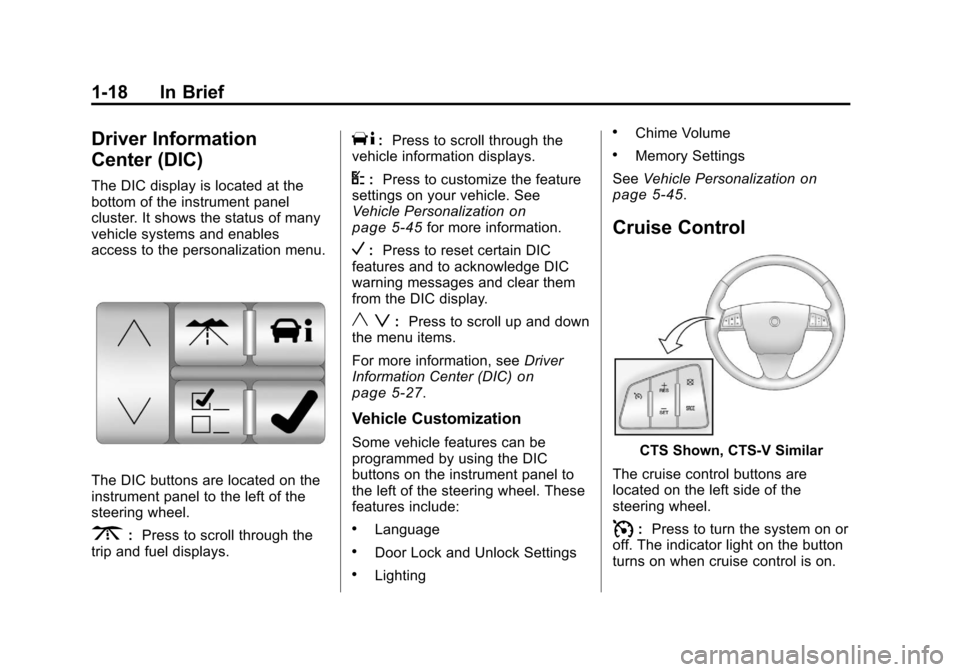
The DIC display is located at the
bottom of the instrument panel
cluster. It shows the status of many
vehicle systems and enables
access to the personalization menu.
The DIC buttons are located on the
instrument panel to the left of the
steering wheel.
3:Press to scroll through the
trip and fuel displays.
T: Press to scroll through the
vehicle information displays.
U: Press to customize the feature
settings on your vehicle. See
Vehicle Personalization
on
page 5‑45for more information.
V: Press to reset certain DIC
features and to acknowledge DIC
warning messages and clear them
from the DIC display.
y z: Press to scroll up and down
the menu items.
For more information, see Driver
Information Center (DIC)
on
page 5‑27.
Vehicle Customization
Some vehicle features can be
programmed by using the DIC
buttons on the instrument panel to
the left of the steering wheel. These
features include:
.Language
.Door Lock and Unlock Settings
.Lighting
.Chime Volume
.Memory Settings
See Vehicle Personalization
on
page 5‑45.
Cruise Control
CTS Shown, CTS‐V Similar
The cruise control buttons are
located on the left side of the
steering wheel.
I: Press to turn the system on or
off. The indicator light on the button
turns on when cruise control is on.
Page 25 of 496

Black plate (19,1)Cadillac CTS/CTS-V Owner Manual - 2011
In Brief 1-19
+RES :Press to make the vehicle
accelerate or resume to a previously
set speed.
−SET : Press to set the speed or
make the vehicle decelerate.
[: Press to cancel cruise control
without erasing the set speed from
memory.
See Cruise Control on page 9‑40.
Rear Vision
Camera (RVC)
The rear vision camera displays a
view of the area behind the vehicle
on either the navigation screen or
the inside rear view mirror when the
vehicle is shifted into R (Reverse).
Once shifted out of R (Reverse), the
navigation screen will go back to the
last screen that had been displayed,
after a delay or the video image
automatically disappears from the
inside rear view mirror. To clean the camera lens, located
above the license plate, rinse it with
water and wipe it with a soft cloth.
See,
Rear Vision Camera (RVC)
on
page 9‑44for more information.
Ultrasonic Parking Assist
For vehicles with this feature, it uses
sensors on the rear bumper to
detect objects while parking the
vehicle. It operates at speeds less
than 8 km/h (5 mph) while in
R (Reverse).
Keep the sensors on the vehicle's
rear bumper clean to ensure proper
operation.
The system can be disabled through
the Driver Information Center (DIC).
See "Park Assist" under Vehicle
Personalization
on page 5‑45for
more information.
Storage Compartments
Press the bottom of the load floor
handle assembly to lift the top on
the handle. Pull up on the handle to
open the cargo management
system.
See Cargo Management System
(Wagon Only)
on page 4‑3for
more information.
Page 29 of 496
Black plate (23,1)Cadillac CTS/CTS-V Owner Manual - 2011
In Brief 1-23
Driving for Better Fuel
Economy
Driving habits can affect fuel
mileage. Here are some driving tips
to get the best fuel economy
possible.
.Avoid fast starts and accelerate
smoothly.
.Brake gradually and avoid
abrupt stops.
.Avoid idling the engine for long
periods of time.
.When road and weather
conditions are appropriate, use
cruise control, if equipped.
.Always follow posted speed
limits or drive more slowly when
conditions require.
.Keep vehicle tires properly
inflated.
.Combine several trips into a
single trip.
.Replace the vehicle's tires with
the same TPC Spec number
molded into the tire's sidewall
near the size.
.Follow recommended scheduled
maintenance.
Roadside Service
U.S. or Canada:1-800-882-1112
TTY Users: 1-888-889-2438
As the owner of a new Cadillac, you
are automatically enrolled in the
Roadside Service program which is
available 24 hours a day, 365 days
a year. Roadside Service and OnStar
If you have a current OnStar
subscription, press the OnStar
button and the current GPS location
will be sent to an OnStar Advisor
who will assess your problem,
contact Roadside Service, and relay
exact location to get you the help
you need.
Online Owner Center
The Online Owner Center is a
complimentary service that includes
online service reminders, vehicle
maintenance tips, online owner
manual, special privileges
and more.
Sign up today at:
www.gmownercenter.com/cadillac
(U.S.) or
www.gm.ca (Canada).
Page 141 of 496
Black plate (1,1)Cadillac CTS/CTS-V Owner Manual - 2011
Instruments and Controls 5-1
Instruments and
Controls
Controls
Steering Wheel Adjustment . . . 5-2
Steering Wheel Controls(Audio) . . . . . . . . . . . . . . . . . . . . . . 5-3
Heated Steering Wheel . . . . . . . 5-4
Horn . . . . . . . . . . . . . . . . . . . . . . . . . . 5-4
Windshield Wiper/Washer . . . . . 5-4
Rear Window Wiper/ Washer . . . . . . . . . . . . . . . . . . . . . . 5-6
Headlamp Washer . . . . . . . . . . . . 5-7
Compass . . . . . . . . . . . . . . . . . . . . . 5-7
Clock . . . . . . . . . . . . . . . . . . . . . . . . . 5-8
Power Outlets . . . . . . . . . . . . . . . . . 5-9
Cigarette Lighter . . . . . . . . . . . . . . 5-9
Ashtrays . . . . . . . . . . . . . . . . . . . . . 5-10
Warning Lights, Gauges, and
Indicators
Warning Lights, Gauges, and Indicators . . . . . . . . . . . . . . . . . . 5-10
Instrument Cluster . . . . . . . . . . . 5-11
Speedometer . . . . . . . . . . . . . . . . 5-13
Odometer . . . . . . . . . . . . . . . . . . . . 5-13
Trip Odometer . . . . . . . . . . . . . . . 5-13 Tachometer . . . . . . . . . . . . . . . . . . 5-13
Fuel Gauge . . . . . . . . . . . . . . . . . . 5-13
Boost Gauge . . . . . . . . . . . . . . . . 5-14
Engine Speed Limiter . . . . . . . . 5-15
Engine Oil Pressure
Gauge . . . . . . . . . . . . . . . . . . . . . . 5-15
Engine Coolant Temperature Gauge . . . . . . . . . . . . . . . . . . . . . . 5-16
Safety Belt Reminders . . . . . . . 5-17
Airbag Readiness Light . . . . . . 5-17
Passenger Airbag Status Indicator . . . . . . . . . . . . . . . . . . . . 5-18
Charging System Light . . . . . . 5-19
Malfunction Indicator Lamp . . . . . . . . . . . . . 5-19
Brake System Warning Light . . . . . . . . . . . . . . . . . . . . . . . 5-22
Antilock Brake System (ABS) Warning Light . . . . . . . . . . . . . . 5-23
Up-Shift Light . . . . . . . . . . . . . . . . 5-24
Traction Control System (TCS)/StabiliTrak
®Light . . . . 5-24
Engine Coolant Temperature Warning Light . . . . . . . . . . . . . . 5-25
Tire Pressure Light . . . . . . . . . . 5-25
Engine Oil Pressure Light . . . . 5-26
Security Light . . . . . . . . . . . . . . . . 5-26
High-Beam on Light . . . . . . . . . 5-26 Fog Lamp Light . . . . . . . . . . . . . . 5-27
Lamps on Reminder . . . . . . . . . 5-27
Cruise Control Light . . . . . . . . . 5-27
Information Displays
Driver Information
Center (DIC) . . . . . . . . . . . . . . . 5-27
Vehicle Messages
Vehicle Messages . . . . . . . . . . . 5-31
Battery Voltage and ChargingMessages . . . . . . . . . . . . . . . . . . 5-31
Brake System Messages . . . . 5-32
Compass Messages . . . . . . . . . 5-34
Cruise Control Messages . . . . 5-34
Door Ajar Messages . . . . . . . . . 5-34
Engine Cooling System Messages . . . . . . . . . . . . . . . . . . 5-35
Engine Oil Messages . . . . . . . . 5-35
Engine Power Messages . . . . 5-36
Fuel System Messages . . . . . . 5-36
Key and Lock Messages . . . . . 5-36
Lamp Messages . . . . . . . . . . . . . 5-39
Object Detection System Messages . . . . . . . . . . . . . . . . . . 5-39
Ride Control System Messages . . . . . . . . . . . . . . . . . . 5-40
Airbag System Messages . . . . 5-42
Page 167 of 496

Black plate (27,1)Cadillac CTS/CTS-V Owner Manual - 2011
Instruments and Controls 5-27
Fog Lamp Light
The fog lamp light comes on when
the fog lamps are in use.
The light goes out when the fog
lamps are turned off. SeeFog
Lamps
on page 6‑5for more
information.
Lamps on Reminder
This light comes on whenever the
parking lamps are on.
See Exterior Lamps Off Reminder
on page 6‑2for more information.
Cruise Control Light
This light comes on whenever the
cruise control is active.
The light goes out when the cruise
control is turned off. See Cruise
Control
on page 9‑40for more
information.
Information Displays
Driver Information
Center (DIC)
The Driver Information Center (DIC)
provides status of many vehicle
systems. The DIC displays warning/
status messages. The DIC display
is at the bottom of the instrument
panel cluster. The DIC buttons are
on the instrument panel next to the
steering wheel.
The DIC comes on when the ignition
is on. After a short delay, the DIC
displays the information that was
last displayed before the engine
was turned off.
The top line of the DIC display
shows the DIC information. The
bottom line shows the compass.
The compass displays in the trip/
fuel menus and in some vehicle
information menus.
Page 174 of 496

Black plate (34,1)Cadillac CTS/CTS-V Owner Manual - 2011
5-34 Instruments and Controls
Compass Messages
Calibrating Drive In Circles
This message displays when
calibrating the compass. Drive the
vehicle in circles at less than 5 mph
(8 km/h) to complete the calibration.
See“DIC Compass” underDriver
Information Center (DIC)
on
page 5‑27for more information.
Calibration Complete
This message displays when the
compass calibration is complete.
See “DIC Compass” underDriver
Information Center (DIC)
on
page 5‑27for more information.
Cruise Control Messages
Cruise Set To XXX MPH (km/h)
This message displays whenever
the cruise control is set. See Cruise
Control
on page 9‑40for more
information.
Door Ajar Messages
Driver Door Open
This message displays when the
driver door is not closed completely.
Close the door completely.
Hood Open
This message displays when the
hood is not closed completely. Make
sure that the hood is closed
completely.
Left Rear Door Open
This message displays when the
driver side rear door is not closed
completely. Make sure that the door
is closed completely.
Passenger Door Open
This message displays when the
passenger side front door is not
closed completely. Make sure that
the door is closed completely.
Rear Access Open (Wagon)
This message displays when the
liftgate is not closed completely.
Make sure that the liftgate is closed
completely.
Right Rear Door Open
This message displays when the
passenger side rear door is not
closed completely. Make sure that
the door is closed completely.
Trunk Open (Sedan and
Coupe)
This message displays when the
trunk is not closed completely. Make
sure that the trunk is closed
completely.