phone CADILLAC CTS 2011 2.G Owners Manual
[x] Cancel search | Manufacturer: CADILLAC, Model Year: 2011, Model line: CTS, Model: CADILLAC CTS 2011 2.GPages: 496, PDF Size: 7.71 MB
Page 1 of 496

Black plate (1,1)Cadillac CTS/CTS-V Owner Manual - 2011
2011 Cadillac CTS/CTS-V Owner ManualM
In Brief. . . . . . . . . . . . . . . . . . . . . . . . 1-1
Instrument Panel . . . . . . . . . . . . . . 1-2
Initial Drive Information . . . . . . . . 1-4
Vehicle Features . . . . . . . . . . . . . 1-15
Performance and Maintenance . . . . . . . . . . . . . . . . 1-21
Keys, Doors and Windows . . . 2-1
Keys and Locks . . . . . . . . . . . . . . . 2-2
Doors . . . . . . . . . . . . . . . . . . . . . . . . 2-17
Vehicle Security . . . . . . . . . . . . . . 2-23
Exterior Mirrors . . . . . . . . . . . . . . . 2-27
Interior Mirrors . . . . . . . . . . . . . . . . 2-28
Windows . . . . . . . . . . . . . . . . . . . . . 2-28
Roof . . . . . . . . . . . . . . . . . . . . . . . . . . 2-32 Seats and Restraints
. . . . . . . . . 3-1
Head Restraints . . . . . . . . . . . . . . . 3-2
Front Seats . . . . . . . . . . . . . . . . . . . . 3-3
Rear Seats . . . . . . . . . . . . . . . . . . . 3-13
Safety Belts . . . . . . . . . . . . . . . . . . 3-14
Airbag System . . . . . . . . . . . . . . . . 3-30
Child Restraints . . . . . . . . . . . . . . 3-44
Storage . . . . . . . . . . . . . . . . . . . . . . . 4-1
Storage Compartments . . . . . . . . 4-1
Additional Storage Features . . . 4-2
Roof Rack System . . . . . . . . . . . . . 4-6
Instruments and Controls . . . . 5-1
Controls . . . . . . . . . . . . . . . . . . . . . . . 5-2
Warning Lights, Gauges, and
Indicators . . . . . . . . . . . . . . . . . . . 5-10
Information Displays . . . . . . . . . . 5-27
Vehicle Messages . . . . . . . . . . . . 5-31
Vehicle Personalization . . . . . . . 5-45
Universal Remote System . . . . 5-53 Lighting
. . . . . . . . . . . . . . . . . . . . . . . 6-1
Exterior Lighting . . . . . . . . . . . . . . . 6-1
Interior Lighting . . . . . . . . . . . . . . . . 6-5
Lighting Features . . . . . . . . . . . . . . 6-6
Infotainment System . . . . . . . . . 7-1
Introduction . . . . . . . . . . . . . . . . . . . . 7-1
Radio . . . . . . . . . . . . . . . . . . . . . . . . . . 7-9
Audio Players . . . . . . . . . . . . . . . . 7-17
Phone . . . . . . . . . . . . . . . . . . . . . . . . 7-38
Climate Controls . . . . . . . . . . . . . 8-1
Climate Control Systems . . . . . . 8-1
Air Vents . . . . . . . . . . . . . . . . . . . . . . . 8-6
Maintenance . . . . . . . . . . . . . . . . . . . 8-6
Page 22 of 496
Black plate (16,1)Cadillac CTS/CTS-V Owner Manual - 2011
1-16 In Brief
Setting the Clock
The analog clock is located on the
instrument panel above the radio.
The clock is not connected with any
other vehicle system and runs by
itself. To adjust the clock:
1. Locate the adjustment buttonsdirectly below the clock face.
2. Push and hold the right adjustment button to move the
clock hands forward, or the left
adjustment button to make the
clock hands go backward.
Holding either button down will
cause the clock to advance
faster. Release the button before
the desired time is reached.
3. Push and release either button to adjust the time by one minute
increments until the desired time
is reached.
For more information on setting the
clock, see Clock on page 5‑8.
Satellite Radio
Vehicles with an XM™ Satellite
Radio tuner and a valid XM Satellite
Radio subscription can receive XM
programming.
XM Satellite Radio Service
XM is a satellite radio service based
in the 48 contiguous United States
and 10 Canadian provinces. XM
Satellite Radio has a wide variety of
programming and commercial-free
music, coast to coast, and in
digital-quality sound. A fee is
required to receive the XM service.
For more information refer to:
.www.xmradio.com or call
1-800-929-2100 (U.S.).
.www.xmradio.ca or call
1-877-438-9677 (Canada).
For more information, see Satellite
Radio on page 7‑12.
Portable Audio Devices
This vehicle may have a 3.5 mm
(1/8 in) auxiliary input and a USB
port located in the center console.
External devices such as iPods
®,
laptop computers, MP3 players, CD
changers, and USB storage
devices. may be connected,
depending on the audio system.
For more information, see Auxiliary
Devices on page 7‑36.
Bluetooth®
The Bluetooth®system allows users
with a Bluetooth-enabled cell phone
to make and receive hands-free
calls using the vehicle’s audio
system, microphone, and controls.
The Bluetooth-enabled cell phone
must be paired with the in-vehicle
Bluetooth system before it can be
used in the vehicle. Not all phones
will support all functions.
See Bluetooth on page 7‑38.
Page 23 of 496
Black plate (17,1)Cadillac CTS/CTS-V Owner Manual - 2011
In Brief 1-17
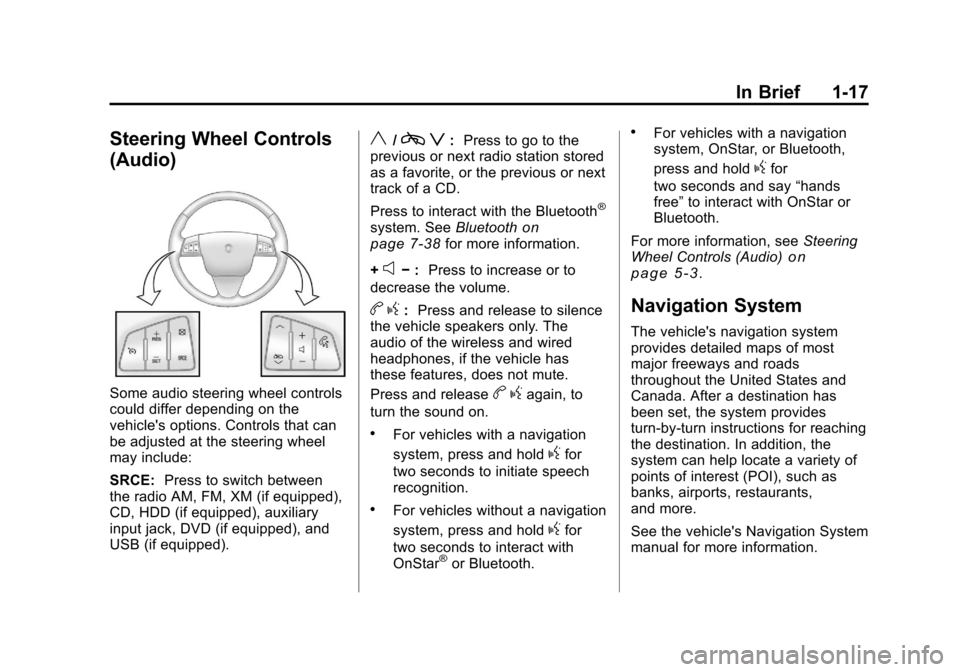
Steering Wheel Controls
(Audio)
Some audio steering wheel controls
could differ depending on the
vehicle's options. Controls that can
be adjusted at the steering wheel
may include:
SRCE:Press to switch between
the radio AM, FM, XM (if equipped),
CD, HDD (if equipped), auxiliary
input jack, DVD (if equipped), and
USB (if equipped).
y/c z:Press to go to the
previous or next radio station stored
as a favorite, or the previous or next
track of a CD.
Press to interact with the Bluetooth
®
system. See Bluetoothon
page 7‑38for more information.
+
e− : Press to increase or to
decrease the volume.
b g: Press and release to silence
the vehicle speakers only. The
audio of the wireless and wired
headphones, if the vehicle has
these features, does not mute.
Press and release
b gagain, to
turn the sound on.
.For vehicles with a navigation
system, press and hold
gfor
two seconds to initiate speech
recognition.
.For vehicles without a navigation
system, press and hold
gfor
two seconds to interact with
OnStar
®or Bluetooth.
.For vehicles with a navigation
system, OnStar, or Bluetooth,
press and hold
gfor
two seconds and say “hands
free” to interact with OnStar or
Bluetooth.
For more information, see Steering
Wheel Controls (Audio)
on
page 5‑3.
Navigation System
The vehicle's navigation system
provides detailed maps of most
major freeways and roads
throughout the United States and
Canada. After a destination has
been set, the system provides
turn-by-turn instructions for reaching
the destination. In addition, the
system can help locate a variety of
points of interest (POI), such as
banks, airports, restaurants,
and more.
See the vehicle's Navigation System
manual for more information.
Page 26 of 496
Black plate (20,1)Cadillac CTS/CTS-V Owner Manual - 2011
1-20 In Brief
Power Outlets
Accessory power outlets can be
used to plug in electrical equipment,
such as a cell phone, MP3
player, etc.
There are three accessory power
outlets. The power outlets located
below the climate control system,
inside the center console storage
bin, and on the rear of the center
console are powered while the
vehicle is in ON/RUN/START or
ACC/ACCESSORY mode, or until
the driver door is opened with
10 minutes of turning off the vehicle.
On the CTS Wagon there is an
additional accessory power outlet
located near the rear cargo net that
is powered at all times.
Remove the cover to access and
replace when not in use.
SeePower Outlets on page 5‑9.
Universal Remote System
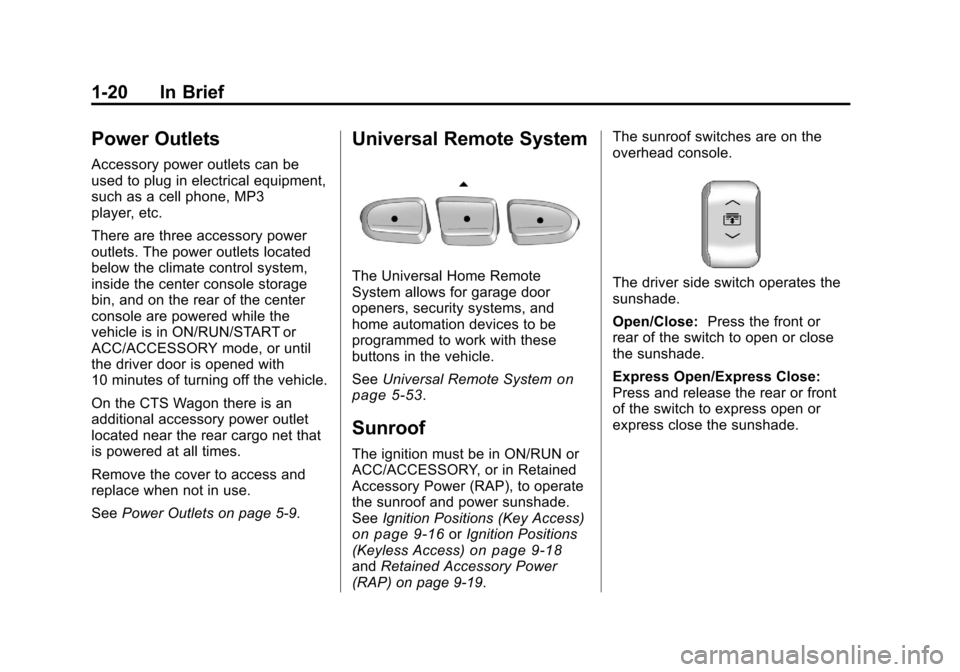
The Universal Home Remote
System allows for garage door
openers, security systems, and
home automation devices to be
programmed to work with these
buttons in the vehicle.
SeeUniversal Remote System
on
page 5‑53.
Sunroof
The ignition must be in ON/RUN or
ACC/ACCESSORY, or in Retained
Accessory Power (RAP), to operate
the sunroof and power sunshade.
See Ignition Positions (Key Access)
on page 9‑16orIgnition Positions
(Keyless Access)on page 9‑18and Retained Accessory Power
(RAP) on page 9‑19. The sunroof switches are on the
overhead console.
The driver side switch operates the
sunshade.
Open/Close:
Press the front or
rear of the switch to open or close
the sunshade.
Express Open/Express Close:
Press and release the rear or front
of the switch to express open or
express close the sunshade.
Page 31 of 496
Black plate (25,1)Cadillac CTS/CTS-V Owner Manual - 2011
In Brief 1-25
service. Service involving location
information about your vehicle can’t
work unless GPS signals are
available, unobstructed, and
compatible with the OnStar
hardware. The vehicle has to have a
working electrical system and
adequate battery power for the
OnStar equipment to operate.
OnStar service may not work if the
OnStar Equipment isn’t properly
installed or you haven’t maintained
it and your vehicle is in good
working order and in compliance
with all government regulations.
If you try to add, connect or modify
any equipment or software in your
vehicle, OnStar service may not
work. Other problems OnStar can’t
control may prevent service to you,
such as hills, tall buildings, tunnels,
weather, electrical system design
and architecture of your vehicle,
damage to important parts of your
vehicle in a crash, or wireless phone
network congestion or jamming.See Radio Frequency Statement for
Information regarding Part 15 of the
Federal Communication
Commission (FCC) rules and
Industry Canada Standards RS-210/
220/310.
OnStar Steering Wheel
Controls
This vehicle may have a Talk/Mute
button that can be used to interact
with OnStar Hands-Free calling.
See
Steering Wheel Controls
(Audio)
on page 5‑3for more
information.
On some vehicles, the mute button
can be used to dial numbers into
voice mail systems, or to dial phone
extensions. See the OnStar Owner's
Guide for more information.
Your Responsibility
Increase the volume of the radio if
the OnStar advisor cannot be heard.
If the light next to the OnStar
buttons is red, the system may not
be functioning properly. Press
Q
and request a vehicle diagnostic.
If the light appears clear (no light is
appearing), your OnStar
subscription has expired and all
services have been deactivated.
Press
Qto confirm that the OnStar
equipment is active.
Page 111 of 496

Black plate (43,1)Cadillac CTS/CTS-V Owner Manual - 2011
Seats and Restraints 3-43
passenger airbag(s). See
Passenger Sensing Systemon
page 3‑37.
If you have questions, call
Customer Assistance. The
phone numbers and addresses
for Customer Assistance are in
Step Two of the Customer
Satisfaction Procedure in this
manual. See Customer
Satisfaction Procedure
on
page 13‑1.
If the vehicle has rollover
roof-rail airbags, see Different
Size Tires and Wheels
on
page 10‑85for additional
important information. Q: Because I have a disability,
I have to get my vehicle
modified. How can I find out
whether this will affect my
airbag system?
A: If you have questions, call
Customer Assistance. The
phone numbers and addresses
for Customer Assistance are in
Step Two of the Customer
Satisfaction Procedure in this
manual. See Customer
Satisfaction Procedure
on
page 13‑1.
In addition, your dealer and the
service manual have information
about the location of the airbag
sensors, sensing and diagnostic
module and airbag wiring.
Airbag System Check
The airbag system does not need
regularly scheduled maintenance or
replacement. Make sure the airbag
readiness light is working. See
Airbag Readiness Light
on
page 5‑17for more information.
Notice: If an airbag covering is
damaged, opened, or broken, the
airbag may not work properly. Do
not open or break the airbag
coverings. If there are any
opened or broken airbag covers,
have the airbag covering and/or
airbag module replaced. For the
location of the airbag modules,
see What Makes an Airbag
Inflate?
on page 3‑35. See your
dealer for service.
Page 143 of 496
Black plate (3,1)Cadillac CTS/CTS-V Owner Manual - 2011
Instruments and Controls 5-3
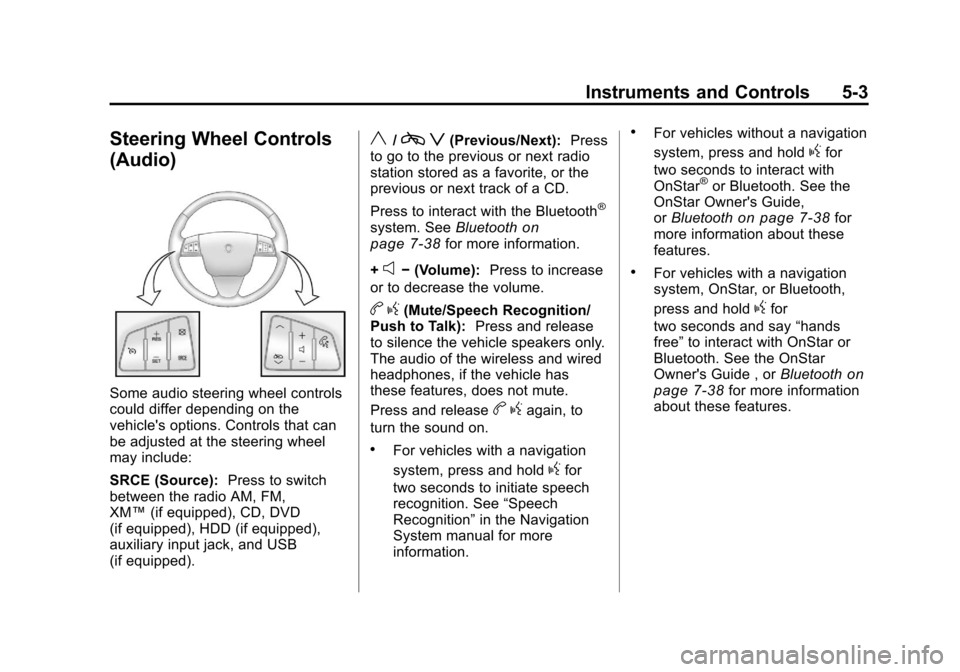
Steering Wheel Controls
(Audio)
Some audio steering wheel controls
could differ depending on the
vehicle's options. Controls that can
be adjusted at the steering wheel
may include:
SRCE (Source):Press to switch
between the radio AM, FM,
XM™ (if equipped), CD, DVD
(if equipped), HDD (if equipped),
auxiliary input jack, and USB
(if equipped).
y/c z(Previous/Next): Press
to go to the previous or next radio
station stored as a favorite, or the
previous or next track of a CD.
Press to interact with the Bluetooth
®
system. See Bluetoothon
page 7‑38for more information.
+
e− (Volume): Press to increase
or to decrease the volume.
b g(Mute/Speech Recognition/
Push to Talk): Press and release
to silence the vehicle speakers only.
The audio of the wireless and wired
headphones, if the vehicle has
these features, does not mute.
Press and release
b gagain, to
turn the sound on.
.For vehicles with a navigation
system, press and hold
gfor
two seconds to initiate speech
recognition. See “Speech
Recognition” in the Navigation
System manual for more
information.
.For vehicles without a navigation
system, press and hold
gfor
two seconds to interact with
OnStar
®or Bluetooth. See the
OnStar Owner's Guide,
or Bluetooth
on page 7‑38for
more information about these
features.
.For vehicles with a navigation
system, OnStar, or Bluetooth,
press and hold
gfor
two seconds and say “hands
free” to interact with OnStar or
Bluetooth. See the OnStar
Owner's Guide , or Bluetooth
on
page 7‑38for more information
about these features.
Page 149 of 496
Black plate (9,1)Cadillac CTS/CTS-V Owner Manual - 2011
Instruments and Controls 5-9
Power Outlets
Accessory power outlets can be
used to plug in electrical equipment,
such as a cell phone, MP3
player, etc.
There are three accessory power
outlets. The power outlets located
below the climate control system,
inside the center console storage
bin, and on the rear of the center
console are powered while the
vehicle is in ON/RUN/START or
ACC/ACCESSORY mode, or until
the driver door is opened with
10 minutes of turning off the vehicle.
On the CTS Wagon there is an
additional accessory power outlet
located near the rear cargo net that
is powered at all times.
Remove the cover to access and
replace when not in use.
Notice:Leaving electrical
equipment plugged in for an
extended period of time while the
vehicle is off will drain the
battery. Always unplug electrical equipment when not in use and
do not plug in equipment that
exceeds the maximum 20 ampere
rating.
Certain electrical accessories may
not be compatible with the
accessory power outlet and could
overload vehicle or adapter fuses.
If a problem is experienced, see
your dealer.
When adding electrical equipment,
be sure to follow the proper
installation instructions included with
the equipment. See
Add-On
Electrical Equipment on page 9‑58.
Notice: Hanging heavy
equipment from the power outlet
can cause damage not covered
by the vehicle warranty. The
power outlets are designed for
accessory power plugs only, such
as cell phone charge cords.
Cigarette Lighter
The vehicle may have a cigarette
lighter. To use the lighter, push it in
all the way and let go. When it is
ready, it will pop back out by itself.
Notice: Holding a cigarette lighter
in while it is heating does not let
the lighter back away from the
heating element when it is hot.
Damage from overheating can
occur to the lighter or heating
element, or a fuse could be
blown. Do not hold a cigarette
lighter in while it is heating.
Page 177 of 496
Black plate (37,1)Cadillac CTS/CTS-V Owner Manual - 2011
Instruments and Controls 5-37
Electronic Key Already Known
If the vehicle has the keyless
access system, this message
displays if you try to match a
transmitter that has already been
learned. See the Keyless Access
information forRemote Keyless
Entry (RKE) System Operation (Key
Access)
on page 2‑5or Remote
Keyless Entry (RKE) System
Operation (Keyless Access)
on
page 2‑7for more information.
Electronic Key Not Detected
If the vehicle has the keyless
access system, this message
displays if the vehicle does not
detect the presence of a transmitter
when you have attempted to start
the vehicle or a vehicle door has
just closed. The following conditions
may cause this message to appear:
.Driver-added equipment plugged
into the accessory power outlet
on the center console is causing
interference. Examples of these
devices are cell phones and cell
phone chargers, two-way radios, power inverters, or similar items.
Try moving the keyless access
transmitter away from these
devices when starting the
vehicle. In addition, PDA devices
and remote garage and gate
openers may also generate
Electromagnetic Interference
(EMI) that may interfere with the
keyless access transmitter. Do
not carry the keyless access
transmitter in the same pocket or
bag as these devices.
.The vehicle is experiencing
Electromagnetic Interference
(EMI). Some locations, such as
airports, automatic toll booths,
and some gas stations have EMI
fields which may interfere with
the keyless access transmitter.
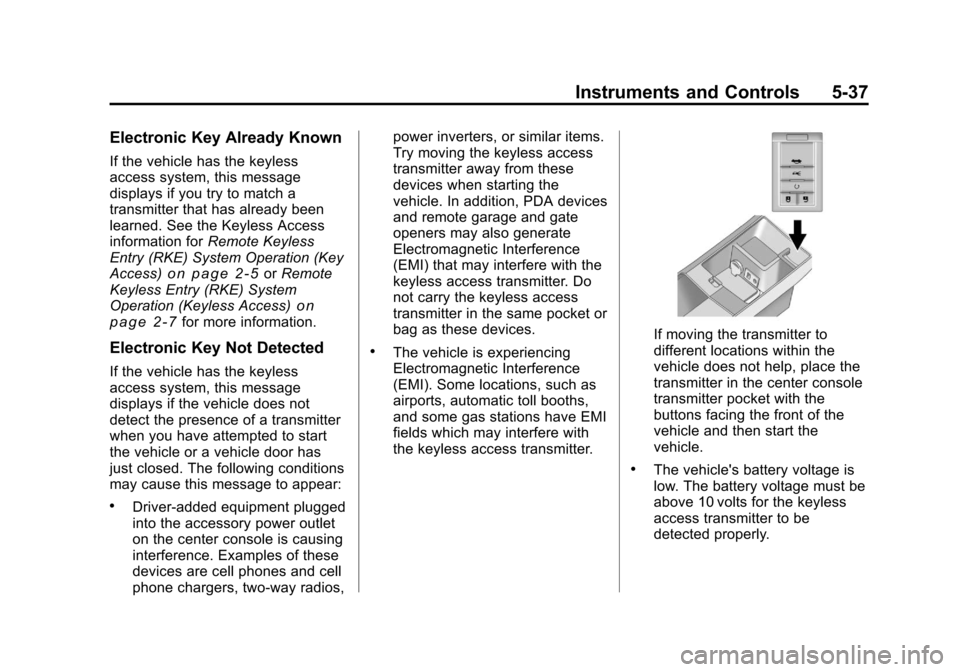
If moving the transmitter to
different locations within the
vehicle does not help, place the
transmitter in the center console
transmitter pocket with the
buttons facing the front of the
vehicle and then start the
vehicle.
.The vehicle's battery voltage is
low. The battery voltage must be
above 10 volts for the keyless
access transmitter to be
detected properly.
Page 197 of 496

Black plate (57,1)Cadillac CTS/CTS-V Owner Manual - 2011
Instruments and Controls 5-57
Universal Remote System
Operation
Using Universal Remote
Press and hold the appropriate
Universal Remote button for at least
half of a second. The indicator light
will come on while the signal is
being transmitted.
Erasing Universal Remote
Buttons
All programmed buttons should be
erased when the vehicle is sold or
the lease ends.To erase all programmed buttons on
the Universal Remote device:
1. Press and hold down the two
outside buttons until the
indicator light begins to flash,
after 20 seconds.
2. Release both buttons.
Reprogramming a Single
Universal Remote Button
To reprogram any of the three
Universal Remote buttons, repeat
the programming instructions earlier
in this section, beginning with
Step 2.
For help or information on the
Universal Home Remote System,
call the customer assistance phone
number under Customer Assistance
Offices on page 13‑4.