steering CADILLAC CTS 2012 2.G Owner's Manual
[x] Cancel search | Manufacturer: CADILLAC, Model Year: 2012, Model line: CTS, Model: CADILLAC CTS 2012 2.GPages: 496, PDF Size: 6.36 MB
Page 98 of 496
Black plate (32,1)Cadillac CTS/CTS-V Owner Manual (Include Mex) - 2012
3-32 Seats and Restraints
Servicing the
Airbag-Equipped Vehicle
Airbags affect how the vehicle
should be serviced. There are parts
of the airbag system in several
places around the vehicle. Your
dealer and the service manual have
information about servicing the
vehicle and the airbag system. To
purchase a service manual, see
Service Publications Ordering
Information on page 13‑17.
{WARNING
For up to 10 seconds after the
vehicle is turned off and the
battery is disconnected, an airbag
can still inflate during improper
service. You can be injured if you
are close to an airbag when it
inflates. Avoid yellow connectors.
They are probably part of the
airbag system. Be sure to follow(Continued)
WARNING (Continued)
proper service procedures, and
make sure the person performing
work for you is qualified to do so.
Adding Equipment to the
Airbag-Equipped Vehicle
Q: Is there anything I might addto or change about the vehicle
that could keep the airbags
from working properly?
A: Yes. If you add things that
change the vehicle's frame,
bumper system, height, front end
or side sheet metal, they may
keep the airbag system from
working properly. Changing or
moving any parts of the front
seats, safety belts, the airbag
sensing and diagnostic module,
steering wheel, instrument
panel, roof-rail airbag modules,
ceiling headliner or pillar garnish
trim, overhead console, front
sensors, side impact sensors, rollover sensor module, or airbag
wiring can affect the operation of
the airbag system.
In addition, the vehicle has a
passenger sensing system for
the right front passenger
position, which includes sensors
that are part of the passenger
seat. The passenger sensing
system may not operate properly
if the original seat trim is
replaced with non-GM covers,
upholstery or trim, or with GM
covers, upholstery or trim
designed for a different vehicle.
Any object, such as an
aftermarket seat heater or a
comfort enhancing pad or
device, installed under or on top
of the seat fabric, could also
interfere with the operation of
the passenger sensing system.
This could either prevent proper
deployment of the passenger
airbag(s) or prevent the
passenger sensing system from
properly turning off the
Page 129 of 496

Black plate (1,1)Cadillac CTS/CTS-V Owner Manual (Include Mex) - 2012
Instruments and Controls 5-1
Instruments and
Controls
Controls
Steering Wheel Adjustment . . . 5-2
Steering Wheel Controls . . . . . . 5-3
Heated Steering Wheel . . . . . . . 5-4
Horn . . . . . . . . . . . . . . . . . . . . . . . . . . 5-4
Windshield Wiper/Washer . . . . . 5-4
Rear Window Wiper/Washer . . . . . . . . . . . . . . . . . . . . . . 5-6
Headlamp Washer . . . . . . . . . . . . 5-7
Compass . . . . . . . . . . . . . . . . . . . . . 5-7
Clock . . . . . . . . . . . . . . . . . . . . . . . . . 5-8
Power Outlets . . . . . . . . . . . . . . . . . 5-9
Cigarette Lighter . . . . . . . . . . . . . . 5-9
Ashtrays . . . . . . . . . . . . . . . . . . . . . 5-10
Warning Lights, Gauges, and
Indicators
Warning Lights, Gauges, and Indicators . . . . . . . . . . . . . . . . . . 5-10
Instrument Cluster . . . . . . . . . . . 5-11
Speedometer . . . . . . . . . . . . . . . . 5-13
Odometer . . . . . . . . . . . . . . . . . . . . 5-13
Trip Odometer . . . . . . . . . . . . . . . 5-13
Tachometer . . . . . . . . . . . . . . . . . . 5-13 Fuel Gauge . . . . . . . . . . . . . . . . . . 5-13
Boost Gauge . . . . . . . . . . . . . . . . 5-14
Engine Speed Limiter . . . . . . . . 5-14
Engine Oil Pressure
Gauge . . . . . . . . . . . . . . . . . . . . . . 5-15
Engine Coolant Temperature Gauge . . . . . . . . . . . . . . . . . . . . . . 5-16
Safety Belt Reminders . . . . . . . 5-16
Airbag Readiness Light . . . . . . 5-17
Passenger Airbag Status Indicator . . . . . . . . . . . . . . . . . . . . 5-18
Charging System Light . . . . . . 5-19
Malfunction Indicator Lamp . . . . . . . . . . . . . 5-19
Brake System Warning Light . . . . . . . . . . . . . . . . . . . . . . . 5-22
Antilock Brake System (ABS) Warning Light . . . . . . . . . . . . . . 5-23
Up-Shift Light . . . . . . . . . . . . . . . . 5-23
StabiliTrak
®OFF Light . . . . . . . 5-23
Traction Control System (TCS)/StabiliTrak
®Light . . . . 5-24
Engine Coolant Temperature Warning Light . . . . . . . . . . . . . . 5-24
Tire Pressure Light . . . . . . . . . . 5-25
Engine Oil Pressure Light . . . . 5-25
Security Light . . . . . . . . . . . . . . . . 5-26
High-Beam On Light . . . . . . . . . 5-26 Front Fog Lamp Light . . . . . . . . 5-26
Lamps On Reminder . . . . . . . . . 5-26
Cruise Control Light . . . . . . . . . 5-27
Information Displays
Driver Information
Center (DIC) . . . . . . . . . . . . . . . 5-27
Vehicle Messages
Vehicle Messages . . . . . . . . . . . 5-31
Battery Voltage and ChargingMessages . . . . . . . . . . . . . . . . . . 5-31
Brake System Messages . . . . 5-32
Compass Messages . . . . . . . . . 5-34
Cruise Control Messages . . . . 5-34
Door Ajar Messages . . . . . . . . . 5-34
Engine Cooling System Messages . . . . . . . . . . . . . . . . . . 5-35
Engine Oil Messages . . . . . . . . 5-35
Engine Power Messages . . . . 5-36
Fuel System Messages . . . . . . 5-36
Key and Lock Messages . . . . . 5-37
Lamp Messages . . . . . . . . . . . . . 5-39
Object Detection System Messages . . . . . . . . . . . . . . . . . . 5-39
Ride Control System Messages . . . . . . . . . . . . . . . . . . 5-40
Airbag System Messages . . . . 5-43
Page 130 of 496
Black plate (2,1)Cadillac CTS/CTS-V Owner Manual (Include Mex) - 2012
5-2 Instruments and Controls
Anti-theft Alarm SystemMessages . . . . . . . . . . . . . . . . . . 5-43
Service Vehicle Messages . . . 5-43
Tire Messages . . . . . . . . . . . . . . . 5-43
Transmission Messages . . . . . 5-44
Vehicle Speed Messages . . . . 5-45
Washer Fluid Messages . . . . . 5-45
Vehicle Personalization
Vehicle Personalization . . . . . . 5-46
Universal Remote System
Universal Remote System . . . 5-53
Universal Remote System Programming . . . . . . . . . . . . . . . 5-53
Universal Remote System Operation . . . . . . . . . . . . . . . . . . 5-57
Controls
Steering Wheel
Adjustment
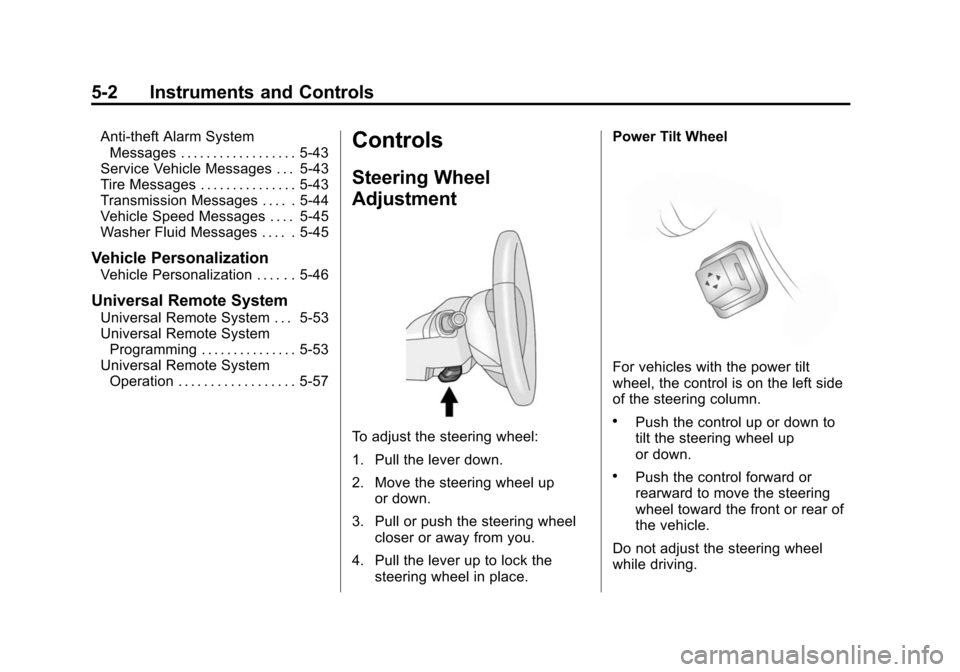
To adjust the steering wheel:
1. Pull the lever down.
2. Move the steering wheel up
or down.
3. Pull or push the steering wheel closer or away from you.
4. Pull the lever up to lock the steering wheel in place. Power Tilt Wheel
For vehicles with the power tilt
wheel, the control is on the left side
of the steering column.
.Push the control up or down to
tilt the steering wheel up
or down.
.Push the control forward or
rearward to move the steering
wheel toward the front or rear of
the vehicle.
Do not adjust the steering wheel
while driving.
Page 131 of 496
Black plate (3,1)Cadillac CTS/CTS-V Owner Manual (Include Mex) - 2012
Instruments and Controls 5-3
Steering Wheel Controls
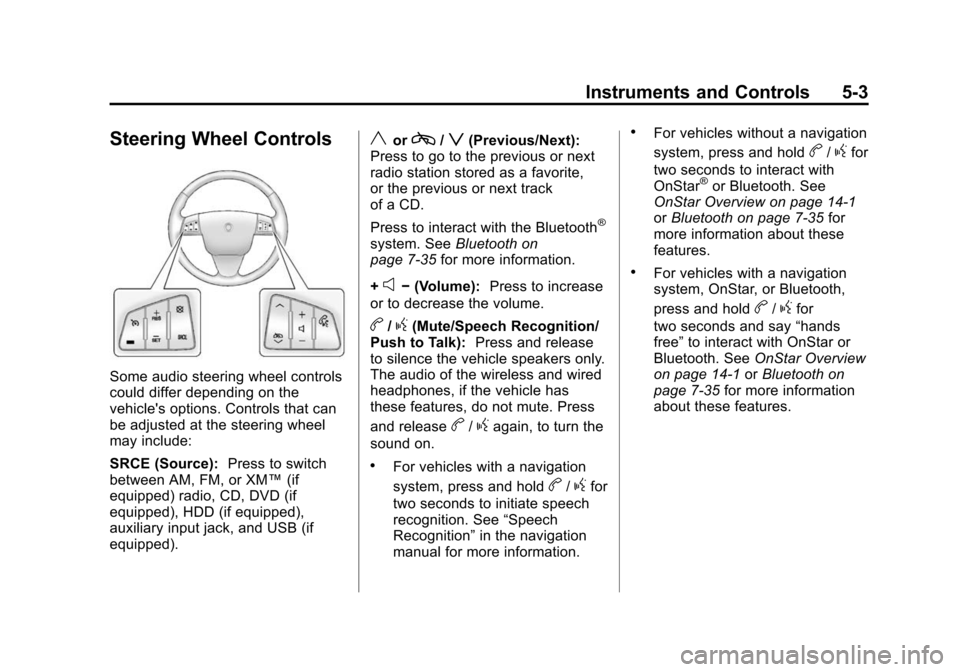
Some audio steering wheel controls
could differ depending on the
vehicle's options. Controls that can
be adjusted at the steering wheel
may include:
SRCE (Source):Press to switch
between AM, FM, or XM™ (if
equipped) radio, CD, DVD (if
equipped), HDD (if equipped),
auxiliary input jack, and USB (if
equipped).
yorc/z(Previous/Next):
Press to go to the previous or next
radio station stored as a favorite,
or the previous or next track
of a CD.
Press to interact with the Bluetooth
®
system. See Bluetooth on
page 7‑35 for more information.
+
e− (Volume): Press to increase
or to decrease the volume.
b/g(Mute/Speech Recognition/
Push to Talk): Press and release
to silence the vehicle speakers only.
The audio of the wireless and wired
headphones, if the vehicle has
these features, do not mute. Press
and release
b/gagain, to turn the
sound on.
.For vehicles with a navigation
system, press and hold
b/gfor
two seconds to initiate speech
recognition. See “Speech
Recognition” in the navigation
manual for more information.
.For vehicles without a navigation
system, press and hold
b/gfor
two seconds to interact with
OnStar
®or Bluetooth. See
OnStar Overview on page 14‑1
or Bluetooth on page 7‑35 for
more information about these
features.
.For vehicles with a navigation
system, OnStar, or Bluetooth,
press and hold
b/gfor
two seconds and say “hands
free” to interact with OnStar or
Bluetooth. See OnStar Overview
on page 14‑1 orBluetooth on
page 7‑35 for more information
about these features.
Page 132 of 496

Black plate (4,1)Cadillac CTS/CTS-V Owner Manual (Include Mex) - 2012
5-4 Instruments and Controls
Heated Steering Wheel
The vehicle may be equipped with a
heated steering wheel.
(:Press to turn the heated
steering wheel on or off. A light on
the button displays when the feature
is turned on.
The steering wheel takes about
three minutes to start heating.
Horn
Pressaon the steering wheel
pad to sound the horn.
Windshield Wiper/Washer
Sedan and Coupe Model Shown
Wagon Model Shown
The windshield wiper lever is on the
right side of the steering column.
Move the windshield wiper lever to
select the wiper speed.
8(Mist): Single wipe, briefly
move the lever down and release.
Several wipes, hold the lever down.
((Off): Turns the wipers off.
3 (Adjustable Interval Wipes):
For a delayed wiping cycle. Turn the
band up for more frequent wipes or
down for less frequent wipes.
1 : Slow wipes.
2 : Fast wipes.
If the windshield wipers are in use
for about six seconds while you are
driving, the exterior lamps come on
automatically if the exterior lamp
control is in AUTO. See “Wiper
Activated Headlamps” for more
information.
Clear snow and ice from the wiper
blades before using them. If frozen
to the windshield, carefully loosen or
thaw them. Damaged wiper blades
should be replaced. For more
information, see Wiper Blade
Replacement on page 10‑32.
Page 149 of 496

Black plate (21,1)Cadillac CTS/CTS-V Owner Manual (Include Mex) - 2012
Instruments and Controls 5-21
.Check that good quality fuel is
used. Poor fuel quality causes
the engine not to run as
efficiently as designed and may
cause stalling after start-up,
stalling when the vehicle is
changed into gear, misfiring,
hesitation on acceleration,
or stumbling on acceleration.
These conditions might go away
once the engine is warmed up.
If one or more of these conditions
occurs, change the fuel brand used.
It will require at least one full tank of
the proper fuel to turn the light off.
See Recommended Fuel on
page 9‑51.
If none of the above have made
the light turn off, your dealer can
check the vehicle. The dealer
has the proper test equipment
and diagnostic tools to fix any
mechanical or electrical problems
that might have developed.Emissions Inspection and
Maintenance Programs
Some local governments may have
programs to inspect the on-vehicle
emission control equipment. For the
inspection, the emission system test
equipment is connected to the
vehicle’s Data Link
Connector (DLC).
The DLC is under the instrument
panel to the next to the steering
wheel. See your dealer if assistance
is needed.
The vehicle may not pass
inspection if:
.The malfunction indicator lamp is
on with the engine running, or if
the light does not come on when
the ignition is turned to ON/RUN while the engine is off. See your
dealer for assistance in verifying
proper operation of the
malfunction indicator lamp.
.The OBD II (On-Board
Diagnostics) system determines
that critical emission control
systems have not been
completely diagnosed. The
vehicle would be considered not
ready for inspection. This can
happen if the 12-volt battery has
recently been replaced or run
down. The diagnostic system is
designed to evaluate critical
emission control systems during
normal driving. This can take
several days of routine driving.
If this has been done and the
vehicle still does not pass the
inspection for lack of OBD II
system readiness, your dealer
can prepare the vehicle for
inspection.
Page 155 of 496

Black plate (27,1)Cadillac CTS/CTS-V Owner Manual (Include Mex) - 2012
Instruments and Controls 5-27
SeeExterior Lamps Off Reminder
on page 6‑2 for more information.
Cruise Control Light
This light comes on whenever the
cruise control is active.
The light goes out when the cruise
control is turned off. See Cruise
Control on page 9‑41 for more
information.
Information Displays
Driver Information
Center (DIC)
The Driver Information Center (DIC)
provides status of many vehicle
systems. The DIC displays warning/
status messages. The DIC display
is at the bottom of the instrument
panel cluster. The DIC buttons are
on the instrument panel next to the
steering wheel.
The DIC comes on when the ignition
is on. After a short delay, the DIC
displays the information that was
last displayed before the engine
was turned off.
The top line of the DIC display
shows the DIC information. The
bottom line shows the compass.
The compass displays in the trip/
fuel menus and in some vehicle
information menus. If a problem is detected, a warning
message appears on the display. All
messages should be taken
seriously; clearing the message
does not correct the problem.DIC Operation and Displays
Press the DIC buttons to access the
different displays.
3(Trip/Fuel):
Press to scroll
through the trip and fuel displays.
See “Trip/Fuel Display Menu Items”
following for more information.
Page 169 of 496

Black plate (41,1)Cadillac CTS/CTS-V Owner Manual (Include Mex) - 2012
Instruments and Controls 5-41
SERVICE ALL WHEEL DRIVE
This message displays if a problem
occurs with the All-Wheel Drive
(AWD) system. The vehicle will run
in 2WD. This could be caused by:
.An electronics problem
.An AWD system oil overheat
.Worn out or overheated clutch
plates
.Various electrical issues
If this message appears, stop as
soon as possible and turn off the
ignition for 30 seconds. Restart the
vehicle and check for the message
on the DIC display. If the message
still displays or appears again when
you begin driving, the system needs
service. See your dealer right away.
SERVICE POWER STEERING
This message displays if a problem
is detected with the speed variable
assist steering system. When this
message is displayed, you may notice that the effort required to
steer the vehicle increases or feels
heavier, but you will still be able to
steer the vehicle. See
Steering on
page 9‑4.
SERVICE STABILITRAK
This message displays if there has
been a problem detected with the
StabiliTrak
®system. The TCS/
StabiliTrak warning light on the
instrument panel cluster also
comes on.
If this message comes on while you
are driving, pull off the road as soon
as possible and stop carefully. Try
resetting the system by turning the
ignition off then back on. If this
message still stays on or comes
back on again while you are driving,
the vehicle needs service. Have the
StabiliTrak system inspected by
your dealer as soon as possible.
See StabiliTrak
®System on
page 9‑39 for more information.
SERVICE SUSPENSION
SYSTEM
This message displays when there
is a problem with the Magnetic Ride
Control system. See Magnetic Ride
Control on page 9‑40 for more
information. Have the vehicle
serviced by your dealer.
SERVICE TRACTION
CONTROL
This message displays when there
is a problem with the Traction
Control System (TCS). The TCS/
StabiliTrak warning light on the
instrument panel cluster also comes
on. When this message displays,
the system will not limit wheel spin.
Adjust your driving accordingly. See
your dealer for service. See Traction
Control System (TCS) on page 9‑38
for more information.
Page 173 of 496
Black plate (45,1)Cadillac CTS/CTS-V Owner Manual (Include Mex) - 2012
Instruments and Controls 5-45
SERVICE TRANSMISSION
This message displays when there
is a problem with the vehicle's
transmission. Have the vehicle
serviced by your dealer.
SHIFT TO PARK (AUTOMATIC
TRANSMISSION ONLY)
If the vehicle has the keyless
access system, this message
displays if the vehicle is not in
P (Park) while the engine is being
turned off. The vehicle will be in
ACC/ACCESSORY. Once the shift
lever is moved to P (Park), the
ignition needs to be turned off. If the
ignition is not turned off, the vehicle
will remain in ACC/ACCESSORY.
To avoid draining the battery, turn
the ignition off before leaving the
vehicle.
SPORT MODE
This message displays when the
vehicle is in sport mode. The
transmission gear position will also
be displayed when DSC is in use.
SeeManual Mode on page 9‑29 for
more information.
TRANSMISSION HOT IDLE
ENGINE
This message displays when the
transmission fluid in the vehicle is
too hot. Stop the vehicle and allow it
to idle until the transmission cools
down or until this message is
removed.
Vehicle Speed Messages
ICE POSSIBLE DRIVE
WITH CARE
This message displays when the
outside temperature is cold enough
to create icy road conditions. Adjust
your driving accordingly.
SPEED LIMITED TO
XXX KM/H (MPH)
This message displays when the
vehicle speed is limited to 128 km/h
(80 mph) because the vehicle
detects a problem in the speed
variable assist steering or magnetic
ride control systems. Have the
vehicle serviced by your dealer.
Washer Fluid Messages
WASHER FLUID LOW ADD
FLUID
This message displays when the
vehicle is low on windshield washer
fluid. Refill the windshield washer
fluid reservoir as soon as possible.
See Washer Fluid on page 10‑25 for
more information.
Page 180 of 496

Black plate (52,1)Cadillac CTS/CTS-V Owner Manual (Include Mex) - 2012
5-52 Instruments and Controls
Entry/Exit Recall
If the vehicle has this feature, it
allows you to select your preferred
automatic recall of stored memory
and exit positions. SeeMemory
Seats on page 3‑8 for more
information.
Press the customization button until
Entry/Exit Recall appears on the
DIC display. Press the set/reset
button once to access the settings
for this feature. Then press the
menu up/down button to scroll
through the following settings.
To select a setting, press the set/
reset button while the desired
setting is displayed on the DIC.
Entry/Exit Recall Off (default): No
automatic Entry/Exit Recall will
occur when entering or leaving the
vehicle. The Exit Recall will only
occur after pressing the door
mounted exit button. This button
will cause the driver seat to move rearward a certain distance, and the
steering column to move full up and
full forward, if equipped. Entry
Recall will only occur by pressing
the door mounted
“1”or“2” button.
Entry/Exit Recall On (Vehicles
without Power Tilt Steering
Wheel): If this setting is selected
the following option will be available:
Easy Exit will automatically move
the driver seat rearward a certain
distance when the key is removed
from the ignition on key access
vehicles, or when the ignition is
turned off and the driver door is
opened on keyless access vehicles.
This movement will also occur when
the door mounted exit button is
pressed.
Easy Entry will automatically recall
the driver seat and outside mirror
memory positions of the current
driver (1 or 2) when the ignition is
turned on. Entry/Exit Recall On (Vehicles
with Power Tilt Steering Wheel):
If this setting is selected the
following two options will be
available:
.Entry/Exit Steering and Seat:
Easy Exit will automatically
move the steering column to a
full up and full forward position
and move the driver seat
rearward a certain distance
when the key is removed from
the ignition on key access
vehicles, or when the ignition is
turned off and the driver door is
opened on keyless access
vehicles. These movements will
also occur when the door
mounted exit button is pressed.
Easy Entry will automatically
recall the driver seat, outside
mirrors, and steering column
memory positions of the current
driver (1 or 2) when the ignition
is turned on.