trunk CADILLAC CTS 2013 2.G User Guide
[x] Cancel search | Manufacturer: CADILLAC, Model Year: 2013, Model line: CTS, Model: CADILLAC CTS 2013 2.GPages: 478, PDF Size: 7.7 MB
Page 47 of 478
Black plate (17,1)Cadillac CTS/CTS-V Owner Manual - 2013 - crc2 - 8/22/12
Keys, Doors, and Windows 2-17
Doors
Trunk
{WARNING
Exhaust gases can enter the
vehicle if it is driven with the
liftgate or trunk/hatch open,
or with any objects that pass
through the seal between the
body and the trunk/hatch or
liftgate. Engine exhaust contains
carbon monoxide (CO) which
cannot be seen or smelled. It can
cause unconsciousness and even
death.
If the vehicle must be driven with
the liftgate or trunk/hatch open:
.Close all of the windows.
.Fully open the air outlets on
or under the instrument
panel.(Continued)
WARNING (Continued)
.Adjust the climate control
system to a setting that
brings in only outside air and
set the fan speed to the
highest setting. See “Climate
Control Systems” in the
Index.
.If the vehicle is equipped with
a power liftgate, disable the
power liftgate function.
See Engine Exhaust on
page 9‑24.
Trunk Lock Release
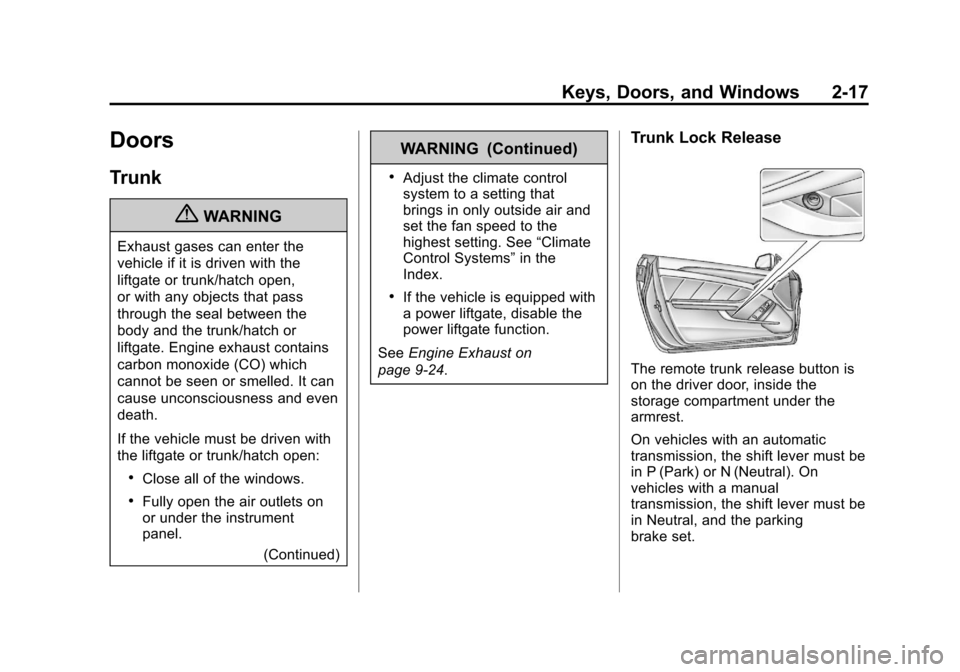
The remote trunk release button is
on the driver door, inside the
storage compartment under the
armrest.
On vehicles with an automatic
transmission, the shift lever must be
in P (Park) or N (Neutral). On
vehicles with a manual
transmission, the shift lever must be
in Neutral, and the parking
brake set.
Page 48 of 478
Black plate (18,1)Cadillac CTS/CTS-V Owner Manual - 2013 - crc2 - 8/22/12
2-18 Keys, Doors, and Windows
The trunk may be opened by
pressing the remote trunk release
button on the driver door,
Von
the Remote Keyless Entry (RKE)
transmitter, or the trunk release
button on the rear of the trunk
above the license plate.
On vehicles with the Keyless
Access System, if the vehicle is
locked, the keyless access
transmitter must be within 1 m (3 ft)
of the trunk for it to be recognized;
the trunk can then be opened by the
trunk release button above the
license plate.
Use the key in the trunk lock
cylinder.
Close the trunk by pulling on the
handle. Do not use the handle as a
tie-down.
Rear-Seat Pass Through
If the vehicle has the rear-seat pass
through door, this is useful when
transporting long items. To open the door, pull down the rear
seat armrest. Then pull the lever all
the way down to release the door.
To close the door, push it up and
back into place. Then try to open
the door without pulling up on the
lever to make sure it is locked into
place.
Emergency Trunk Release
Handle
Notice:
Do not use the
emergency trunk release handle
as a tie-down or anchor point
when securing items in the trunk
as it could damage the handle.
The emergency trunk release
handle is only intended to aid a
person trapped in a latched trunk,
enabling them to open the trunk
from the inside.
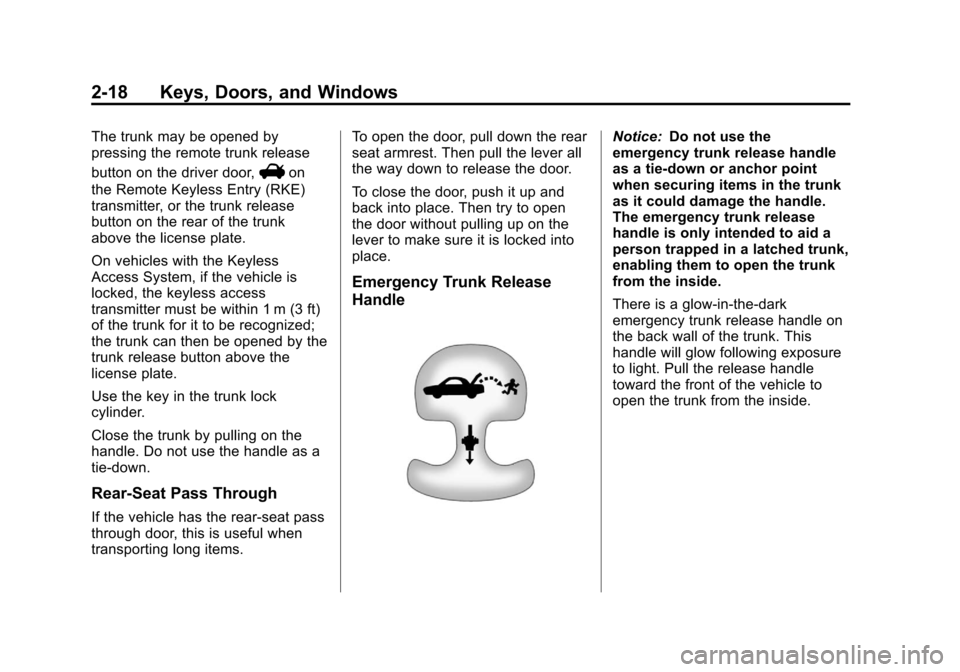
There is a glow-in-the-dark
emergency trunk release handle on
the back wall of the trunk. This
handle will glow following exposure
to light. Pull the release handle
toward the front of the vehicle to
open the trunk from the inside.
Page 49 of 478
Black plate (19,1)Cadillac CTS/CTS-V Owner Manual - 2013 - crc2 - 8/22/12
Keys, Doors, and Windows 2-19
Liftgate
Power Liftgate Operation
{WARNING
Exhaust gases can enter the
vehicle if it is driven with the
liftgate or trunk/hatch open,
or with any objects that pass
through the seal between the
body and the trunk/hatch or
liftgate. Engine exhaust contains
carbon monoxide (CO) which
cannot be seen or smelled. It can
cause unconsciousness and even
death.
If the vehicle must be driven with
the liftgate or trunk/hatch open:
.Close all of the windows.
.Fully open the air outlets on
or under the instrument
panel.(Continued)
WARNING (Continued)
.Adjust the climate control
system to a setting that
brings in only outside air and
set the fan speed to the
highest setting. See “Climate
Control Systems” in the
Index.
.If the vehicle is equipped with
a power liftgate, disable the
power liftgate function.
See Engine Exhaust on
page 9‑24.
{WARNING
You, or others, could be injured if
caught in the path of the power
liftgate. Make sure there is no one
in the way of the liftgate as it is
opening and closing. Notice:
To avoid damage to the
liftgate or liftgate glass, make
sure the area above and behind
the liftgate is clear before
opening it.
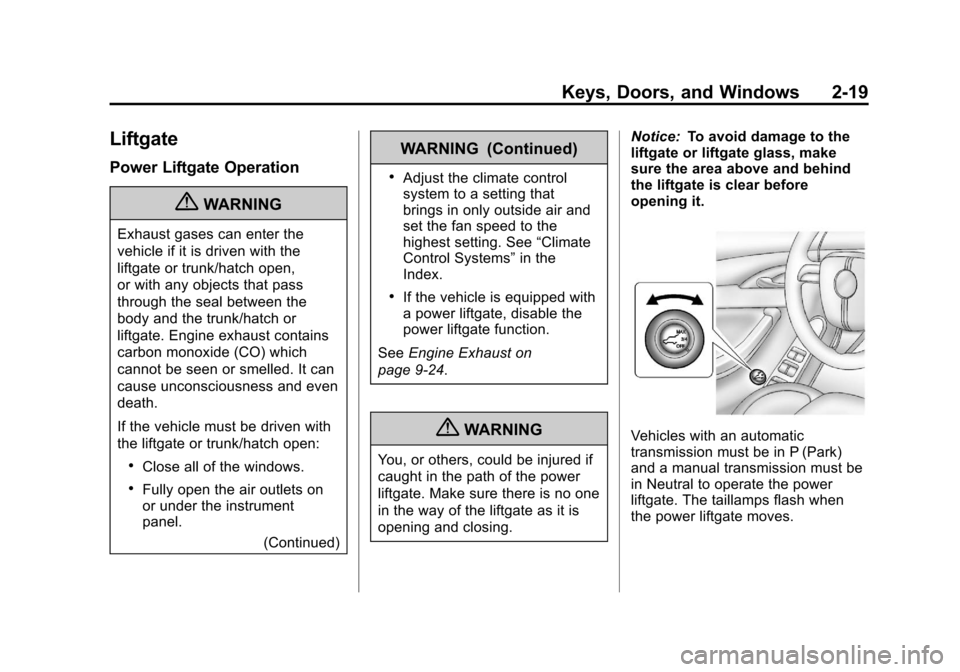
Vehicles with an automatic
transmission must be in P (Park)
and a manual transmission must be
in Neutral to operate the power
liftgate. The taillamps flash when
the power liftgate moves.
Page 53 of 478
Black plate (23,1)Cadillac CTS/CTS-V Owner Manual - 2013 - crc2 - 8/22/12
Keys, Doors, and Windows 2-23
2. Lock the vehicle using the frontpower door lock switches on the
doors when the door is open.
The alarm will arm after
30 seconds. Pressing
Qon the
RKE transmitter a second time
will bypass the 30-second delay
and immediately arm the
system.
If a locked door or trunk is opened
without using the key in the driver
door key cylinder or the RKE
transmitter, a 10-second pre-alarm
will occur. The horn will chirp and
the lights will flash. If the key is not
placed in the ignition and turned to
START or the door is not unlocked
by pressing
Kon the RKE
transmitter during the 10-second
pre-alarm, the alarm will go off. The
headlamps will flash and the horn
will sound for about 30 seconds,
then will turn off to save the battery
power.
The theft-deterrent system will not
activate if the doors are locked with
the key or the manual door lock. It activates only if the power door
lock switch is used while the door is
open, or with the RKE transmitter.
To avoid setting off the alarm by
accident:
.Lock the vehicle with the door
key after the doors are closed.
.Always unlock a door with the
RKE transmitter or by using the
key in the driver door cylinder.
Unlocking a door any other way
will set off the alarm.
Turn off the alarm by pressing
Kon
the RKE transmitter.
Disarming the System
To disarm the system, either unlock
the doors using the transmitter,
or start the vehicle with a
recognized transmitter in the
vehicle.
To avoid setting off the alarm by
accident, lock the vehicle with the
door key after the doors are closed,
and always unlock a door with the
transmitter or by using the key in the driver door cylinder. Unlocking a
door any other way will set off the
alarm.
If you set off the alarm by accident,
turn off the alarm by pressing the
unlock button on the transmitter.
How to Detect a Tamper
Condition
IfKis pressed and the horn
sounds, an attempted break-in
occurred while the system was
armed.
If the alarm has been activated, the
THEFT ATTEMPTED message will
appear on the DIC. See Security
Messages on page 5‑42.
Immobilizer
See Radio Frequency Statement on
page 13‑20 for information
regarding Part 15 of the Federal
Communications Commission (FCC)
rules and Industry Canada
Standards RSS-GEN/210/220/310.
Page 73 of 478
Black plate (11,1)Cadillac CTS/CTS-V Owner Manual - 2013 - crc2 - 8/22/12
Seats and Restraints 3-11
Rear Seats
Notice:Folding a rear seat with
the safety belts still fastened may
cause damage to the seat or the
safety belts. Always unbuckle the
safety belts and return them to
their normal stowed position
before folding a rear seat.
The vehicle may have a split folding
rear seat.
Sedan or Coupe
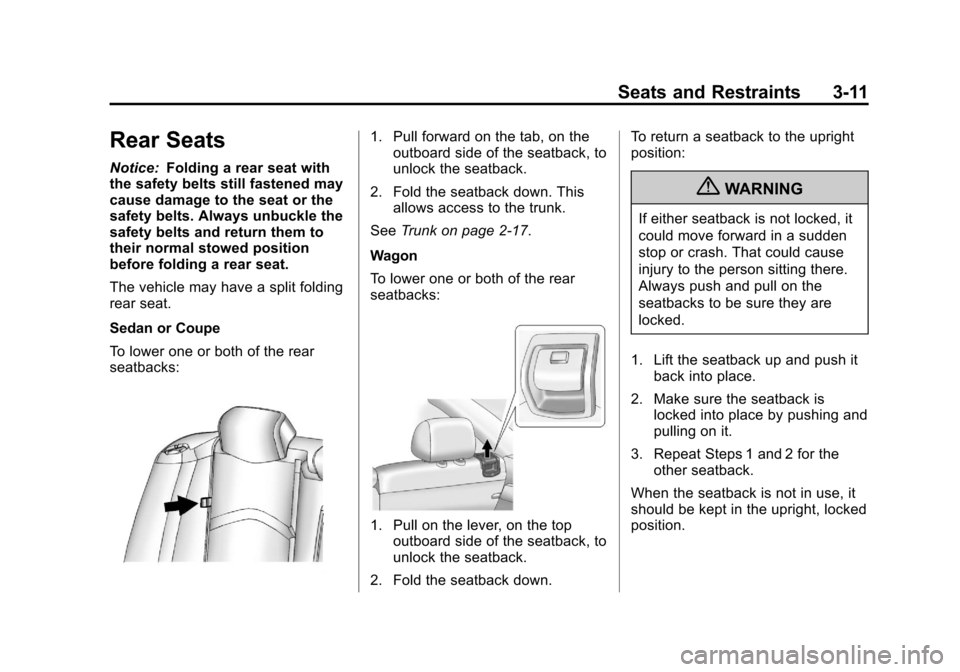
To lower one or both of the rear
seatbacks:
1. Pull forward on the tab, on the outboard side of the seatback, to
unlock the seatback.
2. Fold the seatback down. This allows access to the trunk.
See Trunk on page 2‑17.
Wagon
To lower one or both of the rear
seatbacks:
1. Pull on the lever, on the top outboard side of the seatback, to
unlock the seatback.
2. Fold the seatback down. To return a seatback to the upright
position:
{WARNING
If either seatback is not locked, it
could move forward in a sudden
stop or crash. That could cause
injury to the person sitting there.
Always push and pull on the
seatbacks to be sure they are
locked.
1. Lift the seatback up and push it back into place.
2. Make sure the seatback is locked into place by pushing and
pulling on it.
3. Repeat Steps 1 and 2 for the other seatback.
When the seatback is not in use, it
should be kept in the upright, locked
position.
Page 156 of 478

Black plate (34,1)Cadillac CTS/CTS-V Owner Manual - 2013 - crc2 - 8/22/12
5-34 Instruments and Controls
CALIBRATION COMPLETE
This message displays when the
compass calibration is complete.
SeeCompass on page 5‑7 for more
information.
Cruise Control Messages
CRUISE SET TO XXX MPH
(KM/H)
This message displays whenever
the cruise control is set. See Cruise
Control on page 9‑39 for more
information.
Door Ajar Messages
DRIVER DOOR OPEN
This message displays when the
driver door is not closed completely.
Close the door completely.
HOOD OPEN
This message displays when the
hood is not closed completely. Make
sure that the hood is closed
completely.
LEFT REAR DOOR OPEN
This message displays when the
driver side rear door is not closed
completely. Make sure that the door
is closed completely.
PASSENGER DOOR OPEN
This message displays when the
passenger side front door is not
closed completely. Make sure that
the door is closed completely.
REAR ACCESS OPEN (Wagon)
This message displays when the
liftgate is not closed completely.
Make sure that the liftgate is closed
completely.
RIGHT REAR DOOR OPEN
This message displays when the
passenger side rear door is not
closed completely. Make sure that
the door is closed completely.
TRUNK OPEN (Sedan and
Coupe)
This message displays when the
trunk is not closed completely. Make
sure that the trunk is closed
completely.
Engine Cooling System
Messages
ENGINE HOT A/C (AIR
CONDITIONING) OFF
This message displays when the
engine coolant becomes hotter than
the normal operating temperature.
See Engine Coolant Temperature
Gauge on page 5‑16. To avoid
added strain on a hot engine, the air
conditioning compressor
automatically turns off. When the
coolant temperature returns to
normal, the air conditioning
compressor turns back on. You can
continue to drive the vehicle.
Page 166 of 478
Black plate (44,1)Cadillac CTS/CTS-V Owner Manual - 2013 - crc2 - 8/22/12
5-44 Instruments and Controls
If a tire pressure message appears
on the DIC, stop as soon as you
can. Inflate the tires by adding air
until the tire pressure is equal to the
values shown on the Tire and
Loading Information label. SeeTires
on page 10‑58, Vehicle Load Limits
on page 9‑10, and Tire Pressure on
page 10‑66.
If the vehicle does not have a spare
tire, the message will display USE
INFLATOR KIT IN TRUNK. Use the
inflator kit to inflate the tires to the
correct pressure. See Tire Sealant
and Compressor Kit on page 10‑82
for more information.
More than one tire pressure
message can be received at a time.
To read the other messages, press
the set/reset button.
The DIC display also shows the tire
pressure values. See Driver
Information Center (DIC) on
page 5‑27.Transmission Messages
DIFFERENTIAL HOT, REDUCE
SPEED (CTS-V ONLY)
This message displays and a chime
sounds if the differential fluid
temperature exceeds 150°C
(300°F). Driving aggressively or at
high speeds can cause the
differential fluid temperature to be
higher than normal. If this message
appears, you may continue to drive
at a slower speed. If you have been
operating the vehicle under normal
driving conditions, the vehicle may
need service. See your dealer for an
inspection.
To acknowledge the message, press
V. The message reappears and a
chime sounds every two minutes
until this condition changes. If you
do not clear the message, it will
remain on until the condition
changes.
SERVICE TRANSMISSION
This message displays when there
is a problem with the vehicle's
transmission. Have the vehicle
serviced by your dealer.
SHIFT TO PARK (AUTOMATIC
TRANSMISSION ONLY)
If the vehicle has the keyless
access system, this message
displays if the vehicle is not in
P (Park) while the engine is being
turned off. The vehicle will be in
ACC/ACCESSORY. Once the shift
lever is moved to P (Park), the
ignition needs to be turned off. If the
ignition is not turned off, the vehicle
will remain in ACC/ACCESSORY.
To avoid draining the battery, turn
the ignition off before leaving the
vehicle.
Page 283 of 478

Black plate (41,1)Cadillac CTS/CTS-V Owner Manual - 2013 - crc2 - 8/22/12
Driving and Operating 9-41
Ending Cruise Control
There are four ways to end cruise
control:
.Step lightly on the brake pedal
(manual and automatic
transmissions).
.Press the clutch pedal to the
floor (manual transmissions).
.Press[on the steering wheel.
.To turn off the cruise control,
press
Ion the steering wheel.
Erasing Speed Memory
The cruise control set speed is
erased from memory by pressing
Ior if the ignition is turned off.
Object Detection
Systems
Ultrasonic Parking Assist
If available, the Ultrasonic Rear
Parking Assist (URPA) system
assists the driver with parking and
avoiding objects while in
R (Reverse). URPA operates at
speeds less than 8 km/h (5 mph).
The sensors on the rear bumper
detect objects up to 2.5 m (8 ft)
behind the vehicle, and at least
25 cm (10 in) off the ground.
{WARNING
The URPA system does not
detect children, pedestrians,
bicyclists, animals, or objects
below the bumper or that are too
close or too far from the vehicle.
It is not available at speeds
greater than 8 km/h (5 mph). To
prevent injury, death, or vehicle (Continued)
WARNING (Continued)
damage, even with URPA, always
check the area around the vehicle
and check all mirrors before
backing.
How the System Works
URPA comes on automatically when
the shift lever is moved into
R (Reverse). A single tone sounds
to indicate the system is working.
URPA operates only at speeds less
than 8 km/h (5 mph).
An obstacle is indicated by audible
beeps. The interval between the
beeps becomes shorter as the
vehicle gets closer to the obstacle.
When the distance is less than
30 cm (12 in), the beeping is a
continuous tone for five seconds.
To be detected, objects must be at
least 25 cm (10 in) off the ground
and below trunk or liftgate level.
Objects must also be within 2.5 m
Page 284 of 478

Black plate (42,1)Cadillac CTS/CTS-V Owner Manual - 2013 - crc2 - 8/22/12
9-42 Driving and Operating
(8 ft) of the rear bumper. This
distance may be less during warmer
or humid weather.
Turning the System On and Off
The system can be disabled through
the Driver Information Center (DIC).
See“Parking Assist” underDriver
Information Center (DIC) on
page 5‑27 for more information.
URPA defaults to the on setting
each time the vehicle is started.
When the System Does Not
Seem to Work Properly
The following messages may be
displayed on the DIC:
PARKING ASSIST OFF: This
message occurs if the driver
disables the system or if vehicle is
driven above 8 km/h (5 mph) in
R (Reverse).
SERVICE PARKING ASSIST: If
this message occurs, take the
vehicle to your dealer to repair the
system. PARK ASSIST BLOCKED SEE
OWNER'S MANUAL:
If the URPA
system does not activate due to a
temporary condition, this message
displays on the DIC. This can occur
under the following conditions:
.The ultrasonic sensors are not
clean. Keep the vehicle's rear
bumper free of mud, dirt, snow,
ice and slush. For cleaning
instructions, see Exterior Care
on page 10‑105.
.The park assist sensors are
covered by frost or ice. Frost or
ice can form around and behind
the sensors and may not always
be seen; this can occur after
washing the vehicle in cold
weather. The message may not
clear until the frost or ice has
melted.
.A trailer was attached to the
vehicle, or an object was
hanging out of the trunk or
liftgate during the last drive cycle. Once the object is
removed, URPA will return to
normal operation.
.A tow bar is attached to the
vehicle.
.The bumper is damaged. Take
the vehicle to your dealer to
repair the system.
.Other conditions, such as
vibrations from a jackhammer or
the compression of air brakes on
a very large truck, are affecting
system performance.
Side Blind Zone
Alert (SBZA)
The vehicle may have a Side Blind
Zone Alert (SBZA) system. Read
this entire section before using the
system.
Page 293 of 478
Black plate (51,1)Cadillac CTS/CTS-V Owner Manual - 2013 - crc2 - 8/22/12
Driving and Operating 9-51
Notice:If a new fuel cap is
needed, be sure to get the right
type of cap from your dealer. The
wrong type of fuel cap might not
fit properly, might cause the
malfunction indicator lamp to
light, and could damage the fuel
tank and emissions system. See
Malfunction Indicator Lamp on
page 5‑19.
Filling a Portable Fuel
Container
{WARNING
Filling a portable fuel container
while it is in the vehicle can cause
fuel vapors that can ignite either
by static electricity or other
means. You or others could be
badly burned and the vehicle
could be damaged. Always:
.Use approved fuel
containers.
(Continued)
WARNING (Continued)
.Remove container from
vehicle, trunk, or pickup bed
before filling.
.Place container on the
ground.
.Place the nozzle inside the fill
opening of the container
before dispensing fuel, and
keep it in contact with the fill
opening until filling is
complete.
.Do not smoke while
pumping fuel.
Towing
General Towing
Information
Only use towing equipment that has
been designed for the vehicle.
Contact your dealer or trailering
dealer for assistance with preparing
the vehicle for towing a trailer. Read
the entire section before towing a
trailer.
For towing a disabled vehicle, see
Towing the Vehicle on page 10‑103.
For towing the vehicle behind
another vehicle such as a motor
home, seeRecreational Vehicle
Towing on page 10‑103.
Driving Characteristics
and Towing Tips
Driving with a Trailer
When towing a trailer:
.Become familiar with the state
and local laws that apply
specifically to trailer towing.