warning CADILLAC CTS 2018 User Guide
[x] Cancel search | Manufacturer: CADILLAC, Model Year: 2018, Model line: CTS, Model: CADILLAC CTS 2018Pages: 394, PDF Size: 6.48 MB
Page 44 of 394

Cadillac CTS/CTS-V Owner Manual (GMNA-Localizing-U.S./Canada/Mexico-
11349156) - 2018 - CRC - 9/29/17
KEYS, DOORS, AND WINDOWS 43
Warning (Continued)
set the fan speed to the
highest setting. See“Climate
Control Systems” in the Index.
. If the vehicle is equipped with
a power liftgate, disable the
power liftgate function.
See Engine Exhaust 0199.
Trunk Release
To open the trunk, the vehicle must
be off or the shift lever must be in
P (Park). .
Press
|on the driver door.
. Press
Xtwice quickly on the
Remote Keyless Entry (RKE)
transmitter.
. Press the touch pad on the rear of
the trunk above the license plate
when all doors are unlocked. The trunk can be opened while the
vehicle is locked by pressing the touch
pad above the license plate while the
RKE transmitter is within 1 m (3 ft) of
the rear of the vehicle. See
Remote
Keyless Entry (RKE) System Operation
0 30.
Close the trunk by pulling on the
pull cup.
Rear Seat Pass-Through
Use the rear seat pass-through door
when transporting long items.
To open, pull down the rear seat
armrest. Pull the lever all the way
down to release the door.
To close, push it up and back into
place. Try to open the door without
pulling up on the lever to make sure it
is locked into place.
Page 48 of 394

Cadillac CTS/CTS-V Owner Manual (GMNA-Localizing-U.S./Canada/Mexico-
11349156) - 2018 - CRC - 9/29/17
KEYS, DOORS, AND WINDOWS 47
Exterior Mirrors
Convex Mirrors
{Warning
A convex mirror can make things,
like other vehicles, look farther
away than they really are. If you cut
too sharply into the right lane, you
could hit a vehicle on the right.
Check the inside mirror or glance
over your shoulder before changing
lanes.
The passenger side mirror is convex
shaped. A convex mirror's surface is
curved so more can be seen from the
driver seat.
Manual Mirrors
If equipped, push the tab forward for
daytime use and pull it rearward for
nighttime use to avoid glare of the
headlamps from behind.
Power Mirrors
Controls for the outside power mirrors
are on the driver door.
To adjust each mirror: 1. Press L or R to select the driver or passenger side mirror.
2. Press the arrows on the control pad to move the mirror up,
down, right, or left.
3. Adjust each mirror so that a little of the vehicle and the area
behind it can be seen.
4. Return the selector switch to the center position.
Memory Mirrors
The vehicle may have memory
mirrors. See Memory Seats 062.
Side Blind Zone Alert (SBZA)
The vehicle may have SBZA. See Side
Blind Zone Alert (SBZA) 0236.
Lane Change Alert (LCA)
The vehicle may have LCA. Lane
Change Alert (LCA) 0236.
Folding Mirrors
Manual Folding Mirrors
The mirrors can be folded inward
toward the vehicle to prevent damage
when going through an automatic car
wash. Push the mirror outward to
return it to the original position.
Heated Mirrors
If equipped with heated mirrors:
K:The rear window defogger also
heats the outside mirrors.
See Dual Automatic Climate Control
System 0167.
Page 50 of 394

Cadillac CTS/CTS-V Owner Manual (GMNA-Localizing-U.S./Canada/Mexico-
11349156) - 2018 - CRC - 9/29/17
KEYS, DOORS, AND WINDOWS 49
To adjust the brightness, press the
button (1) on the back of the rearview
mirror without covering the light
sensor (2).
Each button press cycles the
brightness between five settings.
{Warning
The Rear Camera Mirror (RCM) has
a limited view. Portions of the road,
vehicles, and other objects may not
be seen. Do not drive or park the
vehicle using only this camera.
Objects may appear closer than
they are. Check the outside mirrors
or glance over your shoulder when
making lane changes or merging.
Failure to use proper care may
result in injury, death, or vehicle
damage.
The camera that provides the Rear
Camera Mirror (RCM) image is above
the license plate, next to the Rear
Vision Camera (RVC).
To clean the rear camera, see“Rear
Camera Mirror Washer” inWindshield
Wiper/Washer 0111.
Page 51 of 394
Cadillac CTS/CTS-V Owner Manual (GMNA-Localizing-U.S./Canada/Mexico-
11349156) - 2018 - CRC - 9/29/17
50 KEYS, DOORS, AND WINDOWS
Troubleshooting
If the tab is in the rearward position
and a blue screen and
dare displayed
in the mirror and the display shuts
off, see your dealer for service.
The RCM may not work properly or
display a clear image if:
. There is glare from the sun or
headlamps. This may obstruct
objects from view.
. Dirt, snow, or other debris blocks
the camera lens. Clean the lens
with a soft damp cloth.
. The back of the vehicle has been
damaged and the position and
mounting angle of the camera has
changed.
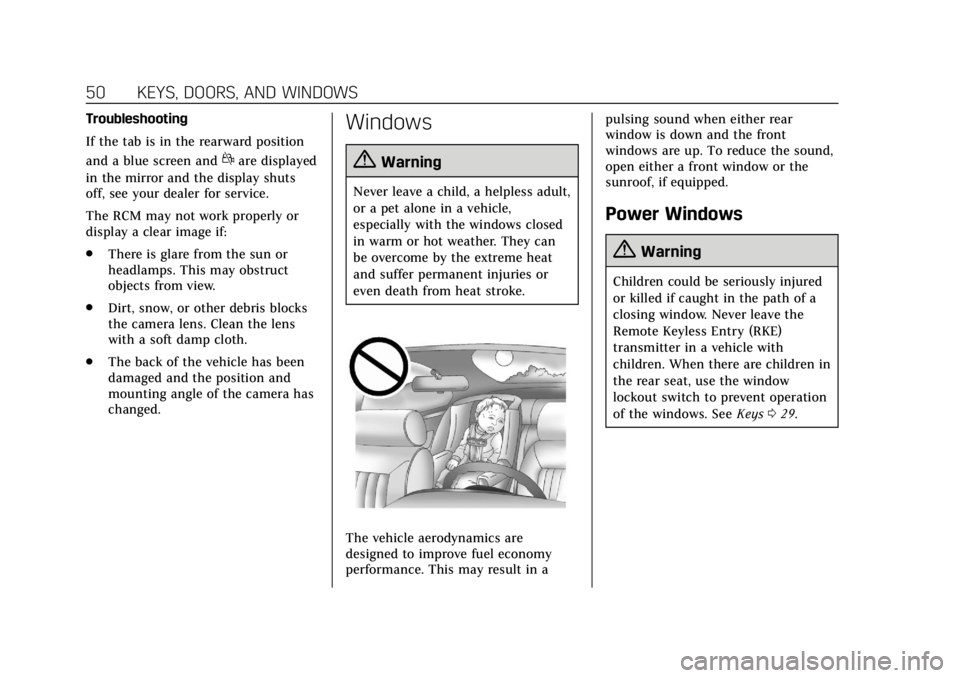
Windows
{Warning
Never leave a child, a helpless adult,
or a pet alone in a vehicle,
especially with the windows closed
in warm or hot weather. They can
be overcome by the extreme heat
and suffer permanent injuries or
even death from heat stroke.
The vehicle aerodynamics are
designed to improve fuel economy
performance. This may result in a pulsing sound when either rear
window is down and the front
windows are up. To reduce the sound,
open either a front window or the
sunroof, if equipped.
Power Windows
{Warning
Children could be seriously injured
or killed if caught in the path of a
closing window. Never leave the
Remote Keyless Entry (RKE)
transmitter in a vehicle with
children. When there are children in
the rear seat, use the window
lockout switch to prevent operation
of the windows. See
Keys029.
Page 52 of 394
Cadillac CTS/CTS-V Owner Manual (GMNA-Localizing-U.S./Canada/Mexico-
11349156) - 2018 - CRC - 9/29/17
KEYS, DOORS, AND WINDOWS 51
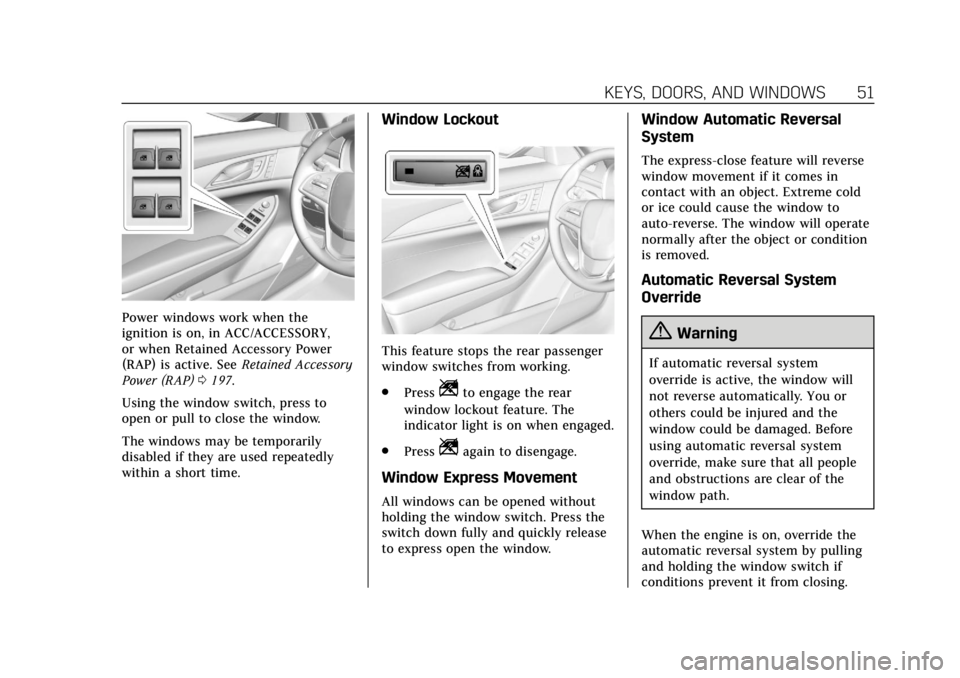
Power windows work when the
ignition is on, in ACC/ACCESSORY,
or when Retained Accessory Power
(RAP) is active. SeeRetained Accessory
Power (RAP) 0197.
Using the window switch, press to
open or pull to close the window.
The windows may be temporarily
disabled if they are used repeatedly
within a short time.
Window Lockout
This feature stops the rear passenger
window switches from working.
. Press
Zto engage the rear
window lockout feature. The
indicator light is on when engaged.
. Press
Zagain to disengage.
Window Express Movement
All windows can be opened without
holding the window switch. Press the
switch down fully and quickly release
to express open the window.
Window Automatic Reversal
System
The express-close feature will reverse
window movement if it comes in
contact with an object. Extreme cold
or ice could cause the window to
auto-reverse. The window will operate
normally after the object or condition
is removed.
Automatic Reversal System
Override
{Warning
If automatic reversal system
override is active, the window will
not reverse automatically. You or
others could be injured and the
window could be damaged. Before
using automatic reversal system
override, make sure that all people
and obstructions are clear of the
window path.
When the engine is on, override the
automatic reversal system by pulling
and holding the window switch if
conditions prevent it from closing.
Page 57 of 394

Cadillac CTS/CTS-V Owner Manual (GMNA-Localizing-U.S./Canada/Mexico-
11349156) - 2018 - CRC - 9/29/17
56 SEATS AND RESTRAINTS
Head Restraints
If equipped with base seats, the
vehicle’s front seats have adjustable
head restraints in the outboard
seating positions.
If equipped with high performance
seats, the vehicle’s front seats have
head restraints in the outboard
seating positions that cannot be
adjusted.
{Warning
With head restraints that are not
installed and adjusted properly,
there is a greater chance that
occupants will suffer a neck/spinal
injury in a crash. Do not drive until
the head restraints for all occupants
are installed and adjusted properly.
If equipped with base seats, adjust the
head restraint so that the top of the
restraint is at the same height as the
top of the occupant's head. This
position reduces the chance of a neck
injury in a crash.
Front Seats
If equipped, the vehicle's front seats
have adjustable head restraints in the
outboard seating positions.
The height of the head restraint can
be adjusted.
To raise or lower the head restraint,
press the button located on the side of
the head restraint, and pull up or
push the head restraint down and
release the button. Pull and push on
the head restraint after the button is
released to make sure that it is locked
in place.
Page 59 of 394

Cadillac CTS/CTS-V Owner Manual (GMNA-Localizing-U.S./Canada/Mexico-
11349156) - 2018 - CRC - 9/29/17
58 SEATS AND RESTRAINTS
To adjust the seatback, seeReclining
Seatbacks 061.
To adjust the lumbar support, see
Lumbar Adjustment 060.
Some vehicles are equipped with a
Safety Alert Seat. This feature
activates a vibrating pulse alert in the
driver seat to help the driver avoid
crashes.
High Performance Seat
Adjustment
{Warning
You can lose control of the vehicle
if you try to adjust a driver seat
while the vehicle is moving. Adjust
the driver seat only when the
vehicle is not moving.
High Performance Seat
1. Feature Select
2. Up
3. Rearward
4. Down
5. Forward
. Move Feature Select (1) to display
seat adjustments on the center
stack. Press and release or hold to
scroll through features. .
Press Up (2) to make upward
adjustments of the selected
feature.
. Press Rearward (3) to make
rearward adjustments of the
selected feature.
. Press Down (4) to make downward
adjustments of the selected
feature.
. Press Forward (5) to make forward
adjustments of the selected
feature.
Four-Way Lumbar Support
To adjust lumbar support for a base
seat, see Lumbar Adjustment 060.
To adjust lumbar support for high
performance seats, if equipped:
Page 62 of 394
Cadillac CTS/CTS-V Owner Manual (GMNA-Localizing-U.S./Canada/Mexico-
11349156) - 2018 - CRC - 9/29/17
SEATS AND RESTRAINTS 61
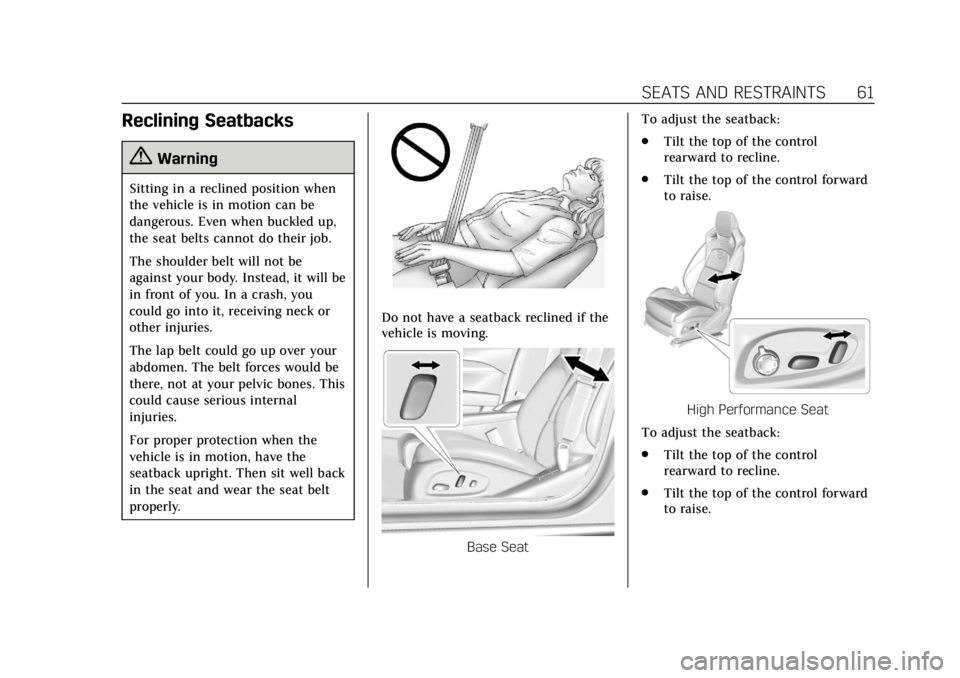
Reclining Seatbacks
{Warning
Sitting in a reclined position when
the vehicle is in motion can be
dangerous. Even when buckled up,
the seat belts cannot do their job.
The shoulder belt will not be
against your body. Instead, it will be
in front of you. In a crash, you
could go into it, receiving neck or
other injuries.
The lap belt could go up over your
abdomen. The belt forces would be
there, not at your pelvic bones. This
could cause serious internal
injuries.
For proper protection when the
vehicle is in motion, have the
seatback upright. Then sit well back
in the seat and wear the seat belt
properly.
Do not have a seatback reclined if the
vehicle is moving.
Base SeatTo adjust the seatback:
.
Tilt the top of the control
rearward to recline.
. Tilt the top of the control forward
to raise.
High Performance Seat
To adjust the seatback:
. Tilt the top of the control
rearward to recline.
. Tilt the top of the control forward
to raise.
Page 65 of 394

Cadillac CTS/CTS-V Owner Manual (GMNA-Localizing-U.S./Canada/Mexico-
11349156) - 2018 - CRC - 9/29/17
64 SEATS AND RESTRAINTS
To stop Auto Memory Recall
movement, turn the ignition off or
press any of the following memory
controls:
.Power seat
. Memory SET, 1, 2, or
B
.Power mirror, with the driver or
passenger side mirror selected
. Power steering wheel
If the stored memory seat position
does not automatically recall or recalls
to the wrong positions, the driver’s
RKE transmitter number (1 or 2) may
not match the memory button
number that positions were saved to.
Try storing the position to the other
memory button or try the other RKE
transmitter.
Easy Exit Recall
Easy Exit Recall is not linked to an
RKE transmitter. The position stored
to
Bis used for all drivers. To turn
Easy Exit Recall on or off, see "Vehicle
Personalization Settings" previously in
this section and Vehicle Personalization
0 144. If turned on, the position saved to
B
is automatically recalled when one of
the following occurs:
.
The vehicle is turned off and the
driver door is opened within a
short time.
. The vehicle is turned off with the
driver door open.
To stop Easy Exit Recall movement,
press any of the following memory
controls:
. Power seat
. Memory SET, 1, 2, or
B
.Power mirror, with the driver or
passenger side mirror selected
. Power steering wheel
Obstructions
If something has blocked the driver
seat and/or power steering wheel
while recalling a memory position, the
recall may stop. Remove the
obstruction and try the recall again.
If the memory position still does not
recall, see your dealer for service.
Heated and Ventilated
Front Seats
{Warning
If temperature change or pain to
the skin cannot be felt, the seat
heater may cause burns. To reduce
the risk of burns, use care when
using the seat heater, especially for
long periods of time. Do not place
anything on the seat that insulates
against heat, such as a blanket,
cushion, cover, or similar item. This
may cause the seat heater to
overheat. An overheated seat heater
may cause a burn or may damage
the seat.
Page 69 of 394
Cadillac CTS/CTS-V Owner Manual (GMNA-Localizing-U.S./Canada/Mexico-
11349156) - 2018 - CRC - 9/29/17
68 SEATS AND RESTRAINTS
Raising the Seatback
{Warning
If either seatback is not locked, it
could move forward in a sudden
stop or crash. That could cause
injury to the person sitting there.
Always push and pull on the
seatbacks to be sure they are
locked.
{Warning
A seat belt that is improperly
routed, not properly attached,
or twisted will not provide the
protection needed in a crash. The
person wearing the belt could be
seriously injured. After raising the
rear seatback, always check to be
sure that the seat belts are properly
routed and attached, and are not
twisted.To raise a seatback:
1. Lift the seatback up. Make sure the center seat belt and latch do
not get trapped behind the seat.
Push the seatback rearward to
secure it in place.
A red tab near the seatback lever
retracts when the seatback is in
place.
2. Push and pull the top of the seatback to be sure it is in
position.
3. Lock the seatback using the vehicle key in the cylinder.
4. Reconnect the center seat belt mini-latch to the mini-buckle. Do
not let the belt twist.
5. Pull on the center seat belt to make sure the mini-latch is
secure.
6. Repeat the steps to raise the other seatback, if necessary.
When the seat is not in use, it should
be kept in the upright, locked position.
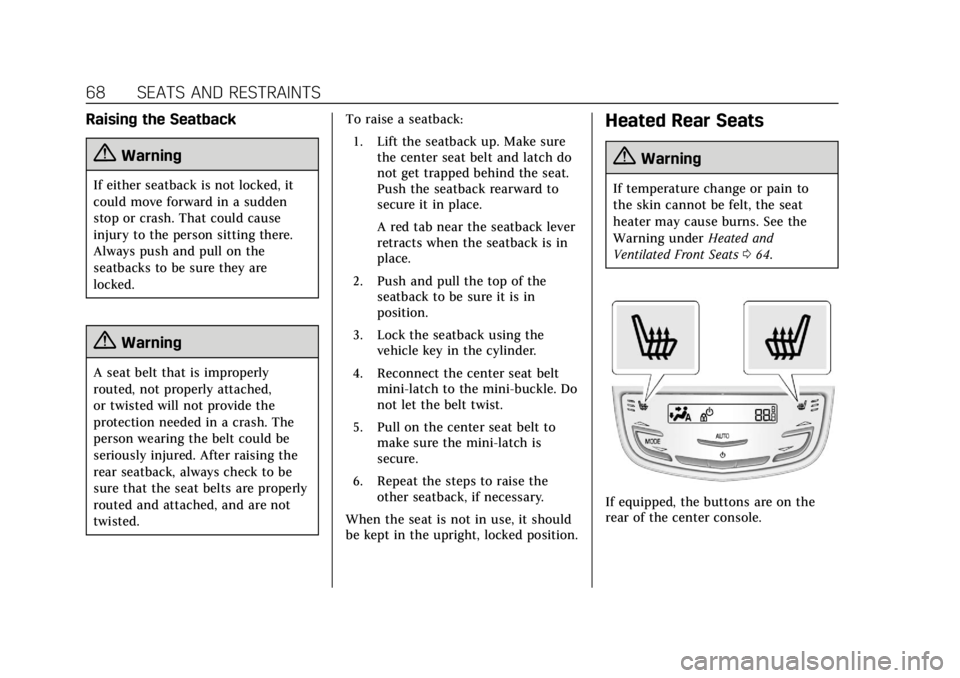
Heated Rear Seats
{Warning
If temperature change or pain to
the skin cannot be felt, the seat
heater may cause burns. See the
Warning under Heated and
Ventilated Front Seats 064.
If equipped, the buttons are on the
rear of the center console.