lock CADILLAC CTS V 2005 1.G Service Manual
[x] Cancel search | Manufacturer: CADILLAC, Model Year: 2005, Model line: CTS V, Model: CADILLAC CTS V 2005 1.GPages: 432, PDF Size: 2.52 MB
Page 124 of 432

I(Vent):Turn the control counterclockwise to this
position to use the vent feature. The glass panel
will tilt upward from the vehicle. The sunshade must be
opened manually.
?(Close):Turn the control to this position to close
the sunroof. The sunshade must be closed manually.
Anti-Pinch Feature
If an object is in the path of the sunroof when it is
closing, the anti-pinch feature will detect the object and
stop the sunroof from closing at the point of the
obstruction. The sunroof will then return to the full-open
or vent position. To close the sunroof once it has
re-opened, turn the control to the closed position.
Anti-Pinch Feature Override
A condition may exist that causes anti-pinch feature of
the sunroof to activate due to weather or an obstruction.
In an emergency, the anti-pinch feature can be
overridden in a supervised mode.
To override the anti-pinch feature rotate the sunroof
control to the closed position, then press the control
upward and continue pressing upward until sunroof
reaches the desired position.
In this mode, the window can still close on an object in
its path. Use care when using the override mode.
Vehicle Personalization
Memory Seat and Mirrors
If your vehicle has the memory feature, you can
program and recall memory settings for the driver’s
seating and outside rearview mirror driving positions for
up to two drivers.
The buttons for this feature
are located on the driver’s
door armrest.
2-52
Page 125 of 432

Use the following steps to program the buttons:
1. Adjust the driver’s seat including the seatback
recliner and both outside mirrors.
2. Press and hold button 1 for at least three seconds.
Two beeps will sound to conrm that the seat and
mirror positions have been saved.
3. Repeat the procedure for a second driver using
button 2.
If your vehicle has an automatic transmission, the
vehicle must be in PARK (P) to recall the stored driving
positions. If your vehicle has a manual transmission
and the engine is running, the parking brake must be set
to recall the memory seat driving positions. The stored
driving positions can be recalled without setting the
parking brake if the vehicle is off.
Press one of the numbered memory buttons to recall
the stored setting. Each time a memory button is
pressed, a single beep will sound.Three chimes will sound and the setting will not be
recalled if you press button 1 or 2 when the vehicle is
not in PARK (P) on an automatic transmission or
the parking brake is not set on a manual transmission.
If you would like the stored driving positions to be
recalled when unlocking your vehicle with the remote
keyless entry transmitter or when you place the
key in the ignition, seeDIC Vehicle Personalization on
page 3-74.
To stop recall movement of the memory feature at any
time, press one of the power seat or mirror controls.
Two personalized exit positions can also be
programmed. Use the following steps to program
exit positions:
1. Press memory seat button 1 or the button with the
unlock symbol on the remote keyless entry
transmitter with the number 1 on the back to recall
the driving position.
2. Adjust the driver’s seat to the desired exit position.
2-53
Page 126 of 432

3. Press and hold the exit button located above
buttons 1 and 2 on the driver’s door armrest
for at least three seconds.
Two beeps will sound to conrm that the exit
position has been saved.
4. Repeat the procedure for a second driver using
memory seat button 2 or the remote keyless
entry transmitter with the number 2 on the back.
To recall the stored exit positions, press and release the
exit button. One beep will sound, and the seat will
move to the previously stored exit position for the
currently identied driver. If an exit position has not
been stored for this driver, the seat will move all the way
back. The position of the outside mirrors is not stored
or recalled for the exit position.
If your vehicle has an automatic transmission, the
vehicle must be in PARK (P) to recall the exit positions.
For a manual transmission, the parking brake must
be set to recall the stored exit positions.Three chimes will sound and the exit setting will not be
recalled if you press the exit button when the vehicle
is not in PARK (P) on an automatic transmission or the
parking brake is not set on a manual transmission.
If you would like your stored exit position to be recalled
when unlocking the vehicle with the remote keyless
entry transmitter or when the ignition is turned off and
the driver’s door is opened, seeDIC Vehicle
Personalization on page 3-74.
2-54
Page 127 of 432
Instrument Panel Overview...............................3-4
Hazard Warning Flashers................................3-6
Other Warning Devices...................................3-6
Horn.............................................................3-6
Tilt Wheel.....................................................3-6
Recongurable Steering Wheel
Controls (SWC) (CTS).................................3-7
Turn Signal/Multifunction Lever.........................3-8
Turn and Lane-Change Signals........................3-9
Headlamp High/Low-Beam Changer..................3-9
Flash-to-Pass...............................................3-10
Windshield Wipers........................................3-10
Windshield Washer.......................................3-11
Headlamp Washer........................................3-12
Cruise Control (CTS).....................................3-12
Cruise Control (CTS-V)..................................3-16
Headlamps..................................................3-19
Wiper Activated Headlamps............................3-20
Headlamps on Reminder................................3-21
Daytime Running Lamps (DRL).......................3-21
Fog Lamps..................................................3-23
Exterior Lighting Battery Saver........................3-23
Instrument Panel Brightness...........................3-24
Entry Lighting...............................................3-24
Parade Dimming...........................................3-24
Reading Lamps............................................3-25Accessory Power Outlets...............................3-25
Ashtrays and Cigarette Lighter........................3-26
Climate Controls............................................3-27
Dual Climate Control System..........................3-27
Outlet Adjustment.........................................3-31
Passenger Compartment Air Filter...................3-32
Steering Wheel Climate Controls (CTS)............3-33
Warning Lights, Gages, and Indicators............3-34
Instrument Panel Cluster................................3-35
Speedometer and Odometer...........................3-37
Trip Odometers............................................3-37
Tachometer.................................................3-37
Engine Speed Limiter....................................3-38
Safety Belt Reminder Light.............................3-38
Airbag Readiness Light..................................3-38
Passenger Airbag Status Indicator...................3-39
Charging System Light..................................3-41
Brake System Warning Light..........................3-41
Anti-Lock Brake System Warning Light.............3-42
Traction Control System (TCS)
Warning Light...........................................3-43
Engine Coolant Temperature Warning
Light (CTS)..............................................3-43
Engine Coolant Temperature Gage..................3-44
Tire Pressure Light (CTS-V)...........................3-44
Section 3 Instrument Panel
3-1
Page 132 of 432

Hazard Warning Flashers
Your hazard warning ashers let you warn others. They
also let police know you have a problem. Your front
and rear turn signal lamps will ash on and off.
The hazard warning
asher button is located
near the center of the
instrument panel.
Your hazard warning ashers work no matter what
position your key is in, and even if the key is not in.
Press the button to make the front and rear turn signal
lamps ash on and off. Press the button again to
turn the ashers off.
When the hazard warning ashers are on, your turn
signals will not work.
Other Warning Devices
If you carry reective triangles, you can set them up at
the side of the road about 300 feet (100 m) behind
your vehicle.
Horn
Press near or on the horn symbols on your steering
wheel pad to sound the horn.
Tilt Wheel
A tilt wheel allows you to adjust the steering wheel
before you drive. You can raise it to the highest level to
give your legs more room when you exit and enter
the vehicle.
The lever that allows you to tilt the steering wheel is
located on the left side of the steering column.
To tilt the wheel, hold the steering wheel and pull the
lever. Then move the steering wheel to a comfortable
position and release the lever to lock the wheel in place.
3-6
Page 137 of 432

x(Delay Adjustment):Use this band to set the
length of the delay between wipes when using the delay
feature. The closer you move the band toward mist,
the longer the delay. The windshield wiper lever must be
in delay for this feature to work.
6(Low Speed):Put the lever in this position for
slow, steady wiping cycles.
1(High Speed):Put the lever in this position for
rapid wiping cycles.
If the windshield wipers are in use for about six seconds
while you are driving, the exterior lamps will come on
automatically if the exterior lamp control is in AUTO. See
Wiper Activated Headlamps on page 3-20for more
information.
Be sure to clear ice and snow from the wiper blades
before using them. If they’re frozen to the windshield,
gently loosen or thaw them. If the blades do become
damaged, install new blades or blade inserts. For more
information, seeWindshield Wiper Blade Replacement
on page 5-52.
Heavy snow or ice can overload the wiper motor. A
circuit breaker will stop the motor until it cools down.
Clear away snow or ice to prevent an overload.
Windshield Washer
{CAUTION:
In freezing weather, do not use your washer
until the windshield is warmed. Otherwise the
washer uid can form ice on the windshield,
blocking your vision.
The windshield washer button is located at the end of
the windshield wiper lever.
K(Washer Fluid):Press the button with this symbol
located at the end of the windshield washer lever to
wash the windshield. Washer uid will spray onto
the windshield and the wipers will run for a few cycles
to clear the windshield. For more wash cycles, press and
hold the button.
If your vehicle is low on washer uid, the Check Washer
Fluid message will appear on the Driver Information
Center (DIC) display. SeeDIC Warnings and Messages
on page 3-65.
If the headlamps are on when you wash the windshield,
the headlamp washers (if equipped) will turn on. Both
the windshield and the headlamps will be washed.
See “Headlamp Washer” following for more information.
3-11
Page 150 of 432
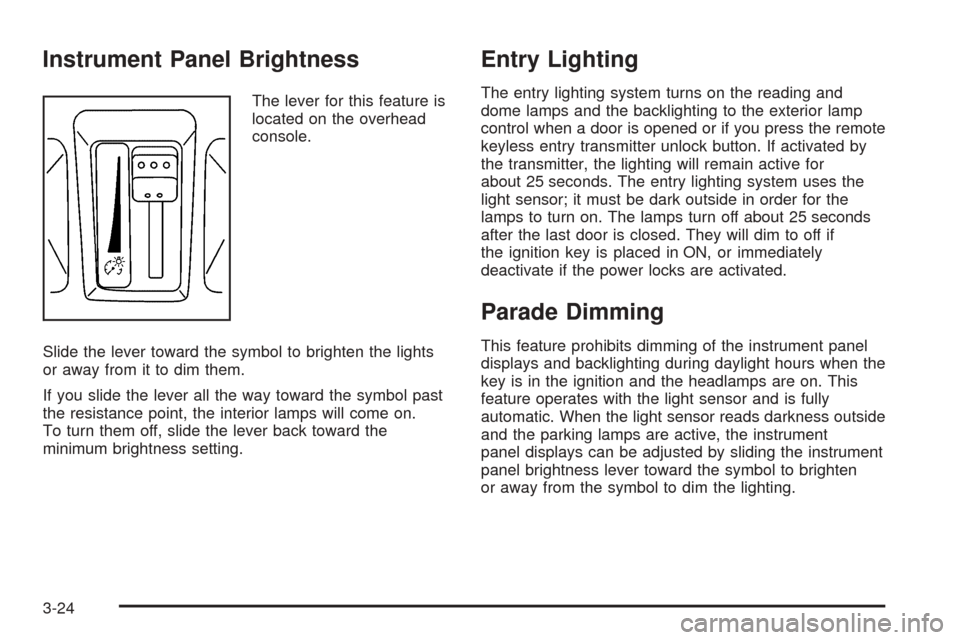
Instrument Panel Brightness
The lever for this feature is
located on the overhead
console.
Slide the lever toward the symbol to brighten the lights
or away from it to dim them.
If you slide the lever all the way toward the symbol past
the resistance point, the interior lamps will come on.
To turn them off, slide the lever back toward the
minimum brightness setting.
Entry Lighting
The entry lighting system turns on the reading and
dome lamps and the backlighting to the exterior lamp
control when a door is opened or if you press the remote
keyless entry transmitter unlock button. If activated by
the transmitter, the lighting will remain active for
about 25 seconds. The entry lighting system uses the
light sensor; it must be dark outside in order for the
lamps to turn on. The lamps turn off about 25 seconds
after the last door is closed. They will dim to off if
the ignition key is placed in ON, or immediately
deactivate if the power locks are activated.
Parade Dimming
This feature prohibits dimming of the instrument panel
displays and backlighting during daylight hours when the
key is in the ignition and the headlamps are on. This
feature operates with the light sensor and is fully
automatic. When the light sensor reads darkness outside
and the parking lamps are active, the instrument
panel displays can be adjusted by sliding the instrument
panel brightness lever toward the symbol to brighten
or away from the symbol to dim the lighting.
3-24
Page 158 of 432

k(Open):Turn the thumbwheel to this symbol to
open the outlets completely and allow the maximum
amount of air to enter your vehicle. A small amount of air
will still be directed to the side windows.
l(Closed):Turn the thumbwheel to this symbol to
close the outlets and minimize the amount of air entering
the vehicle.
Operation Tips
Clear away any ice, snow or leaves from the air
inlets at the base of the windshield that may
block the ow of air into your vehicle.
Use of non-GM approved hood deectors may
adversely affect the performance of the system.
Keep the path under the front seats clear of objects
to help circulate the air inside of your vehicle more
effectively.
If the airow seems low when the fan speed is at
the highest setting, the passenger compartment
air lter may need to be replaced. For more
information, seePassenger Compartment Air Filter
on page 3-32.
Passenger Compartment Air Filter
The passenger compartment air lter traps most of the
pollen from the air entering your vehicle. Like your
vehicle’s engine air cleaner/lter, it needs to be changed
periodically. For how often to change the passenger
compartment air lter, seeScheduled Maintenance on
page 6-4.
Using your climate control system without the passenger
air lter installed may allow water or other debris to
enter the system. This could cause a water leak
or noises. Make sure to install a new air lter after
removing the old one.
The passenger compartment air lter is located
underneath the hood below the windshield wiper arm on
the passenger’s side of the vehicle. SeeEngine
Compartment Overview on page 5-12for more
information on location.
3-32
Page 168 of 432

When the ignition is on, the brake system warning light
will also come on when you set your parking brake.
The light will stay on if your parking brake doesn’t
release fully. If it stays on after your parking brake is
fully released, it means you have a brake problem.
If the light comes on while you are driving, pull off the
road and stop carefully. You may notice that the pedal is
harder to push, or the pedal may go closer to the
oor. It may take longer to stop. If the light is still on,
have the vehicle towed for service. SeeTowing
Your Vehicle on page 4-38.
{CAUTION:
Your brake system may not be working
properly if the brake system warning light is
on. Driving with the brake system warning light
on can lead to an accident. If the light is still
on after you have pulled off the road and
stopped carefully, have the vehicle towed
for service.
Anti-Lock Brake System
Warning Light
With the anti-lock brake
system, the light will come
on when your engine is
started and may stay on for
several seconds. That is
normal.
If the ABS warning light comes on and stays on, there
may be a problem with the anti-lock portion of the brake
system. If the red BRAKE light is not on, you still
have brakes, but you do not have anti-lock brakes. See
Brake System Warning Light on page 3-41.
If the light stays on, turn the ignition to OFF. If the light
comes on when you are driving, stop as soon as
possible and turn the ignition off. Then start the engine
again to reset the system. If the light still stays on,
or comes on again while you are driving, your vehicle
needs service. If the regular brake system warning light
is not on, you still have brakes, but you do not have
anti-lock brakes. If the regular brake system warning
light is also on, you do not have anti-lock brakes
and there is a problem with your regular brakes. See
Brake System Warning Light on page 3-41.
3-42
Page 188 of 432
DIC Main Menu
Accessing the DIC Main Menu
To access the main menu of the DIC, do the following:
1. Press the TUNE/SEL knob once.
2. Turn the knob clockwise or counterclockwise to
scroll through the menu items.
The DIC main menu consists of the following
menu items:
eBASS - MID - TREBLE
eEQ
DSP (Bose®Radio)
AVC (Bose®Radio)
H/A
AUTOSTORE
CAT
TA
RDS MSG
AF
SEEK LOCAL/DISTANT
9(English/Metric Units)
TCS
8(Clock)
8/4(Clock/Information Display)
SETUP
DIC Main Menu Item Descriptions
e
BASS - MID (Midrange) - TREBLE:This menu
item allows you to adjust the levels for the bass,
midrange, treble, balance, and fade features of the
audio system. For more information, see “Setting the
Tone (Bass/Treble)” and “Adjusting the Speakers
(Balance/Fade)” underRadio with CD on page 3-89.
eEQ (Equalizer):This menu item allows you
to choose among ve preset equalizations for the audio
system. See “Audio Equalizer” underRadio with CD
on page 3-89for more information.
3-62