brake CADILLAC DEVILLE 1997 7.G User Guide
[x] Cancel search | Manufacturer: CADILLAC, Model Year: 1997, Model line: DEVILLE, Model: CADILLAC DEVILLE 1997 7.GPages: 386, PDF Size: 21.61 MB
Page 95 of 386

Downloaded from www.Manualslib.com manuals search engine Cifting Into PARK (P)
It can be dangerous to get out of your vehicle if
the shift lever
is not fully in PARK (P) with the
parking brake firmly set. Your vehicle can roll.
If you have left the engine running, the vehicle
can move suddenly.
You or others could be
injured.
To be sure your vehicle won’t move, even
when you’re on fairly level ground, use the steps
that follow.
If you’re pulling a trailer, see
“Towing a Trailer” in the Index.
Steering Column Shift Lever (DeVille and
DeVille d’Elegance Only)
1. Hold the brake pedal down with your right foot.
2. Move the shift lever into the PARK (P) position
like this:
0 Pull the lever toward you.
Page 96 of 386

Downloaded from www.Manualslib.com manuals search engine Move the lever up as far as it will go.
1. With your right foot still holding the brake pedal
down, set the parking brake.
2. Move the ignition key to LOCK.
3. Remove the key and take it with you. If you can
leave your vehicle with the ignition key in your
hand, your vehicle
is in PARK (P).
Console Shift Lever (DeVie Concours Only)
1. Hold the brake pedal down with your right foot.
2. Move the shift lever into the PARK (P) position like this:
. ..
A
3. Hold in the button on the lever and push the lever all
the way toward the front of your vehicle.
4. With your right foot still holding the brake pedal
down, set the parking brake.
5. Move the ignition key to LOCK.
6. Remove the key and take it with you. If you can
leave your vehicle with the ignition key in your
hand, your vehicle is in PARK (P).
2-31
~
Page 97 of 386

Downloaded from www.Manualslib.com manuals search engine Leaving Your Vehicle With the
Enpw Run-;ng
A CAUTIC’Y:
1
It can be dangerous to leave your vehicle with the
engine running. Your vehicle could move
suddenly if the shift lever
is not fully in PARK (P)
with the parking brake firmly set. And, if you
leave the vehicle with the engine running, it could
overheat and even catch fire. You or others could be injured. Don’t leave
your vehicle with the
engine running unless
you have to.
If you have to leave your vehicle with the engine
running, be sure your vehicle is in
PARK (P) and your
parking brake is firmly set before you leave it. After
you’ve moved the shift lever into the PARK (P)
position, hold the regular brake pedal down. Then, see
if
you can move the shift lever away from PARK (P)
without first pulling it toward you (or, if you have the
console shift lever, without first pressing the button).
If
you can, it means that the shift lever wasn’t fully locked
into PARK
(P) .
I
Torque Lock
If you are parking on a lin and you don’t shift your
transaxle into
PARK (P) properly, the weight of the
vehicle may put too much force on the parking pawl in
the transaxle. You may find
it difficult to pull the shift
lever out of PARK
(P). This is called “torque lock.” To
prevent torque lock, set the parking brake and then shift
into PARK (P) properly before you leave the driver’s
seat.
To find out how, see “Shifting Into PARK (P)” in
the Index.
If torque lock does occur,
you may need to have another
vehicle push yours a little uphill to take some of the
pressure from the parking pawl in the transaxle,
so you
can pull the shift lever out of PARK
(P).
Page 98 of 386

Downloaded from www.Manualslib.com manuals search engine Shifting Out of PARK (P) .ng Over Things That Burn
Your Cadillac has a Brake-Transaxle Shift Interlock .- . .,..I ..a’.. . ..*.
(BTSI). You have to fully apply your regular brakes
before you can shift from PARK (P) when the ignition is
in the RUN position. See “Automatic Transaxle” in
the Index.
.... ,.., ’. i
If you cannot shift out of PARK (P), ease pressure on
the shift lever
-- push the shift lever all the way into
PARK
(P) and also release the shift lever button on floor
shift models as you maintain brake application. Then
move the shift lever into the gear you want. (Press the
shift lever button before moving the shift lever.) If you
ever hold the brake pedal down but still can’t shift out of
PARK
(P), try this:
I. Turn the key to OFF. Open and close the driver’s
door
to turn off the RAP feature.
2. Apply and hold the brake until the end of Step 4.
3. Shift to NEUTRAL (N).
m
r
4. Start the vehicle and then shift to the drive gear
you want.
5. Have the vehicle fixed as soon as you can.
Things that can burn coula touch hot exhaust
parts under your vehicle and ignite. Don’t park
over papers, leaves, dry grass or other things that
can burn.
2-33
Page 100 of 386

Downloaded from www.Manualslib.com manuals search engine It can be dangerous to get out of your vehicle if
the shift lever is not fully in PARK (P) with the
parking brake firmly set. Your vehicle can roll.
Don’t leave your vehicle when the engine
is
running unless you have to. If you’ve left the
engine running, the vehicle can move suddenly.
You or others could be injured.
To be sure your
vehicle won’t move, even when you’re on fairly
level ground, always set your parking brake after
you move the shift lever to
PARK (P).
Follow the proper steps to be sure your vehicle won’t
move. See “Shifting Into
PARK (P)” in the Index.
If you are parking on a hill and if you’re pulling a
trailer, also see “Towing
a Trailer” in the Index.
Windows
Power Windows
The controls are located near each window. Press the control
forward
to raise the window and press rearward to lower.
Note that the second rearward position on the driver’s
control operates the express-down window feature.
Your vehicle has Retained Accessory Power
(RAP).
When you stop your vehicle and turn the ignition key to
OFF, you can still use your power windows. The
electrical power to operate the windows will not shut
off
until you open a door or 10 minutes have passed. If you
want this power for another
10 minutes, turn the key to
RUN and back to OFF.
2-35
Page 106 of 386

Downloaded from www.Manualslib.com manuals search engine Press and hold the PUSH paddle to wash the windshield.
Release the paddle when you have enough fluid. The
wipers will clear the windshield and either stop or return
to your preset speed.
LOW WASHER
FLUID will be displayed on the DIC
when the washer fluid reaches a low level.
Driving without washer fluid can be dangerous. A bad
mud splash can block your vision and you could hit
another vehicle or go
off the road. Check the washer
fluid level often.
Cruise Control
With cruise control, you can maintain a speed of about
25 mph (40 km/h) or more without keeping your foot
on the accelerator. This can help on long trips. Cruise
control does not work at speeds below about
25 mph
(40 lun/h).
Cruise control shuts off when you apply your brakes.
2-41
Page 109 of 386

Downloaded from www.Manualslib.com manuals search engine Resuming a Set Speed
Setting the cruise control at a desired speed and then
applying the brake will end the cruise function. Once you’re going about
25 mph (40 km/h) or more,
you can move the cruise
control switch from ON to
R/A (Resume/Accelerate)
for about half a second to
reset. This returns you to
your desired preset speed.
Also note that the DIC
will display the CRUISE
ENGAGED message again.
Increasing Speed While Using Cruise Control
There are two ways to go to a higher speed:
0 Use the accelerator pedal to get to the higher speed.
Push the button at the end of the lever
and then
release the button and the accelerator pedal. You’ll
now cruise at the higher speed.
0 Move the cruise switch from ON to WA. Hold it
there until you reach a desired speed and then release
the switch. (To increase your speed in very small
amounts, move the switch to
WA. Each time
you do this, your vehicle will
go about 1 mph
(1.6
km/h) faster.)
The accelerate feature
will only work after you have set the
cruise control
speed by pushing the SET CRUISE button.
Remember,
if you hold the switch at R/A longer than
half a second, the vehicle will accelerate until you
release the switch or apply the brake. You could be
startled and even lose control.
So unless you want to go
faster, don’t hold the switch at
R/A.
Reducing Speed While Using Cruise Control
There are two ways to reduce your speed while using cruise control:
Push in the button at the end of the lever until you
reach a desired lower speed, then release it. A
CRUISE ENGAGED message will then display.
0 To slow down in very small amounts, push the
button for less than half a second. Each time you do
this, you’ll go
1 mph (1.6 km/h) slower.
2-44
Page 110 of 386

Downloaded from www.Manualslib.com manuals search engine Passing Another Vehicle While Using Cruise Control
Use the accelerator pedal to increase your speed. When
you take your foot
off the pedal, your vehicle will slow
down to the cruise control speed you set earlier.
Using Cruise Control on Hills
How well your cruise control will work on hills depends
upon your speed, load and the steepness
of the hills.
When going up steep hills, you may have to step
on the
accelerator pedal to maintain your speed. When going
downhill, you may have to brake or shift to a lower gear
to keep your speed down.
Of course, applying the brakes
or downshifting into
FIRST (1) takes you out of cruise
control. Many drivers find this to be too much trouble
and don’t use cruise control on steep hills.
Ending Cruise Control
There are two ways to end cruise control:
0 Step lightly on the brake pedal.
0 Move the CRUISE switch to OFF.
Erasing Speed Memory
The cruise control set speed memory is erased when you
turn
off the cruise control or the ignition.
Lamps
The control on the
left side
of the instrument
panel controls these
lamp systems:
Headlamps
0 Taillamps
Parking Lamps
Sidemarker Lamps
0 License Plate Lamp
0 Underhood Lamp
Fog Lamps (DeVille Concours Only)
0 Instrument Panel Lights
Interior Courtesy Lamps
2-45
Page 141 of 386

Downloaded from www.Manualslib.com manuals search engine Brake System Warning Light
Your Cadillac’s hydraulic brake system is divided into
two parts. If one part isn’t working, the other
part can
still work and stop you. For good braking though, you
ueed both parts working well.
If the warning light comes
on, there could be a brake
problem. Have your brake system inspected right away.
BRAKE
This light should come on
briefly when you turn the
’ ignition key to RUN. If it
doesn’t come
on then, have
1 it fixed so it will be ready to
warn
you if there’s a
problem.
If the light comes on while you
are driving, pull off the
road and stop carefully. You may notice that the pedal is
harder to push. Or, the pedal may go closer to the floor.
It may take longer to stop. If the light is still on, have the
vehicle towed
for service. (See “Towing Your Vehicle”
in the Index.)
I- 4
Your brake system may not be working properly
if the brake system warning light
is on. Driving
with the brake system warning light on can lead
to an accident. If the light is still on after you’ve
pulled off the road and stopped carefully, have
the vehicle towed for service.
I I
When the ignition is on, the brake system warning light
will also come on when you set your parking brake. The
light will stay on
if your parking brake doesn’t release
fully. If it stays on after your parking brake is fully
released, it means you have a brake problem.
Page 142 of 386
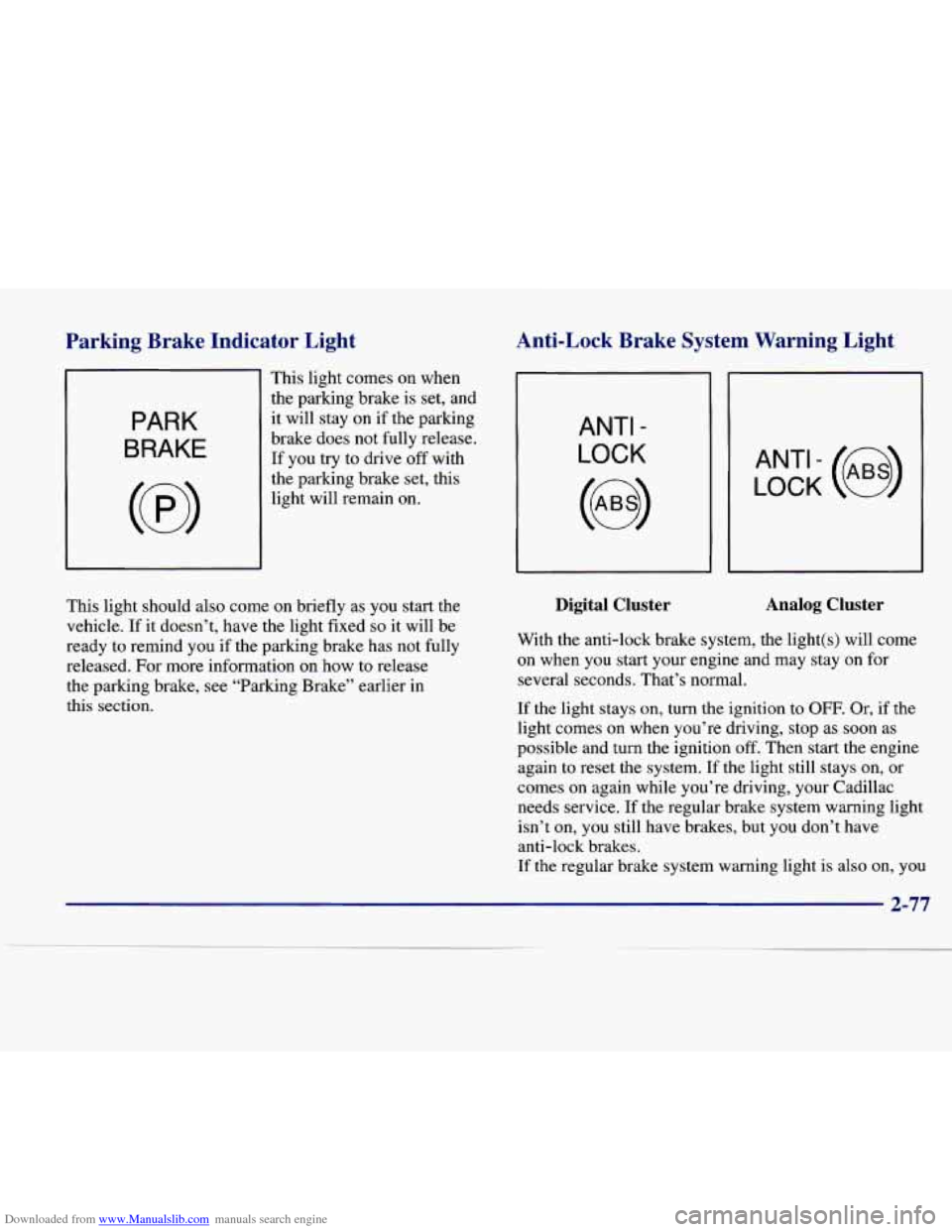
Downloaded from www.Manualslib.com manuals search engine Parkine Brake Indicator Light Anti-Lock Brake System Warning Light
PARK
BRAKE
This light comes on when
the parking brake is set, and
it will stay on if the parking
brake does not fully release.
If you try to drive off with
the parking brake set, this
light will remain on.
ANTI -
LOCK
LOCK (e)
This light should also come on briefly as you start the
vehicle.
If it doesn’t, have the light fixed so it will be
ready to remind you if the parking brake has not fully
released. For more information on how to release
the parking brake, see “Parking Brake” earlier in
this section.
Digital Cluster Analog Cluster
With the anti-lock brake system, the light(s) will come
on when you start your engine and may stay on for
several seconds. That’s normal.
If the light stays on, turn the ignition to OFF. Or, if the
light comes on when you’re driving, stop as soon as
possible and turn the ignition
off. Then start the engine
again to reset the system.
If the light still stays on, or
comes on again while you’re driving, your Cadillac
needs service. If the regular brake system warning light
isn’t on, you still have brakes, but you don’t have
anti-lock brakes.
If the regular brake system warning light is also on, you
2-77