door lock CADILLAC DEVILLE 1997 7.G Owner's Manual
[x] Cancel search | Manufacturer: CADILLAC, Model Year: 1997, Model line: DEVILLE, Model: CADILLAC DEVILLE 1997 7.GPages: 386, PDF Size: 21.61 MB
Page 128 of 386

Downloaded from www.Manualslib.com manuals search engine Illuminated Rear Seat Visor Vanity
Mirror (DeVille d’Elegance and DeVille
Concours Only)
Turn the sunshade down and lift the cover to see the
mirror. Move the slide switch up or down to brighten or
dim the lamp.
Cellular Telephone (Option)
Your vehicle has been prewired for dealer installation of
a Cadillac dual-mode (analog/digital) cellular telephone.
A fixed mobile or a portable hand-held system are
available. Either system has steering wheel telephone
controls and information output through the DIC.
Voice activation and hands-free operation are standard
features. For more information, contact your Cadillac
dealer.
A user’s guide is provided with the telephone.
OnStar System (Option)
This system may be ordered if you have the optional
fixed cellular telephone. The following services are
available
24 hours a day:
0 Roadside Service with Location
0 Emergency Services Button
0
0
0
0
Remote Door Unlock
Theft DetectiodNotification and Stolen-Vehicle
Tracking
Automatic Notification of Front
Air Bag Deployment
Concierge/Customer Convenience Services
For more information, contact your Cadillac dealer.
Assist Handles
A folding handle above each door can be used when
getting out of your vehicle.
Umbrella Holder
(DeVille d’Elegance
Only)
The driver’s front seat cushion comes equipped with an
umbrella holder. Gently slide the umbrella into the slot
located under the front portion
of the driver’s seat cushion.
Floor Mats
Your Cadillac is equipped with rubber-backed front and
rear floor mats. Keep them clean by vacuuming and
using a spot cleaner,
if necessary. Do not machine wash.
2-63
Page 150 of 386

Downloaded from www.Manualslib.com manuals search engine Driver Information Center (DIC)
The DIC display gives you the status of many of your
vehicle’s systems. The DIC is also used
to display driver
personalization features and warningktatus messages.
Memory and Personalization Features
(If Equipped)
Your vehicle may be equipped with the following
features that can be individually customized for up to
two drivers.
0 Programmable Automatic Door Locks
Remote Confirmation (for RKE)
0 Exterior Lighting (at Unlock)
Remote Recall Memory (for RKE or Key in the
Battery Guard Storage
Ignition)
0 Climate Control Personalization
0 Memory
Seat and Mirrors
Radio Personalization
For detailed information, see each feature
in the Index.
Digital Control Buttons
(DeVille and DeVille d’Elegance Only)
DISPLAY ON/OFF: Pressing this button will turn off
the DIC, Electronic Climate Control (ECC), fuel data
center, the fuel gage, trip odometer and odometer. While
the displays are off, pressing the INFORMATION
button will only turn on the DIC.
If the TRIP SET
button is pressed or the fuel level falls below four
gallons
(15.2 L), all of the displays will come back on.
2-85
Page 177 of 386

Downloaded from www.Manualslib.com manuals search engine HVAC Steering Wheel Controls
Some heating and cooling
controls can be adjusted at
the steering wheel. Other touch controls operate some
audio controls. See “Audio
Steering Wheel Controls”
later in this section.
% FAN SPEED: Press the up arrow lever to increase
the fan speed and the down arrow lever to decrease
fan speed.
TEMP: Press the up arrow lever to increase the
temperature and the down arrow lever to decrease
temperature.
Climate Control Personalization
(If Equipped)
With this feature, your vehicle will recall the latest
climate control settings as adjusted the last time your
vehicle was operated. This feature allows two different
drivers to store and recall their own climate control settings. The settings recalled by the climate control
system are determined by which RKE transmitter
(“l”
or “2”) was used to enter the vehicle. The number on the
back of the RKE transmitter corresponds to driver
1 or
to driver
2. After the unlock button is pressed on the
RISE transmitter or the ignition key is placed in the
ignition (the ignition must be turned to LOCK), the climate control settings will automatically adjust to
where they were last set. The settings can also be
changed by briefly pressing the memory seat buttons
1
or 2 located on the driver’s door.
Audio Systems
Your Cadillac audio system has been designed to operate
easily and give years of listening pleasure. You will get
the most enjoyment out of it if you acquaint yourself
with it first. Find out what your audio system can do
and how to operate all its controls, to be sure you’re
getting the most out of the advanced engineering that
went into it.
3-14
Page 192 of 386

Downloaded from www.Manualslib.com manuals search engine Compact Disc Changer Errors
If ERR or ERROR appears on the display, an error has
occurred and the compact disc temporarily cannot play.
CD CHANGER ERROR could be displayed for
the following:
The road is too rough. The disc should play when the
road is smoother.
The disc is dirty, scratched, wet or loaded label
The air is very humid. If so, wait about an hour and
CHEK DOOR or CD CHANGER DOOR OPEN
is
displayed when the CD changer door is left open.
Completely close the changer door to restore
normal operation. side up.
try again.
CD CHANGER NO DISCS is displayed when an empty
magazine is inserted in the CD changer. Try the
magazine again with a disc loaded on one of the trays.
(This message does not appear in the display on the
standard
AM-FM Stereo radios.)
If any error occurs repeatedly or
if an error cannot be
corrected, please contact your dealer. If your radio
displays
an error number, write it down and provide it to
your dealer when reporting the problem.
Radio Personalization (If Equipped)
With this feature, your vehicle will recall the latest radio
settings as adjusted the last time your vehicle was
operated. This feature allows two different drivers to
store and recall their own radio settings. The settings
recalled by the radio are determined by which RKE
transmitter
(“1” or “2”) was used to enter the vehicle.
The number on the back
of the RKE transmitter
corresponds to driver
1 or to driver 2. After the unlock
button is pressed on the RKE transmitter or the ignition
key is placed in the ignition,
the radio settings will
automatically adjust to where they were last set. The
settings can also be changed by briefly pressing the
memory seat buttons
1 or 2 located on the driver’s door.
Theft-Deterrent Feature
Your Cadillac has a “built-in” theft-deterrent feature on
each radio that is automatic
-- there is no programming
required. The radio in your Cadillac cannot be used in
any other vehicle besides another Cadillac if
it were to
be removed.
Page 289 of 386

Downloaded from www.Manualslib.com manuals search engine An alternate fuel door
release
is located inside of
the trunk on the left hand
side. Pull it
to release the
fuel door.
To take off the cap, turn it slowly to the left
(counterclockwise).
If you get gasoline on yourself and then
something ignites it, you could be badly burned.
Gasoline can spray out on you
if you open the
fuel filler cap too quickly. This spray can happen
if your tank
is nearly full, and is more likely in
hot weather. Open the fuel filler cap slowly and
wait for any “hiss” noise to stop. Then unscrew
the cap all the way.
Be careful not to spill gasoline. Clean gasoline from
painted surfaces as soon as possible. See “Cleaning the Outside of Your Cadillac” in the Index.
Hang the cap inside the fuel door while refueling.
6-6
Page 322 of 386

Downloaded from www.Manualslib.com manuals search engine 4. Replace the bulb by pressing and turning it
counterclockwise.
5. Once you have installed the new bulb and socket into
the lamp housing, insert the tab on the lower portion
of the lamp housing first, then gently fit the rest of
the housing in place.
Windshield Wiper Blade Replacement
It’s a good idea to clean or replace the wiper blade
assembly on a regular basis or when worn. For proper
windshield wiper blade length and type, see “Normal Maintenance Replacement Parts” later in this section.
To
replace the wiper blade assembly:
1. Turn the ignition key to ACCESSORY and turn the wipers on. Position the wipers
on the windshield in
the
“mid” wipe position. Then with the door open,
turn the key to
OFF.
2. Insert a screwdriver into the slot as shown and press
down to release the wiper blade assembly.
3. Align the wiper arm pin with the hole on the wiper
blade assembly and snap it into place to install.
6-39
Page 343 of 386
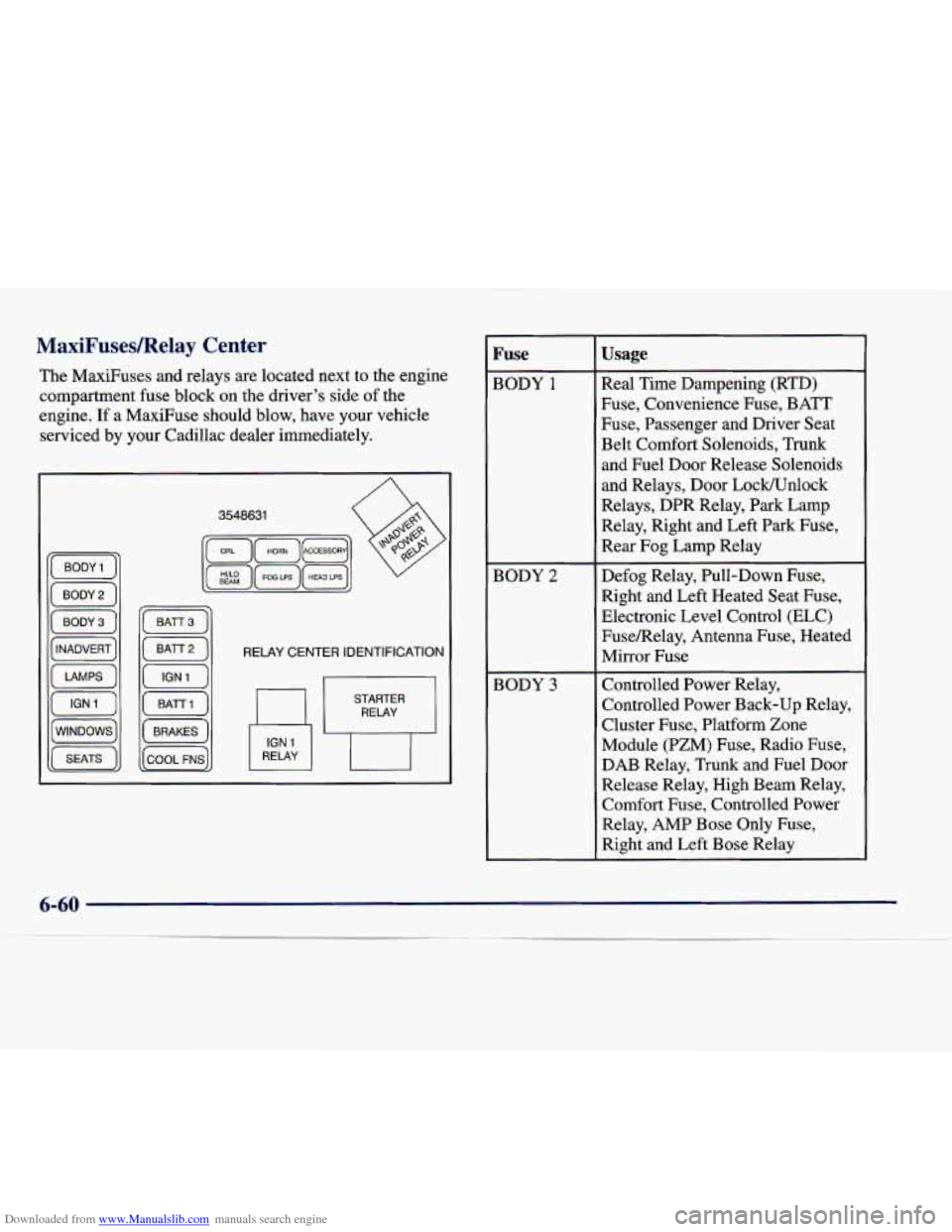
Downloaded from www.Manualslib.com manuals search engine MaxiF'usesIRelay Center
The MaxiFuses and relays are located next to the engine
compartment fuse block on the driver's side
of the
engine.
If a MaxiFuse should blow, have your vehicle
serviced by your Cadillac dealer immediately.
RELAY CENTER IDENTIFICATION
RELAY
Fuse
BODY 1
BODY 2
BODY 3
Usage
Real Time Dampening (RTD)
Fuse, Convenience Fuse, BATT
Fuse, Passenger and Driver Seat
Belt Comfort Solenoids, Trunk
and Fuel Door Release Solenoids
and Relays, Door Lock/Unlock
Relays, DPR Relay, Park Lamp
Relay, Right and Left Park Fuse,
Rear Fog Lamp Relay
Defog Relay, Pull-Down Fuse, Right and Left Heated Seat Fuse,
Electronic Level Control (ELC)
FuseRelay, Antenna Fuse, Heated
Mirror Fuse
Controlled Power Relay,
Controlled Power Back-up Relay,
Cluster Fuse, Platform Zone
Module (PZM) Fuse, Radio Fuse,
DAB Relay, Trunk and Fuel Door
Release Relay, High Beam Relay,
Comfort Fuse, Controlled Power
Relay, AMP Bose Only Fuse,
Right and Left Bose Relay
Page 349 of 386

Downloaded from www.Manualslib.com manuals search engine Rear Compartment Fuse Block
The fuse block is located on the front wall of the trunk
(behind the rear seat) on the driver’s side. Loosen the
four trunk trim fasteners and pull the trim away from the
fuse block to gain access.
, RLY IGN 1 I I SIR I , ELC I I TURN I lGONSOLE1 I BRAKE I I ,
, RSS I IGN , 0-BODY I I COMFORT I I AMP I I PZM I RT/PHOT lCLUSTER,
HTD MIR HTD SEAT R HTD SEAT L PULL DOWN HDLP WASH
, ANTENNA I I RSS I lCONVENCl I BAT I I RSS , I RT PARK I I LT PARK ,
Fuse
RLY IGN1*
SIR
ELC
Usage
Cluster, Cruise in Stalk, PZM, Catalytic Converter Overtemp
Amplifier (Export), TCC Switch
SDM, Left and Ri
.t Door
Sensor
ELC Relay, Vacuum Pump,
ALC Sensor
Electronic Flasher,
Turn/Hazard Switch
- ~~
Fuse
CONSOLE
- -
BRAKE
RSS
IGN 0-BODY
COMFORT
Usage
Rear Zone Blower, Right and
Left Heated Seat Switches
(Optional)
Brake, Vacuum
Pump (VP)
Relay,
VP Motor,
VP Pressure Switch
CV-RTD (CV-RSS)(DeVille Concours Only)
PRNDL, Dual Zone Switch,
PZM, Cluster, Air Control
Module (ACM), Upper Zone
Motor, Lower Zone Motor (Optional), HVAC Solenoids,
Climate Control Panel Analog
Cluster (Console Shift Only),
Rear Defog Relay, ELC Relay
CD Player, Remote Keyless
Entry (RKE), Controlled Power Relay, Air Control Module
(ACM), PZM
6-66
Page 351 of 386

Downloaded from www.Manualslib.com manuals search engine Fuse Usage
CONVENC Trunk
Release Relay, Trunk
Release Solenoid, Fuel Door
Release Relay, Fuel Filler Door
Release Solenoid, Door Lock
Relay, Left Front Door Motors,
PZM, Door Unlock Relay
BATT Driver and Passenger Seat
Lumbar Switch (Optional),
Memory Seat Module
(DeVille Concours Only)
RSS
CV-RTD (CV-RSS)
Fuse
RT PARK
LT PARK
Usage
Headlamp Switches, Rear Fog
Lamp Relay, Right Front and
Rear Sidemarker Lamps, Right
Rear Back-up Lamp (Export),
Park Position Lamp
(Export),
Rear ParWTurn Lamps
Left Front and Rear Sidemarker
Lamps, Front Parking Lamps,
Left Turn/Stop/Tail Lamps,
Right and Left License Plate
Lamps, Park Position Lamp
(Export)
* Do not alter OBD II related fuses or circuit breakers.
6-68
Page 372 of 386
Downloaded from www.Manualslib.com manuals search engine ........ ..
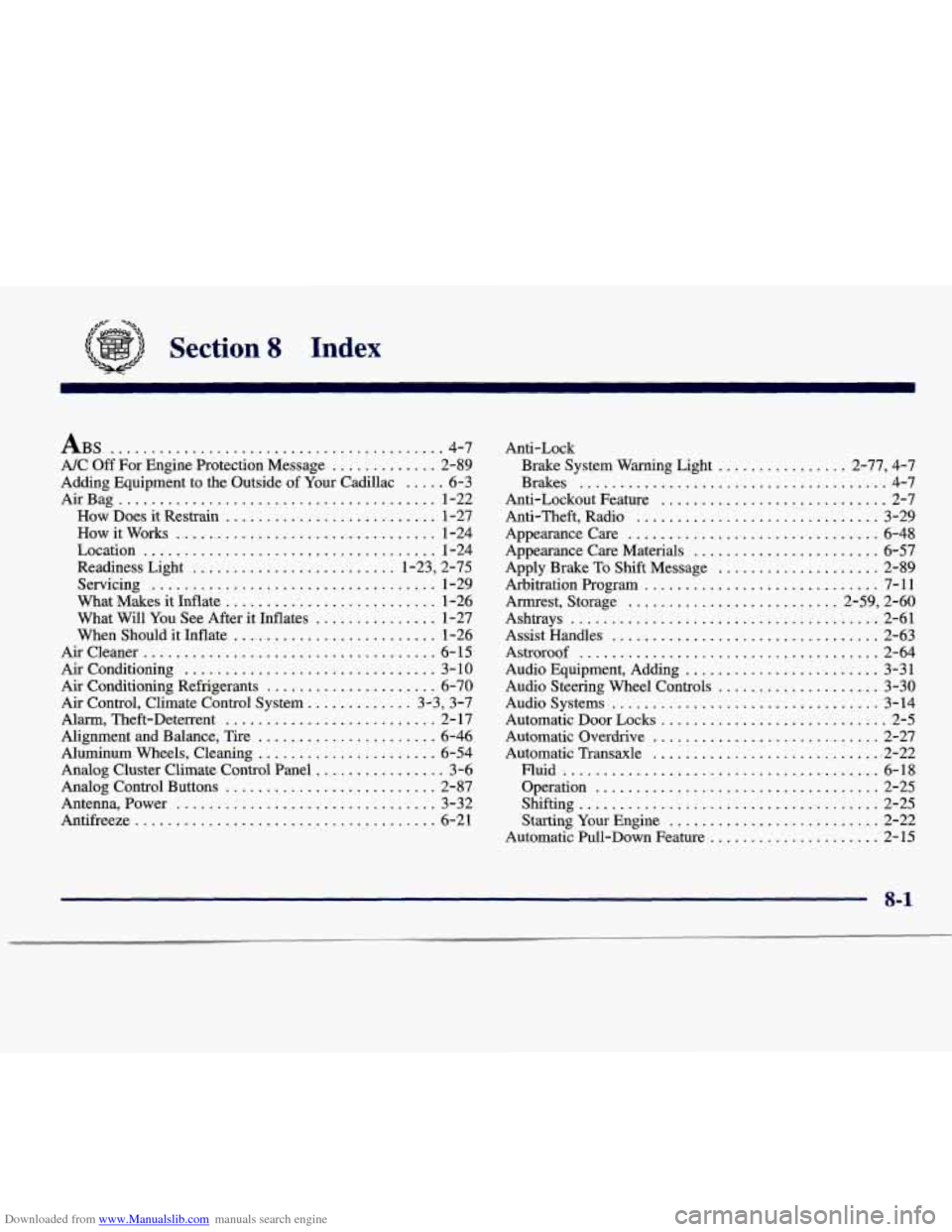
Section 8 Index
ABS ......................................... 4.7
NC
Off For Engine Protection Message ............. 2-89
Adding Equipment to the Outside of
Your Cadillac ..... 6-3
AirBag
....................................... 1-22
How Does it Restrain
.......................... 1-27
How it Works
................................ 1-24
Location
.................................... 1-24
Readiness Light
......................... 1.23. 2.75
Servicing
................................... 1-29
What Makes it Inflate
.......................... 1-26
What Will You See After it Inflates
............... 1-27
When Should it Inflate
......................... 1-26
Aircleaner
.................................... 6-15
Air Conditioning
............................... 3-10
Air Conditioning Refrigerants
..................... 6-70
Alarm. Theft-Deterrent .......................... 2- 17
Alignment and Balance. Tire
...................... 6-46
Aluminum Wheels. Cleaning
...................... 6-54
Analog Control Buttons
.......................... 2-87
Antenna. Power
................................ 3-32
Antifreeze
..................................... 6-21
Air Control. Climate Control System ............. 3.3. 3.7
Analog Cluster Climate Control Panel
................ 3-6 Anti-Lock
Brake System Warning Light
................ 2.77. 4.7
Brakes
...................................... 4-7
Anti-Lockout Feature
............................ 2-7
Anti.Theft. Radio
.............................. 3-29
Appearancecare
............................... 6-48
Appearance Care Materials
....................... 6-57
Apply Brake To Shift Message
.................... 2-89
Arbitration Program
............................. 7-11
Armrest. Storage
.......................... 2.59. 2.60
Ashtrays
...................................... 2-61
Assist Handles
................................. 2-63
Astroroof
..................................... 2-64
Audio Equipment. Adding
........................ 3-31
Audio Steering Wheel Controls
.................... 3-30
Audio Systems
................................. 3-14
Automatic Door Locks
............................ 2-5
Automatic Overdrive
............................ 2-27
Automatic Transaxle ............................. 2-22
Fluid
....................................... 6-18
Operation
................................... 2-25
Shifting
..................................... 2-25
Starting Your Engine
.......................... 2-22
Automatic Pull-Down Feature
..................... 2-15
8-1