fuel CADILLAC DTS 2007 1.G User Guide
[x] Cancel search | Manufacturer: CADILLAC, Model Year: 2007, Model line: DTS, Model: CADILLAC DTS 2007 1.GPages: 518, PDF Size: 2.77 MB
Page 239 of 518

Fuel Gage
The fuel gage shows
approximately how
much fuel is in the tank.
It works only when
the engine is on.
If the fuel supply gets low, the FUEL LEVEL LOW
message will appear in the Driver Information
Center and a single chime will sound. SeeDIC
Warnings and Messages on page 246for more
information.Here are a few concerns some owners have had
about the fuel gage. All of these situations are
normal and do not indicate that anything is wrong
with the fuel gage:
At the gas station the gas pump shuts off
before the gage reads full.
The gage may change when you turn, stop
quickly or accelerate quickly.
It takes a little more or less fuel to ll the
tank than the gage indicated. For example, the
gage may have indicated that the tank was
half full, but it actually took a little more or less
than half the tank’s capacity to ll the tank.
239
Page 240 of 518
Driver Information Center (DIC)
The Driver Information Center (DIC) gives you the
status of many of your vehicle’s systems. The DIC
is also used to display warning/status messages.
All messages will appear in the DIC display located
at the bottom of the instrument panel cluster, below
the tachometer and speedometer. The DIC buttons
are located on the instrument panel, to the left of
the steering wheel.
The DIC comes on when the ignition is on. After
a short delay, the DIC will display the information
that was last displayed before the engine was
turned off.
The top line of the DIC display shows the vehicle
system information and the warning/status
messages. The bottom line of the DIC display
shows the odometer on the left side. The bottom
line of the DIC display also shows a digital
speedometer on the right side.
If a problem is detected, a warning message
will appear on the display. Be sure to take any
message that appears on the display seriously
and remember that clearing the message will only
make the message disappear, not correct the
problem.
DIC Controls and Displays
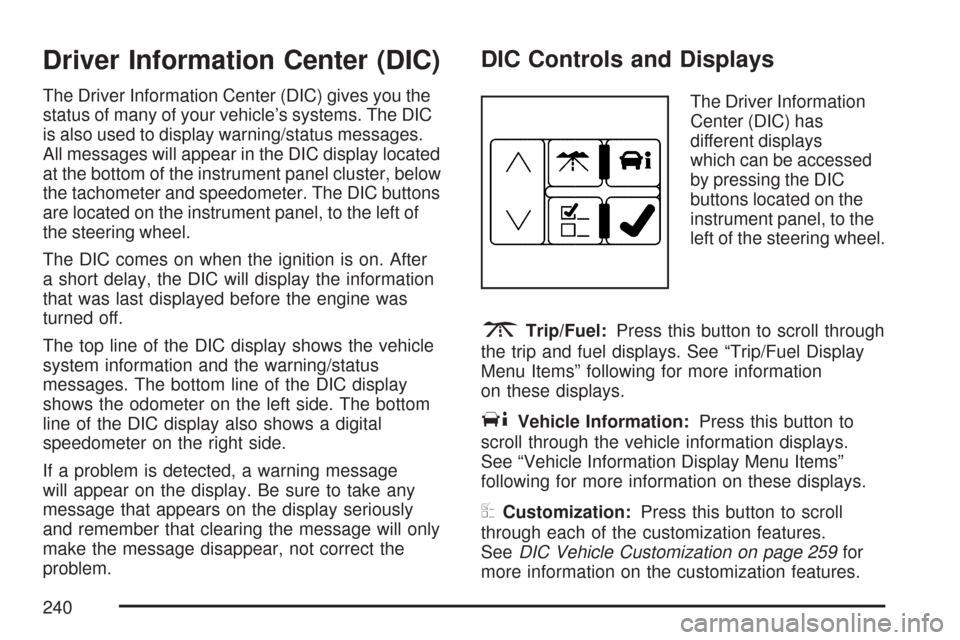
The Driver Information
Center (DIC) has
different displays
which can be accessed
by pressing the DIC
buttons located on the
instrument panel, to the
left of the steering wheel.
3Trip/Fuel:Press this button to scroll through
the trip and fuel displays. See “Trip/Fuel Display
Menu Items” following for more information
on these displays.
TVehicle Information:Press this button to
scroll through the vehicle information displays.
See “Vehicle Information Display Menu Items”
following for more information on these displays.
UCustomization:Press this button to scroll
through each of the customization features.
SeeDIC Vehicle Customization on page 259for
more information on the customization features.
240
Page 241 of 518

VSet/Reset:Press this button to reset certain
DIC features and to acknowledge DIC warning
messages and clear them from the DIC display.
yzMenu Up/Down:Press this button to scroll
up and down the menu items.
Trip/Fuel Display Menu Items
3
(Trip/Fuel):The following display menu
items can be displayed by pressing the trip/fuel
button:
TRIP A or TRIP B
These displays show the current distance traveled
since the last reset for each trip odometer in either
miles (mi) or kilometers (km). Both odometers can
be used at the same time. Each trip odometer can
be reset to zero separately by pressing and holding
the set/reset button for a few seconds while the
desired trip odometer is displayed.
FUEL RANGE
This display shows the approximate number
of remaining miles (mi) or kilometers (km) you can
drive without relling the fuel tank. This estimate
is based on the current driving conditions and
will change if the driving conditions change.
For example, if you are driving in traffic and
making frequent stops, the display may read
one number, but if you enter the freeway,
the number may change even though you still
have the same amount of fuel in the fuel tank.
This is because different driving conditions
produce different fuel economies. Generally,
freeway driving produces better fuel economy
than city driving.
Once the range drops below an estimated
40 miles (64 km) remaining, the display will
show FUEL RANGE LOW.
If your vehicle is low on fuel, the FUEL LEVEL
LOW message will be displayed. See “FUEL
LEVEL LOW” underDIC Warnings and Messages
on page 246for more information.
241
Page 242 of 518
AVERAGE ECONOMY (AFE)
This display shows the approximate average miles
per gallon (mpg) or liters per 100 kilometers
(L/100 km). This number is calculated based on
the number of mpg (L/100 km) recorded since
the last time this display was reset. To reset this
display, press the set/reset button. The display will
return to zero.
INST (Instantaneous) ECONOMY (IFE)
This display shows the current fuel economy
in either miles per gallon (mpg) or liters per
100 kilometers (L/100 km). This number reects
only the fuel economy that the vehicle has right now
and will change frequently as driving conditions
change. Unlike average economy, this display
cannot be reset.
FUEL USED
This display shows the number of gallons (gal) or
liters (L) of fuel used since the last reset of this
display. To reset this display, press the set/reset
button. The display will return to zero.
TIMER ON/OFF
This display can be used like a stopwatch. You can
record the time it takes to travel from one point to
another. To access the timer, press the trip/fuel
button until 00:00:00 TIMER OFF displays.
To turn on the timer, press the set/reset button
until TIMER ON displays. The timer will then start.
To turn off the timer, press the set/reset button
again until TIMER OFF displays. The timer
will stop and display the end timing value.
To reset the timer, press and hold the set/reset
button after the timer has been stopped.
The display will return to zero.
AVERAGE SPEED
This display shows the average speed of the
vehicle in either miles per hour (mph) or kilometers
per hour (km/h). This average is calculated based
on the various vehicle speeds recorded since the
last reset of this display. To reset this display, press
the set/reset button. The display will return to zero.
242
Page 246 of 518

DIC Warnings and Messages
These messages appear if there is a problem
detected in one of your vehicle’s systems.
You must acknowledge a message to clear it from
the screen for further use. To clear a message,
press the set/reset button.
Be sure to take any message that appears on
the screen seriously and remember that clearing
the message will only make the message
disappear, not the problem.
AUTOMATIC LIGHT CONTROL OFF
This message displays when the automatic
headlamps are turned off. SeeExterior Lamps
on page 193for more information.
AUTOMATIC LIGHT CONTROL ON
This message displays when the automatic
headlamps are turned on. SeeExterior Lamps
on page 193for more information.
BATTERY SAVER ACTIVE
This message displays when the system detects
that the battery voltage is dropping beyond a
reasonable level. The battery saver system starts
reducing certain features of the vehicle that
you may be able to notice. At the point that the
features are disabled, this message is displayed.
It means that the vehicle is trying to save the
charge in the battery.
Turn off all unnecessary accessories to allow the
battery to recharge.
The normal battery voltage range is
11.5 to 15.5 volts. You can monitor battery
voltage on the Driver Information Center (DIC)
by pressing the trip/fuel button until BATTERY
VOLTAGE is displayed.
246
Page 250 of 518

FOLLOWING GAP
This symbol appears with this message.
If your vehicle has Adaptive Cruise Control (ACC),
this message displays to show the follow
distance that has been set. There are six follow
distances to choose from. Each follow distance
is shown on the DIC by displaying from one to
six bars between two car symbols. SeeAdaptive
Cruise Control on page 179for more information.
FUEL LEVEL LOW
This symbol appears
with this message.
This message displays when your vehicle is low
on fuel. Rell the fuel tank as soon as possible.
A single chime sounds when this message is
displayed. SeeFilling the Tank on page 358.
HEATED WASHER FLUID SYSTEM OFF
This message displays when you manually turn
off the heated washer uid system or when
the system automatically turns off. See “Heated
Washer Fluid” underWindshield Washer on
page 175for more information.
250
Page 257 of 518

STABILITRAK NOT READY
If your vehicle has StabiliTrak®, this message may
display and the Traction Control System and
StabiliTrak
®Warning Light on the instrument panel
cluster may be on after rst driving the vehicle
and exceeding 19 mph (30 km/h) for 30 seconds.
The StabiliTrak
®system is not functional until
the light has turned off. SeeStabiliTrak®System
on page 311for more information.
STARTING DISABLED SERVICE
THROTTLE
This message displays when your vehicle’s throttle
system is not functioning properly. Have your
vehicle serviced by your dealer.
THEFT ATTEMPTED
This symbol appears
with this message.This message displays if the content theft-deterrent
system has detected a break-in attempt while
you were away from your vehicle. SeeContent
Theft-Deterrent on page 113for more information.
TIGHTEN GAS CAP
This message displays when the fuel cap has not
been fully tightened. Recheck the fuel cap to
ensure that it is on and tightened properly.
TIRE LEARNING ACTIVE
This message displays when the Tire Pressure
Monitor (TPM) system is re-learning the tire
positions on your vehicle. SeeTire Pressure
Monitor System on page 414. The tire positions
must be re-learned after rotating the tires or
after replacing a tire or sensor. SeeTire Inspection
and Rotation on page 418andInation - Tire
Pressure on page 411for more information.
TRACTION CONTROL OFF
This message displays when the Traction Control
System (TCS) is turned off. Adjust your driving
accordingly. SeeTraction Control System
(TCS) on page 309for more information.
257
Page 268 of 518

Exiting the Feature Settings Menu
The feature settings menu will be exited when any
of the following occurs:
The vehicle is shifted out of PARK (P).
The ignition is no longer in RUN.
The trip/fuel or vehicle information DIC buttons
are pressed.
The end of the feature settings menu is
reached.
A 40 second time period has elapsed with no
selection made.
Audio System(s)
Determine which radio your vehicle has and then
read the pages following to familiarize yourself
with its features.
Driving without distraction is a necessity for a safer
driving experience. SeeDefensive Driving on
page 302. By taking a few moments to read this
manual and get familiar with your vehicle’s audio
system, you can use it with less effort, as well as
take advantage of its features. While your vehicle isparked, set up your audio system by presetting your
favorite radio stations, setting the tone and
adjusting the speakers. Then, when driving
conditions permit, you can tune to your favorite
stations using the presets and steering wheel
controls if the vehicle has them.
{CAUTION:
This system provides you with a far
greater access to audio stations and
song listings. Giving extended attention
to entertainment tasks while driving can
cause a crash and you or others can be
injured or killed. Always keep your eyes
on the road and your mind on the
drive — avoid engaging in extended
searching while driving.
Keeping your mind on the drive is important for
safe driving. Here are some ways in which you can
help avoid distraction while driving.
268
Page 325 of 518

Of course, you will nd experienced and able
service experts in GM dealerships all across North
America. They will be ready and willing to help
if you need it.
Here are some things you can check before a trip:
Windshield Washer Fluid:Is the reservoir
full? Are all windows clean inside and outside?
Wiper Blades:Are they in good shape?
Fuel, Engine Oil, Other Fluids:Have you
checked all levels?
Lamps:Are they all working? Are the
lenses clean?
Tires:They are vitally important to a safe,
trouble-free trip. Is the tread good enough
for long-distance driving? Are the tires
all inated to the recommended pressure?
Weather Forecasts:What is the weather
outlook along your route? Should you
delay your trip a short time to avoid a major
storm system?
Maps:Do you have up-to-date maps?
Highway Hypnosis
Is there actually such a condition as highway
hypnosis? Or is it just plain falling asleep at the
wheel? Call it highway hypnosis, lack of
awareness, or whatever.
There is something about an easy stretch of road
with the same scenery, along with the hum of the
tires on the road, the drone of the engine, and the
rush of the wind against the vehicle that can make
you sleepy. Do not let it happen to you! If it does,
your vehicle can leave the road in less than a
second, and you could crash and be injured.
What can you do about highway hypnosis? First,
be aware that it can happen.
Then here are some tips:
Make sure your vehicle is well ventilated, with
a comfortably cool interior.
Keep your eyes moving. Scan the road ahead
and to the sides. Check your rearview mirrors
and your instruments frequently.
If you get sleepy, pull off the road into a rest,
service, or parking area and take a nap, get
some exercise, or both. For safety, treat
drowsiness on the highway as an emergency.
325
Page 331 of 518

You can run the engine to keep warm, but be
careful.
{CAUTION:
Snow can trap exhaust gases under your
vehicle. This can cause deadly CO
(carbon monoxide) gas to get inside. CO
could overcome you and kill you. You
cannot see it or smell it, so you might not
know it is in your vehicle. Clear away
snow from around the base of your
vehicle, especially any that is blocking the
exhaust pipe. And check around again
from time to time to be sure snow does
not collect there.
Open a window just a little on the side of
the vehicle that is away from the wind.
This will help keep CO out.
Run your engine only as long as you must. This
saves fuel. When you run the engine, make it go a
little faster than just idle. That is, push the
accelerator slightly. This uses less fuel for the
heat that you get and it keeps the battery charged.
331