instrument panel CADILLAC DTS 2008 1.G Owner's Manual
[x] Cancel search | Manufacturer: CADILLAC, Model Year: 2008, Model line: DTS, Model: CADILLAC DTS 2008 1.GPages: 454, PDF Size: 2.48 MB
Page 147 of 454

Turn and Lane-Change Signals
To signal a turn, move the lever all the way up or down.
The lever returns automatically when the turn is
complete. If you momentarily press and release the
lever, the turn signal will ash 3 times.
An arrow on the instrument
panel cluster and in the
outside rearview mirror will
ash in the direction of
the turn or lane change.
Raise or lower the lever until the arrow starts to ash to
signal a lane change. Hold it there until the lane
change is complete. The lever returns when it is
released.
If the turn signal is left on, a warning chime will sound
and the Driver Information Center (DIC) will display
TURN SIGNAL ON after driving about a mile to remind
you to turn it off. SeeDIC Warnings and Messages
on page 3-75.Arrows that ash rapidly when signaling for a turn or
lane change may be caused by a burned out signal bulb.
Other drivers will not see the turn signal.
Replace burned-out bulbs to help avoid possible
accidents. Check the fuse and for burned-out bulbs if
the arrow fails to work when signaling a turn. SeeRear
Underseat Fuse Block on page 5-104.
Headlamp High/Low-Beam Changer
Push forward to change the headlamps from low
beam to high. Pull the lever back and then release
it to change from high beam to low.
This light on the instrument
panel cluster will be on,
indicating high-beam
usage.
3-9
Page 148 of 454
Forward Collision Alert (FCA)
System
If your vehicle has this feature, be sure to read this
entire section before using it.
The system operates on a radio frequency subject to
Federal Communications Commission (FCC) Rules and
with Industry Canada.
This device complies with Part 15 of the FCC Rules.
Operation is subject to the following two conditions:
1. This device may not cause interference.
2. This device must accept any interference received,
including interference that may cause undesired
operation of the device.
This device complies with RSS-210 of Industry Canada.
Operation is subject to the following two conditions:
1. This device may not cause interference.
2. This device must accept any interference received,
including interference that may cause undesired
operation of the device.
Changes or modications to this system by other than
an authorized service facility could void authorization to
use this equipment.The Forward Collision Alert (FCA) system provides an
audible and visual alert if you approach a vehicle
too quickly that is directly ahead. FCA also provides a
visual alert with no audible alert if you are following
another vehicle much too closely. The FCA alert symbol
is located on top of the instrument panel to the right
of the driver. FCA uses the Adaptive Cruise Control
radar to detect a vehicle directly ahead, in your path,
within a distance of 328 ft (100 m) and operates at
speeds above 20 mph (32 km/h).
{CAUTION:
FCA is only a warning system and does not
apply the brakes. When you are approaching a
vehicle or object too rapidly or when you are
following a vehicle too closely that is ahead of
you, FCA may not provide you with enough
time to avoid a collision. FCA is not designed
to warn the driver of pedestrians or animals.
Your complete attention is always required
while driving and you should be ready to take
action and apply the brakes. For more
information, seeDefensive Driving on page 4-2.
3-10
Page 154 of 454
Cruise Control
With cruise control, you can maintain a speed of
approximately 25 mph (40 km/h) or more without
keeping your foot on the accelerator. This is helpful on
long trips. Cruise control does not work at speeds
below about 25 mph (40 km/h). When cruise control is
on, you will see a cruise light on the instrument
panel cluster.
When you apply your brakes, the cruise control
shuts off.{CAUTION:
Cruise control can be dangerous where you
cannot drive safely at a steady speed. So, do
not use your cruise control on winding roads
or in heavy traffic.
Cruise control can be dangerous on slippery
roads. On such roads, fast changes in tire
traction can cause excessive wheel slip, and
you could lose control. Do not use cruise
control on slippery roads.
If your vehicle is in cruise control when the Traction
Control System (TCS) begins to limit wheel spin,
the cruise control automatically turns off. SeeTraction
Control System (TCS) on page 4-5. When road
conditions let you safely use it again, you can turn the
cruise control back on.
3-16
Page 155 of 454
Setting Cruise Control
{CAUTION:
If you leave your cruise control on when you
are not using cruise, you might hit a button
and go into cruise when you do not want to.
You could be startled and even lose control.
Keep the cruise control switch off until you
want to use cruise control.
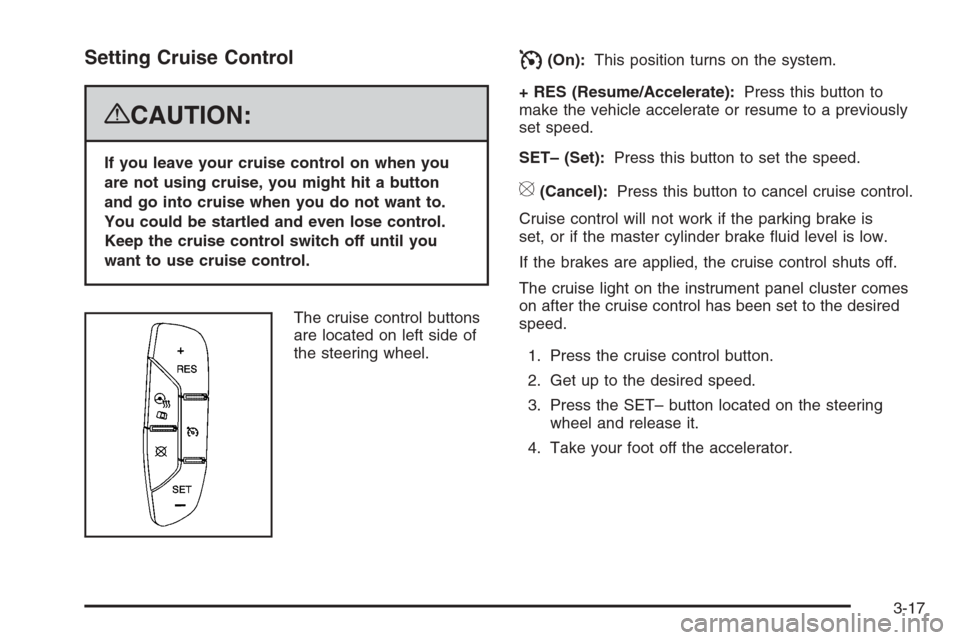
The cruise control buttons
are located on left side of
the steering wheel.
I(On):This position turns on the system.
+ RES (Resume/Accelerate):Press this button to
make the vehicle accelerate or resume to a previously
set speed.
SET– (Set):Press this button to set the speed.
[(Cancel):Press this button to cancel cruise control.
Cruise control will not work if the parking brake is
set, or if the master cylinder brake uid level is low.
If the brakes are applied, the cruise control shuts off.
The cruise light on the instrument panel cluster comes
on after the cruise control has been set to the desired
speed.
1. Press the cruise control button.
2. Get up to the desired speed.
3. Press the SET– button located on the steering
wheel and release it.
4. Take your foot off the accelerator.
3-17
Page 161 of 454
 button.
2. Get up to the speed desired.
3. Press in the SET– button and release it.
4. Take your foot off the accelerator pedal.](/img/23/7892/w960_7892-160.png "CADILLAC DTS 2008 1.G Owners Manual To set Adaptive Cruise Control, do the following:
1. Press the
](On) button.
2. Get up to the speed desired.
3. Press in the SET– button and release it.
4. Take your foot off the accelerator pedal.")
To set Adaptive Cruise Control, do the following:
1. Press the
](On) button.
2. Get up to the speed desired.
3. Press in the SET– button and release it.
4. Take your foot off the accelerator pedal.
Once Adaptive Cruise Control is set, it may immediately
apply the brakes if it detects a vehicle ahead is too
close or moving slower than your vehicle.
The on symbol is located on the display at the top of
the instrument panel to the right of the driver. When
the on symbol is lit on the display, it indicates that
Adaptive Cruise Control is active.
A message on the DIC will also display when Adaptive
Cruise Control is set. SeeDIC Warnings and
Messages on page 3-75.
Keep in mind speed limits, surrounding traffic speeds,
and weather conditions when adjusting your set speed.
If your vehicle is in Adaptive Cruise Control when
the traction control system begins to limit wheel spin,
the Adaptive Cruise Control will automatically disengage.
SeeTraction Control System (TCS) on page 4-5and
StabiliTrak
®System on page 4-7. When road conditions
allow you to safely use it again, you may turn the
Adaptive Cruise Control back on.
Increasing Set Speed While Using Adaptive
Cruise Control
There are two ways to increase the set speed:
Use the accelerator to get to the higher speed.
Press the SET– button and then release the
button and the accelerator pedal. The vehicle will
now cruise at the higher speed.
Press the +RES button. Hold it there until the
desired set speed is displayed on the Driver
Information Center (DIC), then release the switch.
To increase your set speed in very small amounts,
move the switch briey to +RES. Each time this
is done, your set speed increases by 1 mph (1 km/h).
Your vehicle will not reach the set speed until the
system determines there is not a vehicle in front of you.
At that point, your vehicle speed will increase to the
set speed.
3-23
Page 163 of 454

Alerting the Driver
The Adaptive Cruise
Control alert symbol is
located on the display at
the top of the instrument
panel to the right of
the driver.
The alert symbol will ash and a warning beep will
sound when driver action may be required. If Adaptive
Cruise Control is engaged, the alert symbol will
ash when:
Adaptive Cruise Control cannot apply sufficient
braking because you are approaching a vehicle
too rapidly.
The vehicle speed drops below about
20 mph (32 km/h).
A temporary condition prohibits Adaptive Cruise
Control from operating. SeeDIC Warnings and
Messages on page 3-75for more information.
A malfunction is detected in the system.
SeeDIC Warnings and Messages on page 3-75
for more information.
SeeDefensive Driving on page 4-2.
{CAUTION:
Adaptive Cruise Control has only limited
braking ability to slow your vehicle. In some
cases, Adaptive Cruise Control may not have
time to slow your vehicle enough to avoid a
collision. Be ready to take action and apply
the brakes yourself. SeeDefensive Driving
on page 4-2.
3-25
Page 164 of 454

Approaching and Following a Vehicle
The Vehicle Ahead symbol
is located on the top of the
instrument panel to the
right of the driver.
The Vehicle Ahead symbol only appears when a vehicle
is detected in your path.
If this symbol does not appear, or disappears briey,
Adaptive Cruise Control will not respond to vehicles you
may see ahead.{CAUTION:
When the Adaptive Cruise Control radar is
blocked by snow, ice, or dirt, it may not detect
a vehicle ahead. Adaptive Cruise Control may
not have time to slow your vehicle enough to
avoid a collision. Do not use Adaptive Cruise
Control when the radar is blocked by snow,
ice, or dirt. Keep your radar clean. See
“Cleaning the System” later in this section.
Adaptive Cruise Control automatically slows your
vehicle down when approaching a slower moving
vehicle. It then adjusts your vehicle speed to follow
the vehicle in front at the selected follow distance.
Your vehicle speed increases or decreases to follow
the vehicle in front of you, but will not exceed the
set speed. It may apply limited braking, if necessary.
When braking is active, your brake lights will come on.
Braking may feel or sound different than if you were
applying the brakes yourself. This is normal.
3-26
Page 170 of 454

Exterior Lamps
The exterior lamps
control is located on
the instrument panel
to the left of the
steering wheel.
It controls the following systems:
Headlamps
Taillamps
Parking Lamps
License Plate Lamps
Instrument Panel Lights
Fog Lamps
The exterior lamps control has four positions:
O(Off):Turns off the exterior lamps except for
Daytime Running Lamps (DRL).AUTO (Automatic):Automatically turns on the
headlamps at normal brightness, together with the
following:
Parking Lamps
Instrument Panel Lights
IntelliBeam™
;(Parking Lamps):Turns on the parking lamps
together with the following:
Instrument Panel Lights
License Plate Lamps
Taillamps
Side Marker Lamps
The parking brake indicator light comes on and stays on
while the parking lamps are on with the engine off
and the ignition in ACC/ACCESSORY or ON/RUN.
2(Headlamps):Turns on the headlamps together
with the previously listed lamps. A warning chime
sounds if the driver’s door is opened while the ignition
switch is off and the headlamps are on.
-(Fog Lamps):Press the exterior lamps control to
turn on the fog lamps. SeeFog Lamps on page 3-36.
3-32
Page 171 of 454

IntelliBeam™ Intelligent High-Beam
Headlamp Control System
For vehicles with this feature, be sure to read this entire
section before using it.
IntelliBeam is an enhancement to the vehicle’s
headlamp system. Using a digital light sensor on the
rearview mirror, this system turns the vehicle’s
high-beam headlamps on and off according to
surrounding traffic conditions.
The IntelliBeam system turns the high-beam headlamps
on when it is dark enough, there is no other traffic
present, and the IntelliBeam system is enabled.
Turning On and Enabling IntelliBeam™
Press and release the IntelliBeam button on the inside
rear view mirror. The IntelliBeam indicator on the
mirror turns on to indicate the system is on. Once the
system has been turned on, it remains on each time the
vehicle is started, but the IntelliBeam system must be
enabled.
To enable the IntelliBeam system, turn the exterior lamp
control to AUTO, with the turn signal/multifunction
lever in its neutral position. The High-Beam On Light
appears on the instrument panel cluster when the
high-beams are on. SeeHighbeam On Light on
page 3-69.
Driving with IntelliBeam™
IntelliBeam only activates the high-beams when driving
over 20 mph (32 km/h).
The high-beam headlamps remain on, under the
automatic control of IntelliBeam, until any of the
following situations occur:
The system detects an approaching vehicle’s
headlamps.
The system detects a preceding vehicle’s taillamps.
The outside light is bright enough that high-beam
headlamps are not required.
The vehicle’s speed drops below 15 mph (24 km/h).
The headlamp stalk is moved forward to the
high-beam position or the ash-to-pass feature is
used. SeeHeadlamp High/Low-Beam Changer
on page 3-9andFlash-to-Pass on page 3-13.
When either of these conditions occur, the
IntelliBeam feature is disabled and the IntelliBeam
light in the mirror turns off until the high-beam stalk is
returned to the neutral position.
If IntelliBeam was using low-beams prior to this
action, the IntelliBeam feature is temporarily
disabled until the stalk is returned to the neutral
position.
3-33
Page 174 of 454

When DRL are on, no other exterior lamps such as the
parking lamps, taillamps, etc. will be on when the DRL
are being used. The instrument panel will not be lit up
either.
When automatic lighting is on and it is dark enough
outside, the turn signal lamps turn off and normal
low-beam headlamp operation occurs.
When automatic lighting is on and it is bright enough
outside, the regular lamps go off, and the DRL takes over.
If the vehicle is started in a dark garage, the automatic
headlamp system comes on immediately. Once you
leave the garage, it will take approximately one minute for
the automatic headlamp system to change to DRL if there
is light outside. During that delay, the instrument panel
cluster may not be as bright as usual. Make sure the
instrument panel brightness knob is in the full bright
position. SeeInstrument Panel Brightness on page 3-37.
Turning on automatic lighting or the headlamps will
deactivate the DRL. If the parking lamps or the
fog lamps were turned on instead, the DRL will still
deactivate.
To idle the vehicle with the DRL off at night, turn off
automatic lighting and shift the transmission into
PARK (P). Placing the vehicle in PARK (P) disables the
DRL. The DRL will stay off until the vehicle is shifted
out of PARK (P).To drive the vehicle with the DRL off, turn off automatic
lighting and manually turn on the parking lamps or
fog lamps, if the vehicle has them.
As with any vehicle, the regular headlamp system
should be turned on when needed.
Fog Lamps
Use the fog lamps for better vision in foggy or misty
conditions.
-(Fog Lamps):The fog lamps button is located on
the exterior lamps control. The exterior lamps control
is located on the instrument panel to the left of the
steering column.
The ignition must be on for the fog lamps to work.
Press the exterior lamps button to turn the fog lamps
on or off. A light will come on in the instrument
panel cluster when the fog lamps are in use.
When the headlamps are changed to high-beam,
the fog lamps will turn off. The fog lamps come back
on again when the high-beam headlamps are turned off.
Some localities have laws that require the headlamps
to be on along with the fog lamps.
3-36