wheel CADILLAC DTS 2008 1.G Owner's Manual
[x] Cancel search | Manufacturer: CADILLAC, Model Year: 2008, Model line: DTS, Model: CADILLAC DTS 2008 1.GPages: 454, PDF Size: 2.48 MB
Page 145 of 454

Power Tilt Wheel and Telescopic
Steering Column
If your vehicle has this
feature, the power tilt and
telescope wheel control
is located on the outboard
side of the steering
column.
To operate the power tilt feature, push the control up
and the steering wheel tilts up. Push the control
down and the steering wheel goes down.
Push the control forward and the steering wheel moves
toward the front of the vehicle. Push the control
rearward and the steering wheel moves toward the rear
of the vehicle. To set the memory position, seeDIC
Vehicle Customization on page 3-87andMemory Seat,
Mirrors and Steering Wheel on page 1-4.
Heated Steering Wheel
Your vehicle may have a heated steering wheel.
The button for this feature
is located on the steering
wheel.
Press the button to turn the heated steering wheel on or
off. A light on the button will display while the feature
is turned on.
The steering wheel will take about three minutes to start
heating.
3-7
Page 149 of 454
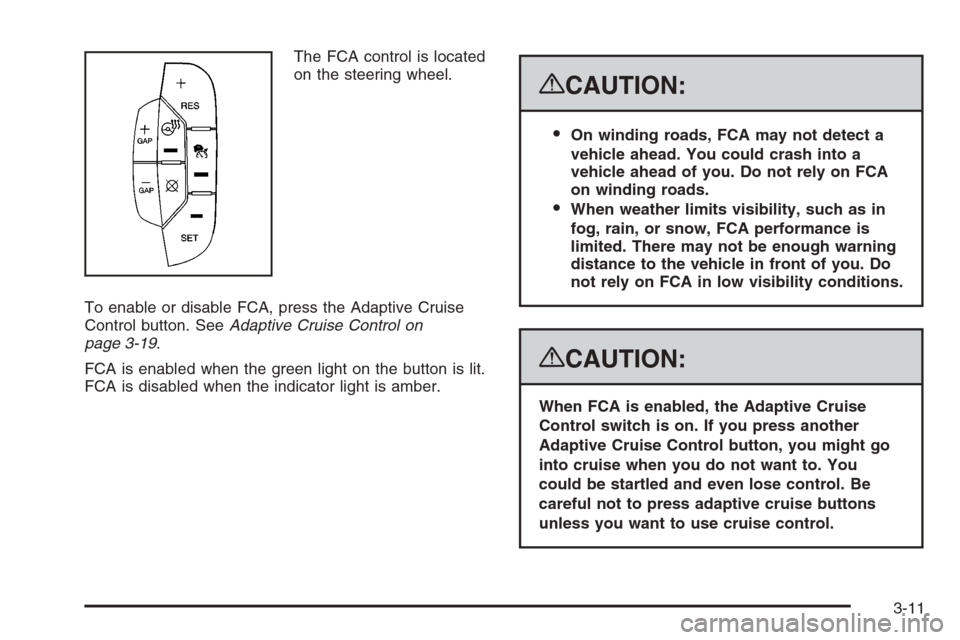
The FCA control is located
on the steering wheel.
To enable or disable FCA, press the Adaptive Cruise
Control button. SeeAdaptive Cruise Control on
page 3-19.
FCA is enabled when the green light on the button is lit.
FCA is disabled when the indicator light is amber.
{CAUTION:
On winding roads, FCA may not detect a
vehicle ahead. You could crash into a
vehicle ahead of you. Do not rely on FCA
on winding roads.
When weather limits visibility, such as in
fog, rain, or snow, FCA performance is
limited. There may not be enough warning
distance to the vehicle in front of you. Do
not rely on FCA in low visibility conditions.
{CAUTION:
When FCA is enabled, the Adaptive Cruise
Control switch is on. If you press another
Adaptive Cruise Control button, you might go
into cruise when you do not want to. You
could be startled and even lose control. Be
careful not to press adaptive cruise buttons
unless you want to use cruise control.
3-11
Page 154 of 454
Cruise Control
With cruise control, you can maintain a speed of
approximately 25 mph (40 km/h) or more without
keeping your foot on the accelerator. This is helpful on
long trips. Cruise control does not work at speeds
below about 25 mph (40 km/h). When cruise control is
on, you will see a cruise light on the instrument
panel cluster.
When you apply your brakes, the cruise control
shuts off.{CAUTION:
Cruise control can be dangerous where you
cannot drive safely at a steady speed. So, do
not use your cruise control on winding roads
or in heavy traffic.
Cruise control can be dangerous on slippery
roads. On such roads, fast changes in tire
traction can cause excessive wheel slip, and
you could lose control. Do not use cruise
control on slippery roads.
If your vehicle is in cruise control when the Traction
Control System (TCS) begins to limit wheel spin,
the cruise control automatically turns off. SeeTraction
Control System (TCS) on page 4-5. When road
conditions let you safely use it again, you can turn the
cruise control back on.
3-16
Page 155 of 454
Setting Cruise Control
{CAUTION:
If you leave your cruise control on when you
are not using cruise, you might hit a button
and go into cruise when you do not want to.
You could be startled and even lose control.
Keep the cruise control switch off until you
want to use cruise control.
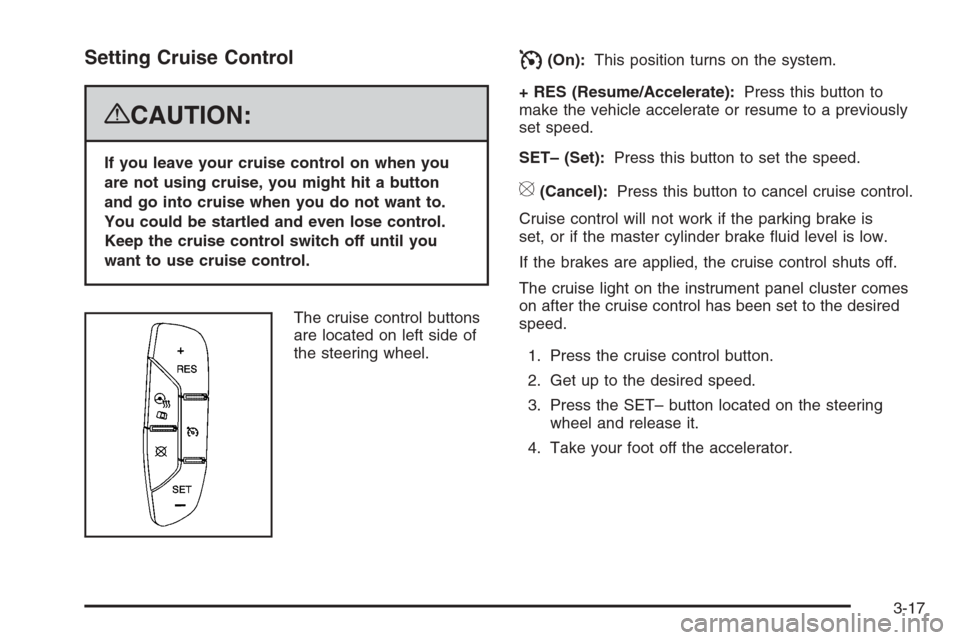
The cruise control buttons
are located on left side of
the steering wheel.
I(On):This position turns on the system.
+ RES (Resume/Accelerate):Press this button to
make the vehicle accelerate or resume to a previously
set speed.
SET– (Set):Press this button to set the speed.
[(Cancel):Press this button to cancel cruise control.
Cruise control will not work if the parking brake is
set, or if the master cylinder brake uid level is low.
If the brakes are applied, the cruise control shuts off.
The cruise light on the instrument panel cluster comes
on after the cruise control has been set to the desired
speed.
1. Press the cruise control button.
2. Get up to the desired speed.
3. Press the SET– button located on the steering
wheel and release it.
4. Take your foot off the accelerator.
3-17
Page 157 of 454
Using Cruise Control on Hills
How well your cruise control works on hills depends
upon the vehicle speed, load, and the steepness of the
hills. When going up steep hills, you might have to
step on the accelerator pedal to maintain the vehicle’s
speed. When going downhill, you might have to brake or
shift to a lower gear to keep the vehicle’s speed
down. Applying the brake or shifting into a lower gear
ends cruise control. If you need to apply the brake
or shift to a lower gear due to the grade of the downhill
slope, you might not want to attempt to use the
cruise control feature.
Ending Cruise Control
To turn off the cruise control, step lightly on the brake
pedal, or press the cancel button on the steering wheel.
Erasing Speed Memory
When you turn off the cruise control or the ignition, your
cruise control set speed memory is erased.
Adaptive Cruise Control
If your vehicle has this feature, be sure to read this
entire section before using it.
The system operates on a radio frequency subject to
Federal Communications Commission (FCC) Rules and
with Industry Canada.This device complies with Part 15 of the FCC Rules.
Operation is subject to the following two conditions:
1. This device may not cause interference.
2. This device must accept any interference received,
including interference that may cause undesired
operation of the device.
This device complies with RSS-210 of Industry Canada.
Operation is subject to the following two conditions:
1. This device may not cause interference.
2. This device must accept any interference received,
including interference that may cause undesired
operation of the device.
Changes or modications to this system by other than
an authorized service facility could void authorization to
use this equipment.
Adaptive Cruise Control is an enhancement to traditional
cruise control. It allows you to keep cruise control
engaged in moderate traffic conditions without having to
constantly reset your cruise control. Adaptive Cruise
Control uses radar to detect a vehicle directly ahead in
your path, within a distance of 330 ft (100 m), and
operates at speeds above 25 mph (40 km/h). When it is
engaged by the driver, the system can apply limited
braking or acceleration of the vehicle automatically to
maintain a selected follow distance to the vehicle ahead.
3-19
Page 159 of 454

CAUTION: (Continued)
On slippery roads, fast changes in tire
traction can cause needless wheel
spinning, and you could lose control.
Do not use cruise control on slippery
roads.
When weather limits visibility, such as
when in fog, rain, or snow conditions,
Adaptive Cruise Control performance is
limited. There may not be enough distance
to adapt to the changing traffic conditions.
Do not use cruise control when visibility
is low.The Adaptive Cruise
controls are located on
the steering wheel.
The cruise control buttons are located on outboard side
of the steering wheel.
](On):This position turns on the system.
+ Res (Resume/Accelerate):Press this button to
make the vehicle resume to a previously set speed or to
increase the set speed when Adaptive Cruise Control
is already active.
3-21
Page 161 of 454
 button.
2. Get up to the speed desired.
3. Press in the SET– button and release it.
4. Take your foot off the accelerator pedal.](/img/23/7892/w960_7892-160.png "CADILLAC DTS 2008 1.G Owners Manual To set Adaptive Cruise Control, do the following:
1. Press the
](On) button.
2. Get up to the speed desired.
3. Press in the SET– button and release it.
4. Take your foot off the accelerator pedal.")
To set Adaptive Cruise Control, do the following:
1. Press the
](On) button.
2. Get up to the speed desired.
3. Press in the SET– button and release it.
4. Take your foot off the accelerator pedal.
Once Adaptive Cruise Control is set, it may immediately
apply the brakes if it detects a vehicle ahead is too
close or moving slower than your vehicle.
The on symbol is located on the display at the top of
the instrument panel to the right of the driver. When
the on symbol is lit on the display, it indicates that
Adaptive Cruise Control is active.
A message on the DIC will also display when Adaptive
Cruise Control is set. SeeDIC Warnings and
Messages on page 3-75.
Keep in mind speed limits, surrounding traffic speeds,
and weather conditions when adjusting your set speed.
If your vehicle is in Adaptive Cruise Control when
the traction control system begins to limit wheel spin,
the Adaptive Cruise Control will automatically disengage.
SeeTraction Control System (TCS) on page 4-5and
StabiliTrak
®System on page 4-7. When road conditions
allow you to safely use it again, you may turn the
Adaptive Cruise Control back on.
Increasing Set Speed While Using Adaptive
Cruise Control
There are two ways to increase the set speed:
Use the accelerator to get to the higher speed.
Press the SET– button and then release the
button and the accelerator pedal. The vehicle will
now cruise at the higher speed.
Press the +RES button. Hold it there until the
desired set speed is displayed on the Driver
Information Center (DIC), then release the switch.
To increase your set speed in very small amounts,
move the switch briey to +RES. Each time this
is done, your set speed increases by 1 mph (1 km/h).
Your vehicle will not reach the set speed until the
system determines there is not a vehicle in front of you.
At that point, your vehicle speed will increase to the
set speed.
3-23
Page 162 of 454

Decreasing Set Speed While Using
Adaptive Cruise Control
Press the SET– button until you reach the lower speed
desired, then release it.
To slow down in very small amounts, briey press the
SET– button. Each time this is done, your set speed
decreases by 1 mph (1 km/h) slower.
Resuming a Set Speed
Suppose the Adaptive Cruise Control is set at a desired
speed and then the brakes are applied. This will turn
off the Adaptive Cruise Control. But it does not need to
be reset.
Once you are going about 25 mph (40 km/h) or more,
press the +RES button. Adaptive Cruise Control
will be engaged with the previously chosen set speed.
Selecting the Follow Distance (GAP)
When the system detects a slower moving vehicle, it will
adjust your vehicle’s speed and maintain the follow
distance (gap) you select.
Use the plus and minus buttons on the steering wheel
to adjust the follow distance.
Press the plus button to increase the distance or the
minus button to decrease the distance. The rst button
press shows the current follow distance setting on
the DIC. The current follow distance setting will
be maintained until you change it.
There are six follow distances to choose from. The
follow distance selection ranges from near to far
(one second to two seconds follow time). The distance
maintained for a selected follow distance will vary
based on vehicle speed. The faster the vehicle speed
the further back your vehicle will follow. Consider
traffic and weather conditions when selecting the follow
distance. The range of selectable distances may not
be appropriate for all drivers and driving conditions.
If you prefer to travel at a follow distance farther than
Adaptive Cruise Control allows, disengage the
system and drive manually.
3-24
Page 170 of 454

Exterior Lamps
The exterior lamps
control is located on
the instrument panel
to the left of the
steering wheel.
It controls the following systems:
Headlamps
Taillamps
Parking Lamps
License Plate Lamps
Instrument Panel Lights
Fog Lamps
The exterior lamps control has four positions:
O(Off):Turns off the exterior lamps except for
Daytime Running Lamps (DRL).AUTO (Automatic):Automatically turns on the
headlamps at normal brightness, together with the
following:
Parking Lamps
Instrument Panel Lights
IntelliBeam™
;(Parking Lamps):Turns on the parking lamps
together with the following:
Instrument Panel Lights
License Plate Lamps
Taillamps
Side Marker Lamps
The parking brake indicator light comes on and stays on
while the parking lamps are on with the engine off
and the ignition in ACC/ACCESSORY or ON/RUN.
2(Headlamps):Turns on the headlamps together
with the previously listed lamps. A warning chime
sounds if the driver’s door is opened while the ignition
switch is off and the headlamps are on.
-(Fog Lamps):Press the exterior lamps control to
turn on the fog lamps. SeeFog Lamps on page 3-36.
3-32
Page 184 of 454

Sensors
The solar sensor, located in the defrost grille, middle
of the instrument panel, monitors the solar radiation.
Do not cover the solar sensor or the system will
not work properly.There is also an interior
temperature sensor
located next to the steering
wheel that measures the
temperature of the air
inside your vehicle.
There is also an exterior temperature sensor located
behind the front grille. This sensor reads the outside
air temperature and helps maintain the temperature
inside the vehicle. Any cover on the front of the
vehicle could cause a false reading in the displayed
temperature.
3-46