ignition CADILLAC DTS 2008 1.G Owner's Guide
[x] Cancel search | Manufacturer: CADILLAC, Model Year: 2008, Model line: DTS, Model: CADILLAC DTS 2008 1.GPages: 454, PDF Size: 2.48 MB
Page 157 of 454
Using Cruise Control on Hills
How well your cruise control works on hills depends
upon the vehicle speed, load, and the steepness of the
hills. When going up steep hills, you might have to
step on the accelerator pedal to maintain the vehicle’s
speed. When going downhill, you might have to brake or
shift to a lower gear to keep the vehicle’s speed
down. Applying the brake or shifting into a lower gear
ends cruise control. If you need to apply the brake
or shift to a lower gear due to the grade of the downhill
slope, you might not want to attempt to use the
cruise control feature.
Ending Cruise Control
To turn off the cruise control, step lightly on the brake
pedal, or press the cancel button on the steering wheel.
Erasing Speed Memory
When you turn off the cruise control or the ignition, your
cruise control set speed memory is erased.
Adaptive Cruise Control
If your vehicle has this feature, be sure to read this
entire section before using it.
The system operates on a radio frequency subject to
Federal Communications Commission (FCC) Rules and
with Industry Canada.This device complies with Part 15 of the FCC Rules.
Operation is subject to the following two conditions:
1. This device may not cause interference.
2. This device must accept any interference received,
including interference that may cause undesired
operation of the device.
This device complies with RSS-210 of Industry Canada.
Operation is subject to the following two conditions:
1. This device may not cause interference.
2. This device must accept any interference received,
including interference that may cause undesired
operation of the device.
Changes or modications to this system by other than
an authorized service facility could void authorization to
use this equipment.
Adaptive Cruise Control is an enhancement to traditional
cruise control. It allows you to keep cruise control
engaged in moderate traffic conditions without having to
constantly reset your cruise control. Adaptive Cruise
Control uses radar to detect a vehicle directly ahead in
your path, within a distance of 330 ft (100 m), and
operates at speeds above 25 mph (40 km/h). When it is
engaged by the driver, the system can apply limited
braking or acceleration of the vehicle automatically to
maintain a selected follow distance to the vehicle ahead.
3-19
Page 169 of 454

Using Adaptive Cruise Control on Hills
and When Towing a Trailer
How well Adaptive Cruise Control will work on hills
and when towing a trailer depends on your vehicle’s
speed, vehicle load, traffic conditions and the steepness
of the hills. It may not detect a vehicle in your lane
while driving on hills. When going up steep hills, you
may want to use the accelerator pedal to maintain your
vehicle’s speed. When going downhill, especially
when towing a trailer, you may want to brake to keep
your speed down. Applying the brake disengages
the system. You may choose not to use Adaptive Cruise
Control on steep hills, especially when towing a trailer.
Disengaging Adaptive Cruise Control
To turn off the system, apply the brake pedal,
press the cancel button, or press the Adaptive
Cruise Control button.
Erasing Set Speed Memory
Press the Adaptive Cruise Control button or turn the
ignition off.
Other Messages
There are three additional messages that may appear
on the DIC. They are SERVICE RADAR CRUISE,
RADAR CRUISE NOT READY and CLEAN RADAR.
These messages will appear to indicate a problem with
the Adaptive Cruise Control. SeeDIC Warnings and
Messages on page 3-75for more information.
Cleaning the System
The radar can become blocked by snow, ice, or dirt.
If so, you may need to turn off the engine and clean the
lens. Remember, do not use Adaptive Cruise Control
in icy conditions, or when visibility is low, such as in fog,
rain or snow.
The emblem/lens is located in the center of the grille.
To clean the emblem/lens, wipe the surface with a
soft cloth. After cleaning the emblem/lens, try to engage
the Adaptive Cruise Control. If you are unable to do
so, see your dealer/retailer.
3-31
Page 170 of 454

Exterior Lamps
The exterior lamps
control is located on
the instrument panel
to the left of the
steering wheel.
It controls the following systems:
Headlamps
Taillamps
Parking Lamps
License Plate Lamps
Instrument Panel Lights
Fog Lamps
The exterior lamps control has four positions:
O(Off):Turns off the exterior lamps except for
Daytime Running Lamps (DRL).AUTO (Automatic):Automatically turns on the
headlamps at normal brightness, together with the
following:
Parking Lamps
Instrument Panel Lights
IntelliBeam™
;(Parking Lamps):Turns on the parking lamps
together with the following:
Instrument Panel Lights
License Plate Lamps
Taillamps
Side Marker Lamps
The parking brake indicator light comes on and stays on
while the parking lamps are on with the engine off
and the ignition in ACC/ACCESSORY or ON/RUN.
2(Headlamps):Turns on the headlamps together
with the previously listed lamps. A warning chime
sounds if the driver’s door is opened while the ignition
switch is off and the headlamps are on.
-(Fog Lamps):Press the exterior lamps control to
turn on the fog lamps. SeeFog Lamps on page 3-36.
3-32
Page 172 of 454

The exterior lamp control is turned to any setting
except AUTO.
When this occurs, IntelliBeam is disabled until the
control is turned back to the AUTO position.
The IntelliBeam system is turned off at the inside
rearview mirror.
IntelliBeam might not turn off the high-beams if the
system cannot detect other vehicle’s lamps because of
any of the following:
The other vehicle’s lamp(s) are missing, damaged,
obstructed from view, or otherwise undetected.
The other vehicle’s lamp(s) are covered with dirt,
snow, and/or road spray.
The other vehicle’s lamp(s) cannot be detected due
to dense exhaust, smoke, fog, snow, road spray,
mist, or other airborne obstructions.
Your vehicle’s windshield is dirty, cracked, or
obstructed by something that blocks the view of the
IntelliBeam light sensor.
Your vehicle’s windshield is covered with ice, dirt,
haze, or other obstructions.
Your vehicle is loaded such that the front end of the
vehicle points upward, causing the IntelliBeam
sensor to aim high and not detect headlamps and
taillamps.
You are driving on winding or hilly roads.
You might need to manually disable or cancel the
high-beam headlamps by turning the low-beam
headlamps on, if any of the above conditions exist.
Disabling and Resetting IntelliBeam™ at
the Rearview Mirror
IntelliBeam can be disabled by using the controls on the
inside rearview mirror.
AUTO
3(On/Off):Press this button on the inside
rearview mirror to disable the system. The IntelliBeam
indicator turns off and does not come back on until
the IntelliBeam button is pressed again.
When IntelliBeam has turned on the high-beams, pull or
push the high-beam stalk. This will disable IntelliBeam.
The IntelliBeam indicator on the mirror turns off. To
turn IntelliBeam back on, press the IntelliBeam button
on the mirror.
A different sensitivity setting is available for dealer/
retailer diagnostics. This is done by pushing and holding
this button for 20 seconds until the IntelliBeam indicator
light ashes three times. If you accidentally activate
this, the vehicle’s setting automatically is reset when the
ignition is turned off and then on again.
3-34
Page 173 of 454

Cleaning the IntelliBeam™ Light Sensor
The light sensor is located
on the inside of the vehicle
in front of the inside
rearview mirror.
Clean the light sensor window, periodically, using glass
cleaner on a soft cloth. Gently wipe the sensor
window. Do not spray glass cleaner directly on the
surface of the sensor window.
Wiper Activated Headlamps
This feature activates the headlamps and parking lamps
after the windshield wipers are turned on and have
completed eight wipe cycles within four minutes.
When the ignition is turned to LOCK/OFF, the
wiper-activated headlamps immediately turn off.
The wiper-activated headlamps also turn off if the
windshield wipers are turned off.
Headlamps on Reminder
A warning chime will sound if the exterior lamp control
is left on in either the headlamp or parking lamp position
and the driver’s door is opened with the ignition off.
Daytime Running Lamps (DRL)
Daytime Running Lamps (DRL) can make it easier for
others to see the front of your vehicle during the
day. DRL can be helpful in many different driving
conditions, but they can be especially helpful in the short
periods after dawn and before sunset. Fully functional
daytime running lamps are required on all vehicles
rst sold in Canada.
The DRL system makes the turn signal lamps come on
when the following conditions are met:
It is still daylight and the ignition is on.
The exterior lamp control is in the off position.
The transmission is not in PARK (P)
(United States only).
The light sensor is covered or not detecting light.
See “Sensors” underDual Climate Control System
on page 3-42.
3-35
Page 174 of 454

When DRL are on, no other exterior lamps such as the
parking lamps, taillamps, etc. will be on when the DRL
are being used. The instrument panel will not be lit up
either.
When automatic lighting is on and it is dark enough
outside, the turn signal lamps turn off and normal
low-beam headlamp operation occurs.
When automatic lighting is on and it is bright enough
outside, the regular lamps go off, and the DRL takes over.
If the vehicle is started in a dark garage, the automatic
headlamp system comes on immediately. Once you
leave the garage, it will take approximately one minute for
the automatic headlamp system to change to DRL if there
is light outside. During that delay, the instrument panel
cluster may not be as bright as usual. Make sure the
instrument panel brightness knob is in the full bright
position. SeeInstrument Panel Brightness on page 3-37.
Turning on automatic lighting or the headlamps will
deactivate the DRL. If the parking lamps or the
fog lamps were turned on instead, the DRL will still
deactivate.
To idle the vehicle with the DRL off at night, turn off
automatic lighting and shift the transmission into
PARK (P). Placing the vehicle in PARK (P) disables the
DRL. The DRL will stay off until the vehicle is shifted
out of PARK (P).To drive the vehicle with the DRL off, turn off automatic
lighting and manually turn on the parking lamps or
fog lamps, if the vehicle has them.
As with any vehicle, the regular headlamp system
should be turned on when needed.
Fog Lamps
Use the fog lamps for better vision in foggy or misty
conditions.
-(Fog Lamps):The fog lamps button is located on
the exterior lamps control. The exterior lamps control
is located on the instrument panel to the left of the
steering column.
The ignition must be on for the fog lamps to work.
Press the exterior lamps button to turn the fog lamps
on or off. A light will come on in the instrument
panel cluster when the fog lamps are in use.
When the headlamps are changed to high-beam,
the fog lamps will turn off. The fog lamps come back
on again when the high-beam headlamps are turned off.
Some localities have laws that require the headlamps
to be on along with the fog lamps.
3-36
Page 175 of 454

Cornering Lamps
The cornering lamps come on when the headlamps or
parking lamps are on and you signal a turn with the
multifunction lever. They provide more light for
cornering.
Exterior Lighting Battery Saver
If the exterior lamp button has been left on, the exterior
lamps will turn off about 10 minutes after the ignition is
turned to LOCK/OFF and a door has been opened. This
protects against draining the battery if the headlamps or
parking lamps are accidentally left on. If you need to
leave the lamps on for more than 10 minutes, use the
exterior lamp control to turn the lamps back on after the
ignition is turned to LOCK/OFF and any door is opened.
Instrument Panel Brightness
D(Instrument Panel Brightness):This feature
controls the brightness of the instrument panel and
footwell lights, if equipped.
The button for this control is located below the exterior
lamps control.
Push the button in and release to extend the button.
Turn the button clockwise or counterclockwise to
brighten or dim the lights.
Courtesy Lamps
The courtesy lamps are located on the headliner above
the rear seat. These lamps come on by turning the
instrument panel brightness knob fully clockwise or when
any door is opened and it is dark outside. Puddle
lamps are located on the bottom of the front and rear
door trim.
Professional vehicles have an additional dome lamp and
also opera lamps.
Entry Lighting
This feature turns on the courtesy lamps and the
backlighting for the door switches and the exterior
lamp control when a door is opened or if the remote
keyless entry transmitter unlock button is pressed.
If activated due to the transmitter, the lighting remains
active for about 40 seconds. Since the entry lighting
system uses the light sensor, it must be dark outside in
order for the courtesy lamps to turn on. The courtesy
lamps turn off approximately 25 seconds after the
last door is closed. They will dim to off if the ignition
key is turned to ON/RUN, or immediately deactivate if
the power locks are activated.
3-37
Page 176 of 454

Parade Dimming
This feature prohibits dimming of the digital displays and
backlighting during daylight hours when the key is in
the ignition and the headlamps are on. This feature is
fully automatic. When the light sensor reads darkness
outside and the parking lamps are active, the digital
displays can be adjusted by turning the instrument panel
brightness knob counterclockwise to dim and clockwise
to brighten lighting.
Reading Lamps
The reading lamps are located on the overhead console
on the headliner and in the rear door opening. These
lamps come on automatically when any door is opened
and it is dark outside.
For manual operation, press the button to turn them on.
Press it again to turn them off.
If the reading lamps are left on, they automatically shut
off 10 minutes after the ignition has been turned off.
Footwell Lamps
If your vehicle has footwell lamps, they are located
under the instrument panel and at the rear of the front
seats. These lamps provide soft light to the front
and rear oor areas. They dim with the instrument panel
cluster lights, before going out completely.
Footwell lighting brightness can be adjusted with the
instrument panel brightness control located below
the exterior lamps control. SeeInstrument Panel
Brightness on page 3-37. The footwell lights will turn off
before the instrument panel lights are at their lowest
level of brightness.
Battery Load Management
The battery load management feature is designed to
monitor the vehicle’s electrical load and determine when
the battery is in a heavy discharge condition. During
times of high electrical loading, the engine may idle
at a higher revolutions per minute (rpm) setting
than normal to make sure the battery charges. High
electrical loads may occur when several of the following
are on: headlamps, high beams, fog lamps, rear
window defogger, the climate control fan at high speeds,
heated seats and engine cooling fans.
3-38
Page 178 of 454

Inadvertent Power Battery Saver
This feature is designed to protect your vehicle’s battery
against drainage from the interior lamps, trunk lamp,
glove box lamp, or the garage door opener. When the
ignition is turned off, the power to these features will
automatically turn off after 10 minutes. Power will
be restored for an additional 10 minutes if any door or
trunk is opened, or the courtesy lamp switch is
turned on.
Battery Run-Down Protection
This vehicle has a feature to help prevent the battery
from being drained, if the interior courtesy lamps,
reading/map lamps, visor vanity lamps or trunk lamp are
accidentally left on. If any of these lamps are left on,
they will automatically turn off after 10 minutes, if
the ignition is off. The lamps will not come back on
again until one of the following occurs:
The ignition is turned on.
The exterior lamps control is turned off, then
on again.
The headlamps will timeout after 10 minutes, if they are
manually turned on before the ignition is off.
Accessory Power Outlet(s)
The accessory power outlets can be used to plug in
electrical equipment such as a cellular telephone,
CB radio, etc.
If your vehicle has a center console, the power outlet is
located inside the lower storage area. There are
outlets also on the right front lower part of the driver’s
seat and under the climate control system next to
the ashtray. SeeCenter Console Storage on page 2-59.
There are two accessory power outlets in the rear
seat area located on the door armrests next to the
ashtrays.
There may be a small cap that must be removed to
access the accessory power outlet. When not using the
outlet be sure to cover it with the protective cap.
The accessory power outlet can be used at any time.
Notice:Leaving electrical equipment plugged in for
an extended period of time while the vehicle is off
will drain the battery. Power is always supplied
to the outlets. Always unplug electrical equipment
when not in use and do not plug in equipment
that exceeds the maximum 20 ampere rating.
3-40
Page 198 of 454
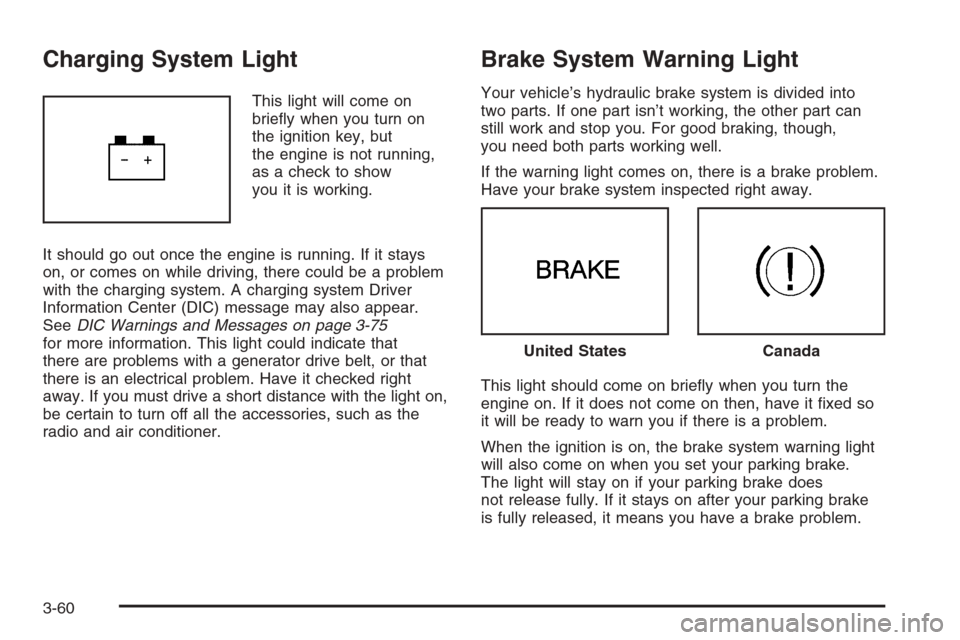
Charging System Light
This light will come on
briey when you turn on
the ignition key, but
the engine is not running,
as a check to show
you it is working.
It should go out once the engine is running. If it stays
on, or comes on while driving, there could be a problem
with the charging system. A charging system Driver
Information Center (DIC) message may also appear.
SeeDIC Warnings and Messages on page 3-75
for more information. This light could indicate that
there are problems with a generator drive belt, or that
there is an electrical problem. Have it checked right
away. If you must drive a short distance with the light on,
be certain to turn off all the accessories, such as the
radio and air conditioner.
Brake System Warning Light
Your vehicle’s hydraulic brake system is divided into
two parts. If one part isn’t working, the other part can
still work and stop you. For good braking, though,
you need both parts working well.
If the warning light comes on, there is a brake problem.
Have your brake system inspected right away.
This light should come on briey when you turn the
engine on. If it does not come on then, have it xed so
it will be ready to warn you if there is a problem.
When the ignition is on, the brake system warning light
will also come on when you set your parking brake.
The light will stay on if your parking brake does
not release fully. If it stays on after your parking brake
is fully released, it means you have a brake problem.
United StatesCanada
3-60