radio CADILLAC DTS 2009 1.G User Guide
[x] Cancel search | Manufacturer: CADILLAC, Model Year: 2009, Model line: DTS, Model: CADILLAC DTS 2009 1.GPages: 462, PDF Size: 2.46 MB
Page 179 of 462

Ashtray(s)
Notice:If papers, pins, or other ammable items
are put in the ashtray, hot cigarettes or other
smoking materials could ignite them and possibly
damage the vehicle. Never put ammable items
in the ashtray.
Front Ashtray
With the full oor console, the ashtray is located below
the climate control system. To open, push down and
then release the cover. To clean the ashtray, push
the lip of the ashtray to remove it. Push the opposite
side of the ashtray’s lip to install.
For vehicles without the oor console, pull the tray
located below the climate controls to reveal the ashtray.
The ashtray can be removed by pulling on the ledge
located at the top of the ashtray.
Rear Ashtray
The ashtrays are located on the door armrests.
To use an ashtray, lift the lid.
Analog Clock
The analog clock is located on the instrument panel
above the radio. The clock is not connected with
any other vehicle system and runs by itself. To adjust
the clock:
1. Locate the adjustment button directly below the
clock face.
2. Push and hold the adjustment button to advance
the clock hands. Holding the button down will
cause the clock to advance faster. Release the
button before reaching the desired time.
3. Push and release the button to increase the time
by one minute increments until the desired time is
reached.
3-39
Page 196 of 462

Charging System Light
This light comes on briey
when the ignition key is
turned to START, but
the engine is not running,
as a check to show it
is working.
If it does not, have the vehicle serviced by your
dealer/retailer.
The light should go out once the engine starts. If it stays
on, or comes on while driving, there could be a problem
with the charging system. A charging system message
in the Driver Information Center (DIC) can also appear.
SeeDIC Warnings and Messages on page 3-73for
more information. This light could indicate that there
are problems with a generator drive belt, or that there
is an electrical problem. Have it checked right away.
If the vehicle must be driven a short distance with the
light on, turn off accessories, such as the radio and air
conditioner.
Brake System Warning Light
The vehicle’s hydraulic brake system is divided into two
parts. If one part is not working, the other part can still
work and stop the vehicle. For good braking both parts
need to be working.
If the warning light comes on, there is a brake problem.
Have the brake system inspected right away.
This light comes on briey when the engine is turned
on. If it does not come on then, have it xed so it will be
ready to warn if there is a problem.
United StatesCanada
3-56
Page 235 of 462
Audio System(s)
Determine which radio the vehicle has and read the
following pages to become familiar with its features.
{CAUTION:
Taking your eyes off the road for extended periods
could cause a crash resulting in injury or death to
you or others. Do not give extended attention to
entertainment tasks while driving.
This system provides access to many audio and non
audio listings.To minimize taking your eyes off the road while driving,
do the following while the vehicle is parked:
Become familiar with the operation and controls of
the audio system.
Set up the tone, speaker adjustments, and preset
radio stations.
For more information, seeDefensive Driving on
page 4-2.
Notice:Contact your dealer/retailer before adding
any equipment.
Adding audio or communication equipment could
interfere with the operation of the vehicle’s engine,
radio, or other systems, and could damage them.
Follow federal rules covering mobile radio and
telephone equipment.
The vehicle has Retained Accessory Power (RAP).
With RAP, the audio system can be played even after
the ignition is turned off. SeeRetained Accessory
Power (RAP) on page 2-26for more information.
3-95
Page 236 of 462
Setting the Clock
Radio with a Single CD or a
Six-Disc CD Player
The vehicle has an analog clock as well as the digital
radio clock. At the time of new vehicle delivery, the digital
radio clock display should be disabled. If you decide to
use the digital radio clock as well as the analog clock, you
can change the setting to enable the radio clock display.
Enabling/Disabling the Digital
Radio Clock
For the Single CD Player
To turn the radio clock display on or off:
1. Turn the radio on.
2. Press the
Hbutton until the clock and date setting
menus appear.3. Press the pushbutton located under the forward
arrow tab until the menu for default clock and
date settings appear.
4. Press the pushbutton located under the currently
displayed status of either ON or OFF. The ON
display indicates the radio clock display is disabled
and the OFF display indicates the radio clock display
is enabled. Press this pushbutton to toggle the radio
clock display on or off.
If the radio clock display is turned on, the screen
displays Radio Clock ON for 10 seconds, then
returns to the original clock display menu.
If the radio clock display is turned off, the
screen displays Radio Clock OFF for 10 seconds.
The menus for clock and date settings are removed,
and ON displays as a current status indicating that
the clock display can be turned on, if desired.
The radio clock and analog clock are not synchronized.
Occasionally you might need to set the digital radio
clock using the procedure below to synchronize
both clocks.
3-96
Page 237 of 462
For a Six-Disc CD Player
To turn the radio clock display on or off:
1. Turn the radio on.
2. Press the MENU button until
His displayed
3. Press the pushbutton located under
Huntil the
clock and date settings appear.
4. Press the pushbutton located under the forward
arrow tab until the menu for default clock and
date settings appear.
5. Press the pushbutton located under the currently
displayed status of either ON or OFF. The ON
display indicates the radio clock display is disabled
and the OFF display indicates the radio clock display
is enabled. Press this pushbutton to toggle the radio
clock display on or off.
If the radio clock display is turned on, the screen
displays Radio Clock ON for 10 seconds, then
returns to the original clock display menu.
If the radio clock display is turned off, the
screen displays Radio Clock OFF for 10 seconds.
The menus for clock and date settings are removed,
and ON displays as a current status indicating that
the clock display can be turned on, if desired.
Setting the Time and Date
For the Single CD Player
This type of radio has aHbutton for setting the time
and date. To set the time and date:
1. Turn the radio on.
2. Press
Hand HR, MIN, MM, DD, YYYY
(hour, minute, month, day, and year) displays.
3. Press the pushbutton located under any one of
the tabs that you want to change. Every time the
pushbutton is pressed again, the time or the date
if selected, increases by one.
Another way to increase the time or date, is to
press the right SEEK arrow or the
\FWD
button.
To decrease the time or date, press the left SEEK
arrow or the
sREV button. You can also turn
the
aknob, located on the upper right side of the
radio faceplate, to adjust the selected setting.
3-97
Page 238 of 462
For a Six-Disc CD Player
This type of radio has a MENU button for setting the
time and date. To set the time and date:
1. Turn the radio on.
2. Press the MENU button until
Hoption is displayed.
3. Press the pushbutton located under
Hand the
HR, MIN, MM, DD, YYYY (hour, minute, month,
day, and year) displays.
4. Press the pushbutton located under any one of
the tabs that you want to change. Every time the
pushbutton is pressed again, the time or the date
if selected, increases by one.
Another way to increase the time or date, is to
press the right SEEK arrow or the
\FWD
button.
To decrease the time or date, press the left SEEK
arrow or the
sREV button. You can also turn
the
aknob, located on the upper right side of the
radio faceplate, to adjust the selected setting.
Changing the Time and Date Default
Setting
For the Single CD Player
To change the time and date default setting:
1. Change the time default setting from 12 hour to
24 hour or the date default setting from month/day/
year to day/month/year, by pressing the
Hbutton.
2. Once the clock and date settings display along with
the forward arrow tab, press the pushbutton located
under the forward arrow tab until the time 12H and
24H, and the date MM/DD/YYYY (month, day, and
year) and DD/MM/YYYY (day, month, and year)
displays.
3. Press the pushbutton located under the desired
option, then press the
Hbutton again to apply
the selected default, or let the screen time out.
3-98
Page 239 of 462
For the Six-Disc CD Player
To change the time and date default setting:
1. Change the time default setting from 12 hour to
24 hour or the date default setting from month/day/
year to day/month/year, by pressing the MENU
button.
2. Once
Hdisplays, press the pushbutton located
under
Huntil the time and date settings display
along with a forward arrow.
3. Press the pushbutton located under the forward
arrow tab until the time 12H and 24H, and the
date MM/DD/YYYY (month, day, and year) and
DD/MM/YYYY (day, month, and year) displays.
4. Press the pushbutton located under the desired
option, then press the MENU button again to
apply the selected default, or let the screen
time out.
Radio(s) (MP3)
Radio Data System (RDS)
The audio system has RDS. The RDS feature is
available for use only on FM stations that broadcast RDS
information. This system relies upon receiving specic
information from these stations and only works when the
information is available. While the radio is tuned to an
FM-RDS station, the station name or call letters display.
In rare cases, a radio station can broadcast incorrect
information that causes the radio features to work
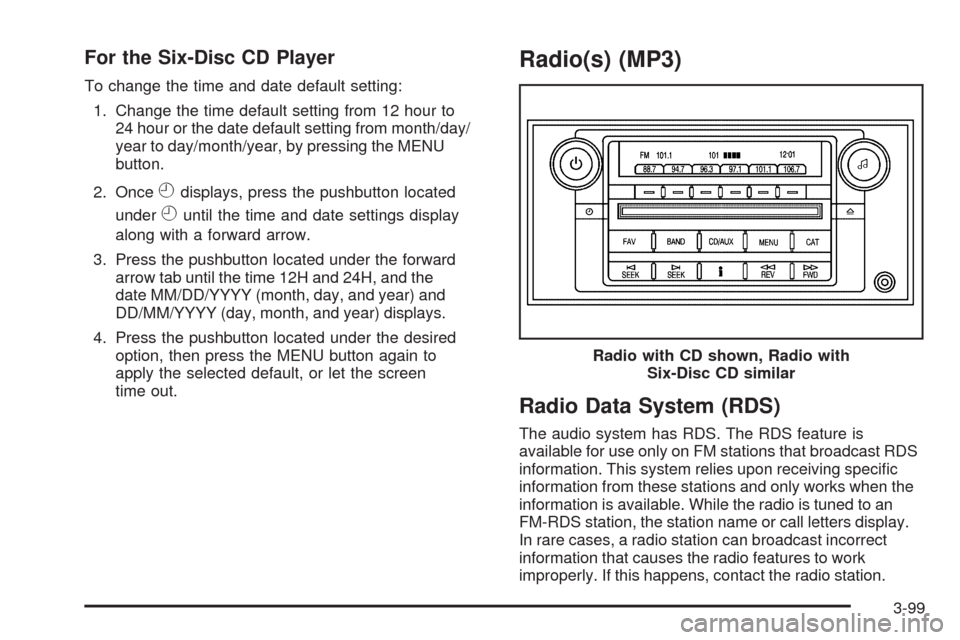
improperly. If this happens, contact the radio station.Radio with CD shown, Radio with
Six-Disc CD similar
3-99
Page 240 of 462
Playing the Radio
O
(Power/Volume):Press to turn the system on
and off.
Turn to increase or decrease the volume.
Speed Compensated Volume (SCV):Radios
with SCV automatically adjusts the radio volume to
compensate for road and wind noise while driving.
That way, the volume level should sound about
the same while driving. To activate SCV:
1. Set the radio volume to the desired level.
2. Press the MENU button to display the radio
setup menu.
3. Press the pushbutton under the AUTO VOLUM
(automatic volume) tab on the radio display.
4. Press the pushbutton under the desired Speed
Compensated Volume setting (OFF, Low, Med,
or High) to select the level of radio volume
compensation. The display times out after
approximately 10 seconds. Each higher setting
allows for more radio volume compensation at
faster vehicle speeds.AudioPilot
®:If the vehicle has the Bose®audio
system, it has AudioPilot noise compensation technology.
To use AudioPilot:
1. Set the radio volume to the desired level.
2. Press the MENU button to display the radio
setup menu.
3. Press the pushbutton located under the
AUTO VOLUM tab on the radio display.
4. Press the ON or OFF button to turn this feature
on or off.
When turned ON, AudioPilot continuously adjusts
the audio system equalization, to compensate for
background noise, so that the music always sounds
the same at the set volume level.
The feature is most effective at lower radio volume
settings where background noise can affect how well
you hear the music being played through the vehicle’s
audio system. At high volume settings there might
be little or no adjustments by AudioPilot. For more
information on AudioPilot, visit bose.com/audiopilot.
3-100
Page 241 of 462
Finding a Station
BAND:Press to switch between AM, FM, or XM™.
The selection displays.
a(Tune):Turn to select radio stations.
©SEEK¨:Press the arrows to go to the next or to
the previous station and stay there.
To scan stations, press and hold either arrow for
three seconds until a beep sounds. The radio goes
to a station, plays for a few seconds, then goes to the
next station. Press either arrow again to stop scanning.
The radio only seeks and scans stations with a
strong signal that are in the selected band.
4(Information) (XM™ Satellite Radio Service,
MP3/WMA, and RDS Features):Press this button to
display additional text information related to the current
FM-RDS or XM station, or MP3/WMA song. A choice of
additional information such as: Channel, Song, Artist,
CAT (category) can display. Continue pressing the
information button to highlight the desired label, or press
the pushbutton positioned under any one of the tabs and
the information about that tab displays.
When information is not available, No Info displays.
Storing a Radio Station as a Favorite
Drivers are encouraged to set up their radio station
favorites while the vehicle is in P (Park). Tune to
favorite stations using the presets, favorites button,
and steering wheel controls, if the vehicle has this
feature. SeeDefensive Driving on page 4-2.
FAV (Favorites):A maximum of 36 stations can be
programmed as favorites using the six pushbuttons
positioned below the radio station frequency tabs and
by using the radio favorites page button. Press the
FAV button to go through up to six pages of favorites,
each having six favorite stations available per page.
Each page of favorites can contain any combination of
AM, FM, or XM stations. To store a station as a favorite:
1. Tune to the desired radio station.
2. Press the FAV button to display the page where
you want the station stored.
3. Press and hold one of the six pushbuttons until a
beep sounds. When that pushbutton is pressed
and released, the station that was set, returns.
4. Repeat the steps for each pushbutton radio station
you want stored as a favorite.
3-101
Page 242 of 462
The number of favorites pages can be setup using the
MENU button. To setup the number of favorites pages:
1. Press the MENU button to display the radio
setup menu.
2. Press the pushbutton located below the FAV 1-6
label.
3. Select the desired number of favorites pages
by pressing the pushbutton located below the
displayed page numbers.
4. Press the FAV button, or let the menu time out,
to return to the original main radio screen showing
the radio station frequency labels and to begin
the process of programming your favorites for
the chosen amount of numbered pages.Setting the Tone
(Bass/Midrange/Treble)
BASS/MID/TREB (Bass, Midrange, or Treble):
To adjust bass, midrange, or treble, press the
aknob
until the tone control labels display. Continue pressing
to highlight the desired label, or press the pushbutton
positioned under the desired label. Turn the
aknob
to adjust the highlighted setting. The highlighted
setting can also be adjusted by pressing either
SEEK arrow,
\FWD, orsREV button until the
desired levels are obtained. If a station’s frequency
is weak or has static, decrease the treble.
To quickly adjust bass, midrange, or treble to the middle
position, press the pushbutton positioned under the
BASS, MID, or TREB label for more than two seconds.
A beep sounds and the level adjusts to the middle
position.
To quickly adjust all tone and speaker controls to the
middle position, press the
aknob for more than
two seconds until a beep sounds.
3-102