ignition CADILLAC DTS 2009 1.G Owner's Manual
[x] Cancel search | Manufacturer: CADILLAC, Model Year: 2009, Model line: DTS, Model: CADILLAC DTS 2009 1.GPages: 462, PDF Size: 2.46 MB
Page 103 of 462

The vehicle has a Computer-Controlled Cranking
System. This feature assists in starting the
engine and protects components. If the ignition
key is turned to the START position, and then
released when the engine begins cranking, the
engine will continue cranking for a few seconds or
until the vehicle starts. If the engine does not
start and the key is held in START, cranking will be
stopped after 15 seconds to prevent cranking
motor damage. To prevent gear damage, this
system also prevents cranking if the engine
is already running. Engine cranking can be
stopped by turning the ignition switch to the
ACC/ACCESSORY or LOCK/OFF position.
Notice:Cranking the engine for long periods of
time, by returning the key to the START position
immediately after cranking has ended, can overheat
and damage the cranking motor, and drain the
battery. Wait at least 15 seconds between each try,
to let the cranking motor cool down.2. If the engine does not start after 5-10 seconds,
especially in very cold weather (below 0°F or
−18°C), it could be ooded with too much gasoline.
Try pushing the accelerator pedal all the way to
the oor and holding it there as you hold the
key in START for up to a maximum of 15 seconds.
Wait at least 15 seconds between each try, to
allow the cranking motor to cool down. When the
engine starts, let go of the key and accelerator.
If the vehicle starts briey but then stops again,
repeat these steps. This clears the extra gasoline
from the engine. Do not race the engine
immediately after starting it. Operate the engine
and transmission gently until the oil warms up and
lubricates all moving parts.
Notice:The engine is designed to work with the
electronics in the vehicle. If you add electrical parts
or accessories, you could change the way the
engine operates. Before adding electrical equipment,
check with your dealer/retailer. If you do not, the
engine might not perform properly. Any resulting
damage would not be covered by the vehicle
warranty.
2-27
Page 105 of 462

Automatic Transmission Operation
The automatic transmission may have a shift lever
located either on the steering column or on the console
between the seats.
There are several different positions for the shift lever.
P (Park):This position locks the front wheels. It is
the best position to use when you start the engine
because the vehicle cannot move easily.{CAUTION:
It is dangerous to get out of the vehicle if the shift
lever is not fully in P (Park) with the parking brake
rmly set. The vehicle can roll.
Do not leave the vehicle when the engine is
running unless you have to. If you have left the
engine running, the vehicle can move suddenly.
You or others could be injured. To be sure the
vehicle will not move, even when you are on fairly
level ground, always set the parking brake and
move the shift lever to P (Park). SeeShifting Into
Park on page 2-33. If you are pulling a trailer,
seeTowing a Trailer on page 4-28.
Make sure the shift lever is fully in P (Park) before
starting the engine. The vehicle has an automatic
transmission shift lock control system. You have to fully
apply the regular brakes before you can shift from
P (Park) while the ignition key is in ON/RUN. If you
cannot shift out of P (Park), ease pressure on the shift
lever. Push the shift lever all the way into P (Park)
as you maintain brake application. Then move the shift
lever into another gear. SeeShifting Out of Park on
page 2-34.
2-29
Page 108 of 462
Performance Shifting
If the vehicle has this feature, it can detect a change in
driving patterns. If you make an aggressive driving
maneuver, the vehicle’s transmission automatically
shifts to the lowest possible gear to maximize vehicle
performance. The vehicle will automatically return
to normal operation when you return to normal driving
patterns.
Parking Brake
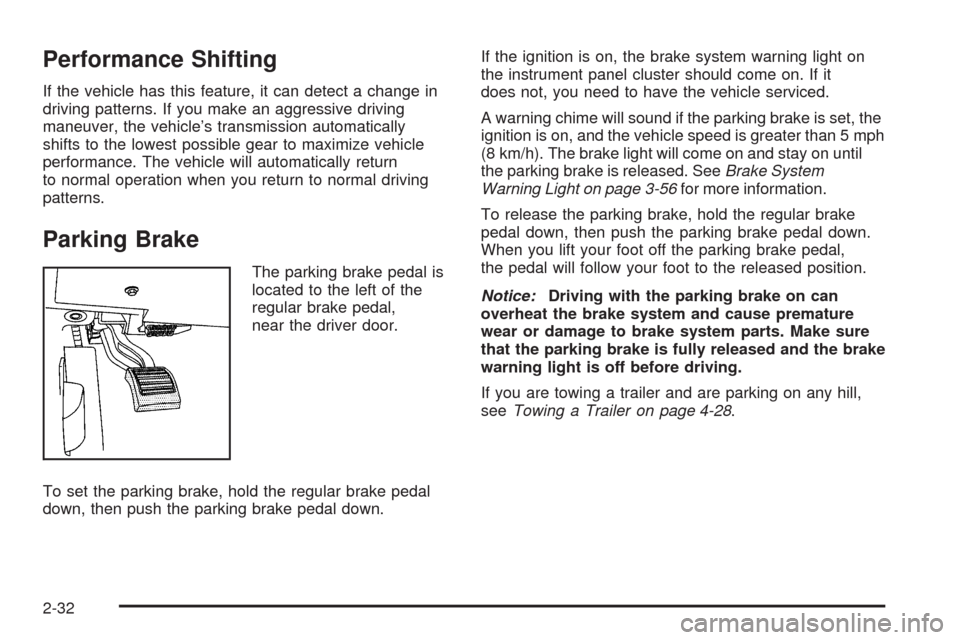
The parking brake pedal is
located to the left of the
regular brake pedal,
near the driver door.
To set the parking brake, hold the regular brake pedal
down, then push the parking brake pedal down.If the ignition is on, the brake system warning light on
the instrument panel cluster should come on. If it
does not, you need to have the vehicle serviced.
A warning chime will sound if the parking brake is set, the
ignition is on, and the vehicle speed is greater than 5 mph
(8 km/h). The brake light will come on and stay on until
the parking brake is released. SeeBrake System
Warning Light on page 3-56for more information.
To release the parking brake, hold the regular brake
pedal down, then push the parking brake pedal down.
When you lift your foot off the parking brake pedal,
the pedal will follow your foot to the released position.
Notice:Driving with the parking brake on can
overheat the brake system and cause premature
wear or damage to brake system parts. Make sure
that the parking brake is fully released and the brake
warning light is off before driving.
If you are towing a trailer and are parking on any hill,
seeTowing a Trailer on page 4-28.
2-32
Page 109 of 462

Shifting Into Park
{CAUTION:
It can be dangerous to get out of the vehicle if the
shift lever is not fully in P (Park) with the parking
brake rmly set. The vehicle can roll. If you have
left the engine running, the vehicle can move
suddenly. You or others could be injured. To be
sure the vehicle will not move, even when you are
on fairly level ground, use the steps that follow.
If you are pulling a trailer, seeTowing a Trailer on
page 4-28.
Steering Column Shift Lever
If the vehicle has a steering column shift lever, use this
procedure to shift the vehicle into P (Park):
1. Hold the brake pedal down.
2. Move the shift lever into P (Park) by pulling the shift
lever toward you and moving it up as far as it will go.3. With your foot still holding the brake pedal down,
set the parking brake. SeeParking Brake on
page 2-32for more information.
4. Turn the ignition key to LOCK/OFF.
5. Remove the key and take it with you. If you can
leave the vehicle with the ignition key in your
hand, the vehicle is in P (Park).
Console Shift Lever
If the vehicle is equipped with a console shift lever,
use this procedure to shift the vehicle into P (Park):
1. Hold the brake pedal down.
2. Move the shift lever into P (Park) by pushing the
lever all the way toward the front of the vehicle
and then to the left.
3. While keeping the brake pedal applied, set the
parking brake. SeeParking Brake on page 2-32
for more information.
4. Turn the ignition key to LOCK/OFF.
5. Remove the key and take it with you. If you can
leave the vehicle with the ignition key in your
hand, the vehicle is in P (Park).
2-33
Page 110 of 462

Leaving the Vehicle With the Engine
Running
{CAUTION:
It can be dangerous to leave the vehicle with the
engine running. The vehicle could move suddenly
if the shift lever is not fully in P (Park) with the
parking brake rmly set. And, if you leave the
vehicle with the engine running, it could overheat
and even catch re. You or others could be
injured. Do not leave the vehicle with the engine
running.
If you have to leave the vehicle with the engine running,
be sure your vehicle is in P (Park) and the parking
brake is rmly set before you leave it. SeeParking Brake
on page 2-32for more information.
Torque Lock
Torque lock is when the weight of the vehicle puts too
much force on the parking pawl in the transmission.
This happens when parking on a hill and shifting
the transmission into P (Park) is not done properly and
then it is difficult to shift out of P (Park). To prevent
torque lock, set the parking brake and then shift into
P (Park). To nd out how, see “Shifting Into Park” in this
section.
If torque lock does occur, your vehicle may need to be
pushed uphill by another vehicle to relieve the parking
pawl pressure, so you can shift out of P (Park).
Shifting Out of Park
Automatic Transmission Shift Lock
This vehicle has an electronic shift lock release system.
The shift lock release is designed to:
Prevent ignition key removal unless the shift lever
is in P (Park)
Prevent movement of the shift lever out of
P (Park), unless the ignition is in ON/RUN or
ACC/ACCESSORY and the regular brake pedal
is applied.
2-34
Page 111 of 462
The shift lock is always functional except in the case
of a an uncharged or low voltage (less than 9 volt)
battery.
If the vehicle has an uncharged battery or a battery with
low voltage, try charging or jump starting the battery.
SeeJump Starting on page 5-38.
Console Shift
If the console shift cannot be moved out of P (Park)
1. Apply the regular brakes.
2. Turn the ignition to ON/RUN or ACC/ACCESSORY
position. SeeIgnition Positions on page 2-25for
more information.
3. Push the shift lever all the way into P (Park).
4. Then, shift into the desired gear.
If you still cannot move the shift lever from P (Park),
consult your dealer/retailer or a professional towing
service.
Column Shift
If the column shift cannot be moved out of P (Park)
1. Apply the regular brakes.
2. Turn the ignition key to the ON/RUN or
ACC/ACCESSORY position. SeeIgnition
Positions on page 2-25for more information.
3. Shift out of the P (Park) position to the
N (Neutral) position.
4. Move the column shift to the desired gear.
If you still cannot move the shift lever from P (Park),
consult your dealer/retailer or a professional towing
service.
Parking Over Things That Burn
{CAUTION:
Things that can burn could touch hot exhaust
parts under the vehicle and ignite. Do not park
over papers, leaves, dry grass, or other things that
can burn.
2-35
Page 114 of 462
Mirrors
Automatic Dimming Rearview Mirror
The vehicle has an automatic dimming inside rearview
mirror with a compass display. The mirror may also
have OnStar
®controls and Intellibeam™. For more
information on Intellibeam™, see “Intellibeam Intelligent
High-Beam Headlamp Control System” underExterior
Lamps on page 3-29. For more information about
OnStar
®, seeOnStar®System on page 2-51.
Automatic Dimming Mirror Operation
Automatic dimming reduces the glare of lights from
behind the vehicle. The dimming feature comes on and
the indicator light illuminates each time the vehicle is
started.
O(On/Off):Press and holdOfor about three seconds
to turn the dimming feature and compass display on
or off.
AUTO
3(Vehicles with Intellibeam™):Press and
hold for approximately three seconds to turn the
compass display on or off.
Cleaning the Mirror
Do not spray glass cleaner directly on the mirror.
Use a soft towel dampened with water.
Compass
Compass Operation
PressOor AUTO3, depending on the vehicle,
to turn the compass on or off.
When the ignition and the compass feature are on, after
a few seconds, the mirror will display the compass
heading. The compass automatically calibrates as the
vehicle is driven.
Compass Calibration
If after a few seconds, the display does not show the
correct direction, (for example, N for North), there
may be a strong magnetic eld interfering with the
compass. Interference can be caused by a magnetic
antenna mount, magnetic note pad holder or a
similar magnetic item.
2-38
Page 117 of 462

Park Tilt Mirrors
If your vehicle is equipped with memory mirrors,
it is capable of performing the park tilt mirror feature.
This feature allows the driver and passenger side
mirror to tilt to a factory programmed position when
the vehicle is in R (Reverse). This feature may be
useful in allowing you to view the curb when you are
parallel parking.
When the vehicle is shifted out of R (Reverse) and
either a ve-second delay has occurred, or the
ignition is turned to LOCK/OFF, the driver and
passenger side mirror will return to its original
position.
This feature can be enabled/disabled through
the Driver Information Center (DIC). SeeDIC
Vehicle Customization on page 3-86for more
information.
Outside Convex Mirror
{CAUTION:
A convex mirror can make things (like other
vehicles) look farther away than they really are.
If you cut too sharply into the right lane, you could
hit a vehicle on the right. Check the inside mirror or
glance over your shoulder before changing lanes.
The passenger side mirror is convex shaped. A convex
mirror’s surface is curved so more can be seen from
the driver seat.
Outside Heated Mirrors
=(Rear Window Defogger):Press to heat the mirrors.
See “Rear Window Defogger” underDual Climate Control
System on page 3-40for more information.
Side Blind Zone Alert (SBZA)
If the vehicle has the Side Blind Zone Alert (SBZA)
system, seeSide Blind Zone Alert (SBZA) on page 2-45.
2-41
Page 140 of 462
Sunroof
The vehicle may have a power sunroof.
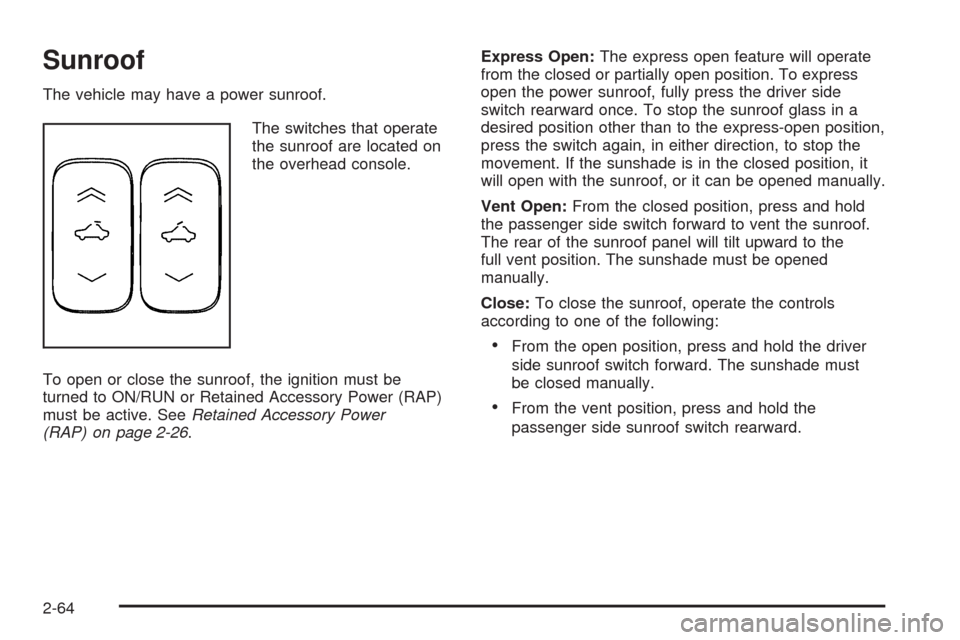
The switches that operate
the sunroof are located on
the overhead console.
To open or close the sunroof, the ignition must be
turned to ON/RUN or Retained Accessory Power (RAP)
must be active. SeeRetained Accessory Power
(RAP) on page 2-26.Express Open:The express open feature will operate
from the closed or partially open position. To express
open the power sunroof, fully press the driver side
switch rearward once. To stop the sunroof glass in a
desired position other than to the express-open position,
press the switch again, in either direction, to stop the
movement. If the sunshade is in the closed position, it
will open with the sunroof, or it can be opened manually.
Vent Open:From the closed position, press and hold
the passenger side switch forward to vent the sunroof.
The rear of the sunroof panel will tilt upward to the
full vent position. The sunshade must be opened
manually.
Close:To close the sunroof, operate the controls
according to one of the following:
From the open position, press and hold the driver
side sunroof switch forward. The sunshade must
be closed manually.
From the vent position, press and hold the
passenger side sunroof switch rearward.
2-64
Page 159 of 462

Passing Another Vehicle While Using
Cruise Control
Use the accelerator pedal to increase the vehicle speed.
When you take your foot off the pedal, the vehicle
slows down to the previous cruise control speed.
Using Cruise Control on Hills
How well your cruise control works on hills depends
upon the vehicle speed, load, and the steepness of the
hills. When going up steep hills, you might have to step
on the accelerator pedal to maintain the vehicle’s speed.
When going downhill, you might have to brake or shift to
a lower gear to keep the vehicle’s speed down. Applying
the brake or shifting into a lower gear ends cruise control.
If you need to apply the brake or shift to a lower gear due
to the grade of the downhill slope, you might not want to
attempt to use the cruise control feature.
Ending Cruise Control
To turn off the cruise control, step lightly on the brake
pedal, or press the cancel button on the steering wheel.
Erasing Speed Memory
The cruise control set speed memory is erased when
the cruise control or the ignition is turned off.
Adaptive Cruise Control
For vehicles with this feature, be sure to read this entire
section before using it.
The system operates on a radio frequency subject to
Federal Communications Commission (FCC) Rules and
with Industry Canada.
This device complies with Part 15 of the FCC Rules.
Operation is subject to the following two conditions:
1. This device may not cause interference.
2. This device must accept any interference received,
including interference that may cause undesired
operation of the device.
This device complies with RSS-210 of Industry Canada.
Operation is subject to the following two conditions:
1. This device may not cause interference.
2. This device must accept any interference received,
including interference that may cause undesired
operation of the device.
Changes or modications to this system by other than
an authorized service facility could void authorization to
use this equipment.
Adaptive Cruise Control (ACC) is an enhancement
to traditional cruise control. It allows you to keep
cruise control engaged in moderate traffic conditions
without having to constantly reset your cruise control.
3-19