AUX CADILLAC DTS 2010 1.G User Guide
[x] Cancel search | Manufacturer: CADILLAC, Model Year: 2010, Model line: DTS, Model: CADILLAC DTS 2010 1.GPages: 480, PDF Size: 17.56 MB
Page 268 of 480

O(Power/Volume):Turn to increase or decrease the
volume of the portable player. You might need to doadditional volume adjustments from the portable device.
BAND:Press to listen to the radio when a portableaudio device is playing. The portable audio devicecontinues playing, so you might want to stop it orpower it off.
CD/AUX (CD/Auxiliary):Press to play a CD when aportable audio device is playing. Press again andthe system begins playing audio from the connectedportable audio player. If a portable audio player isnot connected, “No Aux Input Device Found” displays.
Using an MP3
MP3/WMA CD-R or CD-RW Disc
The radio plays MP3 and WMA files that were recordedon a CD-R or CD-RW disc. The files can be recordedwith the following fixed bit rates: 32 kbps, 40 kbps,56 kbps, 64 kbps, 80 kbps, 96 kbps, 112 kbps,128 kbps, 160 kbps, 192 kbps, 224 kbps, 256 kbps, and320 kbps or a variable bit rate. Song title, artist name,and album can display when files are recorded usingID3 tags version 1 and 2.
Compressed Audio
The radio also plays discs that contain bothuncompressed CD audio (.CDA files) and MP3/WMAfiles. By default the radio reads only the uncompressedaudio and ignores the MP3/WMA files. Pressing theCAT button toggles between compressed anduncompressed audio format.
MP3/WMA Format
If you burn your own MP3/WMA disc on a personalcomputer:
•Make sure the MP3/WMA files are recorded on a
CD-R or CD-RW disc.
•Do not mix standard audio and MP3/WMA files on
one disc.
•The CD player is able to read and play a maximum
of 50 folders, 50 playlists, and 255 files.
•Create a folder structure that makes it easy to find
songs while driving. Organize songs by albumsusing one folder for each album. Each folderor album should contain 18 songs or less.
•Avoid subfolders. The system can support up to
8 subfolders deep, however, keep the totalnumber of folders to a minimum in order to reducethe complexity and confusion in trying to locatea particular folder during playback.
4-102
Page 272 of 480

2. Press the pushbutton positioned under the RDMlabel until Randomize All Discs displays to playsongs from all CDs loaded in a six-disc CD playerin random order. Press the same pushbuttonagain to turn off random play.
h(Music Navigator):Use the music navigator
feature to play MP3/WMA files on the CD-R or CD-RWin order by artist or album. Press the pushbuttonlocated below the music navigator label. The playerscans the disc to sort the files by artist and album ID3tag information. It may take several minutes to scan thedisc depending on the number of MP3/WMA filesrecorded to the CD-R or CD-RW. The radio might beginplaying while it is scanning the disc in the background.When the scan is finished, the CD-R or CD-RWbegins playing again.
Once the disc has scanned, the player defaults toplaying MP3/WMA files in order by artist. The currentartist playing is shown on the second line of the displaybetween the arrows. Once all songs by that artisthave played, the player moves to the next artist inalphabetical order on the CD-R or CD-RW and beginsplaying MP3/WMA files by that artist. If you want tolisten to MP3/WMA files by another artist, pressthe pushbutton located below either arrow button. TheCD goes to the next or previous artist in alphabeticalorder. Continue pressing either button until the desiredartist displays.
To change from playback by artist to playback byalbum, press the pushbutton located below the Sort Bylabel. From the sort screen, push one of the buttonsbelow the album button. Press the pushbutton below theBack label to return to the main music navigatorscreen. Now the album name displays on the secondline between the arrows and songs from the currentalbum begins to play. Once all songs from that albumhave played, the player moves to the next album inalphabetical order on the CD-R or CD-RW and beginsplaying MP3/WMA files from that album.
To exit music navigator mode, press the button belowthe Back label to return to normal MP3/WMA playback.
BAND:Press to listen to the radio when a CD isplaying. The inactive CD remains inside the radio forfuture listening.
CD/AUX (CD/Auxiliary):Press to play a CD whenlistening to the radio. The CD icon and a messageshowing disc and/or track number displays when aCD is in the player. Press this button again andthe system automatically searches for an auxiliary inputdevice such as a portable audio player. If a portableaudio player is not connected, “No Aux Input DeviceFound” displays.
4-106
Page 285 of 480

Theft-Deterrent Feature
THEFTLOCK®is designed to discourage theft of thevehicle’s radio by learning a portion of the VehicleIdentification Number (VIN). The radio does not operateif it is stolen or moved to a different vehicle.
Audio Steering Wheel Controls
Vehicles with audiosteering wheel controlscould differ depending onthe vehicle’s options.Some audio controls canbe adjusted at thesteering wheel.
w(Next):Press to go to the next radio station stored
as a favorite, or the next track if a CD/DVD is playing.
cx(Previous/End):Press to go to the previous
radio station stored as a favorite, the next track ifa CD/DVD is playing, to reject an incoming call, or enda current call.
bg(Mute/Push to Talk):Press to silence the vehicle
speakers only. Press again to turn the sound on.
For vehicles with Bluetooth or OnStar®systems pressand hold for longer than two seconds to interactwith those systems. SeeBluetooth®on page 4-108orthe OnStar Owner’s Guide for more information.
SRCE (Source):Press to switch between the radio(AM, FM, XM), CD, and for vehicles with, DVD,front auxiliary, and rear auxiliary.
For vehicles with the navigation system, press and holdthis button for longer than two seconds to initiatevoice recognition. See “Voice Recognition” in theNavigation System manual for more information.
+e!e(Volume): Press to increase or to decrease
the radio volume.
¨(Seek):Press to go to the next radio station while
in AM, FM, or XM™. Press¨to go to the next
track or chapter while sourced to the CD or DVD slot.
Press the¨if multiple discs are loaded to go to
the next disc while sourced to a CD player.
4-119
Page 427 of 480
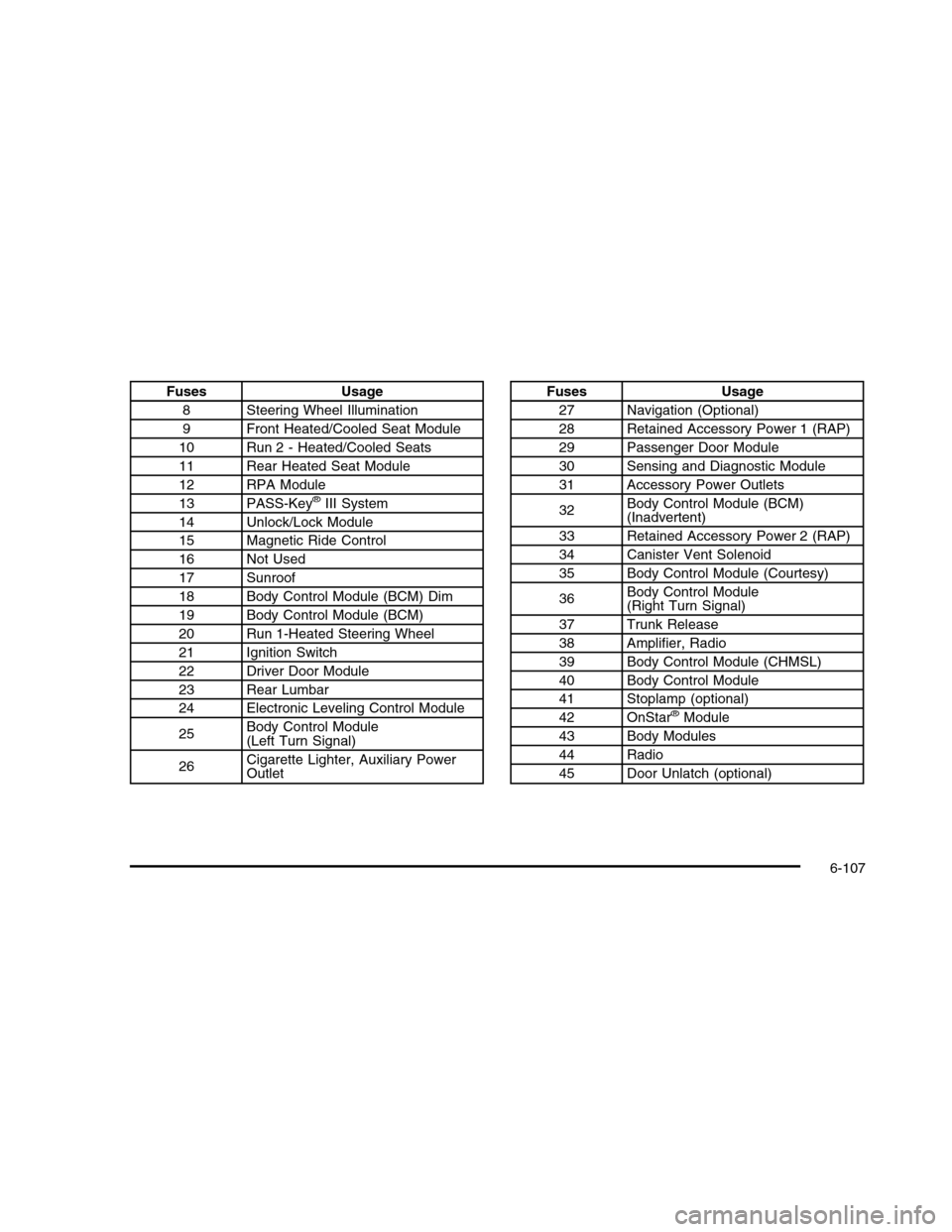
FusesUsage
8Steering Wheel Illumination
9Front Heated/Cooled Seat Module
10Run 2 - Heated/Cooled Seats
11Rear Heated Seat Module
12RPA Module
13PASS-Key®III System
14Unlock/Lock Module
15Magnetic Ride Control
16Not Used
17Sunroof
18Body Control Module (BCM) Dim
19Body Control Module (BCM)
20Run 1-Heated Steering Wheel
21Ignition Switch
22Driver Door Module
23Rear Lumbar
24Electronic Leveling Control Module
25Body Control Module(Left Turn Signal)
26Cigarette Lighter, Auxiliary PowerOutlet
FusesUsage
27Navigation (Optional)
28Retained Accessory Power 1 (RAP)
29Passenger Door Module
30Sensing and Diagnostic Module
31Accessory Power Outlets
32Body Control Module (BCM)(Inadvertent)
33Retained Accessory Power 2 (RAP)
34Canister Vent Solenoid
35Body Control Module (Courtesy)
36Body Control Module(Right Turn Signal)
37Trunk Release
38Amplifier, Radio
39Body Control Module (CHMSL)
40Body Control Module
41Stoplamp (optional)
42OnStar®Module
43Body Modules
44Radio
45Door Unlatch (optional)
6-107