wheel CADILLAC DTS 2011 1.G User Guide
[x] Cancel search | Manufacturer: CADILLAC, Model Year: 2011, Model line: DTS, Model: CADILLAC DTS 2011 1.GPages: 470, PDF Size: 4.72 MB
Page 27 of 470
Black plate (21,1)Cadillac DTS Owner Manual - 2011
Performance and Maintenance
Traction Control System (TCS)
The traction control system limits wheel spin. The
system turns on automatically every time the vehicle is
started.
.To turn off traction control, press and releaseiin
front of the shift lever.
Filluminates and the
appropriate DIC message is displayed. See DIC
Warnings and Messages on page 4‑65.
.Press and release the button again to turn on
traction control.
For more information, see Traction Control System
(TCS) on page 5‑6.
StabiliTrak®System
The vehicle may have the StabiliTrak system that
assists with directional control of the vehicle in difficult
driving conditions. The system turns on automatically
every time the vehicle is started. The system cannot be
turned off.
For more information, see StabiliTrak
®Systemon
page 5‑6.
Tire Pressure Monitor
This vehicle may have a Tire Pressure Monitor
System (TPMS).
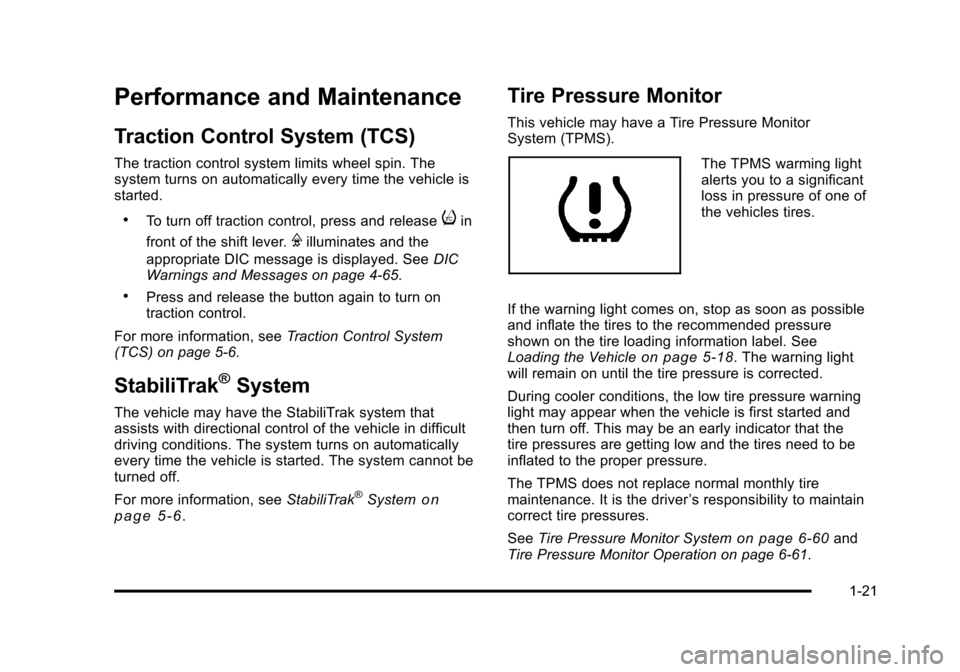
The TPMS warming light
alerts you to a significant
loss in pressure of one of
the vehicles tires.
If the warning light comes on, stop as soon as possible
and inflate the tires to the recommended pressure
shown on the tire loading information label. See
Loading the Vehicle
on page 5‑18. The warning light
will remain on until the tire pressure is corrected.
During cooler conditions, the low tire pressure warning
light may appear when the vehicle is first started and
then turn off. This may be an early indicator that the
tire pressures are getting low and the tires need to be
inflated to the proper pressure.
The TPMS does not replace normal monthly tire
maintenance. It is the driver ’s responsibility to maintain
correct tire pressures.
See Tire Pressure Monitor System
on page 6‑60and
Tire Pressure Monitor Operation on page 6‑61.
1-21
Page 31 of 470
Black plate (25,1)Cadillac DTS Owner Manual - 2011
SeeRadio Frequency Statementon page 8‑18for information regarding Part 15 of the Federal
Communications Commission (FCC) rules and Industry
Canada Standards RSS-210/220/310.
OnStar Steering Wheel Controls
This vehicle may have a Talk/Mute button that can be
used to interact with OnStar Hands-Free calling. See
Audio Steering Wheel Controls
on page 4‑114for more
information.
On some vehicles, the mute button can be used to
dial numbers into voice mail systems, or to dial phone
extensions. See the OnStar Owner's Guide for more
information.
Your Responsibility
Increase the volume of the radio if the OnStar advisor
cannot be heard.
If the light next to the OnStar buttons is red, the system
may not be functioning properly. Push the
Qbutton
and request a vehicle diagnostic. If the light appears
clear (no light appears), your OnStar subscription has
expired and all services have been deactivated. Push
the
Qbutton to confirm that the OnStar equipment is
active.
1-25
Page 33 of 470
Black plate (1,1)Cadillac DTS Owner Manual - 2011
Section 2 Seats and Restraint System
Head Restraints. . . . . . . . . . . . . . . . . . . . . . . . . . . . . . . . . . . . 2-2
Front Seats . . . . . . . . . . . . . . . . . . . . . . . . . . . . . . . . . . . . . . . . . 2-3
Power Seats . . . . . . . . . . . . . . . . . . . . . . . . . . . . . . . . . . . . 2-3
Power Lumbar . . . . . . . . . . . . . . . . . . . . . . . . . . . . . . . . . . 2-4
Massaging Lumbar . . . . . . . . . . . . . . . . . . . . . . . . . . . . . . 2-4
Heated and Ventilated Seats . . . . . . . . . . . . . . . . . . . . 2-5
Memory Seat, Mirrors and Steering Wheel . . . . . . 2-6
Power Reclining Seatbacks . . . . . . . . . . . . . . . . . . . . . 2-8
Center Seat . . . . . . . . . . . . . . . . . . . . . . . . . . . . . . . . . . . . . 2-9
Rear Seats . . . . . . . . . . . . . . . . . . . . . . . . . . . . . . . . . . . . . . . . 2-10
Heated Seats . . . . . . . . . . . . . . . . . . . . . . . . . . . . . . . . . . 2-10
Rear Seat Pass-Through Door . . . . . . . . . . . . . . . . . 2-10
Safety Belts . . . . . . . . . . . . . . . . . . . . . . . . . . . . . . . . . . . . . . . 2-11
Safety Belts: They Are for Everyone . . . . . . . . . . . 2-11
How to Wear Safety Belts Properly . . . . . . . . . . . . 2-15
Lap-Shoulder Belt . . . . . . . . . . . . . . . . . . . . . . . . . . . . . 2-24
Safety Belt Use During Pregnancy . . . . . . . . . . . . . 2-29
Lap Belt . . . . . . . . . . . . . . . . . . . . . . . . . . . . . . . . . . . . . . . 2-29
Safety Belt Extender . . . . . . . . . . . . . . . . . . . . . . . . . . . 2-31
Child Restraints . . . . . . . . . . . . . . . . . . . . . . . . . . . . . . . . . . 2-31
Older Children . . . . . . . . . . . . . . . . . . . . . . . . . . . . . . . . . 2-31
Infants and Young Children . . . . . . . . . . . . . . . . . . . . 2-34
Child Restraint Systems . . . . . . . . . . . . . . . . . . . . . . . 2-37 Where to Put the Restraint . . . . . . . . . . . . . . . . . . . . . 2-39
Lower Anchors and Tethers for Children
(LATCH) . . . . . . . . . . . . . . . . . . . . . . . . . . . . . . . . . . . . . 2-41
Securing a Child Restraint in a Rear Seat Position . . . . . . . . . . . . . . . . . . . . . . . . . . . . . . . . . . . . . . 2-47
Securing a Child Restraint in the Center Front Seat Position . . . . . . . . . . . . . . . . . . . . . . . . . . . . . . . . 2-50
Securing a Child Restraint in the Right Front Seat Position . . . . . . . . . . . . . . . . . . . . . . . . . . . . . . . . 2-50
Airbag System . . . . . . . . . . . . . . . . . . . . . . . . . . . . . . . . . . . . 2-54
Where Are the Airbags? . . . . . . . . . . . . . . . . . . . . . . . 2-57
When Should an Airbag Inflate? . . . . . . . . . . . . . . . 2-59
What Makes an Airbag Inflate? . . . . . . . . . . . . . . . . 2-61
How Does an Airbag Restrain? . . . . . . . . . . . . . . . . 2-61
What Will You See After an Airbag Inflates? . . . 2-62
Passenger Sensing System . . . . . . . . . . . . . . . . . . . 2-64
Servicing Your Airbag-Equipped Vehicle . . . . . . . 2-68
Adding Equipment to Your Airbag-Equipped Vehicle . . . . . . . . . . . . . . . . . . . . . . . . . . . . . . . . . . . . . . 2-69
Restraint System Check . . . . . . . . . . . . . . . . . . . . . . . . .2-70
Checking the Restraint Systems . . . . . . . . . . . . . . . 2-70
Replacing Restraint System Parts After a Crash . . . . . . . . . . . . . . . . . . . . . . . . . . . . . . . . . . . . . . . . 2-71
2-1
Page 35 of 470

Black plate (3,1)Cadillac DTS Owner Manual - 2011
Pull the head restraint up to raise it. To lower the head
restraint, press the button, located on the top of the
seatback, and push the restraint down.
Push down on the head restraint after the button is
released to make sure that it is locked in place.
The head restraints are not designed to be removed.
Front Seats
Power Seats
The power seat controls
are on the outboard side
of the seats.
.Move the seat forward or rearward by sliding the
control forward or rearward.
.Raise or lower the front part of the seat cushion by
moving the front of the control up or down.
.Raise or lower the rear part of the seat cushion by
moving the rear of the control up or down.
The front seats also have power reclining seatbacks.
See Power Reclining Seatbacks on page 2‑8.
On vehicles with the memory feature, memory settings
can be programmed and recalled for seat positions.
See Memory Seat, Mirrors and Steering Wheel
on
page 2‑6.
2-3
Page 38 of 470

Black plate (6,1)Cadillac DTS Owner Manual - 2011
Remote Start Heated Front Seats
During a remote start, the front heated seats can be
turned on automatically. They are canceled when the
ignition is turned on. Press the button to use the heated
seats after the vehicle is started.
The heated seat indicator lights on the button do not
turn on during a remote start.
The temperature performance of an unoccupied seat
may be reduced. This is normal.
SeeRemote Vehicle Start
on page 3‑7for more
information.
Memory Seat, Mirrors and Steering
Wheel
On vehicles with the memory feature, the controls on
the driver door are used to program and recall memory
settings for the driver seat, outside mirrors, and the
steering wheel position if the vehicle has the power tilt
wheel and telescopic steering feature.
Storing Memory Positions
To save into memory:
1. Adjust the driver seat, including the seatback recliner and lumbar, both outside mirrors, and the
steering column.
2. Press and hold “1”until two beeps sound.
3. Repeat for a second driver position using “2.”
To recall the memory positions, press and release “1”
or “2.” The vehicle must be in P (Park). A single beep
will sound. The seat, outside mirrors, and steering
wheel will move to the position previously stored for the
identified driver.
Memory Remote Recall
The memory feature can recall the driver seat, outside
mirrors, and power steering column, if available, to
stored positions when entering the vehicle.
To activate memory remote recall, unlock the driver
door with the Remote Keyless Entry (RKE) transmitter.
The driver seat, outside mirrors, and adjustable pedals
will move to the memory position associated with the
transmitter used to unlock the vehicle.
The automatic recall feature can be turned on or off
using the vehicle customization menu. See “Memory
Seat Recall” DIC Vehicle Customization
on page 4‑77for more information.
2-6
Page 39 of 470

Black plate (7,1)Cadillac DTS Owner Manual - 2011
To stop recall movement, press one of the power seat
controls, memory or power mirror buttons, or the power
tilt wheel control.
If something has blocked the driver seat and/or the
steering column while recalling a memory position, the
recall may stop. Remove the obstruction; then press
and hold the appropriate manual control for the memory
item that is not recalling for two seconds. Try recalling
the memory position again by pressing the appropriate
memory button. If the memory position is still not
recalling, see your dealer for service.
Easy Exit Driver Seat
The easy exit driver seat feature can move the seat
rearward and the power steering column, if equipped,
up and forward to allow extra room to exit the vehicle.
S(Easy Exit Driver Seat):Press to recall the easy exit
seat position. The vehicle must be in P (Park). If the easy exit seat feature is programmed on in the
vehicle customization menu, automatic seat and
steering column movement occur when the ignition key
is removed.
A single beep sounds. The driver seat will move
back, and if the vehicle has the power tilt wheel and
telescopic steering feature, the power telescopic
steering column will move up and forward.
If something has blocked the driver seat while recalling
the exit position, the recall may stop. Remove the
obstruction; then press and hold the power seat control
rearward for two seconds. Try recalling the exit position
again. If the exit position is still not recalling, see your
dealer for service.
See
“Easy Exit Recall” and“Easy Exit Setup” under
DIC Vehicle Customizationon page 4‑77for more
information.
2-7
Page 44 of 470
Black plate (12,1)Cadillac DTS Owner Manual - 2011
After more than 40 years of safety belts in vehicles,
the facts are clear. In most crashes buckling up does
matter ... a lot!
Why Safety Belts Work
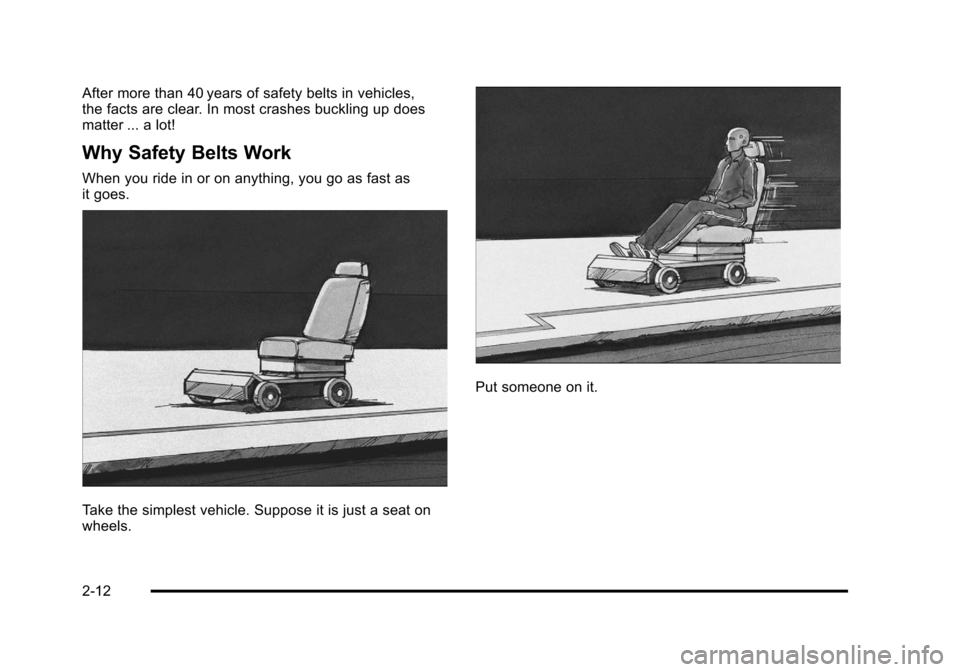
When you ride in or on anything, you go as fast as
it goes.
Take the simplest vehicle. Suppose it is just a seat on
wheels.
Put someone on it.
2-12
Page 86 of 470
Black plate (54,1)Cadillac DTS Owner Manual - 2011
Airbag System
The vehicle has the following airbags:
.A frontal airbag for the driver.
.A frontal airbag for the right front passenger.
.A seat-mounted side impact airbag for the driver.
.A seat-mounted side impact airbag for the right
front passenger.
The vehicle may also have the following airbags:
.A roof-rail airbag for the driver and the passenger
seated directly behind the driver.
.A roof-rail airbag for the right front passenger and
the passenger seated directly behind the right front
passenger. All of the airbags in your vehicle will have the word
AIRBAG embossed in the trim or on an attached label
near the deployment opening.
For frontal airbags, the word AIRBAG will appear on the
middle part of the steering wheel for the driver and on
the instrument panel for the right front passenger.
With seat-mounted side impact airbags, the word
AIRBAG will appear on the side of the seatback closest
to the door.
With roof-rail airbags, the word AIRBAG will appear
along the headliner or trim.
Airbags are designed to supplement the protection
provided by safety belts. Even though today's airbags
are also designed to help reduce the risk of injury from
the force of an inflating bag, all airbags must inflate very
quickly to do their job.
2-54
Page 89 of 470
Black plate (57,1)Cadillac DTS Owner Manual - 2011
Where Are the Airbags?
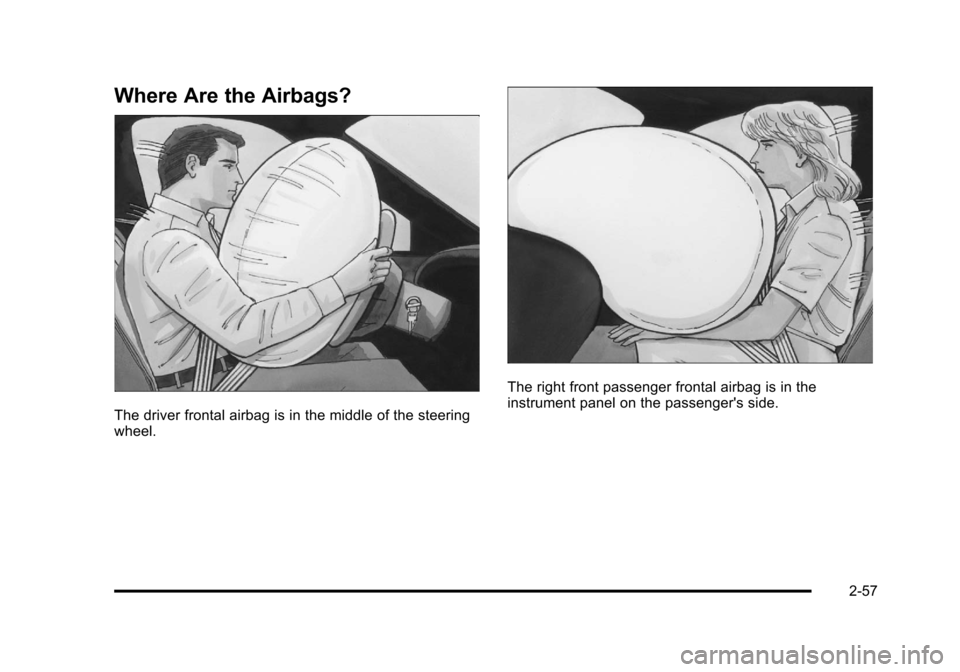
The driver frontal airbag is in the middle of the steering
wheel.
The right front passenger frontal airbag is in the
instrument panel on the passenger's side.
2-57
Page 91 of 470
Black plate (59,1)Cadillac DTS Owner Manual - 2011
{WARNING:
If something is between an occupant and an
airbag, the airbag might not inflate properly or it
might force the object into that person causing
severe injury or even death. The path of an
inflating airbag must be kept clear. Do not put
anything between an occupant and an airbag,
and do not attach or put anything on the steering
wheel hub or on or near any other airbag
covering.
Do not use seat accessories that block the
inflation path of a seat-mounted side impact
airbag.
Never secure anything to the roof of a vehicle with
roof-rail airbags by routing a rope or tie down
through any door or window opening. If you do,
the path of an inflating roof-rail airbag will be
blocked.
When Should an Airbag Inflate?
Frontal airbags are designed to inflate in moderate to
severe frontal or near-frontal crashes to help reduce
the potential for severe injuries mainly to the driver's or
right front passenger's head and chest. However, they
are only designed to inflate if the impact exceeds a
predetermined deployment threshold. Deployment
thresholds are used to predict how severe a crash is
likely to be in time for the airbags to inflate and help
restrain the occupants.
Whether your frontal airbags will or should deploy is not
based on how fast your vehicle is traveling. It depends
largely on what you hit, the direction of the impact, and
how quickly your vehicle slows down.
Frontal airbags may inflate at different crash speeds.
For example:
.If the vehicle hits a stationary object, the airbags
could inflate at a different crash speed than if the
vehicle hits a moving object.
.If the vehicle hits an object that deforms, the
airbags could inflate at a different crash speed
than if the vehicle hits an object that does not
deform.
2-59