instrument panel CADILLAC DTS 2011 1.G Service Manual
[x] Cancel search | Manufacturer: CADILLAC, Model Year: 2011, Model line: DTS, Model: CADILLAC DTS 2011 1.GPages: 470, PDF Size: 4.72 MB
Page 207 of 470
Black plate (45,1)Cadillac DTS Owner Manual - 2011
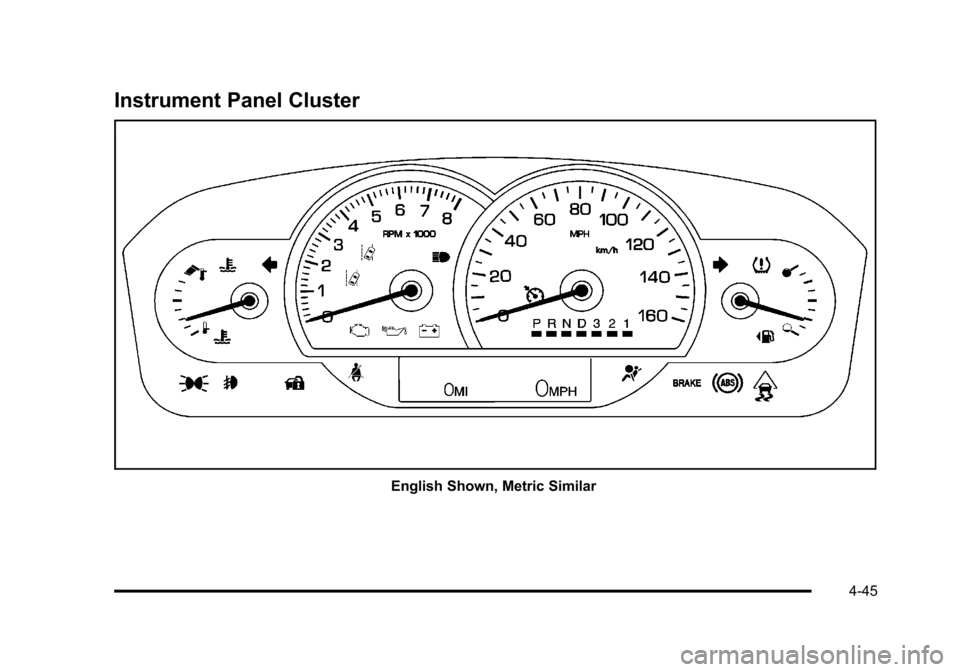
Instrument Panel Cluster
English Shown, Metric Similar
4-45
Page 209 of 470

Black plate (47,1)Cadillac DTS Owner Manual - 2011
Safety Belt Reminders
Driver Safety Belt Reminder Light
When the engine is started, a chime sounds for
several seconds to remind a driver to fasten the safety
belt, unless the driver safety belt is already buckled.
The safety belt light
comes on and stays on
for several seconds, then
flashes for several more.
This chime and light are repeated if the driver remains
unbuckled and the vehicle is in motion. If the driver
safety belt is already buckled, neither the chime nor the
light comes on.
Passenger Safety Belt Reminder Light
For vehicles equipped with the passenger safety belt
reminder light, several seconds after the engine is
started, a chime sounds for several seconds to remind
the front passenger to buckle their safety belt. The
passenger safety belt light, located on the instrument
panel, comes on and stays on for several seconds and
then flashes for several more.
This chime and light are
repeated if the passenger
remains unbuckled and
the vehicle is in motion.
If the passenger safety belt is buckled, neither the
chime nor the light comes on.
The front passenger safety belt warning light and chime
may turn on if an object is put on the seat such as a
briefcase, handbag, grocery bag, laptop or other
electronic device. To turn off the warning light and or
chime, remove the object from the seat or buckle the
safety belt.
4-47
Page 218 of 470

Black plate (56,1)Cadillac DTS Owner Manual - 2011
.If the vehicle has been driven through a deep
puddle of water, the vehicle's electrical system
might be wet. The condition is usually corrected
when the electrical system dries out. A few driving
trips should turn the light off.
.Make sure to fuel the vehicle with quality fuel.
Poor fuel quality causes the engine not to run as
efficiently as designed and can cause: stalling
after start-up, stalling when the vehicle is changed
into gear, misfiring, hesitation on acceleration,
or stumbling on acceleration. These conditions
might go away once the engine is warmed up.
If one or more of these conditions occurs, change
the fuel brand used. It will require at least one full
tank of the proper fuel to turn the light off.See Gasoline Octane on page 6‑5.
If none of the above have made the light turn off,
your dealer can check the vehicle. The dealer has the
proper test equipment and diagnostic tools to fix any
mechanical or electrical problems that might have
developed.
Emissions Inspection and Maintenance
Programs
Some state/provincial and local governments may have
programs to inspect the on-vehicle emission control
equipment For the inspection, the emission system
test equipment is connected to the vehicle’s Data Link
Connector (DLC).
The DLC is under the instrument panel to the left
of the steering wheel. See your dealer if assistance is
needed.
The vehicle may not pass inspection if:
.the Malfunction Indicator Lamp is on with the
engine running, or if the light does not come on
when the ignition is turned to ON/RUN while the
engine is off.
4-56
Page 221 of 470

Black plate (59,1)Cadillac DTS Owner Manual - 2011
Fuel Gauge
The fuel gauge shows
approximately how much
fuel is in the tank. It works
only when the engine
is on.
An arrow on the fuel gauge indicates the side of the
vehicle the fuel door is on.
If the fuel supply gets low, the FUEL LEVEL LOW
message appears in the Driver Information Center
and a single chime sounds. See DIC Warnings and
Messages
on page 4‑65for more information.
Here are a few situations that may occur with the fuel
gauge. All of these situations are normal and do not
indicate that anything is wrong with the fuel gauge:
.At the gas station the gas pump shuts off before
the gauge reads full.
.The gauge may change when the vehicle is
turning, stops quickly or accelerates quickly.
.It takes a little more or less fuel to fill the tank than
the gauge indicated. For example, the gauge may
have indicated that the tank was half full, but it
actually took a little more or less than half the
tank's capacity to fill the tank.
Driver Information Center (DIC)
The Driver Information Center (DIC) gives you the
status of many of your vehicle's systems. The DIC is
also used to display warning/status messages. All
messages will appear in the DIC display located at
the bottom of the instrument panel cluster, below the
tachometer and speedometer. The DIC buttons are
located on the instrument panel, to the left of the
steering wheel.
The DIC comes on when the ignition is on. After a short
delay, the DIC will display the information that was last
displayed before the engine was turned off.
The top line of the DIC display shows the vehicle
system information and the warning/status messages.
The bottom line of the DIC display shows the odometer
on the left side. The bottom line of the DIC display also
shows a digital speedometer on the right side.
If a problem is detected, a warning message will appear
on the display. Be sure to take any message that
appears on the display seriously and remember that
clearing the message will only make the message
disappear, not correct the problem.
4-59
Page 222 of 470

Black plate (60,1)Cadillac DTS Owner Manual - 2011
DIC Operation and Displays
The Driver Information
Center (DIC) has different
displays which can be
accessed by pressing the
DIC buttons located on
the instrument panel, to
the left of the steering
wheel.
3Trip/Fuel:Press this button to scroll through the
trip and fuel displays. See “Trip/Fuel Display Menu
Items” following for more information on these displays.
TVehicle Information: Press this button to scroll
through the vehicle information displays. See “Vehicle
Information Display Menu Items” following for more
information on these displays.
UCustomization: Press this button to scroll through
each of the customization features. See DIC Vehicle
Customization
on page 4‑77for more information on
the customization features.
VSet/Reset: Press this button to reset certain DIC
features and to acknowledge DIC warning messages
and clear them from the DIC display.
y zMenu Up/Down: Press this button to scroll up
and down the menu items.
Trip/Fuel Display Menu Items
3
(Trip/Fuel): The following display menu items can
be displayed by pressing the trip/fuel button:
TRIP A or TRIP B
These displays show the current distance traveled
since the last reset for each trip odometer in either
kilometers (km) or miles (mi). Both odometers can be
used at the same time. Each trip odometer can be reset
to zero separately by pressing and holding the set/reset
button for a few seconds while the desired trip odometer
is displayed.
FUEL RANGE
This display shows the approximate number of
remaining kilometers (km) or miles (mi) you can drive
without refilling the fuel tank. This estimate is based on
the current driving conditions and will change if the
driving conditions change. For example, if you are
driving in traffic and making frequent stops, the display
may read one number, but if you enter the freeway, the
number may change even though you still have the
same amount of fuel in the fuel tank. This is because
different driving conditions produce different fuel
economies. Generally, freeway driving produces better
fuel economy than city driving.
4-60
Page 229 of 470

Black plate (67,1)Cadillac DTS Owner Manual - 2011
DRIVER DOOR OPEN
This symbol appears with
this message.
This message displays when the driver door is not
closed completely. Make sure that the door is closed
completely.
ENGINE HOT –A/C
(Air Conditioning) OFF
This message displays when the engine coolant
becomes hotter than the normal operating temperature.
See Engine Coolant Temperature Gauge
on
page 4‑53. To avoid added strain on a hot engine, the
air conditioning compressor automatically turns off.
When the coolant temperature returns to normal, the
air conditioning compressor turns back on. You can
continue to drive your vehicle. If this message continues to appear, have the system
repaired by your dealer as soon as possible to avoid
damage to the engine.
ENGINE OVERHEATED IDLE ENGINE
Notice:
If you drive your vehicle while the engine is
overheating, severe engine damage may occur. If an
overheat warning appears on the instrument panel
cluster and/or DIC, stop the vehicle as soon as
possible. Do not increase the engine speed above
normal idling speed. See Engine Overheating
on
page 6‑29for more information.
This message displays when the engine coolant
temperature is too hot. Stop and allow the vehicle
to idle until it cools down. See Engine Coolant
Temperature Warning Light on page 4‑53.
See Overheated Engine Protection Operating Mode
on
page 6‑31for information on driving to a safe place in
an emergency.
4-67
Page 230 of 470

Black plate (68,1)Cadillac DTS Owner Manual - 2011
ENGINE OVERHEATED STOP ENGINE
Notice:If you drive your vehicle while the engine is
overheating, severe engine damage may occur. If an
overheat warning appears on the instrument panel
cluster and/or DIC, stop the vehicle as soon as
possible. See Engine Overheating
on page 6‑29for
more information.
This message displays when the engine has
overheated. Immediately look for a safe place to pull
your vehicle over and turn the engine off right away to
avoid severe engine damage. See Engine Overheating
on page 6‑29andOverheated Engine Protection
Operating Modeon page 6‑31. A chime also sounds
when this message is displayed.
ENGINE POWER REDUCED
This message displays when the engine power is being
reduced to protect the engine from damage. There
could be several malfunctions that might cause this
message. Reduced engine power can affect the
vehicle's ability to accelerate. If this message is on, but
there is no reduction in performance, proceed to your
destination. The performance may be reduced the next time the vehicle is driven. The vehicle may be driven
at a reduced speed while this message is on, but
acceleration and speed may be reduced. Anytime this
message stays on, the vehicle should be taken to your
dealer for service as soon as possible.
FOLLOWING GAP
This symbol appears with this message.
If your vehicle has Adaptive Cruise Control (ACC), this
message displays to show the follow distance that has
been set. There are six follow distances to choose from.
Each follow distance is shown on the DIC by displaying
from one to six bars between two car symbols. See
Adaptive Cruise Control
on page 4‑14for more
information.
4-68
Page 232 of 470
Black plate (70,1)Cadillac DTS Owner Manual - 2011
NO CRUISE BRAKING GAS PEDAL
APPLIED
This message displays when the Adaptive Cruise
Control (ACC) is engaged and you are pressing the
accelerator pedal enough to disable ACC automatic
braking. SeeAdaptive Cruise Control
on page 4‑14for
more information.
OIL PRESSURE LOW STOP ENGINE
Notice: If you drive your vehicle while the engine
oil pressure is low, severe engine damage may
occur. If a low oil pressure warning appears on
the instrument panel cluster and/or DIC, stop the
vehicle as soon as possible. Do not drive the
vehicle until the cause of the low oil pressure is
corrected. See Engine Oil
on page 6‑15for more
information.
This message displays when the vehicle's engine oil
pressure is low. The oil pressure light also appears on
the instrument panel cluster. See Oil Pressure Light
on
page 4‑57. A multiple chime sounds when this message is
displayed. See
Engine Oil
on page 6‑15for more
information.
Stop the vehicle immediately, as engine damage can
result from driving a vehicle with low oil pressure. Have
the vehicle serviced by your dealer as soon as possible
when this message is displayed.
PARKING ASSIST OFF
If your vehicle has the Ultrasonic Front and Rear
Parking Assist (UFRPA) system, after the vehicle is
shifted out of P (Park), this message displays to remind
the driver that the UFRPA system has been turned off.
Press the set/reset button to acknowledge this message
and clear it from the DIC display. To turn the UFRPA
system back on, see “PARKING ASSIST”underDIC
Operation and Displays
on page 4‑60. See Ultrasonic
Front and Rear Parking Assist (UFRPA)on page 3‑38for more information.
4-70
Page 234 of 470

Black plate (72,1)Cadillac DTS Owner Manual - 2011
SERVICE AIR BAG
This message displays when there is a problem with
the airbag system. Have your vehicle serviced by your
dealer immediately. SeeAirbag Readiness Light
on
page 4‑48for more information.
SERVICE A/C SYSTEM
This message displays when the air delivery mode door
or the electronic sensors that control the air conditioning
and heating systems are no longer working. Have the
climate control system serviced by your dealer if you
notice a drop in heating and air conditioning efficiency.
SERVICE BATTERY CHARGING
SYSTEM
This message displays when a problem with the
charging system has been detected. The charging
system light also displays on the instrument panel
cluster. See Charging System Light
on page 4‑49for
more information. Have your vehicle serviced by your
dealer.
SERVICE BRAKE ASSIST
This message displays if there is a problem with the
brake system. The brake system warning light and
the antilock brake system warning light may also be
displayed on the instrument panel cluster. See Brake
System Warning Light
on page 4‑50and Antilock
Brake System (ABS) Warning Lighton page 4‑51for
more information. If this happens, stop as soon as
possible and turn off the vehicle. Restart the vehicle
and check for the message on the DIC display. If the
message is displayed or appears again when you begin
driving, the brake system needs service. See your
dealer as soon as possible. See Brakes
on page 6‑33for more information.
SERVICE BRAKE SYSTEM
This message displays if the ignition is on to inform the
driver that the brake fluid level is low. Have the brake
system serviced by your dealer as soon as possible.
SERVICE LANE DEPARTURE SYSTEM
If your vehicle has the Lane Departure Warning (LDW)
system, this message may display to indicate that the
LDW system is not working properly. If this message
remains on after continued driving, the system needs
service. See your dealer. SeeLane Departure Warning
(LDW)
on page 3‑45for more information.
4-72
Page 237 of 470

Black plate (75,1)Cadillac DTS Owner Manual - 2011
SIDE BLIND ZONE ALERT
SYSTEM OFF
If your vehicle has the Side Blind Zone Alert (SBZA)
system, this message displays when the SBZA system
has been turned off. SeeSide Blind Zone Alert (SBZA)
on page 3‑42andDIC Operation and Displayson
page 4‑60for more information.
SIDE BLIND ZONE SYSTEM
UNAVAILABLE
If your vehicle has the Side Blind Zone Alert (SBZA)
system, this message displays when the SBZA system
is disabled because the sensor is blocked and cannot
detect vehicles in your blind zone. The sensor may be
blocked by mud, dirt, snow, ice, or slush. This message
may also display during heavy rain or due to road spray.
It may also come on when driving in isolated areas
with no guardrails, trees, or road signs and light traffic.
Your vehicle does not need service. For cleaning
instructions, see Washing Your Vehicle
on page 6‑98.
See Side Blind Zone Alert (SBZA)on page 3‑42for
more information.
SPEED LIMIT XXX MPH (km/h)
This message displays when the Speed Alert has
been turned on through the DIC Information Menu
and the vehicle is at or above the speed limit. See DIC
Operation and Displays
on page 4‑60for more
information.
SPEED LIMITED TO XXX MPH (km/h)
This message displays when your vehicle speed is
limited to 128 km/h (80 mph) because the vehicle
detects a problem in the speed variable assist steering,
magnetic ride control, or automatic leveling control
systems. Have your vehicle serviced by your dealer.
STABILITRAK NOT READY
If your vehicle has StabiliTrak, this message may
display and the Traction Control System and StabiliTrak
Warning Light on the instrument panel cluster may be
on after first driving the vehicle and exceeding 30 km/h
(19 mph) for 30 seconds. The StabiliTrak system is not
functional until the light has turned off. See StabiliTrak
®
Systemon page 5‑6for more information.
STARTING DISABLED SERVICE
THROTTLE
This message displays when your vehicle's throttle
system is not functioning properly. Have your vehicle
serviced by your dealer.
4-75