ignition CADILLAC DTS 2011 1.G Repair Manual
[x] Cancel search | Manufacturer: CADILLAC, Model Year: 2011, Model line: DTS, Model: CADILLAC DTS 2011 1.GPages: 470, PDF Size: 4.72 MB
Page 275 of 470

Black plate (113,1)Cadillac DTS Owner Manual - 2011
Transferring a Call
Audio can be transferred between the Bluetooth system
and the cell phone.
The cell phone must be paired and connected with the
Bluetooth system before a call can be transferred. The
connection process can take up to two minutes after the
ignition is turned to ON/RUN.
To Transfer Audio From the Bluetooth
System to a Cell Phone
During a call with the audio in the vehicle:1. Press
b g.
2. Say “Transfer Call”.
To Transfer Audio to the Bluetooth System
From a Cell Phone
During a call with the audio on the cell phone,
press
bg. The audio transfers to the vehicle. If the
audio does not transfer to the vehicle, use the audio
transfer feature on the cell phone. See your cell phone
manufacturers user guide for more information.
Voice Pass-Thru
Voice pass‐thru allows access to the voice recognition
commands on the cell phone. See your cell phone
manufacturers user guide to see if the cell phone
supports this feature.
To access contacts stored in the cell phone:
1. Press and hold
b gfor two seconds.
2. Say “Bluetooth”. The system responds “Bluetooth
ready”, followed by a tone.
3. Say “Voice”. The system responds “OK, accessing
.The cell phone's normal prompt messages will
go through its cycle according to the phone's
operating instructions.
Dual Tone Multi-Frequency (DTMF)
Tones
The Bluetooth system can send numbers and the
numbers stored as name tags during a call. You can
use this feature when calling a menu driven phone
system. Account numbers can also be stored for use.
4-113
Page 292 of 470
Black plate (14,1)Cadillac DTS Owner Manual - 2011
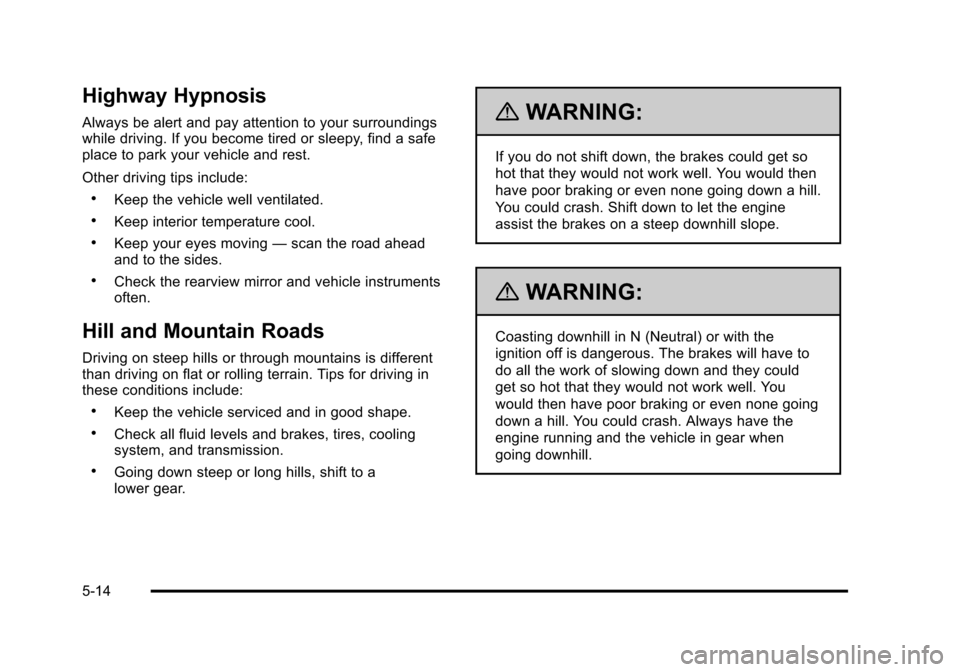
Highway Hypnosis
Always be alert and pay attention to your surroundings
while driving. If you become tired or sleepy, find a safe
place to park your vehicle and rest.
Other driving tips include:
.Keep the vehicle well ventilated.
.Keep interior temperature cool.
.Keep your eyes moving—scan the road ahead
and to the sides.
.Check the rearview mirror and vehicle instruments
often.
Hill and Mountain Roads
Driving on steep hills or through mountains is different
than driving on flat or rolling terrain. Tips for driving in
these conditions include:
.Keep the vehicle serviced and in good shape.
.Check all fluid levels and brakes, tires, cooling
system, and transmission.
.Going down steep or long hills, shift to a
lower gear.
{WARNING:
If you do not shift down, the brakes could get so
hot that they would not work well. You would then
have poor braking or even none going down a hill.
You could crash. Shift down to let the engine
assist the brakes on a steep downhill slope.
{WARNING:
Coasting downhill in N (Neutral) or with the
ignition off is dangerous. The brakes will have to
do all the work of slowing down and they could
get so hot that they would not work well. You
would then have poor braking or even none going
down a hill. You could crash. Always have the
engine running and the vehicle in gear when
going downhill.
5-14
Page 302 of 470

Black plate (24,1)Cadillac DTS Owner Manual - 2011
Automatic Level Control
This feature keeps the rear of your vehicle level
as the load changes. It is automatic, you do not
need to adjust anything.
This type of level control is fully automatic and will
provide a better leveled riding position as well as
better handling under a variety of passenger and
loading conditions. An air compressor connected
to the rear shocks will raise or lower the rear of
the vehicle to maintain proper vehicle height. The
system is activated when the ignition key is turned
to ON/RUN and will automatically adjust vehicle
height thereafter. The system may exhaust (lower
vehicle height) for up to ten minutes after the
ignition key has been turned to LOCK/OFF. You
may hear the air compressor operating when the
height is being adjusted.
Towing
Towing Your Vehicle
Consult your dealer or a professional towing service if
the disabled vehicle must be towed. SeeRoadside
Service on page 8‑7.
To tow the vehicle behind another vehicle for
recreational purposes (such as behind a motorhome),
see “Recreational Vehicle Towing” following.
Recreational Vehicle Towing
Recreational vehicle towing means towing the vehicle
behind another vehicle–such as behind a motorhome.
The two most common types of recreational vehicle
towing are known as dinghy towing and dolly towing.
Dinghy towing is towing the vehicle with all four wheels
on the ground. Dolly towing is towing the vehicle with
two wheels on the ground and two wheels up on a
device known as a dolly.
5-24
Page 304 of 470

Black plate (26,1)Cadillac DTS Owner Manual - 2011
Dolly Towing
The vehicle can be towed using a dolly. To tow the
vehicle using a dolly, follow these steps:1. Put the front wheels on a dolly.
2. Put the gear shift lever in P (Park).
3. Set the parking brake.
4. Clamp the steering wheel in a straight-ahead position with a clamping device designed for
towing. 5. Remove the key from the ignition.
6. Secure the vehicle to the dolly.
7. Release the parking brake.
Towing a Trailer
The Cadillac Professional Vehicle cannot tow a trailer.
{WARNING:
The driver can lose control when pulling a trailer if
the correct equipment is not used or the vehicle is
not driven properly. For example, if the trailer is
too heavy, the brakes may not work well
—or
even at all. The driver and passengers could be
seriously injured. The vehicle may also be
damaged; the resulting repairs would not be
covered by the vehicle warranty. Pull a trailer only
if all the steps in this section have been followed.
Ask your dealer for advice and information about
towing a trailer with the vehicle.
5-26
Page 329 of 470

Black plate (19,1)Cadillac DTS Owner Manual - 2011
How to Reset the Engine Oil Life
System
Reset the system whenever the engine oil is changed
so that the system can calculate the next engine oil
change. To reset the system:1. Turn the ignition to ON/RUN, with the engine off.
2. Press the DIC INFO button until OIL LIFE REMAINING displays. See DIC Operation and
Displays on page 4‑60.
3. Press and hold the DIC INFO RESET button until 100% displays.
4. Turn the key to LOCK/OFF.
If the CHANGE ENGINE OIL SOON message comes
back on when the vehicle is started, the engine oil life
system has not been reset. Repeat the procedure.
Engine Air Cleaner/Filter
See Engine Compartment Overviewon page 6‑14for
the location of the engine air cleaner/filter.
When to Inspect the Engine Air
Cleaner/Filter
Inspect the air cleaner/filter at the scheduled
maintenance intervals and replace it at the first oil
change after each 50,000 mile (80 000 km) interval.
See Scheduled Maintenance
on page 7‑3for more
information. If you are driving in dusty/dirty conditions,
inspect the filter at each engine oil change.
How to Inspect the Engine Air
Cleaner/Filter
To inspect the air cleaner/filter, remove the filter from
the vehicle and lightly shake the filter to release loose
dust and dirt. If the filter remains caked with dirt, a new
filter is required.
6-19
Page 344 of 470

Black plate (34,1)Cadillac DTS Owner Manual - 2011
Do not top off the brake fluid. Adding fluid does not
correct a leak. If fluid is added when the linings are
worn, there will be too much fluid when new brake
linings are installed. Add or remove brake fluid, as
necessary, only when work is done on the brake
hydraulic system.
{WARNING:
If too much brake fluid is added, it can spill on the
engine and burn, if the engine is hot enough. You
or others could be burned, and the vehicle could
be damaged. Add brake fluid only when work is
done on the brake hydraulic system.
If the ignition is on and the brake fluid is low, the
SERVICE BRAKE SYSTEM message displays in the
Driver Information Center (DIC). See DIC Warnings and
Messages on page 4‑65.
What to Add
Use only new DOT 3 brake fluid from a sealed
container. See Recommended Fluids and Lubricantson
page 7‑9.
Always clean the brake fluid reservoir cap and the area
around the cap before removing it. This helps keep dirt
from entering the reservoir.
{WARNING:
With the wrong kind of fluid in the brake hydraulic
system, the brakes might not work well. This could
cause a crash. Always use the proper brake fluid.
Notice:
.Using the wrong fluid can badly damage
brake hydraulic system parts. For example,
just a few drops of mineral-based oil, such
as engine oil, in the brake hydraulic system
can damage brake hydraulic system parts so
badly that they will have to be replaced. Do
not let someone put in the wrong kind of
fluid.
.If brake fluid is spilled on the vehicle's
painted surfaces, the paint finish can be
damaged. Be careful not to spill brake
fluid on the vehicle. If you do, wash it off
immediately. See Washing Your Vehicle
on
page 6‑98
.
6-34
Page 349 of 470

Black plate (39,1)Cadillac DTS Owner Manual - 2011
Notice:If you leave the radio or other accessories
on during the jump starting procedure, they could
be damaged. The repairs would not be covered by
the warranty. Always turn off the radio and other
accessories when jump starting the vehicle.
3. Turn off the ignition on both vehicles. Unplug unnecessary accessories plugged into the
cigarette lighter or the accessory power outlets.
Turn off the radio and all lamps that are not
needed. This will avoid sparks and help save
both batteries. And it could save the radio!
4. Open the hoods and locate the positive (+) and negative (−) terminal locations on the other vehicle.
Your vehicle has a remote positive (+) jump starting
terminal and a remote negative (−) jump starting
terminal.
4.6L LD8 Engine shown,4.6L L37 Engine similar
The remote positive (+) terminal is located in the
engine compartment on the passenger's side of
the vehicle. Lift the red plastic cap to access the
terminal. See Engine Compartment Overview
on
page 6‑14for more information on the location of
the remote positive (+) terminal.
A second remote positive (+) terminal is located on
the rear underseat fuse block.
6-39
Page 371 of 470

Black plate (61,1)Cadillac DTS Owner Manual - 2011
Federal Communications Commission
(FCC) and Industry Canada
SeeRadio Frequency Statementon page 8‑18for
information regarding Part 15 of the Federal
Communications Commission (FCC) rules and Industry
Canada Standards RSS-210/220/310.
Tire Pressure Monitor Operation
This vehicle may have a Tire Pressure Monitor System
(TPMS). The TPMS is designed to warn the driver when
a low tire pressure condition exists. TPMS sensors are
mounted onto each tire and wheel assembly, excluding
the spare tire and wheel assembly. The TPMS sensors
monitor the air pressure in the vehicle's tires and
transmits the tire pressure readings to a receiver
located in the vehicle.
When a low tire pressure
condition is detected, the
TPMS illuminates the low
tire pressure warning light
located on the instrument
panel cluster. If the warning light comes on, stop as soon as possible
and inflate the tires to the recommended pressure
shown on the tire loading information label. See
Loading the Vehicle on page 5‑18.
At the same time a message to check the pressure in a
specific tire appears on the Driver Information Center
(DIC) display. The low tire pressure warning light and
the DIC warning message come on at each ignition
cycle until the tires are inflated to the correct inflation
pressure. Using the DIC, tire pressure levels can be
viewed by the driver. For additional information and
details about the DIC operation and displays see
DIC
Operation and Displays
on page 4‑60and DIC
Warnings and Messages on page 4‑65.
The low tire pressure warning light may come on in cool
weather when the vehicle is first started, and then turn
off as you start to drive. This could be an early indicator
that the air pressure in the tire(s) are getting low and
need to be inflated to the proper pressure.
6-61
Page 372 of 470

Black plate (62,1)Cadillac DTS Owner Manual - 2011
A Tire and Loading Information label, attached to
your vehicle, shows the size of your vehicle's original
equipment tires and the correct inflation pressure for
your vehicle's tires when they are cold. SeeLoading the
Vehicle
on page 5‑18, for an example of the Tire and
Loading Information label and its location on your
vehicle. Also see Inflation - Tire Pressure on page 6‑57.
Your vehicle's TPMS can warn you about a low tire
pressure condition but it does not replace normal tire
maintenance. See Tire Inspection and Rotation
on
page 6‑65and Tires on page 6‑48.
Notice: Tire sealant materials are not all the same.
A non-approved tire sealant could damage the Tire
Pressure Monitor System (TPMS) sensors. TPMS
sensor damage caused by using an incorrect tire
sealant is not covered by the vehicle warranty.
Always use only the GM approved tire sealant
available through your dealer or included in the
vehicle.
Factory-installed Tire Inflator Kits use a GM approved
liquid tire sealant. Using non-approved tire sealants
could damage the TPMS sensors. See Tire Sealant and
Compressor Kit
on page 6‑75for information regarding
the inflator kit materials and instructions.
TPMS Malfunction Light and Message
The TPMS will not function properly if one or more of
the TPMS sensors are missing or inoperable. When the
system detects a malfunction, the low tire warning light
flashes for about one minute and then stays on for the
remainder of the ignition cycle. A DIC warning message
is also displayed. The low tire warning light and DIC
warning message come on at each ignition cycle until
the problem is corrected. Some of the conditions that
can cause the malfunction light and DIC message to
come on are:
.One of the road tires has been replaced with the
spare tire. The spare tire does not have a TPMS
sensor. The TPMS malfunction light and DIC
message should go off once you re‐install the road
tire containing the TPMS sensor.
.The TPMS sensor matching process was started
but not completed or not completed successfully
after rotating the vehicle's tires. The DIC message
and TPMS malfunction light should go off once the
TPMS sensor matching process is performed
successfully. See “TPMS Sensor Matching
Process” later in this section.
6-62
Page 374 of 470

Black plate (64,1)Cadillac DTS Owner Manual - 2011
The TPMS sensor matching process is outlined below:1. Set the parking brake.
2. Turn the ignition switch to ON/RUN with the engine off.
3. Press the Remote Keyless Entry (RKE) transmitter's lock and unlock buttons at the same
time for approximately five seconds. The horn
sounds twice to signal the receiver is in relearn
mode and TIRE LEARNING ACTIVE message
displays on the DIC screen.
4. Start with the driver side front tire.
5. Remove the valve cap from the valve cap stem. Activate the TPMS sensor by increasing or
decreasing the tire's air pressure for five seconds,
or until a horn chirp sounds. The horn chirp, which
may take up to 30 seconds to sound, confirms that
the sensor identification code has been matched to
this tire and wheel position. 6. Proceed to the passenger side front tire, and
repeat the procedure in Step 5.
7. Proceed to the passenger side rear tire, and repeat the procedure in Step 5.
8. Proceed to the driver side rear tire, and repeat the procedure in Step 5. The horn sounds two times to
indicate the sensor identification code has been
matched to the driver side rear tire, and the TPMS
sensor matching process is no longer active. The
TIRE LEARNING ACTIVE message on the DIC
display screen goes off.
9. Turn the ignition switch to LOCK/OFF.
10. Set all four tires to the recommended air pressure level as indicated on the Tire and Loading
Information label.
11. Put the valve caps back on the valve stems.
6-64