instrument panel CADILLAC DTS 2011 1.G Owners Manual
[x] Cancel search | Manufacturer: CADILLAC, Model Year: 2011, Model line: DTS, Model: CADILLAC DTS 2011 1.GPages: 470, PDF Size: 4.72 MB
Page 1 of 470

Black plate (1,1)Cadillac DTS Owner Manual - 2011
2011 Cadillac DTS Owner ManualM
In Brief. . . . . . . . . . . . . . . . . . . . . . . . . . . . . . . . . . . . . . . . . . . . 1-1
Instrument Panel . . . . . . . . . . . . . . . . . . . . . . . . . . . . . . . . . 1-2
Initial Drive Information . . . . . . . . . . . . . . . . . . . . . . . . . . . 1-4
Vehicle Features . . . . . . . . . . . . . . . . . . . . . . . . . . . . . . . . 1-15
Performance and Maintenance . . . . . . . . . . . . . . . . . . 1-21
Seats and Restraint System . . . . . . . . . . . . . . . . . . . . . . 2-1
Head Restraints . . . . . . . . . . . . . . . . . . . . . . . . . . . . . . . . . . 2-2
Front Seats . . . . . . . . . . . . . . . . . . . . . . . . . . . . . . . . . . . . . . . 2-3
Rear Seats . . . . . . . . . . . . . . . . . . . . . . . . . . . . . . . . . . . . . . 2-10
Safety Belts . . . . . . . . . . . . . . . . . . . . . . . . . . . . . . . . . . . . . 2-11
Child Restraints . . . . . . . . . . . . . . . . . . . . . . . . . . . . . . . . . 2-31
Airbag System . . . . . . . . . . . . . . . . . . . . . . . . . . . . . . . . . . 2-54
Restraint System Check . . . . . . . . . . . . . . . . . . . . . . . . . 2-70
Features and Controls . . . . . . . . . . . . . . . . . . . . . . . . . . . . 3-1
Keys . . . . . . . . . . . . . . . . . . . . . . . . . . . . . . . . . . . . . . . . . . . . . 3-3
Doors and Locks . . . . . . . . . . . . . . . . . . . . . . . . . . . . . . . . . 3-9
Windows . . . . . . . . . . . . . . . . . . . . . . . . . . . . . . . . . . . . . . . . 3-14 Theft-Deterrent Systems . . . . . . . . . . . . . . . . . . . . . . . . 3-18
Starting and Operating Your Vehicle . . . . . . . . . . . . . 3-22
Mirrors . . . . . . . . . . . . . . . . . . . . . . . . . . . . . . . . . . . . . . . . . . 3-35
Object Detection Systems . . . . . . . . . . . . . . . . . . . . . . . 3-38
Universal Home Remote System . . . . . . . . . . . . . . . . 3-47
Storage Areas . . . . . . . . . . . . . . . . . . . . . . . . . . . . . . . . . . . 3-54
Sunroof . . . . . . . . . . . . . . . . . . . . . . . . . . . . . . . . . . . . . . . . . 3-56
Instrument Panel . . . . . . . . . . . . . . . . . . . . . . . . . . . . . . . . . 4-1
Instrument Panel Overview . . . . . . . . . . . . . . . . . . . . . . . 4-3
Climate Controls . . . . . . . . . . . . . . . . . . . . . . . . . . . . . . . . 4-34
Warning Lights, Gauges, and Indicators . . . . . . . . . 4-44
Driver Information Center (DIC) . . . . . . . . . . . . . . . . . 4-59
Audio System(s) . . . . . . . . . . . . . . . . . . . . . . . . . . . . . . . . 4-86
Driving Your Vehicle . . . . . . . . . . . . . . . . . . . . . . . . . . . . . . 5-1
Your Driving, the Road, and the Vehicle . . . . . . . . . . 5-2
Towing . . . . . . . . . . . . . . . . . . . . . . . . . . . . . . . . . . . . . . . . . . 5-24
Page 7 of 470
Black plate (1,1)Cadillac DTS Owner Manual - 2011
Section 1 In Brief
Instrument Panel. . . . . . . . . . . . . . . . . . . . . . . . . . . . . . . . . . . 1-2
Initial Drive Information . . . . . . . . . . . . . . . . . . . . . . . . . . . 1-4
Remote Keyless Entry (RKE) System . . . . . . . . . . . 1-4
Remote Vehicle Start . . . . . . . . . . . . . . . . . . . . . . . . . . . 1-4
Door Locks . . . . . . . . . . . . . . . . . . . . . . . . . . . . . . . . . . . . . 1-5
Trunk Release . . . . . . . . . . . . . . . . . . . . . . . . . . . . . . . . . . 1-5
Windows . . . . . . . . . . . . . . . . . . . . . . . . . . . . . . . . . . . . . . . . 1-6
Seat Adjustment . . . . . . . . . . . . . . . . . . . . . . . . . . . . . . . . 1-6
Memory Features . . . . . . . . . . . . . . . . . . . . . . . . . . . . . . . 1-8
Heated and Ventilated Seats . . . . . . . . . . . . . . . . . . . . 1-9
Head Restraint Adjustment . . . . . . . . . . . . . . . . . . . . . . 1-9
Safety Belt . . . . . . . . . . . . . . . . . . . . . . . . . . . . . . . . . . . . . 1-10
Sensing System for Passenger Airbag . . . . . . . . . 1-10
Mirror Adjustment . . . . . . . . . . . . . . . . . . . . . . . . . . . . . . 1-11
Steering Wheel Adjustment . . . . . . . . . . . . . . . . . . . . 1-12
Interior Lighting . . . . . . . . . . . . . . . . . . . . . . . . . . . . . . . . 1-13
Exterior Lighting . . . . . . . . . . . . . . . . . . . . . . . . . . . . . . . 1-13
Windshield Wiper/Washer . . . . . . . . . . . . . . . . . . . . . . 1-14
Climate Controls . . . . . . . . . . . . . . . . . . . . . . . . . . . . . . . 1-14 Vehicle Features
. . . . . . . . . . . . . . . . . . . . . . . . . . . . . . . . . . 1-15
Radio(s) . . . . . . . . . . . . . . . . . . . . . . . . . . . . . . . . . . . . . . . 1-15
Satellite Radio . . . . . . . . . . . . . . . . . . . . . . . . . . . . . . . . . 1-17
Portable Audio Devices . . . . . . . . . . . . . . . . . . . . . . . . 1-17
Steering Wheel Controls . . . . . . . . . . . . . . . . . . . . . . . 1-18
Bluetooth
®. . . . . . . . . . . . . . . . . . . . . . . . . . . . . . . . . . . . . 1-18
Navigation System . . . . . . . . . . . . . . . . . . . . . . . . . . . . . 1-18
Driver Information Center (DIC) . . . . . . . . . . . . . . . . 1-19
Cruise Control . . . . . . . . . . . . . . . . . . . . . . . . . . . . . . . . . 1-20
Power Outlets . . . . . . . . . . . . . . . . . . . . . . . . . . . . . . . . . 1-20
Performance and Maintenance . . . . . . . . . . . . . . . . . .1-21
Traction Control System (TCS) . . . . . . . . . . . . . . . . 1-21
StabiliTrak
®System . . . . . . . . . . . . . . . . . . . . . . . . . . . 1-21
Tire Pressure Monitor . . . . . . . . . . . . . . . . . . . . . . . . . . 1-21
Tire Sealant and Compressor Kit . . . . . . . . . . . . . . 1-22
Engine Oil Life System . . . . . . . . . . . . . . . . . . . . . . . . 1-22
Driving for Better Fuel Economy . . . . . . . . . . . . . . . 1-22
Roadside Service . . . . . . . . . . . . . . . . . . . . . . . . . . . . . . 1-23
OnStar
®. . . . . . . . . . . . . . . . . . . . . . . . . . . . . . . . . . . . . . . 1-23
1-1
Page 8 of 470
Black plate (2,1)Cadillac DTS Owner Manual - 2011
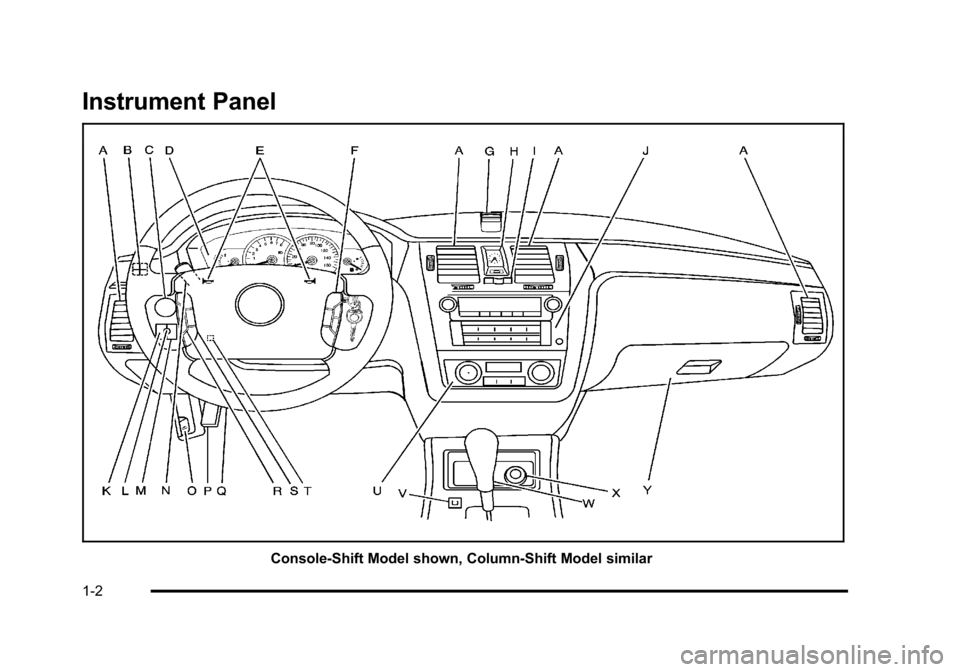
Instrument Panel
Console-Shift Model shown, Column-Shift Model similar
1-2
Page 9 of 470

Black plate (3,1)Cadillac DTS Owner Manual - 2011
A.Outlet Adjustment on page 4‑40.
B. Driver Information Center (DIC) Buttons. See Driver Information Center (DIC) on page 4‑59.
C. Exterior Lamps on page 4‑25.
D. Instrument Panel Cluster on page 4‑45.
E. Horn on page 4‑3.
F. Audio Steering Wheel Controls on page 4‑114.
G. Ultrasonic Front and Rear Parking Assist (UFRPA)
on page 3‑38.
Adaptive Cruise Control
on page 4‑14(If Equipped).
H. Analog Clock on page 4‑34.
I. Hazard Warning Flashers on page 4‑3.
J. Audio System(s) on page 4‑86.
K. Trunk Release Button. See Trunk on page 3‑12.
L. Instrument Panel Brightness on page 4‑30.
M. Lane Departure Warning (LDW) on page 3‑45.
N. Turn Signal/Multifunction Lever on page 4‑5.
Windshield Wipers on page 4‑10. O.
Hood Release on page 6‑13.
P. Parking Brake on page 3‑29.
Q. Data Link Connector (DLC). See Malfunction
Indicator Lamp on page 4‑54.
R. Heated Steering Wheel
on page 4‑4(If Equipped).
S. Cruise Control
on page 4‑12(If Equipped).
Adaptive Cruise Control
on page 4‑14(If Equipped).
T. Tilt Wheel
on page 4‑3.
Power Tilt Wheel and Telescopic Steering Column
on page 4‑4(If Equipped).
U. Dual Climate Control System on page 4‑34.
V. Traction Control System Button (Console-Shift Vehicles). See Traction Control System (TCS)
on
page 5‑6.
W. Shift Lever. See Automatic Transmission Operation
on page 3‑26.
X. Accessory Power Outlet(s) on page 4‑33.
Y. Glove Box
on page 3‑54.
Valet Lockout Switch on page 3‑18.
1-3
Page 11 of 470
Black plate (5,1)Cadillac DTS Owner Manual - 2011
When the vehicle starts, the parking lamps will turn on
and remain on as long as the engine is running. The
doors will be locked and the climate control system may
come on.
The engine will continue to run for 10 minutes. Repeat
the steps for a 10-minute time extension. Remote start
can be extended only once.
Canceling a Remote Start
To cancel a remote start:
.Aim the RKE transmitter at the vehicle and press
and hold
/until the parking lamps turn off.
.Turn on the hazard warning flashers.
.Turn the ignition on and then back off.
See Remote Vehicle Start on page 3‑7.
Door Locks
From the outside, unlock the door using either the key
or the RKE transmitter.
From the inside, use the power door lock switches or
manual lock knobs located at the top of the door panel
near the window.
Power Door Locks
On vehicles with power door locks, the switches are
located on the front doors.
"(Unlock): Press to unlock the doors.
Q(Lock):Remove the key from the ignition and press
to lock the doors.
For more information, see:
.Door Locks on page 3‑9.
.Power Door Locks on page 3‑10.
.Remote Keyless Entry (RKE) System Operationon page 3‑4.
Trunk Release
In addition to the trunk release button on the RKE
transmitter, there is a remote release
Vbutton
located to the left of the steering wheel, next to the
instrument panel brightness control. Press to open the
trunk.
See Trunk on page 3‑12.
1-5
Page 19 of 470
Black plate (13,1)Cadillac DTS Owner Manual - 2011
Interior Lighting
Courtesy Lamps
The courtesy lamps are located on the headliner above
the rear seat. These lamps come on by turning the
instrument panel brightness knob fully clockwise or
when any door is opened and it is dark outside.
Reading Lamps
The reading lamps are located on the overhead console
on the headliner and in the rear door opening. These
lamps come on automatically when any door is opened
and it is dark outside.
For manual operation, press the button to turn them on
or off.
If the reading lamps are left on, they automatically shut
off 10 minutes after the ignition has been turned off.
For more information, see:
.Instrument Panel Brightness on page 4‑30.
.Entry Lighting on page 4‑30.
.Parade Dimming on page 4‑31.
.Footwell Lamps on page 4‑31.
Exterior Lighting
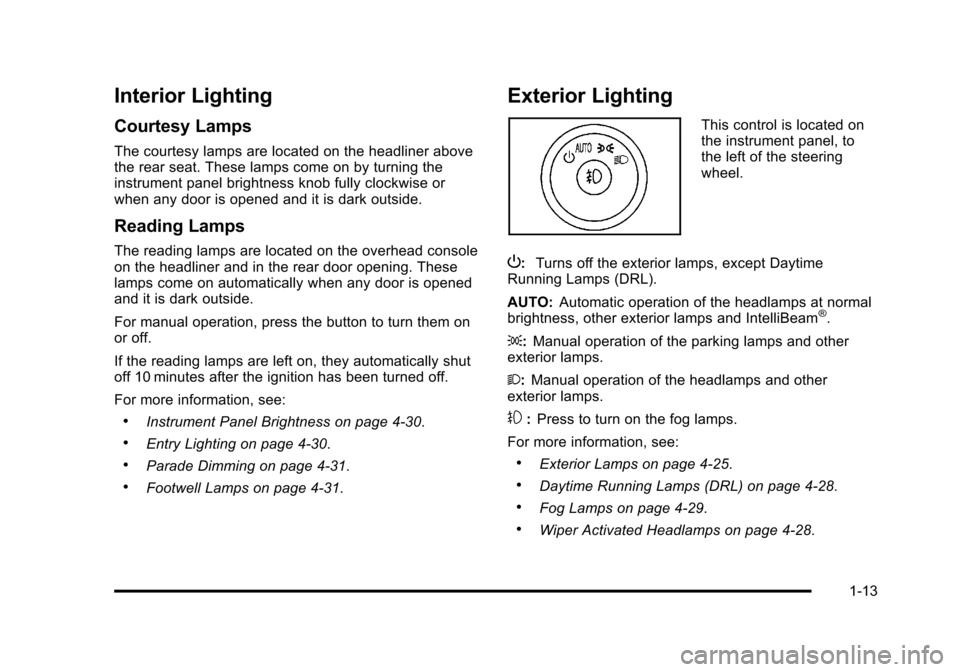
This control is located on
the instrument panel, to
the left of the steering
wheel.
P: Turns off the exterior lamps, except Daytime
Running Lamps (DRL).
AUTO: Automatic operation of the headlamps at normal
brightness, other exterior lamps and IntelliBeam
®.
;: Manual operation of the parking lamps and other
exterior lamps.
2: Manual operation of the headlamps and other
exterior lamps.
#: Press to turn on the fog lamps.
For more information, see:
.Exterior Lamps on page 4‑25.
.Daytime Running Lamps (DRL) on page 4‑28.
.Fog Lamps on page 4‑29.
.Wiper Activated Headlamps on page 4‑28.
1-13
Page 25 of 470
Black plate (19,1)Cadillac DTS Owner Manual - 2011
Driver Information Center (DIC)
The DIC display is located at the bottom of the
instrument panel cluster. It shows the status of
many vehicle systems and enables access to the
personalization menu.
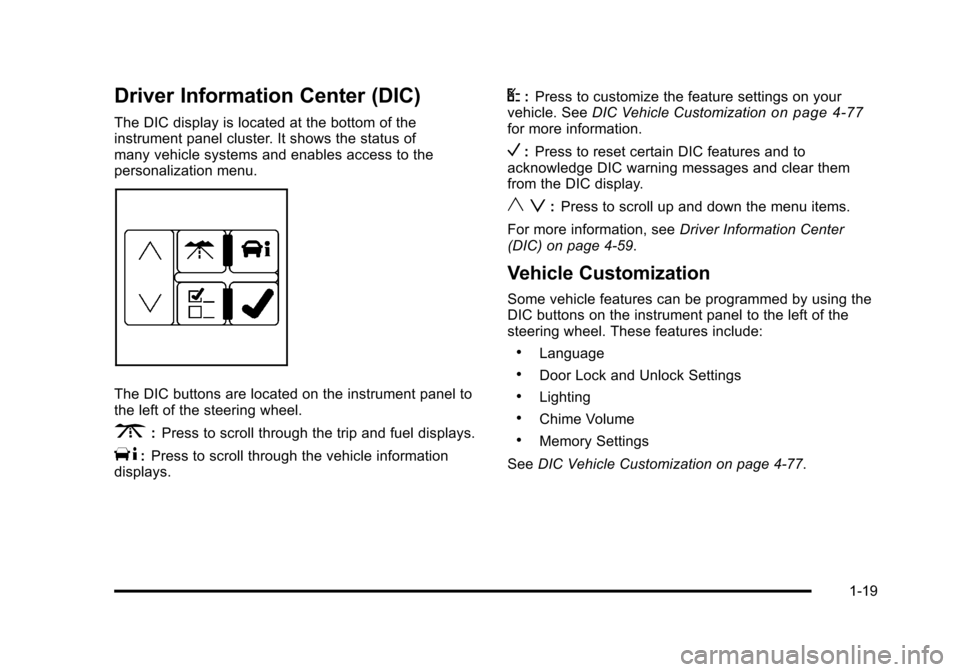
The DIC buttons are located on the instrument panel to
the left of the steering wheel.
3:Press to scroll through the trip and fuel displays.
T:Press to scroll through the vehicle information
displays.
U: Press to customize the feature settings on your
vehicle. See DIC Vehicle Customizationon page 4‑77for more information.
V:Press to reset certain DIC features and to
acknowledge DIC warning messages and clear them
from the DIC display.
y z: Press to scroll up and down the menu items.
For more information, see Driver Information Center
(DIC) on page 4‑59.
Vehicle Customization
Some vehicle features can be programmed by using the
DIC buttons on the instrument panel to the left of the
steering wheel. These features include:
.Language
.Door Lock and Unlock Settings
.Lighting
.Chime Volume
.Memory Settings
See DIC Vehicle Customization on page 4‑77.
1-19
Page 46 of 470
Black plate (14,1)Cadillac DTS Owner Manual - 2011
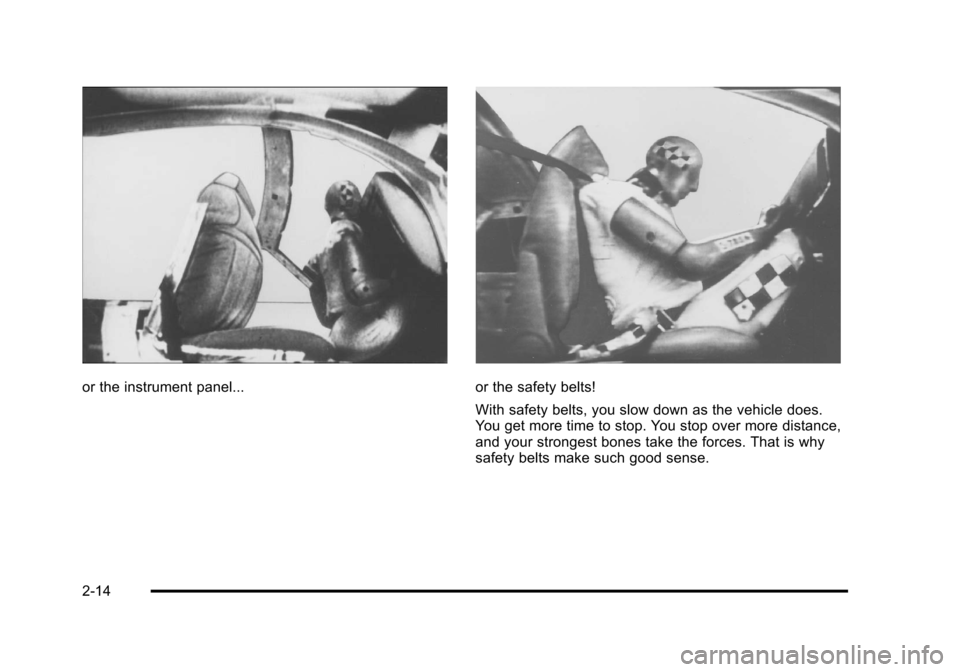
or the instrument panel...or the safety belts!
With safety belts, you slow down as the vehicle does.
You get more time to stop. You stop over more distance,
and your strongest bones take the forces. That is why
safety belts make such good sense.
2-14
Page 86 of 470
Black plate (54,1)Cadillac DTS Owner Manual - 2011
Airbag System
The vehicle has the following airbags:
.A frontal airbag for the driver.
.A frontal airbag for the right front passenger.
.A seat-mounted side impact airbag for the driver.
.A seat-mounted side impact airbag for the right
front passenger.
The vehicle may also have the following airbags:
.A roof-rail airbag for the driver and the passenger
seated directly behind the driver.
.A roof-rail airbag for the right front passenger and
the passenger seated directly behind the right front
passenger. All of the airbags in your vehicle will have the word
AIRBAG embossed in the trim or on an attached label
near the deployment opening.
For frontal airbags, the word AIRBAG will appear on the
middle part of the steering wheel for the driver and on
the instrument panel for the right front passenger.
With seat-mounted side impact airbags, the word
AIRBAG will appear on the side of the seatback closest
to the door.
With roof-rail airbags, the word AIRBAG will appear
along the headliner or trim.
Airbags are designed to supplement the protection
provided by safety belts. Even though today's airbags
are also designed to help reduce the risk of injury from
the force of an inflating bag, all airbags must inflate very
quickly to do their job.
2-54
Page 88 of 470
Black plate (56,1)Cadillac DTS Owner Manual - 2011
{WARNING:
Children who are up against, or very close to, any
airbag when it inflates can be seriously injured
or killed. Airbags plus lap-shoulder belts offer
protection for adults and older children, but not for
young children and infants. Neither the vehicle's
safety belt system nor its airbag system is
designed for them. Young children and infants
need the protection that a child restraint system
can provide. Always secure children properly in
your vehicle. To read how, seeOlder Children
on
page 2‑31
or Infants and Young Childrenon
page 2‑34
.
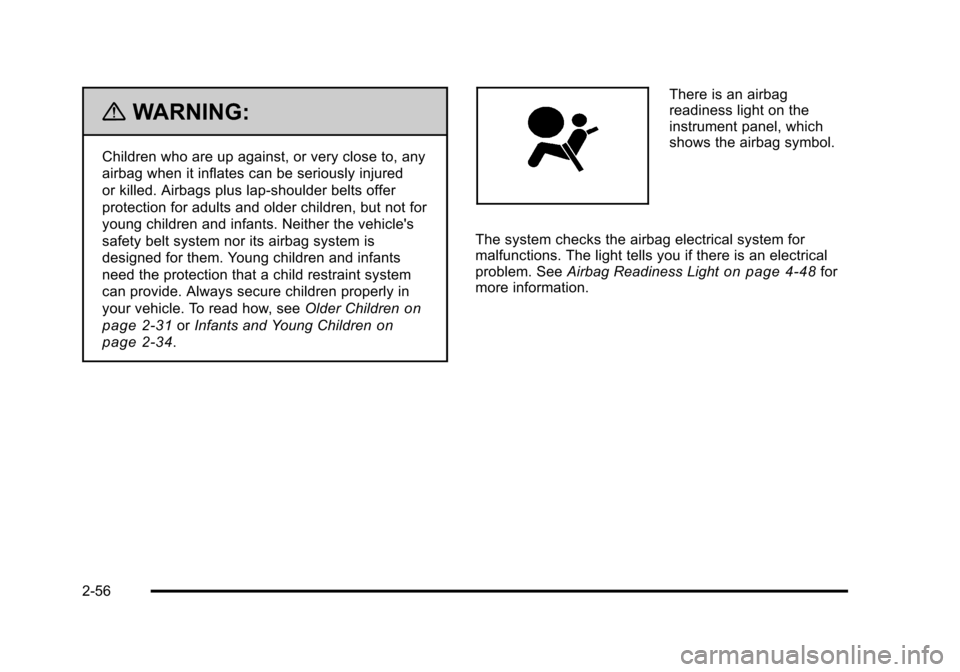
There is an airbag
readiness light on the
instrument panel, which
shows the airbag symbol.
The system checks the airbag electrical system for
malfunctions. The light tells you if there is an electrical
problem. See Airbag Readiness Light
on page 4‑48for
more information.
2-56