seats CADILLAC ELR 2014 Repair Manual
[x] Cancel search | Manufacturer: CADILLAC, Model Year: 2014, Model line: ELR, Model: CADILLAC ELR 2014Pages: 408, PDF Size: 4.47 MB
Page 105 of 408

Black plate (49,1)Cadillac ELR Owner Manual (GMNA-Localizing-U.S./Canada-6081525) -
2014 - Second Edition - 1/22/14
Seats and Restraints 3-49
5. Pull the shoulder belt all the wayout of the retractor to set the
lock. When the retractor lock is
set, the belt can be tightened but
not pulled out of the retractor.6. To tighten the belt, push downon the child restraint, pull the
shoulder portion of the belt to
tighten the lap portion of the belt,
and feed the shoulder belt back
into the retractor. When installing
a forward-facing child restraint, it
may be helpful to use your knee
to push down on the child
restraint as you tighten the belt.
Try to pull the belt out of the
retractor to make sure the
retractor is locked. If the
retractor is not locked, repeat
Steps 5 and 6. 7. Before placing a child in the
child restraint, make sure it is
securely held in place. To check,
grasp the child restraint at the
safety belt path and attempt to
move it side to side and back
and forth. When the child
restraint is properly installed,
there should be no more than
2.5 cm (1 in) of movement.
If the airbags are off, the off
indicator in the passenger airbag
status indicator will come on and
stay on when the vehicle is started.
If a child restraint has been installed
and the on indicator is lit, see “If the
On Indicator Is Lit for a Child
Restraint ”under Passenger
Sensing System on page 3-25.
To remove the child restraint,
unbuckle the vehicle safety belt and
let it return to the stowed position.
Make sure the adjustable latch plate
stop is in a position where it sits
above the door trim, when the belt is
returned to its stowed position.
Page 106 of 408

Black plate (50,1)Cadillac ELR Owner Manual (GMNA-Localizing-U.S./Canada-6081525) -
2014 - Second Edition - 1/22/14
3-50 Seats and Restraints
2NOTES
Page 110 of 408
Black plate (2,1)Cadillac ELR Owner Manual (GMNA-Localizing-U.S./Canada-6081525) -
2014 - Second Edition - 1/22/14
5-2 Instruments and Controls
Key and Lock Messages . . . . . 5-45
Lamp Messages . . . . . . . . . . . . . 5-46
Object Detection SystemMessages . . . . . . . . . . . . . . . . . . 5-46
Propulsion Power
Messages . . . . . . . . . . . . . . . . . . 5-48
Ride Control System Messages . . . . . . . . . . . . . . . . . . 5-48
Airbag System Messages . . . . 5-49
Security Messages . . . . . . . . . . 5-49
Service Vehicle Messages . . . 5-49
Starting the Vehicle Messages . . . . . . . . . . . . . . . . . . 5-50
Tire Messages . . . . . . . . . . . . . . . 5-50
Vehicle Reminder Messages . . . . . . . . . . . . . . . . . . 5-51
Vehicle Speed Messages . . . . 5-51
Washer Fluid Messages . . . . . 5-51
Window Messages . . . . . . . . . . . 5-51
Vehicle Personalization
Vehicle Personalization . . . . . . 5-51
Universal Remote System
Universal Remote System . . . 5-59
Universal Remote System Programming . . . . . . . . . . . . . . . 5-59
Universal Remote System Operation . . . . . . . . . . . . . . . . . . 5-62
Controls
Steering Wheel
Adjustment
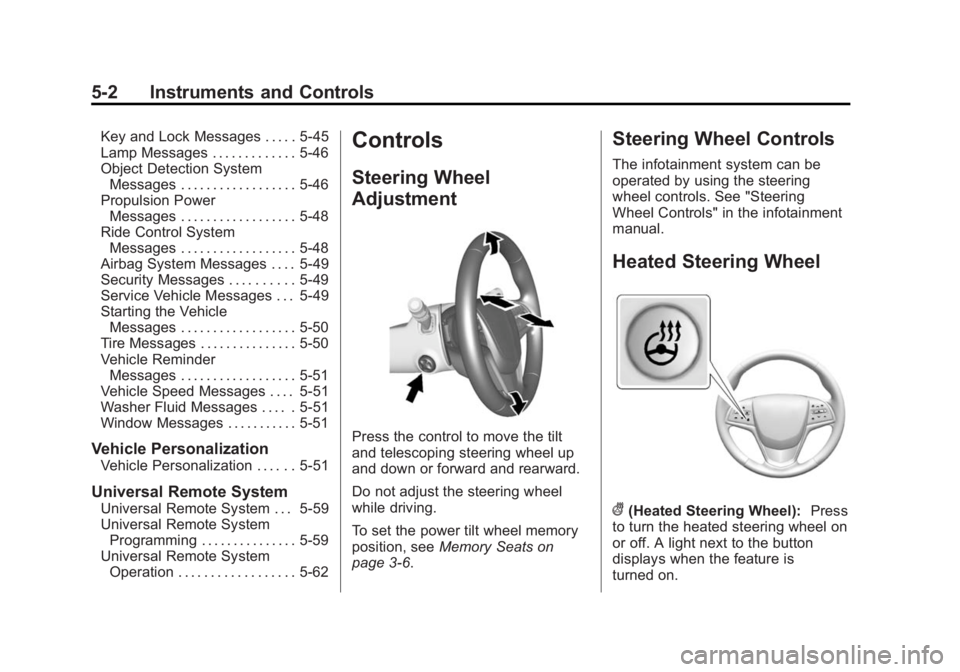
Press the control to move the tilt
and telescoping steering wheel up
and down or forward and rearward.
Do not adjust the steering wheel
while driving.
To set the power tilt wheel memory
position, see Memory Seats on
page 3-6.
Steering Wheel Controls
The infotainment system can be
operated by using the steering
wheel controls. See "Steering
Wheel Controls" in the infotainment
manual.
Heated Steering Wheel
((Heated Steering Wheel): Press
to turn the heated steering wheel on
or off. A light next to the button
displays when the feature is
turned on.
Page 161 of 408

Black plate (53,1)Cadillac ELR Owner Manual (GMNA-Localizing-U.S./Canada-6081525) -
2014 - Second Edition - 1/22/14
Instruments and Controls 5-53
adjusted to this level. To set the
maximum startup volume, press +
or−to increase or decrease.
Audio Cue Volume
This feature sets the volume of
audio files played at system startup
and shutdown.
Select On, then press + or −to
increase or decrease the volume.
Vehicle
Select and the following may
display:
.Climate and Air Quality
.Collision/Detection Systems
.Comfort and Convenience
.Energy
.Lighting
.Power Door Locks
.Remote Lock, Unlock, Start Climate and Air Quality
Select and the following may
display:
.Auto Fan Max Speed
.Auto Heated Seats
.Auto Defog
.Engine Assisted Heating
Plugged-In
Auto Fan Max Speed
This feature will set the maximum
auto fan speed.
Select Low, Medium, or High.
Auto Heated Seats
When enabled, the auto heated seat
buttons on the touch screen will be
highlighted. This feature will
automatically activate heated seats
at the level required by the interior
temperature. The auto heated seats
can be turned off by using the
heated seat buttons on the center
stack.
Select Off or On. Auto Defog
When set to On, the front defog will
automatically come on when the
vehicle is started.
Select Off or On.
Engine Assisted Heating
Plugged-In
During remote start, this feature
turns on or off the ability for the
engine to run to help heat the
vehicle when it is plugged in.
A change in setting will not take
affect until after the vehicle is first
powered down.
Select Off or On.
Collision/Detection Systems
Select and the following may
display:
.Alert Type
.Auto Collision Preparation
.Go Notifier
.Side Blind Zone Alert
.Rear Cross Traffic Alert
Page 162 of 408
Black plate (54,1)Cadillac ELR Owner Manual (GMNA-Localizing-U.S./Canada-6081525) -
2014 - Second Edition - 1/22/14
5-54 Instruments and Controls
Alert Type
This feature will set crash alerts to
beeps or seat vibrations. This
setting affects all crash alerts
including Forward Collision, Lane
Departure Warning, and Parking
Assist alerts.
Select Beeps or Safety Alert Seat.
Auto Collision Preparation
This feature will turn on or off the
Forward Collision Alert feature as
well as the Automatic Braking
capability of the Auto Collision
Preparation feature. With the Alert &
Brake setting, both Forward
Collision Alert as well as the
Automatic Braking capability of the
Auto Collision Preparation feature
are available. The Alert setting
disables most automatic braking
functions of the Auto Collision
Preparation feature. Some
last-second automatic braking
capability is still provided with the
Alert setting, but it is much less
likely to be triggered by most driving
conditions. Off disables all ForwardCollision Alert and Automatic
Braking capabilities of the Auto
Collision Preparation feature. See
Active Emergency Braking System
on page 9-53.
Press Auto Collision Preparation.
Press to select Off, Alert & Brake,
or Alert.
Go Notifier
This feature will give a reminder that
Adaptive Cruise Control provides
when it has brought the vehicle to a
complete stop behind another
stopping vehicle, and then that
vehicle drives on.
Press Go Notifier. Press to select
Off or On. See
Adaptive Cruise
Control on page 9-39.
Side Blind Zone Alert
This allows the Side Blind Zone
Alert feature to be turned on or off.
Press Side Blind Zone Alert. Press
to select Off or On. See Side Blind
Zone Alert (SBZA) on page 9-54. Rear Cross Traffic Alert
This allows the Rear Cross Traffic
Alert to be turned on or off.
Select to turn Off or On. See
Assistance Systems for Parking or
Backing on page 9-47.
Comfort and Convenience
Select and the following may
display:
.Auto Memory Recall
.Easy Exit Options
.Chime Volume
.Reverse Tilt Mirror
.Rainsense Wipers
Auto Memory Recall
This feature automatically recalls
the current driver ’s previously stored
1 or 2 button positions when
entering the vehicle. See Memory
Seats on page 3-6.
Select Off, On - Driver Door Open,
or On - At ignition On.
Page 163 of 408

Black plate (55,1)Cadillac ELR Owner Manual (GMNA-Localizing-U.S./Canada-6081525) -
2014 - Second Edition - 1/22/14
Instruments and Controls 5-55
Easy Exit Options
This feature automatically recalls
the current driver’s previously stored
EXIT button position when exiting
the vehicle. See Memory Seats on
page 3-6.
Select Off or On.
Chime Volume
This allows the selection of the
chime volume level.
Press + or −to adjust the volume.
Reverse Tilt Mirror
This allows the feature to be turned
on or off.
Select Off, On - Driver and
Passenger, On - Driver, or
On - Passenger.
Rainsense Wipers
This allows the feature to be turned
on or off.
Select Off or On. Energy
Select and the following may
display:
.Energy Summary Pop-up
.Charge Status Feedback
.Charge Cord Theft Alert
.Charge Power Loss Alert
Energy Summary Pop-up
This allows the feature to be turned
on or off.
Select Off or On.
Charge Status Feedback
This allows the horn chirp and
outside rear view mirror charge
status feedback to be turned on
or off.
Select Off or Horn Chirps.
Charge Cord Theft Alert
This allows the feature to be turned
on or off.
Select Off or On. Charge Power Loss Alert
This allows the feature to be turned
on or off.
Select Off or On.
Lighting
Select and the following may
display:.Vehicle Locator Lights
.Exit Lighting
.Auto High Beam
Vehicle Locator Lights
This feature will flash the exterior
lamps when
Kon the Remote
Keyless Entry (RKE) transmitter is
pressed to locate the vehicle.
Select Off or On.
Exit Lighting
This allows the selection of how
long the exterior lamps stay on
when leaving the vehicle when it is
dark outside.
Page 164 of 408

Black plate (56,1)Cadillac ELR Owner Manual (GMNA-Localizing-U.S./Canada-6081525) -
2014 - Second Edition - 1/22/14
5-56 Instruments and Controls
Select Off, 30 Seconds, 60
Seconds, or 120 Seconds.
Auto High Beam
This allows the feature to be turned
on or off.
Select Off or On.
Power Door Locks
Select and the following may
display:
.Unlocked Door Anti-Lockout
.Auto Door Unlock
.Delayed Door Lock
Unlocked Door Anti-Lockout
When on, this feature will keep the
driver door from locking when the
door is open. If Off is selected, the
Delayed Door Lock menu will be
available.
Select Off or On. Auto Door Unlock
This allows selection of which of the
doors will automatically unlock when
the vehicle is shifted into P (Park).
Select Off, All Doors, or Driver Door.
Delayed Door Lock
When on, this feature will delay the
locking of the doors. To override the
delay, press the power door lock
switch on the door.
Select Off or On.
Remote Lock, Unlock, Start
Select and the following may
display:
.Remote Unlock Light Feedback
.Remote Lock Feedback
.Remote Door Unlock
.Remote Start Auto Heat Seats
.Passive Door Unlock
.Passive Door Lock
.Remote Left in Vehicle AlertRemote Unlock Light Feedback
When on, the exterior lamps will
flash when unlocking the vehicle
with the RKE transmitter.
Select Off or Flash Lights.
Remote Lock Feedback
This allows selection of what type of
feedback is given when locking the
vehicle with the RKE transmitter.
Select Off, Lights and Horn, Lights
Only, or Horn Only.
Remote Door Unlock
This allows selection of which doors
will unlock when pressing
Kon the
RKE transmitter.
Select All Doors or Driver Door.
Remote Start Auto Heat Seats
If equipped and turned on, this
feature will turn the heated seats on
when using remote start on
cold days.
Select Off or On.
Page 181 of 408

Black plate (1,1)Cadillac ELR Owner Manual (GMNA-Localizing-U.S./Canada-6081525) -
2014 - Second Edition - 1/22/14
Climate Controls 8-1
Climate Controls
Climate Control Systems
Dual Automatic Climate ControlSystem . . . . . . . . . . . . . . . . . . . . . . 8-1
Air Vents
Air Vents . . . . . . . . . . . . . . . . . . . . . . 8-7
Maintenance
Passenger Compartment AirFilter . . . . . . . . . . . . . . . . . . . . . . . . . 8-8
Service . . . . . . . . . . . . . . . . . . . . . . . 8-8
Climate Control Systems
Dual Automatic Climate Control System
The climate control buttons and the touch screen are used to adjust the
heating, cooling, and ventilation.
Climate Control Buttons
1. Driver and Passenger Temperature Controls
2. Fan Control
3. OFF (Fan)
4. Driver and Passenger Heated Seats 5. AUTO (Automatic Operation)
6. Defrost
7. Rear Window Defogger
8. Recirculation
Page 182 of 408

Black plate (2,1)Cadillac ELR Owner Manual (GMNA-Localizing-U.S./Canada-6081525) -
2014 - Second Edition - 1/22/14
8-2 Climate Controls
Climate Touch Screen Controls
1. Outside Air Temperature Display
2. Driver and Passenger Temperature Controls
3. Fan Control
4. Climate Modes: MIN, ECO, MAX
5. SYNC (Synchronized Temperature)
6. Climate Control Selection (Application Tray Button)
7. Climate Power Gauge
8. Driver and Passenger Auto Heated Seats 9. Air Delivery Mode Controls
Climate Control Touch Screen
The fan, air delivery mode, driver
and passenger temperatures, A/C
mode, and SYNC settings can be
controlled by pressing CLIMATE on
the infotainment home screen or the
climate button in the touch screen
application tray. A selection can
then be made on the front climate
control page displayed. See
Infotainment on page 7-1.
Climate Control Status Screen
The climate control status screen
appears briefly when the climate
control buttons on the faceplate are
adjusted. The air delivery mode can
be adjusted on the climate control
status screen.
Climate Mode Operation
There are three climate mode
settings: MIN, ECO, and MAX.
These settings adjust the impact the
climate control system has on the
vehicle's electric range or fuel
economy.
To select a climate mode:
1. Press CLIMATE on the center
stack.
2. Press the climate mode button on the touch screen. The climate
mode will be lit.
MIN (Fan Only Mode): The air
conditioning and electric heat are
turned off. As long as
0is not
selected, the climate control settings
may not have a noticeable effect on
the vehicle electric range and fuel
economy.
Page 185 of 408

Black plate (5,1)Cadillac ELR Owner Manual (GMNA-Localizing-U.S./Canada-6081525) -
2014 - Second Edition - 1/22/14
Climate Controls 8-5
-(Defog):Clears the windows of
fog or moisture. Air is directed to the
windshield, side windows, and floor
outlets.
0(Defrost): Press the0button
to turn on or off. This clears the
windshield of fog or frost more
quickly. Air is directed to the
windshield and side windows.
Automatic Air Recirculation:
When the AUTO indicator light is
on, the air is automatically
recirculated as needed to help
quickly cool the inside of the
vehicle.
@(Recirculation): Press to
alternate between recirculating air
inside the vehicle or pulling in
outside air. The indicator light on the
button is lit when recirculation mode
is active. This helps to quickly cool
the air inside the vehicle or prevent
outside air and odors from entering. Pressing this button cancels
automatic recirculation. Press AUTO
to return to automatic operation;
recirculation runs automatically as
needed.
Manual recirculation mode is not
available when in Defrost mode.
Auto Defog:
The climate control
system may have a sensor to
automatically detect high humidity
inside the vehicle. When high
humidity is detected, the climate
control system may adjust to
outside air supply and turn on the
air conditioner. If the climate control
system does not detect possible
window fogging, it returns to normal
operation. To turn Auto Defog off or
on, see “Climate and Air Quality”
under Vehicle Personalization on
page 5-51.
Rear Window Defogger
=REAR (Rear Window
Defogger): Press to turn the rear
window defogger on or off. The rear window defogger turns off
automatically after about
five minutes. At higher vehicle
speeds, the rear window defogger
may stay on continuously.
The heated outside mirrors turn on
when the rear window defogger
button is on. They help to clear fog
or frost from the surface of the
mirrors.
{Caution
Do not try to clear frost or other
material from the inside of the
front windshield and rear window
with a razor blade or anything
else that is sharp. This may
damage the rear window
defogger grid and affect the
radio's ability to pick up stations
clearly. The repairs would not be
covered by the vehicle warranty.
Jorz(Manual Heated Seats):
The controls are on the center
stack. Press
Jorzto heat the