clock CADILLAC ESCALADE 2003 2.G Owner's Manual
[x] Cancel search | Manufacturer: CADILLAC, Model Year: 2003, Model line: ESCALADE, Model: CADILLAC ESCALADE 2003 2.GPages: 486, PDF Size: 3.32 MB
Page 405 of 486
6. After mounting the
spare, put the wheel
nuts back on with the
rounded end of the nuts
toward the wheel.
Tighten each wheel nut
by hand. Then use the
wheel wrench to tighten
the nuts until the wheel
is held against the hub.
7. Turn the wheel wrench counterclockwise to lower
the vehicle. Lower the jack completely.
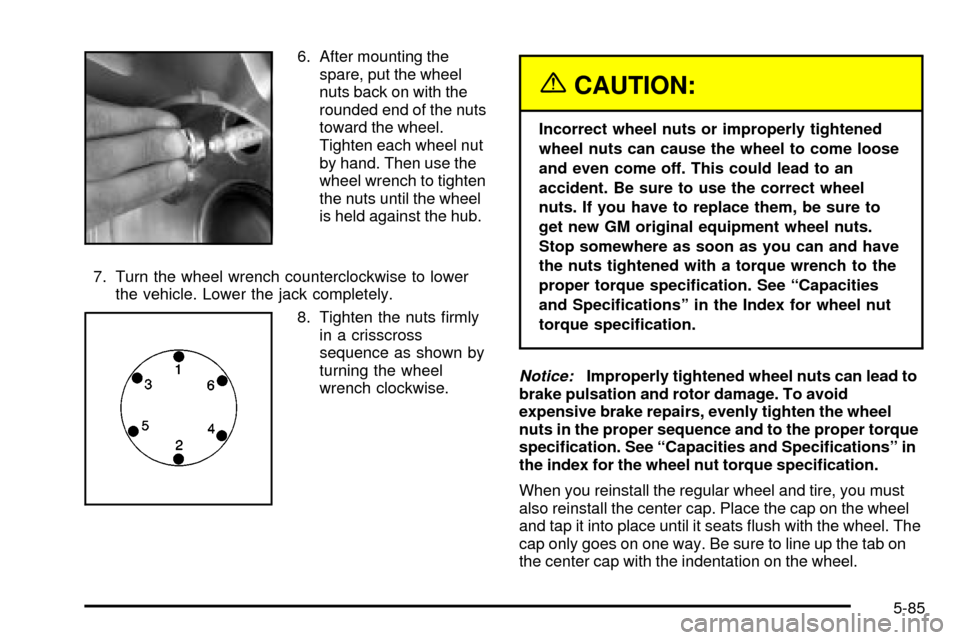
8. Tighten the nuts ®rmly
in a crisscross
sequence as shown by
turning the wheel
wrench clockwise.
{CAUTION:
Incorrect wheel nuts or improperly tightened
wheel nuts can cause the wheel to come loose
and even come off. This could lead to an
accident. Be sure to use the correct wheel
nuts. If you have to replace them, be sure to
get new GM original equipment wheel nuts.
Stop somewhere as soon as you can and have
the nuts tightened with a torque wrench to the
proper torque speci®cation. See ªCapacities
and Speci®cationsº in the Index for wheel nut
torque speci®cation.
Notice:Improperly tightened wheel nuts can lead to
brake pulsation and rotor damage. To avoid
expensive brake repairs, evenly tighten the wheel
nuts in the proper sequence and to the proper torque
speci®cation. See ªCapacities and Speci®cationsº in
the index for the wheel nut torque speci®cation.
When you reinstall the regular wheel and tire, you must
also reinstall the center cap. Place the cap on the wheel
and tap it into place until it seats ¯ush with the wheel. The
cap only goes on one way. Be sure to line up the tab on
the center cap with the indentation on the wheel.
5-85
Page 407 of 486

2. Tilt the retainer (D)
downward and through
the wheel opening.
Make sure the retainer
is fully seated across
the underside of
the wheel.
3. Attach the wheel wrench (H) and extensions (I)
together.4. Insert the hoist end (F)
through the hole (G) in
the rear bumper and
into the hoist shaft.
5. Raise the tire part way upward. Make sure the
retainer is seated in the wheel opening.
6. Raise the tire fully against the underside of the
vehicle by turning the wheel wrench clockwise
until you hear two clicks or feel it skip twice. You
cannot overtighten the cable.
5-87
Page 408 of 486

7. Make sure the tire is stored securely. Push, pull
and then try to rotate or turn the tire. If the tire
moves, use the wheel wrench to tighten the cable.
Reinstall the spare tire lock (if equipped).To store the tools, follow these procedures:
For Escalade, do the following:
1. Put the tool kit, with the jack tools and gloves, in
the tool bag and place in the retaining clip above
the jack.
2. Tighten down with the wing nut.
3. Then, assemble wheel chocks and bottle jack
together with the wing nut and retaining hook.
4. Position behind the jack storage cover in the left
rear side panel and tighten, adjusting clockwise
until the jack is secured tight in the mounting
bracket. Be sure to position the holes in the base of
the jack onto the pin in the mounting bracket.
For Escalade ESV, do the following:
1. Return the tool kit (jack tools and gloves) to the tool
bag.
2. Assemble wheel chocks and bottle jack together
with the wing nut and retaining hook.
3. Position under the jack storage tray in the left rear
side panel below the wheelbase and tighten,
adjusting clockwise until the jack is secured tight in
the mounting bracket. Be sure to position the
holes in the base of the jack onto the pin in the
mounting bracket. (A) Push and Pull (B) Rotate or Turn
5-88
Page 409 of 486
4. Use the retaining clip to fasten the tool kit on the
stud in the storage compartment in the rear left
trim panel and turn the wing nut clockwise to
secure.
5. Return the storage tray.
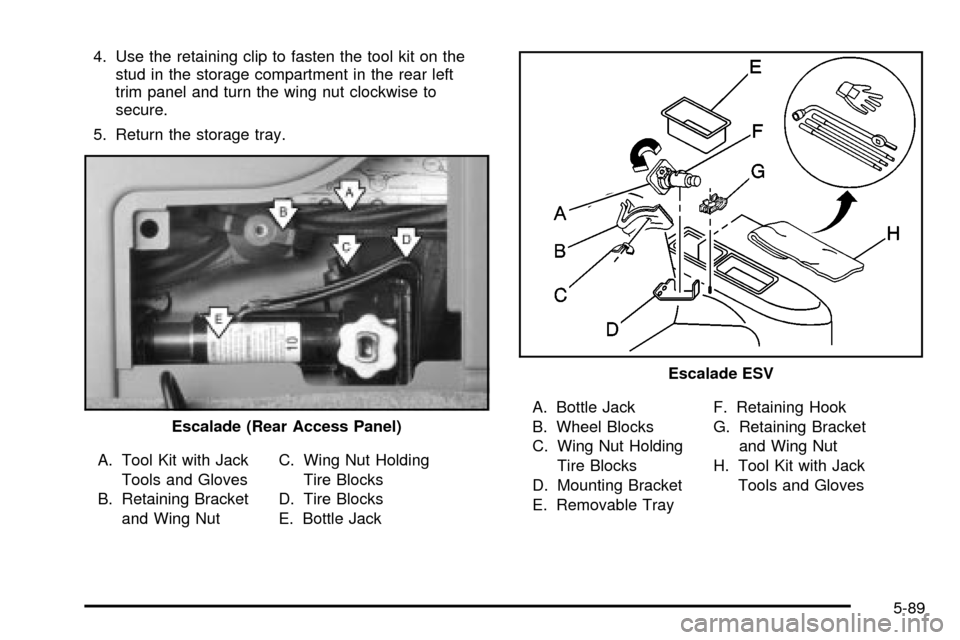
A. Tool Kit with Jack
Tools and Gloves
B. Retaining Bracket
and Wing NutC. Wing Nut Holding
Tire Blocks
D. Tire Blocks
E. Bottle JackA. Bottle Jack
B. Wheel Blocks
C. Wing Nut Holding
Tire Blocks
D. Mounting Bracket
E. Removable TrayF. Retaining Hook
G. Retaining Bracket
and Wing Nut
H. Tool Kit with Jack
Tools and Gloves Escalade (Rear Access Panel)
Escalade ESV
5-89
Page 410 of 486
Secondary Latch System
Your vehicle has an underbody mounted tire hoist
assembly equipped with a secondary latch system. It's
designed to stop the spare tire from suddenly falling
off your vehicle. For the secondary latch to work,
the spare must be installed with the valve stem pointing
down. See ªStoring a Flat or Spare Tire, Jack and
Toolsº earlier in this section.
{CAUTION:
Before beginning this procedure read all the
instructions. Failure to read and follow the
instructions could damage the hoist assembly
and you and others could get hurt. Read and
follow the instructions listed below.To release the spare tire from the secondary latch do
the following:
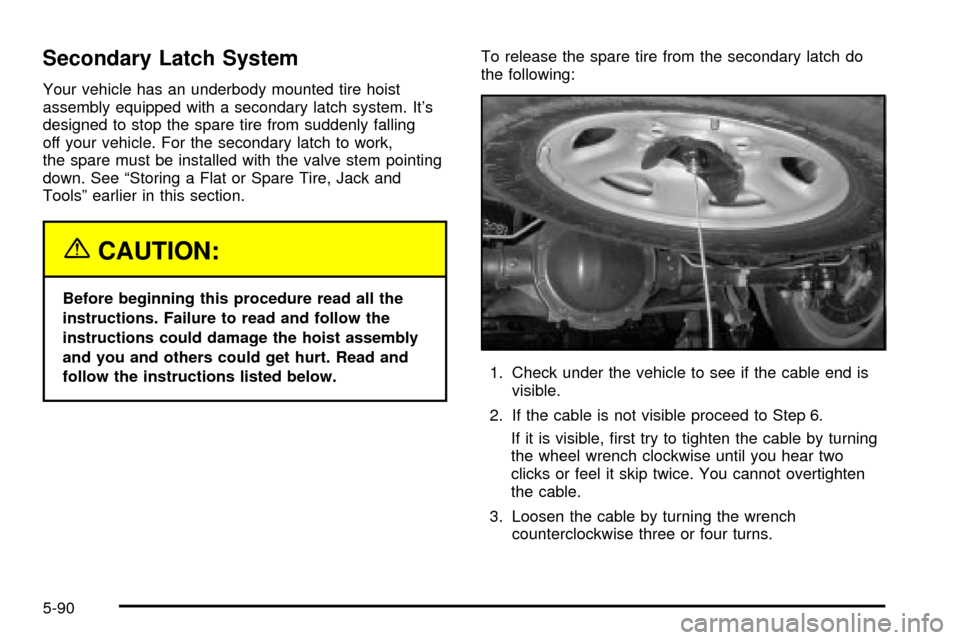
1. Check under the vehicle to see if the cable end is
visible.
2. If the cable is not visible proceed to Step 6.
If it is visible, ®rst try to tighten the cable by turning
the wheel wrench clockwise until you hear two
clicks or feel it skip twice. You cannot overtighten
the cable.
3. Loosen the cable by turning the wrench
counterclockwise three or four turns.
5-90
Page 411 of 486
4. Repeat this procedure at least two times. If the
spare tire lowers to the ground, continue with
Step 5 of ªRemoving the Spare Tire and Toolsº
earlier in this section.
5. Turn the wrench counterclockwise until
approximately six inches (15 cm) of cable is
exposed.
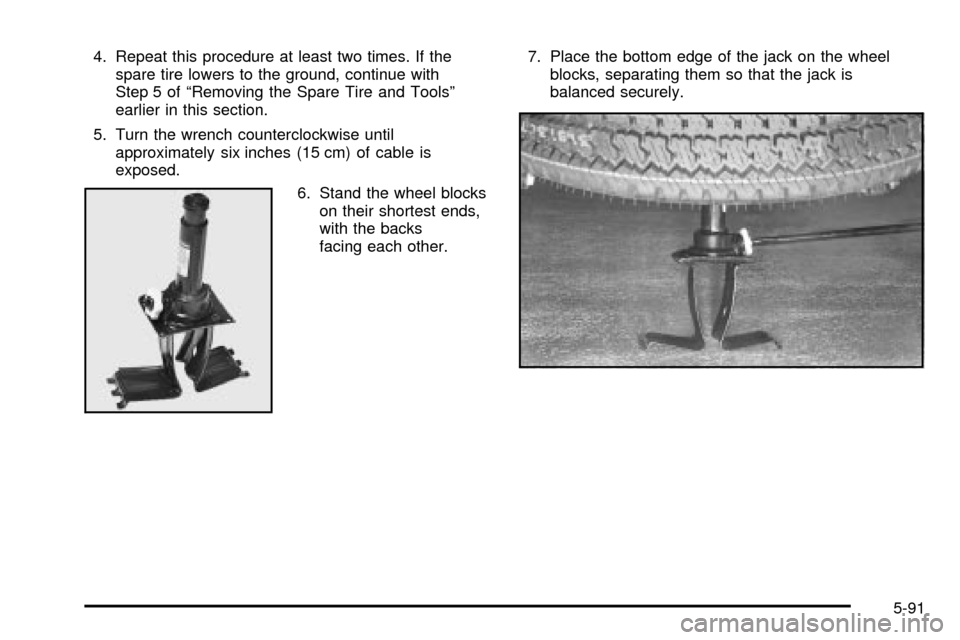
6. Stand the wheel blocks
on their shortest ends,
with the backs
facing each other.7. Place the bottom edge of the jack on the wheel
blocks, separating them so that the jack is
balanced securely.
5-91
Page 412 of 486
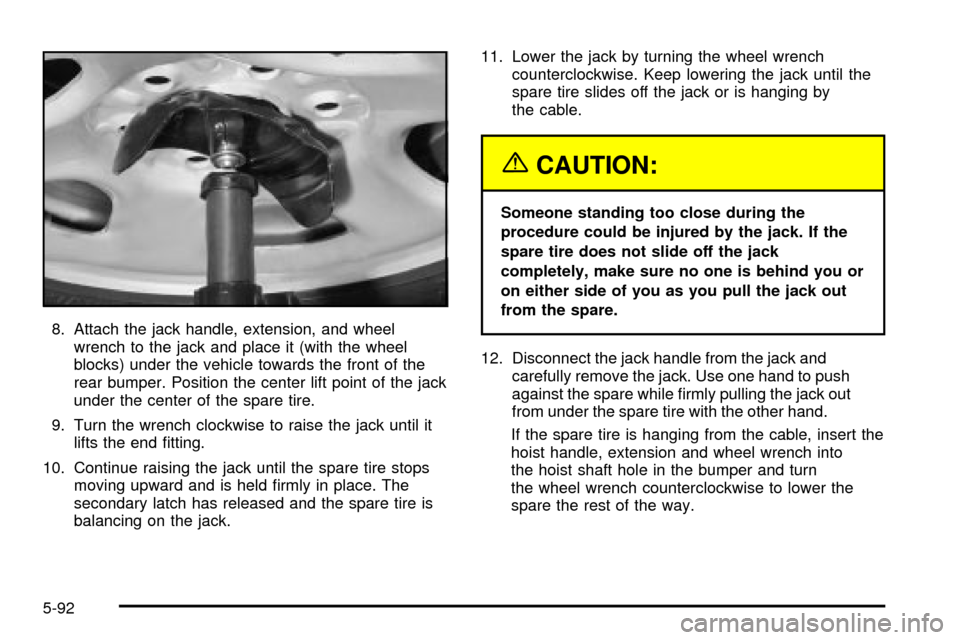
8. Attach the jack handle, extension, and wheel
wrench to the jack and place it (with the wheel
blocks) under the vehicle towards the front of the
rear bumper. Position the center lift point of the jack
under the center of the spare tire.
9. Turn the wrench clockwise to raise the jack until it
lifts the end ®tting.
10. Continue raising the jack until the spare tire stops
moving upward and is held ®rmly in place. The
secondary latch has released and the spare tire is
balancing on the jack.11. Lower the jack by turning the wheel wrench
counterclockwise. Keep lowering the jack until the
spare tire slides off the jack or is hanging by
the cable.
{CAUTION:
Someone standing too close during the
procedure could be injured by the jack. If the
spare tire does not slide off the jack
completely, make sure no one is behind you or
on either side of you as you pull the jack out
from the spare.
12. Disconnect the jack handle from the jack and
carefully remove the jack. Use one hand to push
against the spare while ®rmly pulling the jack out
from under the spare tire with the other hand.
If the spare tire is hanging from the cable, insert the
hoist handle, extension and wheel wrench into
the hoist shaft hole in the bumper and turn
the wheel wrench counterclockwise to lower the
spare the rest of the way.
5-92
Page 413 of 486

13. Tilt the retainer at the
end of the cable and
pull it through the
wheel opening. Pull the
tire out from under
the vehicle.
14. If the cable is hanging under the vehicle, turn the
wheel wrench clockwise to raise the cable back up.
Have the hoist assembly inspected as soon as you can.
You will not be able to store a spare or ¯at tire using
the hoist assembly until it has been replaced.
To continue changing the ¯at tire, see ªRemoving the
Flat Tire and Installing the Spare Tireº earlier in
this section.Spare Tire
Your vehicle, when new, had a fully in¯ated spare tire.
A spare tire may lose air over time, so check its
in¯ation pressure regularly. See
In¯ation -- Tire Pressure
on page 5-67andLoading Your Vehicle on page 4-51for information regarding proper tire in¯ation and loading
your vehicle. For instruction on how to remove, install
or store a spare tire, see
Changing a Flat Tire on
page 5-76.
After installing the spare tire on your vehicle, you should
stop as soon as possible and make sure the spare is
correctly in¯ated. Have the damaged or ¯at road
tire repaired or replaced as soon as you can and
installed back onto your vehicle. This way, a spare tire
will be available in case you need it again.
If your vehicle has a spare tire that does not match your
vehicle's original road tires and wheels in size and
type, do not include the spare in the tire rotation.
5-93
Page 469 of 486

A
Accessory Power Outlets.................................3-23
Adding Washer Fluid.......................................5-38
Additional Program Information........................... 7-9
Additives, Fuel................................................. 5-6
Add-On Equipment..........................................4-52
Adjustable Throttle and Brake Pedal..................2-22
Adjusting the Speakers (Balance/Fade)..............3-75
After Off-Road Driving.....................................4-32
Air Bag System, Supplemental Restraint
System (SRS).............................................1-76
Air Bag .........................................................3-38
Passenger Status Indicator...........................3-38
Readiness Light..........................................3-37
Air Cleaner/Filter, Engine.................................5-19
Air Conditioning..............................................3-29
All-Wheel Drive...............................................5-50
AM .............................................................3-103
Analog Clock..................................................3-24
Antenna, Diversity Antenna System..................3-105
Antenna, XMŸ Satellite Radio Antenna
System.....................................................3-105
Anti-Lock Brake, System Warning Light..............3-42
Anti-lock Brake System..................................... 4-7
Appearance Care............................................5-94
Care of Safety Belts....................................5-96
Chemical Paint Spotting..............................5-100
Cleaning the Inside of Your Vehicle................5-94Appearance Care (cont.)
Cleaning the Outside of Your Vehicle..............5-97
Finish Damage..........................................5-100
Sheet Metal Damage...................................5-99
Underbody Maintenance.............................5-100
Vehicle Care/Appearance Materials...............5-100
Weatherstrips..............................................5-96
Approaching a Hill..........................................4-24
Ashtrays........................................................3-23
Audio Output..................................................3-92
Audio System(s).............................................3-70
Audio Steering Wheel Controls....................3-102
Care of Your Cassette Tape Player...............3-103
Care of Your CD and DVD Player................3-104
Care of Your CD Changer...........................3-104
Care of Your CDs and DVDs.......................3-104
CD Changer...............................................3-99
Diversity Antenna System............................3-105
Navigation/Radio System..............................3-96
Radio with Cassette and CD.........................3-71
Rear Seat Audio (RSA)................................3-97
Setting the Time..........................................3-70
Theft-Deterrent Feature...............................3-101
Understanding Radio Reception...................3-103
XMŸ Satellite Radio Antenna System...........3-105
Automatic Climate Control System.....................3-24
Automatic Headlamp System............................3-16
Automatic Level Control...................................4-53
Automatic Transmission Check..........................6-12
1
Page 472 of 486

Cleaning the Speaker Covers...........................5-96
Cleaning the Top of the Instrument Panel...........5-95
Cleaning the Windshield, Backglass and Wiper
Blades.......................................................5-98
Cleaning Tires................................................5-99
Cleaning Vinyl................................................5-95
Cleaning Wood Panels....................................5-96
Cleaning........................................................5-94
Inside of Your Vehicle..................................5-94
Outside of Your Vehicle................................5-97
Underbody Maintenance.............................5-100
Video Screen............................................3-105
Weatherstrips..............................................5-96
Climate Control System...................................3-24
Automatic...................................................3-24
Climate Controls Personalization....................3-33
Outlet Adjustment........................................3-31
Rear..........................................................3-31
Clock............................................................3-24
Compact Disc Changer Errors.........................3-101
Compact Disc Messages..................................3-84
Compass Calibration.......................................2-35
Compass Variance..........................................2-34
Content Theft-Deferrent....................................2-18
Control of a Vehicle.......................................... 4-5Convenience Net............................................2-47
Coolant.........................................................3-43
Engine Temperature Gage............................3-43
Heater, Engine............................................2-23
Surge Tank Pressure Cap.............................5-27
Cooling System..............................................5-30
Cruise Control Light........................................3-49
Cruise Control................................................3-11
Cupholder(s)..................................................2-44
Current and Past Model Order Forms................7-12
Customer Assistance Information........................ 7-7
Courtesy Transportation.................................. 7-7
Customer Assistance for Text Telephone (TTY)
Users....................................................... 7-4
Customer Assistance Offices........................... 7-4
Customer Satisfaction Procedure..................... 7-2
GM Mobility Program for Persons with
Disabilities................................................ 7-5
Reporting Safety Defects to General Motors....7-10
Reporting Safety Defects to the Canadian
Government............................................7-10
Reporting Safety Defects to the United States
Government............................................7-10
Roadside Service.......................................... 7-6
Service Publications Ordering Information........7-11
4