lights CADILLAC ESCALADE 2010 3.G User Guide
[x] Cancel search | Manufacturer: CADILLAC, Model Year: 2010, Model line: ESCALADE, Model: CADILLAC ESCALADE 2010 3.GPages: 616, PDF Size: 39.41 MB
Page 167 of 616
Mirrors
Manual Rearview Mirror
Hold the inside rearview mirror in the center to move itfor a clearer view behind your vehicle. Adjust the mirrorto avoid glare from the headlamps behind you. Push thetab forward for daytime use and pull it for nighttime use.
Automatic Dimming Rearview Mirror
This vehicle may have an automatic dimming insiderearview mirror with OnStar®. It may also haveIntellibeam®. For more information on Intellibeam™, see“Intellibeam™Intelligent High!Beam Headlamp ControlSystem”underExterior Lampson page 4!11. For moreinformation on OnStar®, see the OnStar®owner's guide.
Automatic Dimming Mirror Operation
Automatic dimming reduces the glare of lights frombehind the vehicle. The dimming feature comes onand the indicator light illuminates each time thevehicle is started.
O(On/Off):Press to turn the dimming feature on or off.
Cleaning the Mirror
Do not spray glass cleaner directly on the mirror. Use asoft towel dampened with water.
Outside Power Foldaway Mirrors
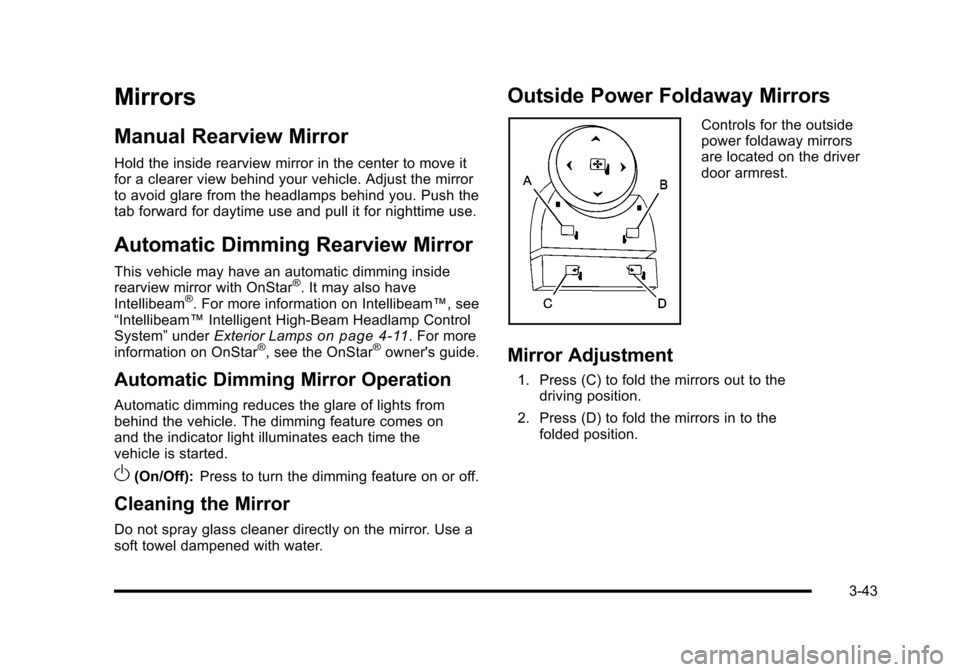
Controls for the outsidepower foldaway mirrorsare located on the driverdoor armrest.
Mirror Adjustment
1. Press (C) to fold the mirrors out to thedriving position.
2. Press (D) to fold the mirrors in to thefolded position.
3-43
Page 179 of 616
When the System Does Not Seem To
Work Properly
The rear vision camera system might not work properlyor display a clear image if:
.The RVC is turned off. See“Turning the RearCamera System On or Off”earlier in this section.
.It is dark.
.The sun or the beam of headlights is shiningdirectly into the camera lens.
.Ice, snow, mud, or anything else builds up on thecamera lens. Clean the lens, rinse it with water,and wipe it with a soft cloth.
.The back of the vehicle is in an accident, theposition and mounting angle of the camera canchange or the camera can be affected. Be sure tohave the camera and its position and mountingangle checked at your dealer/retailer.
Universal Home Remote
System
SeeRadio Frequency Statementon page 9!20forinformation regarding Part 15 of the FederalCommunications Commission (FCC) Rules andRSS-210/211 of Industry and Science Canada.
Universal Home Remote System
Operation (With Three Round LED)
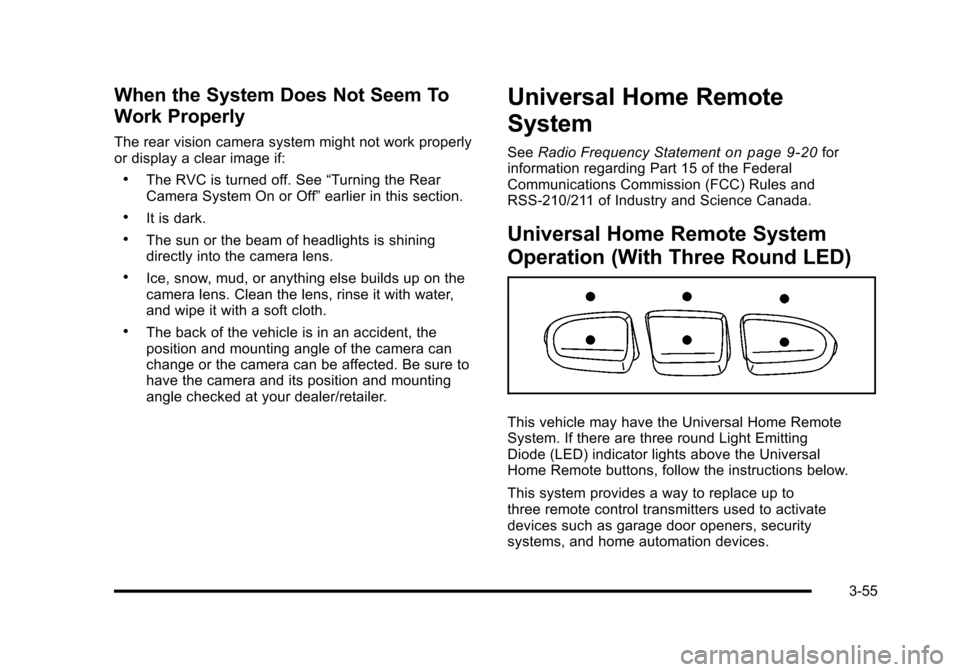
This vehicle may have the Universal Home RemoteSystem. If there are three round Light EmittingDiode (LED) indicator lights above the UniversalHome Remote buttons, follow the instructions below.
This system provides a way to replace up tothree remote control transmitters used to activatedevices such as garage door openers, securitysystems, and home automation devices.
3-55
Page 185 of 616
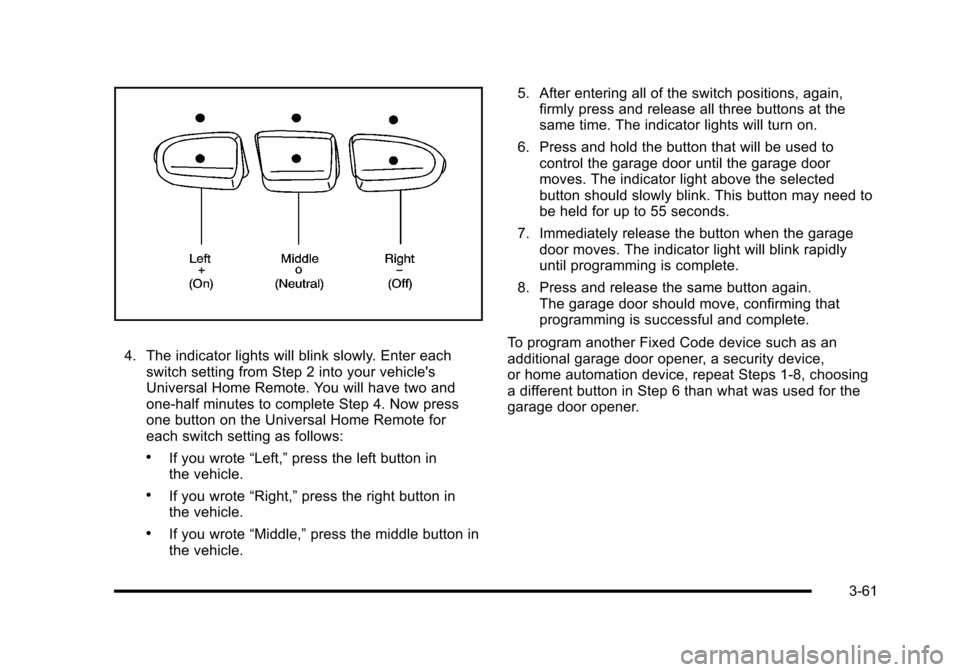
4. The indicator lights will blink slowly. Enter eachswitch setting from Step 2 into your vehicle'sUniversal Home Remote. You will have two andone-half minutes to complete Step 4. Now pressone button on the Universal Home Remote foreach switch setting as follows:
.If you wrote“Left,”press the left button inthe vehicle.
.If you wrote“Right,”press the right button inthe vehicle.
.If you wrote“Middle,”press the middle button inthe vehicle.
5. After entering all of the switch positions, again,firmly press and release all three buttons at thesame time. The indicator lights will turn on.
6. Press and hold the button that will be used tocontrol the garage door until the garage doormoves. The indicator light above the selectedbutton should slowly blink. This button may need tobe held for up to 55 seconds.
7. Immediately release the button when the garagedoor moves. The indicator light will blink rapidlyuntil programming is complete.
8. Press and release the same button again.The garage door should move, confirming thatprogramming is successful and complete.
To program another Fixed Code device such as anadditional garage door opener, a security device,or home automation device, repeat Steps 1-8, choosinga different button in Step 6 than what was used for thegarage door opener.
3-61
Page 186 of 616
Using Universal Home Remote
Press and hold the appropriate button for at least halfof a second. The indicator light will come on while thesignal is being transmitted.
Reprogramming Universal Home
Remote Buttons
Any of the three buttons can be reprogrammed byrepeating the instructions.
Erasing Universal Home Remote
Buttons
The programmed buttons should be erased when thevehicle is sold or the lease ends.
To erase either Rolling Code or Fixed Code on theUniversal Home Remote device:
1. Press and hold the two outside buttons at thesame time for approximately 20 seconds, until theindicator lights, located directly above the buttons,begin to blink rapidly.
2. Once the indicator lights begin to blink, releaseboth buttons. The codes from all buttons willbe erased.
For help or information on the Universal Home RemoteSystem, call the customer assistance phone numberunderCustomer Assistance Offices on page 9!6.
Storage Areas
Glove Box
Pull the bottom of the glove box handle upward toopen it. Use the key to lock and unlock the glove box.
Cupholders
Cupholders are located in the center console for thefront passengers. Press down on the access doorrelease to open and use the front cupholders. Push thedoor back down to close it. Push down and then backon the front cupholder to remove it for cleaning.
Heated and Cooled Cupholders
For vehicles with heated and cooled cupholders, theseare located in the front center console.
Press down on the access door release button to openthe cupholder door.
3-62
Page 193 of 616
Section 4 Instrument Panel
Instrument Panel Overview. . . . . . . . . . . . . . . . . . . . . . . . 4-3Hazard Warning Flashers . . . . . . . . . . . . . . . . . . . . . . . 4-3Horn . . . . . . . . . . . . . . . . . . . . . . . . . . . . . . . . . . . . . . . . . . . . 4-3Tilt Wheel . . . . . . . . . . . . . . . . . . . . . . . . . . . . . . . . . . . . . . . 4-3Heated Steering Wheel . . . . . . . . . . . . . . . . . . . . . . . . . 4-4Turn Signal/Multifunction Lever . . . . . . . . . . . . . . . . . . 4-4Turn and Lane-Change Signals . . . . . . . . . . . . . . . . . 4-5Headlamp High/Low-Beam Changer . . . . . . . . . . . . 4-5Flash-to-Pass . . . . . . . . . . . . . . . . . . . . . . . . . . . . . . . . . . . 4-6Windshield Wipers . . . . . . . . . . . . . . . . . . . . . . . . . . . . . . 4-6Windshield Washer . . . . . . . . . . . . . . . . . . . . . . . . . . . . . 4-7Rear Window Wiper/Washer . . . . . . . . . . . . . . . . . . . . 4-7Cruise Control . . . . . . . . . . . . . . . . . . . . . . . . . . . . . . . . . . 4-8Exterior Lamps . . . . . . . . . . . . . . . . . . . . . . . . . . . . . . . . . 4-11Headlamps on Reminder . . . . . . . . . . . . . . . . . . . . . . 4-15Daytime Running Lamps (DRL) . . . . . . . . . . . . . . . . 4-15Automatic Headlamp System . . . . . . . . . . . . . . . . . . 4-15Fog Lamps . . . . . . . . . . . . . . . . . . . . . . . . . . . . . . . . . . . . 4-16Instrument Panel Brightness . . . . . . . . . . . . . . . . . . . 4-16Dome Lamps . . . . . . . . . . . . . . . . . . . . . . . . . . . . . . . . . . 4-17Dome Lamp Override . . . . . . . . . . . . . . . . . . . . . . . . . . 4-17Entry Lighting . . . . . . . . . . . . . . . . . . . . . . . . . . . . . . . . . . 4-17Exit Lighting . . . . . . . . . . . . . . . . . . . . . . . . . . . . . . . . . . . 4-17
Reading Lamps . . . . . . . . . . . . . . . . . . . . . . . . . . . . . . . . 4-17Electric Power Management . . . . . . . . . . . . . . . . . . . 4-18Battery Run-Down Protection . . . . . . . . . . . . . . . . . . 4-18Accessory Power Outlet(s) . . . . . . . . . . . . . . . . . . . . . 4-19Ashtray(s) and Cigarette Lighter . . . . . . . . . . . . . . . 4-20Analog Clock . . . . . . . . . . . . . . . . . . . . . . . . . . . . . . . . . . 4-20
Climate Controls. . . . . . . . . . . . . . . . . . . . . . . . . . . . . . . . . . 4-20Dual Automatic Climate Control System . . . . . . . 4-20Outlet Adjustment . . . . . . . . . . . . . . . . . . . . . . . . . . . . . . 4-25Rear Air Conditioning and Heating System andElectronic Climate Controls . . . . . . . . . . . . . . . . . . 4-26
Warning Lights, Gages, and Indicators. . . . . . . . . . 4-27Instrument Panel Cluster . . . . . . . . . . . . . . . . . . . . . . . 4-28Speedometer and Odometer . . . . . . . . . . . . . . . . . . . 4-29Trip Odometer . . . . . . . . . . . . . . . . . . . . . . . . . . . . . . . . . 4-29Tachometer . . . . . . . . . . . . . . . . . . . . . . . . . . . . . . . . . . . . 4-29Safety Belt Reminders . . . . . . . . . . . . . . . . . . . . . . . . . 4-29Airbag Readiness Light . . . . . . . . . . . . . . . . . . . . . . . . 4-30Passenger Airbag Status Indicator . . . . . . . . . . . . . 4-31Charging System Light . . . . . . . . . . . . . . . . . . . . . . . . 4-32Brake System Warning Light . . . . . . . . . . . . . . . . . . . 4-33Antilock Brake System (ABS) Warning Light . . . 4-34
4-1
Page 194 of 616
Section 4 Instrument Panel
StabiliTrak®Indicator Light . . . . . . . . . . . . . . . . . . . . . 4-34Engine Coolant Temperature Gage . . . . . . . . . . . . 4-35Tire Pressure Light . . . . . . . . . . . . . . . . . . . . . . . . . . . . 4-35Malfunction Indicator Lamp . . . . . . . . . . . . . . . . . . . . 4-36Oil Pressure Light . . . . . . . . . . . . . . . . . . . . . . . . . . . . . 4-38Security Light . . . . . . . . . . . . . . . . . . . . . . . . . . . . . . . . . . 4-39Fog Lamp Light . . . . . . . . . . . . . . . . . . . . . . . . . . . . . . . . 4-39Lights On Reminder . . . . . . . . . . . . . . . . . . . . . . . . . . . 4-39Cruise Control Light . . . . . . . . . . . . . . . . . . . . . . . . . . . 4-39Highbeam On Light . . . . . . . . . . . . . . . . . . . . . . . . . . . . 4-40Tow/Haul Mode Light . . . . . . . . . . . . . . . . . . . . . . . . . . 4-40Fuel Gage . . . . . . . . . . . . . . . . . . . . . . . . . . . . . . . . . . . . . 4-40
Driver Information Center (DIC). . . . . . . . . . . . . . . . . . 4-41DIC Operation and Displays . . . . . . . . . . . . . . . . . . . 4-41DIC Compass . . . . . . . . . . . . . . . . . . . . . . . . . . . . . . . . . . 4-47DIC Warnings and Messages . . . . . . . . . . . . . . . . . . 4-48DIC Vehicle Customization . . . . . . . . . . . . . . . . . . . . 4-57
Audio System(s). . . . . . . . . . . . . . . . . . . . . . . . . . . . . . . . . . 4-67Bluetooth®. . . . . . . . . . . . . . . . . . . . . . . . . . . . . . . . . . . . . 4-67Rear Seat Entertainment (RSE) System(Overhead) . . . . . . . . . . . . . . . . . . . . . . . . . . . . . . . . . . 4-77Rear Seat Entertainment (RSE) System(Headrest DVD) . . . . . . . . . . . . . . . . . . . . . . . . . . . . . 4-86Rear Seat Audio (RSA) . . . . . . . . . . . . . . . . . . . . . . . 4-103Theft-Deterrent Feature . . . . . . . . . . . . . . . . . . . . . . 4-105Audio Steering Wheel Controls . . . . . . . . . . . . . . . 4-105Radio Reception . . . . . . . . . . . . . . . . . . . . . . . . . . . . . . 4-107Rear Side Window Antenna . . . . . . . . . . . . . . . . . . 4-108XM™Satellite Radio Antenna System . . . . . . . . 4-108
4-2
Page 203 of 616
Exterior Lamps
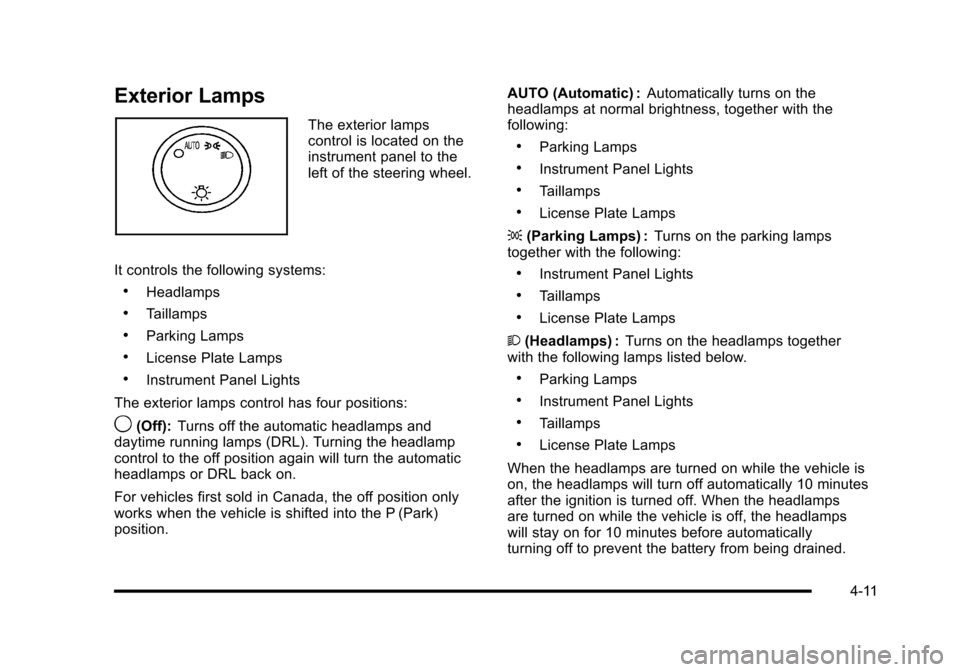
The exterior lampscontrol is located on theinstrument panel to theleft of the steering wheel.
It controls the following systems:
.Headlamps
.Taillamps
.Parking Lamps
.License Plate Lamps
.Instrument Panel Lights
The exterior lamps control has four positions:
9(Off):Turns off the automatic headlamps anddaytime running lamps (DRL). Turning the headlampcontrol to the off position again will turn the automaticheadlamps or DRL back on.
For vehicles first sold in Canada, the off position onlyworks when the vehicle is shifted into the P (Park)position.
AUTO (Automatic) :Automatically turns on theheadlamps at normal brightness, together with thefollowing:
.Parking Lamps
.Instrument Panel Lights
.Taillamps
.License Plate Lamps
;(Parking Lamps) :Turns on the parking lampstogether with the following:
.Instrument Panel Lights
.Taillamps
.License Plate Lamps
2(Headlamps) :Turns on the headlamps togetherwith the following lamps listed below.
.Parking Lamps
.Instrument Panel Lights
.Taillamps
.License Plate Lamps
When the headlamps are turned on while the vehicle ison, the headlamps will turn off automatically 10 minutesafter the ignition is turned off. When the headlampsare turned on while the vehicle is off, the headlampswill stay on for 10 minutes before automaticallyturning off to prevent the battery from being drained.
4-11
Page 207 of 616
Headlamps on Reminder
If a door is open, a reminder chime sounds when theheadlamps or parking lamps are manually turned onand the key is out of the ignition. To turn off the chime,turn the headlamp switch to off or AUTO and then backon, or close and re-open the door. In the AUTO mode,the headlamps turn off once the ignition is in LOCK/OFFor remains on until the headlamp delay ends (if enabledin the DIC). See“Exit Lighting”underDIC VehicleCustomization on page 4!57.
Daytime Running Lamps (DRL)
Daytime Running Lamps (DRL) can make it easier forothers to see the front of your vehicle during the day.Fully functional daytime running lamps are required onall vehicles first sold in Canada.
The DRL system comes on when the followingconditions are met:
.The ignition is on.
.The exterior lamps control is in AUTO.
.The engine is running.
.The light sensor determines it is daytime.
When the DRL system is on, only the DRL lamps areon. The taillamps, sidemarker, instrument panel lights,and other lamps will not be on.
When it begins to get dark, the automatic headlampsystem switches from DRL to the headlamps.
To turn off the DRL lamps, turn the exterior lampscontrol to the OFF position and then release. Forvehicles first sold in Canada, the transmission must bein the P (Park) position, before the DRL lamps can beturned off.
Automatic Headlamp System
When it is dark enough outside, the automaticheadlamp system turns on the headlamps at the normalbrightness, along with the taillamps, sidemarker, parkinglamps, and the instrument panel lights. The radio lightswill also be dim.
To turn off the automatic headlamp system, turn theexterior lamps switch to the off position and thenrelease it. For vehicles first sold in Canada, thetransmission must be in the P (Park) position, beforethe automatic headlamp system can be turned off.
The vehicle has a light sensor located on the top of theinstrument panel in the defroster grille that regulateswhen the automatic headlamps turn on. Do not coverthe sensor or the headlamps will come on whenever theignition is on.
The system may also turn on the headlamps whendriving through a parking garage, heavy overcastweather, or a tunnel. This is normal.
4-15
Page 208 of 616
There is a delay in the transition between the daytimeand nighttime operation of the Daytime Running Lamps(DRL) and the automatic headlamp systems so thatdriving under bridges or bright overhead street lightsdoes not affect the system. The DRL and automaticheadlamp system is only affected when the light sensordetects a change in lighting lasting longer than thedelay.
If the vehicle is started in a dark garage, the automaticheadlamp system will come on immediately. Once thevehicle leaves the garage, it takes approximatelyone minute for the automatic headlamp system tochange to DRL if it is bright enough outside. During thatdelay, the instrument panel cluster may not be as brightas usual. Make sure the instrument panel brightnesscontrol is in the full bright position. SeeInstrumentPanel Brightness on page 4!16.
To idle the vehicle with the automatic headlamp systemoff, turn the control to the off position.
The headlamps will also stay on after you exit thevehicle. This feature can be programmed using theDriver Information Center (DIC). SeeDIC VehicleCustomization on page 4!57.
The regular headlamp system can be turned on whenneeded.
Fog Lamps
For vehicles with fog lamps, the control is located nextto the exterior lamps control on the instrument panel tothe left of the steering column.
#(Fog Lamps):Press the button to turn the fog lampson or off. A indicator light comes on in the instrumentpanel cluster. The ignition must be in the ON/RUNposition for the fog lamps to come on.
When the fog lamps are turned on, the headlampsautomatically turn on.
When the headlamps are changed to high-beam, thefog lamps also go off. When the high-beam headlampsgo off, the fog lamps will come on again.
Some localities have laws that require the headlamps tobe on along with the fog lamps.
Instrument Panel Brightness
D(Instrument Panel Brightness) :This featurecontrols the brightness of the instrument panel lightsand is located next to the exterior lamp control.
Push the knob to extend out and then it can be turned.
Turn the knob clockwise or counterclockwise to brightenor dim the instrument panel lights. Turning the knob tothe farthest clockwise position turns on the dome lamps.
4-16
Page 209 of 616
Dome Lamps
The dome lamps come on when any door is opened.They turn off after all the doors are closed.
The dome lamps can also be turned on by turning theinstrument panel brightness knob, located on theinstrument panel to the left of the steering column,clockwise to the farthest position. In this position, thedome lamps remain on whether a door is opened orclosed.
Dome Lamp Override
The dome lamp override button is located next to theexterior lamps control.
k(Dome Off):Press the button in and the domelamps remain off when a door is opened. Press thebutton again to return it to the extended position so thatthe dome lamps come on when a door is opened.
Entry Lighting
The vehicle has an illuminated entry feature.
When the doors are opened, the dome lamps will comeon if the dome override button is in the extendedposition. If the dome override button is pressed in, thelamps will not come on.
Exit Lighting
The interior lamps come on when the key is removedfrom the ignition. They turn off automatically in20 seconds. The lights do not come on if the domeoverride button is pressed in.
Reading Lamps
If the vehicle has front reading lamps, press the buttonlocated next to the lamp to turn it on or off.
The vehicle may also have reading lamps in otherlocations. The lamps cannot be adjusted.
4-17