door lock CADILLAC ESCALADE 2011 3.G Owner's Guide
[x] Cancel search | Manufacturer: CADILLAC, Model Year: 2011, Model line: ESCALADE, Model: CADILLAC ESCALADE 2011 3.GPages: 558, PDF Size: 7.59 MB
Page 99 of 558
Black plate (43,1)Cadillac Escalade/Escalade ESV Owner Manual - 2011
Seats and Restraints 3-43
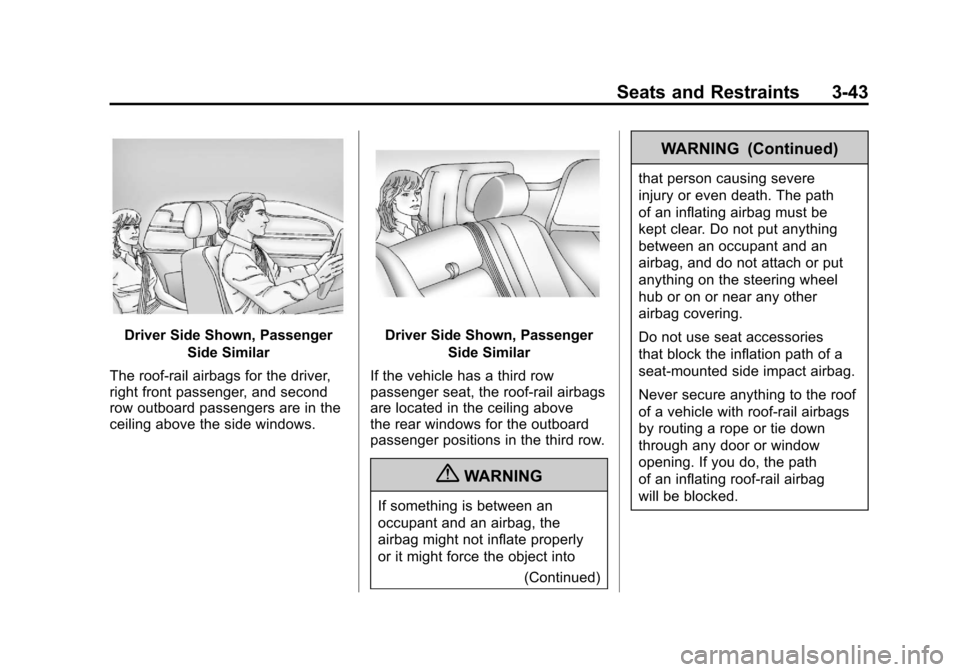
Driver Side Shown, PassengerSide Similar
The roof-rail airbags for the driver,
right front passenger, and second
row outboard passengers are in the
ceiling above the side windows.Driver Side Shown, Passenger Side Similar
If the vehicle has a third row
passenger seat, the roof-rail airbags
are located in the ceiling above
the rear windows for the outboard
passenger positions in the third row.
{WARNING
If something is between an
occupant and an airbag, the
airbag might not inflate properly
or it might force the object into (Continued)
WARNING (Continued)
that person causing severe
injury or even death. The path
of an inflating airbag must be
kept clear. Do not put anything
between an occupant and an
airbag, and do not attach or put
anything on the steering wheel
hub or on or near any other
airbag covering.
Do not use seat accessories
that block the inflation path of a
seat-mounted side impact airbag.
Never secure anything to the roof
of a vehicle with roof-rail airbags
by routing a rope or tie down
through any door or window
opening. If you do, the path
of an inflating roof-rail airbag
will be blocked.
Page 103 of 558
Black plate (47,1)Cadillac Escalade/Escalade ESV Owner Manual - 2011
Seats and Restraints 3-47
{WARNING
When an airbag inflates, there
may be dust in the air. This dust
could cause breathing problems
for people with a history of
asthma or other breathing trouble.
To avoid this, everyone in the
vehicle should get out as soon
as it is safe to do so. If you have
breathing problems but cannot
get out of the vehicle after an
airbag inflates, then get fresh air
by opening a window or a door.
If you experience breathing
problems following an airbag
deployment, you should seek
medical attention.
The vehicle may have a feature
that may automatically unlock the
doors, turn on the interior lamps and
hazard warning flashers, and shut
off the fuel system after the airbags
inflate. You can lock the doors, turn off the interior lamps and hazard
warning flashers by using the
controls for those features.
{WARNING
A crash severe enough to inflate
the airbags may have also
damaged important functions
in the vehicle, such as the fuel
system, brake and steering
systems, etc. Even if the vehicle
appears to be drivable after a
moderate crash, there may be
concealed damage that could
make it difficult to safely operate
the vehicle.
Use caution if you should attempt
to restart the engine after a crash
has occurred.
In many crashes severe enough to
inflate the airbag, windshields are
broken by vehicle deformation. Additional windshield breakage
may also occur from the right front
passenger airbag.
.Airbags are designed to inflate
only once. After an airbag
inflates, you will need some
new parts for the airbag system.
If you do not get them, the
airbag system will not be there
to help protect you in another
crash. A new system will include
airbag modules and possibly
other parts. The service manual
for your vehicle covers the need
to replace other parts.
.The vehicle has a crash
sensing and diagnostic module
which records information after
a crash. See
Vehicle Data
Recording and Privacy on
page 13‑17 andEvent Data
Recorders on page 13‑18.
Page 135 of 558
Black plate (1,1)Cadillac Escalade/Escalade ESV Owner Manual - 2011
Storage 4-1
Storage
Storage Compartments
Glove Box . . . . . . . . . . . . . . . . . . . . 4-1
Cupholders . . . . . . . . . . . . . . . . . . . 4-1
Armrest Storage . . . . . . . . . . . . . . 4-2
Rear Storage . . . . . . . . . . . . . . . . . 4-2
Center Console Storage . . . . . . 4-3
Roof Rack System
Roof Rack System . . . . . . . . . . . . 4-3
Storage
Compartments
Glove Box
Pull the bottom of the glove box
handle upward to open it. Use
the key to lock and unlock the
glove box.
Cupholders
Cupholders are located in the center
console for the front passengers.
Press down on the access door
release to open and use the front
cupholders. Push the door back
down to close it. Push down and
then back on the front cupholder
to remove it for cleaning.
Heated and Cooled
Cupholders
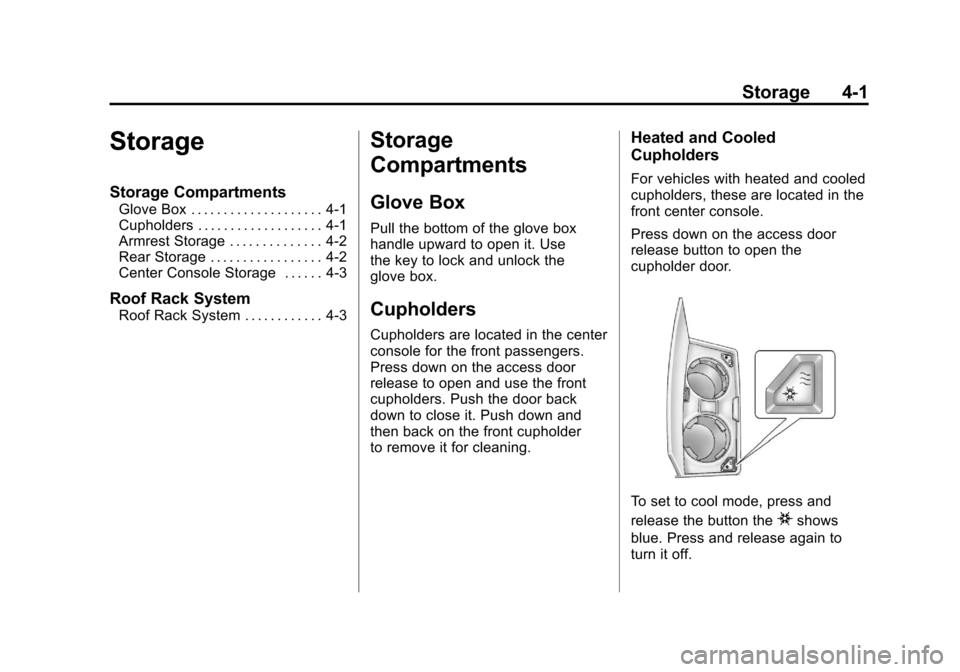
For vehicles with heated and cooled
cupholders, these are located in the
front center console.
Press down on the access door
release button to open the
cupholder door.
To set to cool mode, press and
release the button the
ishows
blue. Press and release again to
turn it off.
Page 138 of 558
Black plate (4,1)Cadillac Escalade/Escalade ESV Owner Manual - 2011
4-4 Storage
Avoid high speeds, sudden starts,
sharp turns, sudden braking or
abrupt maneuvers, otherwise it may
result in loss of control. If driving for
a long distance, on rough roads,
or at high speeds, occasionally stop
the vehicle to make sure the cargo
remains in its place.
Do not exceed the maximum vehicle
capacity when loading the vehicle.
For more information on vehicle
capacity and loading, seeVehicle
Load Limits on page 9‑24.
To prevent damage or loss of cargo,
check now and then to make sure
the luggage and cargo are still
securely fastened. Be sure the cargo is properly
loaded.
.If small heavy objects are placed
on the roof, place the load in
the area over the rear wheels
(behind the rear side door on
extended models). If needed,
cut a piece of 3/8 inch plywood
to fit inside the crossrails and
siderails to spread the load.
If plywood is used, tie it to the
siderail supports.
.Tie the load to the crossrails
or the siderail supports. Use
the crossrails only to keep the
load from sliding. To move the
crossrails, pull out on the latch
release handle at each end.
Slide the crossrail to the desired
position balancing the force side
to side. Push the release handle
back into the latched position
and slide the crossrail back and
forth slightly to be sure the latch
snaps securely into place.
.If needed to carry long items,
move the crossrails as far apart
as they will go. Tie the load to
the crossrails and the siderails
or siderail supports. Also tie
the load to the bumpers. Do not
tie the load so tightly that the
crossrails or siderails are
damaged.
.After moving a crossrail, be sure
it is securely locked into the
siderail.
A Center High-Mounted Stoplamp
(CHMSL) is located above the glass
or above the rear load doors.
If items are loaded on the roof of the
vehicle, care should be taken not to
block or damage the CHMSL unit.
Page 140 of 558
Black plate (2,1)Cadillac Escalade/Escalade ESV Owner Manual - 2011
5-2 Instruments and Controls
Vehicle Messages
Vehicle Messages . . . . . . . . . . . 5-31
Battery Voltage and ChargingMessages . . . . . . . . . . . . . . . . . . 5-31
Brake System Messages . . . . 5-31
Door Ajar Messages . . . . . . . . . 5-32
Engine Cooling System Messages . . . . . . . . . . . . . . . . . . 5-33
Engine Oil Messages . . . . . . . . 5-34
Engine Power Messages . . . . 5-34
Fuel System Messages . . . . . . 5-35
Key and Lock Messages . . . . . 5-35
Lamp Messages . . . . . . . . . . . . . 5-35
Object Detection System Messages . . . . . . . . . . . . . . . . . . 5-36
Ride Control System Messages . . . . . . . . . . . . . . . . . . 5-37
Airbag System Messages . . . . 5-38 Anti-Theft Alarm System
Messages . . . . . . . . . . . . . . . . . . 5-38
Tire Messages . . . . . . . . . . . . . . . 5-39
Transmission Messages . . . . . 5-40
Vehicle Reminder Messages . . . . . . . . . . . . . . . . . . 5-40
Washer Fluid Messages . . . . . 5-40
Vehicle Personalization
Vehicle Personalization . . . . . . 5-40
Universal Remote System
Universal Remote System . . . 5-50
Universal Remote System Programming . . . . . . . . . . . . . . . 5-50
Universal Remote System Operation . . . . . . . . . . . . . . . . . . 5-55
Controls
Steering Wheel
Adjustment
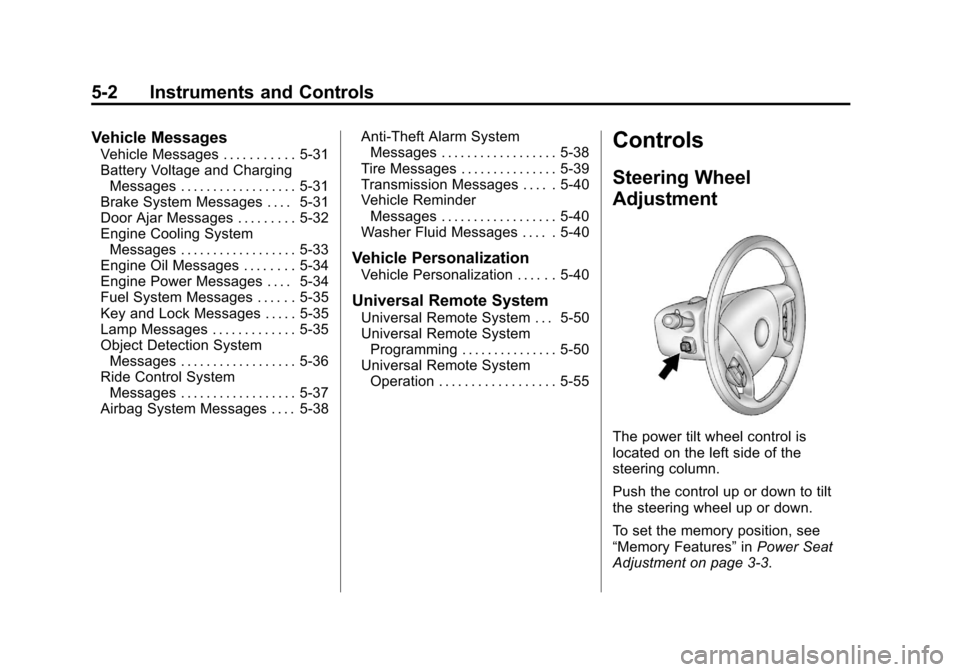
The power tilt wheel control is
located on the left side of the
steering column.
Push the control up or down to tilt
the steering wheel up or down.
To set the memory position, see
“Memory Features” inPower Seat
Adjustment on page 3‑3.
Page 180 of 558
Black plate (42,1)Cadillac Escalade/Escalade ESV Owner Manual - 2011
5-42 Instruments and Controls
AUTO DOOR LOCK
This feature allows you to select
when the vehicle's doors will
automatically lock. SeeAutomatic
Door Locks on page 2‑8 for more
information.
Press the customization button until
AUTO DOOR LOCK appears on
the DIC display. Press the set/reset
button once to access the settings
for this feature. Then press the
customization button to scroll
through the following settings:
SHIFT OUT OF PARK (default):
The doors will automatically lock
when the vehicle is shifted out of
P (Park).
AT VEHICLE SPEED: The doors
will automatically lock when the
vehicle speed is above 13 km/h
(8 mph) for three seconds. NO CHANGE:
No change will be
made to this feature. The current
setting will remain.
To select a setting, press the
set/reset button while the desired
setting is displayed on the DIC.
AUTO DOOR UNLOCK
This feature allows you to select
whether or not to turn off the
automatic door unlocking feature.
It also allows you to select which
doors and when the doors will
automatically unlock. See Automatic
Door Locks on page 2‑8 for more
information.
Press the customization button until
AUTO DOOR UNLOCK appears on
the DIC display. Press the set/reset
button once to access the settings
for this feature. Then press the
customization button to scroll
through the following settings:
OFF: None of the doors will
automatically unlock. DRIVER AT KEY OUT:
Only the
driver door will unlock when the key
is taken out of the ignition.
DRIVER IN PARK: Only the driver
door will unlock when the vehicle is
shifted into P (Park).
ALL AT KEY OUT: All of the doors
will unlock when the key is taken
out of the ignition.
ALL IN PARK (default): All of the
doors will unlock when the vehicle is
shifted into P (Park).
NO CHANGE: No change will be
made to this feature. The current
setting will remain.
To select a setting, press the
set/reset button while the desired
setting is displayed on the DIC.
Page 181 of 558
Black plate (43,1)Cadillac Escalade/Escalade ESV Owner Manual - 2011
Instruments and Controls 5-43
REMOTE DOOR LOCK
This feature allows you to select
the type of feedback you will receive
when locking the vehicle with
the Remote Keyless Entry (RKE)
transmitter. You will not receive
feedback when locking the vehicle
with the RKE transmitter if the doors
are open. SeeRemote Keyless
Entry (RKE) System Operation on
page 2‑3 for more information.
Press the customization button until
REMOTE DOOR LOCK appears on
the DIC display. Press the set/reset
button once to access the settings
for this feature. Then press the
customization button to scroll
through the following settings:
OFF: There will be no feedback
when you press the lock button on
the RKE transmitter. LIGHTS ONLY:
The exterior lamps
will flash when you press the lock
button on the RKE transmitter.
HORN ONLY: The horn will sound
on the second press of the lock
button on the RKE transmitter.
HORN & LIGHTS (default): The
exterior lamps will flash when you
press the lock button on the RKE
transmitter, and the horn will sound
when the lock button is pressed
again within five seconds of the
previous command.
NO CHANGE: No change will be
made to this feature. The current
setting will remain.
To select a setting, press the
set/reset button while the desired
setting is displayed on the DIC. REMOTE DOOR UNLOCK
This feature allows you to select the
type of feedback you will receive
when unlocking the vehicle with
the Remote Keyless Entry (RKE)
transmitter. You will not receive
feedback when unlocking the
vehicle with the RKE transmitter if
the doors are open. See
Remote
Keyless Entry (RKE) System
Operation on page 2‑3 for more
information.
Press the customization button
until REMOTE DOOR UNLOCK
appears on the DIC display. Press
the set/reset button once to access
the settings for this feature. Then
press the customization button to
scroll through the following settings:
LIGHTS OFF: The exterior lamps
will not flash when you press
the unlock button on the RKE
transmitter.
Page 182 of 558
Black plate (44,1)Cadillac Escalade/Escalade ESV Owner Manual - 2011
5-44 Instruments and Controls
LIGHTS ON (default):The exterior
lamps will flash when you press
the unlock button on the RKE
transmitter.
NO CHANGE: No change will be
made to this feature. The current
setting will remain.
To select a setting, press the
set/reset button while the desired
setting is displayed on the DIC.
DELAY DOOR LOCK
This feature allows you to select
whether or not the locking of the
vehicle's doors and liftgate will be
delayed. When locking the doors
and liftgate with the power door
lock switch and a door or the liftgate
is open, this feature will delay
locking the doors and liftgate until
five seconds after the last door is
closed. You will hear three chimes
to signal that the delayed locking
feature is in use. The key must be
out of the ignition for this feature to work. You can temporarily override
delayed locking by pressing the
power door lock switch twice.
See
Delayed Locking on page 2‑8
for more information.
Press the customization button until
DELAY DOOR LOCK appears on
the DIC display. Press the set/reset
button once to access the settings
for this feature. Then press the
customization button to scroll
through the following settings:
OFF: There will be no delayed
locking of the vehicle's doors.
ON (default): The doors will not
lock until five seconds after the last
door or the liftgate is closed.
NO CHANGE: No change will be
made to this feature. The current
setting will remain.
To select a setting, press the
set/reset button while the desired
setting is displayed on the DIC. EXIT LIGHTING
This feature allows you to select
the amount of time you want the
exterior lamps to remain on when
it is dark enough outside. This
happens after the key is turned
from ON/RUN to LOCK/OFF.
Press the customization button until
EXIT LIGHTING appears on the
DIC display. Press the set/reset
button once to access the settings
for this feature. Then press the
customization button to scroll
through the following settings:
OFF:
The exterior lamps will not
turn on.
30 SECONDS (default): The
exterior lamps will stay on for
30 seconds.
1 MINUTE: The exterior lamps will
stay on for 1 minute.
2 MINUTES: The exterior lamps will
stay on for 2 minutes.
Page 199 of 558
Black plate (5,1)Cadillac Escalade/Escalade ESV Owner Manual - 2011
Lighting 6-5
Disabling and Resetting
IntelliBeam at the Rearview Mirror
IntelliBeam can be disabled by
using the controls on the inside
rearview mirror.
AUTO
3(On/Off):To disable
the system, press this button
on the inside rearview mirror.
The IntelliBeam indicator will turn off
and will not come back on until the
IntelliBeam button is pressed again.
(Stalk Disable): When IntelliBeam
has turned on the high-beams,
pull or push the high-beam stalk.
This will disable IntelliBeam.
The IntelliBeam indicator on the
mirror will turn off. To re-enable
IntelliBeam, press the IntelliBeam
button on the mirror.
A different sensitivity setting is
available for dealer diagnostics.
This is done by pushing and holding this button for 20 seconds until the
IntelliBeam indicator light flashes
three times. If you accidentally
activate this, the vehicle's setting
will automatically be reset each time
the ignition is turned off and then
on again.
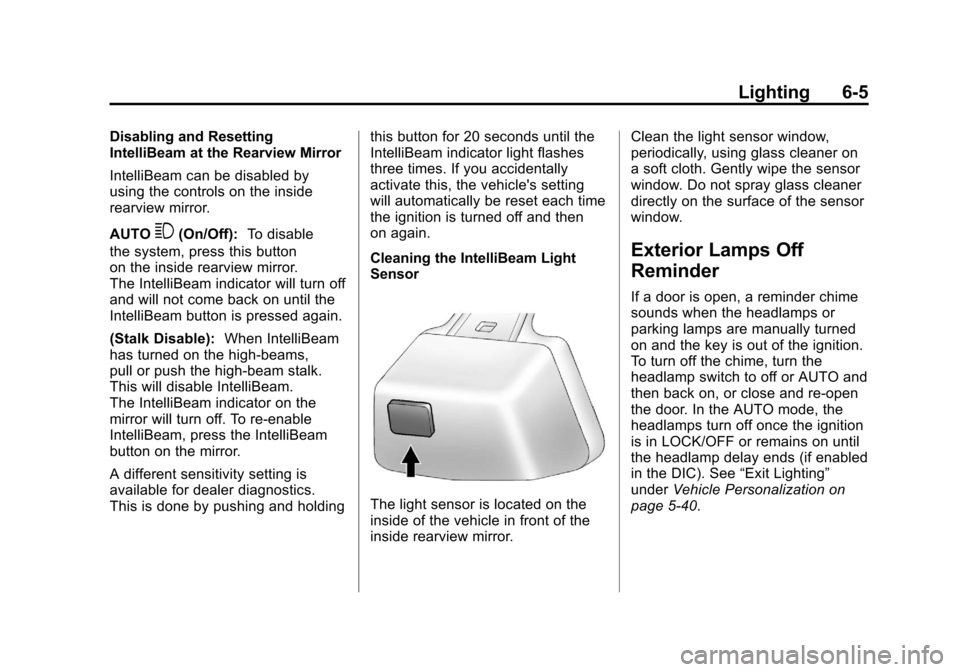
Cleaning the IntelliBeam Light
Sensor
The light sensor is located on the
inside of the vehicle in front of the
inside rearview mirror.Clean the light sensor window,
periodically, using glass cleaner on
a soft cloth. Gently wipe the sensor
window. Do not spray glass cleaner
directly on the surface of the sensor
window.
Exterior Lamps Off
Reminder
If a door is open, a reminder chime
sounds when the headlamps or
parking lamps are manually turned
on and the key is out of the ignition.
To turn off the chime, turn the
headlamp switch to off or AUTO and
then back on, or close and re-open
the door. In the AUTO mode, the
headlamps turn off once the ignition
is in LOCK/OFF or remains on until
the headlamp delay ends (if enabled
in the DIC). See
“Exit Lighting”
under Vehicle Personalization on
page 5‑40.
Page 204 of 558
Black plate (10,1)Cadillac Escalade/Escalade ESV Owner Manual - 2011
6-10 Lighting
Push the knob to extend out and
then it can be turned.
Turn the knob clockwise or
counterclockwise to brighten or
dim the instrument panel lights.
Turning the knob to the farthest
clockwise position turns on the
dome lamps.
Dome Lamps
The dome lamps are located in the
overhead console.
They come on when any door is
opened and turn off after all the
doors are closed.
Turn the instrument panel
brightness knob located below
the dome lamp override button,
clockwise to the farthest position to
manually turn on the dome lamps.
The dome lamps remain on until the
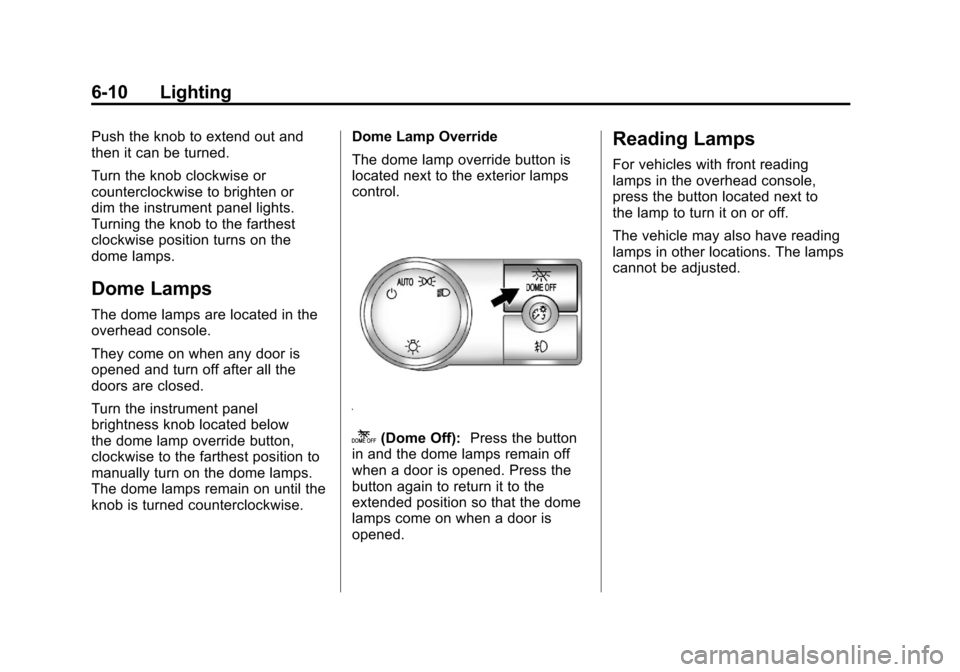
knob is turned counterclockwise.Dome Lamp Override
The dome lamp override button is
located next to the exterior lamps
control.
k(Dome Off):
Press the button
in and the dome lamps remain off
when a door is opened. Press the
button again to return it to the
extended position so that the dome
lamps come on when a door is
opened.
Reading Lamps
For vehicles with front reading
lamps in the overhead console,
press the button located next to
the lamp to turn it on or off.
The vehicle may also have reading
lamps in other locations. The lamps
cannot be adjusted.