light CADILLAC ESCALADE 2012 3.G Workshop Manual
[x] Cancel search | Manufacturer: CADILLAC, Model Year: 2012, Model line: ESCALADE, Model: CADILLAC ESCALADE 2012 3.GPages: 538, PDF Size: 7.59 MB
Page 159 of 538

Black plate (37,1)Cadillac Escalade/Escalade ESV Owner Manual - 2012
Instruments and Controls 5-37
This message also displays LEFT
FRT (left front), RIGHT FRT
(right front), LEFT RR (left rear),
or RIGHT RR (right rear) to indicate
the location of the low tire. The low
tire pressure warning light will also
come on. SeeTire Pressure Light
on page 5‑21. You can receive more
than one tire pressure message at a
time. To read the other messages
that may have been sent at the
same time, press the set/reset
button or the trip odometer reset
stem. If a tire pressure message
appears on the DIC, stop as soon
as you can. Have the tire pressures
checked and set to those shown on
the Tire Loading Information label.
See Tires on page 10‑46, Vehicle
Load Limits on page 9‑15, and Tire
Pressure on page 10‑52. The DIC
also shows the tire pressure values.
See “DIC Operation and Displays
(With DIC Buttons)” earlier in this
section.Transmission Messages
MANUAL SHIFT
This message displays when the
automatic transmission is in manual
mode. See Manual Mode on
page 9‑32 for more information.
TRANSMISSION HOT IDLE
ENGINE
Notice:If you drive the vehicle
while the transmission fluid is
overheating and the transmission
temperature warning is displayed
on the instrument panel cluster
and/or DIC, you can damage the
transmission. This could lead to
costly repairs that would not be
covered by the warranty. Do not
drive the vehicle with overheated
transmission fluid or while the
transmission temperature
warning is displayed.
This message displays along with
four chimes if the transmission fluid
in the vehicle gets hot. Driving with
the transmission fluid temperature
high can cause damage to the vehicle. Stop the vehicle and let it
idle to allow the transmission to
cool. This message clears and
the chime stops when the fluid
temperature reaches a safe level.
Vehicle Reminder
Messages
ICE POSSIBLE DRIVE
WITH CARE
This message displays when ice
conditions are possible.
Washer Fluid Messages
WASHER FLUID LOW ADD
FLUID
This message displays when the
windshield washer fluid is low. Fill
the windshield washer fluid reservoir
as soon as possible. See
Engine
Compartment Overview on
page 10‑6 for the location of the
windshield washer fluid reservoir.
Also, see Washer Fluid on
page 10‑23 for more information.
Page 162 of 538

Black plate (40,1)Cadillac Escalade/Escalade ESV Owner Manual - 2012
5-40 Instruments and Controls
ALL IN PARK (default):All of the
doors will unlock when the vehicle is
shifted into P (Park).
NO CHANGE: No change will be
made to this feature. The current
setting will remain.
To select a setting, press the set/
reset button while the desired
setting is displayed on the DIC.
REMOTE DOOR LOCK
This feature allows you to select the
type of feedback you will receive
when locking the vehicle with the
Remote Keyless Entry (RKE)
transmitter. You will not receive
feedback when locking the vehicle
with the RKE transmitter if the doors
are open. See Remote Keyless
Entry (RKE) System Operation on
page 2‑3 for more information.
Press the customization button until
REMOTE DOOR LOCK appears on
the DIC display. Press the set/reset
button once to access the settings for this feature. Then press the
customization button to scroll
through the following settings:
OFF:
There will be no feedback
when you press the lock button on
the RKE transmitter.
LIGHTS ONLY: The exterior lamps
will flash when you press the lock
button on the RKE transmitter.
HORN ONLY: The horn will sound
on the second press of the lock
button on the RKE transmitter.
HORN & LIGHTS (default): The
exterior lamps will flash when you
press the lock button on the RKE
transmitter, and the horn will sound
when the lock button is pressed
again within five seconds of the
previous command.
NO CHANGE: No change will be
made to this feature. The current
setting will remain.
To select a setting, press the set/
reset button while the desired
setting is displayed on the DIC. REMOTE DOOR UNLOCK
This feature allows you to select the
type of feedback you will receive
when unlocking the vehicle with
the Remote Keyless Entry (RKE)
transmitter. You will not receive
feedback when unlocking the
vehicle with the RKE transmitter if
the doors are open. See
Remote
Keyless Entry (RKE) System
Operation on page 2‑3 for more
information.
Press the customization button until
REMOTE DOOR UNLOCK appears
on the DIC display. Press the set/
reset button once to access the
settings for this feature. Then press
the customization button to scroll
through the following settings:
LIGHTS OFF: The exterior lamps
will not flash when you press the
unlock button on the RKE
transmitter.
LIGHTS ON (default): The exterior
lamps will flash when you press
the unlock button on the RKE
transmitter.
Page 163 of 538

Black plate (41,1)Cadillac Escalade/Escalade ESV Owner Manual - 2012
Instruments and Controls 5-41
NO CHANGE:No change will be
made to this feature. The current
setting will remain.
To select a setting, press the set/
reset button while the desired
setting is displayed on the DIC.
DELAY DOOR LOCK
This feature allows you to select
whether or not the locking of the
vehicle's doors and liftgate will be
delayed. When locking the doors
and liftgate with the power door
lock switch and a door or the liftgate
is open, this feature will delay
locking the doors and liftgate until
five seconds after the last door is
closed. You will hear three chimes
to signal that the delayed locking
feature is in use. The key must be
out of the ignition for this feature to
work. You can temporarily override
delayed locking by pressing the
power door lock switch twice. See
Delayed Locking on page 2‑7 for
more information. Press the customization button until
DELAY DOOR LOCK appears on
the DIC display. Press the set/reset
button once to access the settings
for this feature. Then press the
customization button to scroll
through the following settings:
OFF:
There will be no delayed
locking of the vehicle's doors.
ON (default): The doors will not
lock until five seconds after the last
door or the liftgate is closed.
NO CHANGE: No change will be
made to this feature. The current
setting will remain.
To select a setting, press the set/
reset button while the desired
setting is displayed on the DIC.
EXIT LIGHTING
This feature allows you to select
the amount of time you want the
exterior lamps to remain on when
it is dark enough outside. This
happens after the key is turned from
ON/RUN to LOCK/OFF. Press the customization button
until EXIT LIGHTING appears on
the DIC display. Press the set/reset
button once to access the settings
for this feature. Then press the
customization button to scroll
through the following settings:
OFF:
The exterior lamps will not
turn on.
30 SECONDS (default): The
exterior lamps will stay on for
30 seconds.
1 MINUTE: The exterior lamps will
stay on for 1 minute.
2 MINUTES: The exterior lamps will
stay on for 2 minutes.
NO CHANGE: No change will be
made to this feature. The current
setting will remain.
To select a setting, press the set/
reset button while the desired
setting is displayed on the DIC.
Page 164 of 538

Black plate (42,1)Cadillac Escalade/Escalade ESV Owner Manual - 2012
5-42 Instruments and Controls
APPROACH LIGHTING
This feature allows you to select
whether or not to have the exterior
lamps turn on briefly during low
light periods after unlocking the
vehicle using the Remote Keyless
Entry (RKE) transmitter.
Press the customization button until
APPROACH LIGHTING appears on
the DIC display. Press the set/reset
button once to access the settings
for this feature. Then press the
customization button to scroll
through the following settings:
OFF:The exterior lamps will not
turn on when you unlock the vehicle
with the RKE transmitter.
ON (default): If it is dark enough
outside, the exterior lamps will turn
on briefly when you unlock the
vehicle with the RKE transmitter.
The lamps will remain on for
20 seconds or until the lock button
on the RKE transmitter is pressed,
or the vehicle is no longer off. See
Remote Keyless Entry (RKE)
System Operation on page 2‑3 for
more information.
NO CHANGE: No change will be
made to this feature. The current
setting will remain.
To select a setting, press the set/
reset button while the desired
setting is displayed on the DIC.
AUTO HIGH BEAMS
If your vehicle has this feature, it
allows you to select to have the
IntelliBeam system turned off or on.
See Exterior Lamp Controls on
page 6‑1 for more information.
Press the customization button until
AUTO HIGH BEAMS appears on
the DIC display. Press the set/reset
button once to access the settings
for this feature. Then press the
customization button to scroll
through the following settings:
OFF (default): The IntelliBeam
system will be turned off. ON:
The IntelliBeam system will be
turned on.
NO CHANGE: No change will be
made to this feature. The current
setting will remain.
To select a setting, press the set/
reset button while the desired
setting is displayed on the DIC.
CHIME VOLUME
This feature allows you to select the
volume level of the chime.
Press the customization button until
CHIME VOLUME appears on the
DIC display. Press the set/reset
button once to access the settings
for this feature. Then press the
customization button to scroll
through the following settings:
NORMAL: The chime volume will
be set to a normal level.
LOUD: The chime volume will be
set to a loud level.
NO CHANGE: No change will be
made to this feature. The current
setting will remain.
Page 170 of 538
Black plate (48,1)Cadillac Escalade/Escalade ESV Owner Manual - 2012
5-48 Instruments and Controls
It can usually be found where
the hanging antenna wire is
attached to the motor-head unit
and may be a colored button.
Press this button. After pressing
this button, complete the
following steps in less than
30 seconds.
3. Immediately return to the vehicle. Press and hold the
Universal Home Remote button
that will be used to control the
garage door until the garage
door moves. The indicator light,
above the selected button,
should slowly blink. This button
may need to be held for up to
20 seconds.
4. Immediately, within one second, release the button when the
garage door moves. The
indicator light will blink rapidly
until programming is complete. 5. Press and release the same
button again. The garage door
should move, confirming that
programming is successful and
complete.
To program another Rolling Code
device such as an additional garage
door opener, a security device,
or home automation device, repeat
Steps 1 through 5, choosing a
different function button in Step 3
than what was used for the garage
door opener.
If these instructions do not work,
the garage door opener is probably
a Fixed Code unit. Follow the
programming instructions that follow
for a Fixed Code garage door
opener.
Programming Universal Home
Remote —Fixed Code
For questions or help programming
the Universal Home Remote
System, call 1-866-572-2728 or go
to www.learcar2u.com. Most garage door openers sold
before 1996 are Fixed Code units.
Programming a garage door opener
involves time-sensitive actions, so
read the entire procedure before
starting. Otherwise, the device will
time out and the procedure will have
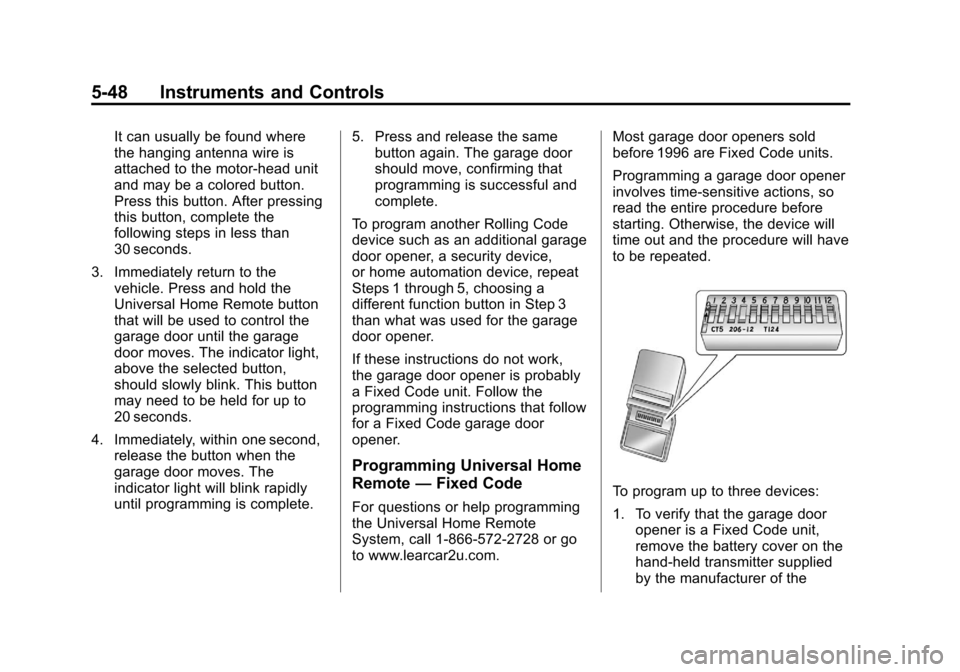
to be repeated.To program up to three devices:
1. To verify that the garage door
opener is a Fixed Code unit,
remove the battery cover on the
hand-held transmitter supplied
by the manufacturer of the
Page 172 of 538
Black plate (50,1)Cadillac Escalade/Escalade ESV Owner Manual - 2012
5-50 Instruments and Controls
The switch settings written
down in Step 2 now
become the button strokes
to be entered into the
Universal Home Remote in
Step 4. Be sure to enter the
switch settings written down
in Step 2, in order from left
to right, into the Universal
Home Remote, when
completing Step 4.
3. From inside your vehicle, first firmly press all three buttons at
the same time for about
three seconds. Release
the buttons to put the
Universal Home Remote
into programming mode.
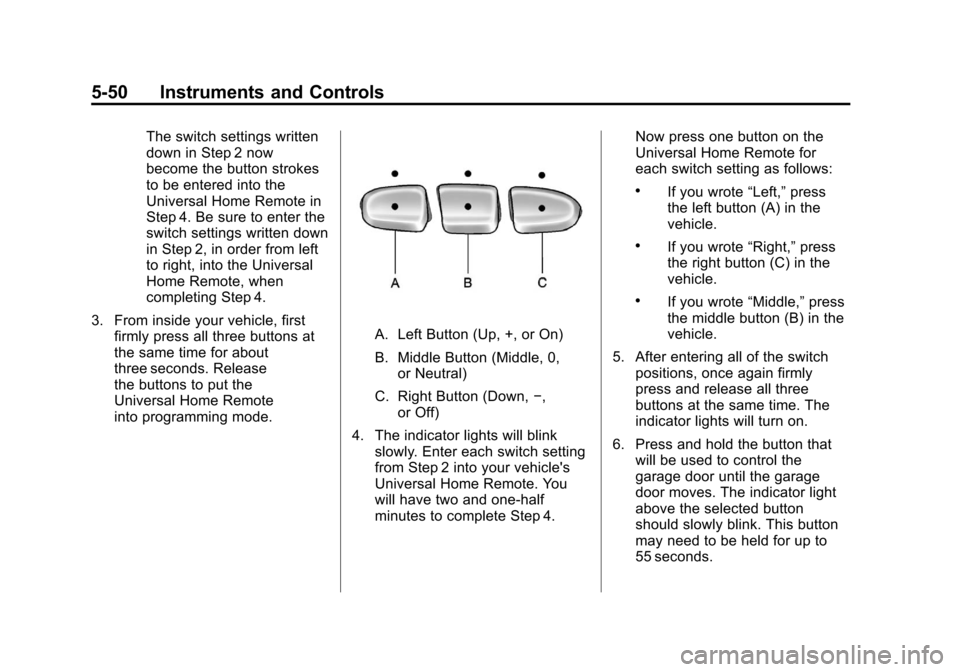
A. Left Button (Up, +, or On)
B. Middle Button (Middle, 0,or Neutral)
C. Right Button (Down, −,
or Off)
4. The indicator lights will blink slowly. Enter each switch setting
from Step 2 into your vehicle's
Universal Home Remote. You
will have two and one-half
minutes to complete Step 4. Now press one button on the
Universal Home Remote for
each switch setting as follows:
.If you wrote
“Left,”press
the left button (A) in the
vehicle.
.If you wrote “Right,”press
the right button (C) in the
vehicle.
.If you wrote “Middle,”press
the middle button (B) in the
vehicle.
5. After entering all of the switch positions, once again firmly
press and release all three
buttons at the same time. The
indicator lights will turn on.
6. Press and hold the button that will be used to control the
garage door until the garage
door moves. The indicator light
above the selected button
should slowly blink. This button
may need to be held for up to
55 seconds.
Page 173 of 538
Black plate (51,1)Cadillac Escalade/Escalade ESV Owner Manual - 2012
Instruments and Controls 5-51
7. Immediately release the buttonwhen the garage door moves.
The indicator light will blink
rapidly until programming is
complete.
8. Press and release the same button again. The garage door
should move, confirming that
programming is successful and
complete.
To program another Fixed Code
device such as an additional garage
door opener, a security device,
or home automation device, repeat
Steps 1-8, choosing a different
button in Step 6 than what was used
for the garage door opener.Universal Remote System
Operation
Press and hold the appropriate
button for at least half of a second.
The indicator light will come on
while the signal is being transmitted.
Reprogramming Universal
Home Remote Buttons
Any of the three buttons can be
reprogrammed by repeating the
instructions.
Erasing Universal Home
Remote Buttons
The programmed buttons should be
erased when the vehicle is sold or
the lease ends. To erase either Rolling Code or
Fixed Code settings on the
Universal Home Remote device:
1. Press and hold the two outside
buttons at the same time for
approximately 20 seconds, until
the indicator lights, located
directly above the buttons, begin
to blink rapidly.
2. Once the indicator lights begin to blink, release both buttons. The
codes from all buttons will be
erased.
For help or information on the
Universal Home Remote System,
call the customer assistance phone
number under Customer Assistance
Offices (U.S. and Canada) on
page 13‑5 orCustomer Assistance
Offices (Mexico) on page 13‑6.
Page 175 of 538
Black plate (1,1)Cadillac Escalade/Escalade ESV Owner Manual - 2012
Lighting 6-1
Lighting
Exterior Lighting
Exterior Lamp Controls . . . . . . . . 6-1
Exterior Lamps OffReminder . . . . . . . . . . . . . . . . . . . . 6-5
Headlamp High/Low-Beam Changer . . . . . . . . . . . . . . . . . . . . . 6-5
Flash-to-Pass . . . . . . . . . . . . . . . . . 6-5
Daytime Running Lamps (DRL) . . . . . . . . . . . . . . . . 6-5
Automatic Headlamp System . . . . . . . . . . . . . . . . . . . . . . 6-6
Hazard Warning Flashers . . . . . 6-7
Turn and Lane-Change Signals . . . . . . . . . . . . . . . . . . . . . . 6-7
Fog Lamps . . . . . . . . . . . . . . . . . . . . 6-8
Interior Lighting
Instrument Panel Illumination Control . . . . . . . . . . . . . . . . . . . . . . 6-8
Dome Lamps . . . . . . . . . . . . . . . . . 6-9
Reading Lamps . . . . . . . . . . . . . . . 6-9
Lighting Features
Entry Lighting . . . . . . . . . . . . . . . . . 6-9
Exit Lighting . . . . . . . . . . . . . . . . . . . 6-9
Battery Load Management . . . 6-10
Battery Power Protection . . . . 6-10
Exterior Lighting
Exterior Lamp Controls
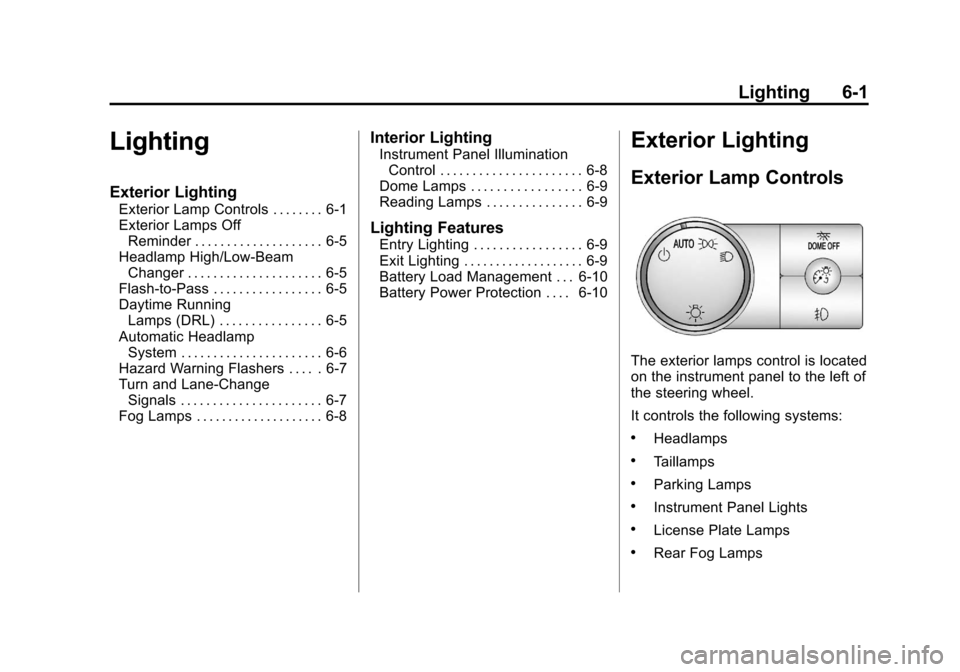
The exterior lamps control is located
on the instrument panel to the left of
the steering wheel.
It controls the following systems:
.Headlamps
.Taillamps
.Parking Lamps
.Instrument Panel Lights
.License Plate Lamps
.Rear Fog Lamps
Page 176 of 538

Black plate (2,1)Cadillac Escalade/Escalade ESV Owner Manual - 2012
6-2 Lighting
The exterior lamps control has
four positions:
P(Off):Turns off the automatic
headlamps and Daytime Running
Lamps (DRL). Turning the headlamp
control to the off position again will
turn the automatic headlamps and
DRL back on.
For vehicles first sold in Canada,
the off position only works when the
vehicle is shifted into the P (Park)
position.
AUTO (Automatic): Automatically
turns on the headlamps at normal
brightness, together with the
following:
.Parking Lamps
.Instrument Panel Lights
.Taillamps
.License Plate Lamps
;(Parking Lamps): Turns on the
parking lamps together with the
following:
.Instrument Panel Lights
.Taillamps
.License Plate Lamps
2(Headlamps): Turns on the
headlamps together with the
following lamps listed below.
.Parking Lamps
.Instrument Panel Lights
.Taillamps
.License Plate Lamps
When the headlamps are turned
on while the vehicle is on, the
headlamps will turn off automatically
10 minutes after the ignition is
turned off. When the headlamps are
turned on while the vehicle is off,
the headlamps will stay on for
10 minutes before automatically
turning off to prevent the battery from being drained. Turn the
headlamp control to off and then
back to the headlamp on position to
make the headlamps stay on for an
additional 10 minutes.
IntelliBeam®Intelligent
High-Beam Headlamp Control
System
For vehicles with this feature, be
sure to read this entire section
before using it.
IntelliBeam is an enhancement to
the vehicle's headlamp system.
Using a digital light sensor on the
rearview mirror, this system will turn
the vehicle's high-beam headlamps
on and off according to surrounding
traffic conditions.
The IntelliBeam system turns the
high-beam headlamps on when it is
dark enough, there is no other traffic
present, and the IntelliBeam system
is enabled.
Page 177 of 538

Black plate (3,1)Cadillac Escalade/Escalade ESV Owner Manual - 2012
Lighting 6-3
Turning On and Enabling
IntelliBeam
Press and release the IntelliBeam
button on the inside rear view
mirror. The IntelliBeam indicator on
the mirror will turn on to let you
know the system has been turned
on. Once the system has been
turned on, it will remain on each
time the vehicle is started.
Additionally, the IntelliBeam system
must be enabled.
To enable the IntelliBeam system,
turn the exterior lamp control to
AUTO, with the turn signal/
multifunction lever in its neutral
position. The High-Beam On Light
will appear on the instrument panel
cluster when the high-beams are on.
Driving with IntelliBeam
IntelliBeam will only activate your
high-beams when driving over
32 km/h (20 mph).The high-beam headlamps will
remain on, under the automatic
control of IntelliBeam, until any of
the following situations occur:
.The system detects an
approaching vehicle's
headlamps.
.The system detects a preceding
vehicle's taillamps.
.The outside light is bright
enough that high-beam
headlamps are not required.
.The vehicle's speed drops below
24 km/h (15 mph).
.The headlamp stalk is moved
forward to the high-beam
position.
When either of these conditions
occur, the IntelliBeam feature
will be disabled and the
IntelliBeam light in the mirror
will turn off until the high-beam
stalk is returned to the neutral
position.
.If IntelliBeam was using
low-beams prior to this action,
the IntelliBeam feature will be
temporarily disabled until the
stalk is returned to the neutral
position.
.The exterior lamp control is
turned to any setting
except AUTO.
When this occurs, IntelliBeam
will be disabled until the control
is turned back to the AUTO
position.
.The IntelliBeam system is turned
off at the inside rearview mirror.
IntelliBeam may not turn off the
high-beams if the system cannot
detect other vehicle's lamps
because of any of the following:
.The others vehicle's lamp(s) are
missing, damaged, obstructed
from view or otherwise
undetected.
.The other vehicle's lamp(s) are
covered with dirt, snow and/or
road spray.