instrument panel CADILLAC ESCALADE 2013 3.G Owner's Manual
[x] Cancel search | Manufacturer: CADILLAC, Model Year: 2013, Model line: ESCALADE, Model: CADILLAC ESCALADE 2013 3.GPages: 532, PDF Size: 7.69 MB
Page 144 of 532
Black plate (24,1)Cadillac Escalade/Escalade ESV Owner Manual - 2013 - CRC 2nd Edition - 10/
9/12
5-24 Instruments and Controls
Operation and Displays
The DIC has different displays
which can be accessed by pressing
the DIC buttons located on the
instrument panel, next to the
steering wheel.
The DIC displays trip, fuel, and
vehicle system information, and
warning messages if a system
problem is detected. A digital
speedometer also appears at the
bottom of the DIC display. The
digital speedometer can be enabled
or disabled. See“DISPLAY DIGITAL
SPEED” underVehicle
Personalization on page 5‑37 for
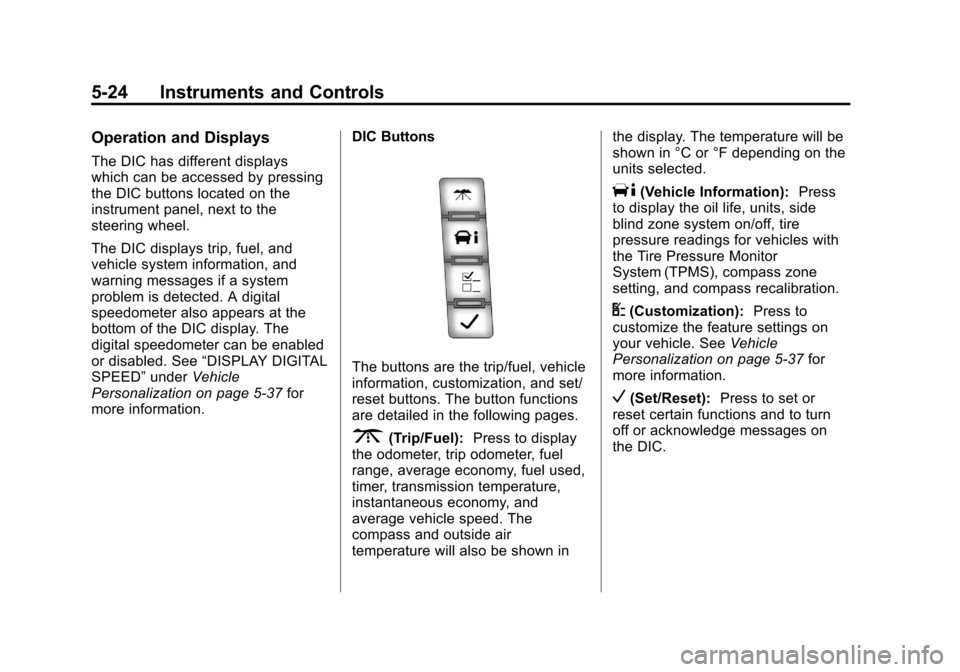
more information. DIC Buttons
The buttons are the trip/fuel, vehicle
information, customization, and set/
reset buttons. The button functions
are detailed in the following pages.
3(Trip/Fuel):
Press to display
the odometer, trip odometer, fuel
range, average economy, fuel used,
timer, transmission temperature,
instantaneous economy, and
average vehicle speed. The
compass and outside air
temperature will also be shown in the display. The temperature will be
shown in °C or °F depending on the
units selected.
T(Vehicle Information):
Press
to display the oil life, units, side
blind zone system on/off, tire
pressure readings for vehicles with
the Tire Pressure Monitor
System (TPMS), compass zone
setting, and compass recalibration.
U(Customization): Press to
customize the feature settings on
your vehicle. See Vehicle
Personalization on page 5‑37 for
more information.
V(Set/Reset): Press to set or
reset certain functions and to turn
off or acknowledge messages on
the DIC.
Page 149 of 532
Black plate (29,1)Cadillac Escalade/Escalade ESV Owner Manual - 2013 - CRC 2nd Edition - 10/
9/12
Instruments and Controls 5-29
Battery Voltage and
Charging Messages
BATTERY LOW START
VEHICLE
When the vehicle’s battery is
severely discharged, this message
will display and four chimes will
sound. Start the vehicle
immediately. If the vehicle is not
started and the battery continues to
discharge, the climate controls,
heated seats, and audio systems
will shut off and the vehicle may
require a jump start. These systems
will function again after the vehicle
is started.
SERVICE BATTERY
CHARGING SYSTEM
On some vehicles, this message
displays if there is a problem with
the battery charging system. Under
certain conditions, the charging
system light may also turn on in the
instrument panel cluster. See
Charging System Light on
page 5‑16. Driving with this problem could drain the battery. Turn off all
unnecessary accessories. Have the
electrical system checked as soon
as possible. See your dealer.
Brake System Messages
SERVICE BRAKE SYSTEM
This message displays along with
the brake system warning light if
there is a problem with the brake
system. See
Brake System Warning
Light on page 5‑19. If this message
appears, stop as soon as possible
and turn off the vehicle. Restart the
vehicle and check for the message
on the DIC display. If the message
is still displayed or appears again
when you begin driving, the brake
system needs service as soon as
possible. See your dealer.
SERVICE BRAKES SOON
This message displays if there is a
problem with the brake system.
If this message appears, stop as
soon as possible and turn off the
vehicle. Restart the vehicle and check for the message on the DIC
display. If the message is still
displayed or appears again when
you begin driving, the brake system
needs service. See your dealer.
Door Ajar Messages
DRIVER DOOR OPEN
This message displays and a chime
sounds if the driver door is not fully
closed and the vehicle is shifted out
of P (Park). Stop and turn off the
vehicle, check the door for
obstructions, and close the door
again. Check to see if the message
still appears on the DIC.
HOOD OPEN
This message displays and a chime
sounds if the hood is not fully
closed. Stop and turn off the
vehicle, check the hood for
obstructions, and close the hood
again. Check to see if the message
still appears on the DIC.
Page 169 of 532
Black plate (49,1)Cadillac Escalade/Escalade ESV Owner Manual - 2013 - CRC 2nd Edition - 10/
9/12
Instruments and Controls 5-49
To program up to three devices:
1. To verify that the garage dooropener is a Fixed Code unit,
remove the battery cover on the
hand-held transmitter supplied
by the manufacturer of the
garage door opener motor.
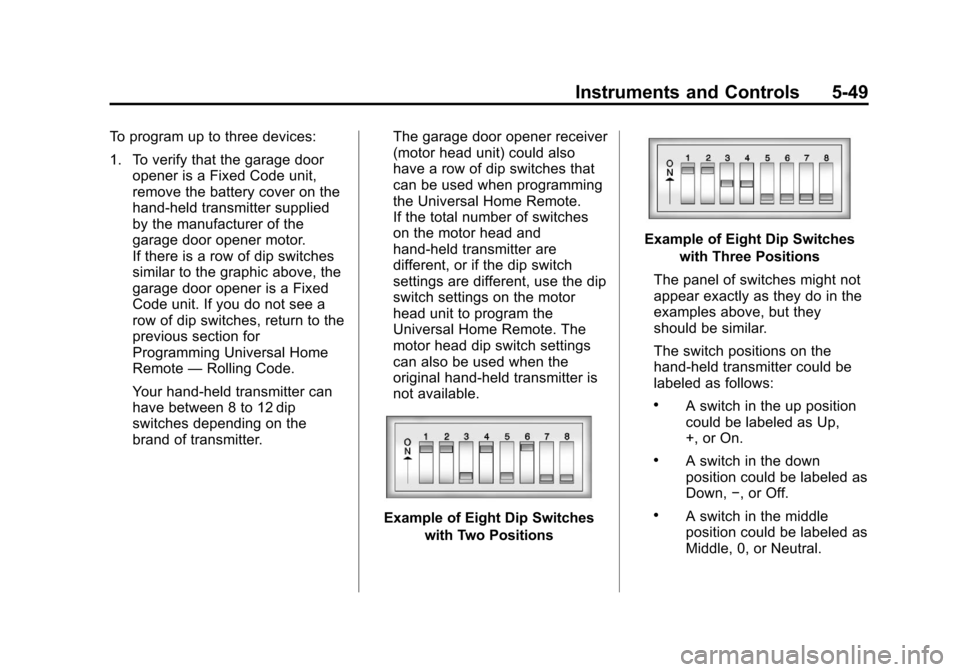
If there is a row of dip switches
similar to the graphic above, the
garage door opener is a Fixed
Code unit. If you do not see a
row of dip switches, return to the
previous section for
Programming Universal Home
Remote —Rolling Code.
Your hand-held transmitter can
have between 8 to 12 dip
switches depending on the
brand of transmitter. The garage door opener receiver
(motor head unit) could also
have a row of dip switches that
can be used when programming
the Universal Home Remote.
If the total number of switches
on the motor head and
hand-held transmitter are
different, or if the dip switch
settings are different, use the dip
switch settings on the motor
head unit to program the
Universal Home Remote. The
motor head dip switch settings
can also be used when the
original hand-held transmitter is
not available.
Example of Eight Dip Switches
with Two Positions
Example of Eight Dip Switcheswith Three Positions
The panel of switches might not
appear exactly as they do in the
examples above, but they
should be similar.
The switch positions on the
hand-held transmitter could be
labeled as follows:
.A switch in the up position
could be labeled as Up,
+, or On.
.A switch in the down
position could be labeled as
Down, −, or Off.
.A switch in the middle
position could be labeled as
Middle, 0, or Neutral.
Page 173 of 532
Black plate (1,1)Cadillac Escalade/Escalade ESV Owner Manual - 2013 - CRC 2nd Edition - 10/
9/12
Lighting 6-1
Lighting
Exterior Lighting
Exterior Lamp Controls . . . . . . . . 6-1
Exterior Lamps OffReminder . . . . . . . . . . . . . . . . . . . . 6-4
Headlamp High/Low-Beam Changer . . . . . . . . . . . . . . . . . . . . . 6-5
Flash-to-Pass . . . . . . . . . . . . . . . . . 6-5
Daytime Running Lamps (DRL) . . . . . . . . . . . . . . . . 6-5
Automatic Headlamp System . . . . . . . . . . . . . . . . . . . . . . 6-6
Hazard Warning Flashers . . . . . 6-7
Turn and Lane-Change Signals . . . . . . . . . . . . . . . . . . . . . . 6-7
Fog Lamps . . . . . . . . . . . . . . . . . . . . 6-8
Interior Lighting
Instrument Panel Illumination Control . . . . . . . . . . . . . . . . . . . . . . 6-8
Dome Lamps . . . . . . . . . . . . . . . . . 6-9
Reading Lamps . . . . . . . . . . . . . . . 6-9
Lighting Features
Entry Lighting . . . . . . . . . . . . . . . . . 6-9
Exit Lighting . . . . . . . . . . . . . . . . . . . 6-9
Battery Load Management . . . 6-10
Battery Power Protection . . . . 6-10
Exterior Lighting
Exterior Lamp Controls
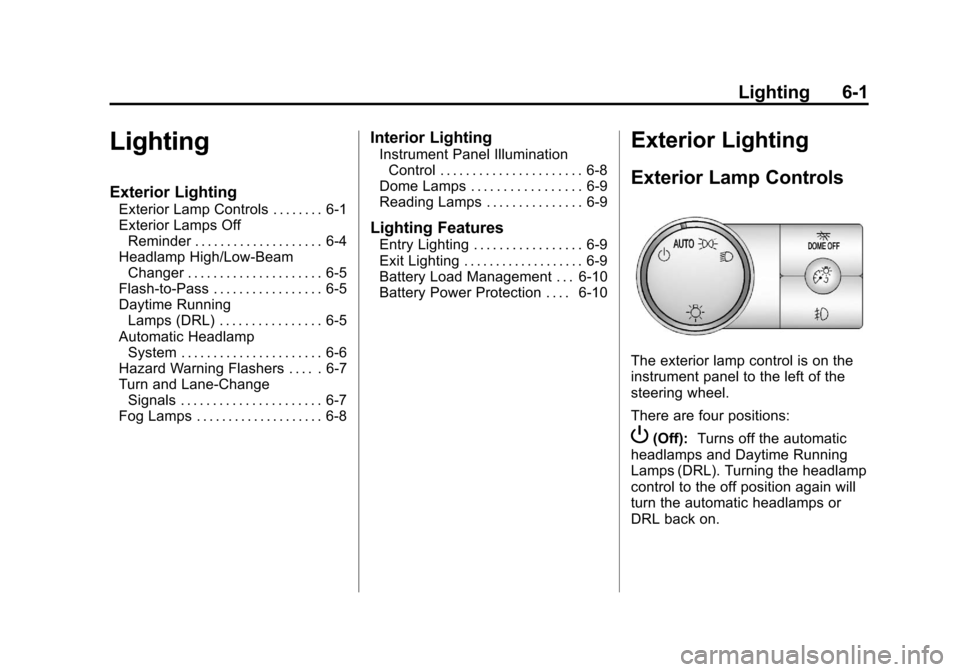
The exterior lamp control is on the
instrument panel to the left of the
steering wheel.
There are four positions:
P(Off): Turns off the automatic
headlamps and Daytime Running
Lamps (DRL). Turning the headlamp
control to the off position again will
turn the automatic headlamps or
DRL back on.
Page 174 of 532
Black plate (2,1)Cadillac Escalade/Escalade ESV Owner Manual - 2013 - CRC 2nd Edition - 10/
9/12
6-2 Lighting
For vehicles first sold in Canada,
the off position only works when the
vehicle is shifted into the P (Park)
position.
AUTO (Automatic):Automatically
turns on the headlamps at normal
brightness, together with the
following:
.Parking Lamps
.Instrument Panel Lights
.Taillamps
.License Plate Lamps
;(Parking Lamps): Turns on the
parking lamps together with the
following:
.Instrument Panel Lights
.Taillamps
.License Plate Lamps
2(Headlamps): Turns on the
headlamps together with the
following:
.Parking Lamps
.Instrument Panel Lights
.Taillamps
.License Plate Lamps
When the headlamps are turned on
while the vehicle is on, the
headlamps will turn off automatically
10 minutes after the ignition is
turned off. When the headlamps are
turned on while the vehicle is off,
the headlamps will stay on for
10 minutes before automatically
turning off to prevent the battery
from being drained. Turn the
headlamp control to off and then
back to the headlamp on position to
make the headlamps stay on for an
additional 10 minutes.
IntelliBeam®Intelligent
High-Beam Headlamp Control
System
For vehicles with this feature, be
sure to read this entire section
before using it.
IntelliBeam is an enhancement to
the vehicle's headlamp system.
Using a digital light sensor on the
rearview mirror, this system will turn the vehicle's high-beam headlamps
on and off according to surrounding
traffic conditions.
The IntelliBeam system turns the
high-beam headlamps on when it is
dark enough, there is no other traffic
present, and the IntelliBeam system
is enabled.
Turning On and Enabling
IntelliBeam
Press and release the IntelliBeam
button on the inside rear view
mirror. The IntelliBeam indicator on
the mirror will turn on to let you
know the system has been turned
on. Once the system has been
turned on, it will remain on each
time the vehicle is started.
Additionally, the IntelliBeam system
must be enabled.
To enable the IntelliBeam system,
turn the exterior lamp control to
AUTO, with the turn signal/
multifunction lever in its neutral
position. The High-Beam On Light
will appear on the instrument panel
cluster when the high-beams are on.
Page 177 of 532
Black plate (5,1)Cadillac Escalade/Escalade ESV Owner Manual - 2013 - CRC 2nd Edition - 10/
9/12
Lighting 6-5
Headlamp High/
Low-Beam Changer
5 3
(Headlamp High/Low Beam
Changer): To change the
headlamps from low to high beam,
push the turn signal lever toward the
instrument panel. To return to
low-beam headlamps, pull the lever
toward you. Then release it.
When the high beams are on, this
indicator light on the instrument
cluster will also be on.
Flash-to-Pass
Use your high-beam headlamps to
signal to a driver in front that you
want to pass. It works even if the
headlamps are in the automatic
position. To use it, pull the turn signal lever
toward you, then release it.
If the headlamps are in the
automatic position or on low beam,
the high-beam headlamps turn on.
They stay on as long as the lever is
held. The high-beam indicator on
the instrument panel cluster comes
on. Release the lever to return to
normal operation.
Daytime Running
Lamps (DRL)
Daytime Running Lamps (DRL) can
make it easier for others to see the
front of your vehicle during the day.
Fully functional daytime running
lamps are required on all vehicles
first sold in Canada.
The DRL system comes on when
the following conditions are met:
.The ignition is on.
.The exterior lamp control is
in AUTO.
.The transmission is not in Park.
.The light sensor determines it is
daytime.
When the DRL system is on, only
the DRL lamps are on. The
taillamps, sidemarker, instrument
panel lights, and other lamps will not
be on.
When it begins to get dark, the
automatic headlamp system
switches from DRL to the
headlamps.
To turn off the DRL lamps, turn the
exterior lamp control to the OFF
position and then release. For
vehicles first sold in Canada, the
transmission must be in the P (Park)
position before the DRL lamps can
be turned off.
Page 178 of 532
Black plate (6,1)Cadillac Escalade/Escalade ESV Owner Manual - 2013 - CRC 2nd Edition - 10/
9/12
6-6 Lighting
Automatic Headlamp
System
When it is dark enough outside, the
automatic headlamp system turns
on the headlamps at the normal
brightness, along with the taillamps,
sidemarker, parking lamps, and the
instrument panel lights. The radio
lights will also be dim.
To turn off the automatic headlamp
system, turn the exterior lamps
control to
Pand then release it.
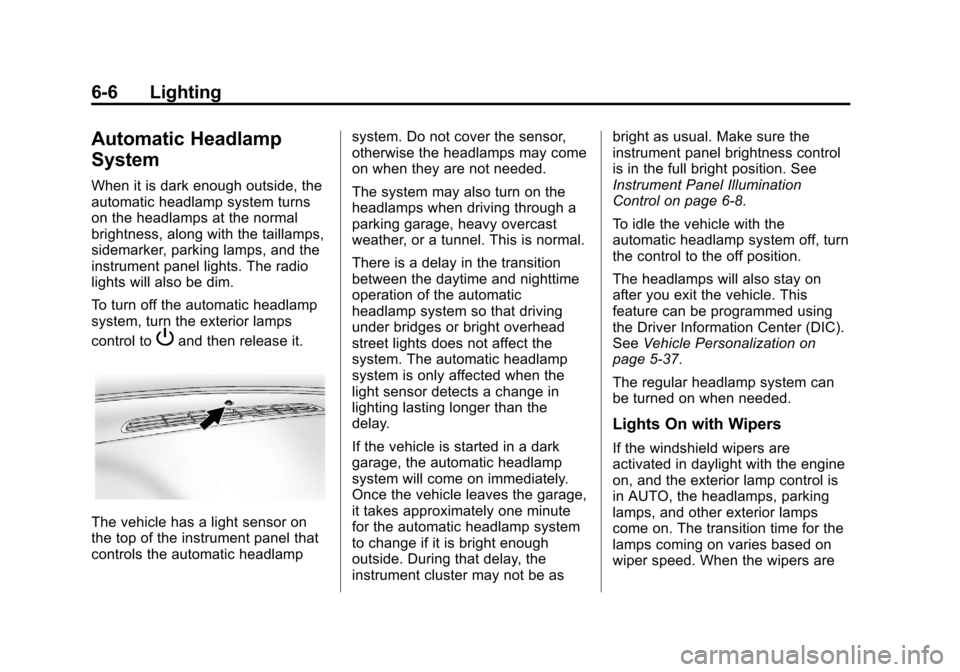
The vehicle has a light sensor on
the top of the instrument panel that
controls the automatic headlampsystem. Do not cover the sensor,
otherwise the headlamps may come
on when they are not needed.
The system may also turn on the
headlamps when driving through a
parking garage, heavy overcast
weather, or a tunnel. This is normal.
There is a delay in the transition
between the daytime and nighttime
operation of the automatic
headlamp system so that driving
under bridges or bright overhead
street lights does not affect the
system. The automatic headlamp
system is only affected when the
light sensor detects a change in
lighting lasting longer than the
delay.
If the vehicle is started in a dark
garage, the automatic headlamp
system will come on immediately.
Once the vehicle leaves the garage,
it takes approximately one minute
for the automatic headlamp system
to change if it is bright enough
outside. During that delay, the
instrument cluster may not be asbright as usual. Make sure the
instrument panel brightness control
is in the full bright position. See
Instrument Panel Illumination
Control on page 6‑8.
To idle the vehicle with the
automatic headlamp system off, turn
the control to the off position.
The headlamps will also stay on
after you exit the vehicle. This
feature can be programmed using
the Driver Information Center (DIC).
See
Vehicle Personalization on
page 5‑37.
The regular headlamp system can
be turned on when needed.
Lights On with Wipers
If the windshield wipers are
activated in daylight with the engine
on, and the exterior lamp control is
in AUTO, the headlamps, parking
lamps, and other exterior lamps
come on. The transition time for the
lamps coming on varies based on
wiper speed. When the wipers are
Page 179 of 532
Black plate (7,1)Cadillac Escalade/Escalade ESV Owner Manual - 2013 - CRC 2nd Edition - 10/
9/12
Lighting 6-7
not operating, these lamps turn off.
Move the exterior lamp control to
P
or;to disable this feature.
Hazard Warning Flashers
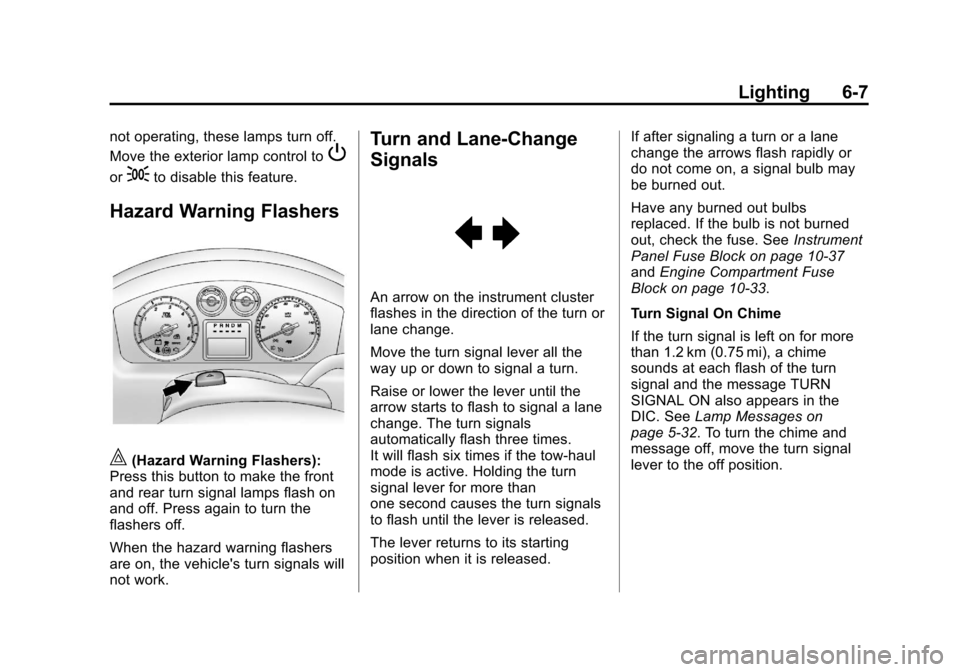
|(Hazard Warning Flashers):
Press this button to make the front
and rear turn signal lamps flash on
and off. Press again to turn the
flashers off.
When the hazard warning flashers
are on, the vehicle's turn signals will
not work.
Turn and Lane-Change
Signals
An arrow on the instrument cluster
flashes in the direction of the turn or
lane change.
Move the turn signal lever all the
way up or down to signal a turn.
Raise or lower the lever until the
arrow starts to flash to signal a lane
change. The turn signals
automatically flash three times.
It will flash six times if the tow-haul
mode is active. Holding the turn
signal lever for more than
one second causes the turn signals
to flash until the lever is released.
The lever returns to its starting
position when it is released. If after signaling a turn or a lane
change the arrows flash rapidly or
do not come on, a signal bulb may
be burned out.
Have any burned out bulbs
replaced. If the bulb is not burned
out, check the fuse. See
Instrument
Panel Fuse Block on page 10‑37
and Engine Compartment Fuse
Block on page 10‑33.
Turn Signal On Chime
If the turn signal is left on for more
than 1.2 km (0.75 mi), a chime
sounds at each flash of the turn
signal and the message TURN
SIGNAL ON also appears in the
DIC. See Lamp Messages on
page 5‑32. To turn the chime and
message off, move the turn signal
lever to the off position.
Page 180 of 532
Black plate (8,1)Cadillac Escalade/Escalade ESV Owner Manual - 2013 - CRC 2nd Edition - 10/
9/12
6-8 Lighting
Fog Lamps
For vehicles with fog lamps, they
can be used for better vision in
foggy or misty conditions. The
parking lamps and/or low-beam
headlamps must be on for the fog
lamps to work.
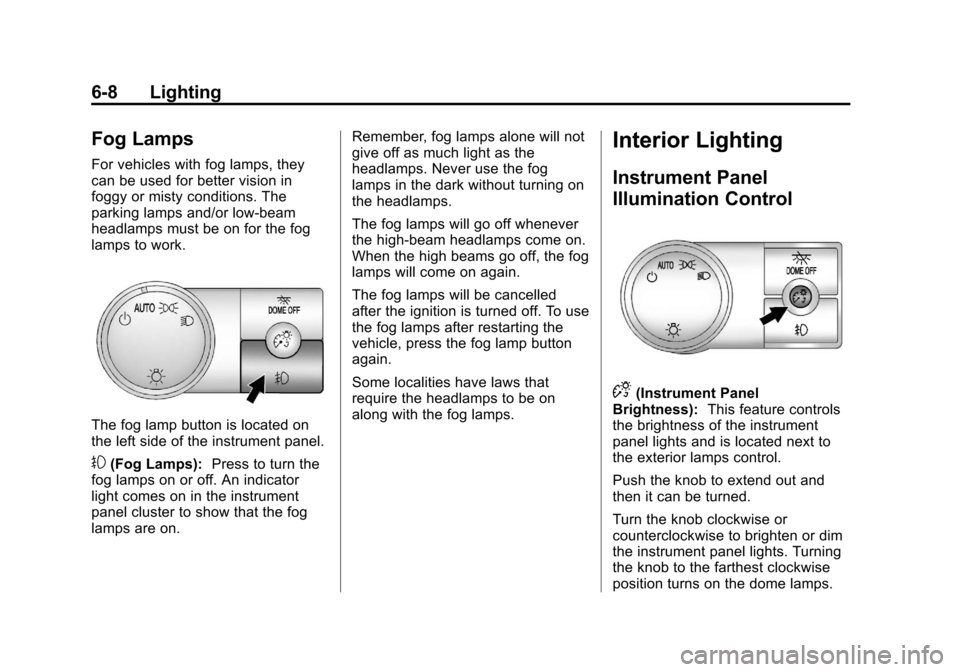
The fog lamp button is located on
the left side of the instrument panel.
#(Fog Lamps):Press to turn the
fog lamps on or off. An indicator
light comes on in the instrument
panel cluster to show that the fog
lamps are on. Remember, fog lamps alone will not
give off as much light as the
headlamps. Never use the fog
lamps in the dark without turning on
the headlamps.
The fog lamps will go off whenever
the high-beam headlamps come on.
When the high beams go off, the fog
lamps will come on again.
The fog lamps will be cancelled
after the ignition is turned off. To use
the fog lamps after restarting the
vehicle, press the fog lamp button
again.
Some localities have laws that
require the headlamps to be on
along with the fog lamps.
Interior Lighting
Instrument Panel
Illumination Control
D(Instrument Panel
Brightness): This feature controls
the brightness of the instrument
panel lights and is located next to
the exterior lamps control.
Push the knob to extend out and
then it can be turned.
Turn the knob clockwise or
counterclockwise to brighten or dim
the instrument panel lights. Turning
the knob to the farthest clockwise
position turns on the dome lamps.
Page 181 of 532
Black plate (9,1)Cadillac Escalade/Escalade ESV Owner Manual - 2013 - CRC 2nd Edition - 10/
9/12
Lighting 6-9
Dome Lamps
The dome lamps are located in the
overhead console.
They come on when any door is
opened and turn off after all the
doors are closed.
Turn the instrument panel
brightness knob located below the
dome lamp override button,
clockwise to the farthest position to
manually turn on the dome lamps.
The dome lamps remain on until the
knob is turned counterclockwise.
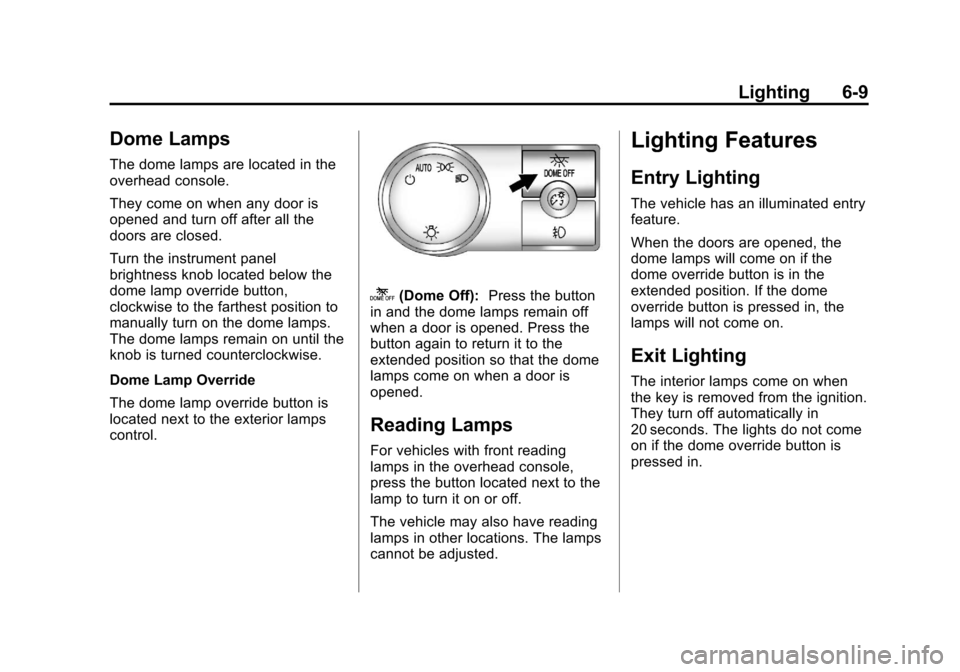
Dome Lamp Override
The dome lamp override button is
located next to the exterior lamps
control.
k(Dome Off):Press the button
in and the dome lamps remain off
when a door is opened. Press the
button again to return it to the
extended position so that the dome
lamps come on when a door is
opened.
Reading Lamps
For vehicles with front reading
lamps in the overhead console,
press the button located next to the
lamp to turn it on or off.
The vehicle may also have reading
lamps in other locations. The lamps
cannot be adjusted.
Lighting Features
Entry Lighting
The vehicle has an illuminated entry
feature.
When the doors are opened, the
dome lamps will come on if the
dome override button is in the
extended position. If the dome
override button is pressed in, the
lamps will not come on.
Exit Lighting
The interior lamps come on when
the key is removed from the ignition.
They turn off automatically in
20 seconds. The lights do not come
on if the dome override button is
pressed in.