display CADILLAC ESCALADE 2017 4.G User Guide
[x] Cancel search | Manufacturer: CADILLAC, Model Year: 2017, Model line: ESCALADE, Model: CADILLAC ESCALADE 2017 4.GPages: 354, PDF Size: 3.9 MB
Page 32 of 354
Cadillac Escalade Owner Manual (GMNA-Localizing-MidEast-10293077) -
2017 - crc - 8/24/16
KEYS, DOORS, AND WINDOWS 31
inside the vehicle. Do not leave the
RKE transmitter in an unattended
vehicle.
To customize the doors to
automatically lock when exiting the
vehicle, see“Remote Lock, Unlock,
Start ”under Vehicle
Personalization 0154.
Temporarily Disable Passive Locking
Feature
Temporarily disable the passive
locking by pressing and holding
Kon
the interior door switch with a door
open for at least four seconds or until
three chimes are heard. Passive
locking will then remain disabled until
Qon the interior door is pressed or
until the vehicle is turned on.
Remote Left In Vehicle Alert
When the vehicle is turned off and a
remote is left in the vehicle, the horn
will chirp three times after all doors
are closed. To turn on or off see
Vehicle Personalization 0154. Auto Door Relock
If a door is not opened or the vehicle
is not started within three minutes of
unlocking the vehicle and disarming
the alarm system with the RKE
transmitter, all doors are
automatically locked and the vehicle
alarm system is re-armed. This can be
turned on or off in through vehicle
personalization. See
Vehicle
Personalization 0154.
Keyless Liftgate Opening
Press the touch pad on the rear of the
liftgate above the license plate to open
the liftgate when all doors are
unlocked or when the transmitter is
within 1 m (3 ft).
Keyless Liftglass Opening
Press the exterior liftglass button to
open the liftglass when all doors are
unlocked when the transmitter is
within 1 m (3 ft).
Key Access
To access a vehicle with a dead
transmitter battery, see Door
Locks 034.
Programming Transmitters to
the Vehicle
Only RKE transmitters programmed to
the vehicle will work. If a transmitter
is lost or stolen, a replacement can be
purchased and programmed through
your dealer. When the replacement
transmitter is programmed to this
vehicle, all remaining transmitters
must also be reprogrammed. Any lost
or stolen transmitters will no longer
work once the new transmitter is
programmed. Each vehicle can have
up to eight transmitters programmed
to it. See your dealer to program
transmitters to the vehicle.
Starting the Vehicle with a Low
Transmitter Battery
If the transmitter battery is weak or if
there is interference with the signal,
the DIC may display NO REMOTE
DETECTED or NO REMOTE KEY WAS
DETECTED PLACE KEY IN
TRANSMITTER POCKET THEN
START YOUR VEHICLE when starting
the vehicle. See Key and Lock
Messages 0147.
Page 33 of 354
Cadillac Escalade Owner Manual (GMNA-Localizing-MidEast-10293077) -
2017 - crc - 8/24/16
32 KEYS, DOORS, AND WINDOWS
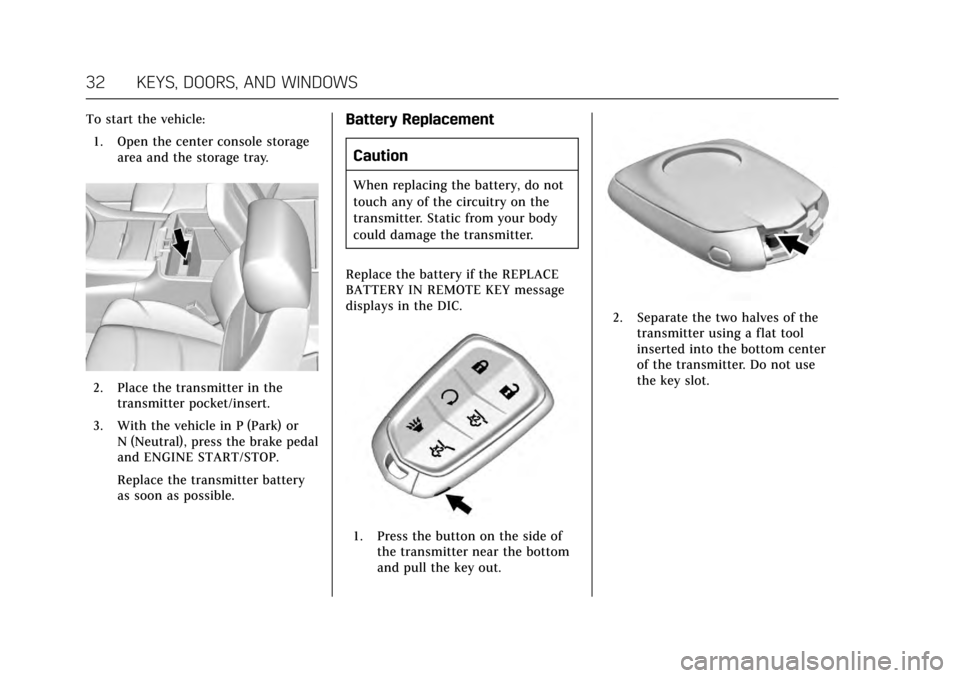
To start the vehicle:1. Open the center console storage area and the storage tray.
2. Place the transmitter in thetransmitter pocket/insert.
3. With the vehicle in P (Park) or N (Neutral), press the brake pedal
and ENGINE START/STOP.
Replace the transmitter battery
as soon as possible.
Battery Replacement
Caution
When replacing the battery, do not
touch any of the circuitry on the
transmitter. Static from your body
could damage the transmitter.
Replace the battery if the REPLACE
BATTERY IN REMOTE KEY message
displays in the DIC.
1. Press the button on the side of the transmitter near the bottom
and pull the key out.
2. Separate the two halves of thetransmitter using a flat tool
inserted into the bottom center
of the transmitter. Do not use
the key slot.
Page 49 of 354

Cadillac Escalade Owner Manual (GMNA-Localizing-MidEast-10293077) -
2017 - crc - 8/24/16
48 KEYS, DOORS, AND WINDOWS
Interior Mirrors
Interior Rearview Mirrors
Adjust the rearview mirror for a clear
view of the area behind the vehicle.
Do not spray glass cleaner directly on
the mirror. Use a soft towel dampened
with water.
Automatic Dimming
Rearview Mirror
The rearview mirror automatically
dims to reduce the glare of the
headlamps from behind. This feature
comes on when the vehicle is started.
Rear Camera Mirror
If equipped, this automatic dimming
mirror provides a wide angle camera
view of the area behind the vehicle.
Pull the tab rearward to turn on the
display. Push the tab forward to turn
it off. When off, the mirror is
automatic dimming. Adjust the mirror
for a clear view of the area behind the
vehicle while the display is off.To adjust the brightness, press the
button (1) on the back of the rearview
mirror without covering the light
sensor (2).
Each button press cycles the
brightness between five settings.
Page 50 of 354
Cadillac Escalade Owner Manual (GMNA-Localizing-MidEast-10293077) -
2017 - crc - 8/24/16
KEYS, DOORS, AND WINDOWS 49
{Warning
The Rear Camera Mirror (RCM) has
a limited view. Portions of the road,
vehicles, and other objects may not
be seen. Do not drive or park the
vehicle using only this camera.
Objects may appear closer than
they are. Check the outside mirrors
or glance over your shoulder when
making lane changes or merging.
Failure to use proper care may
result in injury, death, or vehicle
damage.
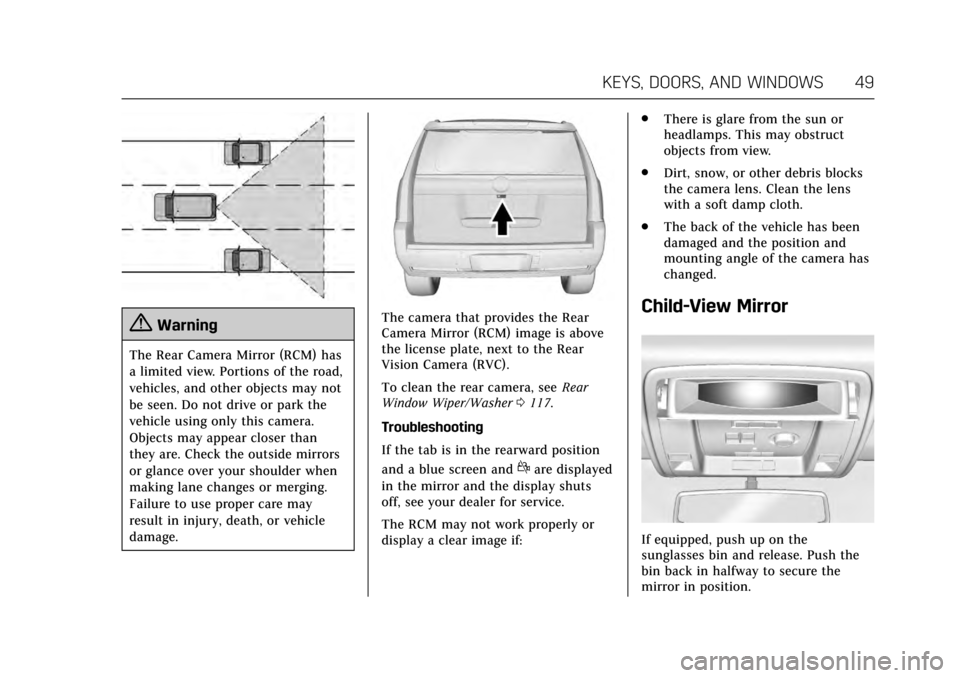
The camera that provides the Rear
Camera Mirror (RCM) image is above
the license plate, next to the Rear
Vision Camera (RVC).
To clean the rear camera, seeRear
Window Wiper/Washer 0117.
Troubleshooting
If the tab is in the rearward position
and a blue screen and
dare displayed
in the mirror and the display shuts
off, see your dealer for service.
The RCM may not work properly or
display a clear image if: .
There is glare from the sun or
headlamps. This may obstruct
objects from view.
. Dirt, snow, or other debris blocks
the camera lens. Clean the lens
with a soft damp cloth.
. The back of the vehicle has been
damaged and the position and
mounting angle of the camera has
changed.
Child-View Mirror
If equipped, push up on the
sunglasses bin and release. Push the
bin back in halfway to secure the
mirror in position.
Page 58 of 354
Cadillac Escalade Owner Manual (GMNA-Localizing-MidEast-10293077) -
2017 - crc - 8/24/16
SEATS AND RESTRAINTS 57
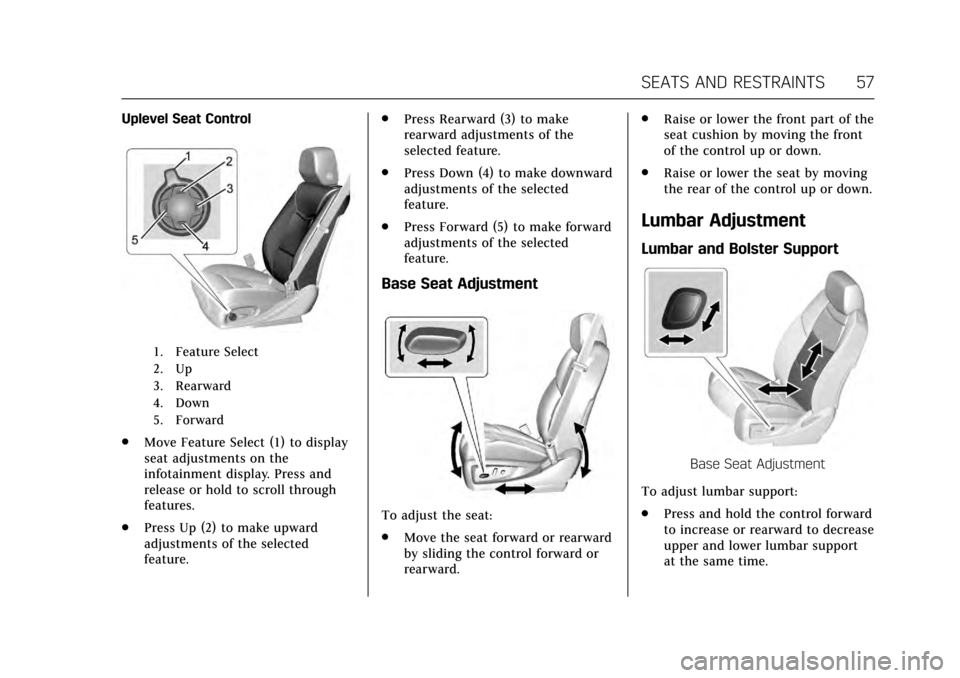
Uplevel Seat Control
1. Feature Select
2. Up
3. Rearward
4. Down
5. Forward
.Move Feature Select (1) to display
seat adjustments on the
infotainment display. Press and
release or hold to scroll through
features.
. Press Up (2) to make upward
adjustments of the selected
feature. .
Press Rearward (3) to make
rearward adjustments of the
selected feature.
. Press Down (4) to make downward
adjustments of the selected
feature.
. Press Forward (5) to make forward
adjustments of the selected
feature.
Base Seat Adjustment
To adjust the seat:
.Move the seat forward or rearward
by sliding the control forward or
rearward. .
Raise or lower the front part of the
seat cushion by moving the front
of the control up or down.
. Raise or lower the seat by moving
the rear of the control up or down.
Lumbar Adjustment
Lumbar and Bolster Support
Base Seat Adjustment
To adjust lumbar support:
. Press and hold the control forward
to increase or rearward to decrease
upper and lower lumbar support
at the same time.
Page 59 of 354
Cadillac Escalade Owner Manual (GMNA-Localizing-MidEast-10293077) -
2017 - crc - 8/24/16
58 SEATS AND RESTRAINTS
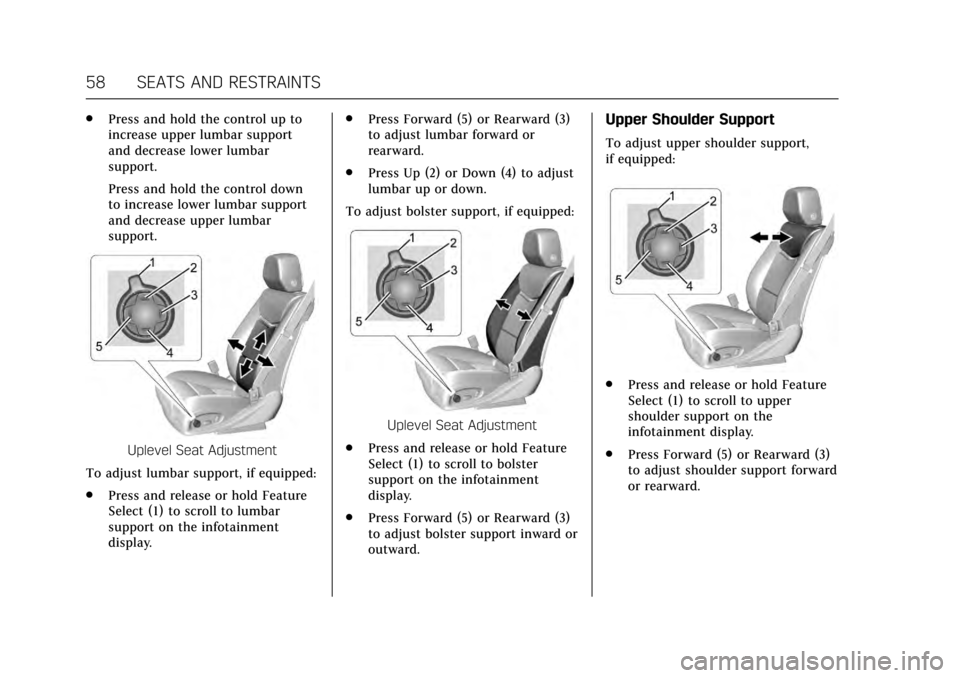
.Press and hold the control up to
increase upper lumbar support
and decrease lower lumbar
support.
Press and hold the control down
to increase lower lumbar support
and decrease upper lumbar
support.
Uplevel Seat Adjustment
To adjust lumbar support, if equipped:
. Press and release or hold Feature
Select (1) to scroll to lumbar
support on the infotainment
display. .
Press Forward (5) or Rearward (3)
to adjust lumbar forward or
rearward.
. Press Up (2) or Down (4) to adjust
lumbar up or down.
To adjust bolster support, if equipped:
Uplevel Seat Adjustment
. Press and release or hold Feature
Select (1) to scroll to bolster
support on the infotainment
display.
. Press Forward (5) or Rearward (3)
to adjust bolster support inward or
outward.
Upper Shoulder Support
To adjust upper shoulder support,
if equipped:
.
Press and release or hold Feature
Select (1) to scroll to upper
shoulder support on the
infotainment display.
. Press Forward (5) or Rearward (3)
to adjust shoulder support forward
or rearward.
Page 61 of 354
Cadillac Escalade Owner Manual (GMNA-Localizing-MidEast-10293077) -
2017 - crc - 8/24/16
60 SEATS AND RESTRAINTS
The SET, 1, 2, andB(Exit) buttons
on the driver door are used to
manually store and recall memory
settings for the driver seat, outside
mirrors, power tilt and telescoping
steering column, adjustable pedals (if
equipped), and massage settings (if
equipped).
Storing Memory Positions
To store positions to the 1 and 2
buttons:
1. The ignition must be in ON/RUN or ACC/ACCESSORY.
2. Adjust the driver seat, outside mirrors, power tilt and
telescoping steering column,
adjustable pedals (if equipped),
and massage settings (if
equipped) to the desired
positions.
3. Press and release SET. A beep will sound.
4. Immediately press and hold 1 until two beeps sound.
5. Repeat Steps 1–4 for a second driver using 2. To store exit positions and easy exit
features to theB(Exit) button,
repeat Steps 1–4 using
Bto store
your positions for getting out of the
vehicle.
Manually Recalling Memory
Positions
Press and hold 1, 2, or
Bto
manually recall the previously stored
memory positions.
To stop recall movement, release 1, 2,
or
Bbefore the stored positions are
reached; or press the SET, power
mirror, or power seat controls; or
press the power tilt and telescoping
steering wheel control; or press the
adjustable pedal control.
If the massage feature is off when the
memory recall is performed, the
previously stored type and intensity
will be recalled, but it will remain off
until activated with the massage
control. Automatically Recalling Memory
Positions (Auto Memory Recall)
If programmed on in vehicle
personalization, the Auto (Automatic)
Memory Recall feature automatically
recalls the current driver’s previously
stored 1 or 2 position and massage
settings (if equipped) when the
ignition is changed from OFF to ON/
RUN or ACC/ACCESSORY.
See
“Auto Memory Recall” under
"Comfort and Convenience" in Vehicle
Personalization 0154.
To stop recall movement, pressB,
power mirror, or power seat controls;
or press the power tilt and telescoping
steering wheel control; or press the
adjustable pedal control. Turning the
ignition off also stops the recall.
If the vehicle driver has changed, in
some vehicles the Driver ID may be
displayed for the first few ignition
cycles.
RKE transmitters are not labeled with
a number. If your memory seat
position is stored to 1 or 2 but this
position is not automatically recalling,
Page 62 of 354
Cadillac Escalade Owner Manual (GMNA-Localizing-MidEast-10293077) -
2017 - crc - 8/24/16
SEATS AND RESTRAINTS 61
then store your positions to the other
button or switch RKE transmitters
with the other driver.
Easy Exit Recall
If programmed on in vehicle
personalization, the easy exit feature
automatically recalls the previously
stored Exit positions when leaving the
vehicle. See“Storing Memory
Positions” previously in this section.
See also Vehicle Personalization 0154.
Easy exit recall automatically activates
when one of the following occurs:
. The vehicle is turned off and the
driver door is opened within a
short time.
. The vehicle is turned off with the
driver door open.
RKE transmitters are not labeled with
a number. If your memory seat
position is stored to 1 or 2 but this
position is not automatically recalling,
then store your positions to the other
button or switch RKE transmitters
with the other driver. To stop recall movement, press one of
the memory, power mirror, or power
seat controls; press the power tilt and
telescoping steering column control;
or press the adjustable pedal control.
Obstructions
If something has blocked the driver
seat, power tilt and telescoping
steering column, and/or adjustable
pedals while recalling a memory
position, the recall may stop. Remove
the obstruction. Then do one of the
following:
.
If automatically or manually
recalling the stored memory
position, press and hold the
appropriate manual control for
two seconds. Try recalling again
by pressing the appropriate
memory button.
. If recalling the exit position, press
and hold the appropriate manual
control for the exit feature not
recalling for two seconds. Then try
recalling the exit position again.
If the memory position is still not
recalling, see your dealer for service.Massage
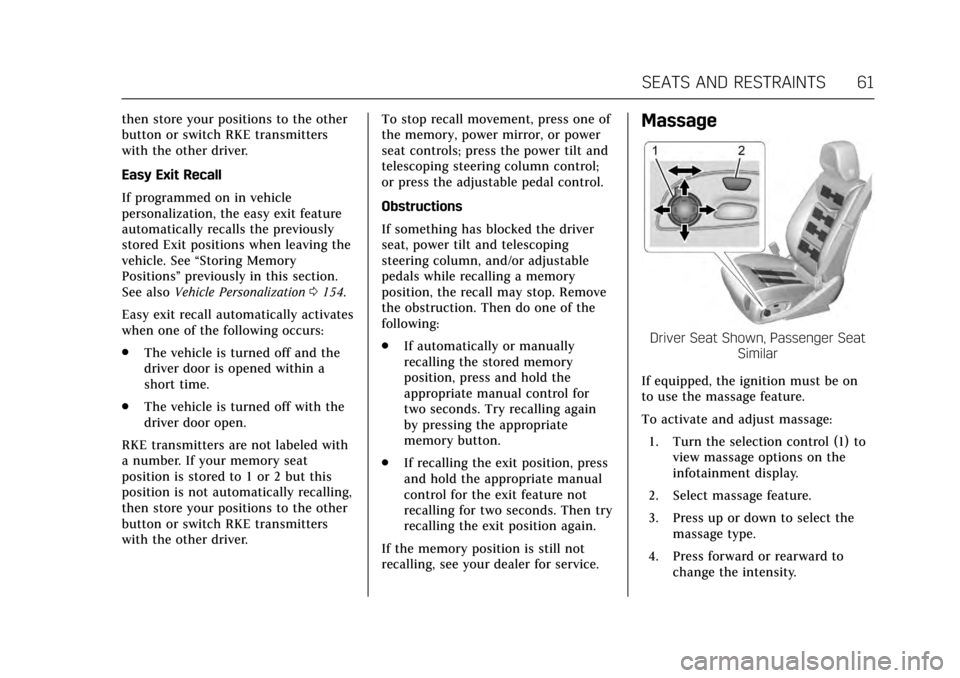
Driver Seat Shown, Passenger Seat Similar
If equipped, the ignition must be on
to use the massage feature.
To activate and adjust massage: 1. Turn the selection control (1) to view massage options on the
infotainment display.
2. Select massage feature.
3. Press up or down to select the massage type.
4. Press forward or rearward to change the intensity.
Page 64 of 354
Cadillac Escalade Owner Manual (GMNA-Localizing-MidEast-10293077) -
2017 - crc - 8/24/16
SEATS AND RESTRAINTS 63
the vehicle is started. SeeRemote
Vehicle Start 033 and Vehicle
Personalization 0154.
The heated or cooled seat indicator
lights do not turn on during a remote
start.
The temperature performance of an
unoccupied seat may be reduced. This
is normal.
Auto Heated and Cooled Seats
When the ignition is on, the auto
heated or cooled seats will
automatically activate at the level
determined by the vehicle's interior
temperature, if enabled in vehicle
personalization. See Vehicle
Personalization 0154. The indicator
lights next to the buttons indicate the
level of operation. Use the heated or
cooled seat buttons to turn off auto
heated or cooled seats. If the
passenger seat is unoccupied, this
feature will not activate that seat.
Rear Seats
Heated Rear Seats
{Warning
If you cannot feel temperature
change or pain to the skin, the seat
heater may cause burns. See the
Warning under Heated and Cooled
Front Seats 062.
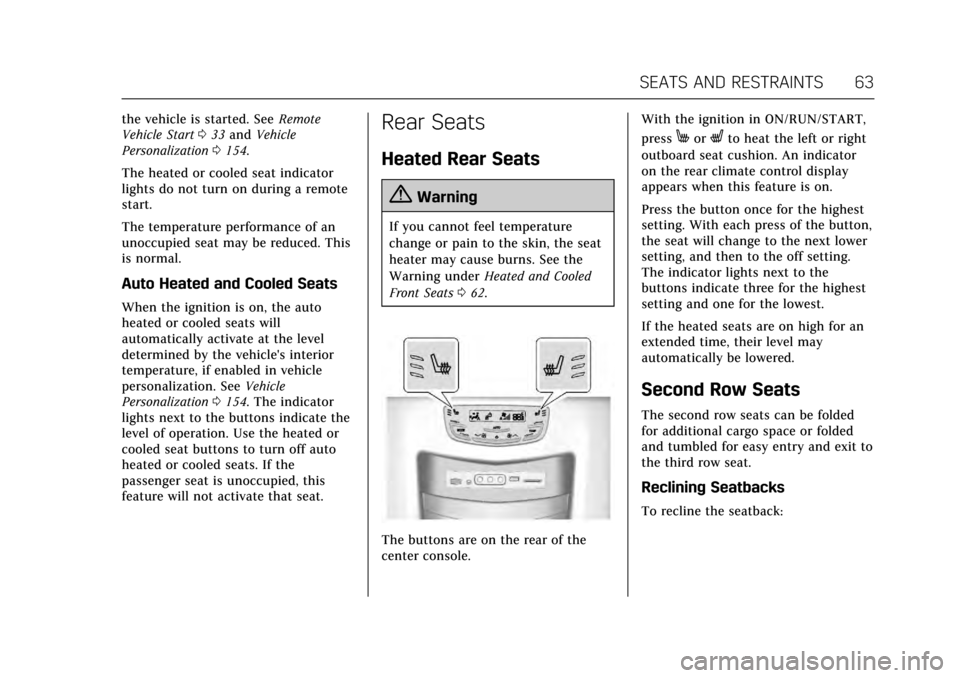
The buttons are on the rear of the
center console. With the ignition in ON/RUN/START,
press
MorLto heat the left or right
outboard seat cushion. An indicator
on the rear climate control display
appears when this feature is on.
Press the button once for the highest
setting. With each press of the button,
the seat will change to the next lower
setting, and then to the off setting.
The indicator lights next to the
buttons indicate three for the highest
setting and one for the lowest.
If the heated seats are on high for an
extended time, their level may
automatically be lowered.
Second Row Seats
The second row seats can be folded
for additional cargo space or folded
and tumbled for easy entry and exit to
the third row seat.
Reclining Seatbacks
To recline the seatback:
Page 75 of 354
Cadillac Escalade Owner Manual (GMNA-Localizing-MidEast-10293077) -
2017 - crc - 8/24/16
74 SEATS AND RESTRAINTS
Before a door is closed, be sure the
safety belt is out of the way. If a door
is slammed against a safety belt,
damage can occur to both the belt
and the vehicle.
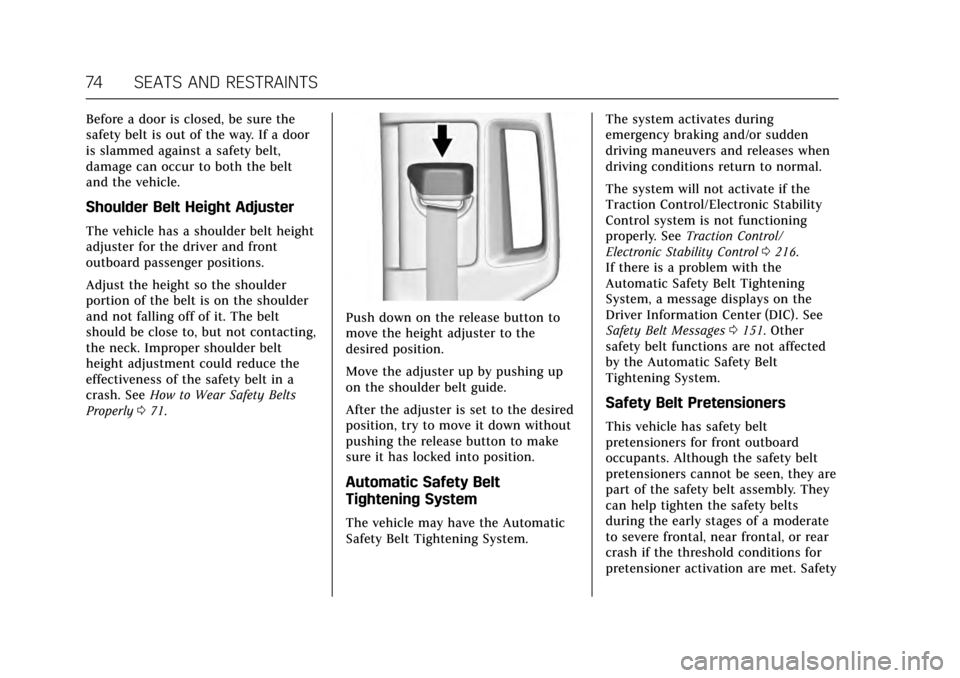
Shoulder Belt Height Adjuster
The vehicle has a shoulder belt height
adjuster for the driver and front
outboard passenger positions.
Adjust the height so the shoulder
portion of the belt is on the shoulder
and not falling off of it. The belt
should be close to, but not contacting,
the neck. Improper shoulder belt
height adjustment could reduce the
effectiveness of the safety belt in a
crash. SeeHow to Wear Safety Belts
Properly 071.
Push down on the release button to
move the height adjuster to the
desired position.
Move the adjuster up by pushing up
on the shoulder belt guide.
After the adjuster is set to the desired
position, try to move it down without
pushing the release button to make
sure it has locked into position.
Automatic Safety Belt
Tightening System
The vehicle may have the Automatic
Safety Belt Tightening System. The system activates during
emergency braking and/or sudden
driving maneuvers and releases when
driving conditions return to normal.
The system will not activate if the
Traction Control/Electronic Stability
Control system is not functioning
properly. See
Traction Control/
Electronic Stability Control 0216.
If there is a problem with the
Automatic Safety Belt Tightening
System, a message displays on the
Driver Information Center (DIC). See
Safety Belt Messages 0151. Other
safety belt functions are not affected
by the Automatic Safety Belt
Tightening System.
Safety Belt Pretensioners
This vehicle has safety belt
pretensioners for front outboard
occupants. Although the safety belt
pretensioners cannot be seen, they are
part of the safety belt assembly. They
can help tighten the safety belts
during the early stages of a moderate
to severe frontal, near frontal, or rear
crash if the threshold conditions for
pretensioner activation are met. Safety