display CADILLAC ESCALADE 2017 4.G Owner's Manual
[x] Cancel search | Manufacturer: CADILLAC, Model Year: 2017, Model line: ESCALADE, Model: CADILLAC ESCALADE 2017 4.GPages: 354, PDF Size: 3.9 MB
Page 115 of 354
Cadillac Escalade Owner Manual (GMNA-Localizing-MidEast-10293077) -
2017 - crc - 8/24/16
114 INSTRUMENTS AND CONTROLS
Instruments and
Controls
Controls
Steering Wheel Adjustment . . . . . 115
Steering Wheel Controls . . . . . . . . . 115
Heated Steering Wheel . . . . . . . . . . 115
Horn . . . . . . . . . . . . . . . . . . . . . . . . . . . . . . . 115
Windshield Wiper/Washer . . . . . . . 116
Rear Window Wiper/Washer . . . . 117
Compass . . . . . . . . . . . . . . . . . . . . . . . . . . 118
Clock . . . . . . . . . . . . . . . . . . . . . . . . . . . . . . 119
Power Outlets . . . . . . . . . . . . . . . . . . . . . 119
Wireless Charging . . . . . . . . . . . . . . . . 121
Cigarette Lighter . . . . . . . . . . . . . . . . . . 122
Ashtrays . . . . . . . . . . . . . . . . . . . . . . . . . . 122
Warning Lights, Gauges, and
Indicators
Warning Lights, Gauges, andIndicators . . . . . . . . . . . . . . . . . . . . . . . 123
Instrument Cluster . . . . . . . . . . . . . . . 124
Speedometer . . . . . . . . . . . . . . . . . . . . . . 126
Odometer . . . . . . . . . . . . . . . . . . . . . . . . . 126
Trip Odometer . . . . . . . . . . . . . . . . . . . . 126
Tachometer . . . . . . . . . . . . . . . . . . . . . . . 127
Fuel Gauge . . . . . . . . . . . . . . . . . . . . . . . . 127
Engine Coolant Temperature Gauge . . . . . . . . . . . . . . . . . . . . . . . . . . . . 127 Safety Belt Reminders . . . . . . . . . . . . 128
Airbag Readiness Light . . . . . . . . . . 129
Passenger Airbag Status
Indicator . . . . . . . . . . . . . . . . . . . . . . . . . 129
Charging System Light . . . . . . . . . . . 130
Malfunction Indicator Lamp
(Check Engine Light) . . . . . . . . . . . 130
Brake System Warning Light . . . . 132
Electric Parking Brake Light . . . . . 132
Service Electric Parking Brake Light . . . . . . . . . . . . . . . . . . . . . . . . . . . . . 133
Antilock Brake System (ABS) Warning Light . . . . . . . . . . . . . . . . . . 133
Sport Mode Light . . . . . . . . . . . . . . . . . 133
Tow/Haul Mode Light . . . . . . . . . . . . 133
Winter Driving Mode Light . . . . . . 134
Lane Keep Assist (LKA) Light . . . 134
Vehicle Ahead Indicator . . . . . . . . . 134
Traction Off Light . . . . . . . . . . . . . . . . 134
StabiliTrak
®OFF Light . . . . . . . . . . . 135
Traction Control System (TCS)/ StabiliTrak
®Light . . . . . . . . . . . . . . 135
Engine Coolant Temperature Warning Light . . . . . . . . . . . . . . . . . . 135
Tire Pressure Light . . . . . . . . . . . . . . . 136
Engine Oil Pressure Light . . . . . . . . 136
Low Fuel Warning Light . . . . . . . . . 137
Security Light . . . . . . . . . . . . . . . . . . . . . 137
High-Beam On Light . . . . . . . . . . . . . 137
Lamps On Reminder . . . . . . . . . . . . . 137
Cruise Control Light . . . . . . . . . . . . . . 137 Door Ajar Light . . . . . . . . . . . . . . . . . . . 138
Information Displays
Driver Information
Center (DIC) . . . . . . . . . . . . . . . . . . . . . 138
Head-Up Display (HUD) . . . . . . . . . 141
Vehicle Messages
Vehicle Messages . . . . . . . . . . . . . . . . . 144
Battery Voltage and Charging Messages . . . . . . . . . . . . . . . . . . . . . . . . 144
Brake System Messages . . . . . . . . . . 144
Compass Messages . . . . . . . . . . . . . . . 145
Cruise Control Messages . . . . . . . . . 145
Door Ajar Messages . . . . . . . . . . . . . . 145
Engine Cooling System Messages . . . . . . . . . . . . . . . . . . . . . . . . 146
Engine Oil Messages . . . . . . . . . . . . . 146
Engine Power Messages . . . . . . . . . . 147
Fuel System Messages . . . . . . . . . . . 147
Key and Lock Messages . . . . . . . . . . 147
Lamp Messages . . . . . . . . . . . . . . . . . . . 148
Object Detection System Messages . . . . . . . . . . . . . . . . . . . . . . . . 148
Ride Control System Messages . . . . . . . . . . . . . . . . . . . . . . . . 150
Airbag System Messages . . . . . . . . . 151
Safety Belt Messages . . . . . . . . . . . . . 151
Security Messages . . . . . . . . . . . . . . . . 151
Service Vehicle Messages . . . . . . . . 151
Steering System Messages . . . . . . . 151
Page 118 of 354
Cadillac Escalade Owner Manual (GMNA-Localizing-MidEast-10293077) -
2017 - crc - 8/24/16
INSTRUMENTS AND CONTROLS 117
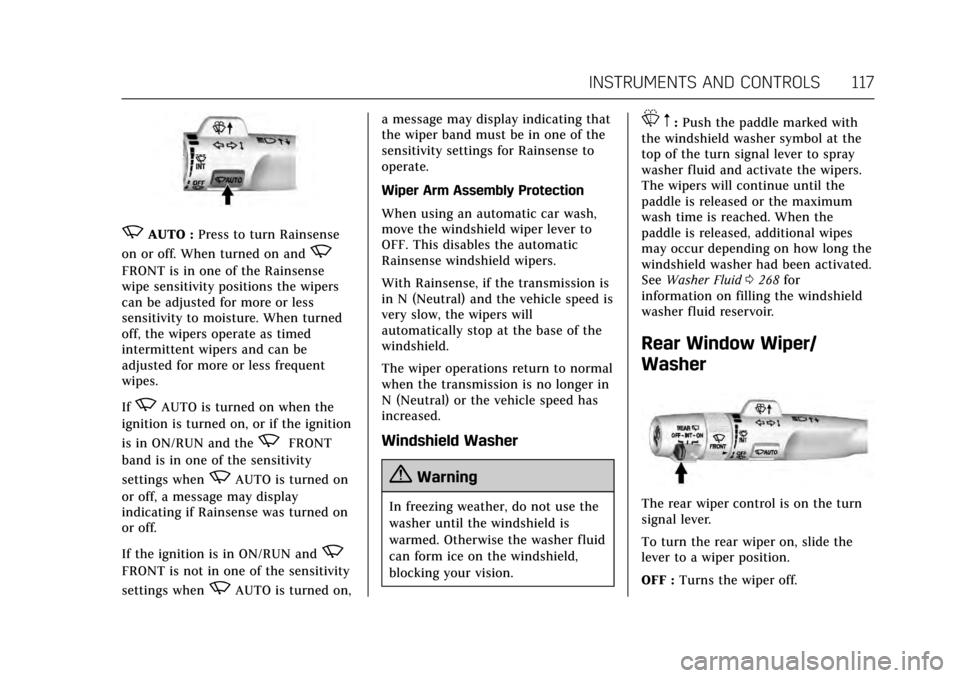
zAUTO :Press to turn Rainsense
on or off. When turned on and
z
FRONT is in one of the Rainsense
wipe sensitivity positions the wipers
can be adjusted for more or less
sensitivity to moisture. When turned
off, the wipers operate as timed
intermittent wipers and can be
adjusted for more or less frequent
wipes.
If
zAUTO is turned on when the
ignition is turned on, or if the ignition
is in ON/RUN and the
zFRONT
band is in one of the sensitivity
settings when
zAUTO is turned on
or off, a message may display
indicating if Rainsense was turned on
or off.
If the ignition is in ON/RUN and
z
FRONT is not in one of the sensitivity
settings when
zAUTO is turned on, a message may display indicating that
the wiper band must be in one of the
sensitivity settings for Rainsense to
operate.
Wiper Arm Assembly Protection
When using an automatic car wash,
move the windshield wiper lever to
OFF. This disables the automatic
Rainsense windshield wipers.
With Rainsense, if the transmission is
in N (Neutral) and the vehicle speed is
very slow, the wipers will
automatically stop at the base of the
windshield.
The wiper operations return to normal
when the transmission is no longer in
N (Neutral) or the vehicle speed has
increased.
Windshield Washer
{Warning
In freezing weather, do not use the
washer until the windshield is
warmed. Otherwise the washer fluid
can form ice on the windshield,
blocking your vision.
L
m:Push the paddle marked with
the windshield washer symbol at the
top of the turn signal lever to spray
washer fluid and activate the wipers.
The wipers will continue until the
paddle is released or the maximum
wash time is reached. When the
paddle is released, additional wipes
may occur depending on how long the
windshield washer had been activated.
See Washer Fluid 0268 for
information on filling the windshield
washer fluid reservoir.
Rear Window Wiper/
Washer
The rear wiper control is on the turn
signal lever.
To turn the rear wiper on, slide the
lever to a wiper position.
OFF : Turns the wiper off.
Page 119 of 354
Cadillac Escalade Owner Manual (GMNA-Localizing-MidEast-10293077) -
2017 - crc - 8/24/16
118 INSTRUMENTS AND CONTROLS
INT :Turns on the rear wiper with a
delay between wipes.
ON : Turns on the rear wiper.
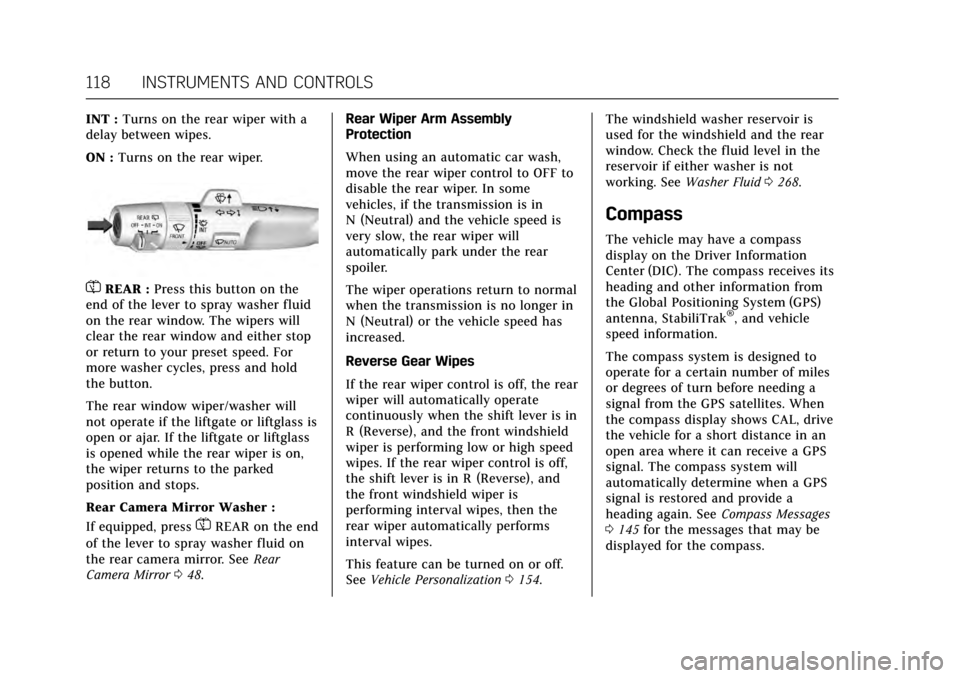
=REAR : Press this button on the
end of the lever to spray washer fluid
on the rear window. The wipers will
clear the rear window and either stop
or return to your preset speed. For
more washer cycles, press and hold
the button.
The rear window wiper/washer will
not operate if the liftgate or liftglass is
open or ajar. If the liftgate or liftglass
is opened while the rear wiper is on,
the wiper returns to the parked
position and stops.
Rear Camera Mirror Washer :
If equipped, press
=REAR on the end
of the lever to spray washer fluid on
the rear camera mirror. See Rear
Camera Mirror 048. Rear Wiper Arm Assembly
Protection
When using an automatic car wash,
move the rear wiper control to OFF to
disable the rear wiper. In some
vehicles, if the transmission is in
N (Neutral) and the vehicle speed is
very slow, the rear wiper will
automatically park under the rear
spoiler.
The wiper operations return to normal
when the transmission is no longer in
N (Neutral) or the vehicle speed has
increased.
Reverse Gear Wipes
If the rear wiper control is off, the rear
wiper will automatically operate
continuously when the shift lever is in
R (Reverse), and the front windshield
wiper is performing low or high speed
wipes. If the rear wiper control is off,
the shift lever is in R (Reverse), and
the front windshield wiper is
performing interval wipes, then the
rear wiper automatically performs
interval wipes.
This feature can be turned on or off.
See
Vehicle Personalization 0154. The windshield washer reservoir is
used for the windshield and the rear
window. Check the fluid level in the
reservoir if either washer is not
working. See
Washer Fluid 0268.
Compass
The vehicle may have a compass
display on the Driver Information
Center (DIC). The compass receives its
heading and other information from
the Global Positioning System (GPS)
antenna, StabiliTrak
®, and vehicle
speed information.
The compass system is designed to
operate for a certain number of miles
or degrees of turn before needing a
signal from the GPS satellites. When
the compass display shows CAL, drive
the vehicle for a short distance in an
open area where it can receive a GPS
signal. The compass system will
automatically determine when a GPS
signal is restored and provide a
heading again. See Compass Messages
0 145 for the messages that may be
displayed for the compass.
Page 120 of 354
Cadillac Escalade Owner Manual (GMNA-Localizing-MidEast-10293077) -
2017 - crc - 8/24/16
INSTRUMENTS AND CONTROLS 119
Clock
The infotainment system controls are
used to access the time and date
settings through the menu system.
See“Home Page ”in the infotainment
manual for information about how to
use the menu system.
Setting the Clock
Time
To set the time:
1. From the Home Page, touch SETTINGS, then touch Time
and Date.
2. Touch Set Time, then touch + or −to increase or decrease hours
or minutes, and change AM
or PM.
3. Touch 12-24 Hr for a 12 or 24 hour clock.
4. Touch
[Back to go back to the
previous menu. Date
To set the date:
1. From the Home Page, touch SETTINGS, then touch Time
and Date.
2. Touch Set Date, then touch + or −to increase or decrease month,
day, or year.
3. Touch
[Back to go back to the
previous menu.
Auto Set
When on, the time and date will
automatically update.
To set auto set: 1. From the Home Page, touch SETTINGS, then touch Time
and Date.
2. Touch Set Time or Set Date.
3. Touch Auto Set, then select On-Cell Network or Off-Manual
to manually set the time
and date.
4. Touch
[Back to go back to the
previous menu. If auto set is on, the time displayed on
the clock may not update immediately
when driving into a new time zone.
Auto set requires an active OnStar
®
subscription.
Clock Display
When on, the digital clock will display
on the infotainment screen.
To set the clock display:
1. From the Home Page, touch SETTINGS, then touch Time
and Date.
2. Touch Clock Display, then select Off or On.
3. Touch
[Back to go back to the
previous menu.
Power Outlets
Power Outlets 12 Volt Direct
Current
Accessory power outlets can be used
to plug in electrical equipment, such
as a cell phone or MP3 player.
Page 123 of 354
Cadillac Escalade Owner Manual (GMNA-Localizing-MidEast-10293077) -
2017 - crc - 8/24/16
122 INSTRUMENTS AND CONTROLS
The operating temperature is -20 °C
(-4 °F) to 60 °C (140 °F) for the
charging system and 0 °C (32 °F) to
35 °C (95 °F) for the phone.
{Warning
Remove all metal objects from the
charging pad before charging your
mobile device. Metal objects, such
as coins, keys, rings, or paper clips,
between the phone and charging
pad will become very hot. On the
rare occasion that the charging
system does not detect a metal
object, and the object gets wedged
between the phone and charger,
remove the phone and allow the
metallic object to cool before
removing it from the charging pad,
to prevent burns.
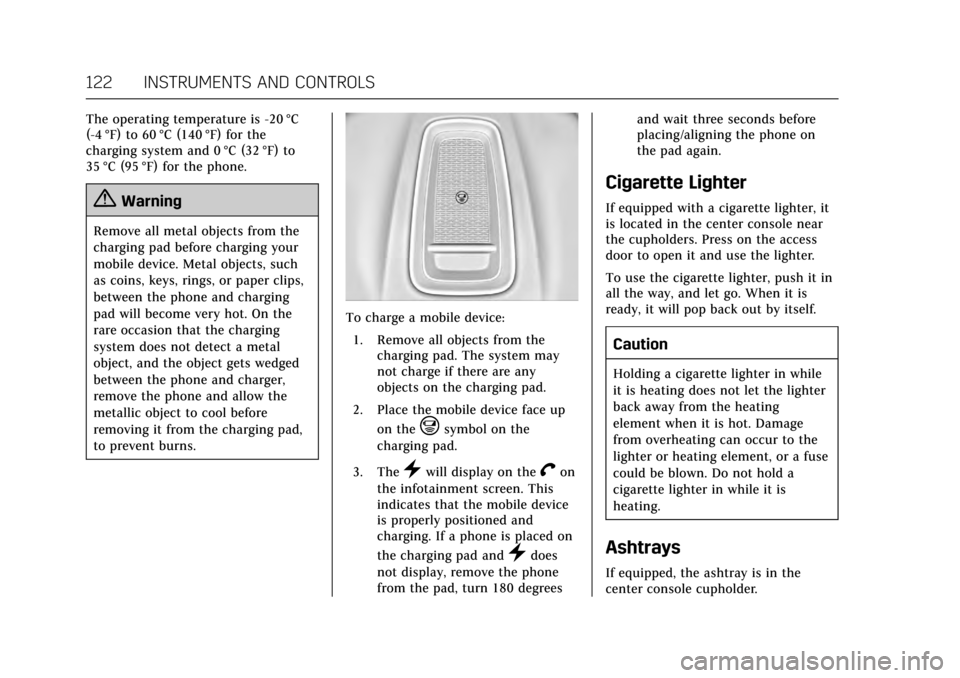
To charge a mobile device:1. Remove all objects from the charging pad. The system may
not charge if there are any
objects on the charging pad.
2. Place the mobile device face up on the
@symbol on the
charging pad.
3. The
}will display on theVon
the infotainment screen. This
indicates that the mobile device
is properly positioned and
charging. If a phone is placed on
the charging pad and
}does
not display, remove the phone
from the pad, turn 180 degrees and wait three seconds before
placing/aligning the phone on
the pad again.
Cigarette Lighter
If equipped with a cigarette lighter, it
is located in the center console near
the cupholders. Press on the access
door to open it and use the lighter.
To use the cigarette lighter, push it in
all the way, and let go. When it is
ready, it will pop back out by itself.
Caution
Holding a cigarette lighter in while
it is heating does not let the lighter
back away from the heating
element when it is hot. Damage
from overheating can occur to the
lighter or heating element, or a fuse
could be blown. Do not hold a
cigarette lighter in while it is
heating.
Ashtrays
If equipped, the ashtray is in the
center console cupholder.
Page 126 of 354
Cadillac Escalade Owner Manual (GMNA-Localizing-MidEast-10293077) -
2017 - crc - 8/24/16
INSTRUMENTS AND CONTROLS 125
Reconfigurable Instrument
Cluster
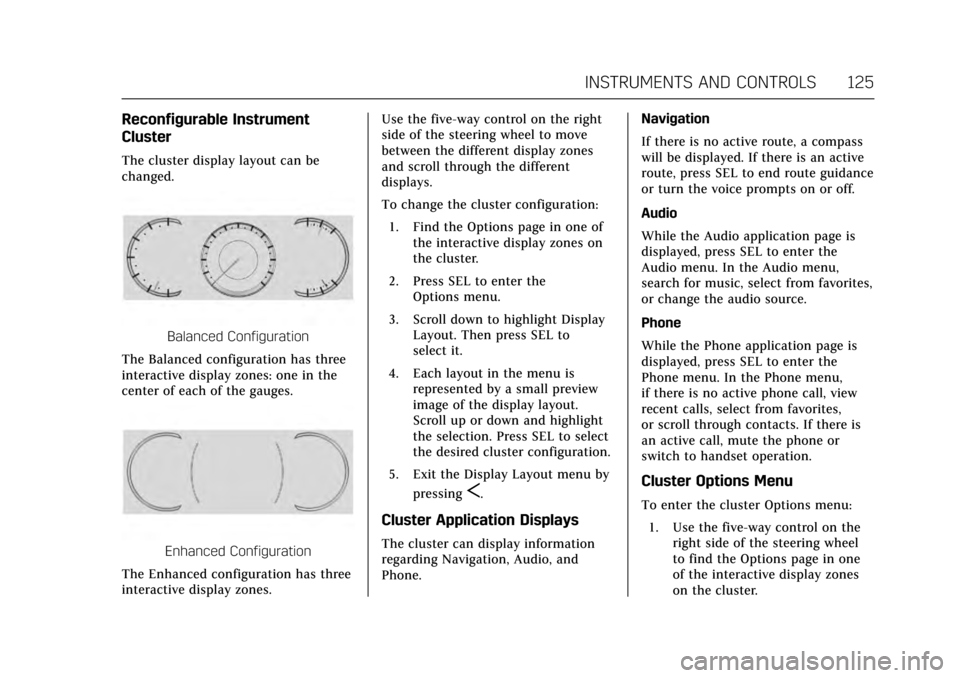
The cluster display layout can be
changed.
Balanced Configuration
The Balanced configuration has three
interactive display zones: one in the
center of each of the gauges.
Enhanced Configuration
The Enhanced configuration has three
interactive display zones. Use the five-way control on the right
side of the steering wheel to move
between the different display zones
and scroll through the different
displays.
To change the cluster configuration:
1. Find the Options page in one of the interactive display zones on
the cluster.
2. Press SEL to enter the Options menu.
3. Scroll down to highlight Display Layout. Then press SEL to
select it.
4. Each layout in the menu is represented by a small preview
image of the display layout.
Scroll up or down and highlight
the selection. Press SEL to select
the desired cluster configuration.
5. Exit the Display Layout menu by pressing
S.
Cluster Application Displays
The cluster can display information
regarding Navigation, Audio, and
Phone. Navigation
If there is no active route, a compass
will be displayed. If there is an active
route, press SEL to end route guidance
or turn the voice prompts on or off.
Audio
While the Audio application page is
displayed, press SEL to enter the
Audio menu. In the Audio menu,
search for music, select from favorites,
or change the audio source.
Phone
While the Phone application page is
displayed, press SEL to enter the
Phone menu. In the Phone menu,
if there is no active phone call, view
recent calls, select from favorites,
or scroll through contacts. If there is
an active call, mute the phone or
switch to handset operation.
Cluster Options Menu
To enter the cluster Options menu:
1. Use the five-way control on the right side of the steering wheel
to find the Options page in one
of the interactive display zones
on the cluster.
Page 127 of 354
Cadillac Escalade Owner Manual (GMNA-Localizing-MidEast-10293077) -
2017 - crc - 8/24/16
126 INSTRUMENTS AND CONTROLS
2. Press SEL on the center of thefive-way control to enter the
Options menu.
Units : Press SEL while Units is
highlighted to enter the Unit menu.
Choose US or metric units by pressing
SEL while the desired item is
highlighted. A checkmark will be
displayed next to the selected item.
Info Pages : Press SEL while Info
Pages is highlighted to select the
items to be displayed in the DIC info
displays. See Driver Information Center
(DIC) 0138.
Head-up Display (HUD) Rotation :
This feature allows for adjusting the
angle of the HUD image. Press SEL on
the steering wheel controls while
Head-up Display Rotation is
highlighted to enter Adjust Mode.
Press
yorzto adjust the angle of
the HUD display. Press
SorTto
highlight OK, then press SEL to save
the setting. Cancel can also be
selected to cancel the setting. The
vehicle must be in P (Park). Fav Button Options :
Press SEL while
Fav Button Options is highlighted to
select between FAV Primary and SEEK
Primary. This selection allows for
configuration of the
CandB
steering wheel controls. When FAV
Primary is selected, pressing
Cand
Bwill go to the next or previous
favorite and pressing and holding
C
andBwill seek. When SEEK Primary
is selected, pressing
CandBwill
seek and pressing and holding
Cand
Bwill go to the next or previous
favorite.
Display Layout : Press SEL while
Display Layout is highlighted to
change the configuration of the
cluster. See “Reconfigurable
Instrument Cluster” earlier in this
section.
Open Source Software : Press SEL
while Open Source Software is
highlighted to display open source
software information.
Speedometer
The speedometer shows the vehicle's
speed in kilometers per hour (km/h)
or miles per hour (mph).
This vehicle is equipped with an
overspeed warning device. When the
vehicle's speed reaches 120 km/h
(75 mph), a chime will sound.
A message also displays in the Driver
Information Center (DIC). See Vehicle
Speed Messages 0153.
Odometer
The odometer shows how far the
vehicle has been driven, in either
kilometers or miles.
Trip Odometer
The trip odometer shows how far the
vehicle has been driven since the trip
odometer was last reset.
The trip odometer is accessed and
reset through the Driver Information
Center (DIC). See Driver Information
Center (DIC) 0138.
Page 128 of 354
Cadillac Escalade Owner Manual (GMNA-Localizing-MidEast-10293077) -
2017 - crc - 8/24/16
INSTRUMENTS AND CONTROLS 127
Tachometer
The tachometer displays the engine
speed in revolutions per minute (rpm).
Fuel Gauge
Balanced Configuration
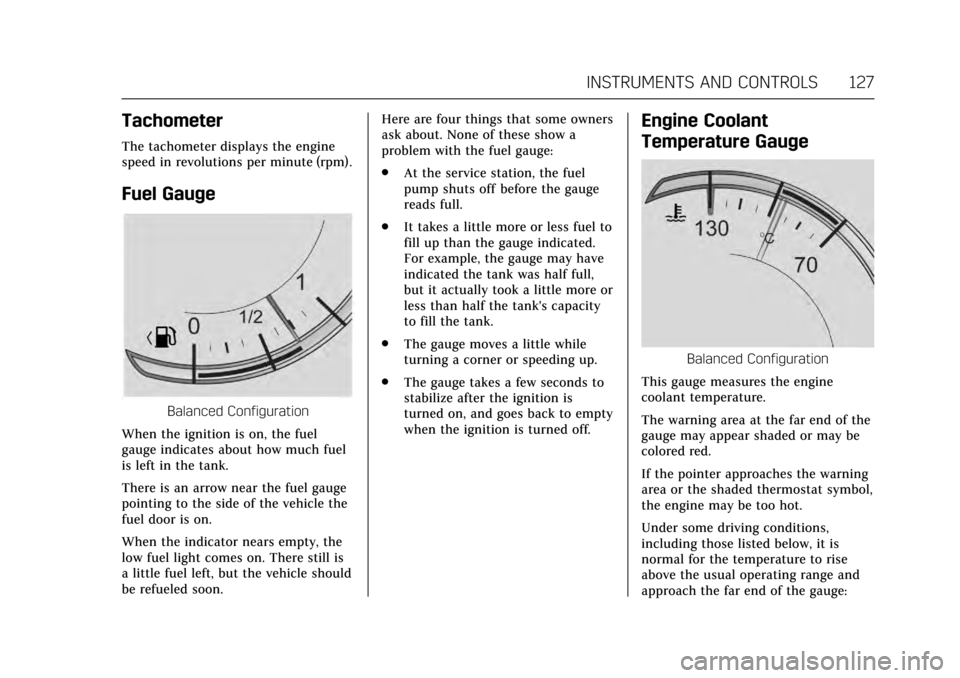
When the ignition is on, the fuel
gauge indicates about how much fuel
is left in the tank.
There is an arrow near the fuel gauge
pointing to the side of the vehicle the
fuel door is on.
When the indicator nears empty, the
low fuel light comes on. There still is
a little fuel left, but the vehicle should
be refueled soon. Here are four things that some owners
ask about. None of these show a
problem with the fuel gauge:
.
At the service station, the fuel
pump shuts off before the gauge
reads full.
. It takes a little more or less fuel to
fill up than the gauge indicated.
For example, the gauge may have
indicated the tank was half full,
but it actually took a little more or
less than half the tank's capacity
to fill the tank.
. The gauge moves a little while
turning a corner or speeding up.
. The gauge takes a few seconds to
stabilize after the ignition is
turned on, and goes back to empty
when the ignition is turned off.
Engine Coolant
Temperature Gauge
Balanced Configuration
This gauge measures the engine
coolant temperature.
The warning area at the far end of the
gauge may appear shaded or may be
colored red.
If the pointer approaches the warning
area or the shaded thermostat symbol,
the engine may be too hot.
Under some driving conditions,
including those listed below, it is
normal for the temperature to rise
above the usual operating range and
approach the far end of the gauge:
Page 131 of 354
Cadillac Escalade Owner Manual (GMNA-Localizing-MidEast-10293077) -
2017 - crc - 8/24/16
130 INSTRUMENTS AND CONTROLS
{Warning
If the airbag readiness light ever
comes on and stays on, it means
that something may be wrong with
the airbag system. To help avoid
injury to yourself or others, have
the vehicle serviced right away. See
Airbag Readiness Light0129 for
more information, including
important safety information.
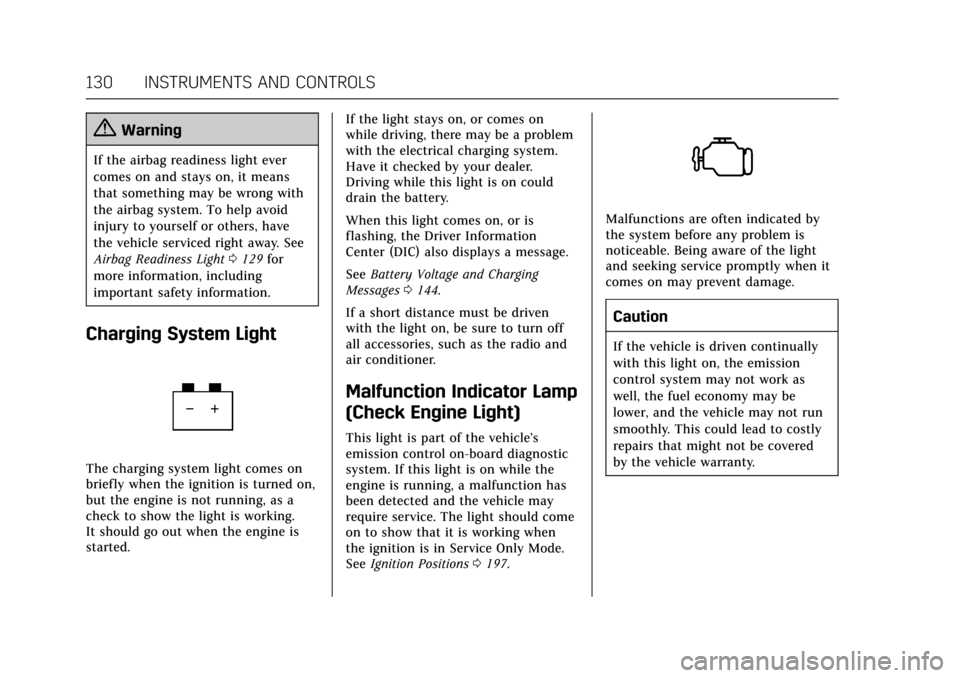
Charging System Light
The charging system light comes on
briefly when the ignition is turned on,
but the engine is not running, as a
check to show the light is working.
It should go out when the engine is
started. If the light stays on, or comes on
while driving, there may be a problem
with the electrical charging system.
Have it checked by your dealer.
Driving while this light is on could
drain the battery.
When this light comes on, or is
flashing, the Driver Information
Center (DIC) also displays a message.
See
Battery Voltage and Charging
Messages 0144.
If a short distance must be driven
with the light on, be sure to turn off
all accessories, such as the radio and
air conditioner.
Malfunction Indicator Lamp
(Check Engine Light)
This light is part of the vehicle’s
emission control on-board diagnostic
system. If this light is on while the
engine is running, a malfunction has
been detected and the vehicle may
require service. The light should come
on to show that it is working when
the ignition is in Service Only Mode.
See Ignition Positions 0197.
Malfunctions are often indicated by
the system before any problem is
noticeable. Being aware of the light
and seeking service promptly when it
comes on may prevent damage.
Caution
If the vehicle is driven continually
with this light on, the emission
control system may not work as
well, the fuel economy may be
lower, and the vehicle may not run
smoothly. This could lead to costly
repairs that might not be covered
by the vehicle warranty.
Page 134 of 354
Cadillac Escalade Owner Manual (GMNA-Localizing-MidEast-10293077) -
2017 - crc - 8/24/16
INSTRUMENTS AND CONTROLS 133
the parking brake is released, or while
driving, there is a problem with the
electric parking brake system or
another system. A message may also
display in the Driver Information
Center (DIC). SeeBrake System
Messages 0144.
If the light does not come on,
or remains flashing, see your dealer.
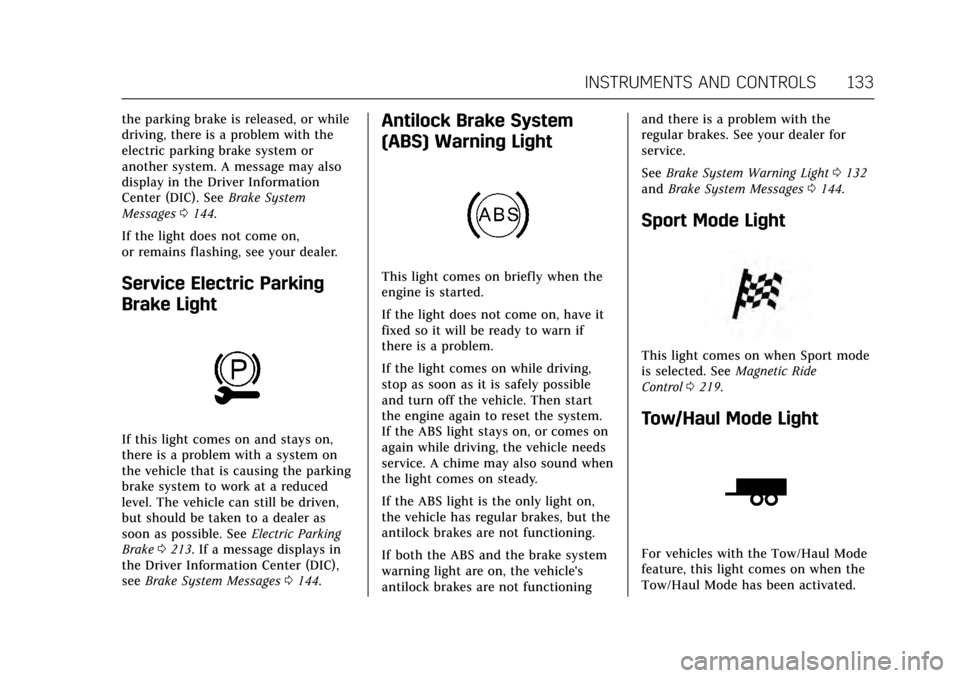
Service Electric Parking
Brake Light
If this light comes on and stays on,
there is a problem with a system on
the vehicle that is causing the parking
brake system to work at a reduced
level. The vehicle can still be driven,
but should be taken to a dealer as
soon as possible. See Electric Parking
Brake 0213. If a message displays in
the Driver Information Center (DIC),
see Brake System Messages 0144.
Antilock Brake System
(ABS) Warning Light
This light comes on briefly when the
engine is started.
If the light does not come on, have it
fixed so it will be ready to warn if
there is a problem.
If the light comes on while driving,
stop as soon as it is safely possible
and turn off the vehicle. Then start
the engine again to reset the system.
If the ABS light stays on, or comes on
again while driving, the vehicle needs
service. A chime may also sound when
the light comes on steady.
If the ABS light is the only light on,
the vehicle has regular brakes, but the
antilock brakes are not functioning.
If both the ABS and the brake system
warning light are on, the vehicle's
antilock brakes are not functioning and there is a problem with the
regular brakes. See your dealer for
service.
See
Brake System Warning Light 0132
and Brake System Messages 0144.
Sport Mode Light
This light comes on when Sport mode
is selected. See Magnetic Ride
Control 0219.
Tow/Haul Mode Light
For vehicles with the Tow/Haul Mode
feature, this light comes on when the
Tow/Haul Mode has been activated.